
Most CRM migrations usually fail because the scope was underestimated; the data was never cleaned, and nobody told the sales team what was coming until go-live day.
This guide covers how to plan a migration, how to run one, where they break down, and how to come out on the other side with clean data and a team that uses the new system.
What is CRM Migration?
CRM migration is moving contact records, deal history, activity logs, and associated data from one system to another. In practice, CRM migration is a business continuity event. Pipeline visibility drops, sales activity goes unlogged, and reporting breaks, often at the exact moment leadership needs the numbers.
Migrations fail at three specific points:
- Before migration: Data quality problems get transferred rather than fixed
- During migration: Scope expands past what the timeline and team can absorb
- After migration: Users revert to old systems because training was treated as an afterthought
What Are the Main Types of CRM Migration?
The 4 common migration types each carry different levels of complexity and risk.
Platform-to-Platform
Moving from one CRM to another, such as Salesforce to Hubspot or vice versa. Custom objects, non-standard field names, and proprietary workflow logic rarely transfer cleanly. Direct mapping is required at the field level before any data moves.
On-Premises to Cloud CRM
Moving from a server-hosted CRM to a cloud platform introduces network dependency, access control changes, and data residency questions. IT involvement is not optional here.
Legacy or Homegrown System to Modern CRM
Homegrown systems are the highest-risk migration type. Data is often stored in formats no modern CRM recognizes; documentation is sparse, and the person who built it may no longer work at the company.
Spreadsheets to CRM
This is structurally the simplest migration but often the messiest in practice. Spreadsheets grow without rules. Duplicate contacts, inconsistent naming, and missing fields are standard. Expect to spend more time cleaning data than moving it.
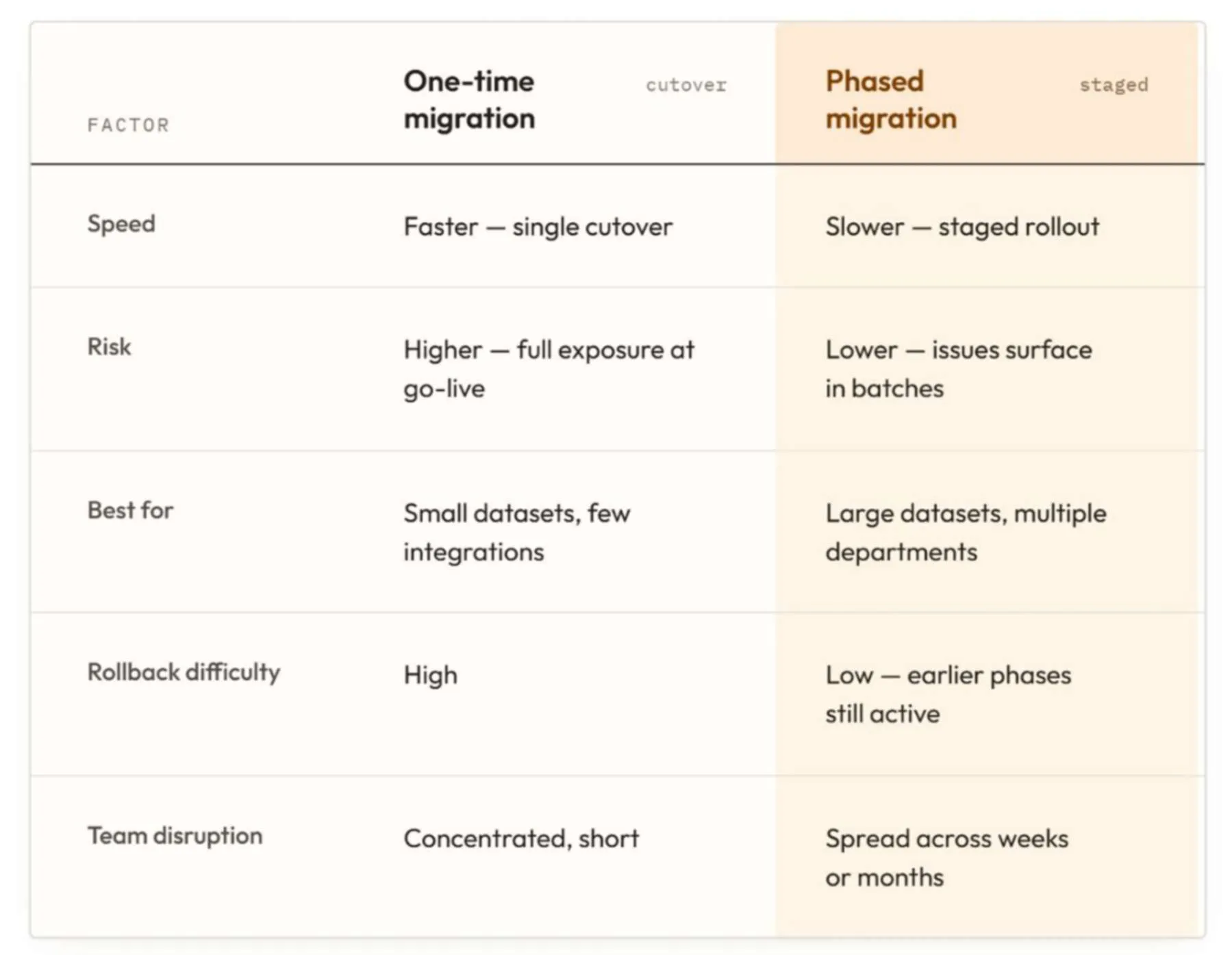
One-Time or Phased: Which Approach Fits?
The right approach depends on dataset size, integration count, and how much downtime the business can absorb.
Choose a phased approach when the record count exceeds 20,000; more than 3 integrations are in scope, or multiple departments run on the current system simultaneously.
Who Needs to Be Involved?
A CRM migration requires both an internal team and, in most cases, an external specialist. The internal side needs a project sponsor, a CRM admin, department representatives from sales and marketing, and IT if the system is on premises.
The external side needs a migration lead, a data specialist, and a platform architect. The most common gap is no clear internal owner. When everyone is responsible, no one is. Name one person internally who has final accountability for timeline and scope before the project starts.
How Long Does a CRM Migration Take?
Timeline depends on record volume, integration complexity, and the state of the data. These are real ranges based on project delivery:
- Simple (under 5,000 records, one platform, small team): 2 to 4 weeks
- Mid-complexity (5,000 to 50,000 records, integrations, multiple departments): 6 to 12 weeks
- High complexity (50,000+ records, custom objects, ERP sync): 4 to 6 months or more
Most timeline overruns occur during planning and data preparation instead of the technical transfer itself. Teams that start cleaning data on day one of the migration add weeks.
What Are the 8 Steps to CRM Migration?
CRM migration planning requires eight steps, in order, with no skipped phases. Data cleaning and test migration are the ones that cause the most expensive problems.
Step 1: Audit Your Current CRM and Data
Pull a full export. Identify what exists, what is complete, what is duplicated, and what is junk. Count records by object type:
- Contacts
- Companies
- Deals
- Activities
This audit determines the scope and timeline.
Step 2: Define Scope
List every object, field, relationship, and integration that needs to be moved. Then cut it off. Migrating everything from the old system into the new one is the fastest way to import technical debt. If a field has not been populated in 18 months, archive it rather than migrate it.
Step 3: Choose Your Target Platform
The platform decision should happen before migration planning begins, not during it. If that decision is still open, choosing between different platforms (Salesforce, HubSpot, Microsoft Dynamics) comes down to company size, sales cycle length, and internal admin capacity.
Step 4: Map Every Field
Build a field mapping document that shows the source field name, the destination field name, the data type, and any transformation required. This document becomes the source of truth for the data specialist running the migration.
Step 5: Clean Before You Migrate
A duplicate contact in the old system becomes a duplicate in the new system, now in front of every rep, every report, and every automation. Deduplicate, normalize values, and archive dead records before any data transfer begins.
Run deduplication, standardize field values (state abbreviations, phone number formats, company name variations), and remove or archive contacts with no activity in 24 months.
Step 6: Run a Test Migration
Migrate a representative subset, 500 to 1,000 records across object types, into a sandbox environment. This surfaces field mapping errors, relationship breaks, and missing data before they affect live records.
Step 7: Validate With Stakeholders
Admins validate technical accuracy. Stakeholders validate business accuracy. A sales manager looking at their pipeline in the sandbox will catch problems a technical review miss. Both reviews are required before go-live.
Step 8: Go Live with a Rollback Plan
Define exactly what conditions trigger a rollback and how long the old system stays accessible post-go live. Two weeks of parallel access is a minimum for mid-complexity migrations. Communicate the plan to all users before the cutover.
What Are the Most Common CRM Migration Risks?
6 risks account for most CRM migration failures. Each is predictable and avoidable with the right preparation.
1. Data loss during transfer
Occurs when field types are incompatible, or records exceed size limits.
Mitigation: Run a test migration and compare record counts between source and destination before go-live.
2. Duplicate records post-migration
Occurs when deduplication runs in the new system rather than the old one.
Mitigation: Address CRM data migration quality in the source system first. Run deduplication logic before the migration, not after.
3. Broken integrations
Occurs when the migration plan excludes the integration layer.
Mitigation: Map every integration to a named owner, test each one in the sandbox, and confirm API connections before go-live.
4. Low user adoption
Occurs when training is scheduled at or after go-live.
Mitigation: Begin user training and change management during the test migration phase, not after cutover.
5. Scope creep
Occurs when stakeholders add objects, fields, or features mid-migration.
Mitigation: Freeze scope at the end of Step 2. All additions go on a post-migration backlog.
6. Downtime at go-live
Occurs when the cutover window is underestimated.
Mitigation: Schedule go-live during a low-activity window, communicate blackout hours to all users, and stage the cutover rather than switching everything simultaneously.
Migration Tools or Manual: What Works Better?
Migration tools reduce transfer time but do not solve the two problems that cause most failures: data quality and field mapping accuracy.
Tools like Trujay, Appy Pie, and native import wizards handle record-level transfer well for standard objects. They break down custom objects, non-standard relationships, and data that require transformation before it can land in the destination system.
A specialist who understands the business context catches issue with a tool process without flagging. Use tools to accelerate transfer. Do not use them to replace the planning, mapping, and cleaning work that makes a migration successful.
In-House or Specialist: Which Is Right?
The decision between in-house migration and hiring CRM consulting services comes down to three factors: risk tolerance, internal capacity, and platform complexity.
In-house execution makes sense when the dataset is under 5,000 records, the team includes an experienced CRM admin, no custom objects are in scope, and the timeline has room for error.
External help makes sense when any of the following apply:
- Custom objects or complex field relationships exist in the current system
- More than 3 integrations are in scope
- The internal team has no prior migration experience
- The deadline is fixed with no buffer
- A failed migration would directly affect pipeline or revenue reporting
The cost of a failed migration, clean-up time, data loss, adoption recovery, almost always exceeds the cost of engaging a specialist at the start.
What Happens After the Migration?
In the first 30 days, validate record counts, confirm integration logs, and check that workflows are triggering correctly. Assign one person to monitor data quality daily. On day 30, run a structured data audit and compare against the pre-migration baseline.
At the 60-day mark, measure adoption. Are reps logging activities? Are deals being created in the new system or tracked elsewhere? Low adoption at day 60 rarely self-corrects. Address it directly.
For teams without internal CRM admin capacity, ongoing managed services cover configuration updates, data hygiene, and integration maintenance post-migration, without requiring a full-time internal hire.
Ready to Start Your CRM Migration?
Most migration problems are visible before the project starts. Book a 30-minute call and we’ll review what you have, where the risk is, and what a realistic timeline looks like.
Let's create something out of this world together.
Have a project in mind? Contact us for expert design and development solutions. Let's discuss how we can help grow your business.
Ready to Unboxx Your Potential?
Build smarter systems. Automate faster. Scale confidently.