
Closing Email Marketing Gaps With Salesforce Account Engagement Automation
How a professional services firm moved off iContact and brought email marketing into Salesforce Lightning.

Snapshot of the Project
Client
A growing professional services organization that runs its customer relationships in Salesforce.
Challenge
Its iContact for Salesforce email setup did not fit well with the company's move to Salesforce Lightning.
Solution
Unboxx reviewed the setup and moved email marketing to Salesforce Marketing Cloud Account Engagement.
Outcomes
Simpler campaign work, clearer engagement data inside Salesforce, and an email base ready for growth.
Why the Old Email Setup Stopped Fitting Salesforce
The client used Salesforce to manage customer relationships and iContact for Salesforce to send email campaigns. When the company moved to Salesforce Lightning, the email setup did not move with it cleanly. Existing processes needed rework, and the iContact integration raised compatibility concerns.
Contacts and campaigns were handled in more than one place, so the marketing team repeated work and audiences were harder to keep clean. Email opens, clicks, and activity were hard to see inside Salesforce. Sales and marketing did not share one view of how prospects engaged. Reporting on campaign performance also took extra effort.
Leadership wanted an email marketing setup that would connect reliably with Salesforce and keep working as the business grew. Any new platform also had to fit the way sales and marketing already worked in Salesforce. Before choosing one, the team needed a clear picture of every current workflow.
How Unboxx Moved Email Marketing Into Salesforce
Unboxx started with a full review and then rebuilt each part of the email process inside the Salesforce environment. The goal was one Salesforce-connected place to manage audiences, automate campaigns, and track engagement.
Review the Setup
Unboxx mapped the current iContact and Salesforce workflows, contact sync, templates, reporting, and integration needs.
Choose the Platform
The team recommended Salesforce Marketing Cloud Account Engagement to connect CRM data and email marketing in one place.
Centralize Contacts
Lead and contact records now sync with Salesforce, so audience and prospect data sit in one shared source.
Automate Campaigns
Automated email and engagement workflows, plus standard reusable templates, replaced manual campaign steps.
Track and Report
Opens, clicks, and marketing activity feed Salesforce campaign and engagement reports that sales and marketing both use.
Existing processes were carefully moved into the new environment instead of being dropped or rebuilt from scratch. Templates, campaign workflows, and reporting were set up to work with Salesforce Lightning, which cut the compatibility concerns that came with the old integration.

Shared Salesforce data gives marketing and sales one place to plan and review campaigns.
“Our email marketing now runs on the same Salesforce data our sales team uses. Campaigns are easier to manage, and we can finally see how prospects engage.”
Director of Marketing
What Improved Once Email Lived in Salesforce
With email marketing connected to Salesforce Lightning, the client cut manual work and gained clearer insight into campaign performance. The charts below show the measured change.
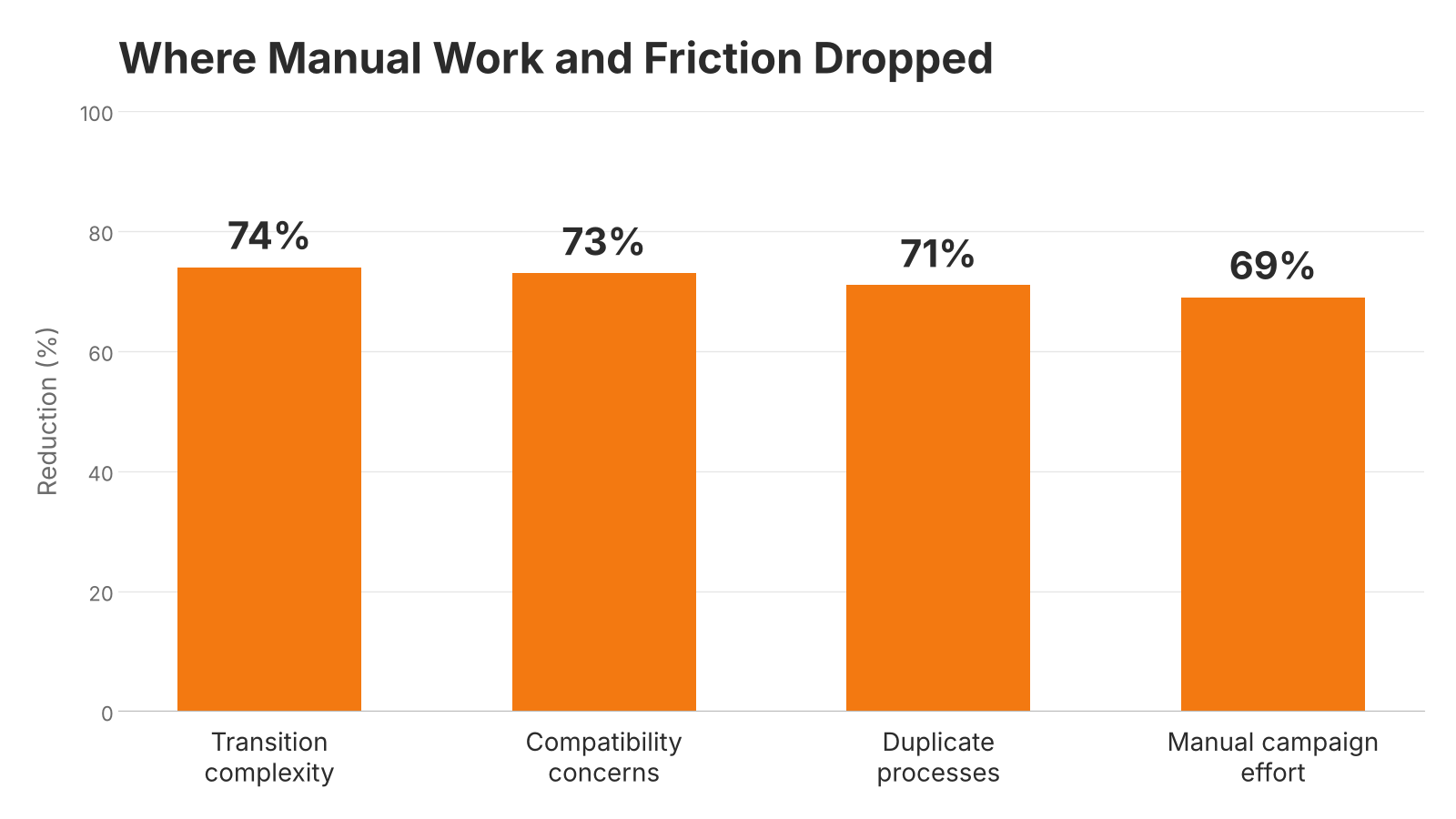
Reductions in transition complexity, compatibility concerns, duplicate processes, and manual campaign effort.

Improvements in data alignment, sales and marketing visibility, email engagement visibility, reporting access, and campaign consistency.
These gains give the client one Salesforce-connected email marketing framework. Marketing spends less time on upkeep, and sales sees the engagement data it needs to follow up. The setup also gives the company a scalable base for future automation and customer engagement.