
Need CRM Integration Services That Connect Every System?
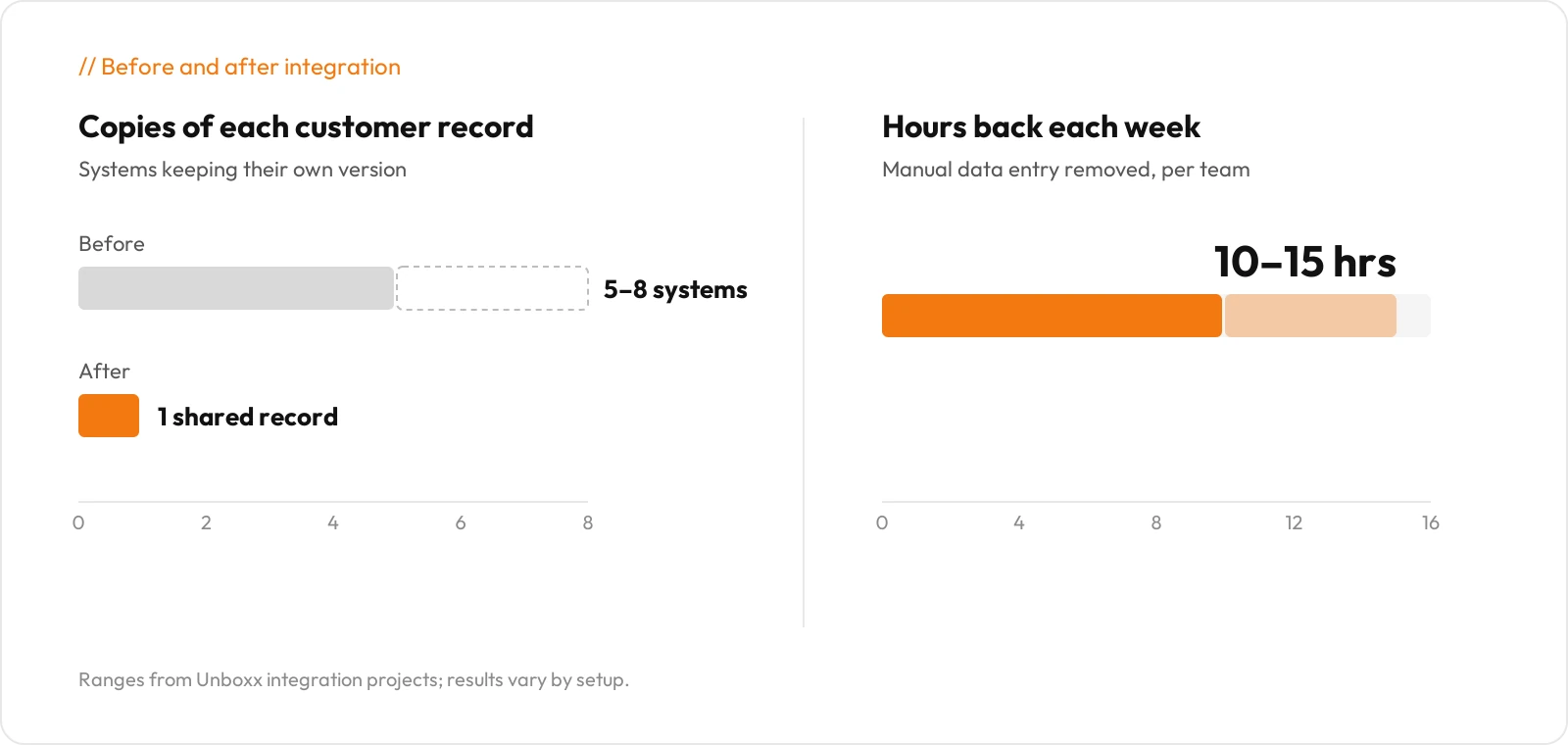
Your sales team works in the CRM. Finance works in QuickBooks or NetSuite, and support has its own help desk. Each one holds a slightly different version of the same customer, and nobody can say which one is right. Across the integration projects we scope, a typical mid-sized team runs five to eight systems that each hold their own copy of customer data.
Unboxx Technologies provides CRM integration services that close those gaps. We connect your CRM to your ERP, accounting software, marketing platform, online store and help desk. Then we keep those connections running after launch, so everyone works from one customer record they trust.
What Are CRM Integration Services?
CRM integration services connect your CRM to your other business software, so customer data moves between systems automatically. Once integrated, your CRM shares contacts, leads, accounts, opportunities and orders with those tools and keeps them current.
Under the hood, each integration settles four things. It defines the source system, the destination, the direction of flow and how often data syncs. The connection runs through an API or a middleware platform. A field map tells each system where every piece of data belongs.
Workflows sit on top of that. A closed deal in one system can trigger a new sales order in another. This is where teams save the most time, because nobody has to retype the order or chase a missing detail.
What Problems Does a Disconnected CRM Create?
It creates manual work and records that disagree. A rep closes a deal, then retypes the order into the ERP. An account manager calls about a renewal without knowing the last invoice is still unpaid. A support agent answers a ticket with no idea what the customer bought last month.
Marketing hands over leads that sales never sees, or sees twice. Managers stitch reports together from four or five spreadsheet exports. When a sync fails, nobody tends to notice until a customer complains.
None of these problems looks serious on its own. Added up, they slow the pipeline and wear down the customer experience. In one recent migration, we moved 48,000 customer records from Salesforce to HubSpot and connected sales, marketing and accounting so every team read the same data.
Which CRM Integration Services Does Unboxx Technologies Provide?
Unboxx Technologies provides 15 CRM integration services. Some businesses need one. Others need a combination built around the systems that cause the most double entry.
01How Does Our CRM API Integration Work?
We connect your CRM to other applications through their REST or SOAP APIs. That means configuring endpoints, HTTP methods and request formats. It also means setting up authentication with OAuth, API keys or access tokens. The less visible work matters as much. We plan around rate limits and handle error codes. We also prepare for version changes, so the connection holds up when a vendor updates its API.
02What Does Our CRM Data Integration Cover?
It covers the full path a record takes between systems. We extract data from the source, transform it into the right format and validate it. Then we map it to CRM fields and sync it to the destination. Large or scheduled loads run through ETL pipelines. This work is what makes the customer record in your CRM match the one in every connected system.
03How Does CRM Application Integration Connect Your Tools?
Application integration links your CRM to the software your teams open every day. That includes website forms, document tools such as PandaDoc, scheduling apps, project management platforms and HR systems. Project handoff is a good example. A won deal can create a project, with tasks, in your project management tool. Delivery starts straight away.
04How Does Our CRM and ERP Integration Work?
We place an integration layer between the two systems so sales data and operational data stay in sync. Customers, accounts, products, pricing, inventory, sales orders and invoices move across it. A won opportunity in the CRM can create the customer and sales order in the ERP automatically. Reps check stock and order status without leaving the CRM. Operations stops retyping orders.
05How Does CRM and Accounting Integration Help Finance?
It keeps sales and finance working from the same numbers. We connect CRMs with QuickBooks, Xero, NetSuite, Sage and other accounting platforms. Customers, quotes, orders, invoices and payments sync in both directions. Account managers can check payment status before they call a client. We also connect cash collection software, which puts overdue invoices directly on the CRM account.
06How Does Our CRM Marketing Integration Improve Lead Management?
It connects the marketing platform to the sales pipeline. We sync leads, contacts and audiences between your CRM and your marketing automation, email and advertising platforms. Email engagement and campaign data flow back the other way. With both sides connected, lead scoring and attribution reflect real sales outcomes rather than opens and clicks. SMS marketing services can plug into the same contact records too.
07What Does CRM E-commerce Integration Connect?
It connects your online store to your CRM, whether you sell on Magento, Shopify or another platform. Customers, orders, products, carts, abandoned carts and order status all land in the CRM, tied to the right customer record. Sales and marketing then have real buying behavior to act on. An abandoned cart can trigger a follow-up, and a high-value repeat buyer can get flagged for a sales call.
08How Does CRM Support Integration Give Agents Full Context?
It puts support history and sales history on the same account. We connect help desks such as HubSpot Service Hub, Jira Service Desk and Salesforce Service Cloud. Tickets, cases, SLAs and conversations then attach to the right customer. Agents see what someone bought before replying. Sales sees open tickets before a renewal call.
09How Does CRM Communication Integration Log Every Conversation?
Every email, text or call becomes an activity on the customer record. We connect email, SMS, WhatsApp, VoIP and telephony, video conferencing, live chat and social messaging. Each activity stores the sender, recipient, timestamp, channel, message status and assigned user. Call tracking and phone answering services can feed in as well. Open the timeline and you see the whole conversation across every channel.
10How Does CRM Payment Integration Keep Billing Accurate?
We connect your CRM to payment gateways and billing systems. Payment status, transaction history, subscriptions and failed payments then update on the customer record. SaaS companies can also sync plan changes and renewals from their billing automation tools. Your CRM shows who has paid, who is overdue and who is up for renewal.
11How Does CRM BI Integration Improve Reporting?
It feeds CRM data into Power BI, Tableau, Looker or whichever BI tool you use. We combine deals, activities and accounts with data from your ERP, accounting and support systems. Leadership gets one dashboard covering pipeline, revenue and service, instead of a spreadsheet someone rebuilds every Monday.
12When Do You Need a Custom CRM Integration?
You need one when no ready-made connector exists. That happens often with proprietary software, legacy databases and industry-specific platforms. We build these integrations through API development, webhooks or custom data connectors, shaped around your data model and business rules. You control how the connection behaves, and it can change as your business does.
13How Does CRM Migration Integration Protect Your Data?
Migration integration moves data from one CRM to another, or keeps two or more CRMs in sync. Typical projects include Salesforce to HubSpot, HubSpot to Salesforce and Salesforce to Microsoft Dynamics 365. Before any data moves, we map contacts, leads, accounts, opportunities and activities field by field. Where teams need to keep separate platforms, we build CRM-to-CRM synchronization instead.
14How Does Our CRM Workflow Integration Automate Processes?
We automate the processes that cross system boundaries. Each workflow runs through a trigger, a condition, an action, a data update and a notification. A new website lead, for instance, enters the CRM, syncs to your marketing platform and alerts the right rep. A new support ticket logs itself as activity on the customer account. Follow-ups happen without anyone having to remember them.
15How Does Middleware and iPaaS Integration Help You Scale?
A middleware or iPaaS platform sits between your CRM and everything else. Instead of maintaining a separate link for each pair of systems, you manage every data flow in one place. The platform handles connectors, transformations, routing, queues, error handling and logs. We configure tools such as MuleSoft, Zapier, Make and Workato. This approach makes the most sense for businesses that expect to add systems over time.
Not sure which integrations you need first?
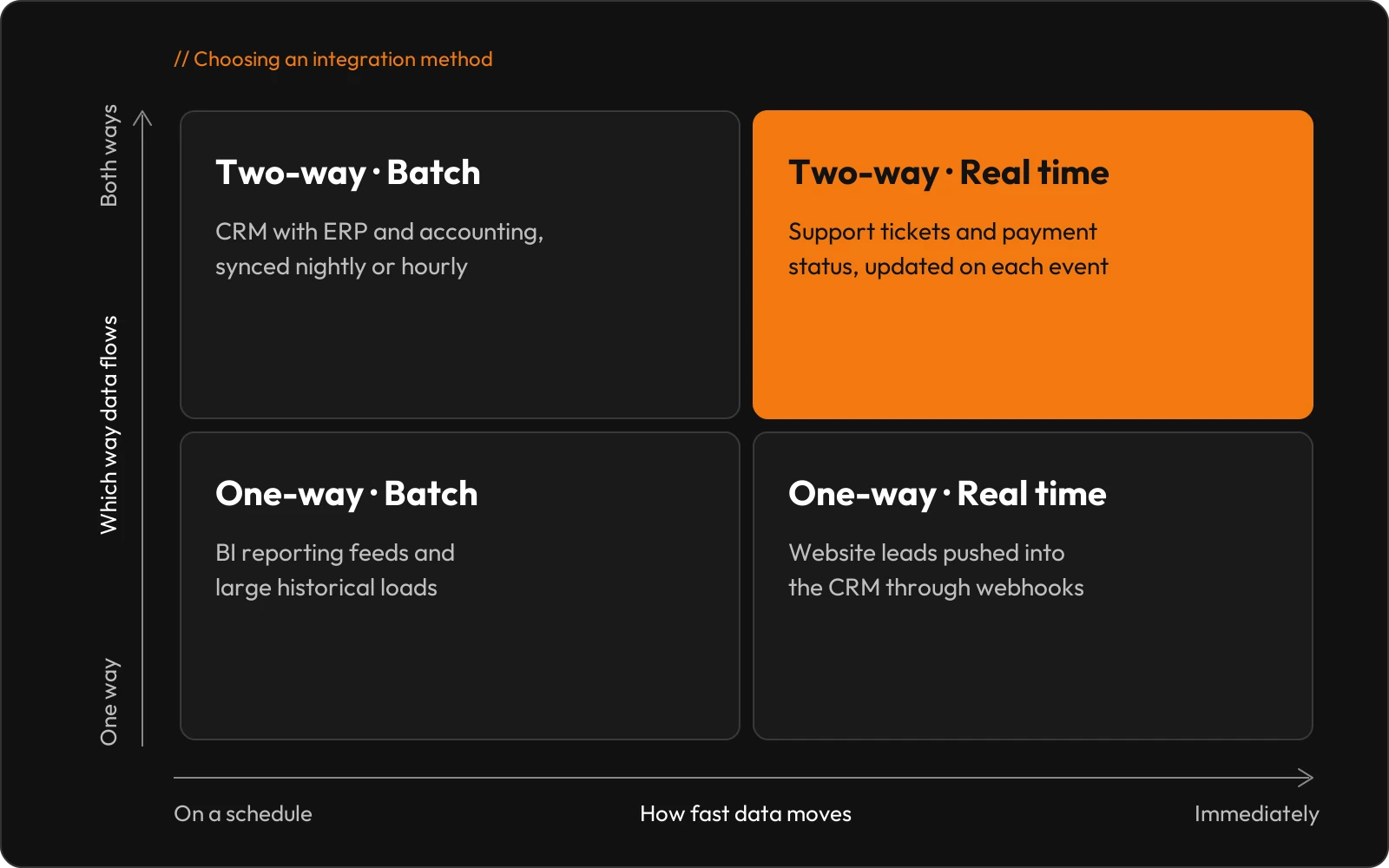
Talk to our integration teamWhich Integration Methods Should Your Business Choose?
That depends on how quickly data needs to move and whether both systems need to update each other. It is common to combine two methods in one setup.
How Does Data Mapping Keep Records Consistent?
Data mapping tells each system which of its fields matches which CRM field. Every mapping rule sets a source field and a target field. It also sets the data type, any transformation, a validation rule and whether the field is required. Here is a simple example.
How Do We Keep Your CRM Integrations Secure?
We plan security before we write any code. Every integration authenticates through OAuth, API keys or access tokens. Roles and permissions limit each system to the data it needs. We encrypt data in transit and keep audit logs of every change. For regulated sectors such as BFSI, we align the setup with your privacy and compliance requirements.
How Does a CRM Integration Project Run?
Every project moves through eight stages.
- 01
Discovery.
We learn how your teams work and which systems hold which data.
- 02
Requirements analysis.
We define scope, stakeholders, data objects and what success looks like.
- 03
Architecture.
We pick the integration method, whether direct API, middleware or iPaaS.
- 04
Data mapping.
We match every source field to its target and set validation rules.
- 05
Development and configuration.
We build the connectors, workflows and error handling.
- 06
Testing.
We check data accuracy, workflow logic, security and failure scenarios.
- 07
Deployment.
We go live and confirm that real data flows correctly.
- 08
Monitoring and maintenance.
We track uptime, errors, failed transactions and latency, and we tune the integration as it runs.
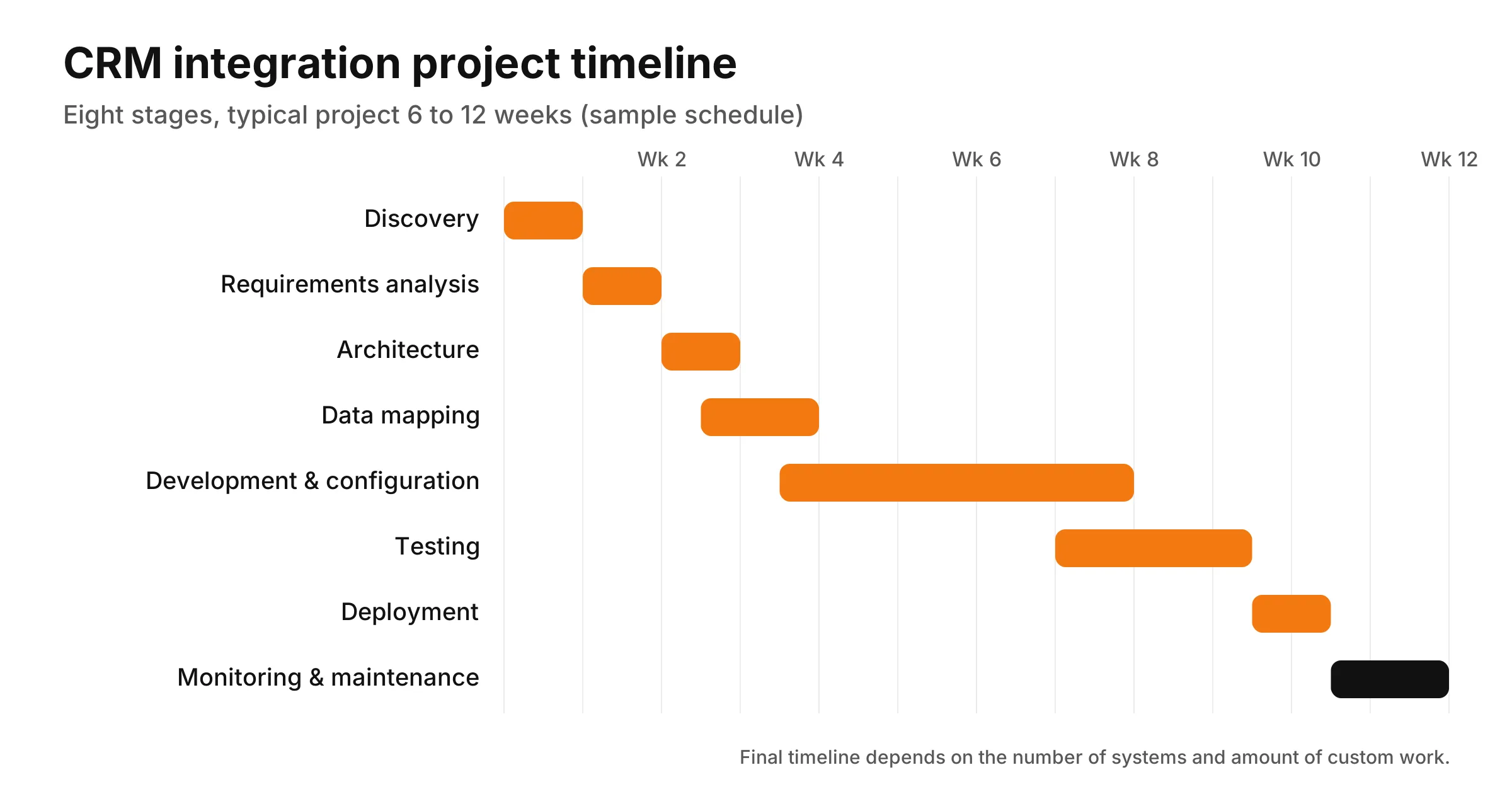
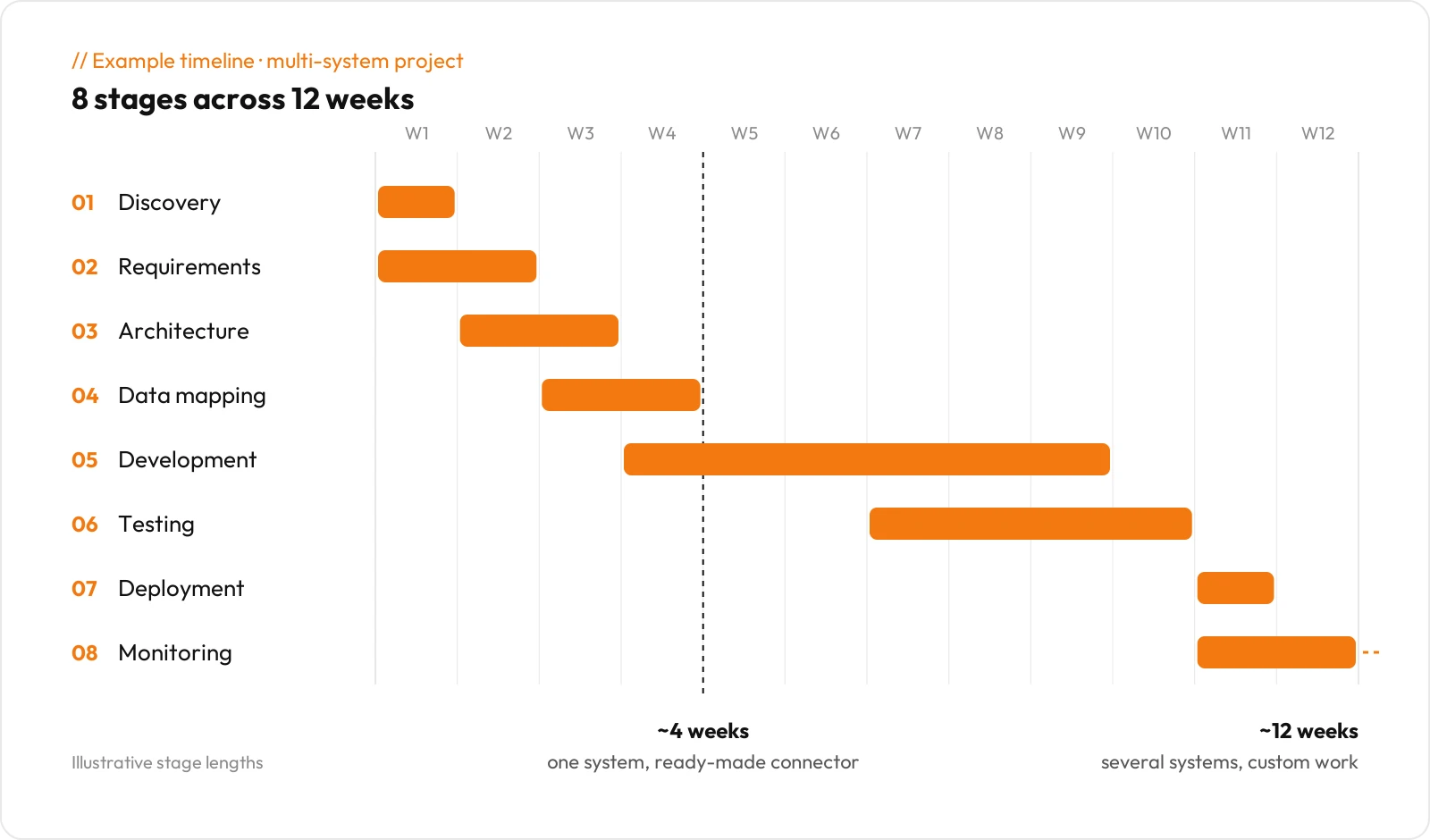
A typical project takes 4 to 12 weeks. The number of systems and the amount of custom work decide the final timeline.
How Does Integrated CRM Data Follow a Customer?
Picture one customer moving from first click to repeat order, with nobody retyping anything along the way.
- 01A visitor fills in a form on your website, and the CRM creates a lead.
- 02Your marketing platform scores and nurtures the lead, then passes it to sales.
- 03The rep converts the lead into an opportunity and wins the deal.
- 04The ERP creates the customer and sales order, and accounting issues the invoice.
- 05Payment status and support tickets show up as activity on the CRM account.
- 06BI dashboards report on the whole cycle, from campaign to revenue.
Which CRM Platforms Does Unboxx Integrate?
We work with Salesforce, HubSpot, Microsoft Dynamics 365, Zoho CRM, Pipedrive and other CRM platforms. Our Salesforce CRM integration services connect Sales Cloud, Service Cloud and custom objects with ERP, marketing and support tools. On HubSpot, we link Sales Hub, Marketing Hub and Service Hub to outside ERPs, accounting software and telephony.
Our Microsoft Dynamics CRM integration services cover Dynamics 365 alongside Outlook, Teams, Power BI and third-party ERP systems. For Zoho CRM and Pipedrive, we connect accounting, e-commerce and communication tools through APIs or middleware.
What Results Can You Expect From CRM Integration Services?
The first change is the simplest one. Every connected system shows the same customer information.
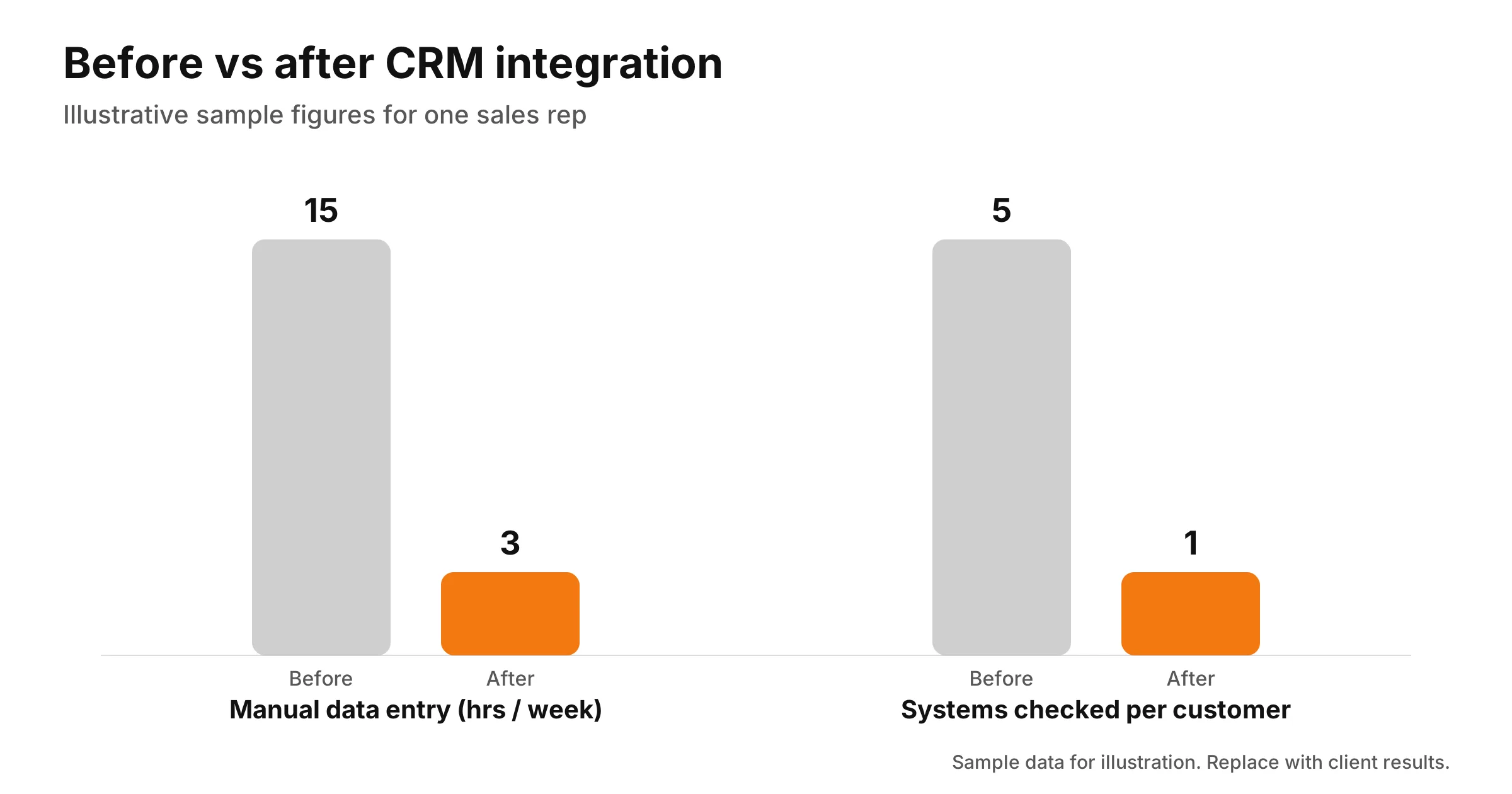
From there, manual data entry drops by an estimated 10 to 15 hours per team each week. Leads get followed up faster because routing is automated. Sales and operations can see each other's work, and support agents get the complete customer history. Monitoring catches failed syncs early instead of weeks later. Your sales team spends more of its day selling, with reps typically getting back several hours a week that used to go on copying orders and chasing details.
Why Choose Unboxx Technologies for CRM Integration?
One team handles the whole lifecycle, from discovery to maintenance. You are not passing requirements from a consultant to a developer to a support desk and hoping nothing gets lost.
We map data and plan security before development starts, which is when integration problems are cheapest to fix. We work across Salesforce, HubSpot, Microsoft Dynamics 365, Zoho CRM and Pipedrive. After launch, we stay on to monitor and maintain what we built. Unboxx is a Salesforce Crest Partner, and our team delivers CRM work across Salesforce, HubSpot, Microsoft Dynamics 365 and Odoo. For example, we connected Salesforce CRM with Odoo ERP for a roadside assistance business so customers, dispatch and orders run on one data flow.
What Do Businesses Usually Ask About CRM Integration?
What Does CRM Integration Mean?
It means connecting your CRM to your other business systems so they share data automatically. You enter a customer's details once. The integration then syncs contacts, leads, orders, invoices or tickets to every system that needs them. It runs through an API or middleware, in real time or on a schedule, one way or both.
Does HubSpot CRM Integrate Sales, Marketing and Customer Service?
Yes. Sales Hub, Marketing Hub and Service Hub all sit on the same HubSpot CRM database. A contact's emails, deals and tickets live on one record. What HubSpot does not cover by itself is your outside software, such as your ERP, accounting tool or phone system. Unboxx Technologies builds those connections.
How Do You Integrate Multiple CRMs Into One Platform?
There are two common routes. One is a middleware or iPaaS layer that syncs each CRM through its own API. The other is a unified API that exposes every CRM through a single interface. Either way, you need a shared data model, clear field mapping and a rule for which system owns each record. Skip that last part and the systems overwrite each other.
How Do You Integrate a CRM With Your Website?
Connect your web forms, chat widget or booking tool directly to the CRM. Most CRMs support embedded forms, a form API or webhooks. Each submission then creates or updates a lead, complete with source, page and campaign data. We add the field mapping, deduplication rules and follow-up workflow so every enquiry reaches the right rep.
Can You Integrate Advertising Platforms With CRM Systems?
Yes. Google Ads, Meta Ads and LinkedIn Ads can all push leads into your CRM and pull conversion data back. That loop shows which campaigns produce deals, not only clicks. You can also build ad audiences from CRM segments. We set up the API connection, field mapping and privacy settings.
How Can Integrated Systems Improve the Customer Experience?
They give every team the same current view of the customer. Support sees past orders before replying. Sales sees open tickets before calling. Customers stop repeating themselves on every channel. Workflows respond faster too, for example by sending an order update the moment the ERP status changes.
Can AI Tools Integrate With Your CRM?
Yes. AI customer service platforms, chat assistants and lead scoring models connect through the same APIs and middleware as other systems. The AI reads CRM data for context, then writes results back, such as ticket summaries or lead scores. We apply the same mapping, access control and monitoring we use on every integration. Our AI-native CRM work covers chat assistants, lead scoring models and AI agents connected to Salesforce and HubSpot.
Ready to Start Your CRM Integration Services Project?
Unboxx Technologies provides CRM integration services for businesses that want every system working from the same customer data. Tell us which CRM you use and which systems need to share its data. We will review your setup and recommend an approach that fits.
Book a consultation at unboxx.io/contact.