
Stop Multi-Account CRM Chaos With HubSpot and Salesforce Management
See how Infinite Marketing brought order to HubSpot and Salesforce work across its client accounts and its own team.
Infinite Marketing in Brief
Client
Infinite Marketing, a marketing agency that runs HubSpot and Salesforce work for many client accounts.
Challenge
CRM tasks were spread across client environments, and urgent fixes kept pushing bigger projects aside.
Solution
Unboxx set up one structured delivery model for strategy, hands-on configuration, and recurring CRM support.
Outcomes
Cleaner client data, reporting tied to client KPIs, faster troubleshooting, and clear visibility into every request.
An Agency Running CRM for Clients and Itself
Infinite Marketing works in a fast-moving client services setting. Its CRM needs cover marketing, sales, digital, operations, and leadership, across many client accounts on both HubSpot and Salesforce. The agency also runs its own internal HubSpot operations.
Every environment needed strategy and hands-on work at once. Implementations, automation, reporting, maintenance, and troubleshooting all fought for the same hours, and client priorities kept shifting. The same three problems kept coming back:
- Recurring configuration requests competed with larger CRM initiatives.
- Data quality, dashboards, and automations needed constant attention in every account.
- With many client priorities open at once, it was hard to see what was being delivered.
Documentation was thin too, which made each client setup hard to hand over. What the agency lacked was clear ownership of HubSpot and Salesforce work, from strategy through support.
Six Parts of the Unboxx Delivery Model
Unboxx set up a structured way to handle CRM work in every client environment. Strategy, architecture, implementation, optimization, troubleshooting, and recurring support sit in one model, so planning and hands-on work stay connected.
Roadmaps and Priorities
CRM roadmaps set clear priorities, so recurring requests and larger initiatives each had a place.
HubSpot Management
Workflows, sequences, lead scoring, lifecycle stages, pipelines, and marketing automation were configured and tuned in HubSpot.
Salesforce Management
Objects, fields, flows, pipelines, automation, and governance were configured and optimized in each Salesforce org.
Data Hygiene
Segmentation, hygiene, and deduplication routines kept client records clean across both HubSpot and Salesforce.
KPI Reporting
Sales, marketing, pipeline, and executive dashboards were aligned with the KPIs each client tracks.
Documentation and Training
Documentation, SOPs, and CRM training improved knowledge transfer and adoption across the agency's work.
How the Agency's CRM Work Runs Today
Client requests now follow a roadmap. They no longer arrive as one-off fires. Recurring configuration work is tracked in one place, which keeps larger projects like new client implementations moving.
Proactive platform support catches workflow and automation issues early, so troubleshooting takes less time. Reports and dashboards match the KPIs each client actually watches.
New client environments start from a scalable structure. Documentation and SOPs give teams one shared reference for how each account is set up. And Unboxx keeps the agency's own HubSpot running, too.
What Changed Across the CRM Portfolio
Results were measured across HubSpot and Salesforce work in the agency's client environments. The first chart covers where effort and delays dropped, and the second covers where accuracy and visibility improved.
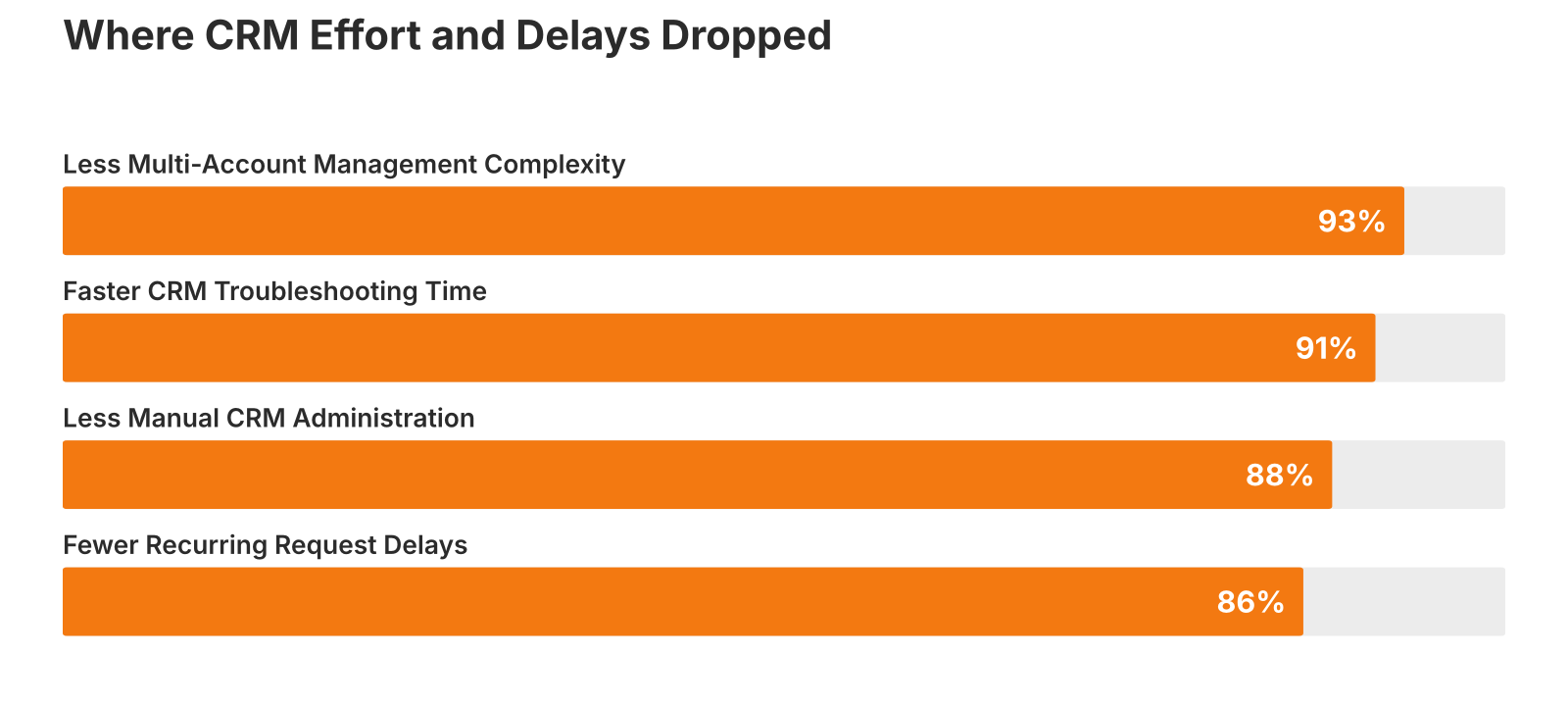
Reductions in CRM effort and delays across client environments.
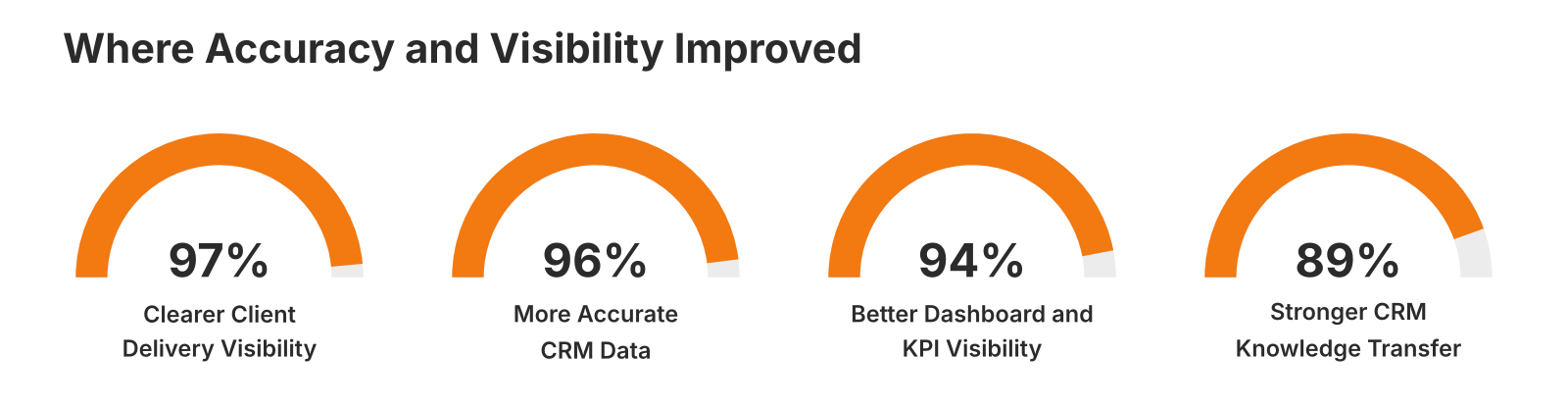
Improvements in data accuracy, reporting, and delivery visibility.
For Infinite Marketing, the gains show up in daily work. Teams spend less time on manual admin, and every client can see what is being delivered.