
Fixing Fragile CRM Workflows With Microsoft Power Platform Optimization
How Unboxx helped a growing organization make a heavily customized Dynamics 365 setup more reliable, connected, and easier to support.
The Short Version
Client
A growing organization running a highly customized Microsoft Dynamics 365 environment for customer engagement, business processes, and operational data.
Challenge
Complex customizations, fragile flows, and API dependencies made the CRM hard to troubleshoot and slow to improve.
Solution
Unboxx reviewed and tuned Dynamics 365, Power Automate, Customer Insights, Dataverse, API Management, and Power BI as one connected system.
Outcomes
Less manual work, fewer integration and recurring issues, faster troubleshooting, and clearer reporting on operations and system health.
When One Customization Breaks Three Processes
The organization had built its Dynamics 365 environment over time, adding customizations, automated processes, integrations, and data workflows as needs came up. Each piece worked on its own, but together they had become hard to support. A single issue could ripple into several business processes before anyone found the cause.
Customizations nobody could trace
Layers of custom development made troubleshooting slow. New work had to fit an architecture that was difficult to read, so every change carried risk.
Automation that needed constant care
Power Automate flows and Customer Insights processes needed ongoing fixes to keep running. Dataverse processes also needed better data consistency and performance.
Integrations that spread every problem
API integrations tied the CRM to other systems, so a fault in one place showed up somewhere else. Reporting gave the team little insight into how the system was actually performing.
Tuning Each Layer of the Microsoft Stack
The work started with a review of the existing Dynamics 365 environment. Unboxx mapped configuration, automation, integrations, and custom development to find what was hurting performance and reliability. Every fix that followed was tied to a finding from that review.
Automation and engagement
Power Automate workflows were optimized to run more reliably and need less upkeep. Dynamics 365 Customer Insights processes were tuned to support stronger customer engagement.
Data and integrations
Dataverse configurations were reviewed for cleaner data operations and more dependable processes. Azure API Management settings and monitoring were improved so connected systems could share data with fewer failures. Custom Dynamics 365 development was aligned with the existing CRM architecture.
Reporting and support
Power BI reports gave the team clear visibility into operations and system performance. Structured testing and troubleshooting turned system issues into a repeatable diagnosis process instead of guesswork.
What the Numbers Show After Optimization
The client measured gains across automation, data, integrations, and reporting. The first chart shows where work and issues went down. The second shows where reliability and visibility went up.
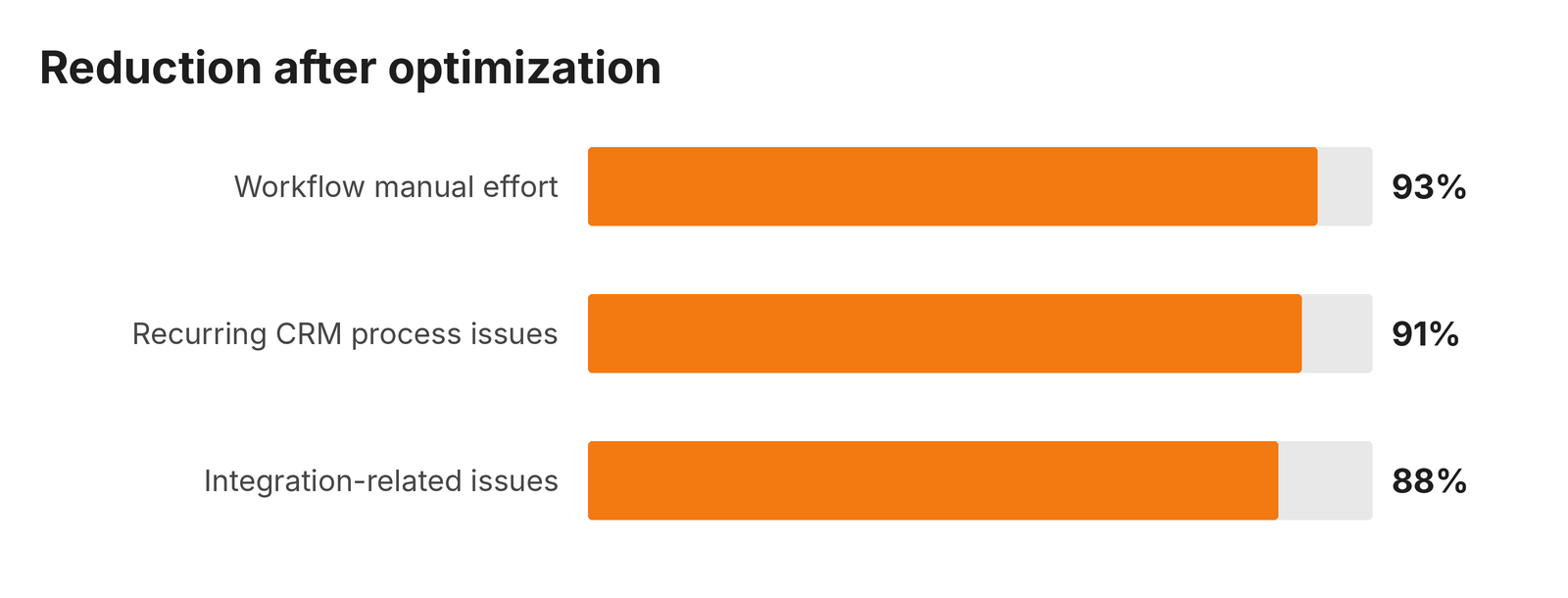
Manual workflow effort, integration issues, and recurring CRM issues all dropped by more than 85%.
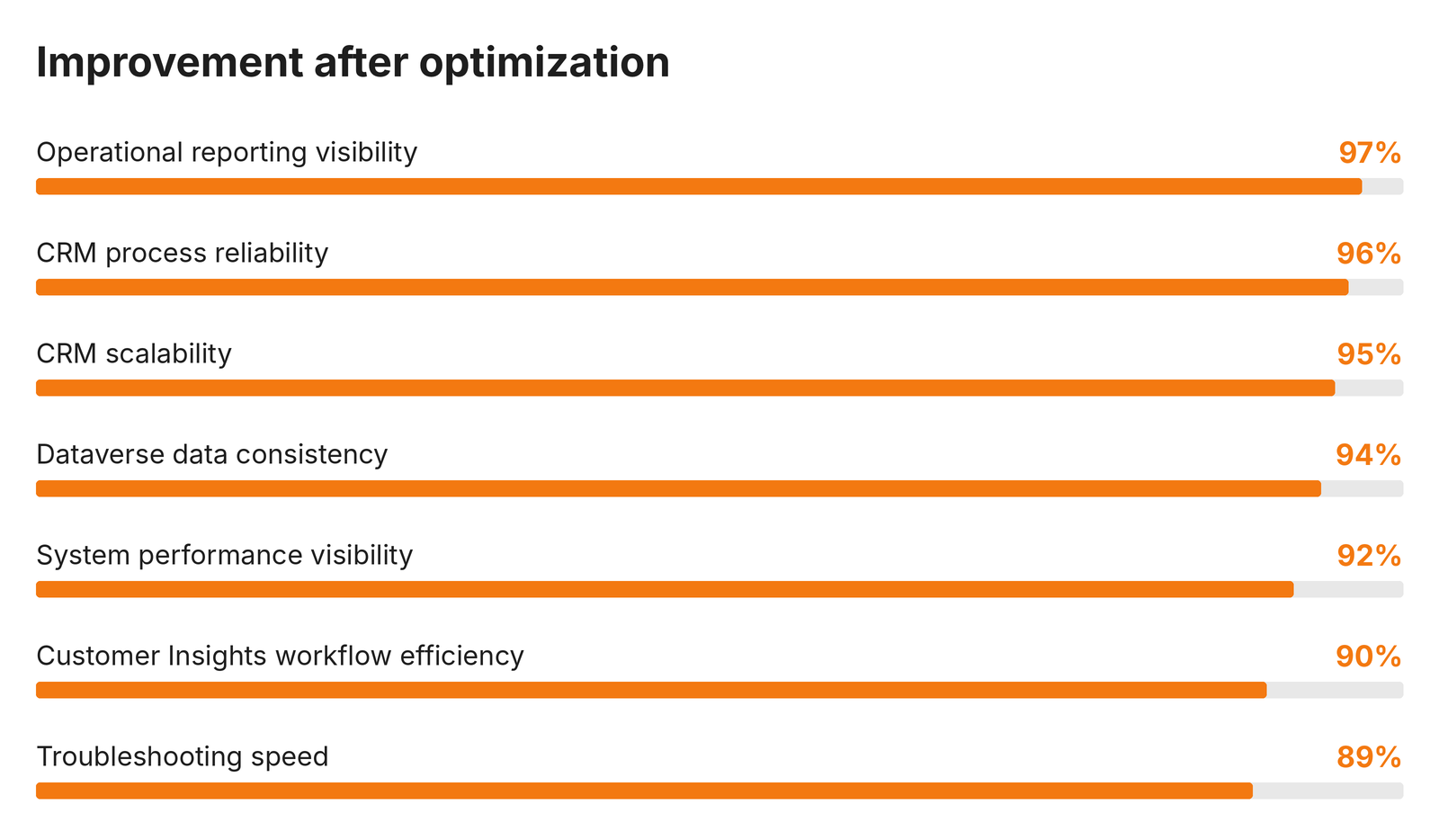
Reliability, data consistency, visibility, and scalability each improved by 92% to 97%.
Together, these results describe a CRM the team can trust and support. Fewer recurring issues mean less firefighting and more time for planned improvements.
Lessons for Teams Running Custom Dynamics 365
- Review the whole environment before fixing single issues, since customizations, flows, and integrations affect each other.
- Treat API monitoring as part of CRM health, alongside workflows and data quality.
- Pair automation work with Power BI reporting so teams can see whether reliability is improving.