
Organize Scattered Referral Data With a Clean HubSpot CRM
See how Unboxx built a clean HubSpot CRM for a two-office restoration company that wins work by referral.

The Restoration CRM Project in Four Lines
Client
A mid-sized property restoration company with two South Florida offices serving water, fire, mold, and reconstruction work.
Challenge
Sales and referral tracking were moving into HubSpot, and the structure had to be right from day one.
Solution
Unboxx designed the data model, properties, pipeline, office split, data cleanup plan, and dashboards around referrals.
Outcomes
Cleaner records, clearer referral tracking, reporting by office, and a CRM ready to grow with the business.
A Referral Business With Two Offices to Track
Restoration work at this company comes in through referrals. That makes one question matter more than most: where did this job come from? Its Palm Beach and Treasure Coast offices handle water, fire, mold, and reconstruction jobs, and each one passes through several stages before it closes.
As the company moved sales and relationship tracking into HubSpot, it wanted the structure right from the start. HubSpot had to match the real sales process, and several parts of the business had to fit into one clear design:
- Referral sources that needed clear classification and tracking
- Carrier and adjuster relationships that needed structured data
- Parent and child companies that needed proper associations
- Two offices that needed clear territory separation
- Custom properties that needed consistent naming rules
- Existing contact and company data with duplicates to clean up
The team also needed reporting by source, stage, and office, and HubSpot had to connect with the existing business stack.
Six Building Blocks of the New HubSpot Setup
Unboxx began with discovery to learn how the company wins and tracks restoration work. The HubSpot design then followed the way jobs actually come in and move forward.
Data Model Design
Objects, associations, and company hierarchies built around referral relationships, account types, and the job lifecycle.
Referral Classification
Account types and referral sources classified so every job can be traced back to its source.
Property Dictionary
Custom properties created with clear naming rules and a property dictionary that keeps data consistent.
Lifecycle Deal Pipeline
Deal stages that follow the real job path: lead, inspection, mitigation, reconstruction, and closed.
Office Segmentation
Palm Beach and Treasure Coast activity kept separate, with teams, users, and access levels configured.
Focused Dashboards
Dashboards for referral sources, pipeline performance, and business development activity in HubSpot reporting.
Clean Data and the Wider Business Stack
Existing contact and company exports weren't ready to go straight into HubSpot. Unboxx planned the cleanup and imports, including deduplication and standardization, so the new CRM would start from records the team could trust.
The team also reviewed integration needs for Outlook, QuickBooks, RMS, and Luxor, so HubSpot could work alongside the systems the company already runs. Documentation and recorded training helped prepare staff to use the new setup.
How the HubSpot Foundation Performed
The charts below show where the new structure made the biggest difference, from cleaner records to clearer reporting for each office.

Gains in data structure, tracking, reporting, and adoption readiness after the HubSpot setup.
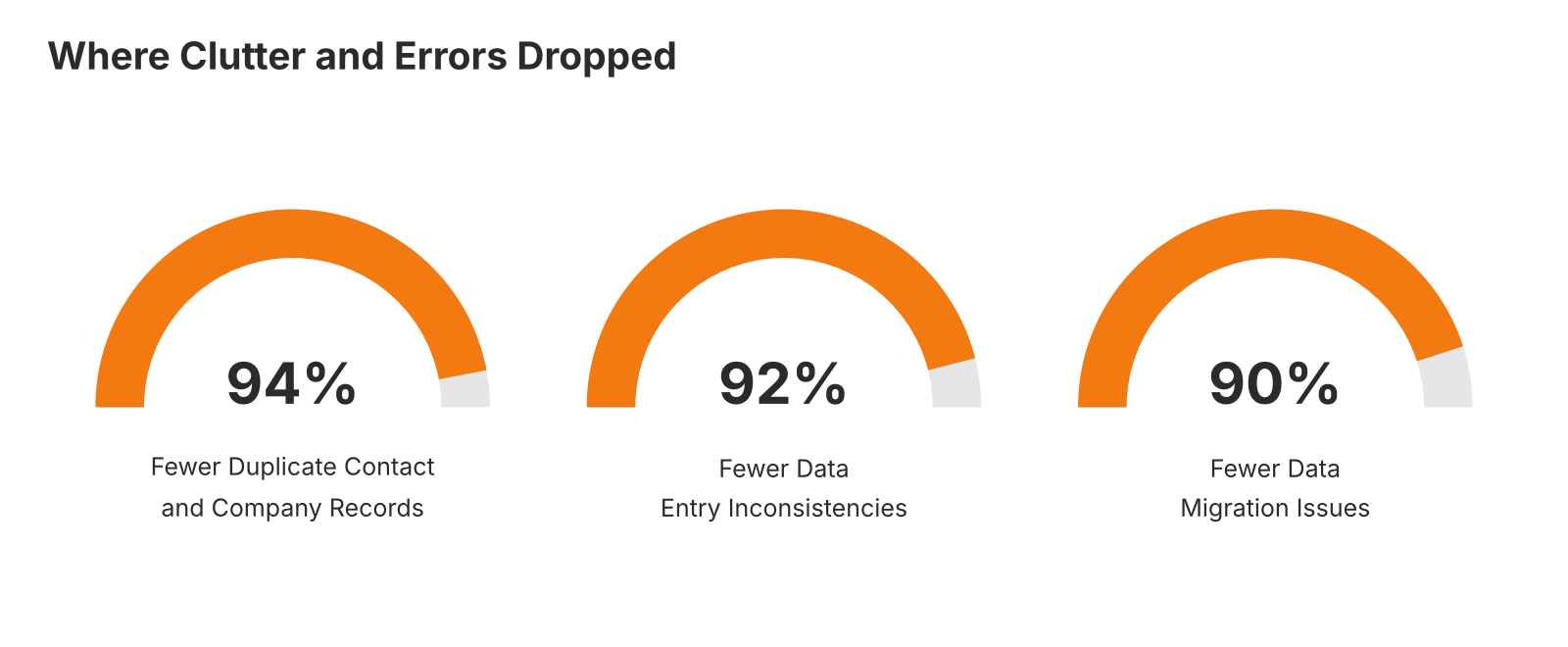
Reductions in duplicate records, data entry inconsistencies, and migration issues.
For a business that depends on referrals, the biggest wins sit in source tracking and relationship visibility. The company can now see where work comes from, how each job moves, and how each office performs.
Lessons for Restoration Firms That Win Work by Referral
- Map the CRM to how work really arrives and moves, from the first referral to a closed job.
- Set naming rules and a property dictionary before data goes in.
- Clean and deduplicate existing records before import so reports start from data people trust.