
Speed Up Slow Lead Follow-Up With HubSpot Workflow Automation
See how Unboxx used HubSpot to capture, route, and follow up on leads with far less manual work.

Lead Automation Project Summary
Client
A growing B2B professional services company that needed better lead management as volume rose.
Challenge
Leads arrived through uneven channels, and sales teams handled most follow-up by hand.
Solution
Unboxx set up HubSpot as the central platform for capture, routing, follow-up, and tracking.
Outcomes
Faster lead response, more accurate routing, and clearer lead visibility for sales and leadership.
Why More Leads Brought More Manual Work
Interest in the company was growing faster than its processes could handle. Every new lead meant more work for the sales team, and the gaps in the CRM got harder to ignore. Leadership wanted growth, not a heavier operational load.
Leads entering in different ways
Lead capture worked one way on one marketing channel and another way on the next. Some records came in complete. Others needed cleanup before anyone could act, and new leads did not always reach the right person.
Follow-up that depended on people
Sales reps spent a large share of their week chasing leads by hand. Marketing sequences needed better timing and more personal messages, and the existing workflows left gaps across the lead lifecycle.
Little view of where leads stood
Customer interactions were tracked differently across the CRM, and key systems did not share data reliably. So sales teams had only a partial view of how leads moved forward, and the data itself was inconsistent.
The HubSpot Automation Unboxx Put in Place
Unboxx started with a review of the existing CRM and marketing processes, looking for workflow gaps and the spots where automation would help most. Each change after that was built around how the company already sold and spoke with customers.
Structured Lead Capture
HubSpot Forms and capture workflows now create complete lead records from every channel.
Automatic Lead Routing
Workflows assign each new lead to the right user and schedule the next follow-up.
Timed Email Sequences
Automated emails and scheduled actions follow the sales process and the customer lifecycle.
Engagement Tracking
CRM activities and engagement data show where every lead and customer stands today.
Connected Business Systems
Key systems now connect to HubSpot, so data moves between them without manual updates.
Testing and Tuning
Each workflow was tested and refined so automation stays reliable as lead volume grows.
How Sales and Marketing Work Today
Sales reps no longer begin the day sorting new leads or rewriting the same follow-up email. HubSpot assigns the lead, sends the first touch, and creates the next task. Reps step in once a conversation is ready.
Marketing changes sequence timing and content in one place and sees how contacts respond. Leadership can follow lead progress across the lifecycle without asking anyone to pull a report by hand.
Where HubSpot Automation Moved the Numbers
The new HubSpot setup removed much of the repetitive work and made lead handling faster and more dependable for both teams. The two charts below show where the biggest changes landed.
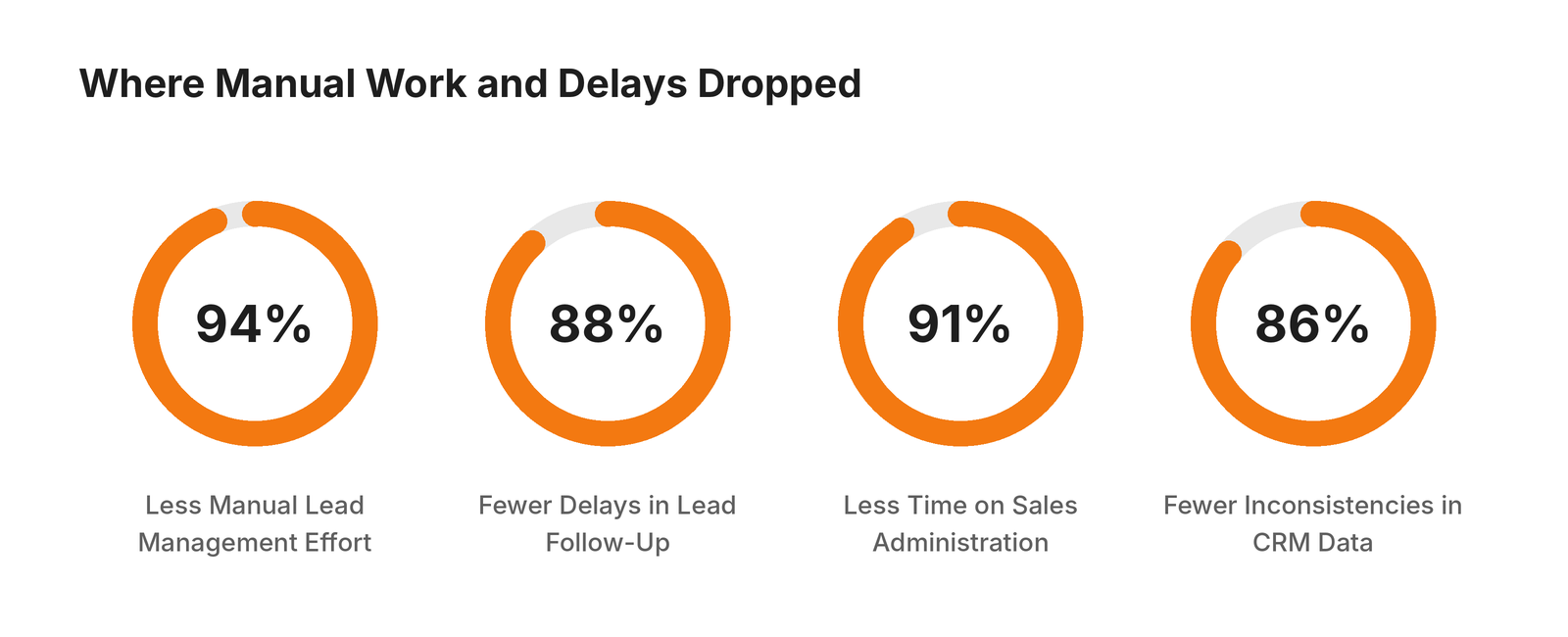
Manual effort, follow-up delays, admin time, and data issues dropped by 86% to 94%.
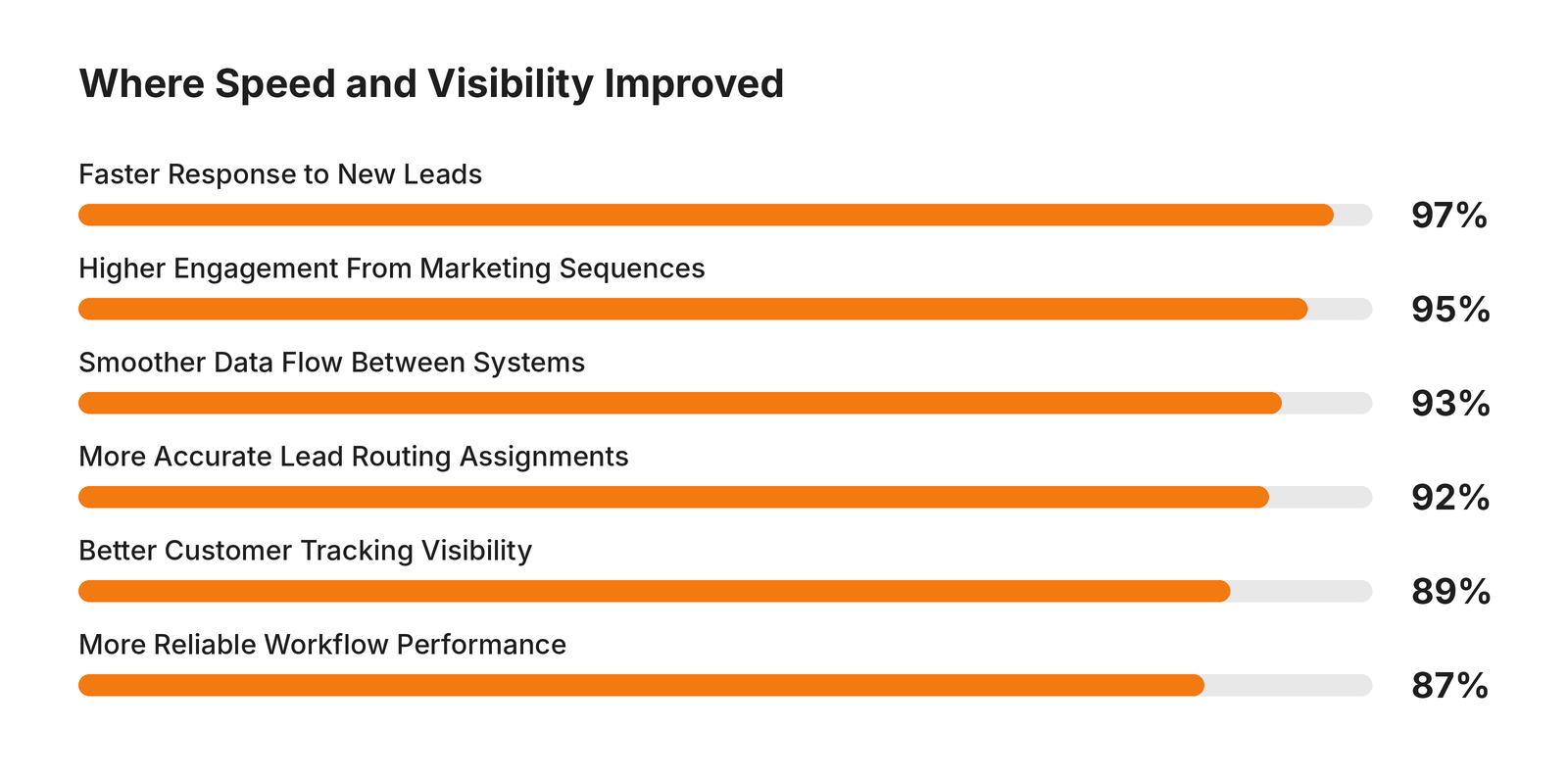
Response speed, engagement, data flow, routing, tracking, and reliability rose by 87% to 97%.
For the company, more leads no longer means more admin. The HubSpot framework can scale as lead volume and business needs change.