
Stop Rollout Delays by Stabilizing Salesforce Connections in Perplexity
How Unboxx connected Perplexity Enterprise to Salesforce, Google Workspace, and Slack so a sales team could expand AI use.

The Rollout at a Glance
Client
A growing B2B sales organization preparing to expand Perplexity Enterprise for sales analysis and business reporting.
Challenge
Salesforce sign-ins and permissions behaved differently for each user, so AI access to sales data was unreliable.
Solution
A native-connector-first setup across Salesforce, Google Workspace, and Slack, tested with more than one enterprise user.
Outcomes
Faster troubleshooting, steadier data access, and a documented onboarding process ready before team training.
Training Was Planned, but the Connections Were Not Ready
The client wanted its teams using Perplexity Enterprise for sales analysis and reporting, with answers drawn from Salesforce, Google Workspace, Slack, and several custom Salesforce objects. That plan had one condition. Every connection had to behave the same way for every user.
It did not. OAuth sign-ins gave different results from one user to the next. Custom objects showed up for some people and stayed hidden for others. Permission sets and field-level security also blocked fields that reporting depended on, so the same question could return different answers depending on who asked it.
An earlier attempt to route the connection through middleware had only added moving parts. With no dedicated internal IT staff and no standard onboarding process, each new user meant another round of one-off troubleshooting. Training stayed on hold until access was fixed.
Five Steps From Unstable Access to a Repeatable Setup
Unboxx started with the connectors Perplexity Enterprise already provides and looked at middleware only where a real gap remained. The goal was the simplest secure setup that still covered what the business actually needed.
Review the Environment
Unboxx mapped the existing Perplexity setup and every Salesforce connection path in use.
Stabilize Salesforce Access
The team tested OAuth behavior, API access, connected apps, permission sets, and field-level security.
Test Another User
The working setup was repeated with a second enterprise user to expose user-specific differences.
Validate Other Sources
Google Drive, Google Sheets, and Slack access were checked, then a sample Salesforce and Sheets analysis was run.
Document the Process
Connector ownership, onboarding steps, known limits, and the conditions that would justify middleware were written down.
What the Finished Integration Covers
The client now runs a controlled integration built on native enterprise capabilities. Access rules are set before any new user is added.
- Salesforce over OAuth 2.0, with standard and custom objects governed by profiles, permission sets, and field-level security
- Google Drive and Google Sheets connected for file access and cross-source analysis
- Slack connected and checked for supported workflows
- A written onboarding guide that names connector owners and known limitations
Unboxx tested every connector setting and permission, one step at a time, before the wider rollout.
Measured Gains Before the Wider Rollout
Unboxx tracked eight measures across the validated Perplexity workflows. The first chart shows where effort and issues fell. The second shows where access and readiness rose.
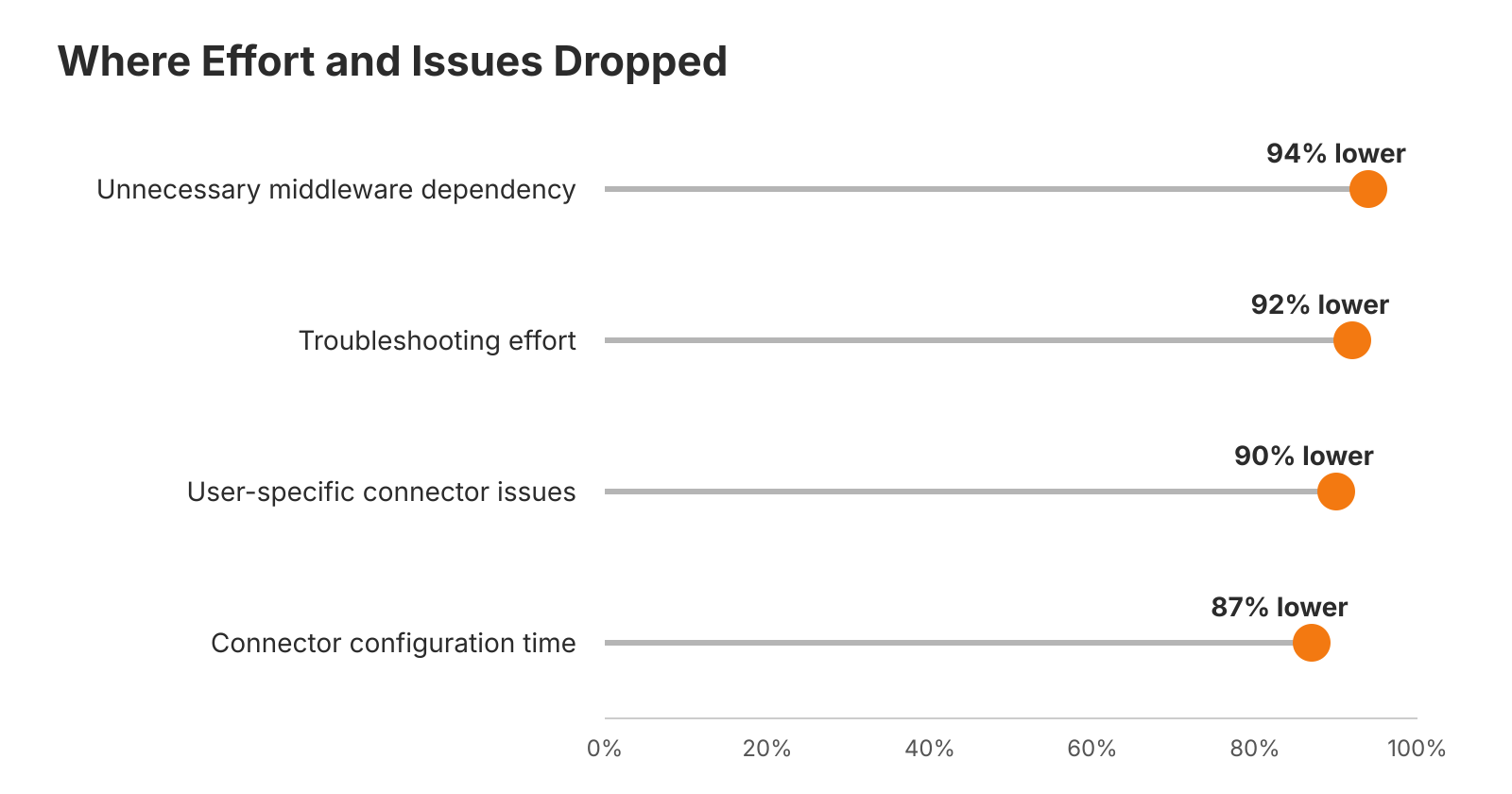
Reductions in middleware dependency, troubleshooting, user issues, and setup time.
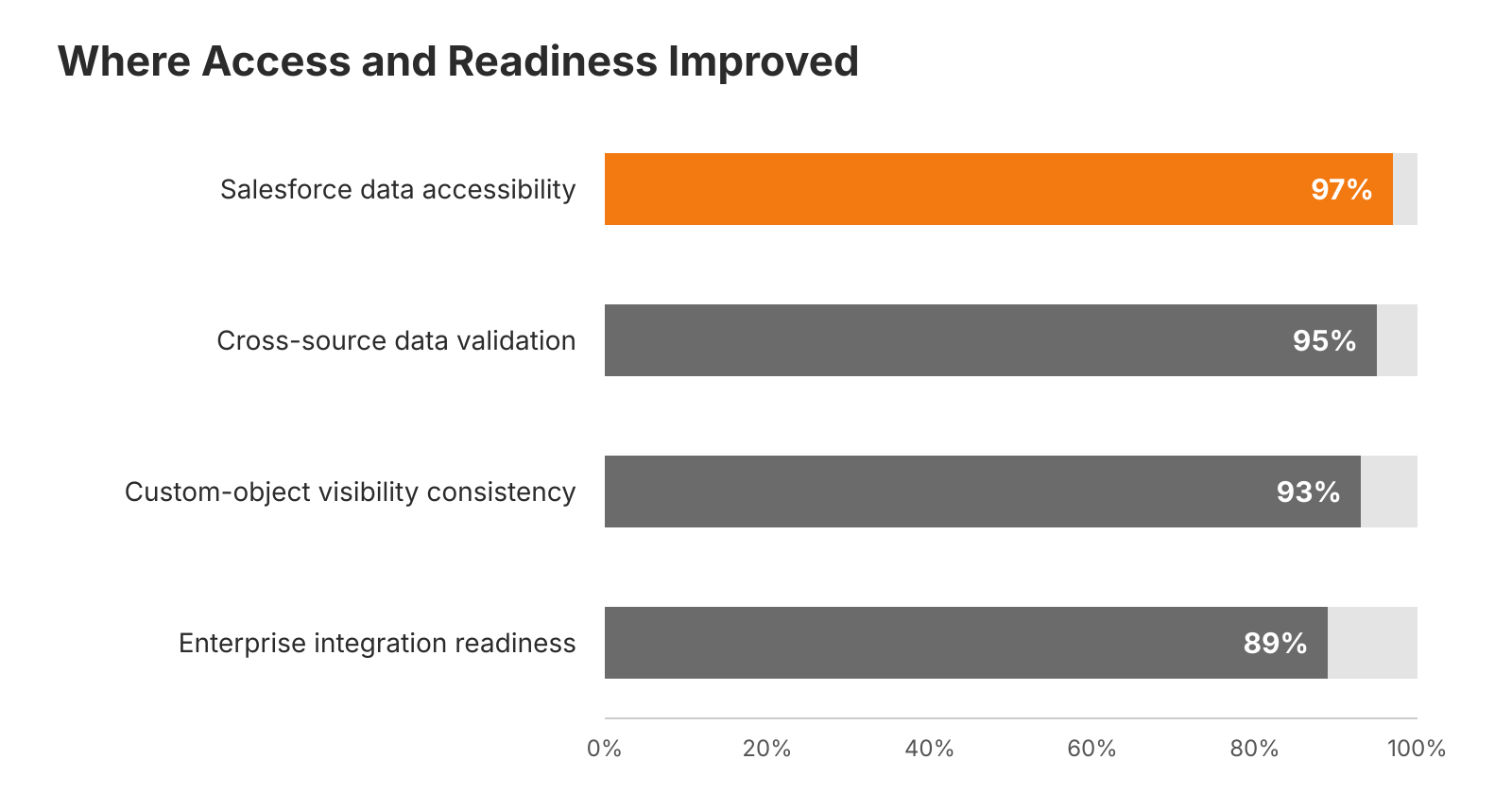
These gains landed before training started. The client can now add Perplexity users through a documented process instead of fixing each case by hand, and leadership has a clear rule for when middleware is worth the extra complexity.