
Enterprise teams move from Microsoft Dynamics to Salesforce for platform breadth, user experience, and AI capability. Cost is rarely the driver.
This dynamics to salesforce migration guide assumes a team already knows both platforms. It covers what structures differently, what breaks without planning, and how to sequence the move.
What Structural Differences Matter Most?
Dynamics and Salesforce structure records differently at the core. That difference drives most of the migration complexity.
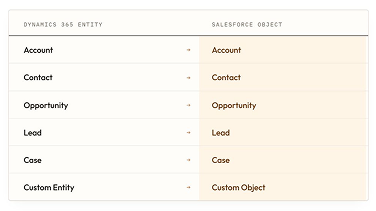
Dynamics organizes data into entities, while Salesforce uses objects. The two frameworks don't map one-to-one, even when they represent the same underlying data.
Power Platform integrations need a direct Salesforce equivalent mapped before cutover. A team running Power Automate flows connected to Dynamics entities must rebuild those flows against Salesforce objects and AppExchange tools. Skipping this step is where integrated workflows break first after migration.
What Are the Common Migration Challenges?
Data model mismatches create the first challenge. Entity-to-object mapping requires manual decisions rather than automated conversion. A Dynamics entity with custom relationships often needs a redesigned Salesforce structure.
Integration dependency mapping is the second challenge. Every system connected to Dynamics needs its Salesforce connection point identified before migration starts. This includes marketing tools, finance systems, and any custom-built integrations.
Security and permission models differ too. Dynamics and Salesforce handle role-based access differently. Permission structures need a full rebuild to match Salesforce's access model.
What Is the Dynamics to Salesforce Migration Plan?
A Dynamics to Salesforce migration plan follows six sequenced steps.
- Set migration goals and define what the platform change should solve
- Estimate budget and timeline based on data volume and integration complexity
- Clean, deduplicate, and enrich Dynamics data before mapping begins
- Map Dynamics entities to their Salesforce object equivalents
- Migrate the data in a defined sequence, starting with core records
- Test and validate the migration before full cutover
Enterprise migrations with heavy Power Platform integration typically benefit from CRM consulting and implementation services. This matters most at the mapping and integration stages, where errors are costliest to fix. Getting this right happens before the Salesforce data migration work of configuring the new org even starts.
How Do You Drive Adoption After Migrating?
Driving adoption after migration starts with a full security review of the new Salesforce org. Confirm that role-based permissions match the team's actual access needs before rolling the platform out broadly.
Test all deployments before full cutover, including any custom objects, workflows, and integrations built during the migration. Train end users and admins separately, since admins need configuration-level training unlike end users.
Stalled adoption is one of the common CRM migration mistakes that undoes an otherwise clean enterprise migration. Monitor adoption in the first weeks after go-live and address gaps directly.
Final Thoughts
Dynamics to Salesforce migration succeeds when the team maps structural differences before touching any data. Entities, integrations, and permissions all need a deliberate rebuild in Salesforce rather than a simple copy.
This is a larger undertaking than a HubSpot-direction migration. Enterprise teams that budget it accordingly avoid the integration failures that surface weeks after go-live. Getting the entity mapping right before cutover is what separates a clean migration from a prolonged one.
FAQs
How long does a Dynamics to Salesforce migration usually take?
Timeline depends on data volume, the number of custom entities requiring remapping, and the depth of Power Platform integration. Enterprise migrations with complex integration dependencies generally need more planning time than core data migration alone.
What are the biggest risks when migrating from Dynamics to Salesforce?
Broken integrations from unmapped Power Platform connections carry the highest risk. Data model mismatches between entities and objects rank second. Incomplete security and permission rebuild is the third major risk, since it surfaces only after go-live.
How much does it cost to migrate Dynamics CRM to Salesforce?
Cost depends on data volume and the number of integrations requiring remapping. It also depends on whether the team uses CRM consulting services for the mapping and integration stages.
Which Dynamics objects map to which Salesforce objects?
The entity-to-object table above covers the most common mappings. Custom entities with complex relationships need individual review to determine the closest Salesforce structure.
Do you need middleware or tools to migrate Dynamics data to Salesforce?
Migration tooling exists for this move, and the right choice depends on data volume and integration complexity. Enterprise migrations with heavy Power Platform integration often need more than a standard data-loading tool.
Let's create something out of this world together.
Have a project in mind? Contact us for expert design and development solutions. Let's discuss how we can help grow your business.
Ready to Unboxx Your Potential?
Build smarter systems. Automate faster. Scale confidently.