
A B2B marketing team signs a marketing automation contract in January. By June, the new platform sends the same monthly newsletter the old tool sent. Nothing else runs. Gartner surveyed 405 marketing leaders and found they used only 33% of their martech stack's capability in 2023.
That figure was 58% in 2020, according to the Gartner Marketing Technology Survey (2023). Marketing automation implementation decides which side of that gap a team lands on. This guide sets out the phases, a 12-week timeline, owners, CRM sync, domain authentication, lead scoring and a go-live checklist.
Key Takeaways
- A marketing automation implementation succeeds or fails on data, CRM sync and lead definitions, not on email templates.
- The worked example below runs 12 weeks across seven phases, with one named owner for every phase.
- Domain authentication and a one-click unsubscribe are now Gmail requirements for bulk senders, so they belong in week two.
What Is Marketing Automation Implementation?
Marketing automation implementation is the project that takes a new platform from signed contract to live programs. Those programs run on clean, synced data. It covers configuration, data import, CRM integration, email deliverability, lead management, content and training. The platform owner signs off each phase before the next one starts.
The marketing automation software itself varies. B2B teams usually choose HubSpot Marketing Hub or Salesforce Marketing Cloud Account Engagement (formerly Pardot). Dynamics 365 Customer Insights - Journeys suits teams already on Microsoft. Adobe Marketo Engage is a fourth common option for larger teams.
Three nearby terms get confused with it. A marketing automation strategy says which audiences, journeys and revenue goals matter. Platform selection compares vendors. Marketing automation onboarding is the vendor's own setup service. The implementation is the full project that sits under all three.
A good marketing automation implementation plan answers five questions in writing. What will run at launch? Which data comes across? Which system owns each field? Who approves leads for sales? How will success be measured?
Why Do Marketing Automation Projects Stall?
Marketing automation projects stall because the work behind the emails is skipped. The tool goes live before the data, the CRM link and the lead definitions are ready. Campaigns then run on duplicates, and sales ignores the leads.
The same five marketing automation implementation mistakes appear in stalled projects:
- Importing the whole contact database without data cleansing or deduplication.
- Connecting the CRM before anyone agrees which system owns which field.
- Sending from an unauthenticated domain, which hurts sender reputation from the first campaign.
- Building lead scoring that sales never agreed to, so nobody acts on the scores.
- Launching 20 programs at once instead of three that can be tested and measured.
A sixth risk applies to replacements. Teams moving from one platform to another are tempted to copy old workflows line by line. The new marketing automation implementation then inherits rules that nobody remembers writing, and some of them fight the new scoring.
Each of these mistakes maps to a phase in the plan below, and running the phases in order prevents them. Speed matters less than sequence.
What Are the 7 Phases of Marketing Automation Implementation?
A marketing automation implementation runs through seven phases: discovery, data, technical setup, CRM integration, lead management, content build and launch. Each phase of the marketing automation implementation ends with a written sign-off. Problems then surface before they reach a customer inbox.
- Discovery and goals: document the marketing automation strategy, the first three programs, the reports leadership wants and the success measures.
- Data audit and cleansing: export contacts, remove duplicates and bounced addresses, and record consent status for every record.
- Technical setup: create users and permissions, authenticate the sending domain, install tracking code and set naming conventions.
- CRM integration: map fields, set sync rules and test records in a sandbox before the live connection.
- Lead management: define lifecycle stages, build lead scoring, set lead routing rules and agree the sales SLA.
- Content and programs: build templates, forms, landing pages and the first lead nurturing journeys.
- QA, training and launch: test every path, train each role and switch programs on one at a time.
Phase one deserves the most care, because every later phase tests against it. Write success measures as numbers with dates. An example: 300 marketing qualified leads a quarter, sales acceptance above 70% and sync errors below 1% of records.
Those targets are assumptions for illustration. Each marketing automation implementation should set its own from last year's CRM data. Without a baseline, nobody can prove the platform changed anything.
These marketing automation implementation steps overlap a little in practice. Content work can start during the CRM integration phase, for example. Data cleansing must finish before the CRM sync goes live, though.

How Long Does Marketing Automation Implementation Take?
A marketing automation implementation for a mid-sized B2B team usually takes 8 to 16 weeks. The range depends on data quality, the number of integrations and how much content exists. The worked example below assumes a 12-week plan.
The example company is assumed: 40 sales and marketing users, 60,000 contacts, one CRM and no previous platform. The hours are planning assumptions for this example, not benchmarks.
| Phase | Weeks | Lead owner | Assumed effort |
|---|---|---|---|
| Discovery and goals | 1-2 | Marketing ops lead | 30 hours |
| Data audit and cleansing | 2-4 | CRM admin | 50 hours |
| Technical setup | 2-3 | IT and marketing ops | 20 hours |
| CRM integration | 4-6 | CRM admin | 60 hours |
| Lead management | 5-7 | Marketing ops and sales leader | 40 hours |
| Content and programs | 6-10 | Content lead | 90 hours |
| QA, training and launch | 10-12 | Marketing ops lead | 40 hours |
Four factors stretch this marketing automation implementation timeline. A marketing automation migration from an older tool adds content and history to move. A second CRM or an ERP link adds mapping work. Salesforce Business Units add setup in Account Engagement. Regulated data adds legal review.
Marketing automation implementation cost follows the same drivers. Budget lines usually include the licence and a vendor onboarding fee where one applies. Add partner hours, internal staff time, content production and data cleanup tools. Price each line, or write down the assumption behind it.
Who Owns Each Part of the Rollout?
The marketing operations lead owns the marketing automation rollout and the platform after launch. Other roles own the parts that touch their systems. A simple RACI chart, signed in week one, settles the question of who owns marketing automation before any argument starts.
- Executive sponsor: approves scope and budget, and settles disputes between marketing and sales.
- Marketing ops lead: runs the project, owns configuration and signs off each phase.
- CRM admin: owns field mapping, the sync rules and the integration user.
- IT or DNS owner: adds SPF, DKIM and DMARC records and approves tracking code.
- Sales leader: agrees lifecycle definitions, the lead routing rules and the follow-up SLA.
- Content lead: builds templates, forms and the first nurture emails.
- Legal or privacy owner: approves consent wording, retention rules and the unsubscribe process.
An outside team such as Unboxx's AI growth marketing services may run the build. Keep the platform owner inside the company anyway. The CRM implementation plan guide uses the same ownership model for the CRM side.
How Do You Prepare Data and CRM Sync?
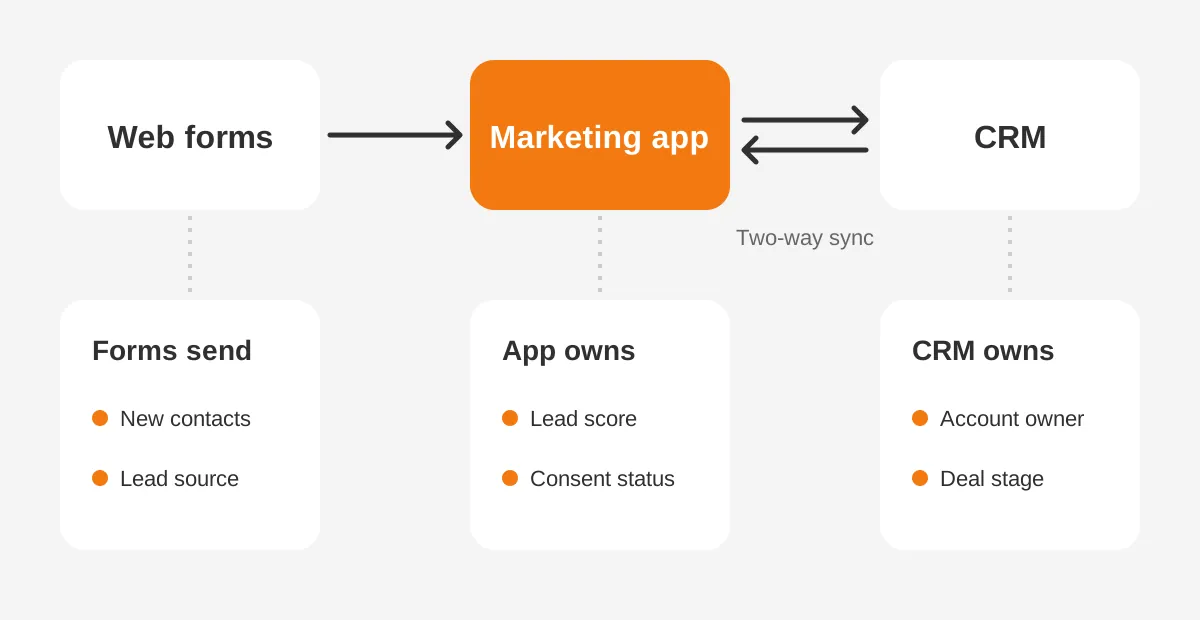
Prepare data by cleaning it before any sync, then connect the CRM in a sandbox first. Marketing automation CRM integration copies every error in both directions. A duplicate in the CRM becomes a duplicate prospect, and a wrong job title breaks scoring.
Start the data work with four decisions:
- Scope: import contacts with activity or consent from the last 24 months, and archive the rest.
- System of record: name the system that owns each field, such as the CRM for account owner.
- Field mapping: list every field, its type, its sync direction and its picklist values.
- Consent: record how and when each contact opted in, with source and date.
Scope changes the numbers fast. Take an assumed case. The company exports 60,000 contacts. Removing hard bounces, duplicates and contacts with no activity in 24 months leaves 34,000. Those 34,000 become the first import, and the rest go to an archive list.
A CRM audit before import shows which fields are trustworthy enough to sync. Run deduplication in the CRM first, because the CRM sync will copy the clean records into the new platform.
Each platform syncs on its own rules, which shape this marketing automation implementation step. Salesforce documents that the Account Engagement connector checks for changes about every two minutes. Version 2 of the connector is created paused, according to Salesforce Trailhead. Prospects only sync once an admin unpauses it.
Use the paused period for sandbox testing. Create test records, change them on both sides and confirm the field mapping holds. Salesforce also notes that someone must watch the sync error queue, or some records will stop updating.
How Do You Authenticate Domains and Protect Deliverability?
Authenticate the sending domain with SPF, DKIM and DMARC before the first campaign, then send to engaged contacts first. Mailbox providers now enforce these rules. Email deliverability problems at launch are hard to reverse, because sender reputation builds slowly.
Google's Email sender guidelines (2024) set two levels. All senders need SPF or DKIM and a spam rate below 0.3% in Postmaster Tools. Senders of more than 5,000 messages a day to Gmail also need DMARC and one-click unsubscribe.
Google recommends keeping the spam rate below 0.10%. Marketing automation for B2B can stay under 5,000 messages a day for months. A newsletter or webinar invite can cross that line in one send. Setting up all three records from day one removes that risk before it appears.
Email domain authentication happens in DNS, so the IT owner has a named marketing automation implementation role. In HubSpot, the process creates four DNS record types: MX, DKIM, SPF and DMARC. HubSpot's knowledge base says DNS changes usually take 10 to 70 minutes to apply.
HubSpot also warns against a second SPF record. If the domain already has one, add the new include entry to the existing record. Two SPF records on one domain cause authentication to fail.
The law sets further rules for commercial email in the US. The FTC CAN-SPAM compliance guide (2024) requires a valid postal address and opt-outs honored within 10 business days. Each violating email can draw a penalty of up to $53,088.
Then plan a domain warm-up. Send the first campaigns to contacts who opened or clicked in the last 90 days. Raise volume over two to four weeks. Early opens and clicks tell mailbox providers that the new domain sends mail people want.
Consent management matters for contacts outside the US. EU and UK contacts fall under GDPR, so record the lawful basis for each one. Store the consent source in a field that syncs to the CRM.
How Do You Build Lead Scoring and Lifecycle Stages?
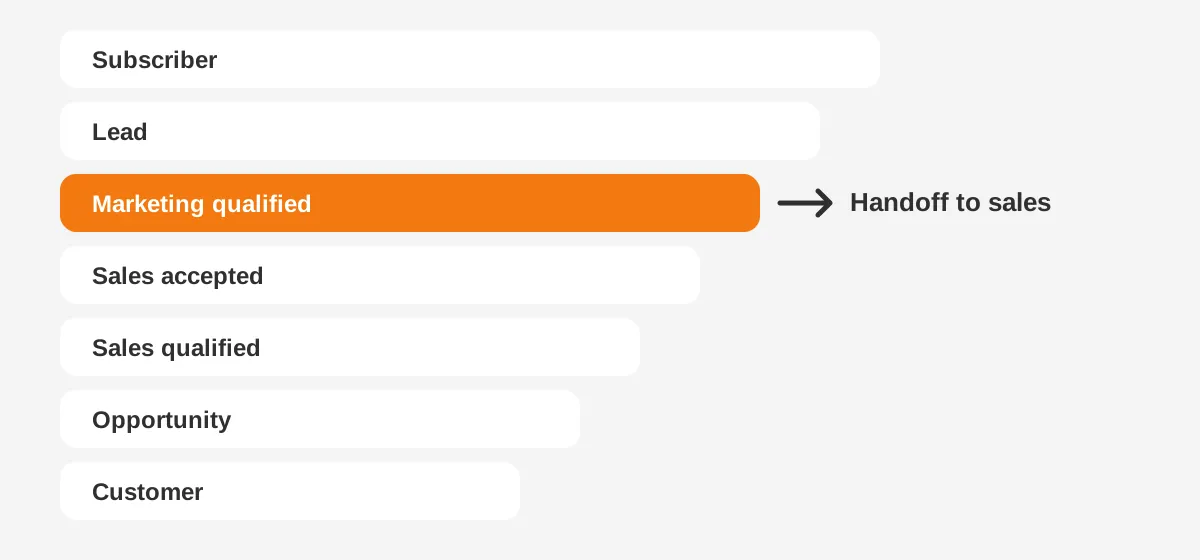
Build lifecycle stages first, then score leads against them, and get the sales leader to sign both. Lead scoring only works when sales trusts the marketing qualified lead definition. Without that agreement, scores become a number nobody reads.
A common set of B2B lead lifecycle stages runs in seven steps:
- Subscriber: opted in to content, with no buying signal yet.
- Lead: gave contact details through a form or event.
- Marketing qualified lead: reached the agreed score threshold.
- Sales accepted lead: a rep reviewed the record and accepted it.
- Sales qualified lead: the rep confirmed need, budget and timing.
- Opportunity: a deal record exists in the CRM.
- Customer: the deal closed and billing started.
Here is how to set up lead scoring in three parts. Fit scores measure who the contact is: job title, company size and industry. Engagement scores measure behaviour: pricing page visits, demo requests and email clicks. Negative scores remove points for students, competitors and unsubscribes.
A starting model, with assumed point values, might look like this. A demo request adds 30 points, a pricing page visit adds 10 and a matching job title adds 15. The marketing qualified lead threshold sits at 60. Review the threshold after 30 days against what sales accepted.
Account Engagement separates fit and behaviour by design. It pairs a numeric score for engagement with a letter grade for fit. HubSpot and Dynamics 365 both support scoring models that combine the two signals in one model.
Lead routing comes next. Route each marketing qualified lead to an owner by territory or segment. Set a follow-up SLA, such as one business day. Lead nurturing journeys then catch the leads sales returns as not ready.
How Does Setup Differ in HubSpot, Pardot and Dynamics?
Setup differs mainly in how each platform connects to the CRM and where scoring lives. The marketing automation implementation phases stay the same. HubSpot Marketing Hub implementation is simplest with HubSpot's own CRM, while Pardot implementation depends on the Salesforce connector.
| Factor | HubSpot Marketing Hub | Account Engagement (Pardot) | Dynamics 365 Customer Insights - Journeys |
|---|---|---|---|
| CRM link | Native HubSpot CRM, or a Salesforce or Dynamics integration | Salesforce connector, one per account | Shares Dataverse with Dynamics 365 Sales |
| Sync timing | Set by the integration's sync rules | Checks for changes about every 2 minutes | Same environment, so no separate sync |
| Lead scoring | Lead scoring tool with fit and engagement scores | Score for behaviour, grade for fit | Lead scoring models inside the app |
| Main setup risk | Duplicate contacts from loose sync rules | Field mapping and paused connector | Licence and environment planning |
Account Engagement implementation adds one more decision: whether to use Marketing Data Sharing. It limits which Salesforce records sync, which suits companies with a large CRM and a smaller marketing audience. Salesforce recommends a partner for that step.
Dynamics 365 Customer Insights - Journeys setup avoids a separate sync because it shares data with Dynamics 365 Sales. The planning effort moves to environments, security roles and licences instead. The Unboxx Pardot campaign templates success story shows the Salesforce side in practice.
Adobe Marketo Engage follows the same phases, with a native Salesforce and Dynamics sync. Its programs and tokens reward strict naming conventions from day one. Budget extra admin hours for that structure when Marketo is the platform in a marketing automation implementation.
How to choose a marketing automation platform comes down to the CRM already in place. A Salesforce shop rarely gains from adding HubSpot alongside it. A team on HubSpot CRM gains most from Marketing Hub on the same database.
How Do You Test and Launch Without Surprises?
Test every path a contact can take, then launch programs one at a time over two weeks. This marketing automation implementation checklist covers the tests that catch the most common launch failures.
- Submit every form and confirm the record appears in the CRM with the right owner.
- Change a field on each side and confirm the sync direction matches the field mapping.
- Push a test lead past the score threshold and confirm the alert reaches sales.
- Send test emails to Gmail, Outlook and Apple Mail, on desktop and mobile.
- Click the unsubscribe link and confirm the contact is suppressed everywhere.
- Check that UTM parameters land in contact fields for campaign attribution.
- Open the revenue reporting dashboard and confirm the test deal appears.
Train people in the order the marketing automation implementation was built. Admins learn configuration, marketers learn programs and reps learn the alerts and lead views. Keep each session to the tasks that role performs.
After go-live, run a weekly review for the first 30 days. Check bounce rate, spam complaints, sync errors and lead acceptance. These marketing automation best practices keep small issues from turning into a deliverability problem.
Which Metrics Show the Implementation Worked?
Five metrics show whether a marketing automation implementation is working after 90 days. Track each one against the baseline from phase one.
- Lead acceptance rate: the share of marketing qualified leads that sales accepts.
- Speed to first touch: the hours between a qualified lead and the first sales contact.
- Sync error count: records that failed to update between the platform and the CRM.
- Spam rate: user-reported complaints, kept below Google's recommended 0.10%.
- Sourced pipeline: opportunity value from contacts that entered through marketing programs.
Put these five in one dashboard that sales and marketing both read. Shared numbers give both teams the same facts when they review lead quality.
Launch the first three programs only: a newsletter, one lead nurturing journey and a demo follow-up. Add more once those run cleanly. The workflow automation examples guide lists the next workflows worth adding.
Frequently Asked Questions
How long does marketing automation implementation take?
Most mid-sized B2B teams need 8 to 16 weeks from kickoff to the first live programs. Clean data and a single CRM keep the project near eight weeks. A migration from another platform, a second CRM or regulated data can push it past four months.
How much does marketing automation implementation cost?
Cost depends on the platform edition, the partner hours and internal staff time. Budget for the licence, any vendor onboarding fee, data cleanup, content production and training. Ask partners for a fixed-scope quote per phase, so the total stays visible before work starts.
Should you migrate old programs to the new platform?
Move contacts, consent records and the templates that still perform. Rebuild workflows rather than copying them, because each platform handles triggers differently. Old email history rarely transfers in full. Export the key reports from the previous tool before its contract ends.
Do you need a marketing automation consultant?
A marketing automation consultant helps most with CRM integration, lead scoring and deliverability setup. Teams with an experienced marketing ops lead can handle content and programs alone. A marketing automation implementation partner earns its fee by preventing the data and sync mistakes that cause rework.
Can you implement marketing automation without a CRM?
You can implement marketing automation without a CRM, but sales loses visibility into lead activity. Most platforms include a contact database, and HubSpot includes a free CRM. Connecting a CRM later means a second data project, so plan the integration from the start.
When Do You Need a Marketing Automation Implementation Partner?
Bring in a partner when the marketing automation implementation touches a CRM sync, a migration or two business units. Those are the phases where errors copy themselves across systems. Content and campaign work can stay in-house once the data and sync are stable.
Unboxx sets up HubSpot, Account Engagement and Dynamics 365 for B2B teams, from data cleanup to the first live journeys. Its HubSpot marketing automation success story shows one example. To scope your own plan, schedule a consultation with the team.
Let's create something out of this world together.
Have a project in mind? Contact us for expert design and development solutions. Let's discuss how we can help grow your business.
Ready to Unboxx Your Potential?
Build smarter systems. Automate faster. Scale confidently.