
Sales reps already lose most of the week to work that is not selling. Salesforce's sixth State of Sales report (Salesforce, 2024) found that non-selling tasks take 70% of reps' time. A stream of unranked leads adds to that load.
HubSpot lead scoring fixes the ranking problem by giving every contact a number sales can act on. Reps call the strongest leads first while marketing keeps nurturing the rest.
The hard part is calibration. A model built on guesses sends cold leads to sales and buries real buyers.
This guide covers the current HubSpot lead scoring tool and its plan tiers. It then covers fit and engagement scores, points set from closed-won deals and score decay. The last sections cover the sales handoff and the Salesforce sync.
Key Takeaways
- HubSpot lead scoring needs a Professional or Enterprise plan, and AI-built contact scores need Marketing Hub Enterprise.
- Point values should come from the traits and actions that separate closed-won deals from lost ones.
- A combined score with an agreed A1 to C3 threshold tells sales which leads to call first.
What Is HubSpot Lead Scoring?
HubSpot lead scoring is a points system that ranks contacts, companies and deals by how likely they are to buy. Each score adds or subtracts points when a record matches rules you set. The total sits in a property that lists, workflows and reports can use.
Does HubSpot have lead scoring? It does, and lead scoring in HubSpot now lives in its own tool under Marketing, then Lead Scoring. The legacy HubSpot Score property reached retirement on August 31, 2025, as Weidert Group reported (2025). Any workflow triggered by the old property stopped firing that day.
Under the hood, how does HubSpot lead scoring work? Every score has at least one score group, such as "Engagement with sales" or "Company size." Each group holds criteria with point values. Group limits add up to the overall score limit, so one group cannot swamp the total.
Points can be whole numbers or decimals. A rule can also subtract points, so a contact who unsubscribes can drop below zero.
The HubSpot Knowledge Base lead scoring overview (HubSpot, 2026) says a score is evaluated retroactively when it is turned on. After that, the property updates as records meet the criteria.
For a new lead scoring model, the retroactive step is useful. On day one, every existing contact gets a score from its full history. Sales sees a ranked list at once instead of waiting for new activity.
The score supports lead qualification and lead prioritization, but it does not replace a conversation with sales. Unboxx's AI growth marketing services treat the score as one input to demand generation, routing and revenue reporting.
Which Plans Include HubSpot Lead Scoring Features?
HubSpot lead scoring requires a Professional or Enterprise subscription to Marketing Hub or Sales Hub. Starter plans do not include the lead scoring tool. The hub you own decides which records can carry a score.
| Record | Score types | Hub required |
|---|---|---|
| Contacts | Fit, engagement or combined | Marketing Hub Professional or Enterprise |
| Companies | Fit, engagement or combined | Marketing Hub or Sales Hub, Professional or Enterprise |
| Deals | Combined only | Sales Hub Professional or Enterprise |
| AI-built contact scores | Fit or engagement | Marketing Hub Enterprise |
So which HubSpot plan includes lead scoring for contacts? Only Marketing Hub. A team on Sales Hub alone can score companies and deals but not individual contacts. Sales-led teams that never bought Marketing Hub often find this out late.
Can you have multiple lead scores in HubSpot? Yes. The tool lets a team create more than one score per object. A common pattern is one HubSpot lead score per product line or per region, each with its own threshold.
Users also need permissions. View access to Lead Scoring shows score values, while Edit access is needed to build or change a score. Edit access is best kept with the marketing operations owner and one backup.
How Do Fit, Engagement and Combined Scores Differ?
A fit score measures who the lead is, and an engagement score measures what the lead does. A combined score joins the two. Sales needs both answers, but not always at the same time.
The HubSpot fit score uses demographic data and firmographic data. Typical criteria are job title, company size, industry, country and annual revenue. These map to the ideal customer profile and buyer persona the sales team already works from.
The HubSpot engagement score uses behavioral data from HubSpot events. Website visits, CTA clicks, marketing email opens, link clicks and form submissions all count. So do meetings booked, meetings completed and calls started.
The two also count matches differently. A "contains any of" criterion adds points once in a fit score. In an engagement score it adds points for every matching event, so ten pricing-page visits earn ten times the points.
The combined lead score sorts records into nine labels, A1 to C3. The letter is fit, where A is high. The number is engagement, where 1 is high. A combined score creates three properties: the total, the engagement part and the fit part.

Where to start depends on the bottleneck. A narrow ideal customer profile favors a fit score first, while heavy inbound traffic favors engagement. B2B teams often settle on the combined score once sales asks for both views in one field.
Which Signals Belong in HubSpot Lead Scoring Criteria?
HubSpot lead scoring criteria should include only signals that change the odds of a sale. Fit signals describe the account and the person. Engagement signals describe buyer intent shown through recent actions.
| Signal | Score type | Typical direction |
|---|---|---|
| Job title or seniority | Fit | Add points for decision makers |
| Company size and industry | Fit | Add points for the target segment |
| Pricing page visits | Engagement | Add points, with a frequency filter |
| Demo or contact form submission | Engagement | Add the most points |
| Meeting booked with sales | Engagement | Add points |
| Unsubscribe | Engagement | Subtract points |
| Competitor or student email domain | Fit | Subtract points |
Form submissions can be filtered by form name. A demo request can then earn more than a newsletter subscription, even though both are forms. Sales forms count as well.
Scoring can also use associated records. For company and deal scores, event criteria read the activity of associated contacts. When four people from one buying committee visit the site, the company score rises. No single contact has to cross the line.
Event rules can also use frequency and time frames. Take the rule "visited the pricing page at least 3 times in the last 30 days." It separates active research from a single accidental click.
How Do You Set Up HubSpot Lead Scoring?
You set up HubSpot lead scoring by choosing a score type, building score groups, adding criteria and setting thresholds. The tool walks through those stages in order. Allow one working session per score and a week of review with sales.
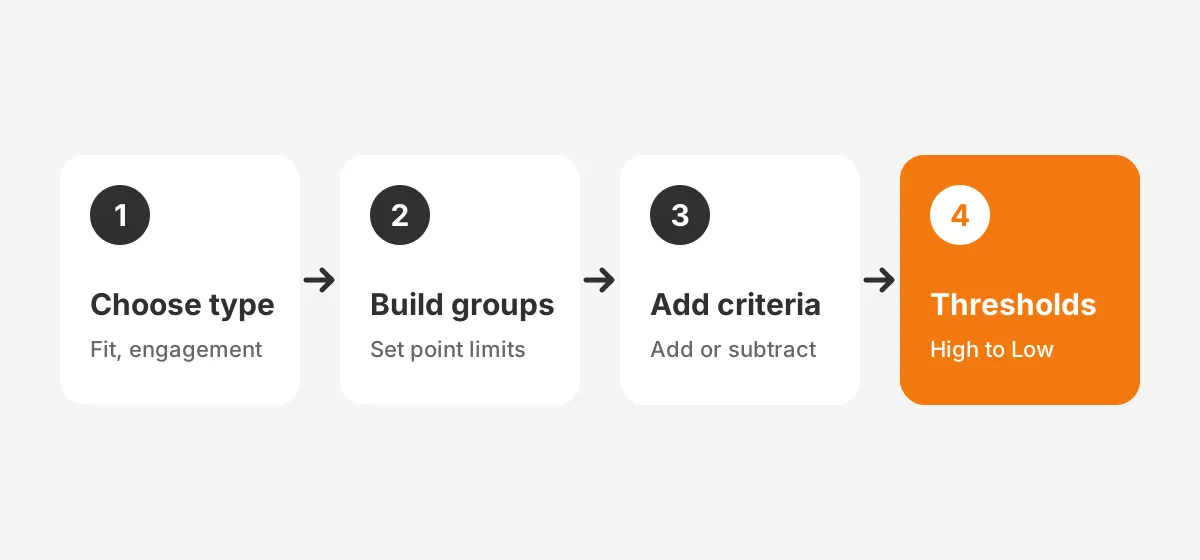
- Go to Marketing, then Lead Scoring, and click Create score.
- Pick the object (contact, company or deal) and the score type.
- Name the score so its purpose is clear, such as "Contact fit, North America."
- Set the overall score limit, such as 100, and a limit for each score group.
- Add criteria to each group, with points added or subtracted for each value or event.
- Add frequency or time-frame filters to event rules where they help.
- Set decay for engagement groups, then set the High, Medium and Low thresholds.
- Review the score distribution, then click Review and turn on.
Learning how to create a lead score in HubSpot takes an afternoon. Step 5 is where judgment comes in. Point values copied from a template reward activity that may not predict revenue in your market.
Keep the criteria lean. A group with five to eight rules is easier for sales to audit than one with thirty. Each rule should trace back to a pattern in won deals.
Marketing Hub Enterprise adds a Create score with AI option. HubSpot AI lead scoring reviews existing contacts and suggests criteria and points. The HubSpot guide to AI-built scores (HubSpot, 2026) covers the inputs. You pick a lifecycle stage change to predict and an evaluation window.
HubSpot's example change is Subscriber to Sales Qualified Lead over 90 days. The AI needs at least 50 contacts, with 25 converted and 25 not converted. Evaluation can take up to one hour.
This HubSpot predictive lead scoring option still lets you edit every suggested rule before the score goes live. Its output works best as a draft that marketing and sales leads review together.
How Should You Calibrate Points From Closed Deals?
Calibrate point values by comparing how often each trait appears in closed-won deals against all leads. Traits that appear far more often among buyers earn the most points. A trait that shows no difference earns nothing.
Pull a report of contacts created in the last 12 months. Split them into contacts tied to closed-won deals and everyone else. For each fit trait and each event, work out its conversion rate.
The table below is a worked example with assumed figures for a B2B software company. It shows how to calibrate lead scoring from data rather than from guesses.
| Trait or event | Share of all leads | Share of won deals | Lift | Points |
|---|---|---|---|---|
| Director or above | 20% | 60% | 3.0x | 25 |
| 200 to 2,000 employees | 30% | 70% | 2.3x | 20 |
| Pricing page, 2+ visits | 10% | 45% | 4.5x | 25 |
| Demo request | 5% | 50% | 10x | 30 |
| 3+ email opens | 40% | 45% | 1.1x | 0 |
| Student email | 15% | 1% | 0.1x | -20 |
Lift is the won-deal share divided by the all-lead share. Here, email opens barely change the odds, so they earn no points. A demo request lifts the odds tenfold. So how many points for a demo request? In this model, the most of any rule.
These are HubSpot lead scoring examples, not benchmarks. Your own figures will differ by market and deal size. Rerun the calculation each quarter, because buyer behavior shifts as campaigns change.
Negative lead scoring belongs in the same pass. Competitors, students, job seekers and current customers should lose points. Leave them out and sales spends calls on contacts who will never buy.
How Does HubSpot Lead Scoring Decay Work?
HubSpot lead scoring decay reduces the points from older events, so a score reflects recent interest. It applies to event groups in engagement and combined scores only. Fit scores do not decay, since job title and company size do not age.
Decay runs every 1, 3, 6 or 12 months, where a month equals 30 days. It is linear and applies to each event on its own, based on the event's original points. It also applies to historical data when a score is turned on.
One limit applies. Score decay does not support segment membership criteria. A rule that adds points for joining a segment keeps those points until the record leaves it.
Pick the interval from the sales cycle. A 30-day cycle suits monthly decay. A nine-month enterprise cycle suits a 3- or 6-month interval. Otherwise early research activity vanishes before the deal reaches procurement.
Here is a worked example with assumed figures. A demo request worth 30 points sits in a group with monthly decay at 50%. One month later the event contributes 15 points. The HubSpot lead scoring model then ranks that contact below one who requested a demo this week.
Decay also protects the sales handoff. A contact who downloaded five guides two years ago should not jump the queue today.
What Lead Score Threshold Should Trigger Sales Handoff?
The lead score threshold for sales handoff is the score above which leads convert at a rate sales accepts. HubSpot leaves that number to you, so set it from data and confirm it with sales leadership.
HubSpot labels engagement and fit scores High, Medium or Low. Its documentation gives an example: 70 to 100 is High and 40 to 69 is Medium. Scores from -100 to 39 are Low. Those ranges are a starting point, not a rule.
For combined scores, the A1 to C3 matrix makes the rule easy to state. A1, A2 and B1 go to sales as sales qualified leads. A3 and B2 stay in lead nurturing. B3 and every C-grade record get no sales time.
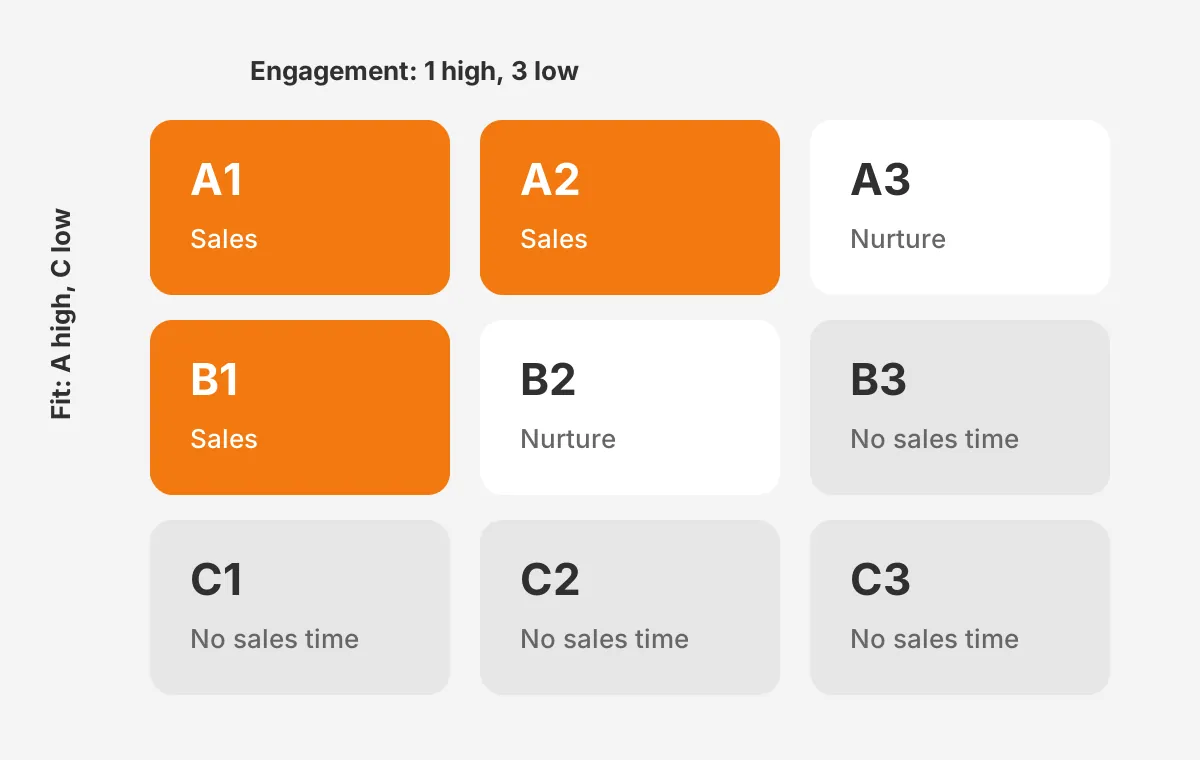
What is a good lead score in HubSpot? One that sales accepts for most of the leads it receives. Track the acceptance rate weekly for the first month. A practical rule: if sales rejects more than a third, raise the threshold or reweight fit.
Write the threshold into a service level agreement between marketing and sales. It should name the score, the response time and the lead status sales sets after first contact. A written rule like this sits at the core of sales and marketing alignment.
Automation does the rest. A HubSpot workflow can watch the threshold label and set the lifecycle stage to marketing qualified lead. It can then run lead routing to the right rep. Unboxx's guide to marketing automation implementation covers that workflow design in more depth.
Scores also feed reporting. In one Unboxx project, an advisory firm replaced scattered revenue reporting with clear HubSpot dashboards for leadership. Lead score bands make a useful dimension in that kind of pipeline report.
How Do You Sync HubSpot Lead Scores to Salesforce?
You sync HubSpot lead scores to Salesforce by mapping the score property to a number field. Use the Salesforce Lead and Contact objects. The HubSpot Salesforce integration then passes the value on each sync. Reps see the score without opening HubSpot.
Create a Number field on both Salesforce objects first. HubSpot's property mapping guide (HubSpot, 2026) pairs HubSpot number properties with Salesforce double or integer fields. A type mismatch triggers a warning.
Choose the sync rule with care. "Always use Salesforce" never sends HubSpot data, so the score would never arrive. "Prefer Salesforce unless blank" sends a value only while the Salesforce field is empty.
Two-way sync passes the most recent value. That works when nobody edits the score in Salesforce, so make the Salesforce field read-only for reps. HubSpot then stays the single source of the score.
Once the field fills, Salesforce reports can sort leads by HubSpot lead scoring bands. Sales managers then see in Salesforce whether reps work the A1 and A2 leads first.
Two more details catch teams out. A new mapping does not sync existing values retroactively, so scores appear as records change. Each object also has a limit of 500 field mappings.
The mapping guide does not name score properties, so test the sync on 10 records in a Salesforce sandbox first. Teams weighing platforms can read Unboxx's Pardot vs HubSpot comparison, since Account Engagement scores leads inside Salesforce.
What HubSpot Lead Scoring Mistakes Should Teams Avoid?
The most common HubSpot lead scoring mistakes are rewarding noise, skipping negative points and never revisiting the model. Each one chips away at sales trust, and reps who stop trusting the score stop using it.
- Scoring email opens as heavily as demo requests.
- Leaving out negative rules for competitors, students and current customers.
- Setting the threshold without asking sales what a ready lead looks like.
- Copying HubSpot lead scoring point values from a template instead of from won deals.
- Letting old activity keep scores high because decay was never set.
- Changing criteria every week, which makes trend reports meaningless.
How often should you update lead scoring? Review the model each quarter against the latest closed-won deals. Change it sooner only after a new product, market or pricing launch. Record every change and its date in a shared log.
One more mistake is hiding the logic. Reps trust HubSpot lead scoring more when they can see why a contact scored 80. Share a one-page summary of the groups, points and threshold, and show score history on the contact record.
Data quality matters as much as the rules do. A fit score can only read the job titles and company sizes stored in the CRM. Enrichment and required form fields keep those properties filled.
A regular review catches scoring problems alongside duplicate records and unused fields. Unboxx's CRM audit checklist covers lead scoring in its review of marketing setup. Scoring also pairs with nurture work, as in a nonprofit project where Unboxx automated outreach with HubSpot marketing automation.
Frequently Asked Questions
Does HubSpot lead scoring work on the free CRM?
No. HubSpot lead scoring requires a Professional or Enterprise subscription to Marketing Hub or Sales Hub. Free and Starter accounts cannot create scores in the lead scoring tool. Teams on those plans can track lead status by hand, then upgrade when lead volume makes manual ranking slow.
Can HubSpot lead scores go negative?
Yes. A criterion can subtract points, and a score falls below zero when subtracted points exceed added points. Teams use negative points for unsubscribes, competitor domains, students and job seekers. HubSpot's own example thresholds even place scores from -100 to 39 in the Low band.
How long does lead scoring setup take in HubSpot?
Building one score takes a single working session. The calibration around it takes longer: pulling closed-won data, agreeing thresholds with sales and testing workflows. Weidert Group estimated two to three weeks for teams leaving the legacy score in 2025. That included a week of testing.
How does lead scoring differ from lead grading?
Lead scoring usually measures engagement with points, while lead grading measures fit with a letter. Salesforce Account Engagement, formerly Pardot, pairs a score with an A+ to F grade. HubSpot folds both ideas into one combined score, labeled A1 to C3, where the letter shows fit.
Should small teams use AI lead scoring in HubSpot?
Only with enough history. HubSpot's AI scoring needs Marketing Hub Enterprise and at least 50 contacts, 25 converted and 25 not converted. Small samples produce unstable suggestions. A team with little data should build a manual fit score first, then test AI suggestions once more deals close.
Is Your HubSpot Lead Scoring Model Ready for Sales?
Your HubSpot lead scoring model is ready when sales accepts most of the leads it receives. Won deals should also score higher than lost ones. If either test fails, revisit the points, decay and threshold before adding more rules.
Unboxx designs and audits HubSpot lead scoring for B2B teams on HubSpot and Salesforce, from calibration to the Salesforce sync. Schedule a consultation with Unboxx to review your current model.
Let's create something out of this world together.
Have a project in mind? Contact us for expert design and development solutions. Let's discuss how we can help grow your business.
Ready to Unboxx Your Potential?
Build smarter systems. Automate faster. Scale confidently.