
Marketing teams on Salesforce reach the same fork at almost every renewal. Keep Pardot, or move nurture, scoring and reporting into HubSpot? The Pardot vs HubSpot decision shapes how leads reach sales for years. A poor pick shows up later as sync errors, duplicate records and reports nobody trusts.
List prices already separate the two. Salesforce prices Account Engagement editions (Salesforce, 2026) from $1,250 per org per month, billed annually. HubSpot lists Marketing Hub Professional at $800 a month on annual billing.
Below, the two are compared on cost, Salesforce sync, scoring, reporting, AI and migration. A decision matrix closes the guide.
Key Takeaways
- Pardot, now Marketing Cloud Account Engagement, fits B2B teams whose sales process already runs in Salesforce.
- HubSpot Marketing Hub costs less to start and puts CRM, email and reporting in one platform.
- The CRM of record, contact volume and the people who run the platform decide the choice.
What Is the Difference Between Pardot and HubSpot?
Pardot is a B2B marketing automation platform built for Salesforce. HubSpot is a full platform with its own CRM. Salesforce renamed Pardot to Marketing Cloud Account Engagement in 2022, as Salesforce Ben reported that year.
Buyers still search for the old name, so both names appear here. A search for MCAE vs HubSpot is the same Pardot vs HubSpot question.
Pardot is now called Marketing Cloud Account Engagement, often shortened to MCAE or Salesforce Account Engagement. It handles email nurturing, landing pages, forms, lead scoring and lead grading. Every record it qualifies is meant to reach Salesforce CRM for sales follow-up.
HubSpot Marketing Hub sits on HubSpot Smart CRM, where marketing, sales and service teams share one contact database. A team can still connect HubSpot to Salesforce. That integration then becomes a second system to run.
The Pardot vs HubSpot comparison table below covers the factors buyers ask about first.
| Factor | Pardot (Account Engagement) | HubSpot Marketing Hub |
|---|---|---|
| CRM of record | Salesforce CRM required | HubSpot Smart CRM built in |
| Entry list price | $1,250 per org per month | $800 per month (Professional) |
| Contacts in entry tier | 10,000 | 2,000 marketing contacts |
| Lead qualification | Score plus A+ to F grade | Fit, engagement and combined scores |
| Attribution | B2B Marketing Analytics | Multi-touch attribution (Enterprise) |
| Salesforce sync | Native connector, every 2 to 4 minutes | Integration app with sync triggers |
The audiences differ as well, and for B2B buyers Pardot vs HubSpot often splits along company stage. Account Engagement serves B2B teams with a Salesforce admin and reps already working in Sales Cloud. HubSpot serves teams that want marketing, sales and service in one interface without a separate CRM project.
On email features the gap is smaller than most buyers expect. Both platforms send email, host forms and score leads. The real split is the CRM each one expects to sit beside.
How Does Pardot vs HubSpot Pricing Compare in 2026?
Pardot vs HubSpot pricing starts lower on HubSpot, but the gap narrows as contact counts rise. Account Engagement bills per org and bundles contacts into each edition. HubSpot bills per hub, with seats and marketing contacts set by tier.
How much does Pardot cost? Salesforce lists four Account Engagement editions, all billed annually.
- Growth+ costs $1,250 per org per month, with 10,000 contacts and 50 automation rules.
- Plus+ costs $2,750 per month, with 10,000 contacts, AI-powered scoring and B2B Marketing Analytics.
- Advanced+ costs $4,400 per month, with 10,000 contacts, business units and a dedicated IP address.
- Premium+ costs $15,000 per month, with 75,000 contacts and Premier Success support.
Every per-month product needs an annual contract, Salesforce states. Account Engagement pricing also assumes a Salesforce CRM subscription, a point HubSpot's own guide raises too.
How much does HubSpot Marketing Hub cost? The HubSpot Marketing Hub pricing guide (HubSpot, 2026) lists three paid tiers.
- Starter costs from $9 per seat per month on annual billing, with 1,000 marketing contacts.
- Professional costs $800 per month on annual billing, with 3 core seats and 2,000 marketing contacts.
- Enterprise costs $3,600 per month, with 5 core seats and 10,000 marketing contacts.
On top of that sits a one-time onboarding fee: $3,000 for Professional and $7,000 for Enterprise. HubSpot Marketing Hub pricing also climbs with marketing contacts. Moving Professional from 2,000 to 5,000 contacts adds about $250 a month, according to the same guide.

What Does Three Years Cost in a Worked Example?
Take an example team with 10,000 contacts that wants AI scoring and attribution. The figures below use list prices only. CRM seats, add-ons and partner fees are left out.
- Account Engagement Plus+ costs $2,750 for 36 months, or $99,000 over three years.
- HubSpot Marketing Hub Enterprise costs $3,600 for 36 months plus $7,000 onboarding, or $136,600.
- Account Engagement Growth+ costs $45,000 over the same period, without the Plus+ AI scoring.
On these numbers Pardot looks cheaper. The total cost of ownership changes once Salesforce licences enter the sum, though. A team without Salesforce has to budget for Sales Cloud seats before Account Engagement makes sense.
Which Costs Sit Outside the List Price?
The list price is only the first line of a Pardot vs HubSpot budget. Five other costs move the total.
- Salesforce CRM seats, which Account Engagement needs and HubSpot does not.
- Extra marketing contacts, sold in blocks on both platforms.
- Add-ons such as Custom Object Integration, which Salesforce lists at $400 a month on Plus+.
- Implementation partner fees for setup, data cleanup and template builds.
- Internal admin time, which grows with every automation rule and workflow.
Contact growth deserves its own line in the model. Project contacts three years out, because a Pardot vs HubSpot cost model built on today's database will understate the bill.
Before a client signs, the AI growth marketing services team at Unboxx models this cost for both platforms. The model covers contacts, seats and the CRM underneath.
How Does Each Platform Sync With Salesforce?
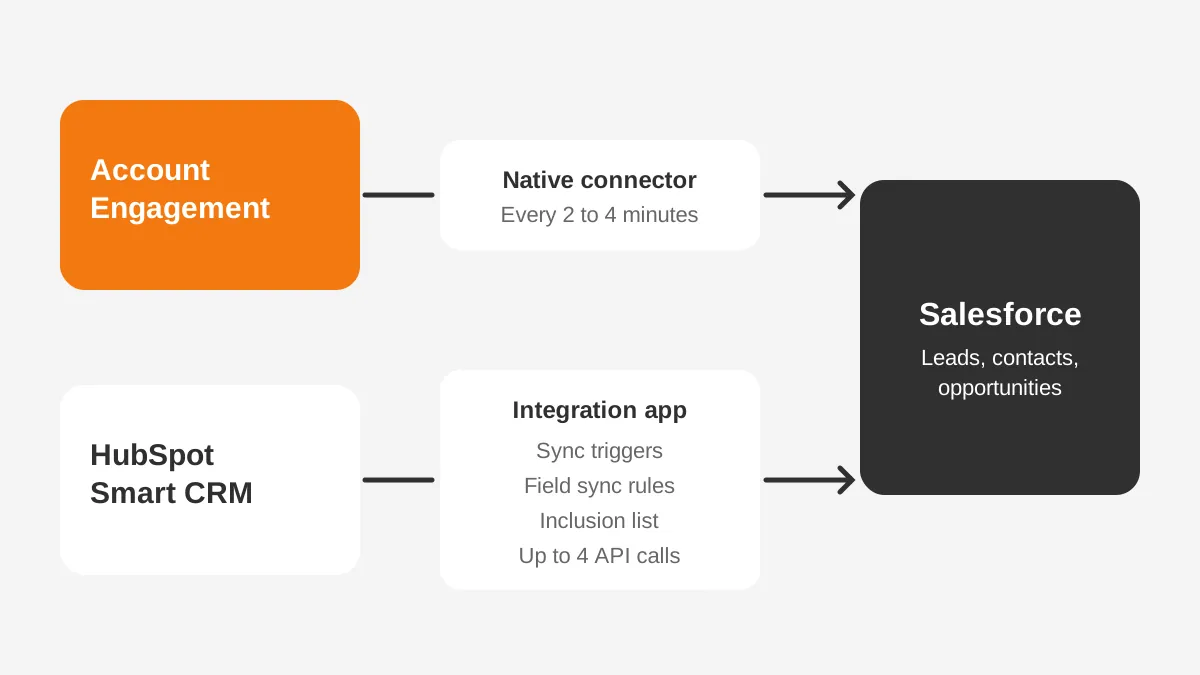
Account Engagement syncs natively with Salesforce, and HubSpot connects through an integration app with its own rules. According to the Salesforce Help article on the Account Engagement connector, syncing runs every 2 to 4 minutes. It works with Salesforce Professional Edition and higher.
Version 2 of the Pardot Salesforce connector adds on-demand metadata sync and an integration user. By default, Account Engagement looks for a matching contact, then a matching lead. A new lead is created only once the prospect is assigned to a user.
On the HubSpot side, the HubSpot Salesforce integration needs a HubSpot Professional or Enterprise subscription. The HubSpot Knowledge Base guide to connecting Salesforce also asks for a Salesforce edition with API access. Records sync through triggers rather than all at once.
HubSpot does integrate with Salesforce well enough for most B2B teams, given planning. One contact sync can take up to four API calls per record, HubSpot notes. A large database can therefore reach the daily Salesforce API limit.
Here is a worked example with assumed figures. A database of 20,000 contacts at four calls each could use 80,000 API calls in one full sync.
HubSpot shows calls used in the last 24 hours on its Sync Health tab. Account Engagement lists its own API allowance by edition: 25,000, 50,000 or 100,000 calls a day.
HubSpot offers three controls for this CRM sync.
- Field mappings use sync rules such as "Always use Salesforce" or "Two-way".
- An inclusion list limits which HubSpot contacts reach Salesforce.
- Salesforce campaigns have no direct HubSpot equivalent, so campaign influence reports need separate design.
The Pardot vs HubSpot sync gap hurts most in complex Salesforce orgs. Custom objects, strict validation rules and large lead volumes all test the connection. On both platforms, failures tend to trace back to three causes:
- Required Salesforce fields that block record creation.
- Validation rules that reject values marketing forms collect.
- Duplicate leads and contacts that split one buyer's history across two records.
For CRM sync, then, Pardot vs HubSpot comes down to one native connector against a flexible two-system setup. The CRM consulting and implementation work behind either one starts with clean Salesforce data.
How Do Pardot vs HubSpot Lead Scoring Models Differ?
Pardot keeps interest and fit apart. Each prospect gets a numeric score for activity and a letter grade for fit. HubSpot folds both into configurable scores.
Pardot grading runs from F to A+, according to Salesforce Trailhead. Every prospect starts at D. A default profile moves the grade for company size, industry, location, job title and department. Custom grading profiles can be added, with automation rules routing prospects into them.
HubSpot lead scoring sits in Marketing Hub or Sales Hub Professional and Enterprise. See the HubSpot lead scoring overview (2026) for details. Contacts can carry fit, engagement or combined scores. AI-built contact scores need Marketing Hub Enterprise and at least 50 contacts.
Pardot lead scoring adds Einstein Lead Scoring and Einstein Behavior Scoring in the Salesforce feature list. Whatever the tool, the model needs a clear marketing qualified lead definition first. Five steps build one.
- Agree the marketing qualified lead definition with sales leadership.
- List the fit fields that matter, such as industry, company size and job title.
- Weight five to ten engagement actions, such as demo requests and pricing page visits.
- Test the model against last quarter's closed deals before it goes live.
- Review thresholds each quarter with feedback from sales reps.
For a fair Pardot vs HubSpot scoring test, run the same closed deals through both models. Sales will trust the one that ranks won deals highest.
That sales and marketing alignment step matters more than the tool. Both platforms only apply the rules a team writes, so a weak definition produces weak scores on either.
Which Platform Has Better Reporting and Attribution?
HubSpot is stronger on attribution inside its own CRM. Pardot is stronger on Salesforce opportunity reporting. Multi-touch revenue attribution comes with Marketing Hub Enterprise and tracks up to 10,000 logged interactions per contact. Professional does not include it.
Account Engagement reports through Salesforce, so marketing reports sit next to pipeline and forecast reports.
Sales leaders see campaign results in dashboards they already use. B2B Marketing Analytics appears in the Plus+ edition. Engagement history dashboards rise by edition: 5 in Growth+, 10 in Plus+ and 20 in Advanced+.
Because the connector syncs prospect and opportunity data, campaign influence reports can use Salesforce campaigns. HubSpot reports natively on HubSpot deals. When HubSpot runs beside Salesforce, revenue sits in Salesforce, and attribution depends on opportunity sync.
Take one example question: which webinar series influenced deals closed last quarter? On Account Engagement, Salesforce campaign and opportunity reports answer it. On HubSpot alone, attribution reports on HubSpot deals answer it. On HubSpot beside Salesforce, opportunity sync has to work first.
So the Pardot vs HubSpot reporting question depends on where revenue lives. Marketing operations teams should name the one report leadership needs most, then check which edition includes it.
What AI Features Do Agentforce and Breeze Offer?
On the Salesforce side, AI centres on Agentforce and Einstein. Agentforce Campaign Creation is listed in Growth+. The AI list also covers Einstein send time optimisation, engagement frequency and campaign insights.
HubSpot's pricing guide lists a Breeze customer agent in Marketing Hub Professional, paid with HubSpot Credits per conversation. A social media agent is in beta for Professional and Enterprise.
Both AI sets depend on clean data. Einstein scoring learns from Salesforce outcomes, and HubSpot AI scores need converted and non-converted contacts to learn from. Any Pardot vs HubSpot AI comparison therefore favours the platform holding the cleaner history.
Treat AI as a tie-breaker in the Pardot vs HubSpot decision, not the main factor. Packaging differs by edition and changes between releases, so confirm entitlements in a written quote before signing.
How Hard Is Each Platform to Implement?
Standing up HubSpot alone is usually faster. Pardot is faster when Salesforce is already clean. Account Engagement inherits the Salesforce data model, so a messy org slows every step.
Account Engagement includes a set-up assistant in its feature list, and HubSpot charges its onboarding fee for guided setup. An implementation partner often handles field mapping, scoring and email templates on either platform. A rollout follows five steps.
- Audit CRM data and remove duplicates before connecting anything.
- Map fields and choose the source of truth for each one.
- Rebuild forms, landing pages and email templates.
- Recreate scoring, grading and nurture programs.
- Run a pilot segment, then switch on full sync.
Step one often decides the timeline. A Salesforce optimization audit finds duplicate leads and unused fields before marketing data lands on top of them.
Ownership after launch matters as much as the build. Account Engagement usually sits with a Salesforce admin or marketing operations lead who knows the org. HubSpot is often owned by a marketing manager, with sales and service sharing the same CRM.
Name that owner before signing, and budget time for weekly sync checks. Left unowned after a Pardot vs HubSpot rollout, either platform collects broken rules and stale lists.
Unboxx has delivered both kinds of project. One Pardot campaign template project rebuilt responsive email templates for a Salesforce team. A HubSpot marketing automation project organised contacts and automated outreach for a nonprofit.
When Should You Migrate From Pardot to HubSpot?
The Pardot vs HubSpot question tends to return at renewal. A Pardot to HubSpot migration makes sense once Salesforce no longer anchors the sales process. It also fits when marketing wants one platform for CRM, email and reporting.
HubSpot can replace Pardot while sales stays on Salesforce, through the integration. Expect a second system to own, with sync rules, API budgets and campaign reports each needing a named owner.
A HubSpot to Pardot migration is the reverse case. It suits teams that have standardised on Salesforce and want marketing data in the same org. The Unboxx guide to HubSpot to Salesforce migration covers the data steps.
In either direction, a Pardot vs HubSpot migration follows the same order. Export and clean the data, rebuild assets, run both systems in parallel for one send cycle, then cut over. Parallel running catches broken forms and missing consent records before customers notice.
Four items rarely move cleanly:
- Engagement history, which often stays in the old platform.
- Scoring and grading rules, which must be rebuilt by hand.
- Email templates, which need new code for the new builder.
- Unsubscribe and consent records, which must transfer before the first send.
What to Ask in a Pardot vs HubSpot Demo?
Ask each vendor to show your own process, not a standard script. These eight questions expose the gaps a Pardot vs HubSpot demo can hide.
- How does a form fill become a Salesforce lead, step by step?
- Which edition includes the attribution report leadership wants?
- Which contact count is included, and what does the next block cost?
- What API call volume will a full sync of the database use?
- Which AI features are included, and which use paid credits?
- How are unsubscribes and consent stored and synced?
- What does onboarding include, and who runs it?
- How is engagement history handled if the contract ends?
Bring a sales leader and a Salesforce admin to each demo. The admin will catch sync gaps a marketing team may miss in a Pardot vs HubSpot walkthrough.
Record the answers in one scoring sheet. Score each platform from 1 to 5 per question and weight the CRM questions double. The Pardot vs HubSpot decision then rests on evidence rather than on the smoother demo.
How Do You Choose Between Pardot vs HubSpot?
Decide by CRM of record first, then contact volume, then the skills of the team. The Pardot vs HubSpot matrix below maps common situations to the better fit.
| Situation | Better fit |
|---|---|
| Sales already runs on Salesforce Sales Cloud | Pardot (Account Engagement) |
| No CRM yet, or a small CRM to replace | HubSpot Marketing Hub |
| Under 2,000 marketing contacts | HubSpot Professional |
| 10,000 contacts and Salesforce in place | Account Engagement Growth+ or Plus+ |
| Separate brands that need business units | Account Engagement Advanced+ |
| No Salesforce admin on the team | HubSpot Marketing Hub |
| Multi-touch attribution on HubSpot deals | HubSpot Enterprise |
Is Pardot better than HubSpot? For Salesforce-centred B2B teams, usually yes. Is HubSpot better than Pardot? For teams that want one system and fast adoption, usually yes.
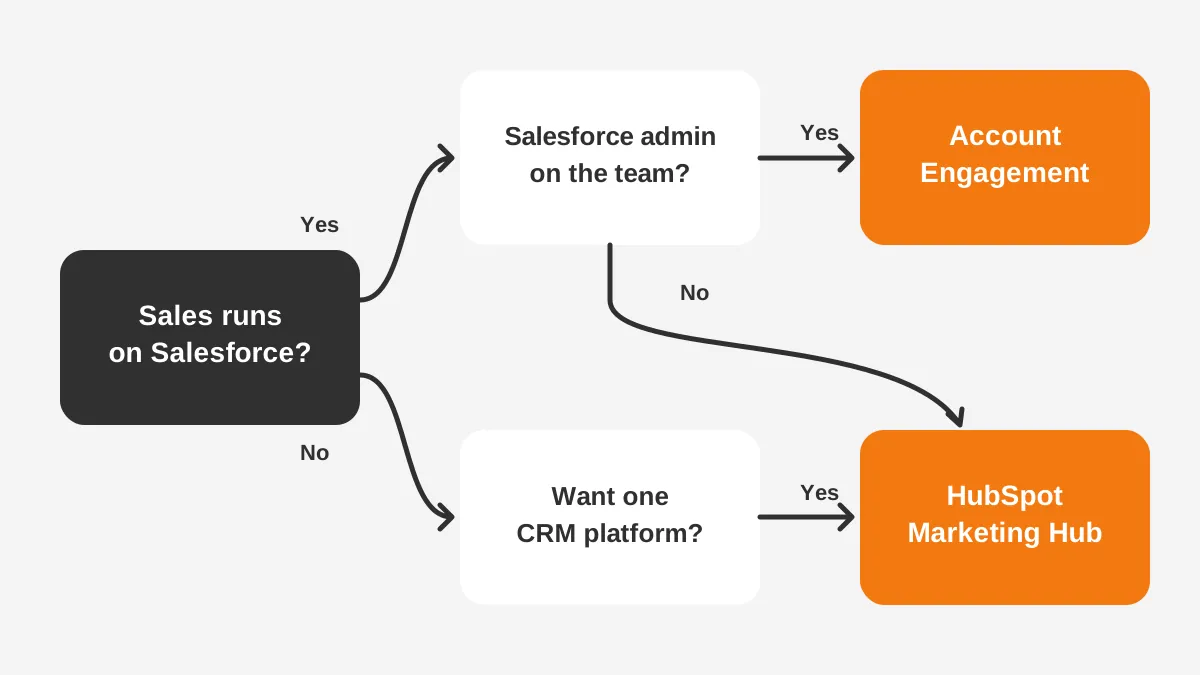
Neither answer holds until the CRM has been checked. A Pardot vs HubSpot pick made on email features alone tends to fail at the sync layer.
Frequently Asked Questions
Does Pardot work without Salesforce?
No. Account Engagement needs a Salesforce CRM subscription, and it connects to Salesforce Professional Edition or higher. Teams without Salesforce must add Sales Cloud seats first, which raises the true cost. HubSpot Marketing Hub runs on its own CRM, so it needs no second platform.
Which is cheaper, Pardot or HubSpot?
HubSpot is cheaper to start. Marketing Hub Professional lists at $800 a month on annual billing, against $1,250 for Account Engagement Growth+. At 10,000 contacts the comparison shifts, because HubSpot Enterprise lists at $3,600 a month. HubSpot also charges a one-time onboarding fee of $3,000 or $7,000.
Can you run Pardot and HubSpot together?
It is possible, but rarely sensible. Both tools would send email, score leads and write to Salesforce records. Two scoring models then compete, and sales reps see conflicting signals. Most teams pick one platform and retire the other after a planned migration with a clear cutover date.
Does HubSpot have lead grading like Pardot?
HubSpot has no letter grades, but its fit score does the same job. A fit score rates demographic properties such as industry and job title. An engagement score tracks actions. A combined score blends both, which mirrors the Pardot pairing of score and grade.
Is Pardot or HubSpot easier to learn?
HubSpot is usually easier for marketers who work outside Salesforce, because everything sits in one interface. Account Engagement suits teams already fluent in Salesforce. Salesforce Trailhead offers free modules on scoring and grading, which shortens the learning curve for new admins.
Pardot vs HubSpot: Which Should Your Team Pick?
The Pardot vs HubSpot answer follows the CRM. Pick Account Engagement when Salesforce is the system of record. Pick HubSpot Marketing Hub when one platform for CRM and marketing matters more.
Unboxx implements both platforms and models the three-year cost before any licence is signed. Schedule a consultation to map your contacts, CRM and reporting needs to the right platform.
Let's create something out of this world together.
Have a project in mind? Contact us for expert design and development solutions. Let's discuss how we can help grow your business.
Ready to Unboxx Your Potential?
Build smarter systems. Automate faster. Scale confidently.