
A sales director signs a CRM contract after three polished demos. Six months later, reps still track deals in spreadsheets, because nobody wrote down how the team sells. The software worked as sold. What the project lacked was a written set of CRM requirements.
The PMI Pulse of the Profession report (2014) found that 47 percent of unsuccessful projects missed their goals. The cause was inaccurate requirements management. This guide gathers CRM requirements by role, writes them as user stories, ranks them and scores vendors against them.
Key Takeaways
- CRM requirements describe what each team must do in the system, not which features look impressive in a demo.
- Interview every role, write each need as a user story, then rank the list with the MoSCoW method.
- A weighted scoring matrix turns your CRM requirements document into a fair, repeatable vendor decision.
What Are CRM Requirements?
CRM requirements are written statements of what your business needs a customer relationship management system to do. They cover the processes, data, users, integrations and limits the platform must support. A complete set lets vendors demo your real work and lets implementers estimate effort.
Most teams start with a feature list of CRM software requirements, such as contact management, email sync and dashboards. It does not say how each feature must behave. A better CRM requirements specification separates needs into five levels, from business goals down to system design.
| Requirement type | What it describes | Example |
|---|---|---|
| Business requirements | Goals and pain points | Cut quote turnaround from 3 days to 1 day |
| Functional requirements | What users must be able to do | A rep can create a quote from an opportunity |
| Non-functional requirements | How well the system must run | 99.9% uptime and single sign-on |
| Technical and integration requirements | Connections and data flows | Orders sync to the ERP every 15 minutes |
| Data requirements | Records, fields and history to keep | Migrate 5 years of closed deals |
The example targets in the table are illustrations, not benchmarks. Your own numbers come from interviews and current reports. The business level explains why the project exists. The functional and technical levels explain what the CRM must do and how it connects to other systems.
Some consultants call the first pass a CRM needs assessment. It answers a simple question before any shopping starts: which problems should a new system solve? If the team cannot name them, revisit why a CRM matters to a business before writing a single line.
Why Do CRM Requirements Decide Project Success?
They decide success because every later choice depends on them. The platform shortlist, the demo script, the budget and the data migration plan all come from this list. A gap found in a workshop means editing a spreadsheet. The same gap found after go-live means rework on a live system.
Admin work already eats into selling time. The Salesforce State of Sales report (2024) says reps spend 70% of their time on non-selling tasks. The same report found only 35% of sales professionals completely trust their organization's data.
Vague requirements make both numbers worse. Reps re-enter data the system should capture, and managers stop trusting the reports. Clear requirements name the data each team needs and the work the CRM should remove. That gives the project a measurable target from the first week.
Requirements also protect the budget. Vendors price by edition, user count and add-on. Without a ranked list, buyers often pay for an enterprise tier to get one feature. A cheaper tier could meet that need with a small workaround.
Who Should You Interview About CRM Requirements?
Interview every role that will create, read or report on CRM data. That usually means sales reps, sales managers, marketing, customer service, finance, IT and an executive sponsor. Each group sees a different part of the customer record, so each one adds requirements the others miss.
Run stakeholder interviews in small groups of 3 to 5 people from one role. Ask them to walk through a real week, not an ideal one. A business analyst or CRM consultant can lead the sessions and turn notes into a draft list.
These CRM requirements interview questions work well by role:
- Sales reps: Where do you record a new lead today, and what do you retype later?
- Sales managers: Which pipeline stages do you review each week, and what data is missing?
- Marketing: How do campaign responses reach sales, and how do you measure lead quality?
- Customer service: What customer history do you need on screen during a call?
- Finance: Which quote, contract or invoice data must match the ERP?
- IT: Which systems must connect, and what security rules apply?
- Executive sponsor: Which three reports would show the project worked?
Bring screenshots of current spreadsheets, forms and reports to each session. People forget steps they do by habit, and a real file shows fields, codes and shortcuts nobody mentions aloud.
Record answers in plain language first. Do not translate them into features during the interview. A rep who says "I lose track of follow-ups" has a requirement about reminders and task lists. The interviewer should capture the problem, the frequency and the cost of the current workaround.
Unboxx runs this kind of discovery as part of its CRM consulting and implementation services, before any platform is chosen.
How Do You Gather CRM Requirements in 6 Steps?
Gather CRM requirements in six steps. Set goals, map processes, interview roles, write user stories, rank the list and score vendors. Each step produces one document the next step uses. As a planning assumption, allow 3 to 6 weeks for a mid-sized B2B team.

- Set goals. Write 3 to 5 business goals with a current baseline, such as average days to send a quote.
- Map processes. Draw a process map for lead-to-cash and case handling as they run today.
- Interview roles. Hold the role-based sessions described above and log every pain point.
- Write user stories. Turn each pain point into a testable statement with acceptance criteria.
- Rank the list. Sort every story into Must, Should, Could and Won't Have for the first release.
- Score vendors. Send the ranked list and a demo script to 3 or 4 vendors, then score each one.
The output of steps 1 to 5 is your CRM requirements document. Keep it in a shared spreadsheet or a CRM requirements template with one row per requirement. Useful columns are ID, role, user story, priority, acceptance criteria, source interview and status.
Requirements gathering for CRM is also the moment to plan change management. Note which teams lose a familiar tool and who will train them. Those notes feed the rollout plan in a CRM implementation plan.
How Do You Write CRM Requirements as User Stories?
Write each requirement as a user story: "As a role, I need an action, so that a result." The format forces a named user and a business reason. It also stops vague lines such as "good reporting" from entering the list.
Add acceptance criteria under each story. These are the checks a tester will run during user acceptance testing. Here are 3 CRM user stories with criteria:
- As a sales rep, I need to log calls by phone, so that my manager sees activity daily. Criteria: the call saves to the contact record within one minute.
- As a sales manager, I need a pipeline view by stage, so that I can spot stalled deals. Criteria: deals older than 30 days in a stage show a flag.
- As a finance analyst, I need closed deals to create ERP orders, so that nobody retypes them. Criteria: an order appears in the ERP within 15 minutes.
Good stories are small, testable and free of vendor terms. "Use Salesforce Flow to route leads" names a tool, not a need. "Route new leads to the right territory owner within five minutes" describes the need and lets every vendor answer it.
Group stories by business area, such as lead management, opportunity management and service. That grouping becomes the structure of your CRM requirements checklist and of each vendor demo. It also shows gaps, because an area with no stories usually means a team was missed in the interviews.
Which CRM Functional Requirements Belong on the Checklist?
CRM functional requirements describe what users must be able to do in the system. A useful checklist covers 8 areas: contacts and accounts, lead management, opportunity management, quotes, service, marketing, reporting and mobile use. Each area should hold user stories, not single words.
| Area | Sample functional requirement |
|---|---|
| Contacts and accounts | Show every email, call and meeting on one account timeline |
| Lead management | Capture web form leads and assign them by territory |
| Opportunity management | Track pipeline stages with required fields per stage |
| Quotes | Build a quote from a product catalog with approval rules |
| Service | Open a case from email and link it to the account |
| Marketing | Send campaign responses to sales with a lead score |
| Reporting | Give managers a weekly forecast by rep and stage |
| Mobile | Update a deal and log a visit from a phone |
CRM reporting requirements deserve extra care. List the exact reports each role reads today, with their filters and refresh timing. A report nobody can rebuild in the new system is a common reason teams fall back to spreadsheets.
CRM requirements for small business can stay shorter. A 10-person team may need contacts, a pipeline, email sync and basic reports. Larger teams add territory rules, approval chains, partner portals and CPQ.
Use the checklist to answer one practical question: what should a CRM do for this team on day one? Anything outside that answer moves to a later release. That keeps the CRM feature requirements tied to real work rather than demo appeal.
The same checklist helps when a team asks how to choose a CRM. The best fit is the platform that covers the day-one list with the fewest workarounds. Brand names and feature counts matter less than that fit.
What Non-Functional and Integration Requirements Matter?
Non-functional requirements set how well the CRM must run, and integration requirements set how it connects. Together they cover security, performance, uptime, data rules and API capacity. Buyers often skip them, then discover the limits after contracts are signed.
CRM security requirements should name role-based permissions, single sign-on, multi-factor login and audit history. Add data retention rules and any regulation that applies, such as GDPR for EU contacts or HIPAA for patient data. These CRM technical requirements go to IT and legal for sign-off.
CRM integration requirements need numbers. List each connected system, the direction of sync, the frequency and the daily record volume. Then compare that volume with each platform's API limits.
ERP integration is usually the hardest link. Decide which system owns customers, products, prices and invoices. Two systems that both edit the same field will overwrite each other, so each field needs one owner. Write that rule into the requirement, along with how errors are reported and who fixes them.
Salesforce lists a daily allocation of 100,000 API calls plus 1,000 per license in its API request limits guide. HubSpot's usage guidelines allow 625,000 daily requests on Professional and 1,000,000 on Enterprise for private apps. Ask Microsoft Dynamics 365 and Odoo vendors for their current limits.
CRM data migration requirements belong here too. State which objects move, the number of years of history to keep and who cleans duplicates. The CRM migration guide covers the full sequence of mapping, testing and cutover.
Ask each vendor for a sandbox as well. Your team should test integrations with real sample data before anything goes live.
How Do You Rank CRM Requirements With MoSCoW?
Rank CRM requirements with the MoSCoW method: Must Have, Should Have, Could Have and Won't Have this time. The method comes from the DSDM framework. It forces a team to agree what the first release cannot ship without.
The Agile Business Consortium's MoSCoW guidance defines Must Haves as the Minimum Usable SubseT. It recommends typically no more than 60% Must Have effort and around 20% Could Have effort. The remaining effort usually goes to Should Haves.
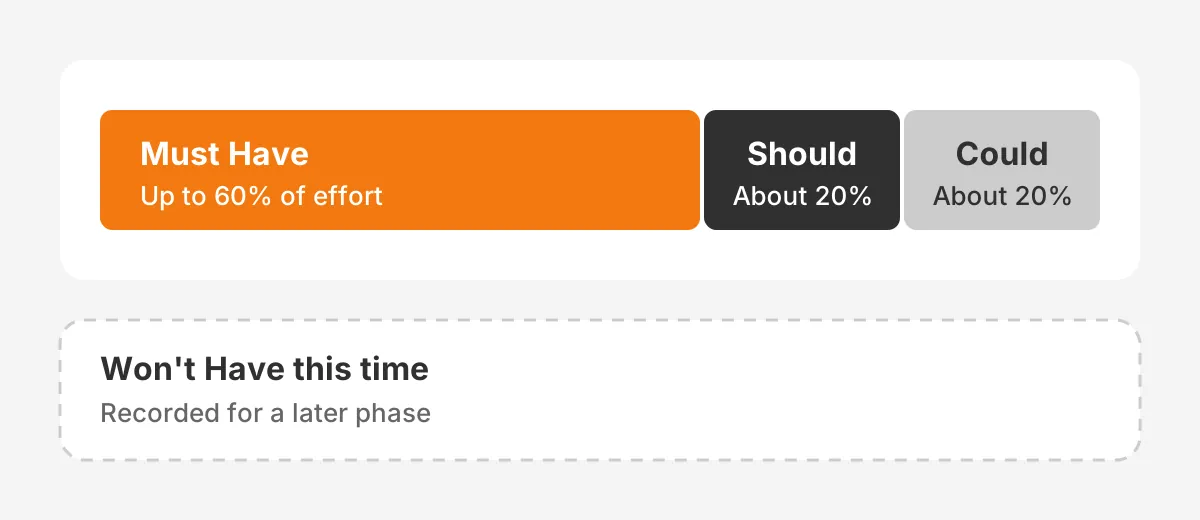
To prioritize CRM requirements, test each Must Have with one question. Would the release fail, or break a legal rule, without it? If a workaround exists, the item is a Should Have. Nice-to-have dashboards and extra automation are usually Could Haves.
Write down the Won't Have items too. Stakeholders see their request was heard and has a place in a later phase. That cuts scope arguments during the build.
Apply the ranking to effort, not to the count of items. Ten small Must Haves can take less time than one complex integration. Ask the implementer for a rough effort estimate per item, then check the 60% guide against those estimates.
Review the ranking with the executive sponsor before any vendor sees it. A sponsor who signs off on priorities will defend them when a department asks for more.
How Do You Score Vendors Against Your Requirements?
Score vendors with a weighted scoring matrix built from your ranked list. Give each criterion a weight, score every vendor from 1 to 5, then multiply and add. The highest total wins only if it also meets every Must Have.
Start with CRM selection criteria that reflect your goals. A common set is Must Have fit, integration fit, ease of use, total cost of ownership and partner support. Weights should add up to 100%.
Agree on the CRM evaluation criteria and weights before the first demo. Weights set after the demos tend to drift toward the vendor the loudest stakeholder liked. Ask 3 to 5 scorers from different teams to score alone, then average their results.
Total cost of ownership should cover 3 years, not the first invoice. Include licenses, implementation, integration tools, data migration, training and ongoing administration. A low license price can hide a high cost to build missing features.
Here is a worked example with assumed scores for three unnamed platforms. The figures show the method, not a real comparison.
| Criterion | Weight | Platform A | Platform B | Platform C |
|---|---|---|---|---|
| Must Have fit | 35% | 5 | 4 | 3 |
| Integration fit | 20% | 4 | 5 | 3 |
| Ease of use | 15% | 3 | 5 | 5 |
| Total cost of ownership | 15% | 3 | 4 | 5 |
| Partner support | 15% | 4 | 3 | 3 |
| Weighted total | 100% | 4.05 | 4.20 | 3.60 |
Platform B leads by 0.15 points, a margin small enough that the team checks its Must Have gaps before deciding. Platform C is the cheapest and easiest to use, yet it trails on fit.

Score demos, not slide decks. Send each vendor a CRM demo script built from your top 10 user stories. Vendors should run those stories live with your sample data.
Questions to ask CRM vendors should cover how they meet each Must Have and which items need custom code. Get the renewal price in writing as well.
The CRM vendor evaluation can also run through a formal CRM RFP. An RFP suits larger teams or regulated buyers who must document the decision.
What Mistakes Weaken a Requirements List?
Five mistakes weaken a CRM requirements list more than any others. Each one is easy to spot in a review, and each has a simple fix. Check the draft against this list before vendors see it.
- Copying a vendor feature list. A list taken from one product's brochure favours that product. Write needs in your own words, then map them to features later.
- Skipping frontline users. Managers describe the process they want, while reps describe the process they run. Both views belong in the document.
- Marking everything as Must Have. A list with 90% Must Haves has no priorities at all. Hold the line at the 60% effort guide.
- Leaving out data quality. Duplicate accounts and missing fields travel into the new system unless someone owns the cleanup. Name that owner early.
- Ignoring the second year. New products, regions or teams change what the system must hold. Note expected growth in users, records and integrations.
A short review meeting catches most of these issues. Invite one person from each interviewed role and read the Must Haves aloud. Anyone who cannot explain why an item is a Must Have should move it down a level.
The list stays live after the contract is signed. Changes during the build go through the same ranking rules, and the sponsor approves any new Must Have. Extras then land in a planned second phase instead of delaying the first release.
Frequently Asked Questions
What should a CRM requirements document include?
A CRM requirements document should include business goals, process maps and user stories with acceptance criteria. Each item carries a MoSCoW priority. Integrations, data migration scope, security rules and reports belong in it too. Keep one row per requirement so vendors and testers can trace every line.
How long does CRM requirements gathering take?
As a planning assumption, CRM requirements gathering takes 3 to 6 weeks for a mid-sized B2B company. A small team with one sales process can often finish in 1 to 2 weeks. Each extra department, integration or approval step adds interviews and sign-off time.
Who should own the CRM requirements?
A named project owner should hold the CRM requirements, with an executive sponsor approving priorities. A business analyst or CRM consultant usually writes and maintains the list. Each department lead signs off on the stories for their own team before vendors receive the document.
Is a CRM requirements template enough on its own?
A CRM requirements template is a useful starting structure, but it is not enough on its own. Generic templates list features every vendor already has. Your value comes from adding your own user stories, process details, data volumes and priorities gathered from real interviews.
How do CRM requirements differ from a CRM RFP?
CRM requirements describe what your business needs. A CRM RFP is the formal request that sends those needs to vendors. The RFP adds pricing questions, contract terms, timelines and response rules. Strong requirements come first, because an RFP built on vague needs returns vague answers.
Where Should You Take Your CRM Requirements Next?
Take your ranked list into scored demos, then into a build plan with clear owners. Review your current system with a CRM audit first if you already run one. See how Unboxx set up a new Salesforce org in this Salesforce setup success story.
Unboxx helps B2B teams turn CRM requirements into a working Salesforce, HubSpot, Dynamics 365 or Odoo system. Schedule a consultation to review your list with an Unboxx consultant.
Let's create something out of this world together.
Have a project in mind? Contact us for expert design and development solutions. Let's discuss how we can help grow your business.
Ready to Unboxx Your Potential?
Build smarter systems. Automate faster. Scale confidently.