
Companies switch from Salesforce to HubSpot when the platform outgrows their team size or budget. Data and deal history survive the move when a team plans the migration as a structural project.
This guide covers the full Salesforce to HubSpot migration process: preparing your data, executing the move, and protecting deal history.
Why Do Companies Switch to HubSpot?
Companies switch to HubSpot when Salesforce's cost and complexity outgrow their team size. HubSpot charges less per seat and carries less administrative overhead to run. A 40-person sales team often pays for Salesforce features it never touches. Territory management, complex approval chains, and custom object frameworks are built for a larger organization.
Sales, marketing, and service teams share one interface. This replaces Salesforce Sales Cloud, Pardot, and a separate service tool stitched together. This consolidation removes a real operational burden for a growing team without a dedicated Salesforce administrator.
How Does HubSpot's Data Model Differ from Salesforce?
HubSpot's data model is flatter than Salesforce's. That difference is where most data loss happens. Salesforce supports unlimited custom objects with complex relationships between them. HubSpot supports custom objects too, but the platform handles fewer nested relationships and different automation logic underneath.
Standard fields transfer cleanly in most cases. Contacts, companies, deals, and their core properties move without issue. Custom fields need mapping decisions before migration starts. A team must decide which custom Salesforce fields become HubSpot custom objects. Fields with no HubSpot equivalent are retired.
Automation logic needs the same scrutiny. A multi-step Salesforce Flow with branching logic across three objects rarely translates directly into a HubSpot workflow. Migrations that skip planning tend to fail at rebuilding that logic.
How Do You Prepare Salesforce Data for Migration?
A well-executed Salesforce data migration starts with a scope and timeline decision before any data moves. Define what's migrating, what's archived, and what's left behind. Then set a cutover date the whole team can follow.
Data cleaning comes next. Deduplicate contact and company records, standardize field formats, and remove stale records that add no value to the new system. Migrating clean data costs less time than cleaning duplicate records inside HubSpot later.
Back up the full Salesforce org before migration begins. Create legacy record IDs for historical objects. This lets a team trace any HubSpot record back to its Salesforce origin when needed.
What Are the 3 Ways to Migrate to HubSpot?
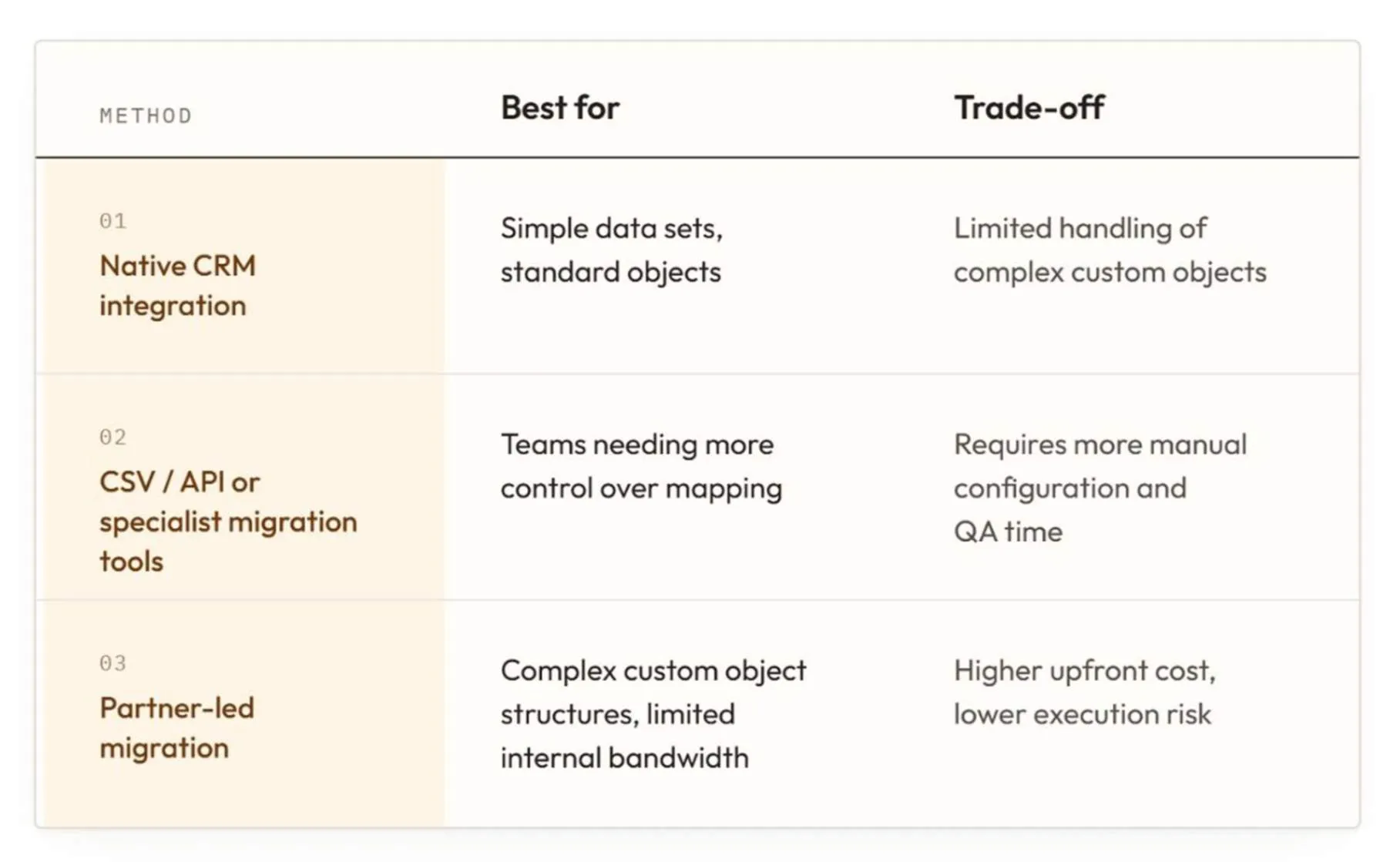
Teams have three realistic options for moving from Salesforce to HubSpot. The right choice depends on data complexity.
Teams with heavily customized Salesforce orgs and limited internal capacity typically achieve better outcomes from a partner-led migration. Outsourced CRM consulting and implementation services handle the object-mapping decisions a native integration or CSV export can't make.
How to Execute a Salesforce to HubSpot Migration?
Executing the migration means moving core objects and their history in a set order:
- Companies
- Contacts
- Deals
- Activities
This order preserves the relationships between records instead of creating orphaned data. Validate data integrity before declaring the migration complete. Spot-check a sample of records across each object type. Confirm that associations between contacts, companies, and deals carried over correctly.
A parallel run, where both systems stay live briefly, catches discrepancies before the team fully cuts over.
How to Configure a New HubSpot Environment?
Configuring the new environment is a distinct step that comes after data migration. Set up sales pipelines, deal stages, and user permissions to match how the team sells. Marketing, service, and operations setup follows the same logic.
HubSpot's marketing tools, ticketing pipelines, and workflow automation need their own configuration pass. Copying a Salesforce structure directly into HubSpot without adjustment usually produces a worse version of the old system.
What Capabilities Do You Risk Losing in HubSpot?
Deep customization and complex, multi-object automation have no direct HubSpot equivalent. Teams should know this before committing to the switch. Apex code enables custom logic that Salesforce admins use to build specific business rules. HubSpot's platform doesn't support this level of custom development.
Enterprise-grade automation spanning three or more linked objects also loses depth in the move. A team that relies heavily on Salesforce Flow logic spanning custom objects should expect to rebuild that logic in HubSpot. This is a real trade-off that deserves honest evaluation before migration begins.
How to Train Your Team After Migrating?
Gaps in adoption are one of the common CRM migration mistakes that derail otherwise well-executed migrations. Monitor adoption in the first 30 days and address gaps directly instead of assuming the team will self-teach.
Formally close out the Salesforce org once the team confirms HubSpot handles daily work reliably. Keep the Salesforce data backup on file for historical record verification.
Final Thoughts
Migrating from Salesforce to HubSpot succeeds when a team treats it as a structural project. Planning data before the move protects deal history. Choosing the right migration method and validating records after cutover keeps the team productive.
The right migration approach depends on how complex that structure has become. Getting that assessment right early determines whether the switch pays off quickly or drags into a longer cleanup.
FAQs
How long does a Salesforce to HubSpot migration usually take?
Timeline depends on data volume and custom object complexity. A straightforward migration with standard objects can be completed in two to three weeks. Heavily customized Salesforce orgs with complex automation need a longer planning and rebuild phase before cutover.
How much does it cost to migrate from Salesforce to HubSpot?
Cost depends on data volume and the number of custom objects requiring remapping. It also depends on whether the team handles migration internally or brings in outside help. These are the same variables that drive cost on any CRM migration project.
Will activities, notes, and attachments transfer from Salesforce to HubSpot?
Standard activities, notes, and attachments transfer with the right migration method. Complex or custom activity types tied to Salesforce-specific automation need manual review to confirm they map to a HubSpot equivalent.
Should you migrate this yourself, or hire a consultant?
Teams with simple data sets and standard objects can often self-manage migration using HubSpot's native integration. Teams with custom objects, complex automation, or limited internal bandwidth typically bring in outside help instead, whether they're moving in this direction or handling a HubSpot to Salesforce migration in reverse.
Let's create something out of this world together.
Have a project in mind? Contact us for expert design and development solutions. Let's discuss how we can help grow your business.
Ready to Unboxx Your Potential?
Build smarter systems. Automate faster. Scale confidently.