
Sales reps stop trusting a CRM the day they find three records for the same customer. Forecasts drift and campaigns hit old addresses. Validity's State of CRM Data Management in 2024 found duplicate records were a problem for 53% of respondents.
CRM data cleansing fixes that problem in a set order: back up, audit, standardize, merge, validate and protect. Below are the steps, the native tools in Salesforce, HubSpot, Dynamics 365 and Odoo, and effort estimates by record count.
Key Takeaways
- CRM data cleansing works best as a fixed sequence that starts with a full backup and a rollback plan.
- Survivorship rules decide which values win in a merge, so write them before anyone clicks merge.
- Salesforce, HubSpot, Dynamics 365 and Odoo all include native duplicate tools that cover most first passes.
What Is CRM Data Cleansing?
CRM data cleansing is the work of finding and fixing records that are duplicated, wrong, incomplete or out of date. The output is one accurate record per person, company and deal. Teams also call it CRM data cleaning, CRM data cleanup or CRM data scrubbing.
A cleanse is a project with a start and an end. CRM data hygiene is the ongoing habit that keeps the database clean afterwards. Both feed CRM data quality, which is the measured state of the data at any point in time.
Dirty CRM data usually falls into six types:
- Duplicate records for the same contact, account or lead.
- Inconsistent formats, such as "CA", "Calif." and "California" in one state field.
- Missing values in fields that reports and routing depend on.
- Stale records for people who changed jobs or companies that closed.
- Invalid values, such as bounced email addresses or phone numbers with letters.
- Orphaned records with no owner, account or related activity.
Each type has its own fix. Duplicates are matched and merged, and formats are standardized. Stale records need a decision: archive, enrich or delete.
Four signals show the database needs CRM data cleansing now. Reps keep their own spreadsheets. Bounce rates rise on campaigns. Two dashboards show different pipeline totals for the same quarter. Lead routing sends records to people who left the company.
Why Does Dirty CRM Data Cost So Much?
Dirty data costs money because every team that reads the CRM acts on it. Gartner research from 2020 puts the average cost of poor data quality at $12.9 million a year per organization.
The Validity 2024 survey of 631 CRM users adds detail. 31% of admins said poor quality data costs them at least 20% of annual revenue. 48% had noticed customer data decay speeding up over the previous 12 months.
The damage shows up in daily work:
- Reps call the same prospect twice because two owners hold duplicate records.
- Marketing pays to email contacts who left their companies a year ago.
- Lead routing fails when the state or industry field is blank.
- Pipeline reports double-count deals attached to duplicate accounts.
- AI scoring and forecasting tools learn from the same errors.
Decay keeps adding to the problem. People change roles and companies change names, so a clean database starts drifting on day one. That is why a one-off CRM cleanup needs a hygiene plan behind it.
What Should You Do Before Cleaning Anything?
Back up the full database and agree on a rollback plan before CRM data cleansing changes a single record. Merges in HubSpot cannot be reverted, and merged duplicates in Salesforce are deleted. A backup is the only undo button.
Use this pre-cleanse checklist:
- Export every object you plan to touch to CSV, including record IDs and owner IDs.
- Store the export in a dated folder that only the cleanse team can edit.
- Test each rule in a sandbox or on a 500-record sample first.
- Pause integrations and automations that fire on record updates.
- Name one data owner who approves every rule before it runs.
- Write down how to restore a wrongly merged record from the export.
Next, run a short data audit to scope the CRM data cleansing work. Count records per object and measure the duplicate rate. Then list the fields that drive routing, scoring and reports. Those fields get cleaned first.
A full CRM review often reveals deeper problems than duplicates. Our CRM audit checklist scores data alongside adoption, automation and permissions. Run it first if the database is large or the configuration is old. Unboxx runs the audit and the cleanse together as part of its CRM consulting services.
Which Fields Should You Clean First?
Clean the fields that drive money and routing first. A CRM data cleansing project that starts with every field rarely finishes. Rank fields by how often reports, workflows and integrations read them.
- Email address and company domain, because matching depends on them.
- Record owner, because record ownership decides routing and follow-up.
- Lifecycle stage and lead status, because funnel reports group on them.
- Country, state and industry, because territories and scoring use them.
- Deal amount and close date, because the forecast sums them.
Leave descriptive fields such as notes and job titles for a later pass. They matter less to reports and take longer to verify.
Check privacy rules before you delete or enrich personal data. Laws such as GDPR and CCPA affect how long you keep contact data and where enrichment data comes from. Your legal or compliance lead should sign off on purge rules.
What Are the Steps of CRM Data Cleansing?
Run CRM data cleansing in seven steps, in this order, so each step makes the next one easier. Standardizing formats before matching, for example, catches duplicates that differ only in spelling.
- Back up and scope: export the data and pick the objects and fields in scope.
- Standardize formats: fix casing, state codes, country names, phone formats and picklist values.
- Match duplicates: run matching rules on email, domain, name and phone.
- Merge with survivorship rules: keep a master record and pull the best values into it.
- Validate: check emails, phones and addresses, then flag records that fail.
- Enrich or archive: fill gaps from trusted sources, or archive records nobody can verify.
- Protect: add validation rules, required fields and duplicate blocking at entry.
The order separates a clean result from a clean-looking one. Teams that merge before standardizing miss duplicates such as "Acme Inc" and "ACME, Inc.". Teams that skip the protect step see the duplicate rate climb back within months.
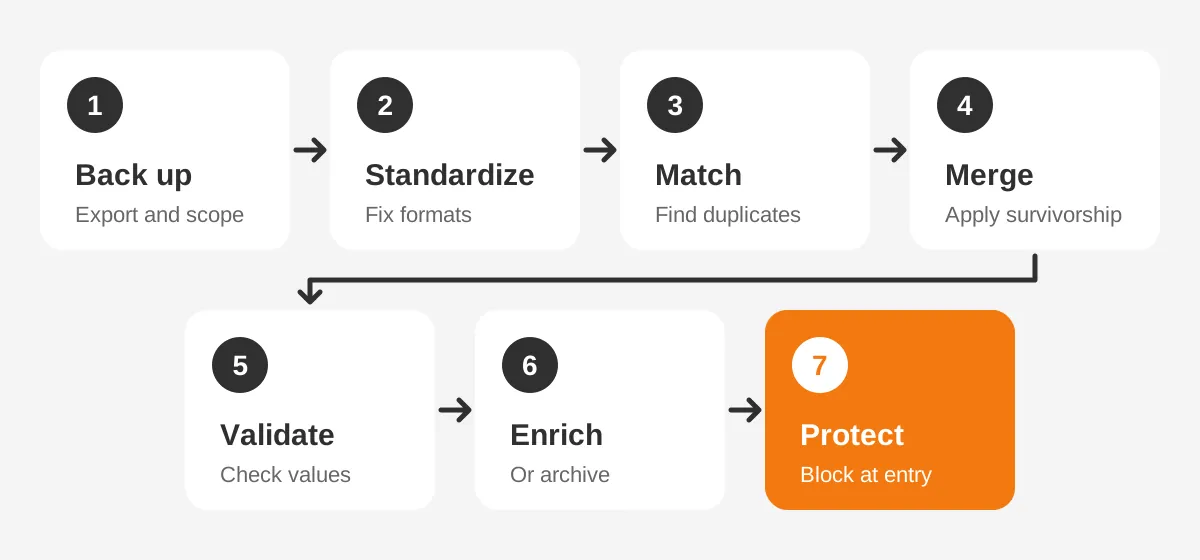
Steps two and five are where the data cleansing process gets specific. Agree field standards in a short table: field name, allowed format, example and owner. For instance, phone numbers use E.164 format, such as +14155550123. Country uses the full English name from a picklist.
Data enrichment should come from a named source with a date. Record the source in a field, so reps know where a job title came from. Records that fail validation and cannot be enriched go to an archive status, not straight to deletion.
Who Does What During a CRM Data Cleansing Project?
A CRM data cleansing project needs four roles, even in a small team. One person can hold two roles, but every role needs a name.
- Data owner: approves rules, merge decisions and purge lists.
- CRM admin: builds rules, runs jobs and restores records when needed.
- Team leads: confirm which records their reps still work.
- Integration owner: pauses syncs and checks them after each merge batch.
Hold a 15-minute check-in after each merge batch. Review a sample of 20 merged records against the backup. Stop the batch if more than one record merged wrongly.
How Do You Set Duplicate and Survivorship Rules?
Set duplicate rules to decide which records match, and survivorship rules to decide which values win when they merge. Both should be written and approved before the first merge runs. Get these two rule sets wrong and the CRM data cleansing result will be wrong, however carefully the merges run.
Matching works best on fields with unique values. Microsoft recommends email for exactly that reason. A practical rule set for contacts looks like this:
- Exact match on email address: treat as a duplicate.
- Same first name, last name and company domain: treat as a duplicate.
- Same last name and phone number: send to a person for review.
- Similar name only: ignore, because the false-match rate is too high.
Survivorship rules then pick the master record and the field values to keep. Common rules are "most recently updated wins", "most complete record wins" and "system of record wins". A finance field, for example, should come from the ERP, not from a rep's edit.
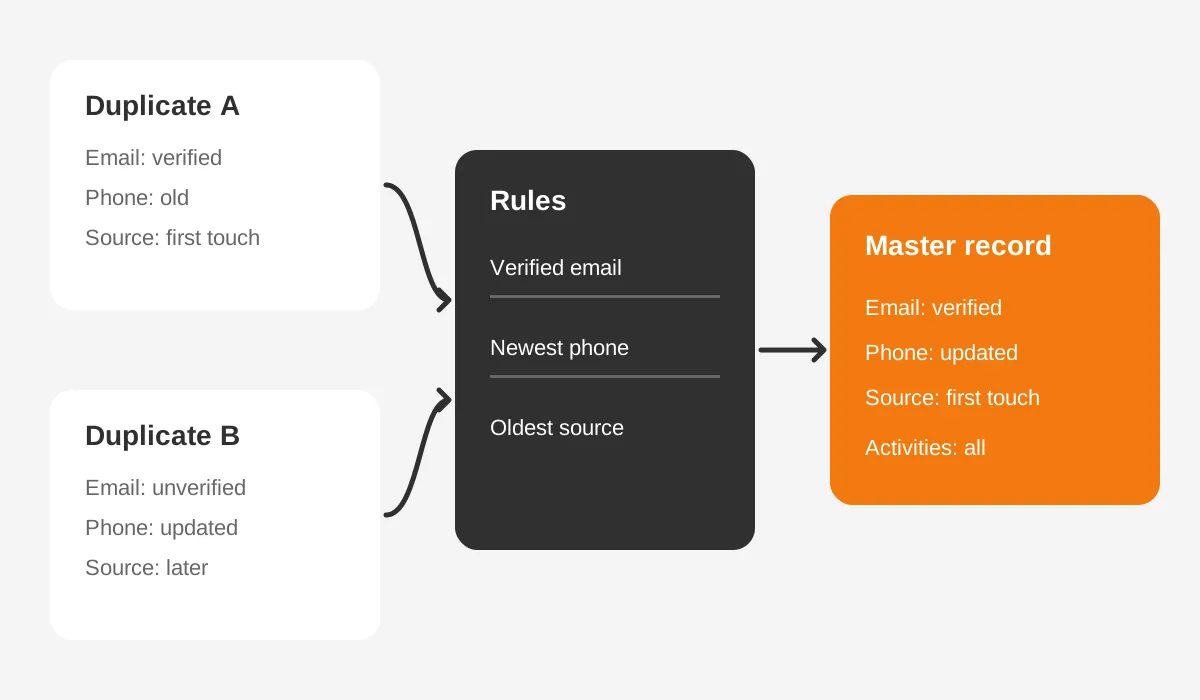
Write the rules in a simple table with three columns: field, winning rule and fallback. The fallback covers ties, such as two records updated on the same day. Without it, the person merging makes a different call on each record.
| Field | Winning rule | Fallback |
|---|---|---|
| Most recently verified | Most recent activity | |
| Phone | Most recently updated | Master record value |
| Billing address | ERP value | Most complete record |
| Lead source | Oldest record | Master record value |
| Owner | Owner of the newest open deal | Owner of the master record |
Lead source keeps the oldest value because it records the first touch. Overwriting it with a newer value breaks attribution reports for that account.
Plan for related records too. Activities, deals, cases and notes must move to the master record. Salesforce reparents related records during a merge. Dynamics 365 links notes and activities from the secondary record to the primary one.
How Does CRM Data Cleansing Work in Each Platform?
CRM data cleansing uses the same logic in every platform, but each system has its own native tools and limits. The table compares them before the platform notes below.
| Platform | Native duplicate tool | Merge limit | Undo after merge |
|---|---|---|---|
| Salesforce | Matching rules and duplicate rules | 3 records at a time | No, duplicates are deleted |
| HubSpot | Manage duplicates tool | Pairs, or bulk with Data Hub | No, merges cannot be reverted |
| Dynamics 365 | Duplicate detection rules and jobs | One secondary into one primary | Secondary is deactivated, not deleted |
| Odoo | Data Cleaning app, deduplication | 3 records at a time | Merge is logged in the chatter |
How Do You Clean Data in Salesforce?
In Salesforce, CRM data cleansing starts with matching rules and duplicate rules in Setup. Matching rules find likely duplicates. Standard rules can match "VP" to "Vice President" and catch transposed first and last names.
Duplicate rules decide what happens next. An admin can block a duplicate on create or edit, or allow it with a warning. The Salesforce merge documentation confirms a merge takes a main record and up to two more. Only leads, contacts, cases and accounts can be merged.
Field values on the main record win, even when they are blank. Copy any value you want to keep onto the main record before merging. Our guide to Salesforce data migration covers backup exports in more depth.
How Do You Clean Data in HubSpot?
HubSpot deduplicates contacts by email and companies by domain automatically. The HubSpot manage duplicates tool compares property values daily and suggests pairs. It needs a Professional or Enterprise subscription.
Default contact matching uses name, email, phone, zip code, IP country and company name. Bulk merging and larger pair limits need Data Hub Professional or Enterprise. HubSpot merges cannot be undone, so the backup step is not optional here.
Watch for companies created through the API. HubSpot does not deduplicate those by domain, so sync apps can create duplicates. A unique-value custom property, such as an ERP account number, closes that gap.
How Do You Clean Data in Dynamics 365?
CRM data cleansing in Dynamics 365 uses duplicate detection rules from the Power Platform admin center. Default rules exist only for accounts and contacts, so other tables need custom rules. The Microsoft duplicate detection guide lists Exact Match, Same First Characters and Same Last Characters as criteria.
You can publish only five rules per base record type. Duplicate detection jobs run on a schedule and email the admin when finished. In a merge, the primary record stays and the secondary record is deactivated.
Dynamics 365 Sales also offers AI duplicate detection for leads. It flags the same email, the same phone, or a similar name and company. Our Dynamics 365 data migration guide shows where this fits in a migration.
How Do You Clean Data in Odoo?
Odoo teams run CRM data cleansing through the Data Cleaning app. The app shows suspected duplicates with a similarity percentage. You pick the master record, then merge up to three records at a time.
Each merge is logged in the chatter of the surviving record. That log gives you an audit trail, but it is not a restore option. Keep a CSV export of contacts before large Odoo data cleaning runs.
How Much Effort Does a Cleanse Take?
A first cleanse usually takes two to eight weeks. Record count, duplicate rate and connected systems set the range. Rule writing and approvals take longer than the merges themselves.
The worked example below uses assumed figures for planning only. It is not a benchmark. Adjust the numbers to your own audit results.
| Database size | Assumed duplicate rate | Records to review | Typical effort |
|---|---|---|---|
| 10,000 records | 10% | 1,000 | 1 admin, 2 weeks |
| 50,000 records | 15% | 7,500 | 1 admin plus 1 analyst, 4 weeks |
| 200,000 records | 20% | 40,000 | Bulk tools plus a partner, 6 to 8 weeks |
Here is how the middle row plays out, again with assumed figures. A 50,000-record HubSpot portal with a 15% duplicate rate holds about 7,500 suspect records. Week one covers backup, audit and rules. Week two standardizes formats. Weeks three and four run merges in batches of 500.
That CRM data cleansing plan leaves one buffer day per week for restores and rule changes. Validation of the merged records runs at the end of each batch, not once at the end of the project.
Three factors push effort up. The first is integrations that write to the CRM, because each one can recreate duplicates. The second is records with no clear owner. The third is a pending CRM migration, which adds a mapping step.
Plan CRM data cleansing before any migration, not after. Clean data moves faster and maps more cleanly to the new system. Our CRM migration guide explains why the cleanse belongs in the planning phase.
Track the outcome with simple metrics: duplicate rate, share of required fields filled and email bounce rate. Measure each one before and after the cleanse. Those numbers show leadership what the project achieved.
Set a target for each metric so every review has a pass mark. As an example, start with a duplicate rate under 2% and required-field completeness above 95%. Tighten the targets after the first quarter of results.
How Do You Keep CRM Data Clean Afterwards?
Keep CRM data clean by blocking bad data at entry and checking it on a fixed schedule. Prevention costs less than a second round of CRM data cleansing.
Use these controls at the point of entry:
- Validation rules that reject badly formatted emails, phones and postcodes.
- Picklists instead of free-text fields for state, country, industry and lead source.
- Required fields for anything that drives routing or reporting.
- Duplicate rules set to block or warn when a rep creates a matching record.
- Limited rights to create new fields, so the schema stays small.
Check the matching key of each integration too. A sync app that matches on name instead of email or record ID recreates duplicates after every cleanse. Ask the admin or vendor which key each sync uses.
Then set a review cadence. Run a duplicate report every month and a field completeness check every quarter. Repeat a full CRM data hygiene review once a year, or before a major system change.
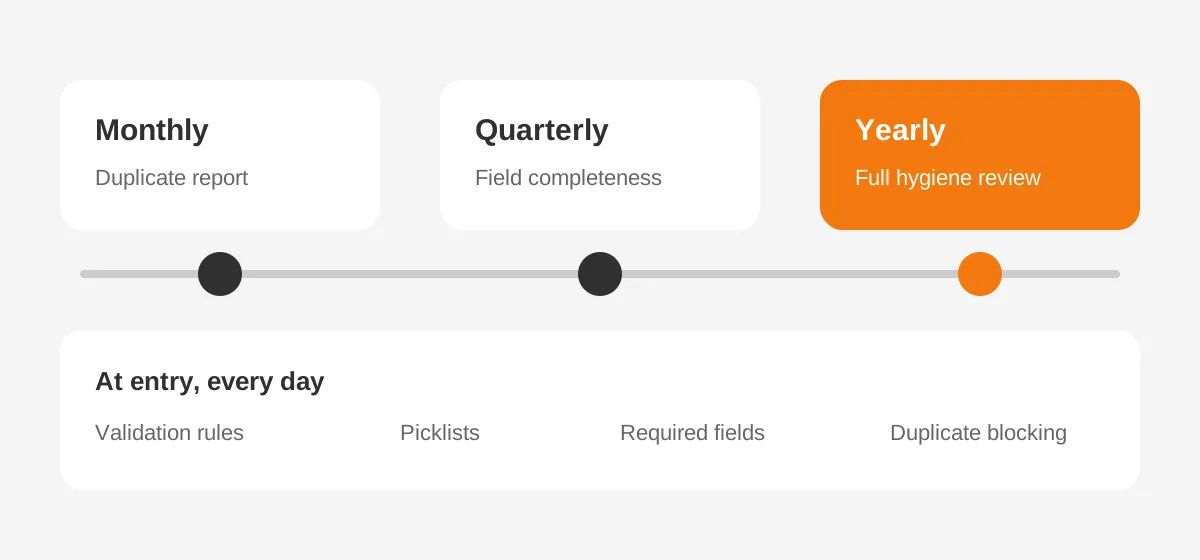
Hygiene also needs a named owner. A data steward, usually a CRM admin or RevOps analyst, owns the rules and the review calendar. Without an owner, CRM data maintenance slips behind other admin work.
Ongoing hygiene is often part of a wider tune-up. The HubSpot CRM optimization success story shows one result. A B2B company cut duplicate HubSpot records by 92% and manual reporting effort by 96%.
Frequently Asked Questions
How often should you clean CRM data?
Clean CRM data with a full cleanse once a year and lighter checks in between. Run a duplicate report monthly and a field completeness check quarterly. Add an extra round of CRM data cleansing before a migration, a merger or an AI rollout. Each one depends on accurate records.
What are the best CRM data cleansing tools?
Start with native tools. These include Salesforce duplicate rules, the HubSpot duplicates manager, Dynamics 365 duplicate detection jobs and the Odoo Data Cleaning app. Add a third-party data cleansing tool when you need bulk merges, cross-object matching or scheduled jobs beyond those native limits.
Is CRM data cleansing different from data enrichment?
Yes, CRM data cleansing fixes or removes wrong data, while data enrichment adds missing data from outside sources. Cleansing comes first. Enriching a duplicate record only creates two richer duplicates. Run enrichment after merging and standardizing, and record the source and date for each enriched field.
Who should own CRM data quality?
A named data steward should own CRM data quality, usually a CRM admin or RevOps analyst. The steward writes the rules, runs the reviews and approves merges. Sales, marketing and service leaders each own the accuracy of the fields their teams enter and update.
Should you delete or archive old CRM records?
Archive old CRM records first, then delete them after a fixed review period. Archiving keeps history for reporting and lets you restore a record if needed. Delete only when retention rules allow it and the record has no open deals, cases or legal hold.
When Should You Get Help With CRM Data Cleansing?
Bring in a partner for CRM data cleansing when the database passes 50,000 records. The same applies when three or more systems write to it, or a migration is close. Those cases need careful rules, bulk tools and a tested rollback plan.
Unboxx runs CRM data cleansing projects for B2B teams on Salesforce, HubSpot, Dynamics 365 and Odoo. Schedule a consultation to review your duplicate rate and get a cleanse plan with clear steps and owners.
Let's create something out of this world together.
Have a project in mind? Contact us for expert design and development solutions. Let's discuss how we can help grow your business.
Ready to Unboxx Your Potential?
Build smarter systems. Automate faster. Scale confidently.