
Operations teams have automated the easy steps already. What remains are the messy ones: emails with missing details, orders that break a rule, tickets that need judgment. Those steps still wait in a queue for a person to read, decide and click.
Agentic AI workflow automation targets that gap. AI agents read the situation, plan the steps, call business systems and check their output.
Gartner expects agentic AI to make 15% of day-to-day work decisions by 2028. In 2024 that figure was 0% (Gartner via Reuters, 2025).
Key Takeaways
- Agentic AI workflow automation lets AI agents plan and act inside a process instead of following one fixed path.
- It works best on exception-heavy steps, with rules, guardrails and human approval kept around the agent.
- Start with one narrow workflow, measure it, and widen the agent's scope only after it proves reliable.
What Is Agentic AI Workflow Automation?
Agentic AI workflow automation is the use of AI agents to run business processes that need judgment, not only rules. The agent receives a goal, decides the steps, uses tools to act and adjusts when something unexpected happens.
Classic workflow automation follows a path someone drew in advance. If the input matches the rule, the step runs. If it does not, the record stops and waits.
Agentic workflows replace that dead end with a reasoning step. A large language model reads the input, chooses an action and explains its choice. That is the core of agentic AI workflow automation.
Anthropic draws a useful line between two system types. In its 2024 guide, workflows are "systems where LLMs and tools are orchestrated through predefined code paths." Agents are systems where LLMs "dynamically direct their own processes and tool usage" (Anthropic, 2024).
Most real agentic AI workflow automation sits between those two poles. A fixed process holds the agent, and the agent handles the steps that a rule cannot. That mix keeps routine steps cheap and puts judgment only where rules fail.
A short example makes the idea concrete. A customer emails to move the delivery date on an open order. A rule cannot parse that request.
With agentic AI workflow automation, the agent reads the email and finds the order. It checks the new date against stock and drafts the change for approval.
The term also gets misused. Gartner warns of "agent washing," the rebranding of chatbots and assistants as agents. It estimates that only about 130 of the thousands of agentic AI vendors are real. A tool that answers questions without acting in your systems is not agentic process automation.
Why Does Agentic AI Workflow Automation Matter Now?
Agentic AI workflow automation matters now for two reasons. Language models can now call business tools through standard connectors. CRM and ERP vendors are also building agents into their products. Meanwhile, the manual queues that remain are the slowest part of most processes.
Earlier waves of intelligent automation covered structured steps. Business process management (BPM) suites modelled the flow. RPA bots handled the clicks. Both struggled with unstructured input, such as a customer email that mixes a complaint, an order change and a question.
Autonomous agents change that. A model can now read the email, split it into three tasks and route each one. Agentic AI workflow automation turns those queues into agent-based workflows with a person at the checkpoints.
Vendors are moving fast. Gartner predicts that 33% of enterprise software applications will include agentic AI by 2028. In 2024 the share was less than 1%. CRM and ERP buyers will see agent features arrive inside tools they already pay for.
That speed creates a planning problem. Teams that wait for agents to appear will get vendor defaults. Teams that design agentic AI workflow automation around their own process keep control of rules, data and approvals.
How Does Agentic AI Workflow Automation Work?
Agentic AI workflow automation works as a loop. The agent reads a goal, plans, acts through tools and checks the result. It repeats until the goal is met, and a person approves risky steps.
Here is how agentic AI works inside one process run:
- A trigger starts the run, such as a new email, form, ticket or CRM record.
- The agent reads the input and pulls context from a knowledge base or past records.
- It plans the steps needed to reach the goal.
- It calls tools: an API, a database query, a CRM update or a draft reply.
- It checks the result against rules and its own instructions.
- It hands risky or unclear cases to a person, with its reasoning attached.
- It logs every action so the run can be reviewed later.
The retrieval step often uses retrieval-augmented generation (RAG). The agent searches approved documents, such as price lists or policies, before it answers. That grounds the output in company data instead of the model's general training.
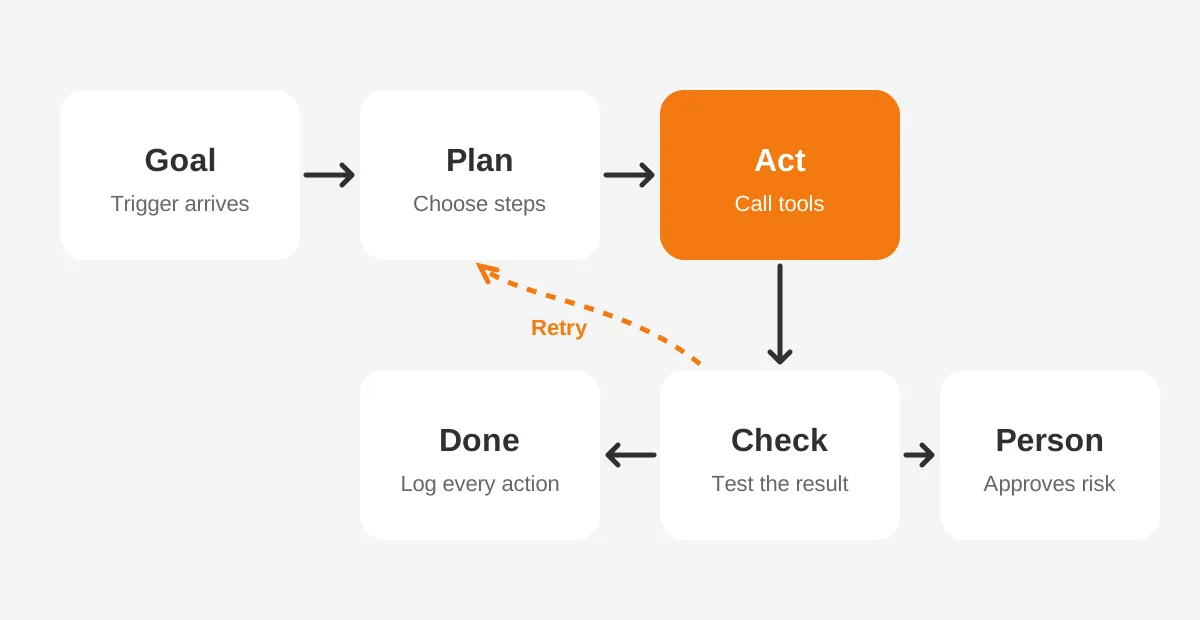
Because of that loop, autonomous workflows behave as self-correcting workflows. When a step fails, the agent can retry with a different tool or ask for missing data. A rule-based flow would stop and raise an error.
How Is It Different From RPA and Rules?
Robotic process automation copies clicks on fixed screens. Agentic automation reasons about the input and chooses its own steps. Rule-based automation sits in between: it branches on conditions but never improvises.
The question of agentic AI vs RPA is rarely either-or. RPA bots still handle stable, high-volume screen work well. Agentic AI workflow automation adds value where inputs vary and exception handling eats staff time. The table below compares the three approaches.
| Factor | Rule-based automation | Robotic process automation | Agentic automation |
|---|---|---|---|
| Input | Structured fields | Fixed screens and forms | Emails, documents, chats and fields |
| Logic | If-then branches | Recorded steps | Planning by a language model |
| Exceptions | Stops and alerts | Breaks when a screen changes | Retries, asks or escalates |
| Best fit | Approvals, field updates | Legacy systems without APIs | Triage, research, drafting, matching |
| Main risk | Rigid paths | Fragile scripts | Wrong decisions without oversight |
Agentic AI vs generative AI is another common confusion. Generative AI produces content, such as a reply or a summary. Agentic AI uses that ability to act: it updates the record, sends the reply and checks the outcome.
For a deeper side-by-side, see the Unboxx guide on AI agents vs traditional automation. It covers cost and maintenance in more detail.
What Are the Core Components of an Agentic Workflow?
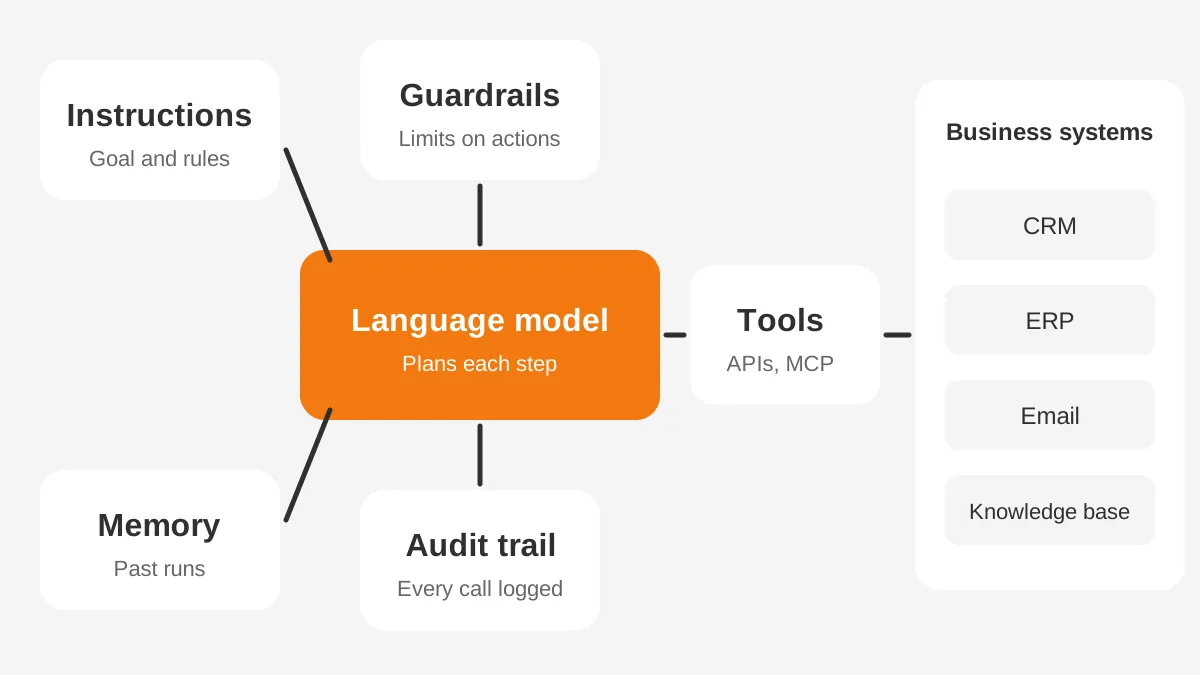
An agentic workflow has six core parts: a model, instructions, tools, memory, guardrails and a human checkpoint. Observability ties them together so every decision can be traced.
- Model: a large language model that reads input and plans actions.
- Instructions: the goal, the policies and the tone the agent must follow.
- Tools: tool calling lets the agent use APIs, search records and write updates.
- Memory: short-term context for the current run and long-term notes from past runs.
- Guardrails: limits on spend, data access, actions and output content.
- Human checkpoint: an approval step for refunds, pricing changes and customer-facing promises.
API integration is where most effort goes. The Model Context Protocol (MCP) is one open standard for this connection. Its documentation calls MCP "an open-source standard for connecting AI applications to external systems."
Instructions deserve the most care, because they are the part a team controls most directly. A good set names the goal, the allowed tools, the escalation triggers and three worked examples. In agentic AI workflow automation, a vague instruction set shows up as inconsistent decisions.
An audit trail matters as much as the model. Every prompt, tool call and output should be stored with a timestamp. Without it, nobody can explain why the agent changed a record.
Which Agentic Workflow Patterns Do Teams Use?
Teams use five common agentic workflow patterns: prompt chaining, routing, parallelization, orchestrator-workers and evaluator-optimizer. Anthropic describes each pattern in its 2024 guide on effective agents.
- Prompt chaining: split a task into ordered steps, each checking the last.
- Routing: classify the input, then send it to the right specialist flow.
- Parallelization: run independent subtasks at once, or ask for three answers and vote.
- Orchestrator-workers: a lead agent splits the job and assigns parts to worker agents.
- Evaluator-optimizer: one model drafts, a second model critiques, and the loop repeats.
Orchestrator-workers is the basis for multi-agent systems. One agent handles research, another drafts, a third checks compliance. AI orchestration software manages the handoffs and shared state between them.
In agentic AI workflow automation, the pattern choice is a design decision, not a product feature. Anthropic advises "finding the simplest solution possible, and only increasing complexity when needed." A routing step plus one agent often beats five agents talking to each other.
Where Does Agentic AI Workflow Automation Fit Best?
Agentic AI workflow automation fits best where inputs are messy, volume is steady and each case needs judgment. It fits poorly where one rule already decides the outcome.
These are common agentic AI use cases in B2B operations:
- Customer service: triage tickets, draft replies from the knowledge base and route urgent cases.
- Sales: research accounts, update CRM fields and draft follow-ups after calls.
- Order desk: read emailed purchase orders and match them to products and prices.
- Finance: match invoices to orders and flag mismatches for review.
- Data quality: find duplicates and missing fields, then propose fixes.
Agentic AI in customer service is often the first pilot because the outcome is easy to measure. Agentic AI for sales comes next, usually inside the CRM. Salesforce Agentforce is one example; Unboxx covers it in Agentforce for sales.
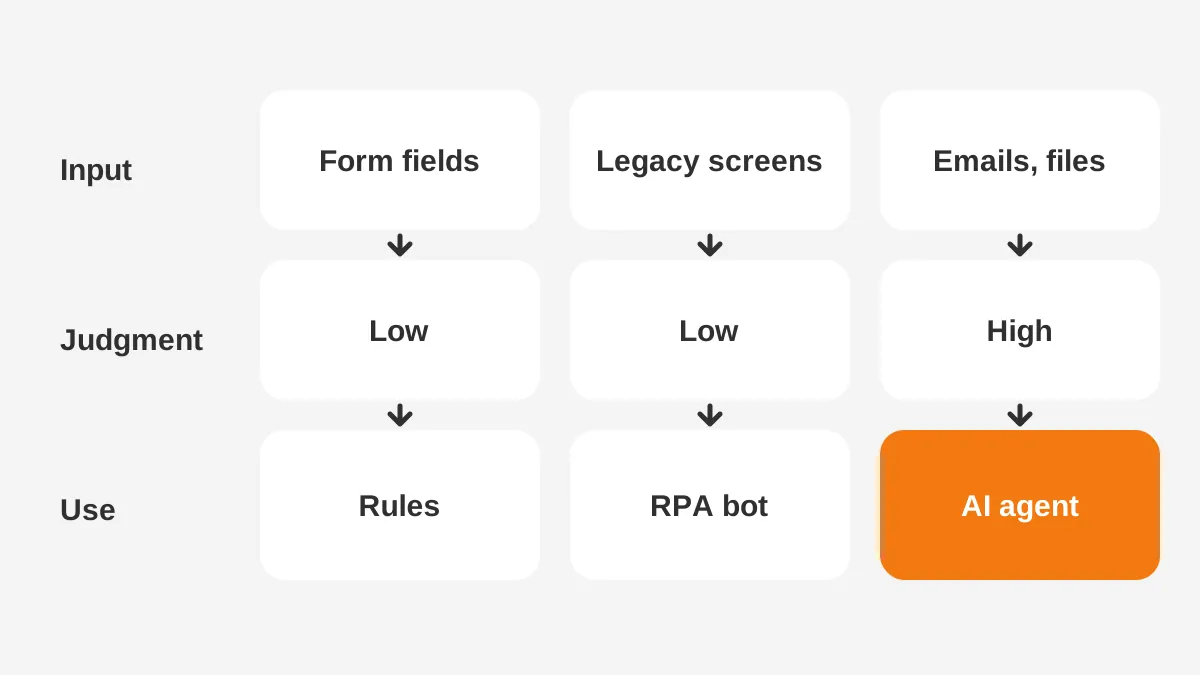
A decision rule helps. Pick an agent if a person spends two or more minutes reading before acting. Keep rules if the decision fits in one if-then line. More agentic workflow examples by department sit in the Unboxx list of workflow automation examples.
Process mining can find candidates for agentic AI workflow automation. It reads event logs from the ERP or CRM and shows where cases wait longest. Those queues are the best targets for AI workflow automation.
A Worked Example: The Order Desk
A worked example shows agentic AI workflow automation on an order desk. The figures below are assumptions for illustration, not measured results.
Assume a distributor receives 400 emailed purchase orders a week. Staff spend about six minutes on each one. They read the email, find the customer, match part numbers and enter the order in the ERP.
An agent handles the same work in five steps:
- It reads the email and attachment.
- It matches the customer in the CRM.
- It maps each line to a part number, using past orders as memory.
- It checks prices against the contract list.
- It creates a draft order through ERP integration.
Lines that do not match, or prices outside the contract, go to a person with a note. If 70% of orders pass without edits, staff review 120 instead of keying 400. The shift from keying to reviewing is where decision automation pays back.
Measure the pilot on four numbers: straight-through rate, error rate after review, minutes per order and cost per order. Compare each number with the manual baseline from the same weeks. If agentic AI workflow automation lowers minutes without raising errors, expand to the next customer group.
The design keeps a human in the loop for every price exception. It also limits the agent to drafts, so no order ships without approval. The AI business automation process guide explains how to scope a pilot like this.
Which Agentic AI Tools and Platforms Exist?
Agentic AI tools fall into three groups: CRM-native agents, workflow platforms with agent steps, and developer frameworks. The right group depends on where the data lives and who will maintain the agent.
| Group | Examples | Good for |
|---|---|---|
| CRM-native agents | Salesforce Agentforce, HubSpot agents, Microsoft Copilot Studio for Dynamics 365 | Sales and service work inside the CRM |
| Workflow platforms | n8n, Zapier, UiPath | Connecting apps and adding agent steps to existing flows |
| Developer frameworks | LangGraph, LangChain | Custom agents with full control over state and logic |
Pick by maintenance, not by demo. Ask who will update instructions, fix broken connectors and review logs after launch. An in-house admin will find a CRM-native agent easier to own. A development team gets more control over agentic AI workflow automation from a framework.
The n8n documentation describes its AI Agent node in plain terms. Connect a chat model and tools, and the agent decides which tools to call. That is the core of LLM agents in any platform.
Developer frameworks add control. LangGraph's documentation lists durable execution, persistence and human-in-the-loop as core features. It can pause a run, let a person edit the state, then continue.
Agentic AI platforms also differ by system. Teams on Odoo or a custom ERP often need a workflow platform or framework. Teams on Salesforce, HubSpot or Dynamics 365 can start with the CRM's own agents.
The market is growing fast. Mordor Intelligence values it at USD 9.89 billion in 2026 and forecasts USD 82.27 billion by 2032 (Mordor Intelligence, 2026). Expect frequent changes to agentic AI workflow automation products.
What Are the Main Agentic AI Risks?
The main agentic AI risks are wrong actions, data exposure, runaway cost and projects with no clear value. Each one needs a control before the agent goes live.
Gartner predicts that more than 40% of agentic AI projects will be canceled by the end of 2027. It cites escalating costs and unclear business value. Both causes trace back to planning: a pilot without a measurable target cannot show its value.
Agentic AI governance turns those risks into rules:
- Scope: list the exact systems and fields the agent can read and write.
- Approval: require human sign-off on money, contracts and customer commitments.
- Guardrails: block actions outside the scope and cap tokens per run.
- Observability: track accuracy, escalation rate, cost per case and time saved.
- Review: sample completed runs every week and correct the instructions.
The NIST AI Risk Management Framework, released on January 26, 2023, gives a structure. Its four functions are Govern, Map, Measure and Manage. Risk teams that already use the AI RMF can apply it to agents too.
Cost control needs its own plan. Every model call costs money, and a looping agent can call the model dozens of times.
Set a budget per run, alert on outliers and review the most expensive runs each week. Agentic AI workflow automation should cost less per case than the manual step it replaces.
Human in the loop AI is the most direct control. It slows the process at first. As accuracy proves out, approval can move from every case to a sample.
How Do You Implement Agentic AI in a Pilot?
To implement agentic AI, pick one workflow and define success in numbers. Build with guardrails, then run it beside the current process. Widen the scope only after the results hold.
- Choose a workflow with steady volume and a clear owner.
- Write down the current time, error rate and cost per case.
- Map each step and mark which ones need judgment.
- Build the agent for those steps only, and keep rules for the rest.
- Run it in shadow mode, where the agent drafts and people decide.
- Compare results for four to six weeks, then decide whether to expand.
Check readiness before step one. Agentic AI workflow automation needs four things in place:
- Clean source data, such as customer, product and price records.
- Written rules for the decisions the agent will make.
- API access to the systems the agent must read and update.
- An owner who will review agent output every week.
Shadow mode is the safest test. The agent processes every case, but people still make the final decision. Each disagreement between the agent and the person becomes a training note for the instructions. After four weeks, the team knows the real accuracy rate before any customer sees an agent's work.
If one of these is missing, fix it first. AI-driven workflow automation on bad data produces wrong answers faster.
The AI implementation roadmap sets this out as a 90-day plan. CRM automation is often the first win, because the data already sits in one system.
Unboxx builds agentic AI for business teams on Salesforce, HubSpot, Dynamics 365 and Odoo. Its AI business automation services cover process mapping, agent design, integration and monitoring. One example is the work behind secure AI agents for enterprise work.
Frequently Asked Questions
How do AI agents differ from AI workflows?
An AI workflow follows a path set in code, with a model doing set tasks at fixed points. AI agents choose their own steps and tools to reach a goal. Most business systems combine both: a fixed process with an agent handling the steps that need judgment.
Does agentic automation replace RPA?
No. RPA still suits stable screen tasks in systems without APIs. Agentic automation handles variable inputs and exceptions that break RPA scripts. Teams often run both. An agent decides what to do, and an RPA bot enters the result into a legacy screen.
Who should own an agentic workflow?
The business owner of the process should own the outcome, such as the order desk or service manager. IT or a partner owns the build, integrations and security. A named reviewer checks samples of agent decisions each week and updates the instructions when errors appear.
When are agentic workflows not worth it?
They are not worth it when one rule already decides the outcome or volume is low. Rare, costly errors are another warning sign. In those cases, standard rule-based automation is cheaper and easier to audit. Agents earn their cost on frequent, varied cases that need short judgment.
What are the benefits of agentic workflows?
The benefits of agentic workflows are fewer manual queues, faster handling of exceptions and more consistent decisions. Staff review drafts instead of keying data. The gains depend on clean data, clear rules and a human checkpoint. Measure them against the current process.
Is Agentic AI Workflow Automation Right for You?
Agentic AI workflow automation is right for teams with high-volume, exception-heavy processes and clean enough data to ground an agent. It is not a replacement for clear rules, owners or business process automation that already works.
The teams that succeed treat agentic AI workflow automation as process design first and software second. They pick one queue, write the rules down and measure honestly.
Unboxx helps B2B teams pick the first workflow, design the guardrails and connect agents to their CRM and ERP. To test agentic AI workflow automation on one of your processes, schedule a consultation with the Unboxx team.
Let's create something out of this world together.
Have a project in mind? Contact us for expert design and development solutions. Let's discuss how we can help grow your business.
Ready to Unboxx Your Potential?
Build smarter systems. Automate faster. Scale confidently.