
Sales reps spend 70% of their time on work that is not selling. That figure comes from the Salesforce State of Sales report (2024). Lead follow-up, meeting prep and opportunity updates eat the week. Deals slip while reps type notes into the CRM.
Agentforce for Sales is the set of AI agents Salesforce builds into its sales product to take on that work. The agents nurture inbound leads, book meetings, update opportunities, coach reps and draft quotes.
This guide explains what each agent does, what your org needs first, how setup works and what it costs.
Key Takeaways
- Agentforce for Sales adds AI agents for lead nurturing, coaching, pipeline updates, quoting and account research inside Salesforce.
- Agentforce SDR needs Enterprise, Performance or Unlimited Edition with Einstein for Sales, plus a dedicated agent user.
- Budget for the $125 per user per month add-on and for consumption charges on lead-facing agent work.
What Is Agentforce for Sales?
Agentforce for Sales is a group of autonomous AI agents that work on Salesforce sales records. Each agent reads CRM data, decides on a next step and takes an action within limits you set.
Salesforce first sold the agents as an addition to Sales Cloud. At Dreamforce 2025, Salesforce renamed Sales Cloud to Agentforce Sales, as part of the Agentforce 360 launch. The product name now carries the agent brand. The underlying objects stay the same: leads, contacts, accounts, opportunities and quotes.
The difference from older Einstein features is autonomy. Einstein scoring suggested which lead to call. An Agentforce SDR agent writes to the lead, answers questions and books the meeting itself. Agentforce vs Einstein is therefore a question of who acts, the rep or the agent.
Agentforce for Sales is built for B2B teams on Salesforce with steady inbound lead flow and long deal cycles. Manufacturers, SaaS vendors and professional services firms fit that profile. A team that closes most deals by phone in one call gains less from agents that nurture over weeks.
That shift matters for planning. Gartner predicts that by 2028, 60% of B2B seller work will run through conversational interfaces. In 2023 the share was less than 5% (Gartner, 2023). Agentforce for Sales is the Salesforce answer to that prediction.
Which Agents Does Agentforce for Sales Include?
Agentforce for Sales includes agents for prospecting, inbound engagement, pipeline management, account research, coaching and quoting. Salesforce groups them by sales stage on its AI sales agent page. The table below lists the main Salesforce sales agents and what each one changes for a rep.
| Agent or skill | What it does | Main records it touches |
|---|---|---|
| Agentforce SDR | Nurtures inbound leads, answers questions, handles objections, books meetings | Leads, contacts, events |
| Agentforce Sales Coach | Runs deal-specific role-play and gives feedback on pitches | Opportunities |
| Pipeline management | Updates Stage and Next Steps from calls, emails and notes | Opportunities |
| Prospecting | Ranks prospects by intent signals and drafts outreach | Leads, accounts |
| Account research | Builds account plans with company overviews and trends | Accounts, account plans |
| Quoting | Creates and amends quotes from plain-language requests | Quotes, products, price books |
Agentforce SDR for inbound leads
The Agentforce SDR agent is where most teams start with Agentforce for Sales. As a sales development agent, it is the first contact for inbound leads. It sends personalized outreach and books meetings on a rep's calendar.
Lead nurturing and lead qualification run around the clock, so no web lead waits until Monday.
Prospecting agent for outbound
The prospecting capabilities rank accounts by intent signals and research each prospect across Salesforce, call recordings and the web. The agent then drafts outreach in the brand voice for a rep to review. Salesforce also previews a sales agent called Hunter that learns from top sellers.
Agentforce Sales Coach for reps
The Sales Coach agent sits on the Opportunity record page. A rep practices a pitch or a negotiation against a simulated buyer built from that deal's data. The agent then scores the role-play against the same standard every time.
Pipeline, quoting and account agents
Pipeline management reads sales conversations and proposes field updates. It runs in suggestive mode, where a rep approves each change, or in autonomous mode. In Pipeline Inspection, an Agent Activity column shows each recommendation with its source. Quoting and account research follow the same pattern of draft, review and approve.
How Does Agentforce for Sales Work Inside Salesforce?
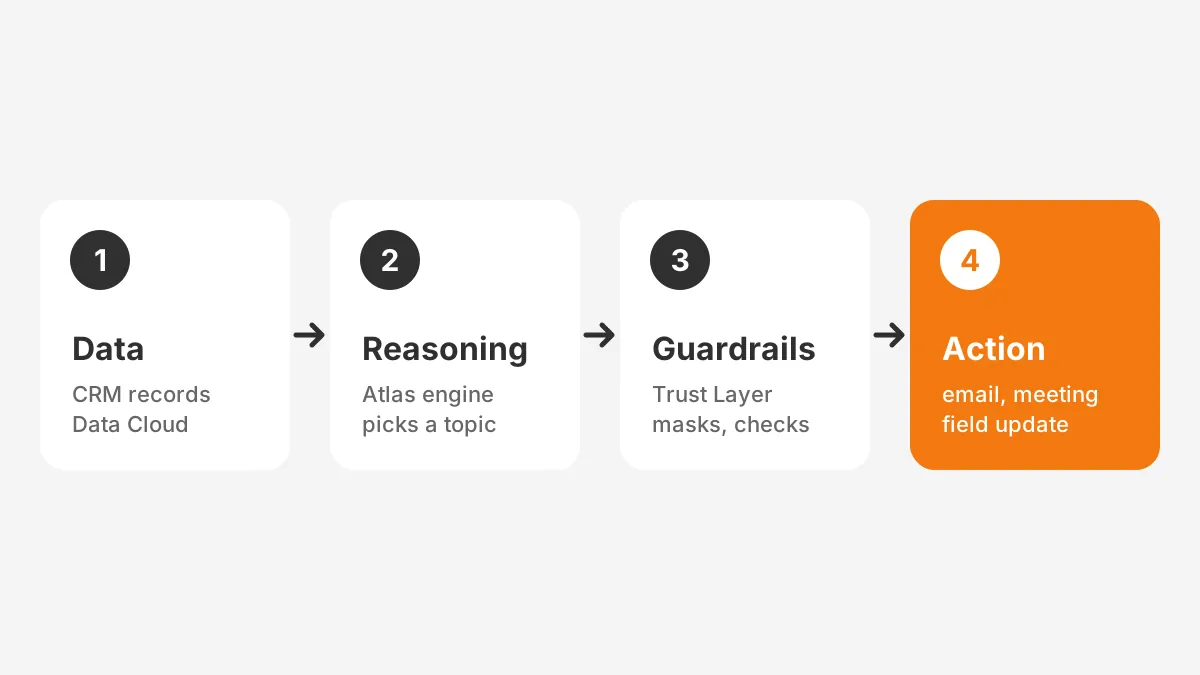
Agentforce for Sales works in three layers: data, reasoning and action. Each agent pulls context from CRM records and Data Cloud. It plans with the Atlas Reasoning Engine, then runs approved actions.
- Data: the agent reads leads, opportunities, emails and call notes. It also reads external data in Data Cloud, now branded Data 360.
- Reasoning: the Atlas Reasoning Engine picks a topic, such as booking a meeting, and plans the steps.
- Guardrails: the Einstein Trust Layer masks sensitive data and checks output before anything reaches a buyer.
- Action: the agent runs actions you allowed in Agentforce Builder, such as sending an email or updating a field.
Topics and actions are the parts you control. A topic describes a job and its rules. An action is a flow, an Apex class or a prompt template the agent may call. Prompt Builder holds the templates, and retrieval augmented generation (RAG) grounds answers in approved content.
What does one agent workday look like?
Here is an illustrative example of Agentforce for Sales across one day. A web lead fills in a demo form at 7 a.m. The SDR agent replies within minutes, answers two product questions and books a call for 11 a.m.
After the call, the pipeline agent reads the transcript. It proposes a new stage, a close date and next steps on the opportunity. The rep accepts two changes and edits one.
Before the next meeting, the rep practices the pricing conversation with Sales Coach. The coach plays a buyer who pushes for a discount. With Agentforce for Sales, the rep spends the day on calls instead of data entry.
Because every layer starts with CRM records, data quality sets the ceiling on agent quality. If opportunity stages are stale or lead sources are blank, the agent reasons from bad inputs. The State of Sales report found that only 35% of sales professionals completely trust their data accuracy.
What Do You Need Before Turning It On?
Four things come first: the right edition, the right add-ons, a dedicated agent user and clean data. Missing any one of these stops setup or produces weak agent output.
Use this checklist for Agentforce prerequisites before a rollout:
- Confirm Lightning Experience on Enterprise, Performance or Unlimited Edition.
- Confirm the Einstein for Sales add-on for the SDR agent.
- Confirm the Agentforce Sales Coach add-on if coaching is in scope.
- Check that Data Cloud is provisioned, because Sales Coach depends on it.
- Create an agent user with the Einstein Agent license.
- Assign permission sets such as Configure Agentforce SDR Agent and Automated Actions User.
- Connect rep mailboxes to Einstein Activity Capture so agent emails appear on the timeline.
Each requirement above comes from the Salesforce Trailhead Summer '25 release module. Release notes change three times a year, so check the current version before you buy. Orgs on the newer Core, Advanced or Max editions should confirm SDR eligibility with Salesforce.
Data readiness checks
Agentforce data readiness is the step most teams skip. Run four checks before go-live. Lead owner and lead source fields should be complete. Opportunity stages should match your real sales process. Duplicate contacts should be merged. Product and price book records should be current if quoting is planned.
A short CRM data cleansing runbook covers deduplication and field standards by platform. CRM data quality work done here pays off in every agent you add later.
How Do You Set Up Agentforce SDR?
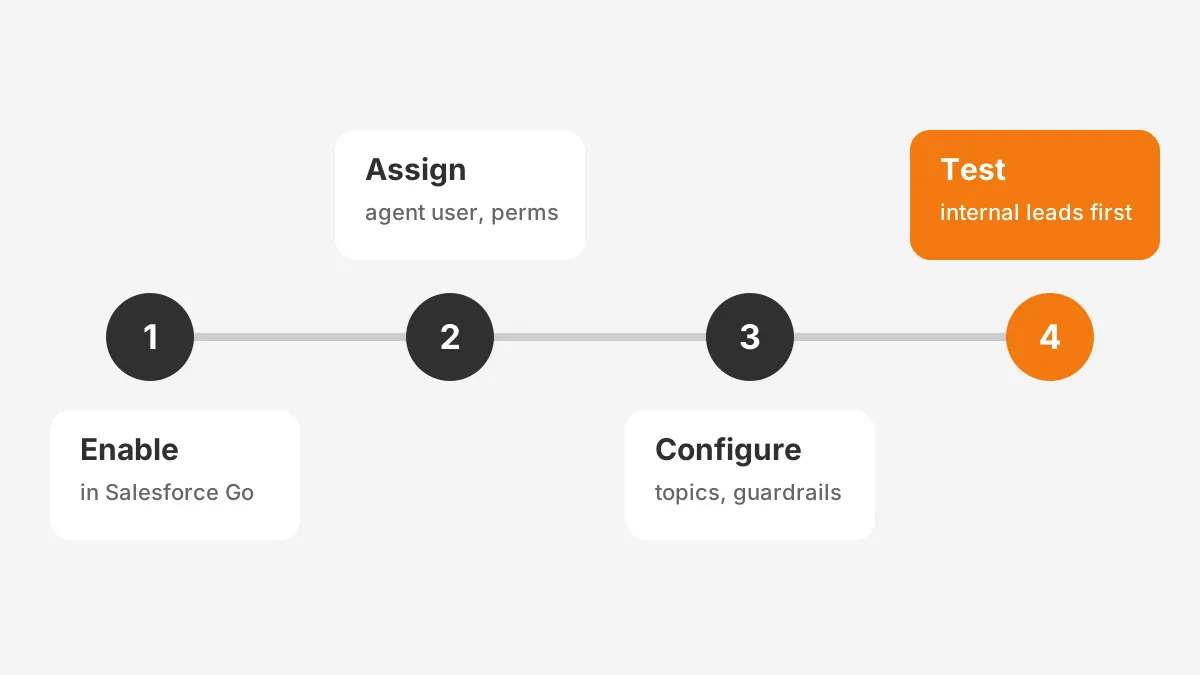
You set up Agentforce SDR in two stages: turn it on in Salesforce Go, then configure it in Agentforce Builder. The full Agentforce SDR setup takes the steps below.
- Open Setup, select Salesforce Go and choose Set Up on the Agentforce for Sales card.
- Click Turn On to enable Agentforce, then switch on the SDR Agent for inbound nurturing.
- Create the agent user, assign the Einstein Agent license and add the required permission sets.
- Give the user that configures it the Sales Engagement Cadence Creator permission.
- In Agentforce Builder, write the agent's role, company description and tone.
- Set guardrails: which leads it may contact, how often, and when to hand off to a rep.
- Add knowledge sources so answers come from approved product content.
- Test with internal leads, then activate for one lead source.
The hand-off rule deserves the most time. Decide which signals move a lead from the agent to a human. Typical signals are a pricing question or a demo request. Write that rule into the topic instructions in plain sentences.
Writing topic instructions for the SDR
Topic instructions are plain sentences that tell the agent what it may and may not do. Short, testable rules work better than long policy text. Here is an example set for an inbound demo form:
- Reply to new web leads within 10 minutes during business hours.
- Answer product questions only from the approved knowledge articles.
- Offer three meeting slots from the assigned rep's calendar.
- Hand off to the rep when a lead asks about pricing or contracts.
- Stop outreach after three unanswered emails and mark the lead as nurture.
Test each rule with internal leads that try to break it. Ask the agent for a discount, a competitor comparison or legal terms. Agentforce Builder shows the topic and action the agent chose, so you can tighten the wording before go-live.
Inbound leads from one web form make a safe first channel. Expand to event leads and older nurture lists once reps trust the meetings the agent books.
How Do You Set Up Agentforce Sales Coach?
You set up Agentforce Sales Coach in three moves: enable its features, create an agent user and place the component. The Agentforce Sales Coach setup follows these steps:
- In Setup, open Agentforce Sales Coach and click Enable All.
- Confirm Data Cloud shows your home org details.
- Create a user with the Einstein Agent license and the Einstein Agent User profile.
- Assign the Sales Coach Agent permission set to that user.
- Give managers Manage Agentforce Sales Coach and reps Use Agentforce Sales Coach.
- In Lightning App Builder, add the Sales Coach component to the Opportunity record page.
- Configure the sales coach agent in Agentforce Builder and activate it.
Sales coaching works best with your own playbook. Attach a retriever from the Einstein Data Library to the prompt templates. The coach then grades role-play against your discovery questions and objection answers, not generic advice.
How Much Does Agentforce for Sales Cost?
Agentforce for Sales costs $125 per user per month as an add-on, according to the Agentforce pricing page. That add-on suits orgs on legacy Enterprise and Unlimited Editions. The Max Edition starts at $550 per user per month.
New buyers have a second route. Since September 2026, Core, Advanced and Max editions bundle Agentforce, Slack and Flex Credits, per Salesforce Ben (2026). Core costs $195 and Advanced $395 per user per month. Existing customers keep their legacy edition pricing.
| Pricing option | List price | Best fit |
|---|---|---|
| Agentforce add-on for Sales | $125 per user per month | Employee-facing agents for named reps |
| Core Edition | $195 per user per month, with 500,000 Flex Credits per org per year | New buyers starting with sales agents |
| Advanced Edition | $395 per user per month, with 1 million Flex Credits per org per year | New buyers adding sales programs |
| Max Edition | From $550 per user per month, with 2.75M Flex Credits per org per year | Teams buying the full sales suite |
| Flex Credits | $500 per 100,000 credits (20 credits per action) | Lead-facing work such as the SDR agent |
| Conversations | $2 per conversation | Low, predictable chat volumes |
The same pricing page lists unmetered usage for employees under the add-ons. Agents that talk to buyers, such as the SDR, should be planned on consumption pricing. Confirm the split with your account executive before signing.
Here is a worked example with assumed figures. A team of 20 reps on the add-on pays $125 times 20 times 12. That is $30,000 a year at list price.
If the SDR agent runs 5,000 actions a month, Flex Credits add $500 a month. That brings the first year to about $36,000 before services.
How do you keep consumption costs predictable?
Consumption costs stay predictable when you cap agent actions and review usage every month. Use these controls from the first week:
- Limit the SDR agent to one lead source until its meeting rate is known.
- Set a maximum number of follow-up emails per lead in the topic instructions.
- Track Flex Credits used per meeting booked, not credits used in total.
- Review the Digital Wallet balance with finance at each monthly close.
Agentforce pricing moved from $2 per conversation in 2024 to Flex Credits and per-user add-ons in 2025. Lock the pricing model into your order form, so a mid-term change does not reset your budget.
The full Agentforce cost breakdown covers discounts, implementation fees and first-year totals in more detail.
Where Does Agentforce for Sales Fall Short?
The agents struggle where data is poor or processes are undefined. They also cannot help teams that run another CRM. These Agentforce limits appear in most early rollouts.
- Poor data: the agent repeats errors in stage, owner and contact records at scale.
- Vague rules: an SDR without a clear hand-off rule either over-contacts leads or passes them too early.
- Edition gaps: Professional Edition orgs cannot run the SDR agent under the published requirements.
- Cost drift: consumption charges grow with lead volume unless you cap actions.
- Change fatigue: reps ignore suggestions they do not trust, which wastes the add-on.
- Answer quality: an agent without approved knowledge can give a wrong product answer to a buyer.
Answer quality is the risk sales leaders ask about most. The Einstein Trust Layer checks output for toxicity and masks sensitive fields. It does not know whether a product claim is true. Grounding answers in reviewed knowledge articles, and reviewing a sample of agent emails each week, closes that gap.
Each of these limits can be planned for. Decisions on scope, data and governance made before launch address most of them.
Agentforce for small business is a harder case. A five-rep team on Professional Edition must upgrade editions first. That upgrade can cost more than the agents themselves. For those teams, rule-based automation often covers the same ground, as the comparison of AI agents and traditional automation explains.
Competing CRMs also ship agents. HubSpot offers Breeze agents and Microsoft Dynamics 365 offers a Sales Qualification Agent. The choice usually follows the CRM you already run, not the agent feature list.
Which Rollout Order Works Best for Sales Teams?
The best rollout order for Agentforce for Sales starts with low-risk internal agents and ends with buyer-facing ones. This order builds rep trust before an agent speaks for the company. It also limits the cost of early mistakes.
- Weeks 1 to 2: clean data and confirm licences, permission sets and Data Cloud.
- Weeks 3 to 4: turn on pipeline management in suggestive mode for one team.
- Weeks 5 to 6: add Sales Coach for new hires and one active deal type.
- Weeks 7 to 8: launch the SDR agent on one inbound source with a strict hand-off rule.
- Week 9 onward: review results, then add quoting or prospecting.
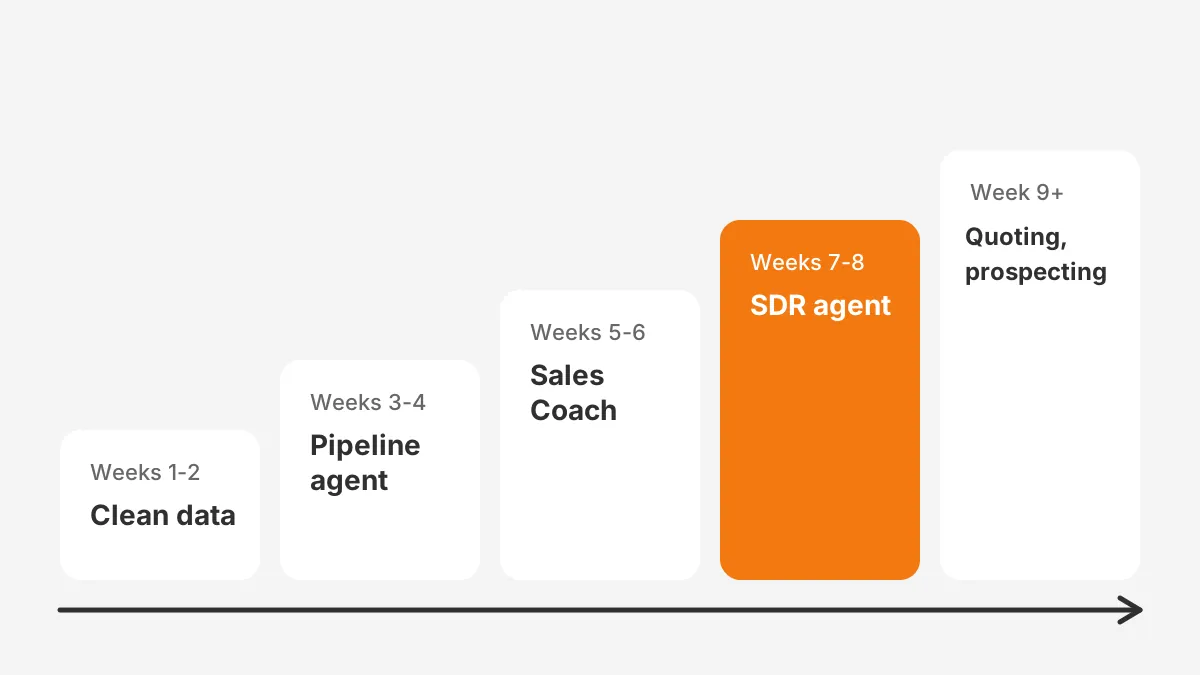
The week counts above are an Unboxx planning assumption for a mid-sized org, not a Salesforce figure. Teams with messy data need longer in phase one. Measure three numbers at each review: meetings booked, opportunity fields updated without edits and rep adoption rate.
What should you measure at each review?
Each review should compare agent output against the manual baseline from before launch. The table below lists the measures that show whether Agentforce for Sales is working.
| Agent | Measure | Why it matters |
|---|---|---|
| Pipeline management | Share of suggested updates accepted without edits | Shows whether reps trust the agent |
| Sales Coach | Role-play sessions per rep per month | Shows whether coaching is used |
| Agentforce SDR | Meetings booked and meetings held | Shows lead quality, not activity |
| All agents | Flex Credits per outcome | Shows cost per result |
Agentforce implementation also needs an owner on the sales side. A sales operations lead should approve topics, review agent emails weekly and decide when to widen scope. The Salesforce Sales Cloud implementation phases give a model for that governance.
Agentforce use cases for sales expand once the first agents prove out. Teams that want help shaping topics, actions and guardrails can review AI-native CRM services from Unboxx. One recent success story on secure AI agents shows the same staged approach.
Frequently Asked Questions
Is Agentforce for Sales included in Sales Cloud?
Not in legacy Sales Cloud editions, where Agentforce for Sales is a $125 per user add-on. The newer Core, Advanced and Max editions bundle Agentforce with Flex Credits. Free Salesforce Foundations access includes Agentforce Builder and Prompt Builder for building and testing.
How long does an Agentforce for Sales rollout take?
A first agent can go live in three to four weeks once licences and data are ready. A staged rollout across pipeline, coaching and SDR agents takes about two months in a mid-sized org. Data cleanup is the step that most often extends the timeline.
Can Agentforce SDR email leads without a human?
Yes. The SDR agent sends outreach and replies on its own within guardrails you set in Agentforce Builder. Reps see every agent email on the lead's activity timeline through Einstein Activity Capture. A hand-off rule sends pricing or demo requests to a human seller.
What is the difference between Agentforce and Einstein?
Einstein features predict and suggest, such as lead scores and next best actions. Agentforce agents act on those insights by sending emails, booking meetings and updating records. Agentforce still uses the Einstein Trust Layer for data masking and output checks behind every action.
Does Agentforce for Sales work with data outside Salesforce?
Yes, through Data Cloud, now branded Data 360. Product documents and third-party intent data can be brought in as agent context. Salesforce lists conversation, customer and external data as agent inputs. The agent's actions still write to Salesforce records like leads, opportunities and quotes.
How Can Unboxx Help You Launch Agentforce for Sales?
Agentforce for Sales pays off with clean data, written hand-off rules and a staged rollout. Skipping those steps turns a sales agent into a source of bad emails and wrong fields.
Unboxx is a Salesforce Crest Partner that plans and configures Agentforce for Sales around your existing sales process. Book a consultation with Unboxx to review your edition, data and first agent.
Let's create something out of this world together.
Have a project in mind? Contact us for expert design and development solutions. Let's discuss how we can help grow your business.
Ready to Unboxx Your Potential?
Build smarter systems. Automate faster. Scale confidently.