
A growing company picks a CRM. Two years later, finance still keys every closed deal into a separate accounting system. That gap is where the Odoo vs Salesforce question usually starts.
Salesforce led all CRM vendors with a 20.7% share in 2024, per IDC data published by Salesforce in 2025. Odoo comes from the ERP side instead.
The short answer to Odoo vs Salesforce: Odoo fits companies that want sales, accounting and inventory in one low-cost system. Salesforce fits companies that need a deep sales platform for complex processes.
Key Takeaways
- Odoo is an ERP suite with a CRM app, while Salesforce is a CRM platform that connects to an ERP.
- At 2026 list prices, Odoo licenses for 20 users cost a fraction of Salesforce Core licenses.
- The right choice depends on whether operations or sales complexity drives the project.
What Is the Core Difference in Odoo vs Salesforce?
The core difference in Odoo vs Salesforce is scope. Odoo is a modular business suite. Its CRM app shares one database with accounting, inventory, purchasing and manufacturing. Salesforce is a cloud CRM platform built around sales, service and marketing, and it reaches finance data through integration.
That design choice shapes the rest of any Odoo vs Salesforce comparison. In Odoo, a won opportunity becomes a quotation, a sales order, a delivery and an invoice in one system.
In Salesforce, the same flow usually ends at a closed deal. The order then passes to an ERP such as NetSuite, SAP or Odoo itself.
The two platforms also differ in how they are built and hosted. Odoo is written in Python and comes in two editions. Odoo Community is free and open source. Odoo Enterprise is the paid edition, sold per user per month.
Odoo Enterprise runs on Odoo Online, on Odoo.sh or on your own servers. Salesforce runs only as a multi-tenant cloud service. Developers extend it with Salesforce Flow for no-code automation and Apex for custom code. Partners add packaged apps through AppExchange, the Salesforce app marketplace.
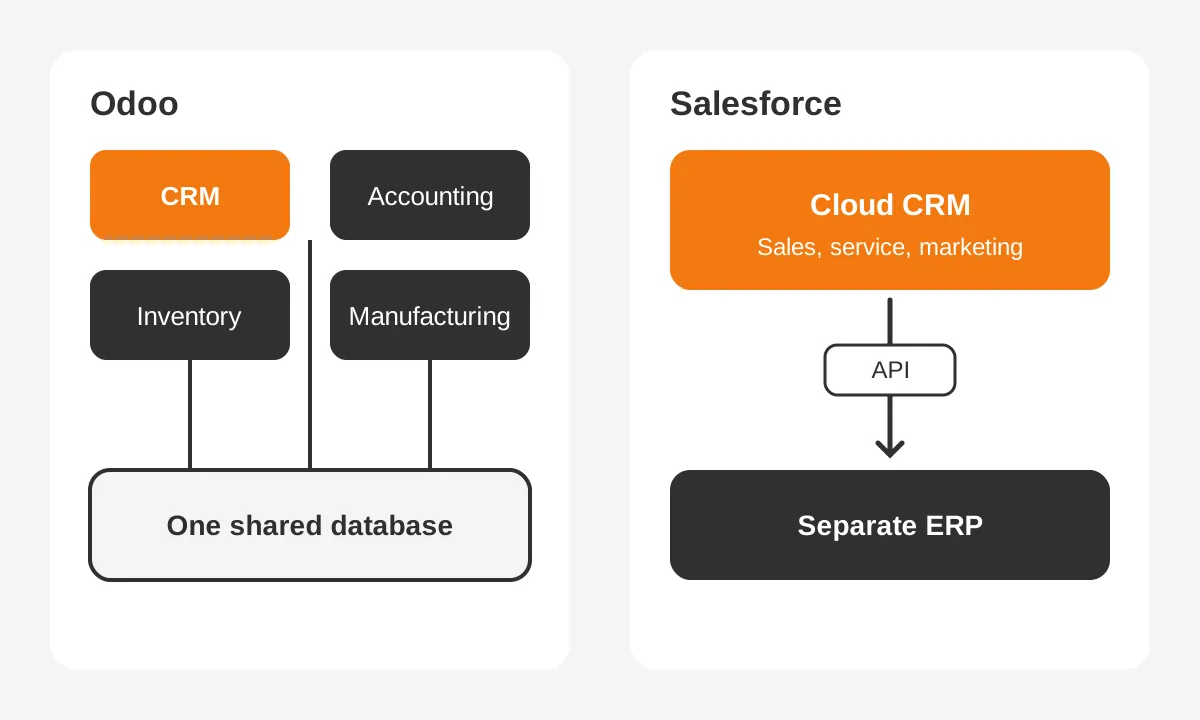
So the useful Odoo vs Salesforce question is rarely "which CRM is better". It is "where should the system of record for orders and invoices live". Answer that first, and the comparison gets much shorter.
How Do Odoo and Salesforce CRM Features Compare?
Both platforms cover the daily work of a sales team: leads, opportunities, a sales pipeline, activities and reports. The Odoo vs Salesforce gap shows in depth, automation and ready-made extensions. Odoo CRM is lean and quick to learn. Salesforce CRM offers more configuration, with more admin work to match.
| Area | Odoo CRM | Salesforce Sales Cloud |
|---|---|---|
| Pipeline and leads | Kanban pipeline, lead assignment and predictive lead scoring | Leads, opportunities, forecasting, territory and lead scoring options |
| Quotes to invoices | Native: quote, order, delivery and invoice in one database | Quotes in CRM; orders and invoices usually in a connected ERP |
| Automation | Automated actions, plus Odoo Studio on a higher-tier plan | Salesforce Flow, approval processes and Apex code |
| Extensions | Odoo Apps store and community modules | AppExchange packages from Salesforce partners |
| AI | AI features inside Odoo apps | Agentforce agents, sold as add-ons or in the Max edition |
| Hosting | Odoo Online, Odoo.sh or on-premise | Salesforce cloud only |
For a 10-person sales team that sells standard products, the Odoo CRM app often covers the full process. Reps see stock levels and past invoices on the customer record without an integration. Sales managers get pipeline reports from the same data that finance uses.
Salesforce pulls ahead when the sales process itself is complex. Examples include account teams with territories, partner channels, multi-step approvals and forecasts by product line. Salesforce Sales Cloud handles these patterns with standard objects and Salesforce Flow rather than custom code.
Where does each CRM ask more of your team?
Odoo asks more of operations. Its CRM depends on clean product, pricing and warehouse data, because sales and stock share one database. Salesforce asks more of administration. A Salesforce org with 50 users usually needs a named admin to manage fields, Flows, permissions and releases.
That admin load is a real line in the budget for either side of Odoo vs Salesforce. Teams that want outside help can use Unboxx CRM consulting and implementation services for setup and support. The Unboxx guide to running a structured CRM selection process scores fit before price.
How do the AI features compare?
Salesforce sells AI as named products. Agentforce agents come as add-ons to Enterprise and Unlimited editions, or inside the Max edition. Odoo builds AI features into its apps rather than selling a separate agent product.
For most buyers, AI should not decide Odoo vs Salesforce on its own. AI agents work only as well as the CRM data under them. Fix data quality and process ownership first, then compare AI add-ons against a real use case such as lead follow-up.
How Does Odoo vs Salesforce Pricing Compare in 2026?
On license price alone, Odoo vs Salesforce pricing is not close: Odoo costs less per user. Odoo Community is free. The Odoo Standard plan runs about $24.90 per user per month billed annually, per Sybill's 2026 comparison. That one price covers the Odoo apps, including CRM, accounting and inventory.
Salesforce prices each cloud and edition separately. The Salesforce Sales Cloud pricing page, checked in November 2026, lists these per-user monthly prices, billed annually.
| Salesforce edition | Price per user per month | Notes |
|---|---|---|
| Free Suite | $0 | Entry plan |
| Starter Suite | $25 | Billed monthly or annually |
| Pro Suite | $100 | Billed annually |
| Core | $195 | Replaces Enterprise Edition |
| Advanced | $395 | Replaces Unlimited Edition |
| Max | $550 | Replaces Agentforce 1 Edition |
The same page lists a Web Services API add-on at $25 per user per month. That matters for any ERP integration. Salesforce developer documentation says API access is on by default in Enterprise, Performance, Unlimited and Developer orgs. Professional orgs add it as an add-on.
Prices also move. Salesforce raised Enterprise and Unlimited list prices by an average of 6% on August 1, 2025. That change is in its 2025 pricing announcement, which also priced Agentforce add-ons from $125 per user per month.
Odoo has its own extra lines. Odoo.sh hosting is billed apart from user licenses, and partner support is a separate contract. Self-hosting Odoo Community removes license fees but adds server, backup and upgrade work.
So is Odoo cheaper than Salesforce? On licenses, yes, by a wide margin. On total cost of ownership, the Odoo vs Salesforce gap narrows once implementation, hosting, integration and admin time are counted. A 20-user example puts numbers on the license part.
What Does a 20-User Team Pay Over Three Years?
A worked example shows the size of the license gap. It uses assumed figures: 20 users, 36 months and the list prices above. It ignores discounts, taxes and implementation, so treat it as a starting point, not a quote.
- Odoo Standard: 20 users x $24.90 x 36 months = $17,928.
- Salesforce Pro Suite: 20 users x $100 x 36 months = $72,000.
- Salesforce Pro Suite with the API add-on: $72,000 plus 20 x $25 x 36 = $90,000.
- Salesforce Core: 20 users x $195 x 36 months = $140,400.
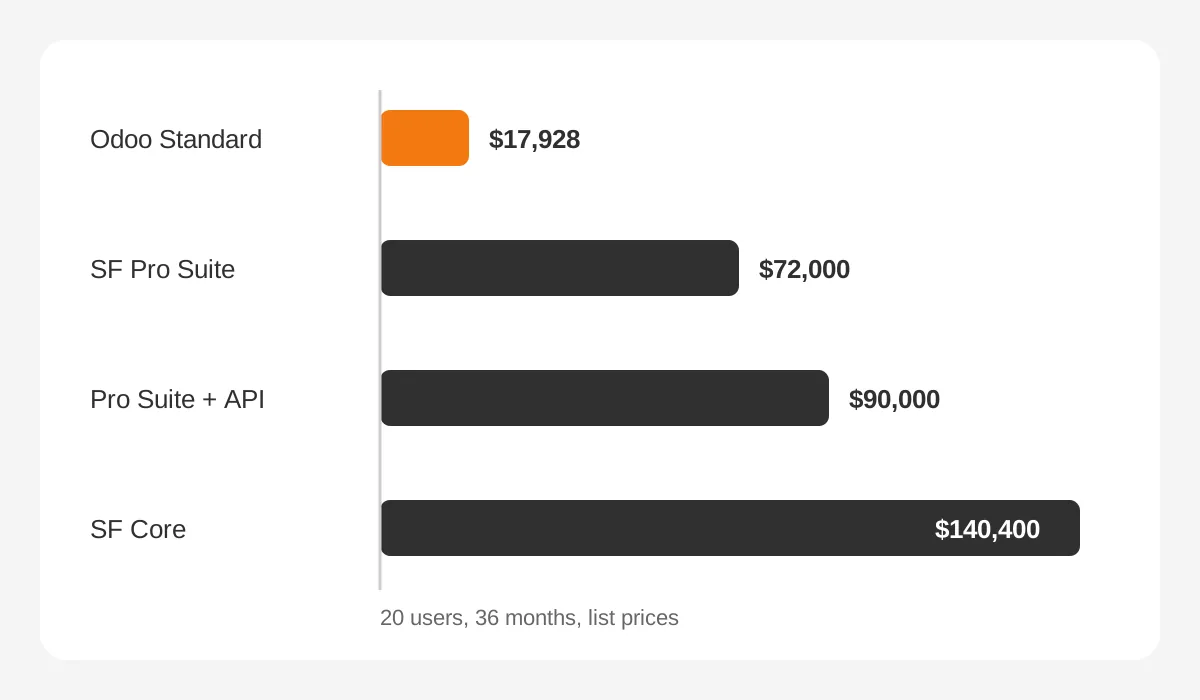
The Odoo figure also includes accounting and inventory apps. The Salesforce figures cover CRM only. A Salesforce customer still pays for an ERP, plus the integration that links it to Salesforce CRM.
Scale changes the picture further. At 50 users over 36 months, the same list prices give $44,820 for Odoo Standard. Salesforce Pro Suite reaches $180,000, and Salesforce Core reaches $351,000. The license gap in Odoo vs Salesforce grows in step with headcount.
The example leaves out three costs that often decide the budget. The first is implementation partner fees. The second is integration licenses and middleware such as MuleSoft. The third is internal admin time after go-live.
For a fuller view of those lines, see the Unboxx breakdown of CRM implementation cost and what drives the budget.
How Do ERP and Integration Needs Change the Answer?
ERP needs often decide Odoo vs Salesforce before any CRM feature does. A company with no ERP, or an old one, can replace both systems with Odoo in one project. A company that already runs a stable ERP can put Salesforce CRM on top of it.
The integration work differs in each case. With Odoo ERP and Odoo CRM, sales and finance need no integration, because both apps use one database. With Salesforce, someone must design what syncs: accounts, products, price books, orders, invoices and payment status.
| Record | Usual owner | Sync direction with Salesforce |
|---|---|---|
| Accounts and contacts | CRM | Salesforce to ERP |
| Products and price books | ERP | ERP to Salesforce |
| Orders | ERP | Salesforce to ERP on deal close |
| Invoices and payment status | ERP | ERP to Salesforce, read-only |
Expect that design to take real time and testing. The Unboxx guide to CRM ERP integration and what to sync lists the objects that move in each direction. For manufacturers, inventory management and production data add more sync points.
Which CRM is better for manufacturing?
Odoo vs Salesforce for manufacturing turns on the ERP you already have. For a small or mid-sized manufacturer without a modern ERP, Odoo is often the better fit. Its manufacturing, inventory and purchasing apps share data with the CRM.
A rep can promise a delivery date based on real stock and work orders.
For a larger manufacturer with an established ERP and a dealer or distributor channel, Salesforce is often stronger. Salesforce Manufacturing Cloud adds sales agreements and account forecasting on top of Sales Cloud. The ERP stays the system of record for production.
Some companies end up with both. Unboxx delivered a Salesforce and Odoo ERP project for a roadside assistance company. In that design, each system kept its own job.
What Do Implementation and Migration Cost for Each?
Implementation cost follows scope more than platform. Sybill's comparison puts Salesforce year-one implementation at $5,000 to $100,000 or more. It puts an Odoo partner implementation at $5,000 to $50,000. Both ranges are wide because a CRM-only rollout and a full ERP rollout are different projects.
An Odoo implementation that replaces CRM and accounting together is an ERP project. It needs a chart of accounts, tax rules, product data, opening stock and finance sign-off. A Salesforce implementation for sales alone is narrower, but integration and admin setup add weeks.
A typical Odoo vs Salesforce rollout plan shares the same five phases on either side:
- Discovery: map the quote-to-cash process and name an owner for each step.
- Design: agree on fields, pipeline stages, roles and integration points.
- Build: configure the platform, then write only the custom code that is unavoidable.
- Data migration: clean, map and test-load records before the final load.
- Go-live and support: train users, watch adoption and fix issues for 30 days.
Scope drives timelines as well. A CRM-only rollout for 20 users often fits inside 6 to 12 weeks on either platform. A combined CRM and ERP rollout on Odoo usually runs longer, because finance cut-over needs a clean month-end close.
How hard is a CRM migration between them?
Data migration in either direction follows the same steps: audit, map, clean, test and load. Migrating from Salesforce to Odoo means mapping Salesforce accounts, contacts, leads and opportunities to their Odoo records. Custom objects and Flows have no direct Odoo match, so they need a redesign.
Moving from Odoo to Salesforce is usually a CRM-only change. The ERP data often stays in Odoo, and an integration links the two systems after the CRM migration. Plan field mapping for products and price lists early, because both sides rely on them.
In both directions, a CRM migration fails most often on dirty data and missing owners, not on tools. Budget a data clean-up phase before any load.
What does each platform need after go-live?
After go-live, the Odoo vs Salesforce workload looks different. Salesforce ships 3 releases a year, so an admin reviews release notes and tests Flows before each one. Odoo releases a new major version once a year, and each upgrade needs custom modules retested.
Plan a monthly review in the first 6 months on either platform. Track login rates, stale opportunities and duplicate records. Those 3 numbers show whether the Odoo vs Salesforce decision is paying off in daily use.
Which Companies Should Choose Odoo, and Which Salesforce?
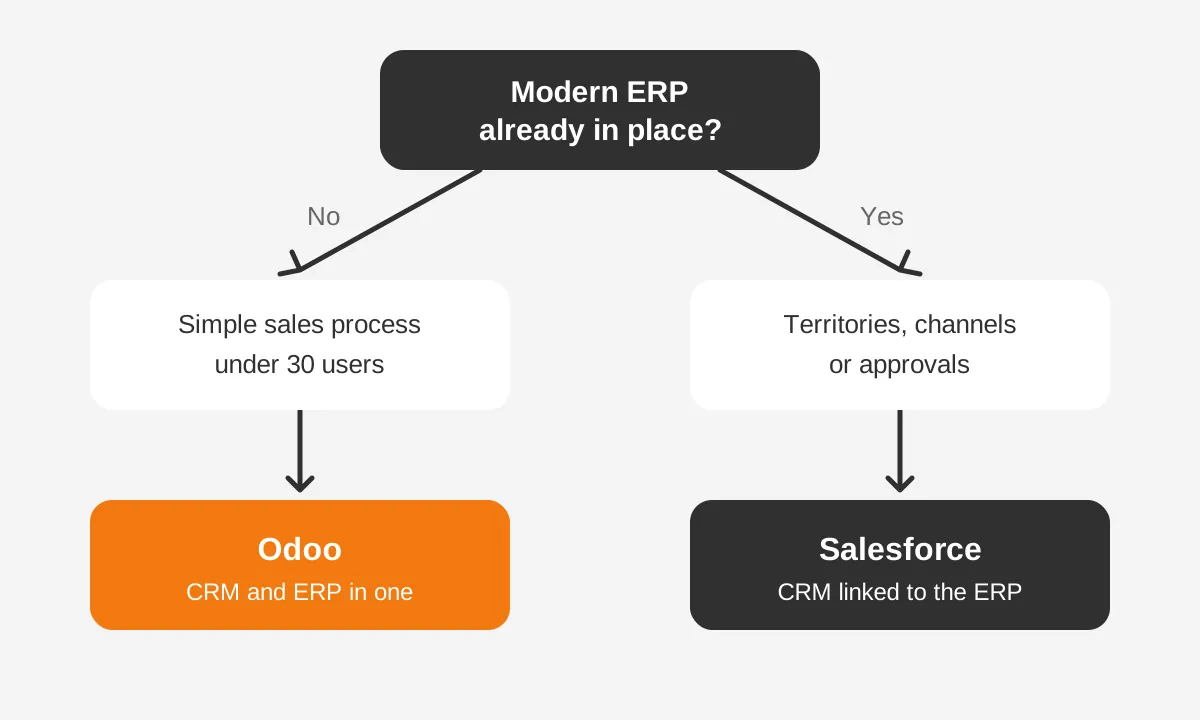
Choose Odoo when operations drive the project and the sales process is simple. Choose Salesforce when sales and service complexity drive the project and an ERP already exists. Most companies fit one of these two Odoo vs Salesforce profiles once the facts are written down.
Whether the shortlist says Odoo or Salesforce, six signals usually settle which group a company belongs to.
- Odoo fits when you need accounting, inventory and CRM in one system.
- Odoo fits when your sales team has fewer than 30 users and one sales motion.
- Odoo fits when license budget is tight and an open-source CRM option matters.
- Salesforce fits when you run territories, partner channels or multi-step approvals.
- Salesforce fits when you already run a stable ERP and want a dedicated cloud CRM.
- Salesforce fits when you plan AI agents at scale through Agentforce.
Who should own the platform decision?
Three people should sign the decision together. The finance lead owns invoicing, tax and month-end close. The sales operations lead owns pipeline stages, quotes and reports. An IT or systems owner owns hosting, security, integrations and upgrades.
When only sales picks the CRM, finance often inherits a second system it never wanted. When only finance picks, reps often get a CRM built around invoices instead of deals. A shared score sheet keeps both views in the Odoo vs Salesforce choice.
For Odoo vs Salesforce for small business, the license math usually favors Odoo. A 5-person team can start on Odoo Community or the Odoo Standard plan. Salesforce Starter Suite at $25 per user is also affordable, but it covers CRM only.
User adoption matters as much as features. A CRM that reps avoid fails on either platform. Test both with 3 real deals from your own pipeline before you sign.
What Should You Test in Odoo vs Salesforce Demos?
Test your own process, not the vendor's script. A scripted demo shows each platform at its best. A process demo shows where your team will need custom work. That is where Odoo vs Salesforce costs differ most.
Ask each vendor or partner to run these five tests live:
- Create a lead from a web form, assign it and convert it to an opportunity.
- Build a quote with your real price list, discount rules and approval step.
- Turn the won deal into an order and an invoice, and show where each record lives.
- Show a pipeline report by rep and stage, then change one stage name.
- Show what breaks, and who fixes it, at the next version upgrade.
Give each test a score from 1 to 3 for fit, effort and cost. Keep the score sheet with your CRM requirements, so the final Odoo vs Salesforce decision rests on evidence. Invite one finance user to the demo, because quote-to-cash is where the two platforms split.
Can You Run Odoo and Salesforce Together?
Yes, and some companies get the best result from Odoo and Salesforce together. Salesforce handles sales, service and marketing automation. Odoo handles accounting, inventory and manufacturing. An Odoo Salesforce integration passes accounts, products, orders and invoices between them.
This hybrid model suits companies with a strong Salesforce sales team and a weak or missing ERP. It avoids a CRM migration that sales would resist. It also gives finance a modern ERP at Odoo license prices.
Teams build the Odoo Salesforce integration in one of 3 ways. They use middleware such as MuleSoft, a packaged third-party connector, or custom code against both APIs. Middleware costs more up front but makes error handling and monitoring easier to own.
The trade-off is integration upkeep. Each Salesforce release and each Odoo version upgrade can affect the connector. Someone must own error queues, field mapping changes and API access on the Salesforce side.
Unboxx works on both platforms through its Odoo consulting services and its Salesforce CRM services. The hybrid design starts from the process, not the tool.
Frequently Asked Questions
Is Odoo a CRM or an ERP?
Odoo is an ERP suite that includes a CRM app. The CRM app manages leads, opportunities and the sales pipeline. Other Odoo apps cover accounting, inventory, purchasing, manufacturing and HR. Companies can start with the CRM app alone and add ERP apps later on the same database.
Can Odoo replace Salesforce for a mid-sized sales team?
Odoo can replace Salesforce when the sales process is standard and the team values ERP data in the CRM. It is a weaker fit for complex territories, partner channels and heavy approval rules. Map your must-have processes before deciding, then test both with real deals.
Does Odoo have an app store like AppExchange?
Yes. Odoo has an apps store with official apps and community modules, similar in purpose to AppExchange. Salesforce AppExchange packages tend to come from established partners with security reviews. Odoo community modules vary in quality, so check version support and maintenance before installing one.
Which is easier to customize, Odoo or Salesforce?
Salesforce is easier to customize without code for complex sales processes, using Salesforce Flow and declarative tools. Odoo Studio covers simple field and view changes on higher-tier plans. Deeper Odoo customization means Python modules, which need a developer and testing at each version upgrade.
Can a small business start free on either?
Yes. Salesforce lists a Free Suite at $0 per user, and Odoo Community is free and open source. Both free options have limits on features and support. Most growing teams move to a paid plan once they need automation, integrations or more than basic reporting.
How Do You Decide Between Odoo vs Salesforce?
Decide Odoo vs Salesforce by naming the system of record for orders and invoices first. Then score sales complexity, integration needs and three-year cost with your own user count. Unboxx implements both platforms and can run that comparison against your real processes.
To test your shortlist, schedule a CRM consultation with Unboxx. Bring one recent deal and walk it from quote to invoice.
Let's create something out of this world together.
Have a project in mind? Contact us for expert design and development solutions. Let's discuss how we can help grow your business.
Ready to Unboxx Your Potential?
Build smarter systems. Automate faster. Scale confidently.