
A prospect calls in March and asks about advisory work. A partner promises a callback after April 15. By May, nobody remembers the call, and the referral source never gets a thank-you.
Knowing how to implement CRM in accounting firm settings comes down to a handful of moves. Set two or three goals and pick a platform that connects to your email and practice tools. Migrate clean data, pilot outside busy season, and train by role.
The hard work is people and data, not software.
The gap is old. In 2007, Accounting Today reported a telling count. One consultant said only one of 20 accounting firms he had spoken with had installed a CRM package.
Key Takeaways
- Plan how to implement CRM in accounting firm operations around the tax calendar, with go-live between May and August.
- Clean and map client data before migration, because bad data kills adoption faster than any missing feature.
- Treat CRM client data as covered by the FTC Safeguards Rule, with multi-factor authentication from day one.
Why Do Accounting Firms Struggle to Adopt a CRM?
Accounting firms struggle because client relationships live with partners. A partner who owns 80 clients rarely sees value in typing notes into a shared system. Staff copy the partner, and the CRM becomes a stale contact list.
Any plan for how to implement CRM in accounting firm culture has to start with partner habits. A tool that partners ignore will not survive its first tax season. Feature lists matter less to how to implement CRM in accounting firm offices than whether partners log their own calls.
The second cause is overlap with practice management software. Tools such as Karbon, Canopy and TaxDome already track tasks, deadlines and client portals. Teams ask why they need another system.
The answer is scope. Practice management runs the work you have won. A CRM runs the work you want to win and grow. Firms that learn how to implement CRM in accounting firm workflows draw this line early.
The third cause is timing. A rollout that starts in January hits tax season in its second month. Training stops, data entry stops, and the project restarts in May with less goodwill.
Anyone deciding how to implement CRM in accounting firm schedules should start from the tax calendar. The vendor's onboarding plan comes second.
The problem is common across professional services. PipelinePlus based its 2023 State of CRM report on 251 U.S. professional services firms. Accounting firms were part of that sample.
What Should You Decide Before Choosing a Platform?
Decide your goals, your scope and your owner before any demo. Firms that skip this step buy features they never use. Good decisions here also shape how to implement CRM in accounting firm budgets.
A clear brief shortens vendor calls. Each vendor can show your three workflows instead of a generic tour. That makes CRM software for accounting firms easier to compare side by side.
Set two or three measurable goals
Pick goals that a partner would repeat in a meeting. Good examples include tracking every referral source and raising advisory revenue from tax clients. Another is cutting the days from first call to signed engagement letter.
Write a baseline number next to each goal. Without a baseline, nobody can prove the CRM worked. Each goal also needs one report that a partner reads every month.
Define what the CRM will and will not do
Draw a line between the CRM and practice management software. A common split puts prospects, pipeline stages, referral tracking and marketing lists in the CRM. Cross-selling advisory services belongs there too.
Engagement work, due dates, time tracking and the client portal stay in the practice tool. Write this split down and share it with every team lead. That one page settles most scope arguments in how to implement CRM in accounting firm projects.
Name an owner and a sponsor
Every CRM implementation needs a managing partner as sponsor and one CRM administrator. The sponsor removes blockers and models the behaviour. The administrator owns fields, users, reports and fixes.
In a firm under 30 people, the administrator is often a marketing or operations manager. Naming these two people is the cheapest step in how to implement CRM in accounting firm governance.
Our guide to gathering and ranking CRM requirements turns these decisions into a scored list. That list becomes the test script for every vendor demo.
How to Implement CRM in Accounting Firm Practices?
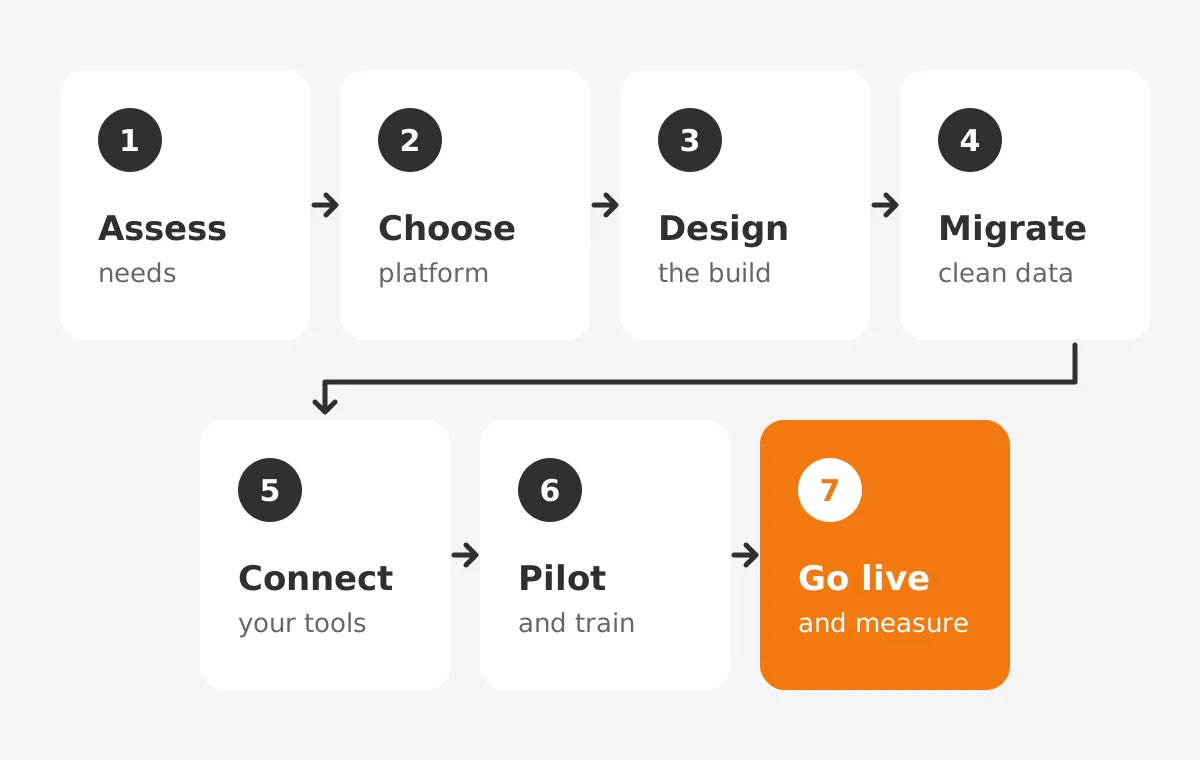
The method for how to implement CRM in accounting firm practices follows seven steps. Each step has one owner and one sign-off.
Partners can use the list to track how to implement CRM in accounting firm work week by week. It works for a five-person practice and a 200-person regional firm.
- Assess needs: interview partners, managers and admin staff about how leads and referrals move today.
- Choose the platform: score two or three options against requirements, integrations and security.
- Design the build: define pipeline stages, fields, permissions and the reports partners will read.
- Clean and migrate data: export, deduplicate, map and load records into a test copy first.
- Connect your tools: link email, calendar, practice management, accounting and e-signature systems.
- Pilot and train: launch a CRM pilot group of five to ten users, then train every role.
- Go live and measure: retire the old spreadsheets and review adoption metrics weekly for 90 days.
Each step produces something a partner can check. The needs assessment ends with a requirements list. The design step ends with a field list and a pipeline diagram. The pilot ends with a short list of fixes.
Skipping a sign-off is the most common reason a rollout drifts into busy season. With visible sign-offs, the managing partner sees which step of how to implement CRM in accounting firm projects is late.
For platform choice, read our comparison of CRM for CPA firms and practice management software. It covers which systems fit which firm size, a key input to how to implement CRM in accounting firm budgets.
Salesforce suits larger firms with complex service lines. HubSpot suits firms that want marketing and CRM in one tool. Microsoft Dynamics 365 fits firms already deep in Microsoft 365. Zoho CRM is a lower-cost option for small practices.
The right CRM for accountants depends on size, service mix and existing tools. A CRM for tax professionals in a two-partner practice needs less. A regional firm with audit, tax and wealth teams needs more.
Unboxx runs this sequence for professional services clients. Our CRM for accounting firms page shows the workflows we build first. Referral tracking, onboarding and advisory upsell pipelines usually lead the list.
How Long Does It Take to Implement Accounting CRM?
Most small and mid-sized firms can implement accounting CRM in 8 to 16 weeks of active work. The range depends on data quality, the number of integrations and partner time. Calendar time is longer when busy season interrupts.
The table below is an assumed plan for a 25-person firm, not a benchmark. It shows a CRM implementation timeline that goes live after April 15. It also leaves room before the extension deadlines in September and October.
| Weeks | Phase | Owner | Sign-off |
|---|---|---|---|
| 1-2 (late April) | Needs assessment and goals | Managing partner | Requirements list approved |
| 3-4 | Platform choice and design | CRM administrator | Field list and pipeline stages |
| 5-7 | Data cleanup and test migration | Operations manager | Sample records checked by partners |
| 8-9 | Integrations and permissions | CRM administrator | Email and accounting sync tested |
| 10-11 | Pilot with 8 users | Pilot group lead | Fix list closed |
| 12 (mid-July) | Firm-wide go-live and training | Managing partner | Old spreadsheets retired |
Two things stretch this plan. The first is messy data, such as five spreadsheets with different spellings of one client. The second is custom work, like a direct link to a legacy tax system with no standard connector.
Budget two to four extra weeks for each. Without them, one late data load can push go-live into the September extension crunch. These buffers keep how to implement CRM in accounting firm schedules clear of filing deadlines.

Our CRM implementation plan article breaks these phases into owners, budget lines and a template. Use it to price the project before you sign with a vendor.
Which Integrations Matter Most for an Accounting CRM?
Email and calendar integration matters most, followed by practice management and accounting software. If a CRM does not capture email, partners will not update it. The table ranks the common connections by daily impact.
| Integration | Examples | What it syncs | Priority |
|---|---|---|---|
| Email and calendar | Microsoft Outlook, Gmail | Emails, meetings, contacts | Must have at launch |
| Practice management | Karbon, Canopy, TaxDome | Client status, engagements, contacts | Must have at launch |
| Accounting and billing | QuickBooks Online, Xero | Invoices, payment status, fees | Phase two |
| E-signature | DocuSign | Engagement letter status | Phase two |
| Marketing | HubSpot, Salesforce Account Engagement | Newsletter lists, event sign-ups | Phase two |
A practical rule keeps this manageable. Connect only what users touch every day at launch. Add the rest after 30 days of steady use. Every integration adds a failure point, so each one needs an owner.
CRM and accounting software integration needs one more rule. Decide which system is the source of truth for each field. Client name and address often belong in practice management software.
Pipeline stage and referral source belong in the CRM. Fee data belongs in the accounting system. Two-way sync on the same field causes overwrites, so pick one direction per field.
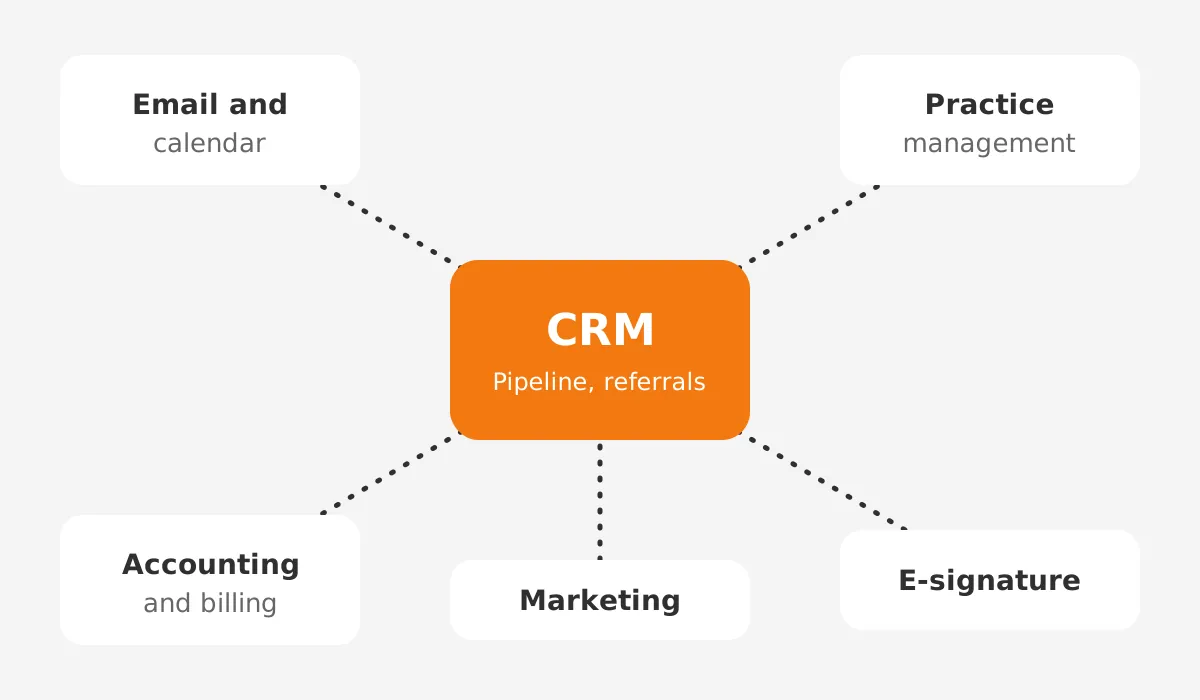
This rule saves more time than any other in how to implement CRM in accounting firm integrations. When no standard connector exists, a middleware tool or custom API link fills the gap.
Our CRM implementation services team builds these links. We also document which system owns each field, so the next administrator inherits a clear map.
How Do You Migrate Client Data Without Losing History?
CRM data migration works when you clean first, map every field, and load a test batch before the full move. Firms that copy spreadsheets straight in import duplicates and outdated contacts.
Users then stop trusting the system in week one. Data work is where how to implement CRM in accounting firm projects most often slips.
- Export every source: spreadsheets, Outlook contacts, the old CRM and the practice client list.
- Deduplicate by tax ID or email, and merge records for the same household or entity.
- Map each source column to a CRM field, and drop columns unused for two years.
- Load 100 sample records into a sandbox, and ask two partners to check them.
- Fix the mapping, load the full set, and compare record counts with the sources.
Keep sensitive fields out of the CRM unless a workflow needs them. A sales pipeline rarely needs full Social Security numbers or bank details. Storing them adds risk without adding value.
Our CRM data cleansing runbook covers deduplication rules by platform. It pairs well with the five steps above.
History matters most for relationships. Import the referral source, the first engagement date and the service lines each client buys. That history shows a partner where advisory work fits.
With that history in place, the CRM stops being a contact list and starts showing growth. Clean history is the real payoff of how to implement CRM in accounting firm data properly.
What Security Rules Apply to Accounting Firm CRM Data?
The FTC Safeguards Rule applies to tax preparation firms, and it covers client data in a CRM. The FTC's Safeguards Rule guide lists tax preparation firms among covered financial institutions.
Any team working out how to implement CRM in accounting firm systems should design for these rules in week one. Retrofitting security after launch costs more and annoys users.
The rule requires a written information security program sized to the business. It requires multi-factor authentication for anyone who accesses customer information.
It also requires disposal of customer information within two years of its last use, unless a business need applies. Since May 2024, a breach involving 500 or more consumers must be reported to the FTC within 30 days.
The IRS gives the same message to CRM for tax preparers. IRS Publication 4557, revised June 2024, tells tax professionals to keep a written information security plan.
The plan names a qualified individual, assesses risks, and oversees service providers that handle client data. A CRM vendor is one of those service providers.
In practice, five CRM security settings cover most of the ground:
- Turn on multi-factor authentication for every user.
- Set role-based access so staff see only their own clients.
- Log exports and bulk deletes.
- Review the vendor's security documentation before signing.
- Add the CRM to your written information security plan, with an owner.
These controls are part of how to implement CRM in accounting firm compliance, not an extra project. Salesforce, HubSpot and Microsoft Dynamics 365 offer these controls, though detailed audit logs can need a higher plan tier.
How Do You Get Partners to Use the CRM?
Partners use a CRM when it saves them time in week one. They also follow leaders who use it in front of them. The managing partner should run pipeline meetings from CRM reports, not from a spreadsheet.
Start with a pilot group of five to ten people. Include one sceptical partner, one manager, one admin and one marketer. Fix what annoys them, then widen the rollout.
A pilot surfaces bad field names, missing picklist values and slow screens early. It is the safest test of how to implement CRM in accounting firm teams.
Train by role, in short sessions. Accounting Today described one firm's lunch-and-learns of about an hour and a half over four or five weeks. The aim was to avoid overwhelming staff.
That pacing still works. A partner needs 20 minutes on reports and logging calls. An admin needs an hour on data entry and imports. Show staff how CRM follow-up reminders replace sticky notes.
Remove the old path on go-live day. Archive the shared referral spreadsheet. When the old tool stays open, people keep using it, and CRM adoption stalls.
A 2009 Accounting Today guide by a Citrin Cooperman marketing manager stresses a related point. Make the business case to partners before you pick a system.
Plan ongoing support too. New staff join and fields multiply. A part-time CRM administrator, or an outside team, should review the system each quarter. Treat that review as the final step in how to implement CRM in accounting firm operations, not an afterthought.
How Do You Measure Whether the Rollout Worked?
Measure adoption first, then business results. Adoption shows whether people use the system. Results show whether it was worth the money.
Review both every week for the first 90 days, then monthly. Without these numbers, nobody can tell whether the plan for how to implement CRM in accounting firm goals worked.
Track three adoption metrics. Count weekly active users as a share of licensed users. Count new opportunities logged per partner. Count emails captured automatically.
A sensible first-quarter target is 80% of licensed users active each week. Treat that as an internal goal, not an industry figure.
Then track the goals you set at the start. Measure the share of new clients with a recorded referral source. Track advisory revenue from tax clients and days from first call to signed engagement letter.
If adoption stalls, find the cause before adding features. Common causes are duplicate data entry, slow screens and unclear fields. Fixing one of these usually lifts usage faster than a new dashboard.
Which Mistakes Derail an Accounting Firm CRM Rollout?
Four mistakes derail most rollouts. A January start, excess custom fields, no partner sponsor and a soft go-live each cause trouble. Each one is easy to avoid with a written plan.
- A January start collides with tax season, so training and data entry stop.
- Excess custom fields slow data entry and confuse new users.
- No partner sponsor means nobody enforces the process in pipeline meetings.
- A soft go-live leaves the old spreadsheet open, so staff keep using it.
A short checklist prevents all four. Confirm the start date against the tax calendar. Cap custom fields at those a report uses. Name the sponsor in the kickoff email. Archive old tools on go-live day.
These four checks turn how to implement CRM in accounting firm planning into a repeatable routine. They suit a CRM for small accounting firm teams and larger offices alike.
One more mistake deserves attention. Firms sometimes copy a sales setup from another industry. Accounting relationships run on referrals, renewals and annual cycles, not short sales funnels.
Pipeline stages should match that reality. A typical set is referral received, consultation held, proposal sent and engagement letter signed. Generic stages such as lead, demo and closed-won do not describe accounting work.
Frequently Asked Questions
How long does accounting CRM implementation take?
Accounting CRM implementation takes about 8 to 16 weeks of active work for most small and mid-sized firms. Messy data or custom integrations can add two to four weeks each. Start after April 15 so the pilot and go-live finish before fall extension deadlines.
How does a CRM improve accounting firm efficiency?
A CRM improves accounting firm efficiency by putting every client email, call and referral in one record. Staff stop searching partner inboxes for context. Automated reminders replace sticky notes, and pipeline reports replace spreadsheets that someone rebuilds before each partner meeting.
Should a CRM replace practice management software?
No, a CRM should sit beside practice management software, not replace it. Practice tools such as Karbon, Canopy and TaxDome run engagements, deadlines and portals. The CRM runs prospects, referrals and growth. Connect the two so client status and contact details stay in sync.
Can small firms run a CRM without IT staff?
Yes, a small accounting firm without IT staff can run a CRM if one person owns it part time. HubSpot and Zoho CRM suit small teams. Plan for two to four hours a week of administration, and use an outside partner for integrations and security.
What drives the cost of an accounting CRM rollout?
The cost of an accounting CRM rollout depends on licences, data cleanup, integrations and training time. Custom links to legacy tax systems cost the most. Partner hours spent on design and testing are a real cost, so budget them early and track them weekly.
How to Implement CRM in Accounting Firm Teams Today?
Unboxx helps firms decide how to implement CRM in accounting firm operations, from requirements to go-live. Our consultants work across Salesforce, HubSpot, Microsoft Dynamics 365 and Odoo. We plan the rollout around your tax calendar and build the integrations staff use daily.
For a plan that fits your firm size and busy season, schedule a consultation with Unboxx. We will review your current tools, map the gaps, and give you a phased timeline to share with your partners.
Let's create something out of this world together.
Have a project in mind? Contact us for expert design and development solutions. Let's discuss how we can help grow your business.
Ready to Unboxx Your Potential?
Build smarter systems. Automate faster. Scale confidently.