
A sales team opens its CRM on Monday and finds three copies of one account. A lead routing rule has failed, and nobody trusts the pipeline dashboard. Data leaders estimate that 26% of company data is untrustworthy, per a Salesforce State of Data and Analytics study (2025).
CRM administration is the ongoing work of configuring, governing and supporting a CRM after go-live. It keeps users, permissions, data, automation, reports and releases under control. This guide covers the tasks, the cadence, the platform differences and who should own CRM administration in a B2B company.
Key Takeaways
- CRM administration keeps users, data, automation, reports and releases under control after go-live.
- A written daily, weekly, monthly and quarterly cadence prevents most CRM problems before users notice them.
- Companies can run CRM administration in-house, through a partner or as a hybrid of both.
What Is CRM Administration?
CRM administration is the set of tasks that keep a customer relationship management system configured, clean and secure. It also keeps the system aligned with how the business sells and serves customers. The work starts on the day the system goes live and never ends.
The person who does this work is the CRM administrator, often shortened to CRM admin. In a Salesforce org the role is called a Salesforce admin. In HubSpot it is often a HubSpot admin or a Super Admin, which is also a permission level.
CRM system administration differs from CRM implementation. An implementation has a fixed scope, a budget and a go-live date. CRM administration is the operating work that follows. The CRM implementation plan should name who takes over this work after launch.
Development is a separate job too. An admin works with declarative tools such as page layouts, validation rules, Salesforce Flow and HubSpot workflows. A developer writes code, such as Apex or JavaScript, when those tools reach their limits.
Revenue operations (RevOps) sits one step upstream of CRM administration. RevOps designs the revenue process across marketing, sales and service. The admin turns that design into fields, stages, automation and reports. In a company with 30 users, one person often holds both jobs.
Why Does CRM Administration Affect Revenue?
CRM administration affects revenue because every forecast, commission report and handoff depends on the data and rules inside the CRM. When those rules break, deals stall and leaders make decisions on wrong numbers.
Consider three common failures. A lead routing rule stops assigning web leads after a territory change, so leads wait two days for a reply. A duplicate account splits a customer's history, and a renewal is missed.
In the third case, someone renames a pipeline stage. The forecast report then silently drops a quarter of open deals, because its filter still uses the old stage name.
None of these failures is a software fault. Each one is an administration gap: a change made without testing, or a check nobody owns. The same Salesforce study found that only 43% of organizations have formal data governance frameworks. Without one, nobody owns CRM data quality.
User adoption suffers next. When reps stop trusting the data, they keep notes in spreadsheets and email. The CRM then holds even less of the truth, and the cycle speeds up. Good CRM administration breaks that cycle with clean data, fast fixes to user requests and reports that match reality.
A regular CRM audit shows how far a system has drifted. CRM administration is what stops the drift in the first place.
What Does CRM Administration Cover?
CRM administration covers six areas of work: user management, data governance, automation, reporting, integrations and release management. Each area needs an owner and a schedule.
- User management: create, update and deactivate users, assign roles, profiles and permission sets, and reset access.
- Data governance: set field standards, required fields, validation rules and duplicate management, then clean what slips through.
- Workflow automation: build and maintain flows, workflows, assignment rules and lifecycle stages.
- Reporting and dashboards: build reports, keep dashboards accurate and retire reports nobody opens.
- Integration monitoring: watch syncs with email, ERP, billing and marketing tools, and fix errors.
- Release management: read release notes, test changes in a sandbox and run change control.
Each area breaks differently. Leavers who keep their login are a user management failure. Two rules writing to the same field cause automation errors, and dashboards drift when nobody remembers why a filter exists.
Two supporting jobs sit across all six areas. The first is training: onboarding new users and showing teams new features. The second is CRM documentation, which records why each field, rule and automation exists.
Security belongs inside user management. Least-privilege access, single sign-on, multi-factor authentication and regular permission reviews protect customer records. In regulated sectors such as finance and healthcare, the admin also keeps audit trails and field history.
Data work deserves its own runbook. Field audits, merge rules and enrichment schedules belong in a written process. The CRM data cleansing runbook shows how to run a full cleanse by platform.
Data governance sets the rules that the cleanup enforces. It answers four questions. Which fields are required, and who may create accounts? Which source wins in a conflict, and how long are records kept?
Write the answers down, then turn each one into a validation rule, a permission or a duplicate rule.
AI features add a new duty to CRM administration. Tools such as Salesforce Agentforce and HubSpot Breeze can write notes, update fields and draft emails. The admin decides which fields AI may change, labels AI-written values and reviews a sample of them each month.
Unboxx sets up these six areas through its CRM consulting and administration services. The system then has owners and rules from day one.
What Does a CRM Administrator Do Each Week?
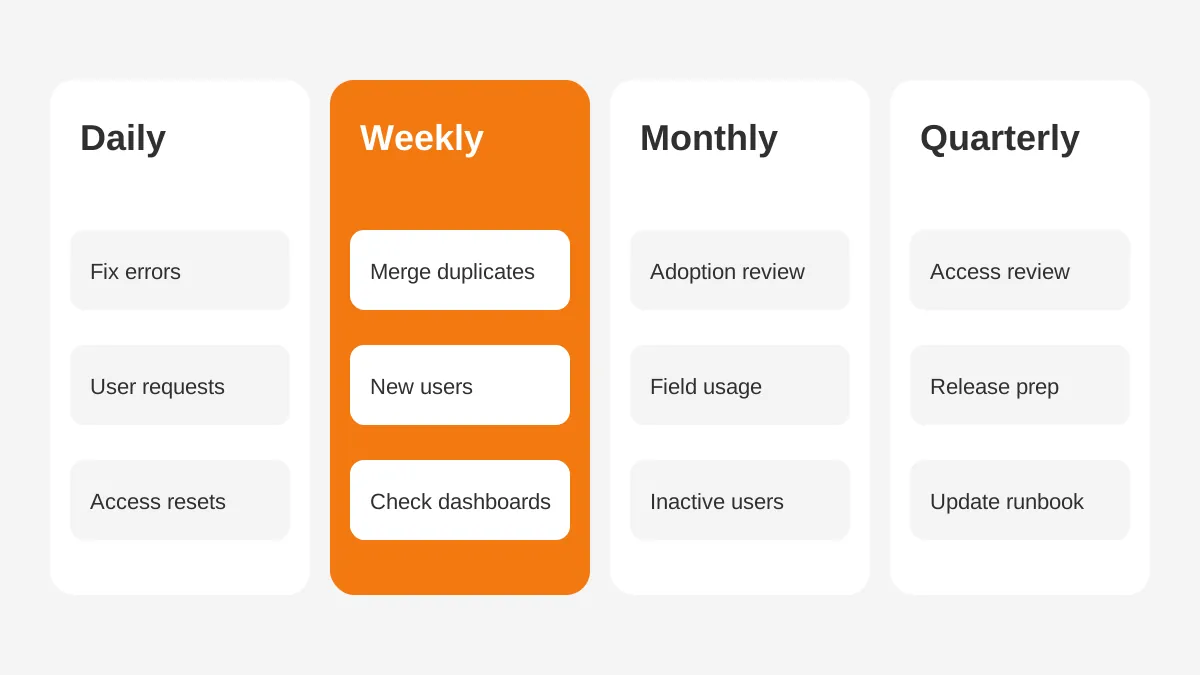
A CRM administrator works to a fixed cadence of daily, weekly, monthly and quarterly tasks. Once that cadence is written down, CRM administration stops being firefighting and becomes maintenance.
Daily CRM Administration Tasks
- Check failed automation and integration error emails.
- Answer user requests from the admin queue or a shared channel.
- Unlock users, reset passwords and adjust access.
Weekly CRM Administration Tasks
- Review the duplicate queue and merge confirmed matches.
- Activate new users and deactivate leavers within one business day.
- Check that key dashboards refreshed and totals look right.
- Groom change requests and agree priorities with team leads.
Monthly and Quarterly Tasks
- Monthly: review login and adoption reports, then follow up with inactive users.
- Monthly: audit field usage and hide fields with almost no data.
- Quarterly: review profiles, roles and permission sets against current job titles.
- Quarterly: prepare for the next platform release and update the admin runbook.
These CRM admin tasks look small one by one. Skipped for a quarter, they become a cleanup project that takes weeks.
The admin runbook is the written version of this cadence. It lists each task, its owner, the report used to check it and what to do when something fails.
How much time does the cadence take? As an illustrative example, a 50-user org might need about 5 hours a week for routine tasks. Change requests and small builds then take another 5 to 15 hours. These figures are assumptions for planning, not a benchmark.
How Do Salesforce, HubSpot and Dynamics 365 Differ?
The CRM administration tasks are the same on every platform, but the tools, release cycles and permission models differ. A Salesforce admin, a HubSpot admin and a Dynamics 365 admin each work with different native features.
| Admin area | Salesforce | HubSpot | Dynamics 365 |
|---|---|---|---|
| Access model | Profiles, roles and permission sets | Seats, teams and permission sets | Security roles and business units |
| Automation tool | Salesforce Flow | HubSpot workflows | Power Automate and business rules |
| Release rhythm | Three major releases a year | Continuous product updates | Two release waves a year |
| Test environment | Sandboxes by type | Sandbox accounts on Enterprise tiers | Sandbox environments |
| Admin home | Setup | Settings | Power Platform admin center |
Salesforce administration centers on Setup. Admins manage profiles, permission sets, validation rules and Flow there. Salesforce ships three major releases a year, named Spring, Summer and Winter, per the Salesforce Admins release overview (2021).
HubSpot administration runs from Settings. Super Admins can manage all users, tools and settings. Permission sets are reusable bundles of user permissions, and only Super Admins can create them, per the HubSpot Knowledge Base. Permission sets need an Enterprise subscription.
Dynamics 365 administration happens in the Power Platform admin center. Power Platform has two major releases each year, in April and October, per Microsoft Learn. These releases cannot be postponed, so testing must happen before they arrive.
Access control differs most between the three. Salesforce combines profiles, roles and permission sets, so one user can hold three layers of access.
Dynamics 365 uses security roles inside business units, which suits companies with regional or divisional teams. HubSpot keeps the model simpler, with teams and permission sets on higher tiers.
That difference changes the quarterly access review. In Salesforce, review permission sets first, because they grow fastest. In Dynamics 365, review which business unit each user sits in. In HubSpot, check who holds Super Admin, and keep that list short.
Odoo and GoHighLevel follow the same pattern with fewer native controls. On those platforms, documentation and manual review carry more of the load.
How Should You Handle Releases and Change Control?
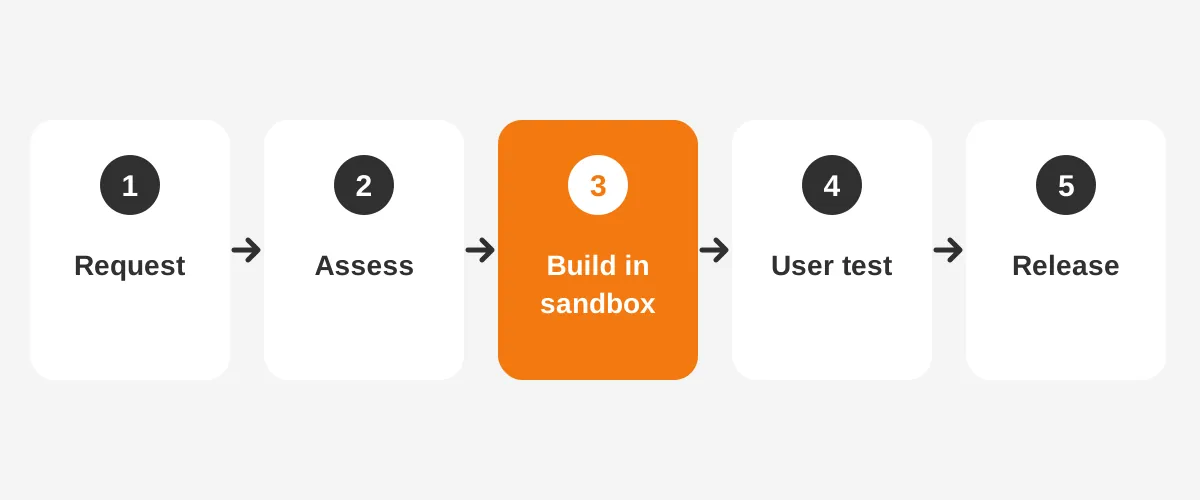
Handle releases and changes with a written CRM change control process. Every request moves through review, a sandbox build, testing and a planned release. No change goes straight into production.
Platform releases come first. Read the release notes for features that touch your org, then test in a preview sandbox. In Salesforce, review Release Updates in Setup and activate them before their enforcement date.
Your own changes follow five steps:
- Log the change request with the business reason and the requester.
- Assess the impact on reports, automation, integrations and permissions.
- Build the change in a sandbox, never in production.
- Test it with one real user from the affected team.
- Release it in a planned window and note it in the change log.
Sandbox choice matters in Salesforce. A Developer sandbox holds 200 MB of data and refreshes once a day. A Full Copy sandbox matches production storage but refreshes only every 29 days, according to Salesforce. Plan large tests around that limit.
HubSpot needs a different habit, because it ships changes continuously rather than in fixed releases. Review HubSpot product announcements once a month and note anything that touches your workflows, properties or permissions.
Keep a change log for every platform. Each entry records the date, the change, the requester, the tester and how to roll it back. When a report breaks three weeks later, the log shows what changed and who can explain it.
Small fixes, such as a picklist value, can follow a light version of this process. Anything that touches automation, permissions or integrations gets the full process.
Who Should Own CRM Administration?
CRM administration should have one named owner, whether an employee, an outside partner or a mix of both. When everyone owns the CRM a little, nobody owns it, and CRM drift follows.
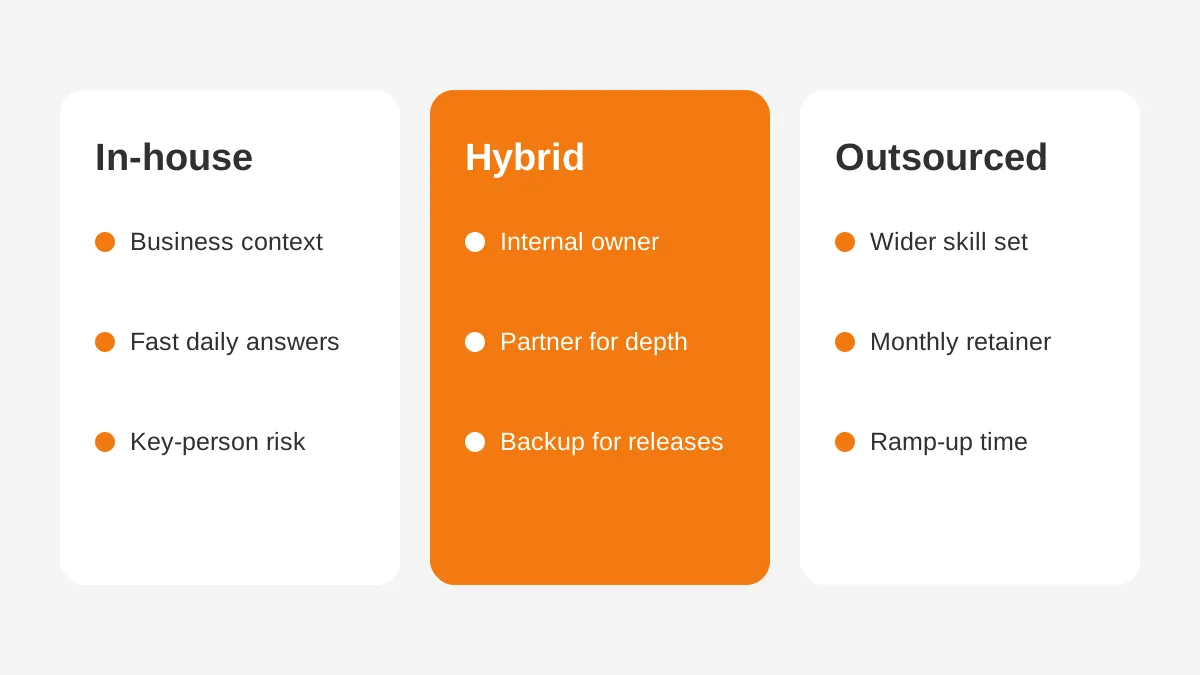
Companies choose between three staffing models:
- In-house: a full-time CRM administrator who knows the business and answers requests within hours.
- Outsourced: a partner who provides admin hours, release coverage and backup for a monthly fee.
- Hybrid: an internal owner for daily requests, with a partner for releases, builds and integrations.
As a rule of thumb, in-house CRM administration fits companies with 100 or more users and steady requests. Outsourced CRM administration suits smaller teams that need expertise without a full salary. The Salesforce managed services guide compares the yearly cost of each option.
Use a simple test to compare them. Count the admin hours your team needed last quarter, then add 30% for releases and planned builds.
Price those hours as a salary plus benefits, as a partner retainer and as a split. The numbers in this test are your own, so the result fits your company.
Price is only part of the decision. An in-house admin can leave and take every undocumented rule with them. A partner brings backup and a wider skill set but needs time to learn your business. Splitting the work reduces both risks.
That split suits mid-sized B2B companies well. In one Unboxx engagement, a dedicated Salesforce administrator handled a fintech client's daily requests. The dedicated Salesforce administration success story reports 80% faster resolution of user requests and a 97% reduction in duplicate records.
Whatever the model, write a simple RACI so each task has a clear owner:
| Task | Responsible | Accountable | Consulted |
|---|---|---|---|
| User access | CRM admin | IT lead | Team managers |
| Pipeline stages | CRM admin | Sales leader | RevOps |
| Lifecycle stages | CRM admin | Marketing leader | Sales leader |
| Integrations | CRM admin or partner | IT lead | Finance |
Which Skills and Certifications Does a CRM Admin Need?
A CRM admin needs platform configuration skills, data skills and the ability to translate business requests into system changes. Communication matters as much as technical skill.
The core CRM administrator skills fall into four groups:
- Configuration: fields, page layouts, validation rules, permission sets and automation.
- Data: imports, deduplication, reports and spreadsheet analysis.
- Process: mapping a sales or service process into stages and rules.
- People: running training, writing documentation and saying no to risky requests.
Certifications show platform knowledge. Common choices include the Salesforce Certified Platform Administrator, HubSpot Academy certifications and Microsoft's Dynamics 365 certifications. A CRM administrator certification is a starting point, not proof of judgment.
Platform depth matters more as the system grows. A Salesforce admin with Flow experience can replace older workflow rules safely. A HubSpot admin who understands lifecycle stages can keep marketing and sales reports in line.
When hiring, ask candidates how they would test a change and roll it back. Those answers reveal more than a certification badge.
Ask for a real example as well. A strong candidate can describe a duplicate problem they fixed. They can also name the rule that prevents it and how they measured the result. A weak answer stays general and names no report, field or number.
For outsourced CRM administration, ask the same questions of the named admin, not only the account manager. The person doing the daily work matters most.
How Do You Set Up CRM Administration After Go-Live?
Set up CRM administration during the last weeks of the implementation, not after the project team leaves. Once the project team has moved on, the reasons behind each rule are much harder to recover.
- Name the owner: one person accountable for the CRM, with a backup.
- Collect the build documentation: fields, automation, integrations and permission sets.
- Open a single request channel, such as a form, queue or shared chat channel.
- Agree response targets, such as one business day for access problems.
- Write the first version of the admin runbook with the cadence above.
- Book the next platform release in the calendar, with a test window before it.
- Set the baseline metrics in the first month.
Each step takes hours, not weeks, and every one of them is cheaper during the project than after it.
Companies that inherit a CRM with no documentation should start with an audit instead. Map what exists, find the rules nobody understands, then write the runbook from that map.
How Do You Measure CRM Administration Work?
Measure CRM administration with six metrics that cover speed, data quality and adoption. Review them each month with the business owner of the CRM.
- Request resolution time: median hours from request to close.
- Duplicate rate: share of accounts and contacts with a confirmed duplicate.
- Field completeness: share of records with the required fields filled.
- Active users: share of licensed users who logged in during the last 30 days.
- Failed automation: count of flow or workflow errors per week.
- Release readiness: share of release updates tested before their deadline.
Take a worked example with assumed figures. A 60-user team starts at a 9% duplicate rate and 70% active users. After one quarter of the weekly cadence, duplicates fall to 4% and active users rise to 85%. That direction matters more than any single month.
Set a baseline in the first month, then watch the trend. A falling duplicate rate and a rising active-user share show the cadence is working. A growing request backlog is the signal to add admin hours.
For a Salesforce org, pair these metrics with a periodic Salesforce optimization review. It finds the technical debt that routine metrics miss.
Frequently Asked Questions
What does a CRM administrator do day to day?
A CRM administrator answers user requests, fixes access problems, checks failed automation and integration errors, and merges duplicates. Most days also include small configuration changes, such as a new field or report. Larger builds go through change control and a sandbox before release.
How many users can one CRM admin support?
There is no fixed ratio, because complexity matters more than headcount. A simple sales CRM with 100 users may need a part-time admin. A 60-user org with integrations, custom objects and heavy automation can keep a full-time CRM administrator busy every week.
Is a CRM administrator a CRM manager?
No. A CRM administrator configures and maintains the system and supports users. A CRM manager usually owns the CRM strategy, budget and roadmap, and decides which changes matter most. In smaller companies, one person often holds both titles and splits time between them.
Can you outsource CRM administration?
Yes. Companies of every size outsource CRM administration to a partner on a monthly retainer of fixed hours. The partner handles requests, releases and builds, while an internal owner sets priorities. This hybrid setup gives smaller teams expert coverage and backup without hiring a full-time admin.
How do you become a CRM administrator?
Most CRM administrators start as power users in sales, marketing or operations. They learn configuration through free training such as Salesforce Trailhead or HubSpot Academy. Next they earn an admin certification and take on small changes. Hands-on practice in a free developer environment speeds this up.
When Should You Get Help With CRM Administration?
Get help with CRM administration when the request backlog grows or data quality falls. A platform release that catches the team unprepared is a third sign. Each one means the current setup lacks hours, depth or a clear owner.
Unboxx provides CRM administration for Salesforce, HubSpot, Dynamics 365 and Odoo, from dedicated admin hours to hybrid support. Teams that want a second opinion can schedule a consultation to review their current CRM administration setup and backlog.
Let's create something out of this world together.
Have a project in mind? Contact us for expert design and development solutions. Let's discuss how we can help grow your business.
Ready to Unboxx Your Potential?
Build smarter systems. Automate faster. Scale confidently.