
Donor counts keep shrinking while gift totals rise. The Fundraising Effectiveness Project (Q1 2026), published by the Association of Fundraising Professionals, reported donor retention flat at 18.0%. Donor counts fell 0.8% year over year, while dollars raised grew 4.3%.
That pattern rewards teams that keep the donors they already have. HubSpot for Nonprofits is one route to that goal: a 40% discount on HubSpot's paid tiers for eligible charities. Whether it pays off depends on who qualifies, what counts toward the bill, and how donor data is set up.
Key Takeaways
- HubSpot for Nonprofits gives eligible new customers 40% off Professional and Enterprise products on an annual contract.
- Marketing contacts, onboarding fees and HubSpot Credits decide the real first-year cost more than the discount does.
- HubSpot fits teams that need marketing, events and donor communication in one system with modest gift-processing needs.
What Is HubSpot for Nonprofits?
HubSpot for Nonprofits is a discount program that cuts 40% off current list prices for eligible charities. It applies to net-new Professional and Enterprise Tier products, according to HubSpot's nonprofit program page (2026).
The program is a pricing offer, not a separate product. A nonprofit buys the same Marketing Hub, Sales Hub and Service Hub that companies use. The difference is the price on the quote and a set of free learning resources.
HubSpot says it works with more than 4,000 nonprofits and offers more than 2,000 integrations. Those integrations include donation and event tools such as Fundraise Up, Donorbox, Eventbrite, Mailchimp, Zoom and Stripe.
The free resources come with every account, discounted or not:
- HubSpot Academy, with free courses and certifications for the whole team.
- The HubSpot Knowledge Base, with setup guides for each tool.
- The Nonprofit HubSpot User Group, a peer community for sharing strategies.
For a nonprofit, the practical question is which products to buy at the discounted price. Marketing Hub is the usual starting point, because email, forms and campaigns carry most donor contact. That choice comes after a simpler test: whether the organization qualifies for HubSpot for Nonprofits at all.
Who Qualifies for HubSpot for Nonprofits?
An organization qualifies when it is a registered charity with recognized legal status and a mission that benefits the community. HubSpot's nonprofit eligibility criteria (2026) treat this as equivalent to 501(c)(3) status in the United States.
The program currently covers registered nonprofits in four countries:
- The United States.
- Canada.
- Australia.
- New Zealand.
HubSpot describes the program as a pilot and says other regions will follow. Until then, HubSpot nonprofit pricing outside North America and Oceania is not on offer.
Six types of organization are excluded, even with charitable status:
- Colleges and universities, with exceptions for foundations and nonprofit research initiatives.
- Hospitals, healthcare networks, health plans and outpatient healthcare organizations.
- Professional and semi-professional sports organizations.
- Government organizations and agencies, including UN entities.
- Political, labor and fraternal organizations.
- Individuals and private organizations.
Account status matters as much as legal status. The discount is for new HubSpot customers only. A charity already paying for HubSpot cannot move its existing subscriptions onto nonprofit pricing.
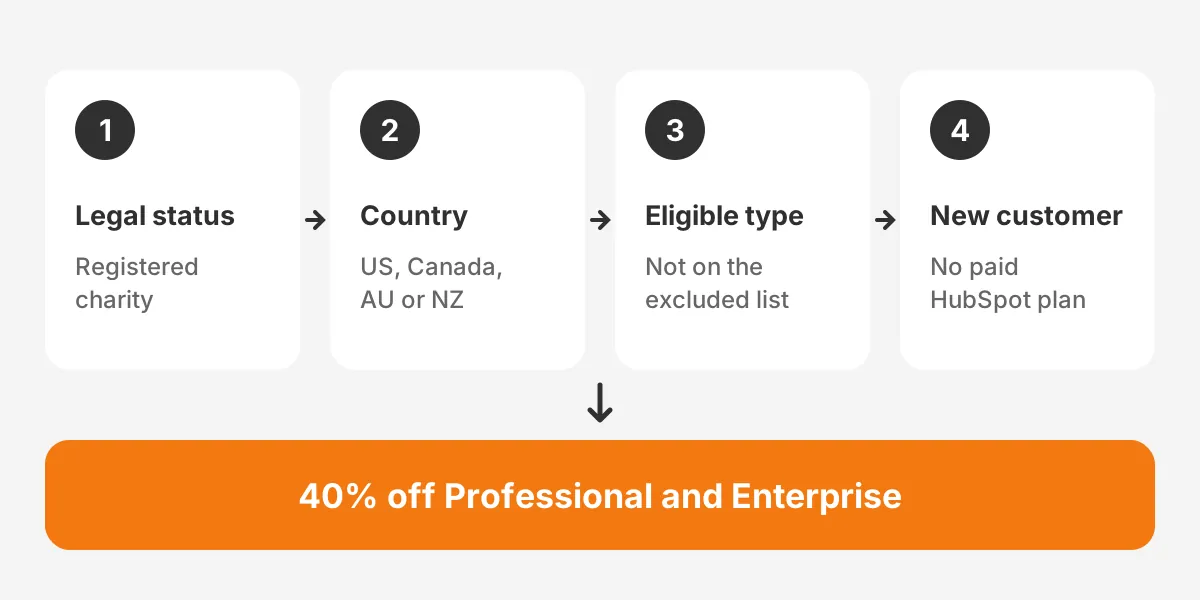
A Canadian food bank with registered charity status and no HubSpot account passes every check. A university alumni office does not, unless it runs through a separate foundation.
What Does the 40% Discount Cover?
The HubSpot for Nonprofits discount covers Professional and Enterprise Tier products bought on an annual term contract. It lasts for as long as the organization stays eligible.
The eligibility page lists four exclusions from the HubSpot nonprofit discount:
- Starter Tier products.
- Add-ons.
- Capacity and limit increases.
- Non-web-based applications, tools and platforms.
Two more rules shape the quote. The offer cannot be combined with any other discount. It also requires a contract of at least one year, so month-to-month billing does not qualify.
The capacity exclusion is the one that catches budgets. Extra marketing contacts are sold as a capacity increase. Expect list growth to be billed at full price unless the quote says otherwise.
Onboarding fees are not listed as discounted on the eligibility page. Ask the sales rep to show onboarding as a separate line and to state in writing whether the discount applies. That one line can decide whether year one fits the budget.
How Much Does HubSpot for Nonprofits Cost?
HubSpot for Nonprofits costs 40% less than list price on Professional and Enterprise, plus any onboarding fee. The list prices below come from HubSpot's Marketing Hub pricing guide (September 2026).
| Marketing Hub tier | List price (annual billing) | Included seats | Included marketing contacts | One-time onboarding |
|---|---|---|---|---|
| Starter | $9 per seat per month | Per seat | 1,000 | None |
| Professional | $800 per month | 3 core seats | 2,000 | $3,000 |
| Enterprise | $3,600 per month | 5 core seats | 10,000 | $7,000 |
The worked example below uses those list prices and assumes the onboarding fee is paid in full. It is an example, not a quote.
- Marketing Hub Professional at $800 a month drops to $480 a month after 40%.
- Twelve months at $480 comes to $5,760, against $9,600 at list price.
- Adding the $3,000 onboarding fee gives a first-year total of $8,760.
- Enterprise at $3,600 a month drops to $2,160, or $25,920 a year.
- Adding the $7,000 onboarding fee gives an Enterprise first-year total of $32,920.
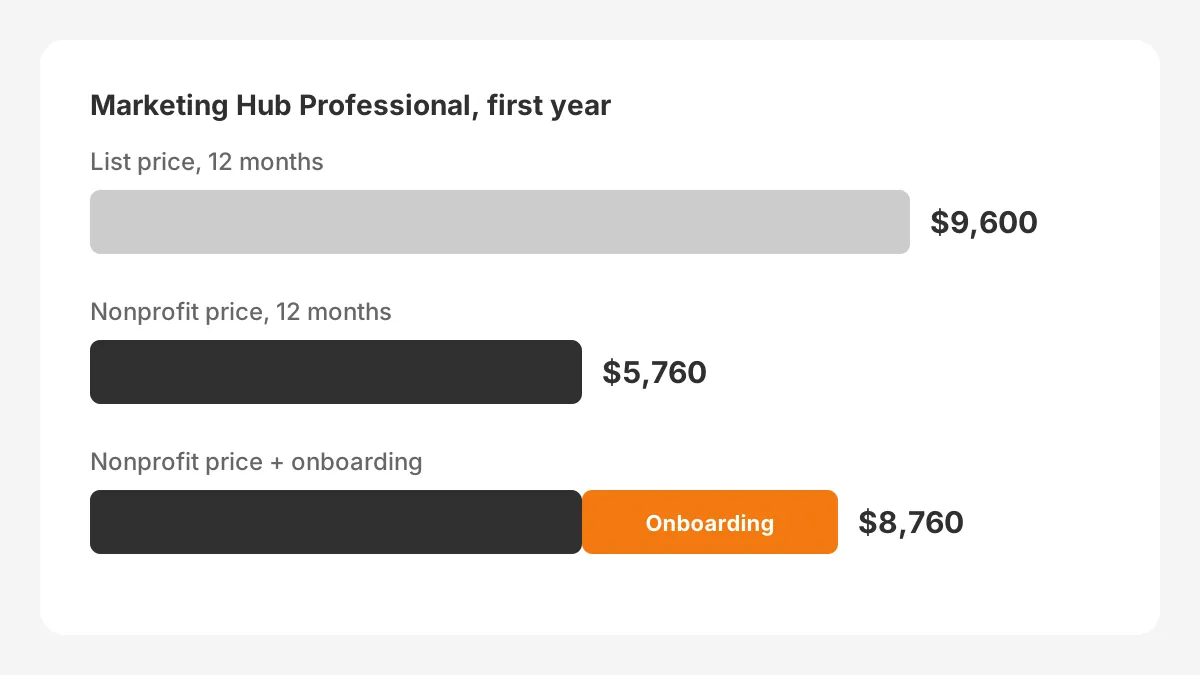
Year two shows how much HubSpot costs nonprofits once onboarding is paid. On Professional, the bill drops to the $5,760 subscription. That holds only if the contact list stays inside the included tier.
Renewal is the number to watch in year three. The discount applies to the then-current list price, so a list price increase raises the nonprofit price too. Budget for that when planning HubSpot for Nonprofits beyond the first contract.
HubSpot Credits are the other variable. Professional includes 3,000 credits, and the Breeze customer agent uses 100 credits per conversation. That covers about 30 agent conversations before extra credits are needed.
Which HubSpot Tier Fits Your Nonprofit?
Under HubSpot for Nonprofits, most small and mid-sized charities fit Professional, because it is the lowest discounted tier. Starter is cheaper at list price, but the HubSpot nonprofit discount does not apply to it.
| Situation | Likely tier | Why |
|---|---|---|
| Under 1,000 marketing contacts, one or two staff | Starter or free tools | Low list price, no discount needed |
| Email programs, donation forms and automated follow-up | Professional | Advanced workflows and 40% off |
| Large list, three or more teams, sensitive data | Enterprise | 10,000 contacts and Sensitive Data storage |
The deciding factor is usually automation. Starter offers basic automation, while branching workflows with triggers and conditions sit in Professional. A charity that sends one newsletter a month may not need them yet.
Enterprise earns its price when the charity stores regulated information. HubSpot's program page says Enterprise plans include Sensitive Data storage for health data and government IDs.
The HubSpot Sales Hub for nonprofits suits major gift officers who manage a pipeline of asks. The HubSpot Marketing Hub for nonprofits suits teams running campaigns and donor journeys. Most charities need only one hub at the start.
Price Professional first for the hub that touches the most donors. A second hub can wait until a named role needs it every week.
Can HubSpot Track Donations and Donors?
HubSpot can track donations, but it records them as deals or synced records rather than through native gift processing. The HubSpot CRM for nonprofits holds contacts, companies and activity, while gift data usually arrives from a donation tool.
HubSpot's program page says admins can rename default objects on any plan, such as Deals to Donations. A donation pipeline then shows each gift with an amount, a date and a stage such as pledged or received.
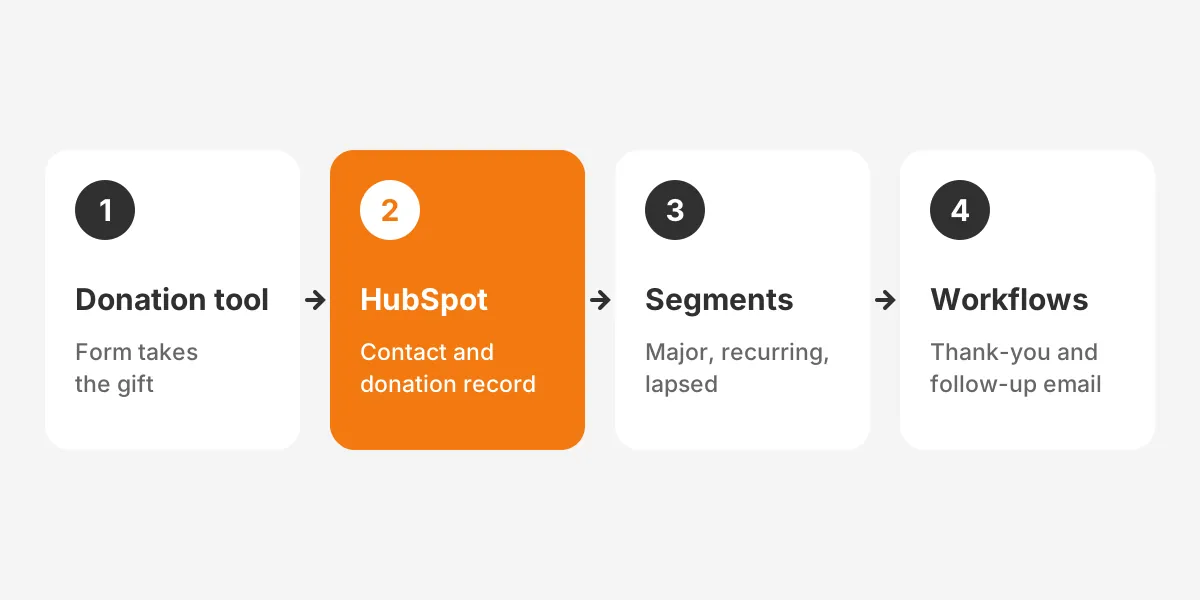
HubSpot donation tracking works best with three pieces in place:
- A donation tool such as Donorbox or Fundraise Up, connected through its HubSpot integration.
- Custom properties for gift type, campaign, fund and first gift date.
- Commerce Hub with Stripe, if the charity wants recurring billing inside HubSpot itself.
With those pieces in place, HubSpot donor segmentation needs only three lists to start. Major donors are contacts with total giving above a set amount, such as $1,000 in twelve months. Recurring donors have an active monthly gift. Lapsed donors gave last year but not this year.
Each list then feeds a different message. Major donors get a call task for the gift officer. Recurring donors get impact updates, and lapsed donors get a re-engagement email.
HubSpot volunteer management follows the same pattern. Volunteers become contacts with properties for skills, shifts and hours, and forms capture sign-ups.
Can HubSpot replace a donor database? A dedicated donor CRM such as Bloomerang or DonorPerfect does more for gift receipting, pledges and grant tracking. HubSpot donor management works best alongside one, synced in both directions. Charities that keep both get receipting from the donor tool and campaigns from HubSpot.
Which Workflows Should HubSpot for Nonprofits Run First?
Start with four email workflows: welcome, thank-you, recurring gift and lapsed donor. Each one fires at a point where a donor decides whether to give again.
Nonprofit marketing automation has the most room to help after the first gift. The FEP retention figure of 18.0% shows how few donors give again. A prompt, personal follow-up costs little and runs without staff time.
- Welcome series: three emails over two weeks after a new contact signs up, explaining the mission and one program.
- Thank-you workflow: an email within one day of each gift, naming the amount, the fund and the impact.
- Recurring donations workflow: a monthly receipt and a yearly summary for donors on a recurring gift.
- Lapsed donor workflow: a re-engagement email to donors with no gift in 13 months, with a direct donation link.
Each workflow needs a clear trigger and a property to write back. The thank-you workflow, for example, triggers on a new donation record and stamps the date of the last thank-you.
Fundraising campaigns come next. HubSpot's campaign tool groups the emails, landing pages, donation forms and social posts for one appeal. Reports then show which emails and pages drove clicks and form submissions.
Giving Tuesday is a good first campaign to build this way. It has a fixed date, a clear goal and a short window, so results are easy to read. HubSpot fundraising reports compare it with the year-end appeal that follows.
Keep the first month to these four workflows and one campaign. Teams that build twenty workflows at once struggle to tell which one sent which email.
How Do You Set Up HubSpot for Nonprofits?
Set up HubSpot for Nonprofits in six steps, from eligibility to staff training. The order matters, because each step depends on the one before it. As a planning assumption, allow one to three months for a HubSpot nonprofit implementation, depending on data quality.
Before signing, compare the platform against donor-first options in a nonprofit CRM software comparison. Teams that want help with fit and setup can review Unboxx's CRM services for nonprofits.
- Confirm eligibility, then contact HubSpot sales and mention the HubSpot for Nonprofits program in the form. This is how to apply for the HubSpot nonprofit discount.
- Design the data model: contact properties, a donation pipeline, and which contacts count as marketing contacts.
- Clean and migrate records from spreadsheets or the old system, merging duplicates before import.
- Connect donation forms and event tools, then check that a test gift lands on the right contact.
- Build email workflows for welcome, thank-you, recurring gift and lapsed donor journeys.
- Train staff with HubSpot Academy and name one internal owner for the system.
Timelines depend on the starting point. As a rough guide, a charity moving from spreadsheets with one donation tool might finish in four to six weeks. Merging two old systems, an event tool and a donor database takes longer.
Data migration is where most of the time goes. A short CRM data cleansing runbook before import saves rework on segments later.
A realistic plan sets owners and dates for each phase. A CRM implementation plan template keeps the rollout on schedule.
The nonprofit HubSpot setup is complete when one test donor passes every step without manual work. That means form, record, segment and thank-you email in sequence.
Unboxx built a similar setup for a nonprofit running community programs on HubSpot Marketing Hub. The community outreach success story reports 95% fewer manual follow-ups and 70% faster participant responses.
HubSpot vs Salesforce: Which Fits Your Nonprofit?
HubSpot for Nonprofits fits charities that want marketing and donor communication in one easy system. Salesforce Nonprofit Cloud fits charities with complex programs, grants and fundraising operations.
| Factor | HubSpot for Nonprofits | Salesforce Nonprofit Cloud |
|---|---|---|
| Offer | 40% off Professional and Enterprise | Power of Us licenses, plus discounts |
| Strength | Email, forms, campaigns and ease of use | Programs, grants and gift data model |
| Admin effort | Low to moderate | Moderate to high |
| Best fit | Marketing-led fundraising teams | Multi-program charities with an admin |
The HubSpot vs Salesforce for nonprofits choice often comes down to staff. A charity without a dedicated administrator is likely to get more from HubSpot in year one.
Cost also differs in shape. Salesforce runs its own nonprofit offer, Power of Us, built around donated licenses. HubSpot for Nonprofits discounts the subscription instead, so the comparison depends on seat count and admin time.
Admin time is the cost most budgets miss. A Salesforce org with custom objects and automation needs a trained administrator, either on staff or on contract. HubSpot settings are easier for a communications manager to own, which suits charities with no technical staff.
Before choosing, list the five reports the board asks for each quarter. Then check which platform produces each one without custom work.
A charity that manages grants, case records and program outcomes needs the deeper data model of Nonprofit Cloud. That depth comes with more setup and more ongoing administration.
Larger charities sometimes run both. HubSpot handles email and campaigns, while Salesforce holds the system of record for gifts and programs. Unboxx's CRM consulting and implementation services cover integrations like this.
What Mistakes Raise the Cost of HubSpot?
The costliest mistake is marking every contact as a marketing contact. Only marketing contacts are billed, according to HubSpot's marketing contacts billing guide (2026).
That guide sets two rules that raise the HubSpot nonprofit cost:
- Exceeding the current tier by one marketing contact moves the account to the next tier.
- HubSpot does not lower a contact tier mid-term, even if the count falls.
Set past event attendees, one-time petition signers and old imports as non-marketing contacts before the first campaign. The change applies on the next update date, not at once.
Four other mistakes add cost with HubSpot for Nonprofits:
- Buying Starter first, which makes the charity an existing customer and can rule out the discount.
- Signing month-to-month, which does not qualify for nonprofit pricing.
- Skipping data cleanup, so duplicates count toward the contact tier.
- Turning on AI agents before checking the number of HubSpot Credits each conversation uses.
A cost model built before the sales call catches all four, keeping the HubSpot fundraising budget near the quote.
Which Questions Should You Ask Before Signing?
Ask for a written quote that lists each product, the discount, the contact tier and onboarding as separate lines. A quote in that form shows the real cost of HubSpot for Nonprofits before the contract starts.
Six questions cover most of the risk:
- Which products on this quote carry the 40% nonprofit discount?
- Is the onboarding fee discounted, and what does onboarding include?
- What number of marketing contacts does the quote include, and what does the next tier cost?
- What number of HubSpot Credits comes with the plan, and what do extra credits cost?
- What price applies at renewal if list prices change?
- Which donation and event integrations does the plan support without extra fees?
Bring real numbers to the call. Count the contacts that will receive email in the next twelve months, not the full database. Count the staff who need a paid seat, not everyone who views reports.
For example, a charity with 6,000 past contacts may have only 1,800 active email subscribers. Marking the rest as non-marketing keeps the HubSpot for Nonprofits quote inside the 2,000 contacts that Professional includes.
A certified partner can also run onboarding, combining setup, data migration and training in one project. Check whether that replaces HubSpot's own onboarding fee.
Frequently Asked Questions
Is HubSpot free for nonprofits?
HubSpot is not free for nonprofits, but every organization can use HubSpot's free tools and HubSpot Academy at no cost. HubSpot for Nonprofits adds 40% off paid Professional and Enterprise products. Starter plans, add-ons and capacity increases are billed at the standard list price.
Does HubSpot offer a nonprofit discount for existing customers?
HubSpot does not offer its nonprofit discount to existing customers on products they already pay for. HubSpot for Nonprofits covers net-new Professional and Enterprise products for new customers only. A charity planning to join should apply before buying any paid HubSpot subscription.
How do you apply for the HubSpot nonprofit program?
Apply for the HubSpot nonprofit program by checking the eligibility criteria, then contacting HubSpot sales. Mention the nonprofit program in the request form. HubSpot then confirms eligibility and prepares a quote on an annual contract with the 40% discount applied to eligible products.
Is HubSpot good for nonprofits with small teams?
HubSpot is good for nonprofits with small teams that need email, forms and campaigns in one system. A communications manager can usually run it without a database administrator. Teams that need gift receipting, pledges or grant tracking often connect a dedicated donor tool.
Does HubSpot offer nonprofit pricing outside North America?
HubSpot for Nonprofits pricing is available only in the United States, Canada, Australia and New Zealand at present. HubSpot describes the program as a pilot and says other regions will follow. Charities elsewhere pay standard list prices until the program expands to their country.
Is HubSpot for Nonprofits Right for Your Team?
HubSpot for Nonprofits is right for an eligible, new customer that needs marketing, events and donor follow-up in one place. Price Professional with real contact counts and the onboarding fee before deciding.
Unboxx helps nonprofits choose, configure and connect HubSpot or Salesforce around their donor data. That includes quoting HubSpot for Nonprofits, migrating records and building the first workflows. To plan the setup and cost model with a specialist, schedule a consultation with Unboxx.
Let's create something out of this world together.
Have a project in mind? Contact us for expert design and development solutions. Let's discuss how we can help grow your business.
Ready to Unboxx Your Potential?
Build smarter systems. Automate faster. Scale confidently.