
A patient calls three clinics on a Monday morning about knee pain. The clinic that calls back first usually books the visit. Without a medical CRM, that callback depends on a sticky note at the front desk.
Missed visits drain clinics in the same way. A 2018 systematic review in Health Policy by Dantas and colleagues put the average no-show rate at about 23%. A medical CRM tracks every inquiry, reminder and recall, so fewer patients slip away.
Key Takeaways
- A medical CRM manages inquiries, referrals, consent, reminders and recalls, while the EHR keeps the clinical record.
- No platform is HIPAA compliant by itself, so a signed business associate agreement and careful setup come first.
- Pick the platform by clinic size and EHR, then roll it out at one location before the rest.
What Is a Medical CRM?
A medical CRM is a customer relationship management system set up for clinics and medical practices. It tracks the relationship around care: inquiries, referrals, appointment metadata, consent, reminders and recalls. Diagnoses, notes and results stay in the electronic health record.
Vendors sell the same category as healthcare CRM, patient CRM or patient relationship management. The labels overlap. Healthcare customer relationship management can also mean selling to hospitals, as device and pharma firms do. This guide covers the provider side: clinics, specialty groups and the medical office crm.
A CRM in healthcare tells the front office who made contact, what happened next and who still needs a call. A medical CRM system also shows which referral sources and campaigns turn into booked visits.
Some clinics buy a packaged tool, and others configure a platform. Unboxx builds CRM for clinics on Salesforce, HubSpot and Odoo. Each build covers intake, reminders, no-show recovery and recall workflows tied to the clinic's scheduling system.
The front desk feels the change from a medical CRM first. Staff stop working from inboxes and spreadsheets, and managers can follow the patient journey from first call to repeat visit.
How Does a Medical CRM Differ From an EHR?
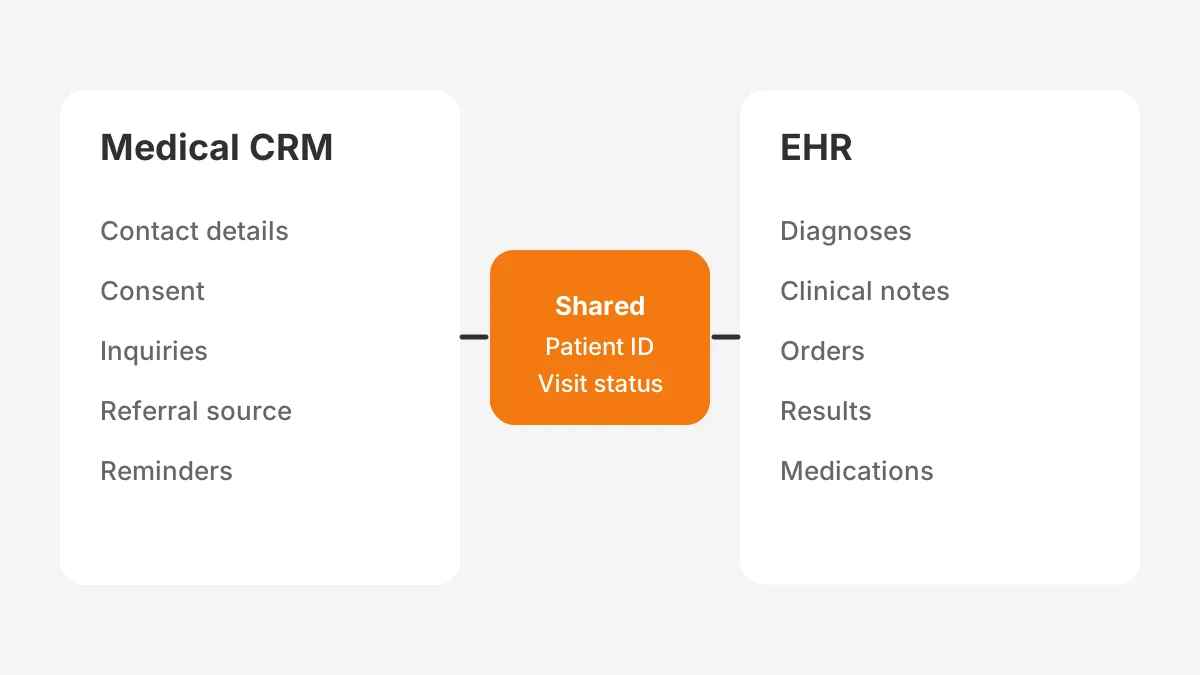
A medical CRM holds the relationship, and the EHR holds the clinical record. The electronic health record is the source of truth for diagnoses, orders, notes and results. The CRM stores identity, contact preferences, consent, inquiries and appointment status.
The crm vs ehr question is less about choosing one and more about drawing a line between them. A third system often sits alongside both. The practice management system runs billing, insurance eligibility and the schedule itself. The table shows a typical split of duties.
| Job | Medical CRM | EHR | Practice management system |
|---|---|---|---|
| Capture web, phone and text inquiries | Yes | No | No |
| Track referral sources and referring doctors | Yes | Referral letters only | Rarely |
| Send reminders, recalls and follow-ups | Yes | Basic in some products | Basic in some products |
| Store diagnoses, notes and results | No, link by patient ID | Yes | No |
| Book appointments and bill visits | Reads status | Sometimes | Yes |
| Report on campaigns and lead source attribution | Yes | No | Rarely |
The clean pattern is to link records by a shared patient ID and copy only what the CRM needs. Appointment date, status, provider and location are usually enough. Clinical detail stays where clinicians already work, which keeps the CRM smaller and easier to secure.
A clinic crm also keeps a history of every referring office. That history matters when a referring doctor retires or a new group opens nearby. The clinic can see who sent patients last year and who has gone quiet.
Which Features Should a Medical CRM Include?
A medical CRM should cover eight jobs that the EHR and scheduling tools leave open. The list below works as a shortlist filter. A product that misses two or more of these jobs will push staff back to spreadsheets.
- Patient intake: web forms, call logging and text capture that create one record per person.
- Two-way texting: replies land on the patient record, with templates for confirmations and directions.
- Appointment reminders: timed messages by channel, with confirm and reschedule links.
- Referral tracking: a record for each referring doctor, with booked and attended counts.
- Patient recall system: due dates for annual visits, follow-ups and lapsed treatment plans.
- Consent management: opt-in and opt-out stored by person, channel and purpose.
- Role-based access and an audit trail: field rules for each role and a log of each change.
- Reporting: booked visits, no-show rate and revenue by source, location and provider.
Two further items matter once the clinic grows. Field-level encryption protects sensitive fields if a user account is compromised. A patient portal link lets patients update contact details without a phone call.
Patient intake automation deserves the closest test during demos. Ask the vendor to show a form, a missed call and a text from one patient. All three should land on a single record. Duplicate records erode staff trust in a medical CRM faster than any missing feature.
How Should Consent Records Work?
Consent records should sit on the patient record as separate entries for each channel and purpose. A patient may accept text reminders but refuse marketing email. Store the date, the source form and the wording shown at the time.
Withdrawal must take effect at once. When a patient replies STOP or asks for no more email, the system should block future sends on that channel. Staff should not be able to override the block by hand without a logged reason.
What Does HIPAA Require From a Medical CRM?
HIPAA requires a signed business associate agreement before a CRM vendor stores protected health information for a clinic. No product is HIPAA compliant on its own. Compliance comes from the agreement, the edition and the way the clinic configures it.
The HHS guidance on HIPAA and cloud computing (2016) is direct on this point. A cloud service provider that stores ePHI is a business associate, even if it cannot read encrypted data. Using one without a hipaa business associate agreement violates the rules.
The same guidance lists what that agreement must cover. It sets the permitted uses of the data, the safeguards and how security incidents get reported. It also covers return or destruction of the data when the contract ends.
Message type matters too. HHS treats appointment reminders as part of treatment, so they need no patient authorization. Marketing communications are different. HHS guidance says marketing uses of protected health information need a signed authorization, with narrow exceptions.
That rule shapes how a clinic builds campaigns. A healthcare marketing crm should hold consent records and keep promotional lists apart from treatment messages. Appointment reminder automation can run from the first day. Newsletters about new services need opt-in records first.
Clinic owners often search "is HubSpot HIPAA compliant" or "is Salesforce HIPAA compliant" before a demo. For each platform, the answer depends on edition and contract. The vendor positions below come from each company's own documentation, read in November 2026.
- Salesforce: its business associate addendum covers Health Cloud, Sales Cloud and Service Cloud. It names exclusions such as Tableau Server.
- Microsoft: its HIPAA and HITECH compliance page offers the BAA by default through its Data Protection Addendum. Dynamics 365 is listed in scope.
- HubSpot: sensitive data properties are on Enterprise tiers, and HubSpot described HIPAA support as a public beta in October 2024.
- Zoho CRM: HIPAA settings cover up to 10 modules and 25 fields per module. Zoho sends a BAA template on request.
Each product also limits which tools may touch health data. HubSpot's help pages bar sensitive properties from chatbots, personalization tokens and sandboxes. Plan workflows around those limits before configuration starts, not after a security review.
Security settings need a regular check after launch. Review user roles each quarter and remove accounts for staff who have left. Export the audit trail for the same period and look for bulk exports or record views outside working hours.
Which Medical CRM Platforms Suit Each Clinic?
The right medical CRM depends on clinic size, the EHR in use and how much custom reporting the practice needs. There is no single best crm for medical practice work. The table matches common clinic profiles to platforms that sign a business associate agreement.
| Platform | Fits best | HIPAA route | Watch for |
|---|---|---|---|
| Salesforce Health Cloud | Multi-location groups and health systems | Signed BAA covering Health Cloud | Licence cost and admin skill |
| HubSpot Enterprise | Marketing-led practices such as dermatology | Sensitive data settings on Enterprise | Excluded tools and beta status |
| Microsoft Dynamics 365 | Clinics already on Microsoft 365 | BAA through Microsoft's addendum | Partner-led setup |
| Zoho CRM | Single-site practices on a tight budget | HIPAA settings plus BAA template | Module and field limits |
| Packaged clinic tools | Practices that want reminders fast | Vendor BAA | Limited custom reporting |
Salesforce health cloud sits at the top of the price range. Its 2026 Health Cloud pricing page lists Sales and Service Core at $350 per user per month, billed annually. Advanced is $525, and the Max editions run $700 to $725.
HubSpot for healthcare fits practices that market elective services and want simpler administration. Small teams with a short list of fields to protect tend toward Zoho CRM for healthcare. Clinics already running Teams and Outlook get the most from Dynamics 365 for healthcare.
Packaged tools in the patient engagement platform category, such as NexHealth, LeadSquared and Emitrr, focus on reminders and texting. They launch faster than a platform build. The trade-off is reporting: custom fields, multi-location dashboards and referral analytics are harder to shape.
Medical crm pricing is rarely the licence alone. Compare the full medical crm software cost, including integration and training, before ranking vendors. The cost section below shows how those lines add up for one example clinic.
Odoo is a further option for clinics that want CRM, invoicing and inventory in one database. It suits aesthetic and wellness clinics that sell products alongside treatments. Confirm who hosts the database and whether that host signs a BAA before any patient data goes in.
How Does a Medical CRM Connect to the EHR?
Connect a medical CRM to the EHR through the EHR's FHIR API, an integration engine or a scheduled file sync. The right path depends on what the EHR vendor exposes and how fresh the data must be.
Federal rules have widened the options. HealthIT.gov reports a deadline under the 21st Century Cures Act update. Certified EHR developers had to provide FHIR-based APIs by December 31, 2022. The criterion is known as (g)(10).
A FHIR API built to the US Core guides gives a standard way to read patients and appointments. Large EHRs such as Epic and Oracle Health publish these interfaces. Smaller practice systems may offer only exports or a vendor API. The crm ehr integration steps below apply either way.
- List the fields the CRM needs: patient ID, contact details, appointment date, status, provider and location.
- Check what the EHR exposes through FHIR, a vendor API or scheduled exports.
- Choose the path: a native connector, an integration engine such as MuleSoft, or a nightly file sync.
- Map the patient ID as the match key and define how duplicates get resolved.
- Test with sample records, then confirm that no clinical notes cross into the CRM.
- Monitor sync errors weekly and assign one owner to fix them.
Keep the flow one-way at first. The EHR sends appointment status to the CRM, and the CRM sends nothing clinical back. Two-way sync can follow once the clinic trusts the data. Unboxx scopes these links as part of its CRM integration services.
Identity matching needs its own rule set. Match first on exact keys, such as the EHR patient ID or a verified mobile number. Then flag near matches on name and date of birth for a person to review. Automatic merges on fuzzy matches cause the worst data errors.
How Should Patient Journeys Run Inside the CRM?
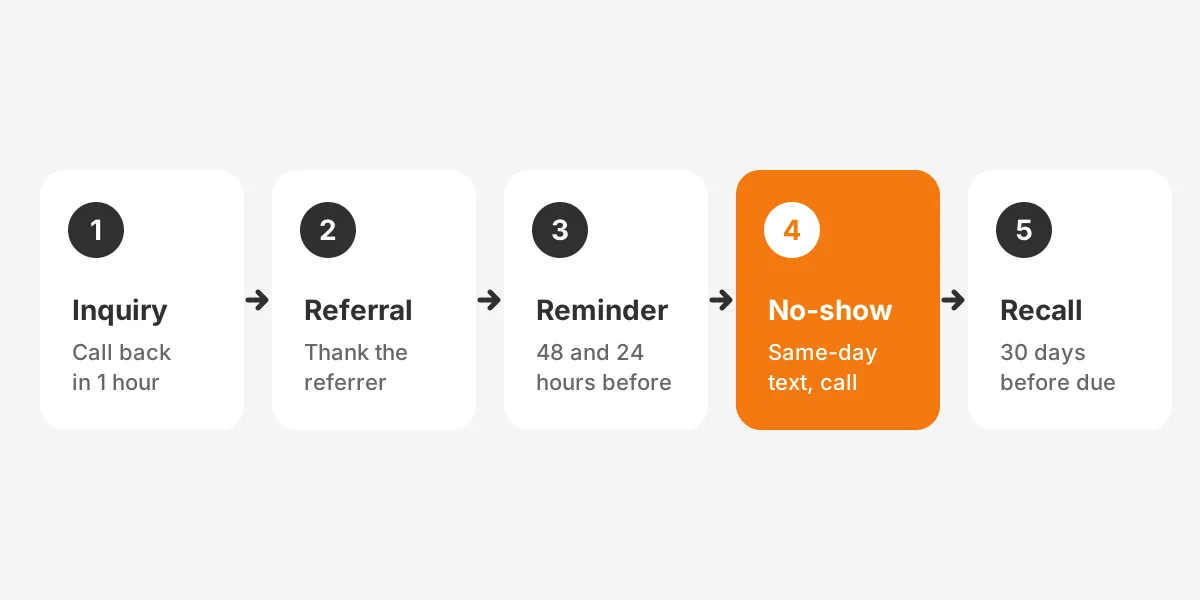
Patient journeys should run as five automated workflows inside the medical CRM: inquiry, referral, reminder, no-show recovery and recall. Each workflow has a trigger, an owner and a deadline.
- Inquiry: a form, call or text creates a record and assigns a callback task within one business hour.
- Referral: a new referral logs the referring doctor and sends that office an acknowledgment.
- Reminder: messages go out 48 hours and 24 hours before the visit, with a reschedule link.
- No-show recovery: a missed visit triggers a same-day text and a call task the next morning.
- Recall: a due date set at checkout starts a sequence 30 days before the next visit is due.
The timings above are an example starting point, not a rule. Each clinic should tune them against its own no-show rate and booking lead time. Dantas and colleagues found that long lead time was a main driver of no-shows.
Referral management software features matter most for specialty clinics. Referring doctors expect a quick confirmation and a note when the patient is seen. Tracking booked and attended counts by referrer shows which relationships to protect. It also supports care coordination between offices.
Automation should never replace a person on sensitive calls. Route clinical questions to nurses, and keep message templates free of diagnosis details. More examples of trigger and owner design appear in the Unboxx guide to workflow automation examples.
What Does a Medical CRM Cost in Year One?
A medical CRM costs licences plus setup, integration, messaging and training in year one. In the example below, licences come to less than half the total. It pairs one published list price with assumed figures.
The example clinic has three locations and 12 CRM users. It runs Salesforce Health Cloud Sales and Service Core at the published $350 per user per month. Every other figure in the table is an assumption for illustration, not a quote or a statistic.
| Cost line | Example figure | Basis |
|---|---|---|
| Licences, 12 users for 12 months | $50,400 | Published list price |
| Configuration and workflows | $40,000 | Assumed |
| EHR and scheduling integration | $15,000 | Assumed |
| Texting and messaging fees | $3,600 | Assumed |
| Training and part-time admin | $12,000 | Assumed |
| Year-one total | $121,000 | Sum of lines |
In this example, licences make up about 42% of year one. Year two drops to licences, messaging and admin, because setup and integration are one-time costs. A single-site practice on Zoho CRM or a packaged tool would spend far less on each line.
Price the same five lines for every shortlisted vendor. That makes a fair comparison between a platform build and a packaged tool. The Unboxx CRM consulting team can price each line against a clinic's own users and systems.
Watch for three costs that rarely appear in a vendor quote. Data cleanup before import takes staff time. Extra storage or archive licences may be needed as records grow. Security add-ons, such as event monitoring or encryption, can carry their own fees on some platforms.
How Do You Roll Out a Medical CRM?
Roll out a medical CRM in six phases, starting with requirements and ending with a review 90 days after launch. Pilot at one location before the rest. Each phase has one owner and a sign-off before the next begins.
- Requirements: list workflows, reports and integrations, then score them as in how to gather and rank CRM requirements.
- Security review: sign the BAA, set roles and decide which fields hold protected health information.
- Data cleanup: merge duplicate patients and referrers before import, following a CRM data cleansing runbook.
- Build and integrate: configure workflows and connect the EHR and scheduling system.
- Pilot: run one location for four weeks and fix what staff report.
- Launch and review: roll out to the other sites, then review adoption and no-show rate at 90 days.

Front-desk adoption decides whether a medical crm implementation succeeds. Train receptionists on the three screens they use daily, not the whole system. Name one super-user per location to answer questions. The CRM implementation plan guide sets out owners and timelines in more detail.
Measure success with numbers the clinic already tracks. Callback time for new inquiries, no-show rate and recall bookings are good first measures. Compare each one against the three months before launch.
Track adoption as closely as outcomes. Logins per user, tasks closed on time and records created by staff all count. They show whether the system is part of daily work. Low numbers at one site usually point to a training gap, not a software fault.
Frequently Asked Questions
Does a medical practice need a CRM?
A medical practice needs a CRM once inquiries, referrals and recalls outgrow the front desk's memory. Signs include missed callbacks, unknown referral sources and lapsed patients. A small clinic crm can start with intake and reminders, then add recall and reporting once staff use it daily.
Can a small clinic use a free CRM?
A small clinic can use a free CRM only if no protected health information goes into it. Free tiers rarely include a business associate agreement. Once names link to appointments or conditions, the clinic needs a paid edition with a signed BAA and access controls.
How long does a medical CRM implementation take?
A single-site medical CRM without EHR sync can launch in about six to eight weeks, as a planning example. Adding EHR integration and three locations can double that. Data cleanup and staff training usually take longer than the configuration itself, so start them early.
Can a medical CRM send appointment reminders?
A medical CRM can send appointment reminders without written authorization, because HHS treats reminders as part of treatment. The clinic still needs a BAA with the vendor. Keep reminder texts short, leave out diagnosis details and store each patient's channel preference.
Who should own the CRM after launch?
The practice manager should own the CRM after launch, with a named admin for daily changes. Clinicians stay users, not owners. Review duplicates, failed syncs and open tasks each month. That keeps the data healthy and shows problems before patients notice them.
Where Should Your Clinic Start With a Medical CRM?
Start with the problem that costs the most today: slow callbacks, no-shows or lapsed recalls. Pick a medical CRM that signs a BAA, fits the EHR and handles that first workflow well. Then pilot it at one location.
Unboxx helps clinics choose, configure and connect patient management crm platforms on Salesforce, HubSpot and Odoo. Book a CRM consultation to map your intake, reminder and recall workflows against the systems you already run.
Let's create something out of this world together.
Have a project in mind? Contact us for expert design and development solutions. Let's discuss how we can help grow your business.
Ready to Unboxx Your Potential?
Build smarter systems. Automate faster. Scale confidently.