
Sales Compensation Data: Join CRM, ERP and HR in One Place
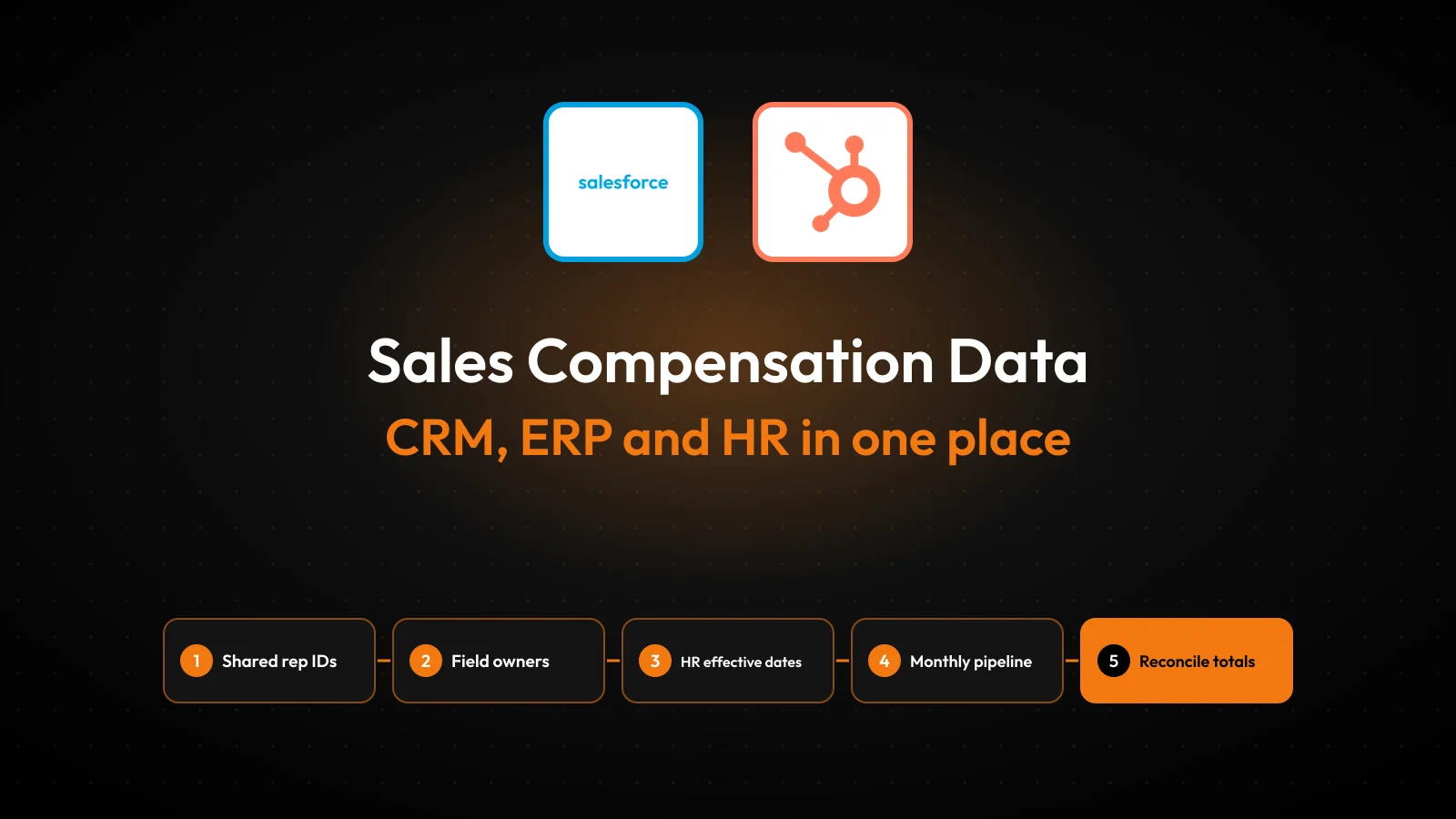
Commission day often starts with three exports that disagree. The CRM says a deal closed in March. The ERP says the invoice went out in April. The HR system says the rep changed territory in February. Someone in sales operations then spends days reconciling spreadsheets before anyone gets paid.
Sales compensation is only as accurate as the data behind it. A 2017 Xactly survey covered over 240 US firms. Over 80% of them were not fully accurate with sales commission payouts.
The fix is a planned data flow. Clean CRM, ERP and HR data lands in one place, with clear owners and checks.
Key Takeaways
- Sales compensation needs deal data from the CRM, revenue data from the ERP and people data from the HRIS.
- Each field needs one system of record and one shared rep ID that every system carries.
- A monthly pipeline with locked cut-off dates and reconciliation checks catches payout errors before money moves.
What Data Does Sales Compensation Depend On?
Sales compensation depends on three groups of data: what was sold, what was billed or paid, and who sold it. Each group usually lives in a different system, which is why commission calculations break so often.
The CRM holds the selling record. That includes opportunities, close dates, deal amounts, products, splits between reps and the account owner. Platforms such as Salesforce, HubSpot and Microsoft Dynamics 365 store these records as objects with their own IDs.
The ERP holds the money record. Invoices, payments, credit notes, refunds and recognized revenue sit in systems such as NetSuite, SAP and Dynamics 365 Business Central. Some compensation plans pay on invoiced or collected revenue, so the ERP decides when a commission is earned.
The HRIS holds the people record. Hire dates, exit dates, titles, managers, territories, base salary and leave come from tools such as Workday, BambooHR or ADP. A rep who joined mid-quarter needs a prorated quota, and only the HRIS knows the start date.
A fourth input is the plan itself: quotas, rates, accelerators, caps and clawback rules. Plan terms usually live in an incentive compensation management (ICM) tool or a spreadsheet. The sales compensation calculation joins all four inputs for every rep and every period.
Why Is Sales Compensation Data Messy Across Systems?
Sales compensation data gets messy because each system was set up by a different team for a different job. Sales built the CRM around pipeline. Finance built the ERP around accounting rules, and HR built the HRIS around employment records.
The same Xactly survey listed poor upstream data quality as a top problem for 42% of companies. It also found 47% took four weeks or longer to process incentive payouts. Slow payouts and bad source data usually come together.
The same problems show up in almost every company:
- Names differ between systems, such as "Acme Corp" in the CRM and "ACME Inc." in the ERP.
- Reps have no shared ID, so an email address in the CRM must match an employee number in the HRIS.
- Dates disagree, because a close date, an invoice date and a payment date fall in different months.
- Amounts disagree, because discounts, taxes and currency conversion happen after the deal closes.
- Changes arrive late, such as a territory move entered in the HRIS two weeks after it took effect.
Each problem looks small. Together they force a manual rebuild of sales compensation data every period. The person doing that rebuild becomes the only one who knows how. The payout process now depends on one person.
Spreadsheets hide these gaps instead of fixing them. A VLOOKUP that fails silently pays a rep zero, and a pasted value overwrites last month's correction. Forrester (2020) calls plan management the most resource-intensive part of the process. Its answer is clean integrated data.
Which System Should Own Each Sales Compensation Field?
Every sales compensation field should have exactly one system of record, and every other system should read from it. Two systems that both "own" the deal amount will eventually disagree, and a payout dispute follows.
The table below shows a common ownership split for a B2B company. Adjust it to the plan, but keep one owner per field.
| Field | System of record | Owner | Used for |
|---|---|---|---|
| Deal amount, products, close date | CRM | Sales operations | Bookings credit, quota attainment |
| Deal splits and overlay credit | CRM | Sales operations | Credit allocation between reps |
| Invoice, payment, credit note | ERP | Finance | Pay on invoice or cash, clawbacks |
| Recognized revenue | ERP | Finance | Revenue-based plans, accruals |
| Hire, exit, title, manager | HRIS | HR | Eligibility, proration, approvals |
| Territory and team | HRIS or CRM | Sales operations | Crediting rules |
| Quota, rate, accelerator | ICM tool | Compensation team | Payout calculation |
Territory is the field companies argue about most. Pick one home for it and write the rule down. If sales operations changes territories weekly in the CRM, keep it there and sync the change to the HRIS.
Write the split down in a short data dictionary. For each field, record the source system, the owner, the refresh time and the rule for fixing a wrong value. Sales compensation disputes get shorter when everyone can see which system was right.
The same thinking applies to any CRM ERP integration: decide which system wins before connecting anything. Integration tools copy data well, but they cannot settle an ownership argument.
How Do You Match Reps Across Three Systems?
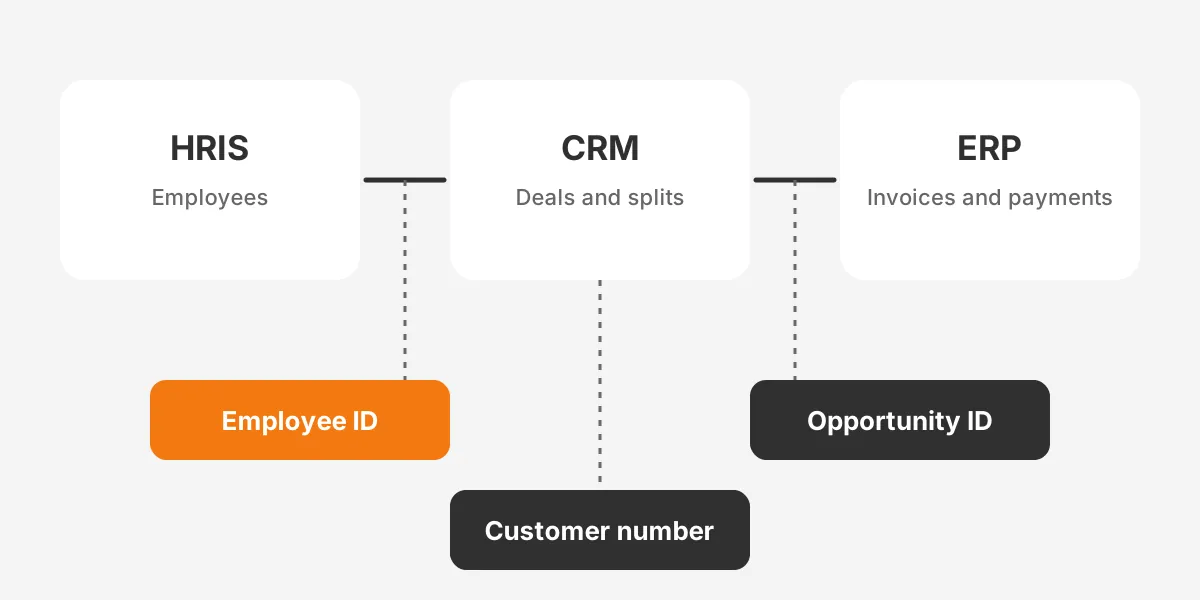
Match reps with one shared employee ID that every system stores, never with names or email addresses alone. The HRIS employee number is usually the best key, because HR creates it first and it does not change.
Add that employee ID as a field on the CRM user record. In Salesforce, the User object has a standard Employee Number field. In HubSpot, add a custom property on the user or owner record. Then store the CRM user ID on each opportunity owner and split record.
Deals need a second key that links the CRM to the ERP. The cleanest option is the CRM opportunity ID written onto the ERP sales order or invoice. An invoice that carries that ID traces revenue and payments back to the deal and the rep.
Customers need a third key. Store the ERP customer number on the CRM account. That stops "Acme Corp" and "ACME Inc." from becoming two customers in the compensation data.
Partner and overlay credit follow the same rule. Channel partners, sales engineers and regional managers who earn credit need a split record in the CRM. Each split record carries the employee ID of the person credited, not a free-text name.
Test the keys before trusting them. Run a monthly report of CRM users with no employee number, and ERP invoices with no opportunity ID. Each blank is a future payout dispute.
How Do HRIS Changes Affect Sales Compensation?
HRIS changes affect sales compensation through eligibility, proration and approvals. A hire date, leave, promotion, territory move or exit changes what a rep should earn. Each event must reach the calculation with its effective date.
Effective dating is the key idea. A territory move entered on 20 March but effective on 1 March must apply to deals from 1 March. An extract that reads only the current value puts March deals in the wrong territory. Two reps then dispute the same credit.
Every plan needs a written rule for these HRIS events:
- New hires: prorate quota by days employed in the period, and set any ramp period.
- Leave of absence: pause or reduce quota for the leave dates, following local law.
- Promotions: switch plan and rate on the effective date, not the entry date.
- Territory or manager changes: move open and future deals, and decide who keeps deals already in progress.
- Exits: stop new credit on the last day, and apply the plan's rule for unpaid commissions.
Ask HR to send these events to sales operations on a set schedule. A weekly change file from Workday or BambooHR works. An integration that reads effective-dated HRIS history is better still. A late HR change forces a sales compensation correction even when the calculation itself was right.
Plan documents should also say which record wins in a conflict. When the HRIS and the CRM disagree on a manager, the HRIS value should usually win. Approvals and payroll follow it.
Where Should Combined Sales Compensation Data Live?
Combined sales compensation data should live in one governed place. That can be an ICM platform, a data warehouse feeding one, or a controlled spreadsheet for small teams. The right choice depends on headcount, plan complexity and audit needs.
| Option | Examples | Fits | Watch out for |
|---|---|---|---|
| ICM platform with native connectors | Salesforce Spiff, CaptivateIQ, Xactly, Varicent | Growing teams, tiered or split plans | Connector limits on ERP and HRIS objects |
| Data warehouse plus ICM | Snowflake or BigQuery, loaded with Fivetran | Large teams, two or more ERPs | Needs a data engineer to own the models |
| Integration platform plus ICM | MuleSoft, Boomi, Workato | Real-time sync needs | Ongoing licence and maintenance cost |
| Controlled spreadsheet | Excel or Google Sheets with locked tabs | Small teams, flat rates | Manual errors, weak audit trail |
Salesforce Spiff is natively connected to Salesforce CRM data. Oracle Sales Performance Management states that it integrates data across CRM, ERP and HCM systems. Both still need clean, keyed source data to calculate correctly.
Whichever option fits, keep raw extracts and calculated results apart. Store each month's raw CRM, ERP and HRIS files unchanged, then build sales compensation results from them. When a rep disputes a statement six months later, the team can rerun that month from the original inputs.
Limit who can see the combined table. It holds base salaries from the HRIS next to deal values, so most managers should see only their own team. Give reps read access to their own statements and nothing else.
A data warehouse helps when a company runs two ERPs after an acquisition or sells through partners. The warehouse becomes the place where keys are matched, and the ICM tool reads one clean table. This mirrors how teams integrate data from ERP and CRM for planning platforms.
How Do You Clean CRM Data Before Commission Runs?
Before each commission run, fix close dates, owners, splits and amounts on the period's closed-won deals. Cleaning the whole database is a separate project; the commission cleanup only covers the deals that will be paid.
Start with a closed-won report for the period and confirm the following:
- Every deal has an owner who is an active user with an employee number.
- Split percentages add up to 100% for each split type.
- Close dates fall inside the period and match the signed contract date.
- Amounts match the signed order form, after discounts.
- Product lines are filled in, because rates often differ by product.
- No duplicate opportunities exist for the same order.
Late changes need a rule too. A deal edited after the freeze date should not change the closed period. Record it as an adjustment in the next period, with the reason and the approver. Earlier statements then stay as they were paid.
Add validation rules so the same errors stop at entry. A Salesforce validation rule can block a closed-won stage when the split total is not 100%. A HubSpot workflow can flag a deal that closes without a line item.
Duplicate accounts and stale owners need deeper work. A regular CRM data cleansing routine handles them between runs. The same fixes make pipeline forecasts more reliable.
How Do ERP Invoices and Payments Change Payouts?
ERP invoices and payments change payouts whenever the plan pays on billing or cash instead of bookings. They also drive clawbacks when a customer cancels, gets a credit note or never pays.
Each period, pull these ERP records into the sales compensation data:
- Invoices, with the opportunity ID, customer number, amount and invoice date.
- Payments received, with the invoice they settle and the payment date.
- Credit notes and refunds, linked to the original invoice.
- Write-offs for unpaid invoices past the clawback window.
Accounting rules add a second reason to link the ERP. Under ASC 340-40, companies capitalize incremental costs of obtaining a contract, such as sales commissions, and amortize them over time. BillingPlatform (2026) notes a practical expedient allows expensing when the amortization period would be one year or less.
That means finance needs commission amounts tied to specific contracts and dates. A spreadsheet total by rep is not enough for the audit. Keeping the opportunity ID and invoice ID on each commission line makes the accounting entry traceable.
Currency and entity add two more layers. A euro deal paid to a US rep needs one agreed exchange rate, usually from the invoice date. Companies with more than one legal entity should put the entity code on each invoice.
Clawback rules belong in the plan document and in the data. Store the clawback window, such as 90 days, as a plan field. The pipeline then matches each credit note against commissions paid inside that window. It creates a negative line automatically.
How Do You Build the Sales Compensation Data Pipeline?
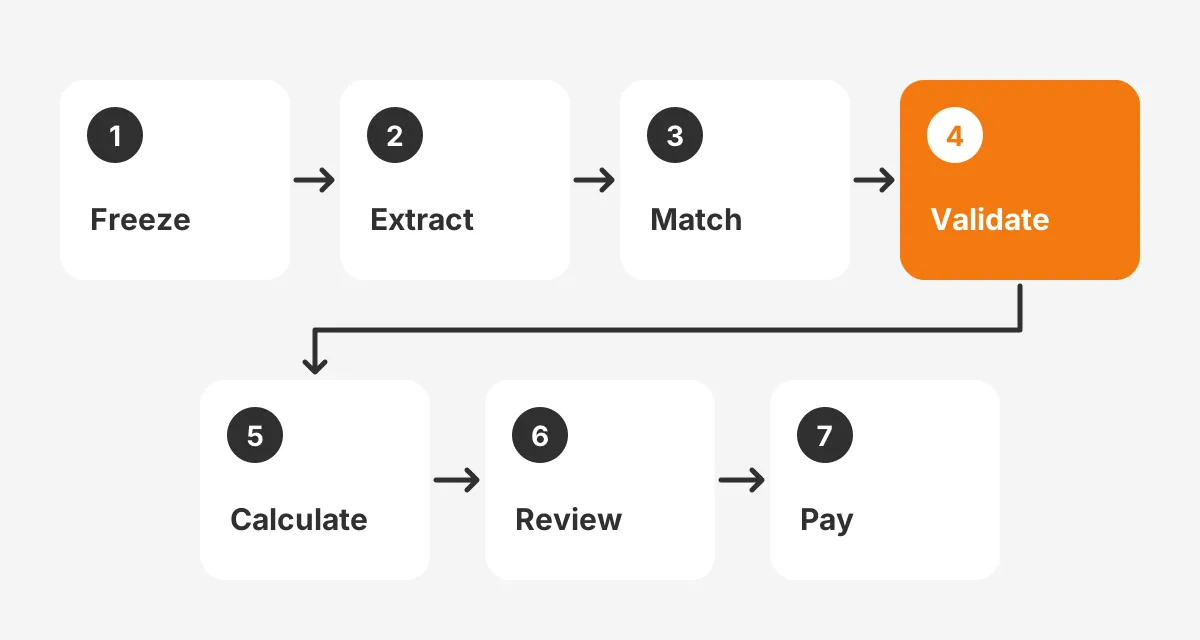
Build the sales compensation data pipeline as a fixed monthly sequence: extract, match, validate, calculate, review and pay. Each step has an owner and a deadline, and nothing moves forward until the previous check passes.
- Freeze the period: lock closed-won deals in the CRM three business days after month end.
- Extract: pull deals and splits from the CRM, invoices and payments from the ERP, and active employees from the HRIS.
- Match: join records on the employee ID, opportunity ID and customer number.
- Validate: run exception reports for missing keys, unmatched invoices and inactive reps.
- Calculate: load the matched data into the ICM tool and apply plan rules.
- Review: managers approve statements, and reps get a dispute window of about five business days.
- Pay: send approved amounts to payroll and post the accrual entries in the ERP.
A worked example, with assumed figures, shows the payoff.
A team of 25 reps closes 180 deals in a month. Matching finds 6 deals with no employee ID on the owner and 4 invoices with no opportunity ID. Fixing those 10 records takes an hour before calculation, instead of 10 disputes after payout.
Publish a sales compensation calendar at the start of each year. It should list the freeze date, statement date, dispute deadline and pay date for every month. Reps stop chasing payroll when they know the dates in advance.
Automate the extract and match steps first, because they repeat every month. Connectors in the ICM tool, or an integration platform, can run them on a schedule. Keep the review and approval steps human.
Which Controls Stop Commission Errors?
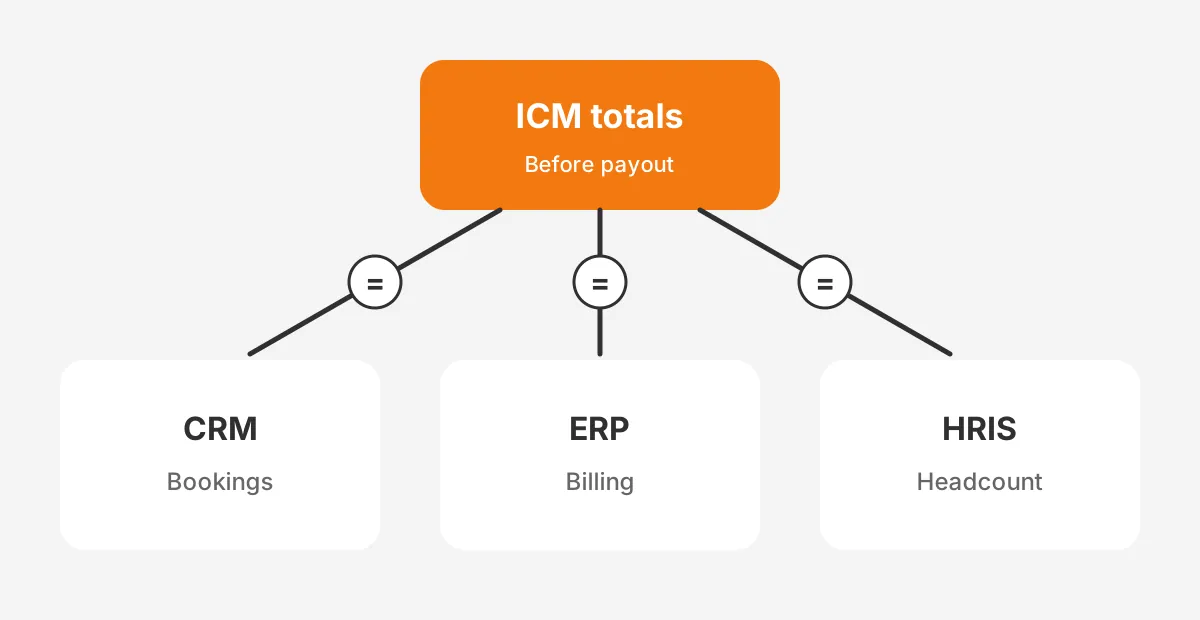
Reconciliation controls stop commission errors by comparing totals across systems before money moves. One check per source system covers the ground: bookings to CRM, billing to ERP and headcount to HRIS.
- Bookings check: total credited bookings in the ICM tool match total closed-won value in the CRM for the period.
- Billing check: total invoiced revenue used for commissions matches the ERP invoice register.
- Headcount check: every paid rep is active in the HRIS, and every active rep has a statement.
Add an audit trail for every manual change. Record who changed a credit, the old value, the new value and the reason. ICM platforms log this by default, while spreadsheets need a change log tab that someone maintains.
Separate duties as well. The person who edits plan rates should not approve payouts. Finance should sign off on the final payroll file, and HR should confirm terminations before the run.
A short monthly scorecard shows whether the sales compensation process is improving:
- Disputes raised per 100 statements.
- Days from period close to payout.
- Exception records found at the validate step.
- Manual adjustments made after calculation.
When exceptions and adjustments fall, the source data is getting cleaner. Rising disputes with few exceptions usually point to unclear plan wording. Reps and the compensation team read the rule differently.
Review the data flow again after any system change. A new CRM field, an ERP upgrade or an HRIS migration can break a key without warning. Run the three checks on the first period after every change.
Frequently Asked Questions
How do you combine CRM, ERP and HR data?
Choose one destination, such as an ICM platform or data warehouse, then connect each source with a scheduled extract. Give every record a shared key: employee ID for reps, opportunity ID for deals and customer number for accounts. Run exception reports before each sales compensation calculation.
Should commissions be paid on bookings or on cash?
Commissions paid on bookings reward closing and are simpler, because they only need CRM data. Paying on cash protects the company from unpaid deals but needs ERP payment data and longer timing. Some B2B companies split the payout, paying part at booking and part at collection.
Who should own sales compensation data?
Sales operations usually owns the combined sales compensation data, with finance owning revenue fields and HR owning employee fields. A compensation committee with members from sales, finance and HR should approve plan changes. One named administrator should run each monthly calculation and keep the audit trail.
Can a CRM calculate commissions on its own?
A CRM can calculate simple flat-rate commissions with formula fields or reports. It struggles with tiers, accelerators, splits, clawbacks and payment-based plans, because that data sits in the ERP and HRIS. Teams with layered plans usually move the sales compensation calculation to a dedicated ICM tool.
What slows down a compensation data integration project?
Missing shared keys slow a compensation data integration project more than any connector does. Projects also stall when plan rules are undocumented or when two systems claim the same field. Adding employee and opportunity IDs first, and agreeing field owners, shortens the build and the testing.
How Can Unboxx Help With Sales Compensation Data?
Accurate sales compensation starts with connected, keyed data. That is integration work first and plan design second. Unboxx connects Salesforce, HubSpot and Dynamics 365 with ERP and HR systems through its CRM integration services. It also automates monthly data checks with AI business automation.
For a client example, read about ending manual revenue reconciliation with HubSpot RevOps automation. To map your own sales compensation data flow, schedule a consultation with the Unboxx team.
Let's create something out of this world together.
Have a project in mind? Contact us for expert design and development solutions. Let's discuss how we can help grow your business.
Ready to Unboxx Your Potential?
Build smarter systems. Automate faster. Scale confidently.