
CRM for Credit Unions: Core Links, Controls and Platforms

Credit unions are getting fewer and larger. The NCUA 2026 Q2 data summary counts 4,214 federally insured credit unions. A year earlier there were 4,370. Members still rose by 2.3 million, to 146.1 million.
Each merger hands a team two member files, two service queues and one board asking for growth.
CRM for credit unions turns those scattered records into one member view that staff can act on. It links the core, the loan origination system and digital banking, then routes service, lending and outreach work.
Before signing, a credit union needs to know what CRM for credit unions must connect to, control and prove.
Key Takeaways
- CRM for credit unions earns its cost only when it reads live data from the core and loan system.
- Compliance controls for fair lending, Regulation E and vendor risk belong in the requirements, not in a later phase.
- A phased rollout of about nine months suits most credit unions with a small IT team.
What Is CRM for Credit Unions?
CRM for credit unions is member relationship management software that records every member, household, product and conversation in one place. The core processor still holds the accounts and the ledger.
The CRM holds the relationship around those accounts. It shows who called, what they asked, which loan they started and which offer fits next.
A banking CRM built for retail banks counts customers. A credit union CRM counts members, and members are also owners. That difference changes the data model.
Households matter, because one family often shares a car loan, a share draft account and a mortgage. Field-of-membership rules matter, because eligibility decides who the credit union can serve at all.
Most CRM software for credit unions covers five jobs:
- A 360-degree member view that shows accounts, loans, cases and channel history on one screen.
- Member onboarding workflows that track a new member through the first 90 days.
- Lending support that follows applications from first inquiry to funding.
- Case management for service requests, disputes and complaints.
- Credit union marketing automation for campaigns, consent and segment lists.
What does onboarding look like in the CRM?
Credit union member onboarding is often the first workflow teams build in CRM for credit unions. A new member gets a welcome call in week one and a digital banking setup check. A product review follows at 90 days. The CRM creates each task and assigns an owner.
Managers then see which new members stalled and why. A member who never logged in to the app gets a call, not another email.
Members notice the 360 view most. A member who calls about a declined card should not repeat their story to the next agent.
A CUNA Strategic Services article (2023) groups the benefits into three areas: member satisfaction, service delivery and decision-making. Each depends on member data that is complete and current.
CRM for credit unions is not a replacement core. A CRM platform for credit unions reads balances and holdings from the core processor. It writes back only the fields it owns, such as contact preferences or opt-out status.
Teams that blur this line end up with two systems claiming the same truth. The Unboxx page on CRM for finance businesses shows how banks and credit unions split these roles.
Why Do Credit Unions Need a CRM Now?
Credit unions need a CRM now because consolidation, digital expectations and supervision all reward institutions that know their members well. The pressure shows in the numbers. The same NCUA summary reports total assets of $2.50 trillion and loans of $1.76 trillion as of June 30, 2026.
Executive surveys point the same way. The Wipfli State of Credit Unions 2025 report surveyed over 100 credit union executives. Of those, 58% named digital member engagement as a top strategy. Another 57% cited data analytics or AI. Both depend on member data that sits in one governed place.
Core budgets leave little room for new work. CU Management (2025) reports that up to 90% of credit union technology spending still goes to maintaining existing infrastructure. The same article says 30% of credit unions plan to include a cloud-native core in their two-year strategic plans.
Four pressures keep CRM for credit unions on the board agenda:
- Mergers create duplicate member records that need one owner.
- Members expect the branch, the app and the call center to share history.
- Loan officers need application status in front of anyone a member talks to.
- Member retention depends on noticing when a household stops using a product.
Credit union mergers add a specific problem. Two credit unions rarely share a member numbering scheme or a core. The CRM becomes the place where staff see both histories during the conversion. Without it, service quality drops at the exact moment members are deciding whether to stay.
The payback from CRM for credit unions shows up in daily service first. A call center agent who sees an open loan application can offer help on the same call. A branch officer who sees a household's products can spot a missing auto loan.
Supervision adds weight. Examiners ask how member data moves between the credit union and its vendors, and who can see it. CRM for credit unions gives that answer one documented home.
Which Core Systems Must CRM for Credit Unions Connect?
CRM for credit unions must connect to the core banking system first. Lending, digital banking and the contact center come next. The core is the source of truth for accounts, balances and transactions. Every other link depends on a clean member key from it.
The common credit union core processors each offer a different integration path. A Vantage Point guide (2026) lists the main patterns:
| Core system | Provider | Typical integration path |
|---|---|---|
| Symitar (Episys) | Jack Henry | APIs, file extracts and middleware connectors |
| KeyStone | Corelation | REST APIs and real-time event streams |
| DNA | Fiserv | APIs, middleware and batch synchronization |
| CU*BASE | CU*Answers | Custom APIs and file extracts |
The core decides how fresh the CRM can be. Corelation KeyStone can push events as they happen. An older core may only send a nightly file. Agree the freshness target for each field before you design screens. Then nobody promises live balances that arrive the next morning.
Beyond the core, plan four more connections:
- The loan origination system, such as MeridianLink or Temenos, for application status and decisions.
- The digital banking platform, such as Alkami or Q2, for login activity and in-app requests.
- The contact center, such as Genesys, Five9 or NICE, for call history and screen pops.
- The marketing system, for consent, campaigns and suppression lists.
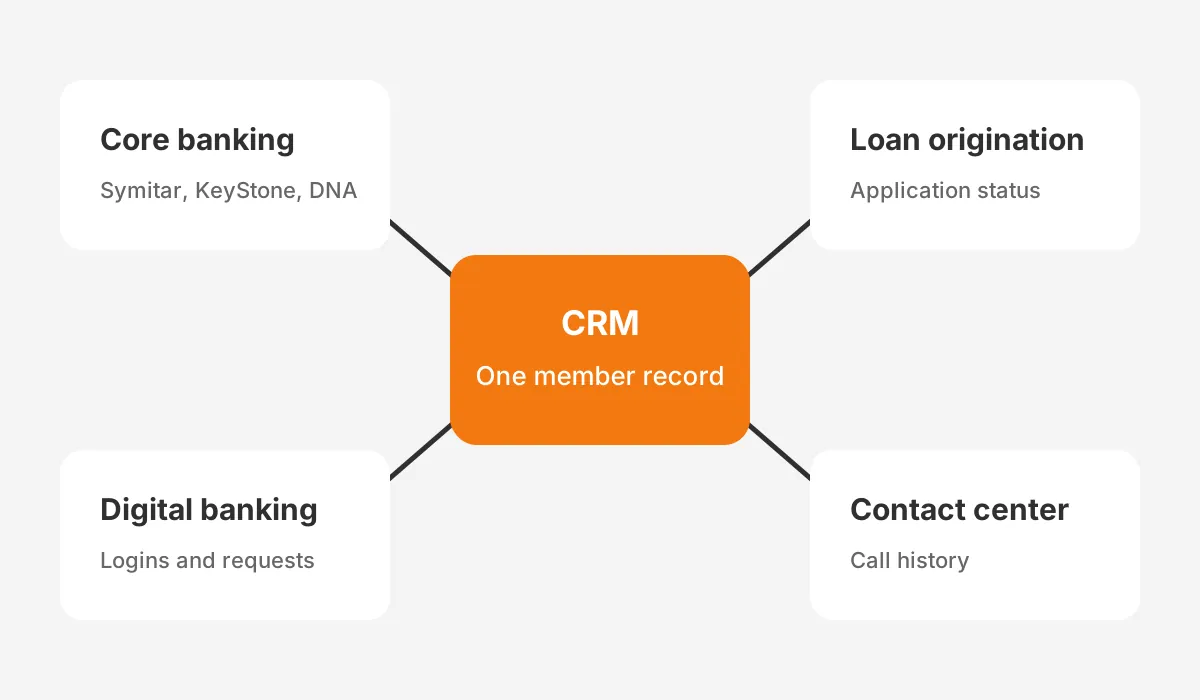
Write an integration contract for each link. It names the member key, the fields each system owns, the sync frequency and the rule for conflicts.
If the loan origination system and the CRM disagree on an application status, the contract says which one wins. Middleware such as MuleSoft helps, but it does not replace these decisions.
Credit union data migration needs the same care. Old CRMs, spreadsheets and email folders hold member notes that staff rely on. Match those records to core member numbers before go-live. Records that cannot be matched go to a review queue, not into the new system as duplicates.
Test the integration with real member scenarios before training starts. Open an account in the core and confirm it appears in CRM for credit unions within the agreed time. Close a share account and check that the household view updates. Staff lose trust fast when data looks wrong.
What Compliance Controls Should the CRM Enforce?
The CRM should enforce the consumer protection rules examiners already test, plus vendor and data security controls. NCUA compliance work starts with the supervisory letter. The NCUA 2025 supervisory priorities name fair lending, HMDA and Regulation C, the Military Lending Act, and Regulation E.
Each of those rules touches CRM workflows:
- Fair lending: pre-qualified offers and next best action rules must not steer members by protected traits.
- HMDA: mortgage inquiries logged in the CRM must match what the loan system reports.
- Regulation E: card disputes opened as CRM cases need dated steps and deadline alerts.
- Military Lending Act: covered-borrower checks belong in the lending workflow, not in staff memory.
Cybersecurity reporting has a fixed deadline. The same NCUA letter says credit unions must report a reportable cyber incident within 72 hours. That rule also covers incidents at a third-party provider. Your CRM vendor is now part of that chain, so the contract must say how fast they tell you.
Third-party risk management is the next control. NCUA examiners review third-party risk practices when lending, servicing or collection work is outsourced.
Ask every CRM vendor for its security reports, data residency terms and an exit plan. A credit union compliance CRM should export your data in a usable format on request.
Member data rights add another layer. The CFPB Personal Financial Data Rights rule (2024) requires covered providers to share a consumer's data on request, free.
The CFPB page says certain small banks and credit unions are not subject to it. The page is now marked as archived, so confirm current status with counsel.
Build these controls into the requirements document. Field-level permissions, audit trails on every member record change, and consent stored with a date and source are baseline requirements. Adding them after go-live costs more than designing them first.
CRM for credit unions also needs a clear rule for AI. If the system suggests offers or next steps, record the inputs, the suggestion and the staff decision. That record answers an examiner's fair lending question without a manual search.
Which Platforms Offer CRM for Credit Unions?
CRM for credit unions comes in two groups. Large platforms offer financial services editions, while banking-specific products target community institutions. The right group depends on your size, your core and how much configuration your team can own.
| Platform | Type | Strength for credit unions | Watch for |
|---|---|---|---|
| Salesforce Financial Services Cloud | Large platform | Household model, accelerator for institutions under $10 billion in assets | Needs skilled admins and a core connector |
| Microsoft Dynamics 365 (incl. Fiserv Enteract) | Large platform | Fits Microsoft 365 shops; Enteract is built on Dynamics 365 | Partner choice shapes the result |
| HubSpot | Marketing-led platform | Fast campaigns and member onboarding journeys | Lending and case depth need add-ons |
| Abrigo 360 View, Total Expert, Marquis, Creatio | Banking-specific | Prebuilt banking objects and reports | Smaller partner pool and fewer integrations |
Salesforce for credit unions now has a named package. Salesforce's credit union page describes Salesforce for Credit Unions and Community Banks. It also offers a Financial Services Cloud accelerator suited to institutions with under $10 billion in assets. Agentforce and Data Cloud sit on top for AI and data work.
Dynamics 365 for credit unions often arrives through a partner. Fiserv's Enteract, for example, is built on Microsoft Dynamics 365. It adds a 360° customer view, sales management and service automation. Credit unions already on a Fiserv core should ask how much of the core integration comes prebuilt.
HubSpot for credit unions works best when marketing and onboarding are the main goal. It handles campaigns, forms and member journeys well. Complex lending pipelines and dispute cases usually need custom objects or a second system.
Banking-specific tools, listed in Abrigo's 2026 banking CRM roundup, come with financial objects out of the box. The trade-off is a smaller partner market. Request a production reference on your own core before shortlisting any of them.
There is no single best CRM for credit unions. Pick the platform that matches your core, your staff skills and your three-year plan.
Whichever platform wins, CRM for credit unions depends on the partner who builds it. Ask how often the partner has delivered credit union or community bank projects on your core. Ask who maintains the core connector after go-live and after each core release.
How Should a Credit Union Choose a CRM?
A credit union should choose a CRM by scoring vendors on integration, compliance and adoption before comparing features or price. Features are easy to demo. Core connections and audit controls are where projects stall.
Use a weighted scorecard with five criteria:
- Core and loan origination system integration, proven on your core: 30%.
- Compliance and security controls, including audit trails and consent: 25%.
- Staff adoption, judged by front-line users in a scripted demo: 20%.
- Total cost over five years, including the partner and connectors: 15%.
- Product roadmap and AI features: 10%.
These weights are an example, not a standard. They reflect a simple rule. A CRM that cannot read the core will not be used, however good its features look. Adjust the weights to your own strategy, then publish them before demos start.
Run demos with your own data where possible. A vendor that shows CRM for credit unions on a sample bank dataset hides the hard parts. Those are your member numbers, your households and your core fields.

Write your requirements before you meet vendors. The Unboxx guide to CRM requirements gathering shows how to turn staff interviews into testable needs. Then run a structured CRM selection process with scripted demos built from your own member scenarios.
Lending teams can borrow from mortgage practice. A mortgage CRM guide covers loan pipeline stages, disclosure timing and loan system links. Most of it applies to consumer lending too. In demos, have each vendor move a car loan from inquiry to funding with real fields.
For a CRM for small credit unions, keep the scope tight. Start with the member view, service cases and onboarding. Add lending and marketing once staff use the system daily.
How Long Does a Credit Union CRM Rollout Take?
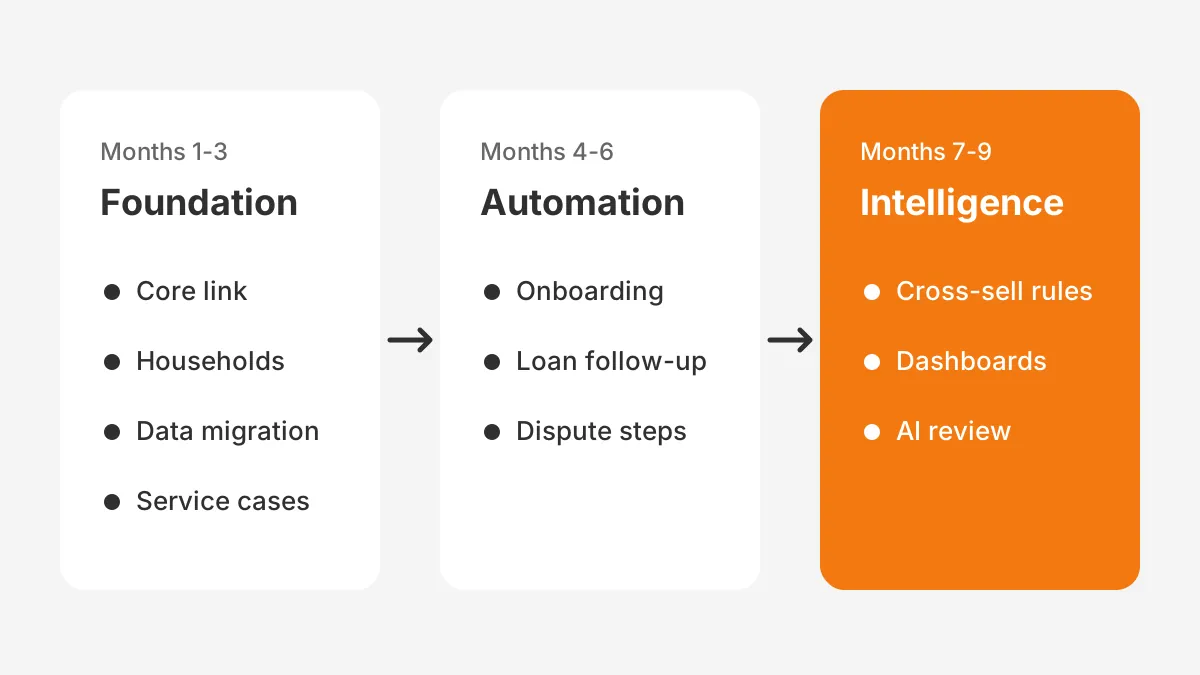
A credit union CRM implementation usually runs six to twelve months in phases. The core and the number of integrations set the pace. A phased plan protects member service, because each phase goes live before the next begins.
Here is an example plan for a mid-sized credit union. It assumes one core, one loan system and about 40 staff users. The figures are assumptions for illustration.
- Months 1 to 3, foundation: core integration, member and household model, data migration, service cases.
- Months 4 to 6, automation: member onboarding journeys, loan application follow-up, Regulation E dispute steps.
- Months 7 to 9, intelligence: cross-sell rules, dashboards, and AI suggestions reviewed by staff.
CRM adoption decides whether the timeline pays off. Name a product owner from operations, not only from IT. Train branch, call center and lending staff on their own daily tasks. Measure logins and case use weekly in the first 90 days.
Who needs to be on the project team?
CRM for credit unions needs a small, named team. The example above would use five roles:
- A product owner from operations or member experience.
- A CRM administrator who configures fields, layouts and reports.
- An integration lead who owns the core and loan system links.
- A compliance reviewer who signs off workflows and offer rules.
- Trainers from the branch, call center and lending teams.
Small credit unions can combine roles. Keep the product owner and the compliance reviewer as separate people.
Cost follows scope. Licenses, the implementation partner, core connectors and internal staff time all count. The Unboxx breakdown of CRM implementation cost lists the budget lines to price before you ask the board for approval.
Merged credit unions need extra time for data. A controlled post-acquisition Salesforce migration shows how one team consolidated duplicate CRM records without losing history.
What Should You Measure After Go-Live?
Measure member outcomes and staff use, not only system uptime. A dashboard that tracks logins alone will look healthy while members leave.
Six measures give a balanced view:
- Products per member, tracked by household and by new members.
- Onboarding completion, meaning new members who reach a set product count in 90 days.
- Loan application follow-up time for incomplete applications.
- Case resolution time for service requests and Regulation E disputes.
- Member retention by segment, with alerts when a household closes a product.
- Weekly active users by team: branch, call center, lending and marketing.
Set a baseline before go-live, from the core and existing reports. Without one, nobody can show the board what changed. Review the measures monthly with the product owner and adjust workflows where numbers stall.
Report the same measures to the board each quarter, in the same format. CRM for credit unions keeps its budget when the board sees products per member and case times move.
Credit union cross-selling deserves care. Offers based on CRM data must pass the same fair lending review as any other model. Keep a human review step on AI suggestions, and log why each offer was shown.
Frequently Asked Questions
What is the best CRM for credit unions?
The best CRM for credit unions is the one that connects to your core and loan system in production. Salesforce Financial Services Cloud and Microsoft Dynamics 365 suit larger teams. HubSpot suits marketing-led goals. Banking-specific tools suit credit unions wanting prebuilt financial objects.
How much does a credit union CRM cost?
A credit union CRM cost depends on user count, platform edition, the implementation partner and core connectors. License fees are only part of it. Price five years of licenses, partner work, integration upkeep and staff time. Then compare vendors on that total.
Can a CRM integrate with Symitar or KeyStone?
Yes, CRM integration with core banking systems such as Symitar and Corelation KeyStone is common. The path differs by core: APIs, real-time events, middleware or nightly files. Ask each vendor for a live reference on your exact core, and agree data freshness targets field by field.
Who should own the CRM at a credit union?
An operations or member experience leader should own the CRM, supported by IT and compliance. The owner sets priorities, approves workflow changes and tracks adoption. A credit union call center CRM, for example, needs a service manager who decides how cases move between teams.
Why do CRM projects fail at credit unions?
CRM projects fail at credit unions when the core integration slips or staff see no daily benefit. A missing owner is the third cause. Phased rollouts avoid most of these problems. So does training on real tasks and publishing adoption figures every week.
Where Should CRM for Credit Unions Start?
CRM for credit unions should start with the core integration and a clean member and household model. Add one service workflow staff use every day. Compliance controls and a named owner come in the same first phase. Lending, marketing and AI follow once the foundation holds.
Unboxx is a Salesforce Crest Partner that implements CRM for finance teams on Salesforce, HubSpot, Microsoft Dynamics 365 and Odoo. Its CRM consulting and implementation services cover integration, migration and automation. You can also schedule a CRM consultation to review your plan for CRM for credit unions.
Let's create something out of this world together.
Have a project in mind? Contact us for expert design and development solutions. Let's discuss how we can help grow your business.
Ready to Unboxx Your Potential?
Build smarter systems. Automate faster. Scale confidently.