
Integrate Data From ERP and CRM Into a Planning Platform
The board wants a revised forecast on Monday. Finance pulls actuals from the ERP, and sales exports pipeline from the CRM. Two analysts then spend the weekend matching account names in a spreadsheet. Gartner puts the average yearly cost of poor data quality at $12.9 million per organization (Gartner, 2021).
The fix is to integrate data from ERP and CRM into one planning platform on a schedule. Ledger actuals come from the ERP, and pipeline comes from the CRM. The planning model reads both, and every number keeps one owner.
This guide shows how to integrate data from ERP and CRM step by step. It covers what to move, which method to use and how to keep the numbers trustworthy.
Key Takeaways
- Move ledger actuals from the ERP and pipeline from the CRM, and let each system own its numbers.
- Pick the connection method by data volume and refresh need, not by the vendor demo.
- Reconcile data at the source, then load the planning model on a fixed schedule.
Why Integrate Data From ERP and CRM Into Planning?
Teams integrate data from ERP and CRM into planning because a forecast needs both history and outlook. The ERP records booked revenue, costs and cash. The CRM records deals that have not closed yet. A plan built on only one of them is either late or unproven.
Planning platforms such as Anaplan, Workday Adaptive Planning and Pigment sit above those transactional systems. Anaplan describes enterprise performance management software as a management layer on top of the ERP. That layer only works when the data under it arrives clean and on time.
Manual exports create three recurring problems. Numbers drift between the spreadsheet and the source. The refresh depends on one analyst's calendar. Nobody can trace a variance back to the record that caused it.
A controlled pipeline gives each of those problems an owner and a schedule. That is the real reason to integrate data from ERP and CRM through a pipeline rather than by hand. Connected planning, in this sense, means one model that reads finance and sales data on the same calendar.
The business case is easy to state. Sales leaders see quota capacity against real bookings. Finance sees pipeline coverage against the revenue target. Operations sees demand early enough to plan stock and staff. Most CRM integration services projects start from exactly these three views.
Which ERP and CRM Data Should Planning Receive?
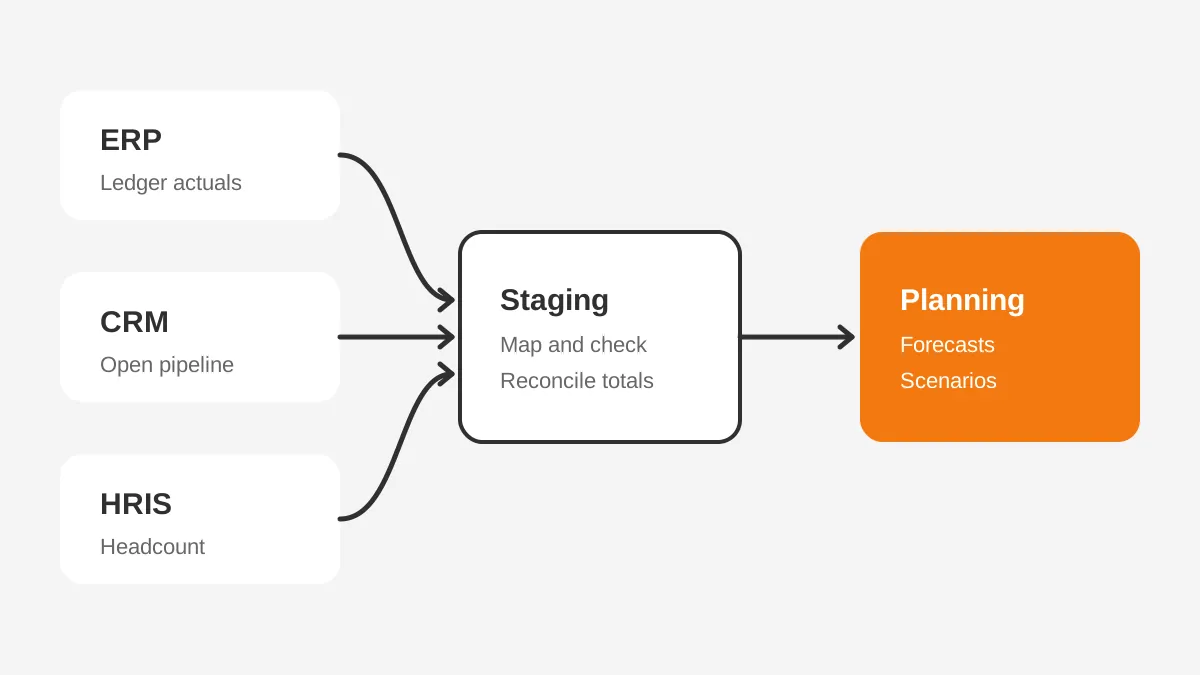
A planning platform needs summarized ERP actuals and CRM pipeline data, not every transaction. The CFO Shortlist EPM guide (2026) lists general ledger balances, trial balance data and journal entries as ERP actuals.
The same guide lists opportunity data, stage progression, close dates and deal values as CRM pipeline. Those two groups form the core of any FP&A integration. Everything else is optional until a planning question needs it. Pigment integrations, Adaptive connectors and Anaplan loaders all expect these two groups first.
A practical starting set for a mid-sized B2B company looks like this:
- ERP: monthly trial balance by account, cost center and legal entity.
- ERP: revenue by customer and product, plus open orders and backlog.
- ERP: chart of accounts, cost centers and currency rates as master data.
- CRM: open opportunities with stage, amount, close date, owner and product.
- CRM: closed-won bookings, renewals and territory assignments.
- HRIS: headcount and salary bands, where the plan covers workforce planning.
Keep the first load narrow. Projects that try to integrate data from ERP and CRM at transaction level on day one usually stall on volume. Start with monthly balances and open pipeline. Prove the reconciliation, then add detail where a question needs it.
Revenue data needs extra care. An opportunity amount is often an annual figure. The ERP books revenue by month over the contract term, which is how revenue recognition works. Decide early whether the plan reads the CRM amount, the contract schedule, or both.
That single choice changes how every revenue driver behaves. A plan that reads only CRM amounts overstates near-term revenue on multi-year deals. A plan that reads only ERP schedules misses deals still in the pipeline. Finance teams usually need both views side by side.
Which System Should Own Each Number?
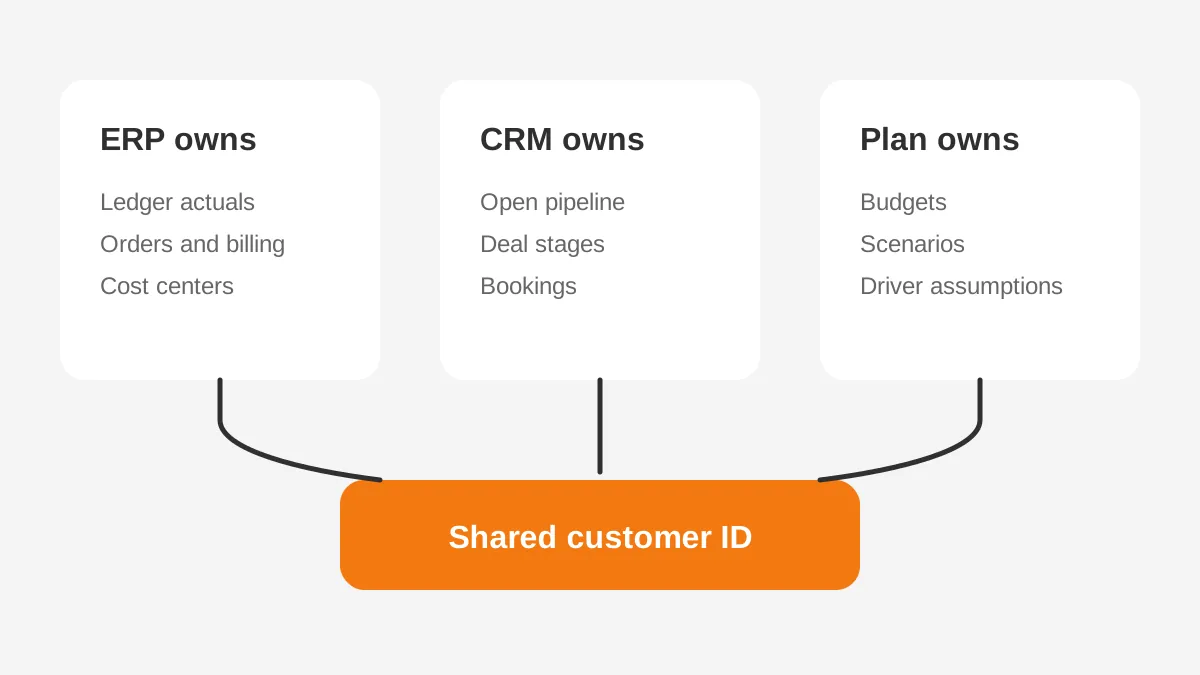
Each number in the plan should have one system of record, and the planning platform should never overwrite it. The ERP owns actuals. The CRM owns pipeline. The planning platform owns budgets, scenarios and driver assumptions.
This rule prevents two versions of the same figure. Before you integrate data from ERP and CRM, write the ownership down in a field-level table. A shared customer ID is the most important row in it.
Without that ID, ERP revenue and CRM pipeline cannot join to the same account. The plan then falls back to name matching. The Salesforce ERP integration guide explains how to carry the ID across both systems.
| Data | System of record | Planning use |
|---|---|---|
| General ledger actuals | ERP | Budget versus actual, variance analysis |
| Open pipeline and stages | CRM | Bookings forecast, coverage ratio |
| Closed-won bookings | CRM, confirmed by ERP orders | Revenue forecast, quota tracking |
| Customer master and IDs | ERP or CRM, chosen once | Joining revenue to accounts |
| Headcount and salaries | HRIS | Workforce and expense plans |
| Budgets and scenarios | Planning platform | Targets, scenario planning, reports |
The customer master deserves a decision meeting of its own. Companies that sell through the CRM usually let it create accounts. The CRM then passes the ID to the ERP at order time. Companies with heavy ERP billing often do the reverse.
Product and region codes need the same treatment. Suppose the CRM sells "Platform Plus" and the ERP bills SKU 4471. The planning model then needs a mapping table that someone maintains. Assign that data mapping work to a named person in finance operations.
Review the mapping table every time a product launches or a region changes. Without this habit, every attempt to integrate data from ERP and CRM collects more unmapped rows each quarter. Those rows land in an "other" bucket that nobody can explain to the board.
What Are the Four Ways to Connect Them?
There are four common ways to integrate data from ERP and CRM into planning. They are native connectors, a direct API, middleware and a data warehouse. CFO Shortlist names the same four patterns. Most companies end up using two of them together.
| Method | Best for | Main trade-off |
|---|---|---|
| Native connector | Standard ERPs and Salesforce, small teams | Limited transformation options |
| Direct API | Custom fields, specific timing needs | Code to build, monitor and maintain |
| Middleware (iPaaS) | Four or more sources, reusable flows | Extra license and a second tool to run |
| Data warehouse | High volume, shared reporting | Longer setup and a data engineering owner |
| File upload (CSV or Excel) | Low frequency, early pilots | Manual steps and audit gaps |
Native connectors are the fastest way to integrate data from ERP and CRM when both systems are mainstream. The Workday Adaptive Planning datasheet (2024) reports over 4,000 integrations. Those span more than 350 source systems, including Oracle, SAP, NetSuite and Salesforce.
Prebuilt connectors cover standard objects well. They struggle with heavy custom fields, unusual currency rules or data that needs reshaping. A direct API fills that gap, but someone has to write and support the code.
Middleware such as MuleSoft, Workato, Celigo or Fivetran suits companies with four or more sources. An iPaaS tool lets one team reuse the same flows for planning, billing and reporting. It adds a license, but it also adds monitoring that file uploads lack.
A data warehouse such as Snowflake or Google BigQuery suits companies that also feed BI dashboards. The warehouse becomes the single staging area for every system. For an example of a shared data layer, see the Unboxx case study on building a reliable AI data platform.
How Do Anaplan, Adaptive and Pigment Connect?
Each planning platform offers prebuilt connectors plus an API, but coverage differs by product. Check your exact ERP and CRM editions against the vendor's connector list before you sign. A "Salesforce" connector may cover standard sales objects only.
- Anaplan offers CloudWorks for scheduled loads and a connector for MuleSoft.
- Workato, Tray.ai and Celigo publish NetSuite and Salesforce recipes for Anaplan integration.
- Workday Adaptive Planning offers scheduled or on-demand loads, custom cloud loaders, an API and Excel import.
- Pigment lists NetSuite, SAP, QuickBooks, Sage Intacct and Xero as ERP connectors.
- Pigment lists Salesforce for CRM, and Snowflake, Databricks and BigQuery for data.
- Oracle EPM Planning uses Data Management to load ERP balances, often from Oracle Fusion or NetSuite.
A Salesforce Anaplan integration is the most common pairing in B2B finance. It feeds bookings and pipeline into revenue models. The same pattern works with Adaptive or Pigment, because each reads Salesforce opportunity objects directly.
HubSpot is a common gap. Planning vendors list Salesforce more often than HubSpot. HubSpot companies therefore route pipeline through middleware or a warehouse. The HubSpot ERP integration guide covers the field mapping for that route.
That extra hop has a benefit. It gives one place to clean stage names and currency before the plan reads them. Teams that integrate data from ERP and CRM on HubSpot often find the cleanup step worth the extra tool.
Microsoft Dynamics 365 and Odoo sit in the middle. Both expose APIs that middleware reads well, and both can push to a warehouse. Confirm whether your planning vendor reads Dynamics 365 Sales or only Business Central finance data. Those are separate products with separate data models.
How Do You Integrate Data From ERP and CRM?
To integrate data from ERP and CRM, follow seven steps in order and never skip reconciliation. A mid-sized company with one ERP, one CRM and one planning platform often needs 8 to 12 weeks. That range is an estimate, not a benchmark.
- List the planning questions first, such as the monthly revenue forecast.
- Map each question to the fields it needs and the owner of each field.
- Agree the shared customer ID, product codes, regions and currency rules.
- Choose the connection method for each source, using the table above.
- Build the extract into a staging area and check row counts and totals.
- Reconcile staged totals against the ERP trial balance and CRM reports.
- Load the planning model, schedule the refresh and set failure alerts.
Reconciliation is the step that decides whether finance trusts any effort to integrate data from ERP and CRM. CFO Shortlist advises validating data at the source rather than cleaning it inside the EPM tool. In practice, that means a reconciliation report on every refresh.
The report compares revenue by month in the ERP with revenue by month in the plan. It also compares open pipeline in the CRM with pipeline in the model. Any gap above an agreed tolerance stops the load until someone explains it.
Here is a worked example with assumed figures. A distributor plans $40 million in annual revenue. The ERP shows $9.6 million booked in the first quarter. The CRM shows $14 million of open pipeline, weighted at 50%, or $7 million expected.
The planning model reads both numbers and flags a $1.4 million gap against the second-quarter target. Without a way to integrate data from ERP and CRM, that gap appears in week six. When teams integrate data from ERP and CRM weekly, it appears in week one.
The sales leader can then shift territory focus while there is still time to close deals. That early warning is the payoff for the whole project. It is also the easiest result to show the leadership team.
Set aside a full week for testing. Load one closed month and compare it line by line with the ERP close pack. Fix the mapping before any scenario work starts, because a wrong January breaks every later forecast.
How Often Should Planning Data Refresh?
Planning data should refresh as often as the plan is reviewed, not as fast as the source can send it. Ledger actuals usually refresh daily during close and weekly afterwards. Pipeline refreshes daily or weekly. Headcount usually refreshes monthly.
Real-time feeds rarely help a monthly planning cycle. A quarterly board model does not need you to integrate data from ERP and CRM every minute. The Workday datasheet makes the same point. It recommends automated loads for frequently refreshed data and manual loads for lower planning frequency and volume.
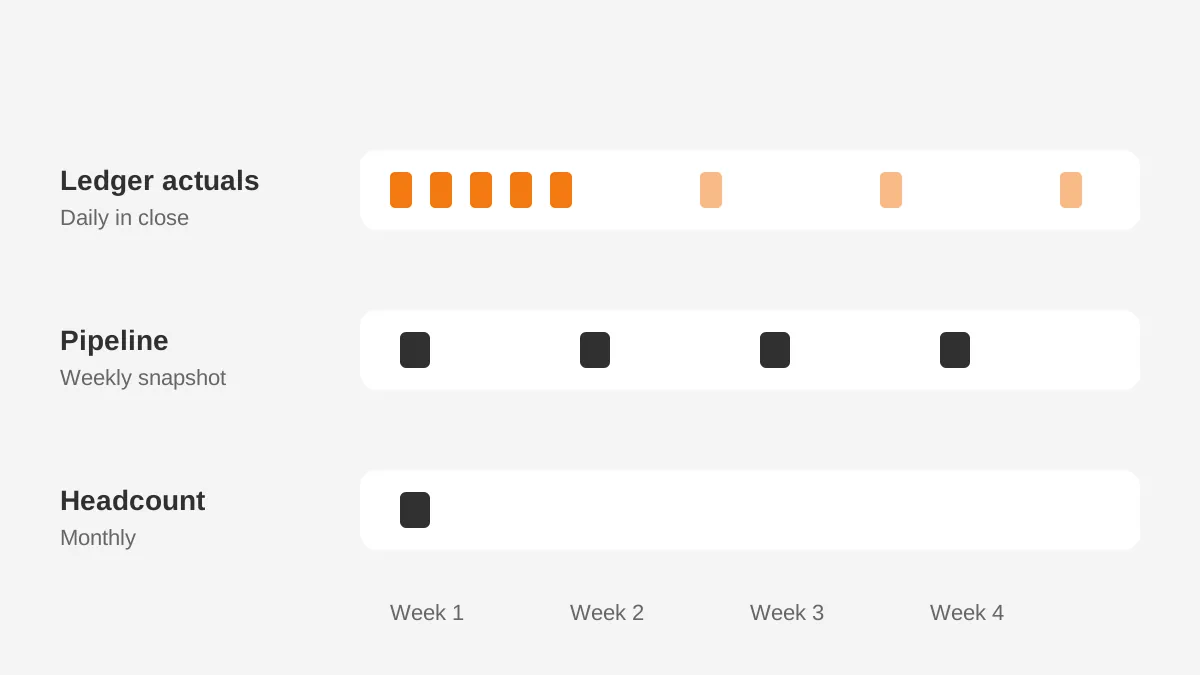
Set the refresh schedule in a fixed order. Load master data first, then ERP actuals, then CRM pipeline. Run the model calculation last. If the customer list loads after the pipeline, new accounts fail to map and drop out of the forecast.
Take a pipeline snapshot at each refresh. A weekly snapshot lets finance compare this week's forecast with last week's. It also explains each movement by deal. Most CRMs only show the current state of an opportunity.
The snapshot table is often the most useful asset the project creates. It also feeds revenue intelligence tools that score deal risk. Without snapshots, a team can integrate data from ERP and CRM every week and still lose the forecast history.
What Limits and Data Issues Break It?
Failed efforts to integrate data from ERP and CRM usually trace back to API limits, unmapped codes or schema changes. The planning platform itself is rarely the cause. Each source system caps how much data an integration can pull, and those caps differ by edition.
The Salesforce Bulk API limits page (2026) allows 10,000 Bulk API 2.0 query jobs per rolling 24 hours. It also allows 1 TB of query results in that window. Those caps are generous, but every integration in the org shares them.
HubSpot API limits are tighter. Its API usage guidelines (HubSpot, 2026) allow 100 requests per 10 seconds on Free and Starter. The daily cap there is 250,000 requests per account. These rate limits rise on higher tiers.
An hourly full pipeline pull can exhaust a small account's allowance. Pull only changed records where the API supports it. Schedule large loads outside business hours, when sales tools make fewer calls.
Watch for these breakpoints when you integrate data from ERP and CRM:
- A sales admin renames a stage, and that stage drops out of the weighted forecast.
- Finance adds a cost center, and the plan rejects every row that uses it.
- A new custom field replaces an old one, and the connector reads the empty field.
- Currency rates load after transactions, so multi-currency totals use stale rates.
- Duplicate CRM accounts split one customer's pipeline across two plan lines.
Each of these is preventable with failure alerts and an owner. Run through this list again whenever you integrate data from ERP and CRM for a newly acquired entity.
Send an alert when row counts drop by more than 10% between refreshes. Lock stage names and cost centers behind a change request that includes the planning team.
Security belongs on this list too. Integration users should read only the objects the plan needs. Their credentials should rotate on a schedule. Planning models hold salary and margin data, so keep access as tight as in the ERP.
Who Should Run the Integration After Go-Live?
A named integration owner in finance systems or revenue operations should run the pipeline after go-live. IT should own credentials and infrastructure. The owner monitors refresh failures, maintains mapping tables and approves source changes.
This role is small but constant. In a mid-sized company it often takes two to four hours a week once the integration is stable. Month-end close and annual planning add more, because both bring new accounts and new scenarios.
The owner also decides whether the plan may send data back. CRM write back is useful for quotas and territory targets. It is risky for anything sales already owns, such as opportunity amounts and stages.
Without a named owner, efforts to integrate data from ERP and CRM tend to follow the same arc. The first quarter goes well. Then a stage gets renamed, a field changes, and the forecast drifts for weeks before anyone notices.
Write the owner's duties into a one-page runbook. A runbook means the process used to integrate data from ERP and CRM survives a staff change.
List each feed, its schedule, its source owner and its failure alert. Add the reconciliation tolerance and the person who signs off each month. A new analyst can then take over without guesswork.
Frequently Asked Questions
Can a planning platform write back to the CRM?
Yes, most planning platforms can write targets or quotas back to the CRM through an API or middleware. Keep write-back limited to fields the planning team owns, such as quota amounts. Never let the plan overwrite opportunity amounts or stages, because sales owns those CRM records.
Do you need a data warehouse for planning integration?
No, a data warehouse is optional for most mid-sized companies. Native connectors or middleware can load the planning platform directly. A warehouse such as Snowflake or BigQuery helps when the same data feeds BI dashboards. It also helps when volumes exceed what direct connectors handle.
Why does planning revenue differ from CRM bookings?
Planning revenue differs from CRM bookings because the CRM records contract value at signing, while revenue is recognized over time. A three-year deal booked today adds revenue month by month. The planning model needs contract dates and terms, not only the opportunity amount, to forecast correctly.
How much does a planning data integration cost?
Cost depends on the number of sources, the connection method and who builds it. Native connectors may be included in the planning license, while middleware adds a yearly subscription. A first version with two sources often takes 8 to 12 weeks of part-time consulting and internal work.
What is financial planning integration?
Financial planning integration is the automated flow of actuals, pipeline and headcount into a planning platform. It replaces manual exports with scheduled loads from the ERP, CRM and HRIS. The goal is one trusted dataset for budgets, forecasts and scenarios, refreshed on a fixed calendar.
Ready to Integrate Data From ERP and CRM?
A plan is only as good as the data under it. Before you integrate data from ERP and CRM, agree the questions the plan must answer.
Assign an owner to every number and choose one connection method per source. Then integrate data from ERP and CRM on a fixed schedule, with reconciliation built into every refresh.
Unboxx connects Salesforce, HubSpot, Dynamics 365 and Odoo with ERPs and planning tools for B2B teams. Read the CRM ERP integration guide for the system side, or schedule a consultation to plan your first integration.
Let's create something out of this world together.
Have a project in mind? Contact us for expert design and development solutions. Let's discuss how we can help grow your business.
Ready to Unboxx Your Potential?
Build smarter systems. Automate faster. Scale confidently.