
Salesforce Implementation Best Practices: 10 Decision Rules
A Salesforce org can look finished on go-live day and still fail its users a month later. Reps find duplicate accounts, managers distrust the pipeline report, and admins patch permissions by hand. Salesforce's State of Sales report (2026) found the average seller spends 40% of their time selling.
Salesforce implementation best practices are the working rules that stop a rollout from eating into that 40%. Ten of them follow, covering scope, sandboxes, deployments, permissions, data, testing, cutover and hypercare. Each comes with a decision rule a project team can apply this week.
Key Takeaways
- Salesforce implementation best practices work as decision rules for scope, environments, access, data, testing and support.
- A permission set led access model and a fixed data load order prevent access drift and orphaned records after launch.
- Written exit criteria for testing, cutover and hypercare turn go-live from a date into a checked decision.
What Are Salesforce Implementation Best Practices?
Salesforce implementation best practices are repeatable rules for planning, building, testing and launching a Salesforce org. Every project meets the same decisions, whatever the cloud or company size. A useful rule names the choice, what triggers it and who owns it.
Advice such as "engage stakeholders" or "train users" is correct, but nobody can check it in a meeting. The Salesforce implementation best practices below are rules with a threshold. A project manager can mark each one pass or fail.
Salesforce implementation best practices apply to Sales Cloud, Service Cloud and Experience Cloud projects alike. An in-house admin team can lead the work, or a partner such as Unboxx Salesforce CRM services can. The project charter names who owns each rule.
The ten Salesforce implementation best practices fall into five groups:
- Scope and success metrics, agreed before configuration.
- Environments and deployment method, matched to team size.
- Access design, built on permission sets.
- Data migration, loaded in a fixed order with reconciliation counts.
- Testing, cutover and hypercare, each with written exit criteria.
For a task-by-task list, pair these Salesforce implementation best practices with the Salesforce implementation checklist with owners and gates. The checklist covers what to do, and the rules here cover how to decide.
Why Do Salesforce Projects Miss Their Goals?
Salesforce projects miss their goals when the build follows feature requests instead of measured business outcomes. Weak data, broad access and untested automation do more damage than any missing feature.
The State of Sales data shows where the damage lands. Of sales leaders using AI, 51% said disconnected systems slow their AI initiatives. In the same survey, 79% of high performers prioritize data hygiene, against 54% of underperformers. The survey covered 4,050 sales professionals in 22 countries.
The same report found 87% of sales organizations already use some form of AI. It also found 74% of sales professionals focus on data cleansing. AI features in Salesforce read the same records reps enter. A rollout that loads messy data limits every AI feature added later.
Those numbers point to three recurring causes:
- Data arrives dirty, so reports contradict each other within weeks.
- Profiles carry every permission, so access drifts and audits fail.
- Flows and Apex reach production without realistic test data.
Each cause maps to one of the Salesforce implementation best practices further down. Fixing them after launch costs more, because live users have already built habits around the broken version.
A fourth cause sits outside the org: nobody owns adoption after the consultants leave. The guide to measuring and raising CRM adoption covers that problem in detail. Setting adoption metrics on day one gives someone a reason to keep watching usage after launch.
How Should You Set Scope and Success Metrics?
The first of the Salesforce implementation best practices is outcome-led scope. Write three to five measurable outcomes, then approve only the features that move them. Every requirement in the backlog should trace to one outcome. A requirement with no outcome waits for phase two.
Good outcomes use numbers the business already tracks. Examples include forecast accuracy, lead response time, case resolution time and the share of opportunities with a next step. Each outcome needs a baseline from the current system before the build starts.
Apply a "one owner, one metric" test. Each outcome gets a single business owner who signs off on it. If two departments claim the same metric, the steering group settles it before any configuration.
User stories make the scope testable. Trailhead's admin module recommends collecting requirements as user stories and building, testing and training in a sandbox. A story such as "an inside rep logs a call in two clicks" gives testers a pass or fail test.
Rank the backlog with a simple method such as MoSCoW: must have, should have, could have and won't have. Only must-have stories enter the first release. Should-have stories fill the change budget if testing finishes early, and the rest wait for the next release plan.
Scope also covers what stays out. Write a short "not in this release" list and share it with every department lead. The list stops late requests from slipping in during user acceptance testing.
Salesforce implementation best practices for scope also include a change budget. Reserve roughly 15% of build time for approved changes found during testing. That figure is a planning assumption, not an industry benchmark, so adjust it to the team's history.
Who Belongs on a Salesforce Implementation Team?
A Salesforce implementation team needs five named roles. They are an executive sponsor, a project manager, a solution architect, builders and business owners. Small companies can combine roles, but every role still needs a name in the charter.
- Executive sponsor: owns the outcomes, breaks ties and approves scope changes.
- Project manager: owns the plan, the risks and the weekly status report.
- Solution architect: owns the data model, security model and integration design.
- Builders: admins and developers who configure, code and deploy.
- Business owners: write user stories, run acceptance tests and sign off.
Business owners decide whether the build fits the work. A sales operations lead who writes the stories and runs the tests catches gaps that builders miss. Budget at least four hours a week of their time during the build, and more during testing.
Salesforce implementation best practices also call for a decision log. Record each design choice, the date, the owner and the reason. When a new admin joins after launch, the log explains why the org works the way it does.
Plan for the team that stays after go-live, too. Name the long-term admin early so they shadow the build instead of inheriting it cold. Salesforce implementation best practices treat that handover as a project deliverable with its own sign-off.
How Do You Set Up Sandboxes and Deployments?
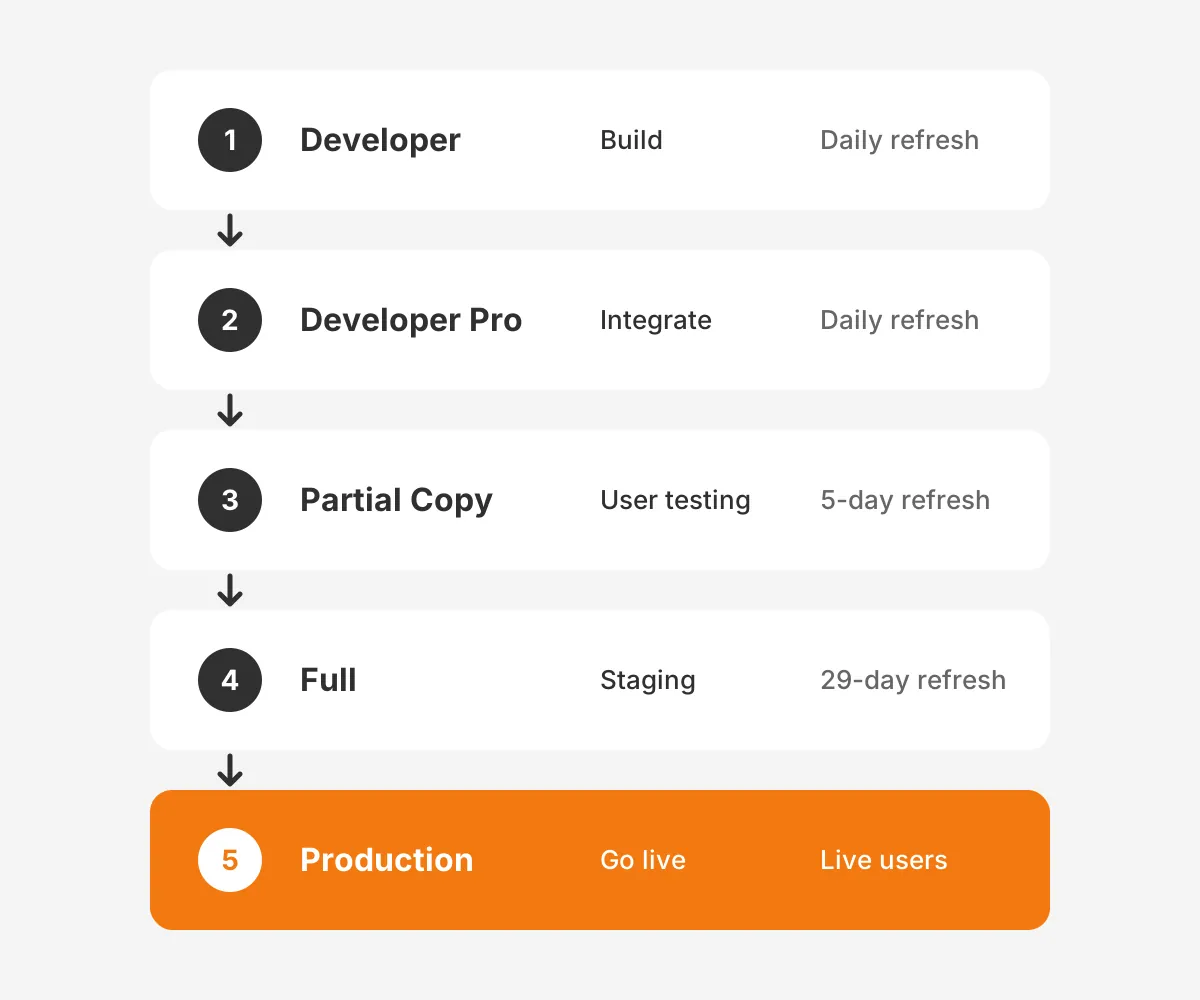
Use one sandbox per purpose and move every change along the same path to production. Under deadline pressure, environment rules are the Salesforce implementation best practices that slip first. Salesforce offers four sandbox types, and each suits a different stage.
According to Salesforce's sandbox guide (2026), Developer and Developer Pro sandboxes can refresh once per day. Partial Copy sandboxes refresh every 5 days, and Full sandboxes every 29 days. Data storage runs from 200 MB in Developer to a full production copy in Full.
A workable sandbox strategy for a mid-sized rollout looks like this:
- Developer sandboxes for each builder's configuration and code.
- A Developer Pro sandbox for integration of all builders' work.
- A Partial Copy sandbox for user acceptance testing with sample records.
- A Full sandbox for staging, load tests and the final rehearsal.
The Salesforce deployment method should match team size and release frequency. Change sets are built into Salesforce, while DevOps Center and the Salesforce CLI track changes in Git. The table below gives a decision rule for each.
| Team situation | Deployment method | Why it fits |
|---|---|---|
| One or two admins, monthly releases | Change sets | No extra tools, low setup effort |
| Three to eight builders, weekly releases | DevOps Center with Git | Tracks work items and avoids overwrites |
| Developers writing Apex daily | Salesforce CLI with a CI pipeline | Automated tests and validation on every merge |
| Regulated industry or audit trail needed | CLI or a DevOps tool such as Gearset or Flosum | Approval gates and full release history |
One of the simplest Salesforce implementation best practices is a hard rule: no direct changes in production. Even a field label edit goes through a sandbox. That rule keeps every environment in sync and makes rollback possible.
Should You Use Profiles or Permission Sets?
Use a minimal profile for baseline settings and grant all other access through permission sets and permission set groups. Salesforce calls this a permission set led model. It sits at the center of current Salesforce implementation best practices for security.
The Salesforce Admins guide to profiles and permissions (2026) explains the split. Profiles hold baseline items such as login hours, IP ranges, default apps and page layouts. Permission sets add object, field and feature access on top. For the tightest start, the guide points to the "Minimum Access – Salesforce" profile.
The practical design follows four rules:
- Build small permission sets, one per job task, such as "Edit Quotes."
- Bundle them into permission set groups by role, such as "Inside Sales."
- Mute a permission inside a group instead of cloning a set.
- Keep a role-to-group matrix in the project wiki and review it quarterly.
Permission sets make role changes safer too. A rep who moves from inside sales to account management swaps one group for another. With profile-heavy designs, the same move often means cloning a profile and drifting from the standard.
Integration users need the same discipline. Give each integration its own user with a dedicated permission set, never a shared admin login. A clear audit trail then shows which system changed which record.
Record access is a separate layer. Organization-wide defaults set the starting visibility, and the role hierarchy and sharing rules open it up. Set organization-wide defaults to private for sensitive objects, then open access with sharing rules where a team needs it.
Salesforce implementation best practices for security end with a test. Log in as a user from each role in the Partial Copy sandbox and walk through their daily tasks. Missing access shows up in minutes, long before go-live.
How Should You Migrate Data Into Salesforce?
Load data in parent-to-child order, choose the tool by volume, and reconcile counts after every object. Each of those three Salesforce implementation best practices guards against a different launch-day failure.
Tool choice follows record count. The Salesforce Data Loader guide recommends the Data Import Wizard for loads under 50,000 records on supported objects. Data Loader handles CSV files up to 150,000,000 records, complex mappings and scheduled loads.
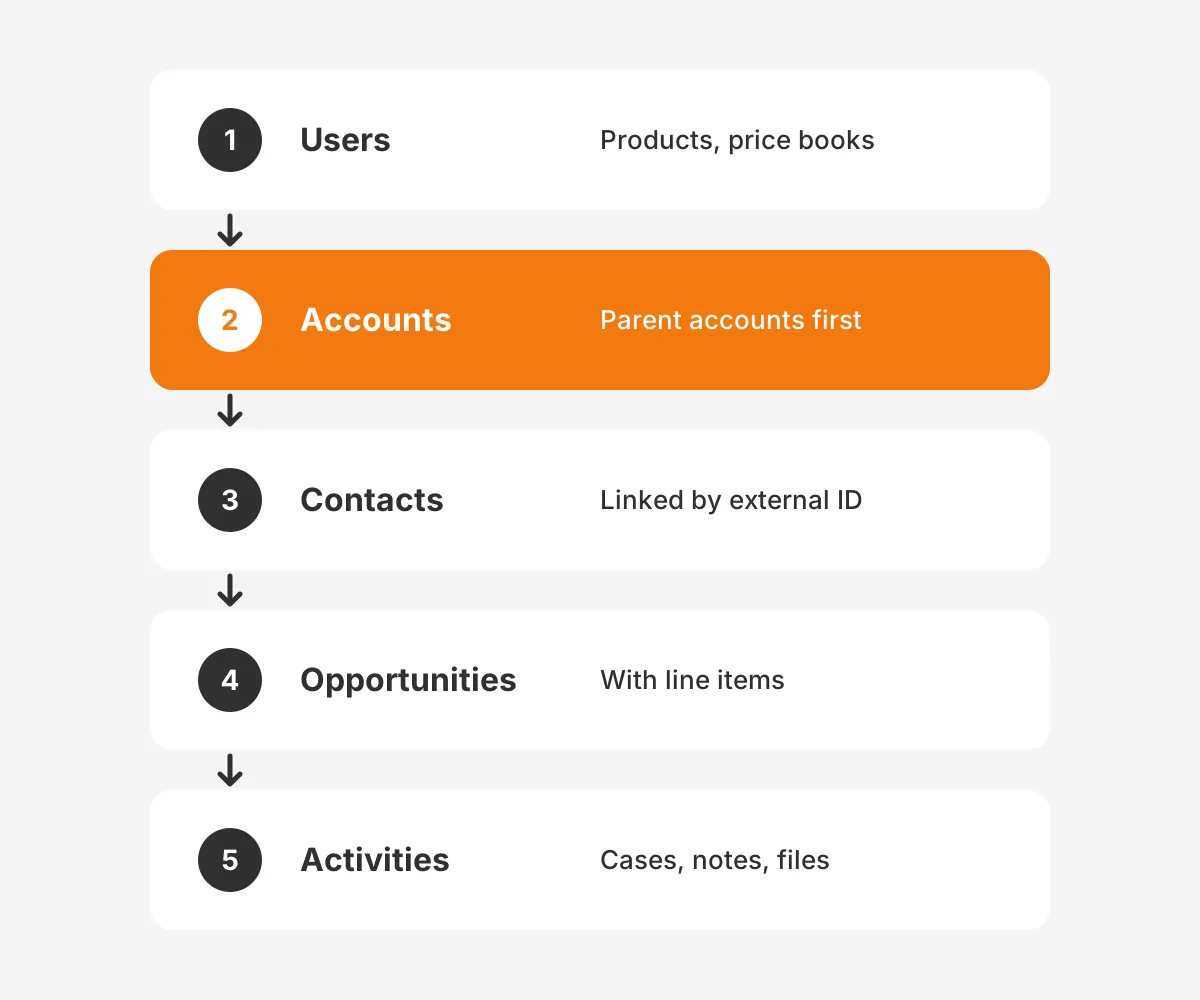
The load order matters because child records need their parent's Salesforce ID. A standard sequence for a B2B sales org runs as follows:
- Users and reference data such as products and price books.
- Accounts, with parent accounts loaded before child accounts.
- Contacts, linked to accounts by external ID.
- Opportunities and opportunity line items.
- Activities, cases, notes and files last.
Give every migrated record an external ID field that holds its legacy key. External IDs make upserts possible and let the team reload one object without duplicating others.
Clean the data before loading, not after. Deduplicate accounts on domain and contacts on email, then standardize states, countries and picklist values. The Salesforce data migration guide covers the before, during and after stages in more depth.
Reconcile after each object loads. Compare the record count in the source file, the success file and the error file. A load passes when success plus error counts equal the source count. Every error also needs an owner.
Salesforce implementation best practices for data also require a rehearsal. Run the whole migration in the Full sandbox at least once, and time it. The timing tells the team how long the cutover window must be.
What Testing Exit Criteria Should You Set?
Salesforce implementation best practices for testing start with written exit criteria for each test stage. No stage starts until every criterion in the previous one passes. Criteria turn "testing looks fine" into a yes or no answer.
Salesforce sets one hard rule itself. The Apex Developer Guide on code coverage states that code coverage below 75% in production blocks deployment. The same guide recommends a Full sandbox as staging and test data created inside tests.
Coverage alone is a weak signal, because a test can cover a line without checking its result. Add exit criteria that measure behaviour:
- Unit tests: every Apex class passes, with assertions on expected outcomes.
- System tests: every Flow runs with bulk data of 200 records.
- Integration tests: each interface sends, receives and logs errors correctly.
- User acceptance testing: every user story passes, signed by its business owner.
- Defects: zero open critical defects and an agreed plan for minor ones.
Use realistic data for user acceptance testing. A Partial Copy sandbox with a sandbox template gives testers real account names and real edge cases. Test scripts written by the business, not the builders, catch the gaps builders cannot see.
Reports and dashboards need testing too. Ask each manager to rebuild one current report in the sandbox and compare the totals. A mismatch at this stage points to a data or sharing problem, and it costs far less to fix now.
Should You Go Live in Phases or Big Bang?
Go live in phases when teams, regions or clouds can work apart for some weeks. Use a big bang cutover when they cannot. The choice depends on how tightly the data and processes connect.
| Factor | Phased rollout | Big bang cutover |
|---|---|---|
| Best fit | Two or more regions or business units | One team sharing one process |
| Risk | Lower, problems stay in one group | Higher, every user moves at once |
| Duration | Longer, usually two to four waves | Shorter, one cutover weekend |
| Data sync | Old and new systems run together | No dual running after cutover |
| Training | Wave by wave, with lessons carried forward | Everyone trained in the same window |
A phased rollout works well for a company with sales teams in separate regions. The first wave acts as a pilot, and its feedback shapes the next. The cost is a period of dual running and an integration to keep both systems current.
A big bang cutover suits a single sales team where accounts and pipeline are shared. Splitting that team across two systems would break reporting. The cutover needs a rehearsed runbook, a frozen legacy system and a go or no-go meeting.
Whichever route a team picks, four Salesforce implementation best practices apply to the cutover itself:
- Freeze legacy data entry at a set time and announce it a week ahead.
- Run the final delta load and reconcile counts by object.
- Smoke test login, record creation and one key report per role.
- Hold the go or no-go call with named decision makers.
The Sales Cloud implementation guide with six phases shows how this cutover fits into a full project timeline.
Which Salesforce Implementation Best Practices Apply After Go-Live?
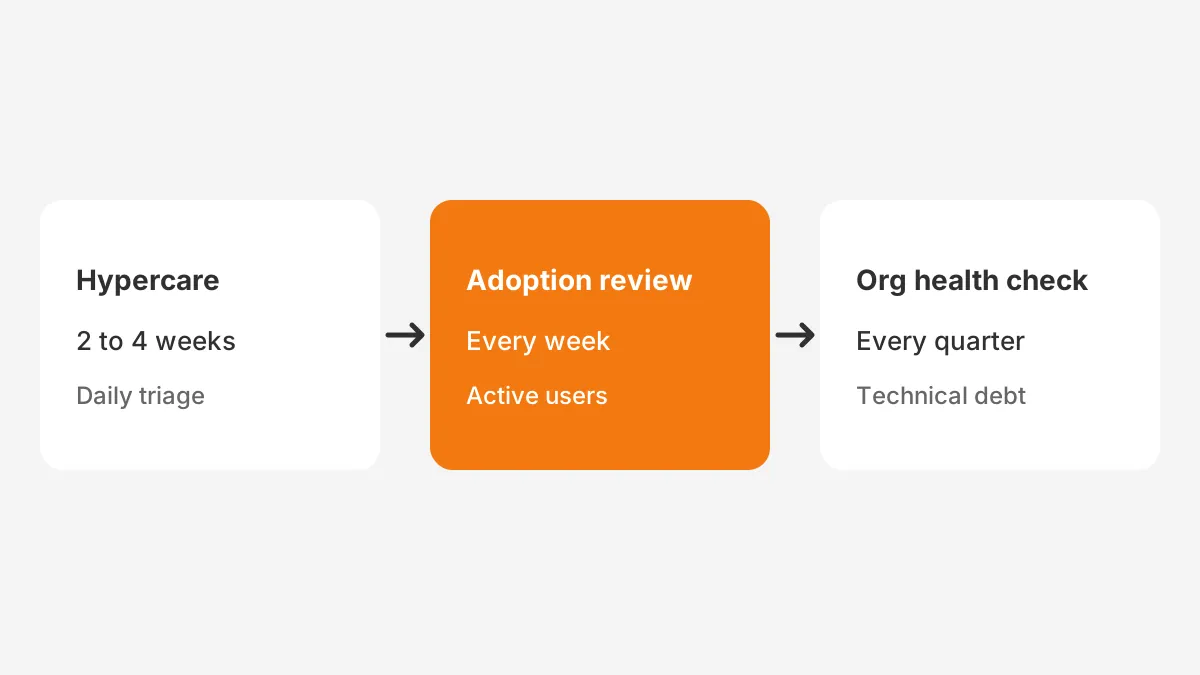
After go-live, the key Salesforce implementation best practices are a fixed hypercare window, daily defect triage and weekly adoption reviews. Launch opens the support phase rather than closing the project.
Plan hypercare for two to four weeks, sized to the number of users and processes changed. During hypercare, builders stay on call and a daily triage meeting sorts new issues. Fixes ship through the same sandbox path.
Triage needs a severity scale everyone understands. A blocked sale or lost data is critical and gets a same-day fix. A cosmetic issue goes to the backlog for the next release.
Measure adoption with numbers from inside the org. Good examples are weekly active users, opportunities updated in 7 days and deals with a next step. Compare each with its scoping baseline.
After hypercare, move the org into a steady release rhythm. A monthly release for small changes and a quarterly review of technical debt suit most mid-sized teams. Salesforce ships three major releases a year: Spring, Summer and Winter. Each one needs a short regression test in a sandbox.
Some companies hand this phase to a partner. The guide on how to hire a Salesforce consultant compares retainer, project and staff augmentation models. A Salesforce CRM built right from day one shows what a clean handover looks like in practice.
Frequently Asked Questions
How long does a Salesforce implementation take?
Salesforce does not publish a standard duration, because scope sets the timeline. A single-cloud rollout for one team finishes far sooner than a multi-cloud program with ERP integration. Estimate the timeline from the user story count, the data rehearsal time and how fast decision makers sign off.
Who should own a Salesforce implementation?
A business executive should own the outcomes, and a project manager should own the plan. A Salesforce admin or architect owns the design decisions. Each user story also needs a business owner who signs off during user acceptance testing. Accountability then stays with system users.
Why should you avoid building directly in production?
Building directly in production skips testing, one of the most basic Salesforce implementation best practices. A small field edit can break a Flow, a report or an integration without warning. Routing every change through a sandbox keeps environments in sync and gives the team a clean rollback path.
What is a Salesforce Center of Excellence?
A Salesforce Center of Excellence is a small cross-functional group that governs the org after launch. It sets standards, approves changes and ranks the backlog. Typical members include an executive sponsor, an admin lead, an architect and representatives from sales, service and marketing operations.
When should you hire a Salesforce implementation partner?
Hire a partner when the team lacks certified Salesforce skills, faces a fixed deadline or needs complex data migration. A partner also helps when the project spans two or more clouds. Smaller teams with one experienced admin can often run a single-cloud rollout with occasional expert reviews.
How Can Unboxx Help With Your Salesforce Rollout?
Unboxx is a Salesforce Crest Partner that plans, builds and supports orgs for B2B companies. Its clients work in manufacturing, professional services and logistics. Its projects follow these Salesforce implementation best practices, from scope metrics through hypercare.
To check a current plan against these Salesforce implementation best practices, schedule a consultation with Unboxx.
Let's create something out of this world together.
Have a project in mind? Contact us for expert design and development solutions. Let's discuss how we can help grow your business.
Ready to Unboxx Your Potential?
Build smarter systems. Automate faster. Scale confidently.