
Salesforce Infor CSD Integration Rollout Plan: 6 Phases
Distributors that run Infor CloudSuite Distribution often give their sales team Salesforce and then find the two systems disagree. Reps quote prices that CSD has already changed. Orders get typed twice, and credit holds surface only after a customer calls.
A Salesforce Infor CSD integration rollout plan fixes that. It decides which system owns each record and how data moves through Infor ION. It also sets the order in which each flow goes live. Infor has certified a Salesforce integration for CSD, according to the Infor CSD release notes.
Key Takeaways
- A Salesforce Infor CSD integration rollout plan names one owner for every record before any field mapping starts.
- Infor ION moves accounts, contacts, products and sales orders as business object documents, and pricing comes through live API calls.
- Phased go-live, one data flow at a time, keeps errors small and leaves a clear rollback plan for each step.
What Is a Salesforce Infor CSD Integration Rollout Plan?
A Salesforce Infor CSD integration rollout plan is the document that sets scope, owners, build order, tests and go-live dates. It turns a connector into a working process for sales, customer service and finance.
Infor CloudSuite Distribution (CSD) is the cloud edition of Infor SX.e. Wholesale distribution companies use it for order entry, inventory, pricing and invoicing. Salesforce holds accounts, opportunities, quotes and activity history for the inside sales team and field reps.
Both systems hold customer data. Without a written plan, each team ends up editing the same customer in two places. A good Salesforce Infor CSD integration rollout plan answers five questions in writing:
- Which records and fields move between the systems?
- Which system is the system of record for each one?
- Which method carries each flow: messages, live API calls or batch loads?
- How is each flow tested before users depend on it?
- In what order do the flows go live, and how is each one rolled back?
The same questions appear in any ERP CRM integration. The general method is covered in this guide to CRM ERP integration planning. The rest of this article applies it to CSD, using what Infor and Salesforce publish about their own platforms.
What Data Moves Between Salesforce and Infor CSD?
The certified integration moves master account and contact information, product records and sales order transactions, according to Infor. It also lets Salesforce call CSD in real time for product availability and price information.
That gives a Salesforce Infor CSD integration rollout plan four core flows to scope:
- Account and contact sync, including bill-to customers and their ship-to addresses.
- Product catalog sync, so reps quote real item numbers from the Salesforce price book.
- Sales orders from Salesforce to ERP, created when a quote is accepted.
- Real-time pricing in Salesforce and product availability in Salesforce, looked up at quote time.
Two more flows often follow in a second phase. Invoice visibility in Salesforce lets account managers see open invoices without logging in to CSD. A customer balance in Salesforce warns reps about credit holds before they promise a delivery date.
Keep the first release small. A Salesforce Infor CSD integration rollout plan built on the four core flows goes live sooner. Purchase orders, supplier records and rebates can wait. Add them once the core flows run cleanly for a full month.
Commerce connectors show how CSD exposes these flows. The Optimizely connector documentation for Infor CSD splits the work into three job types.
Refresh jobs pull product, customer, order history and invoice data in batch through Compass APIs. Submit jobs push orders through ION APIs. Direct jobs make real-time calls for inventory and pricing.
That documentation names the CSD calls it uses. Pricing and availability come from sxapiOEPricingMultipleV4, and the receivables summary from sxapiARGetCustomerBalanceV2. Optimizely built its connector on CSD version 11.21.6. A Salesforce team can use the same split when it decides how each flow should run.
| Data flow | Usual owner | Direction | Method |
|---|---|---|---|
| Customers and ship-to addresses | Infor CSD | CSD to Salesforce | ION messages or batch refresh |
| Contacts | Salesforce | Salesforce to CSD | ION messages |
| Products and price book | Infor CSD | CSD to Salesforce | Scheduled batch |
| Pricing and availability | Infor CSD | Read from Salesforce | Live API call |
| Sales orders | Infor CSD after submit | Salesforce to CSD | ION request with reply |
| Invoices and balances | Infor CSD | CSD to Salesforce | Batch or live call |
How Does Infor ION Carry the Data?
Infor ION carries the data as business object documents (BODs). A verb on each message tells the receiver what to do. Infor calls ION an enterprise grade integration platform as a service, named ION Connect. Its process software is ION Process, according to the Infor OS documentation.
The verbs matter for a Salesforce Infor CSD integration rollout plan because they encode data ownership. The Infor OS guide to BOD verbs defines them this way:
- Sync: the owner of a record announces a change, and any interested system can receive it.
- Process: another system asks the owner to create or change a record, and the owner replies with Acknowledge.
- Get: a system asks for details, and the owner replies with Show.
- Update: a non-owner changes data, and the owner must accept the change.
- Confirm: ION records a failure and keeps a copy of the original message, so an administrator can resubmit it.
In practice, CSD sends Sync messages when a customer or item changes, and middleware writes them into Salesforce. When a rep submits an order, Salesforce sends a Process request. CSD answers with an Acknowledge that carries the order number or a rejection.
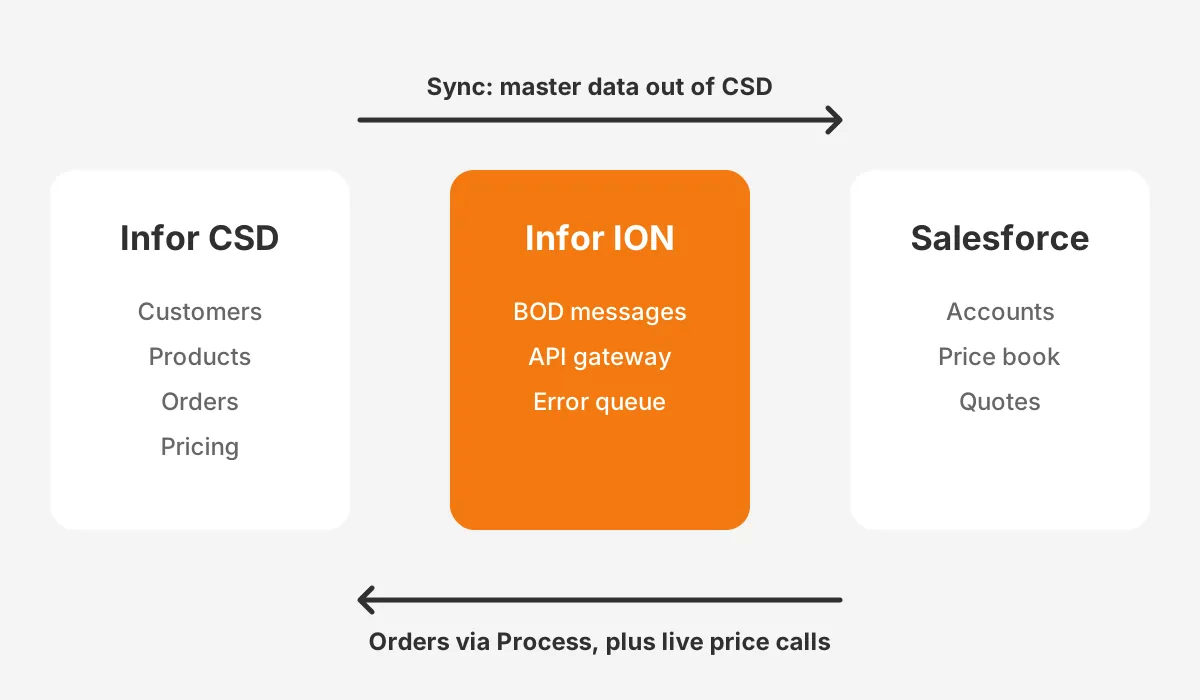
Pricing and availability are different. Copying every customer price into Salesforce would go stale within hours. The certified integration uses live API calls through the ION API gateway instead. The quote then shows what CSD would charge right now.
Some teams add middleware for Infor CSD instead of building every flow in ION. Prebuilt sync products such as CloudJunction, DCKAP Integrator and Stacksync cover part of that ground. Whatever the tool, the verbs above still decide who owns each record.
Who Owns a Salesforce Infor CSD Integration Rollout Plan?
A named integration owner on the business side owns a Salesforce Infor CSD integration rollout plan. A Salesforce admin, a CSD administrator and a sales operations lead support that person.
Each of them signs off the records their team will maintain. Without those signatures, nobody can settle a dispute over the Salesforce Infor CSD integration rollout plan.
Data ownership is the decision behind most sync conflicts. Who owns customer data? A common split gives finance the customer master records in CSD. Credit terms, tax status and ship-to addresses drive invoicing. Sales then owns contacts, opportunities and quotes in Salesforce.
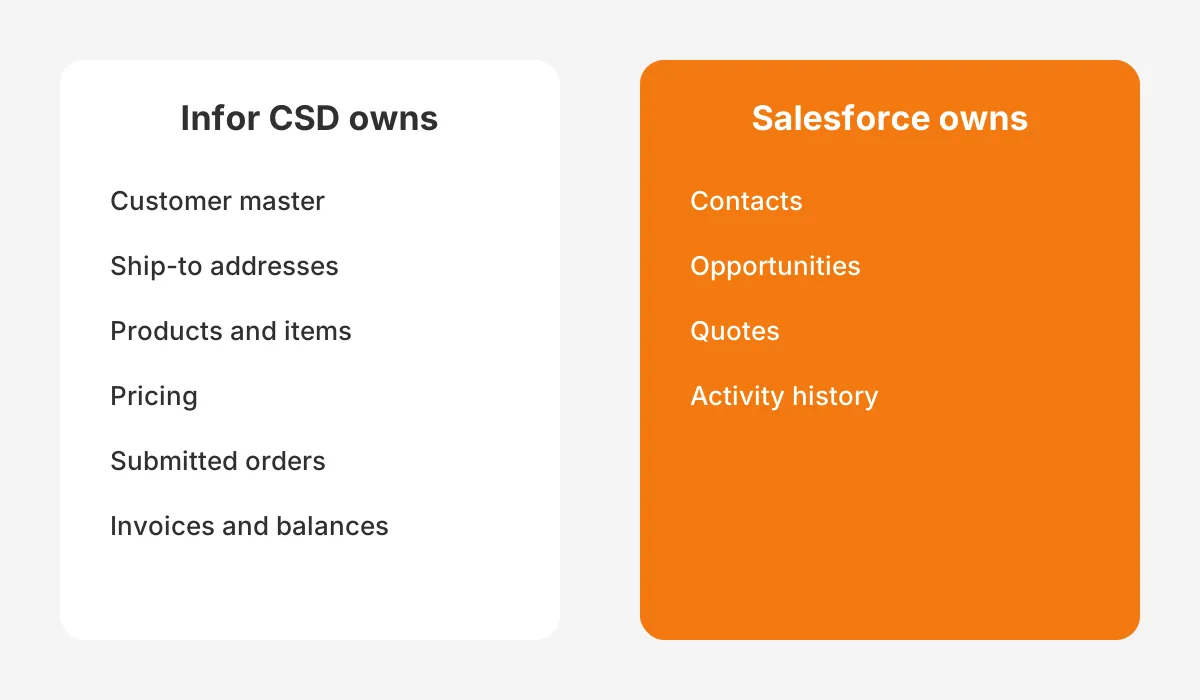
The data mapping workshop turns these decisions into field mapping. For each object, the team lists every field, its owner, its format in both systems and the sync frequency. A Salesforce Infor CSD integration rollout plan should hold this sheet as an appendix that owners approve.
Write down the roles in the Salesforce Infor CSD integration rollout plan too. A typical split looks like this:
- Integration owner: approves scope, go-live criteria and the rollback plan.
- Salesforce admin: builds objects, page layouts and the error queue in Salesforce.
- CSD administrator: configures ION connection points, business rules and the CSD user for API access.
- Sales operations lead: runs user acceptance testing with reps and writes the training notes.
One CSD setting shows why the CSD administrator matters. Optimizely notes that promotions affecting line pricing require the OverridePrice business rule to be set to true. That price override decision belongs in the Salesforce Infor CSD integration rollout plan, not in a support ticket after go-live.
Teams that lack a CSD or Salesforce specialist often bring in a partner for this stage. Unboxx CRM integration services cover the mapping, ION configuration and Salesforce build. They suit distributors that sell through CRM and fulfil through an ERP.
Which Mistakes Does a Rollout Plan Prevent?
A Salesforce Infor CSD integration rollout plan prevents four common mistakes. Each one below comes with the fix that belongs in the plan.
The first mistake is two owners for one record. Reps may edit a bill-to address in Salesforce while finance edits it in CSD. The next sync then overwrites one of them. The fix is one owner per field, with the other system read-only.
The second is copied prices. A nightly copy of customer pricing into Salesforce looks simpler than a live call. By the next morning, contract changes and promotions have already made some quotes wrong. Use the live pricing call the certified integration provides.
Silent errors come third. An order that fails in ION and never reaches CSD is worse than no integration. The customer thinks it was placed. The Salesforce Infor CSD integration rollout plan must route every rejection to a visible error queue with an owner.
The fourth is a big-bang go-live. Switching on every flow on one Monday makes it hard to see which flow caused a problem. A Salesforce Infor CSD integration rollout plan with staged go-live dates isolates each flow, so each fix stays small.
What Are the Six Phases of the Rollout?
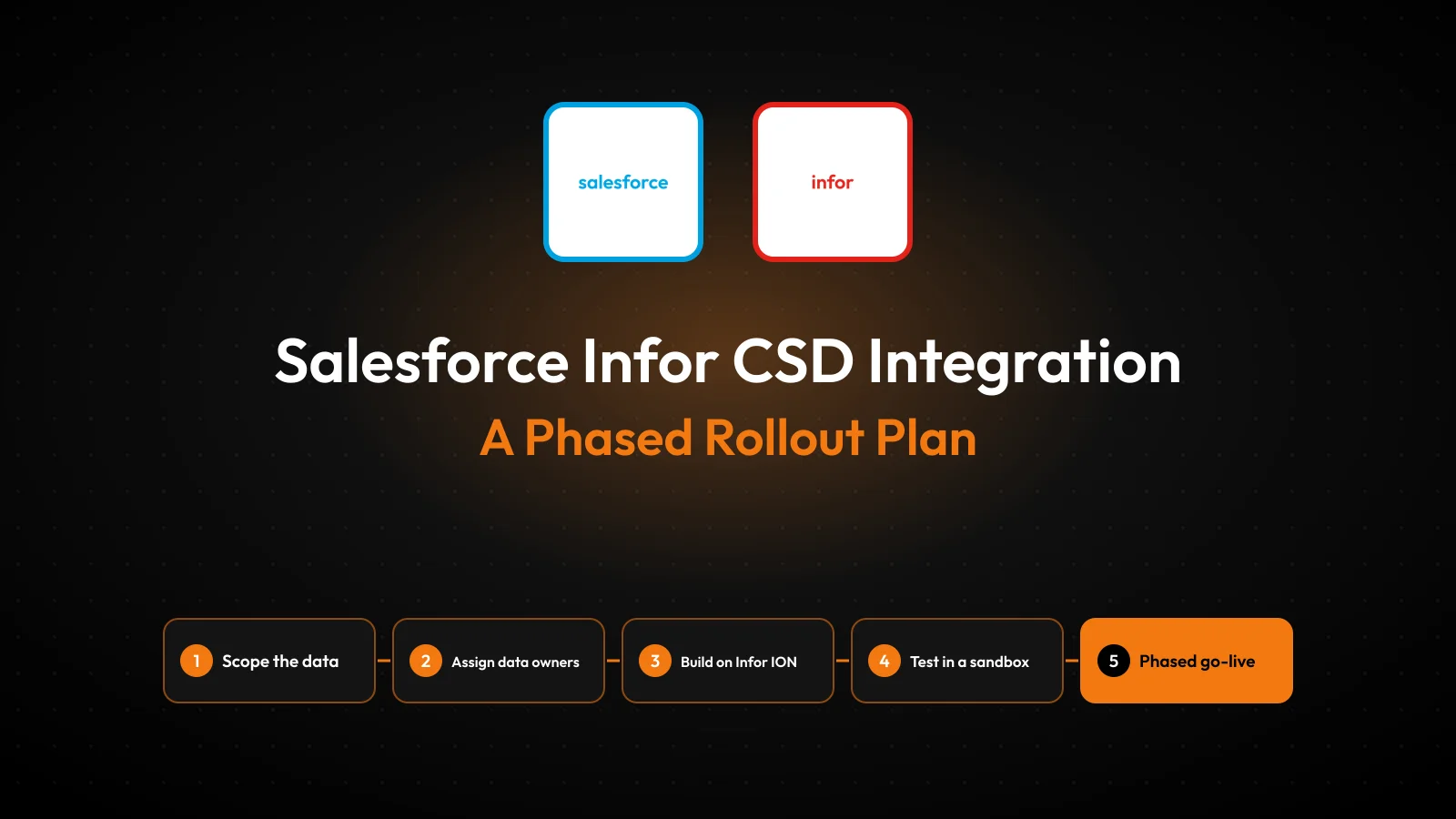
The six phases of a Salesforce Infor CSD integration rollout plan are discovery, design, build, test, phased go-live and hypercare. Each phase ends with a sign-off, so problems surface before the next phase starts.

- Discovery: list current processes, users, data volumes and pain points, such as double order entry or missed credit holds.
- Design: settle data ownership, field mapping, the method for each flow and the error handling rules.
- Build: configure ION, the Salesforce objects and any middleware, one data flow at a time.
- Test: run unit tests, process tests and user acceptance testing in a Salesforce full sandbox against a CSD test company.
- Phased go-live: switch on read-only flows first, then the flows that write orders into CSD.
- Hypercare: watch the error queue daily, fix mapping gaps and hand over to normal support.
Discovery deserves more time than most teams give it. Interview two or three reps, a customer service lead and a credit controller about one real order each. Those walkthroughs show where data is retyped today. That is where a Salesforce Infor CSD integration rollout plan saves the most time.
Order matters inside the go-live phase. A phased rollout starts with the product catalog sync and account and contact sync. Those flows only read CSD data. Pricing lookups come next. Sales orders come last, since an error there creates a wrong order in the ERP.
The Salesforce Infor CSD integration implementation roadmap should show these steps on a calendar. Put each flow on its own row, with its build, test and go-live weeks. That view makes it easy to see when the inside sales team needs training.
Change management runs beside the technical work. Reps need to know which screen now shows prices and where an order error appears.
A short guide for each role does more than a long manual nobody opens. The Salesforce Infor CSD integration rollout plan should name who writes each guide and when reps receive it.
How Do Salesforce API Limits Affect the Design?
Salesforce API limits decide how often middleware can write into Salesforce, so they shape the sync frequency of every flow. The Salesforce API request limits and allocations page sets the daily budget.
An Enterprise Edition org gets 100,000 requests per 24 hours, plus 1,000 for each Salesforce user license. Unlimited and Performance editions add 5,000 per license. A full sandbox gets 5,000,000 requests.
The allocation counts REST, SOAP, Bulk and Bulk 2.0 calls. It applies to the whole org, not to each user.
Take a worked example with assumed figures. An Enterprise org with 40 Salesforce licenses has 140,000 requests a day. If middleware updates 3,000 customer records one at a time, that uses 3,000 requests. Batching the same records through the Bulk API uses far fewer.
Long calls carry a second limit. Production orgs allow 25 concurrent requests that run 20 seconds or longer. REST and SOAP calls time out after 10 minutes. Large nightly loads should run as bulk jobs, not long single calls.
Live pricing works the other way round. When Salesforce calls the CSD pricing API, the CSD side carries the load. The Salesforce Infor CSD integration rollout plan should still test how quickly a 50-line quote returns prices. Reps will not wait long.
Write the API allocation into the design section of the Salesforce Infor CSD integration rollout plan. For each flow, record its expected daily calls and its peak hour. Add an alert that fires at 80 percent of the budget.
That kind of integration monitoring catches a runaway loop before it blocks every other connected app. It also shows when growth in order volume will need extra API capacity.
What Belongs on the Deployment Checklist?
The Salesforce Infor CSD integration deployment checklist lists every task to finish and sign before a flow goes live. It covers access, data, testing, cutover and support, and each line has an owner and a date.
Use this integration testing checklist as a starting point for the Salesforce Infor CSD integration rollout plan:
- A CSD user exists for ION API access, with only the permissions the flows need.
- The Salesforce integration user has API access and a profile limited to the mapped objects.
- Customer master data is cleaned in CSD, with duplicates merged and ship-to addresses checked.
- Field mapping is signed by each data owner, including picklist values and units of measure.
- Error handling is tested: a rejected order returns an Acknowledge with a reason, and the rep sees it.
- Confirm messages in ION are monitored, with a named person who resubmits failed documents.
- User acceptance testing passes for quote to order process scenarios, including credit holds and backorders.
- The cutover plan lists the freeze window, the initial load order and the go-live criteria.
- A rollback plan exists for every flow, stating how to switch it off and who decides.
Go-live criteria in a Salesforce Infor CSD integration rollout plan should be measurable. For example, the team may require 20 test orders in a row to reach CSD without manual fixes. Pick numbers that suit the order volume, and write them down before testing starts.
The cutover plan also fixes the initial load. Load products first, then customers, then contacts, then open orders if they are in scope. That sequence means every record arrives after the records it points to. The same order applies in this guide to Salesforce data migration before, during and after.
For a wider view of Salesforce to ERP checks, see this guide to Salesforce ERP integration tools and steps. It covers connector options and object limits that apply to other ERPs as well.
How Long Does the Rollout Usually Take?
How long does a Salesforce ERP integration take? It depends on the number of flows, the state of the data and how much custom logic each flow needs. Infor and Salesforce do not publish a standard duration for this pairing.
A worked example helps here. Assume a distributor with 60 Salesforce users and the four core flows. The schedule might give discovery two weeks, design three, build five, testing three and the phased go-live three.
Hypercare then runs for about four weeks. Put those dates in the Salesforce Infor CSD integration rollout plan so managers can book reps for testing.
That example totals 16 weeks before hypercare. Treat it as an assumption to test against your own scope, not a benchmark. Custom pricing rules, more than one CSD company or a messy customer file can add weeks.
The timeline also depends on the inside sales team. Reps must be free for testing and training during busy seasons. Distributors often avoid go-live in the last month of a quarter, when order volume peaks.
Industry context shapes the scope as well. Distributors of industrial supplies tend to need ship-to detail and contract pricing early. This article on CRM for industrial supply distributors shows which records those teams track first.
Frequently Asked Questions
Does Infor CSD have a certified Salesforce integration?
Yes. Infor lists a certified Salesforce integration for CloudSuite Distribution in its release notes. It uses ION business object documents and API calls to share accounts, contacts, products and sales orders. It also gives Salesforce real-time availability and prices from CSD for quoting.
Can Salesforce show live inventory from Infor CSD?
Yes, through live API calls rather than stored copies. The certified integration lets Salesforce ask CSD for product availability and price at the moment a rep builds a quote. That keeps quotes current without syncing every warehouse quantity into Salesforce every few minutes.
Is Infor SX.e the same as Infor CSD?
Infor CloudSuite Distribution is the cloud edition of Infor SX.e, the distribution ERP. Planning for an SX.e Salesforce integration follows the same steps. On-premises systems may differ in ION setup, hosting and upgrade timing. Confirm the exact version with your CSD administrator early.
Do you need middleware for the integration?
Not always. Infor ION can carry the certified flows, and some teams add a middleware product for extra objects or easier monitoring. The choice depends on in-house skills, the number of flows and budget. Either way, data ownership and error handling rules stay the same.
Which flow should go live first?
Start with read-only flows such as the product catalog and customer accounts. An error there does not change ERP data. Add live pricing next. Switch on sales orders last, once tests prove that rejected orders return clear reasons to reps inside Salesforce.
How Can Unboxx Help With Your Integration?
A Salesforce Infor CSD integration rollout plan works when the key decisions come before the build. Those are ownership, ION verbs, API budgets and go-live order.
Unboxx is a Salesforce partner that plans and builds CRM and ERP connections for B2B distributors and manufacturers. The work runs through testing and hypercare. The team's CRM for manufacturers projects deal with the same order, pricing and inventory flows.
To scope your flows, map ownership and get a dated plan, schedule a consultation with Unboxx. You will leave with a list of flows, owners and the first go-live step.
Let's create something out of this world together.
Have a project in mind? Contact us for expert design and development solutions. Let's discuss how we can help grow your business.
Ready to Unboxx Your Potential?
Build smarter systems. Automate faster. Scale confidently.