
A rep closes a large order in Salesforce on Friday afternoon. Finance re-keys it into the ERP on Monday, with one part number wrong and the old price. The customer gets an invoice that matches nothing they signed. Most mid-sized B2B companies live with some version of this every week.
Salesforce ERP integration fixes that gap by moving customers, products, prices, orders and invoices between the two systems automatically. Most stacks are still disconnected. The MuleSoft 2025 Connectivity Benchmark found organizations run 897 applications on average. Only 29% of them are connected.
Key Takeaways
- Salesforce ERP integration works best when each field has one owning system and a stated sync direction.
- API allocations, event retention and Bulk API thresholds decide which Salesforce tool fits each data flow.
- Quotes and order status need near-real-time sync, while invoices and catalog updates usually run as scheduled batches.
What Is Salesforce ERP Integration?
Salesforce ERP integration is the automated exchange of records between Salesforce and an ERP system. Each record is entered once and visible in both. Salesforce runs the front office: leads, accounts, opportunities, quotes and cases. The ERP runs the back office: inventory, fulfilment, invoicing and the ledger.
The integration does not merge the two platforms. It sets which system may change each fact, then copies that fact to the people who need it. A won opportunity becomes a sales order without re-typing. A rep sees credit limit, order status and open invoices without a finance login.
You will also see it called ERP integration with Salesforce, or Salesforce to ERP integration. The work is the same. For the platform-neutral version of this topic, read the Unboxx guide to CRM ERP integration.
Salesforce itself is not an ERP. Most mid-sized companies run a separate one, such as Oracle NetSuite, SAP, Microsoft Dynamics 365 Business Central or Odoo. Different vendors built them for different teams. That makes Salesforce ERP integration a project in its own right.
Which Salesforce Objects Map to ERP Records?
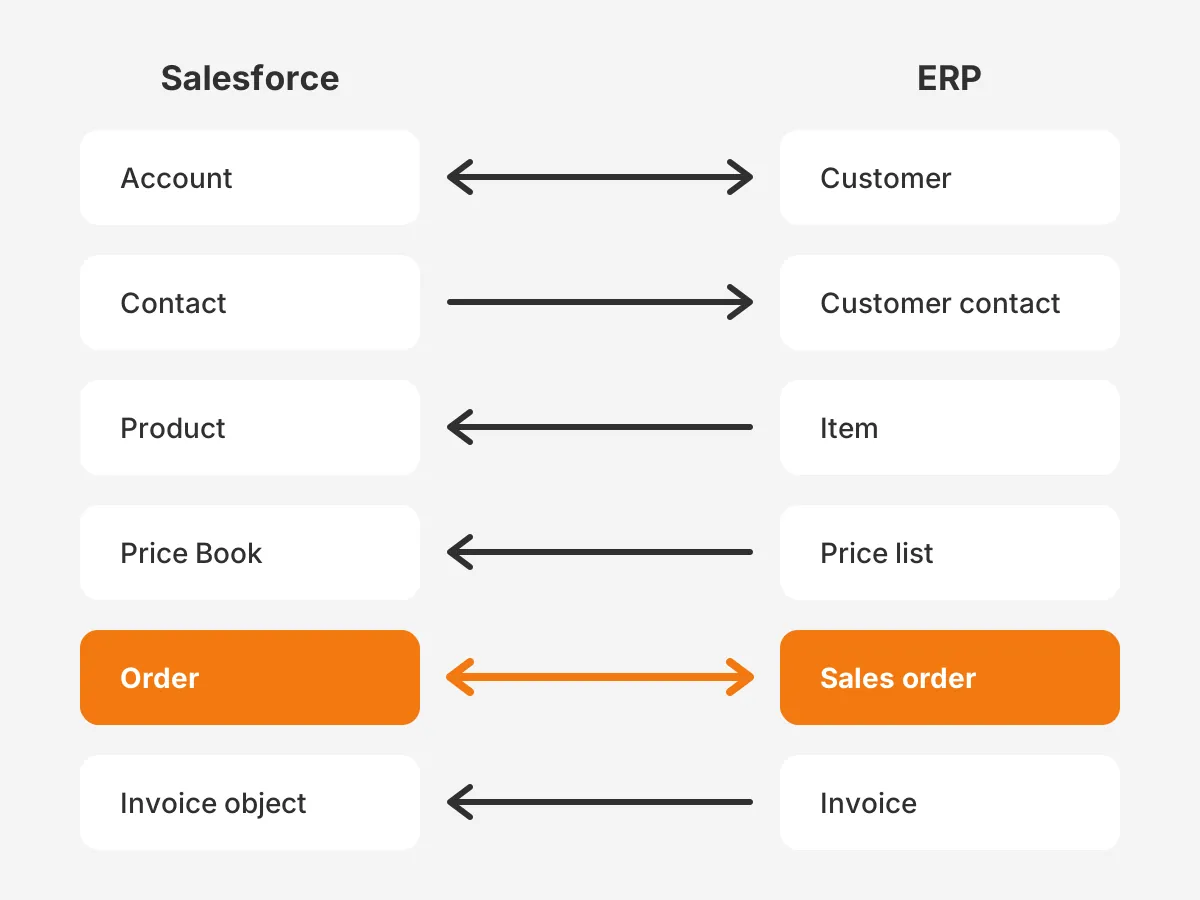
Six Salesforce objects carry most of the load: Account, Contact, Product, Price Book, Quote and Order. Each one maps to a record in the ERP, and each mapping needs an owner and a direction. Getting this table right is most of the design work in Salesforce ERP integration.
| Salesforce object | ERP record | System of record | Sync direction |
|---|---|---|---|
| Account | Customer | Salesforce for prospects, ERP once billed | Both, field by field |
| Contact | Customer contact | Salesforce | Salesforce to ERP |
| Product | Item | ERP | ERP to Salesforce |
| Price Book entry | Price list line | ERP | ERP to Salesforce |
| Quote | Sales quote | Salesforce | Salesforce to ERP, if needed |
| Order and order products | Sales order and lines | Salesforce at creation, ERP after release | Both, by stage |
| Custom invoice object | Invoice and payment status | ERP | ERP to Salesforce |
Read the table as a set of field-level rules. The ERP owns the billing address once a customer has been invoiced. Salesforce owns the account owner and industry. Credit limit, payment terms and credit hold flow from the ERP into read-only Salesforce fields.
Why does every record need an external ID?
An external ID field stores the ERP's key on the Salesforce record. With it, the integration can upsert: update the record if the key exists, create it if not. Without it, a retry after a timeout creates a duplicate account or order.
Add an external ID to Account, Product, Order and the invoice object before the first sync. Mark it unique. This one field prevents most duplicate data problems in a Salesforce ERP integration, and it makes reconciliation reports possible later.
What should stay out of the ERP?
Keep leads, campaign history, email activity and early-stage opportunities in Salesforce. The ERP has no use for them, and sending them inflates API traffic. A prospect becomes an ERP customer only when the first order is released, not when the account is created.
Which Salesforce ERP Integration Tools Should You Use?
Use a prebuilt connector or an iPaaS for standard objects. Use Salesforce's event and bulk tools for flows a connector handles poorly. Most projects combine two or three tools. The table compares the seven options teams choose from.
| Tool | What it does | Best for | Watch out for |
|---|---|---|---|
| AppExchange connector | Prebuilt sync for one ERP | Standard objects, fast start | Limited custom field logic |
| MuleSoft or another iPaaS | Middleware that maps, routes and retries | Three or more systems | Licence cost and a platform to run |
| Change Data Capture | Publishes record changes as events | Sending Salesforce changes out fast | Entity and delivery allocations |
| Platform Events | Custom event messages both ways | Business events such as order released | Hourly publishing allocation |
| Salesforce Connect | Shows ERP tables as external objects | Viewing ERP data without copying it | Extra cost, read only by default |
| Bulk API 2.0 | Asynchronous loads of large record sets | Catalog, price and invoice batches | No guaranteed service level |
| REST API and Apex callouts | Direct record calls in code | Small, specific flows | Code to maintain, daily API allocation |
When is point-to-point integration enough?
Point-to-point integration is enough when one flow connects Salesforce to one ERP and the logic stays small. An Apex callout or a short REST API script can post a released order to the ERP. Once a second system joins, every new link doubles the code to maintain.
When does MuleSoft or an iPaaS make sense?
An iPaaS makes sense once Salesforce, the ERP and a third system all need the same data. MuleSoft Anypoint Platform, Boomi and Workato each offer prebuilt connectors, mapping tools, retry queues and monitoring. MuleSoft states its platform has over 1,500 prebuilt connectors and integrations.
The trade-off is cost and ownership. Someone has to run the platform, watch its error queue and pay its licence. For a company with Salesforce and one ERP, an AppExchange connector plus Change Data Capture is often enough.
What does Salesforce Connect add?
Salesforce Connect maps external objects to tables in the ERP and reads them in real time through web service callouts. Reps see open invoices or stock levels inside Salesforce, but nothing is copied. Salesforce lists it as an extra-cost feature in Enterprise, Performance and Unlimited editions.
External object records are read only by default, though the external data source can be set to allow writes. Use it for lookups, not for data that reports or automation must use offline.
How Do Salesforce API Limits Shape the Design?
Salesforce API limits cap how often the integration can call the platform. They decide polling frequency, batch size and tool choice. They are the reason a design that works in a sandbox can fail in production after a busy week.
The Salesforce API allocation for Enterprise Edition is 100,000 requests per 24 hours plus 1,000 per Salesforce licence. Salesforce's own example: 15 licences give 115,000 requests. The allocation covers the whole org, not each user, and REST, SOAP and Bulk API calls all count.
Beyond the daily allocation, Salesforce ERP integration runs into these ceilings:
- Bulk API 2.0 suits jobs over 2,000 records. It allows up to 150,000,000 records per 24 hours, per the Bulk API limits page.
- Change Data Capture lets you select 5 entities by default and delivers 25,000 events per 24 hours in Enterprise Edition.
- A production org allows 25 concurrent API requests that run 20 seconds or longer.
How fast can a Salesforce API call budget drain?
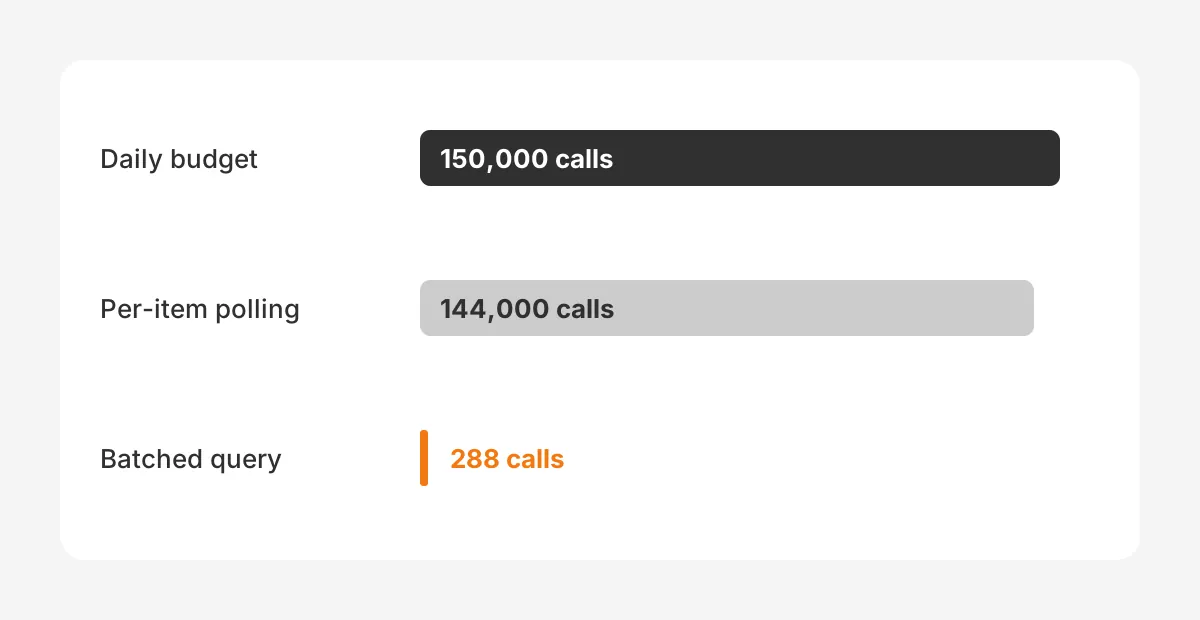
Here is a worked example with assumed figures. A distributor runs Enterprise Edition with 50 Salesforce licences, so its budget is 150,000 calls a day. Its integration checks stock for 500 products every 5 minutes, one call per product.
That polling alone uses 144,000 calls a day, leaving 6,000 for orders, accounts and every other tool. One bulk query per cycle covering all 500 products cuts it to 288 calls. The design change matters more than buying extra calls.
What happens when the ERP side goes offline?
Change events and platform events wait in Salesforce for a limited time. The Change Data Capture allocations page says events received while a subscriber is disconnected are stored for 72 hours. A weekend outage that runs longer loses changes.
Plan a nightly reconciliation job that compares record counts and last-modified dates in both systems. It catches events missed during outages and gives finance a report to trust.
Which Salesforce ERP Integration Pattern Fits Each Process?
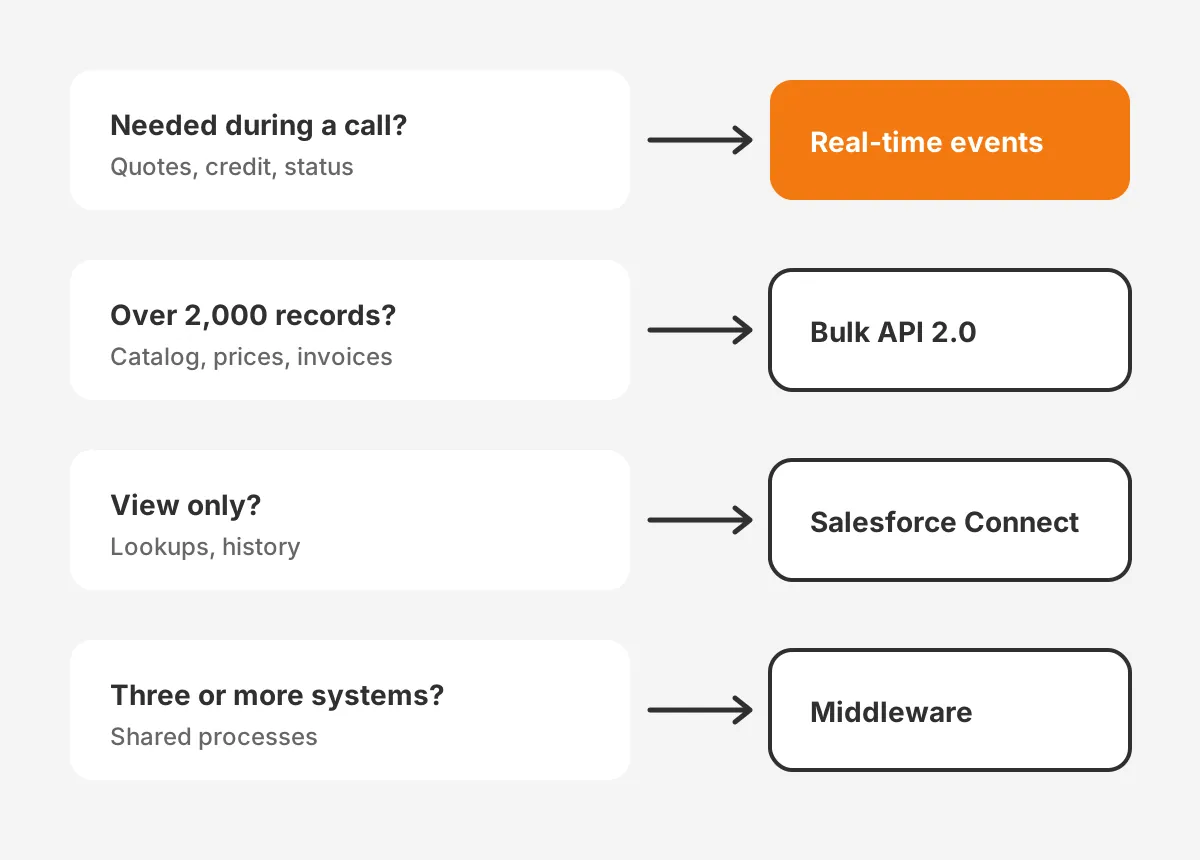
Match the sync pattern to how fast a person needs the data. Near-real-time sync suits quoting, order status and credit checks. Scheduled batches suit catalog updates, price changes and invoice history. On-demand lookups suit data people view but rarely report on.
Use this decision rule for each data flow:
- If a rep needs the value during a customer call, sync it in near real time.
- If more than 2,000 records change at once, such as a product catalog refresh, load them through Bulk API 2.0.
- If people only need to see the data, show it through Salesforce Connect instead of copying it.
- If a process spans three or more systems, route it through middleware with a retry queue.
- If nobody acts on the value inside Salesforce, do not sync it.
Most order-to-cash designs end up mixed. Quote to cash runs on events. A released order fires a platform event, and the ERP returns the order number. Price books refresh nightly in bulk. Invoices sync hourly, because finance rarely needs them faster.
Platform Events carry custom business messages, such as "order released" or "credit hold set." Enterprise Edition allows 250,000 published events per hour by default, per the platform event allocations page. Change Data Capture is simpler when the ERP needs every change to a standard object.
What do Salesforce ERP integration examples look like?
Here is how the rule plays out in practice. Each of these Salesforce ERP integration examples picks a different tool for a different reason.
- A manufacturer checks credit before quoting. Salesforce calls the ERP for the live credit limit when a rep opens a quote.
- A distributor refreshes 40,000 price book entries every night through Bulk API 2.0, outside working hours.
- A services firm shows open invoices on the account page through Salesforce Connect, without copying invoice records.
A typical Salesforce ERP integration architecture combines all three. Events carry urgent changes, bulk jobs carry volume, and external objects cover lookups. Middleware sits in the middle once a third system joins.
How Do You Connect Salesforce to Common ERPs?
Start with what the ERP vendor and AppExchange already offer, then fill gaps with middleware or code. The method changes by ERP, but the object map and ownership rules stay the same.
Salesforce NetSuite integration
Salesforce NetSuite integration is the most common pairing for mid-sized B2B companies. Prebuilt connectors from AppExchange vendors and iPaaS platforms cover customers, items, sales orders and invoices. Custom fields and multi-subsidiary setups are where projects need extra mapping time.
Salesforce SAP integration
Salesforce SAP integration usually runs through MuleSoft or another iPaaS, because SAP landscapes carry heavy customization. Expect more time on material master data, pricing conditions and plant-level inventory than on accounts.
Salesforce Dynamics 365 integration
A Salesforce Dynamics 365 integration often pairs Salesforce with Business Central or Finance and Operations. Teams use an iPaaS or a connector, with the same rule: the ERP owns items, prices and invoices.
Salesforce Odoo integration
A Salesforce Odoo integration suits companies that run operations, inventory and invoicing in Odoo. Unboxx connected Salesforce and Odoo for a roadside assistance company. Salesforce kept customer records, service requests and cases, while Odoo ran work orders, fleet, inventory and invoicing.
How Do You Run a Salesforce ERP Integration Project?
Run it in eight steps, from scope to monitoring, and keep finance and sales operations in every decision. These Salesforce ERP integration steps assume Salesforce is already live. If it is not, plan the Salesforce Sales Cloud implementation first.
- Set the scope. List the business processes, such as quote to cash, credit checks and order status.
- Build the data map. List each object and field, its owner and its sync direction.
- Clean the data. Merge duplicate accounts and products before the first load.
- Choose the tools. Apply the decision rule to each data flow.
- Estimate the API budget. Count daily calls per flow against the org allocation.
- Build in a sandbox. Load a copy of real ERP data, not ten test records.
- Run sandbox testing with users. Push real quotes, orders and credit holds through both systems.
- Go live and monitor. Set alerts on failed records and a daily reconciliation report.
Step three often takes longer than expected. If the account data is poor, the Unboxx guide to Salesforce data migration covers cleansing, matching and load order. Unboxx's CRM consulting and implementation team runs this step on most projects.
Which permissions should the integration user have?
Create a dedicated integration user with its own profile and permission set. Grant access only to the objects and fields in the data map. Never run Salesforce ERP integration under a named employee's login, because a password reset or departure stops every sync.
A dedicated user also makes auditing simple. Every record the integration changes shows the same author. Admins can then separate integration edits from human edits in field history.
How long does Salesforce ERP integration take?
A connector-based project for standard objects often takes 6 to 10 weeks, as a planning estimate rather than a benchmark. Custom middleware with heavy SAP mapping can take two to three times longer. Data cleanup and user testing usually decide the timeline more than the build itself.
What Breaks Salesforce ERP Integration After Go-Live?
Most failures come from ownership gaps rather than from the tools. These are the problems that come up most often in Salesforce ERP integration:
- Two systems can edit the same field, so values flip back and forth on every sync.
- Records have no external ID, so retries create duplicate accounts and orders.
- Polling ignores the API allocation, so other apps hit limit errors by afternoon.
- Failed records sit in an error queue that nobody watches.
- A Salesforce release or ERP upgrade changes a field, and the mapping silently drops it.
Name an integration owner on day one. That person reviews the error queue daily, owns the data map and signs off every field change. In a mid-sized company this is often the Salesforce admin, with an ERP analyst as backup.
Releases are the other risk. Run the main order flows in a sandbox before each Salesforce release reaches production.
Which Salesforce ERP integration best practices prevent this?
The Salesforce ERP integration best practices that matter most are dull and specific. One owner per shared field. A unique external ID on every synced object. An API budget counted before the build starts. An alert within the hour when a record fails.
How should errors be handled?
Log every failed record with its ID, the error message and the time. Retry transient errors such as timeouts automatically, at most three times. Send validation errors to a person, because a retry will fail the same way. Report failure counts weekly to sales operations and finance.
How Much Does Salesforce ERP Integration Cost?
Salesforce ERP integration cost comes from tool licences, build effort and ongoing support. Connector subscriptions and iPaaS licences recur every year. Build effort grows with custom fields, ERP customization and the number of data flows.
Use these cost drivers to size a budget:
- Number of objects and custom fields in the data map.
- ERP customization, especially in SAP and older on-premise systems.
- Salesforce Connect or extra API call add-ons, if the design needs them.
- Data cleanup before the first load.
- Monitoring and support hours after go-live.
For where integration sits in the total project budget, see the Unboxx breakdown of CRM implementation cost. Ask every vendor for a three-year total, because licences and support outlast the build.
Compare quotes on the same data map. A Salesforce ERP integration quote that covers four objects is not comparable with one that covers seven. Ask each vendor to price the same object list, the same sync patterns and the same support hours.
Frequently Asked Questions
Does Salesforce have an ERP?
No. Salesforce sells CRM, service, marketing and analytics products, not a full ERP. Partners offer ERP apps built on the Salesforce platform through AppExchange. Most mid-sized companies keep a separate ERP, such as NetSuite, SAP, Dynamics 365 or Odoo. They connect it to Salesforce through an integration.
How should you integrate Salesforce with ERP?
It depends on the number of systems and the data volume. For Salesforce and one ERP with standard objects, a prebuilt connector is usually fastest. For three or more systems, use MuleSoft or another iPaaS. Use Bulk API 2.0 for large scheduled loads.
Can Salesforce show ERP data without copying it?
Yes. Salesforce Connect maps ERP tables to external objects. Users read ERP data in real time without storing it in Salesforce. Records are read only by default. It suits invoice history and stock lookups. It does not suit data that reports need when the ERP is offline.
Is integration the same as data migration?
No. Data migration is a one-time move of records from an old system into a new one. Integration keeps two live systems in sync every day after go-live. Most projects need both: a migration to load clean history, then an integration to keep Salesforce and the ERP agreeing.
What happens to order history at go-live?
The integration only moves records that change after it starts. Past orders and invoices need a one-time load, usually through Bulk API 2.0, before go-live. Decide how much history reps need. Two or three years usually covers renewals and repeat orders without bloating storage.
Is Your Team Ready for Salesforce ERP Integration?
Your team is ready for Salesforce ERP integration when three things are true. Every shared field has an owner. The API budget is counted. Someone will watch the error queue. Without those three, any connector will produce duplicates and quiet failures.
Unboxx designs and builds Salesforce ERP integration for NetSuite, SAP, Dynamics 365 and Odoo, from data map to monitoring. See the CRM integration services page, or book a consultation to review your data map and API budget.
Let's create something out of this world together.
Have a project in mind? Contact us for expert design and development solutions. Let's discuss how we can help grow your business.
Ready to Unboxx Your Potential?
Build smarter systems. Automate faster. Scale confidently.