
Einstein Activity Capture: Setup, Storage and Limits
Sales reps spend 28% of their week selling, according to Salesforce's State of Sales research (2022). Deal admin and CRM data entry fill much of the rest. Logging every email and meeting by hand is a large part of that drag on sales rep productivity.
Einstein activity capture is the Salesforce feature built to remove that manual work. It connects each rep's Gmail or Outlook mailbox to Salesforce and adds emails, events and contacts to the right records. This guide covers how it works, where data is stored, licensing, setup, reporting and limits.
Key Takeaways
- Einstein activity capture syncs emails, events and contacts between Salesforce and Gmail or Microsoft 365 without manual logging.
- Since Summer '25, captured email can become EmailMessage and Task records that standard reports can use.
- The standard tier covers up to 100 users, while retention and reporting depend on paid editions and add-ons.
What Is Einstein Activity Capture in Salesforce?
Einstein activity capture is a Sales Cloud feature for automatic activity logging. A rep connects a mailbox once. After that, the feature matches messages and meetings to leads, contacts, accounts and opportunities. Each match then shows on the record's activity timeline.
In practice it handles three data types. Emails sent and received are captured into Salesforce. Events sync with the connected calendar. Contacts sync between Salesforce and the mail account's address book. An admin decides which of the three each group of users gets.
The feature replaced older sync tools. Salesforce for Outlook and Lightning Sync were the earlier routes for email logging in Salesforce. EAC in Salesforce cannot run alongside Lightning Sync for the same user, so teams switch fully rather than running both.
Captured email also feeds Einstein Email Insights, which highlight messages that need a reply or an action. Salesforce Ben reports that admins can add up to 10 custom insights next to the standard ones. Salesforce Inbox, a paid add-on, builds on the same capture data inside the mail client.
Teams in the middle of a Salesforce Sales Cloud implementation often switch capture on during the build. That timing makes sense, because matching depends on clean contact and lead records from day one.
How Does Einstein Activity Capture Work With Mailboxes?
Einstein activity capture reads the connected mailbox through an authorized connection and copies activity into Salesforce. The connection uses OAuth 2.0, so the password is not stored for cloud accounts.
Supported sources are Google Workspace, Microsoft 365 with Exchange Online and on-premises Exchange 2013, 2016 and 2019. These details come from Salesforce's activity capture security guide (Spring '24, Japanese edition). Capture with Gmail and Outlook therefore covers almost every business mailbox.
Each data type moves in its own direction. Emails flow one way, from the mailbox into Salesforce. Events and contacts can sync one way or both ways, set per configuration. When both sides change the same event, the external calendar wins the conflict.
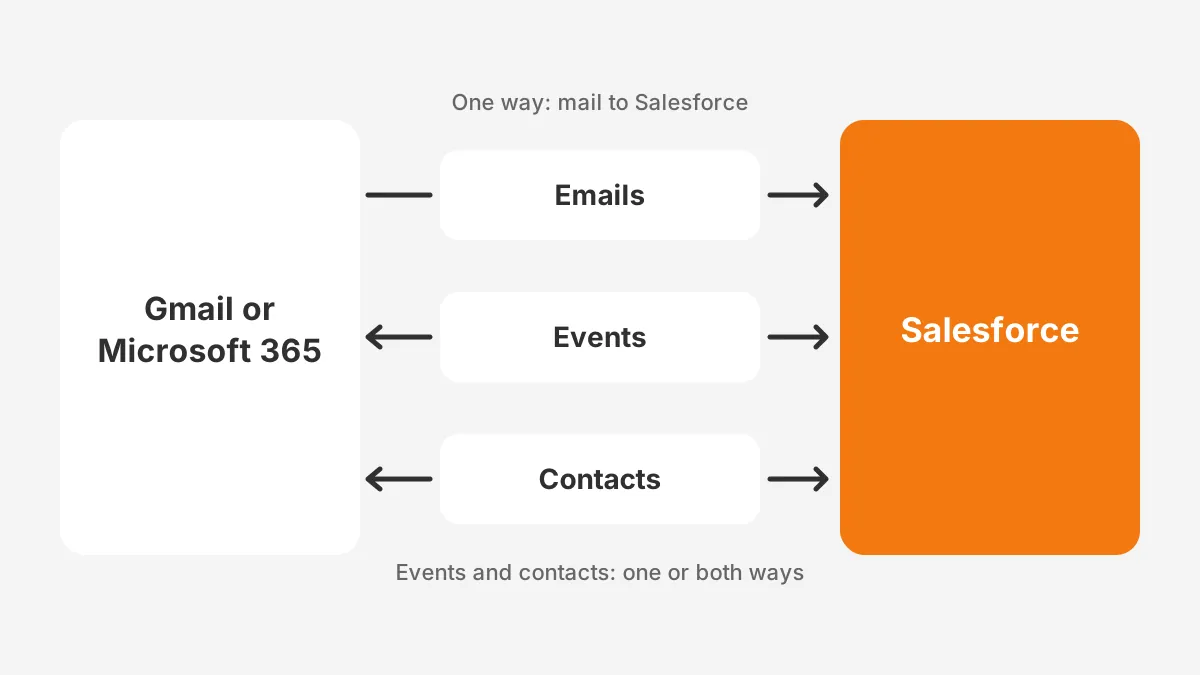
Timing differs by direction for calendar sync with Salesforce. The Salesforce Break guide to activity capture (2026) says Microsoft or Google calendar changes usually arrive within 5 minutes. Changes made in Salesforce can take 15 minutes or more to appear in the mail calendar.
Matching decides which record an email lands on. Since Summer '25, a flow named "Activities: Match Email to Records" runs that logic. It checks leads and contacts first, then accounts and opportunities. Admins can copy and adjust the flow when custom objects need matching.
On first connection, the feature backfills history. The security guide lists up to 6 months of past data, capped at 50,000 emails and 5,000 activities per user. Reps see older threads appear on their records within the first sync cycle.
Where Is Einstein Activity Capture Data Stored?
Captured email sits in one of two places, and a single org setting decides which. The legacy path keeps email on Salesforce's Activity Platform, which runs on Hyperforce in AWS. The newer path, Sync Email as Salesforce Activity, writes each message into standard Salesforce objects.
On the legacy path, email never becomes a record in the core database. It shows on the activity timeline, but standard reports, list views and Flow cannot see it. Einstein activity capture data retention is also capped there.
Standard-only orgs keep legacy data for 6 months by default, and Support can lower that to 3 months. Orgs with at least one paid license keep 24 months by default, adjustable up to 5 years. Data older than the window is deleted, not archived.
Sync Email as Salesforce Activity arrived in Summer '25. It saves each captured email as an EmailMessage record plus Task records, and each meeting as Event records. The Salesforce Ben guide to activity capture notes that these records support reporting, API access and automation.
Those records count toward data storage limits. Salesforce Ben also reports that Spring '26 switched the setting on automatically for new orgs. Sources disagree on how existing orgs migrate, so admins should check their own Setup page before planning around either path.
| Factor | Legacy Activity Platform | Sync Email as Salesforce Activity |
|---|---|---|
| Where email is stored | Hyperforce on AWS, outside core records | EmailMessage and Task records |
| Standard reports | Not available | Available through custom report types |
| Flow and API access | No | Yes |
| Retention | 6 months standard, 24 months paid | Kept like other records |
| Counts toward storage | No | Yes |
Salesforce Ben adds that there is no built-in way to switch the setting off once it is on. Treat the change as permanent and estimate storage before it starts.
Which Editions Include Einstein Activity Capture?
Activity capture comes in two tiers. Salesforce Ben reports that the standard tier comes with Sales Cloud Starter, Professional and Enterprise. It covers up to 100 users. Unlimited Edition and four paid add-ons unlock the full version.
The Salesforce Break guide lists those add-ons as Einstein for Sales, Salesforce Inbox, Sales Engagement and Revenue Intelligence. Assigning one paid license changes legacy retention for the whole org. The default rises from 6 to 24 months.
| Feature | Standard tier | Full license |
|---|---|---|
| Users covered | Up to 100 | Per license or edition |
| Email, event and contact sync | Yes | Yes |
| Legacy retention | 3 to 6 months | 24 months, up to 5 years |
| Activity Metrics and Activity 360 Reports | Not included | Included where already set up |
| Included in | Starter, Professional, Enterprise | Unlimited Edition or a paid add-on |
Two decision rules follow from the Einstein activity capture licensing model, and both affect budget. First, count the reps who need capture before buying add-ons, because the 100 user limit caps the standard tier. Second, weigh storage costs from synced records against the retention benefit of a paid license.
Add-on pricing changes often, so confirm current figures with a Salesforce account executive. Unboxx models license mixes as part of its Salesforce CRM services. That work shows which reps need full capture and which can stay on the standard tier.
A mixed setup is one option. Most reps stay on Einstein activity capture standard access. Managers and sales development reps get paid add-ons for insights and engagement tracking. One paid seat lifts legacy retention for everyone, so a single license can change how long timelines stay complete.
The answer to whether Einstein activity capture is free is yes for the standard tier in those editions. Reporting, longer legacy retention and custom insights are where paid licenses start to matter.
How Do You Set Up Einstein Activity Capture?
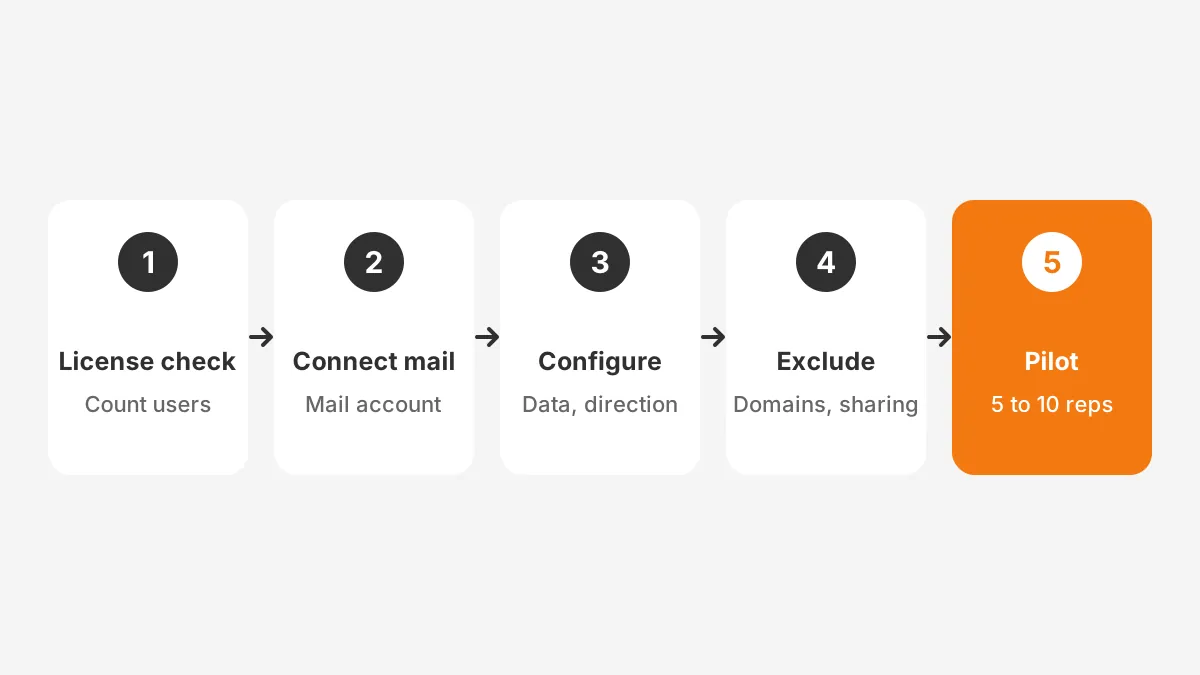
Einstein activity capture setup has two halves: admin work in Setup and a one-time connection by each rep. The steps below show how to enable Einstein activity capture without gaps.
- Confirm editions, licenses and the number of users who need capture.
- Check that no user runs Lightning Sync, because the two tools cannot run together.
- Connect Salesforce to Google Workspace or Microsoft 365, with the mail admin where org access is needed.
- Create each Einstein activity capture configuration with data types, sync direction and days of history.
- Assign users or profiles to each configuration and grant the matching permission set.
- Add excluded addresses and domains, then set the default sharing level.
- Ask each rep to connect a primary email account, not an alias.
- Track progress on the Einstein activity capture user status page in Setup.
Start with a pilot before the full rollout. A group of 5 to 10 reps with different mail habits is a sensible size. After a week, compare each pilot rep's activity timeline against their sent folder and calendar.
Configurations deserve care. Each one sets which data types sync and the direction for events and contacts. It also sets how far back to sync, in days. Users with different needs, such as executives and account managers, can sit in separate configurations.
Disabling a data type later has a cost. Re-enabling email or events does not backfill the gap, according to Salesforce Break. Plan configurations before reps connect, then change them rarely.
What Should Admins Exclude and Share?
Admins should exclude internal traffic, sensitive senders and automated mail before go-live. The default internal domain is excluded automatically. Other company domains, such as a regional domain or an acquired brand, must be added by hand.
Einstein activity capture excluded addresses work at two levels. The admin list applies across the org and overrides each user's personal list. Emails where every address is internal are always left out. Internal events have their own switch, called Sync Internal Events.
Exclusions also act on the past, in part. Past matches are removed from timelines, but the underlying data may stay on the capture platform. Salesforce Ben reports that newer releases no longer keep internal and blocked email on AWS when it is not synced.
Einstein activity capture sharing settings control who sees captured content. The admin picks a default of everyone, a Chatter group or no one, and users can override it. Legal, HR and finance users often warrant a "Don't Share" default.
The Einstein activity capture header only option adds another layer. Header-Only Email Capture keeps the subject and body out of Salesforce and logs who emailed whom and when. Those messages show as "[No subject]" on the timeline, which protects content while keeping the contact history.
What Changed for Microsoft 365 Users in 2026?
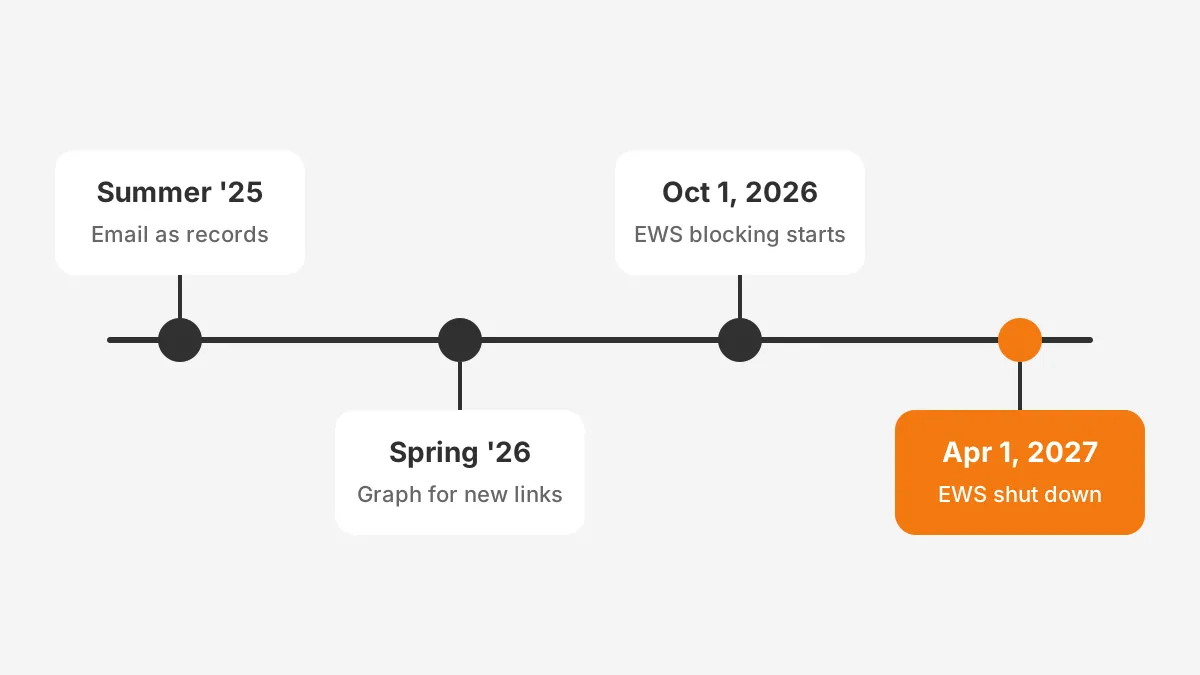
Microsoft 365 orgs had to move their mail connection to Microsoft Graph during 2026. Microsoft's Exchange team set out the Exchange Web Services timeline in February 2026. Blocking for tenants still using it started on October 1, 2026.
The final shutdown follows on April 1, 2027. Microsoft states there will be no exceptions past April 2027. Any capture connection still built on Exchange Web Services will stop syncing by that date.
Tenants could keep named apps on an allow list after October 1, but only until the final shutdown. Re-enabling Exchange Web Services is possible until April 2027 and not after.
Salesforce prepared for the change. From Spring '26, new Office 365 capture connections use Microsoft Graph, according to Salesforce Break. Orgs that connected earlier must run the Graph upgrade, and that upgrade cannot be rolled back.
Three checks are worth doing now. Confirm the connection type in Setup and review the user status page for sync errors. Then ask the Microsoft admin to confirm app permissions for the Einstein activity capture Microsoft Graph connection.
On-premises Exchange is a separate case. Microsoft's change covers Exchange Online only, so Exchange Server mailboxes keep their current connection method. Hybrid setups support user-level connections for capture, according to the security guide.
How Does Einstein Activity Capture Reporting Work?
Einstein activity capture reporting depends on the storage path. With Sync Email as Salesforce Activity on, captured email sits in EmailMessage and Task records. Admins build custom report types on the email message object, then add them to dashboards like any other object.
The legacy path relied on three tools. Activity Metrics rolled up last activity dates onto records. Activity 360 Reports joined records with streamed activity. The Activities Dashboard, built on CRM Analytics, showed activity volume by rep and team.
Salesforce Ben notes that the Unified Activities object no longer covers emails and meetings, though it still holds calls.
Those three tools needed at least one paid license. Salesforce Break reports they are not available to orgs that start after Summer '25, unless they were set up earlier. Guides published in late 2026 expect them to retire in Spring '27.
A practical plan is to rebuild key metrics on standard objects now. Count emails per opportunity stage, days since the last two-way contact and meetings booked per rep. Event records make the meeting count straightforward.
Field managers also need a weekly view of capture health. A simple report of reps with zero synced emails in seven days flags broken connections fast. The user status page then shows which connection needs attention.
The CRM reporting guide covers how to structure those reports. CRM adoption metrics then show whether reps keep their mailboxes connected and their timelines complete.
Captured activity also feeds scoring. Email engagement can inform Salesforce lead scoring once the data sits in reportable records.
What Are the Main Einstein Activity Capture Limitations?
Einstein activity capture limitations come mostly from how the connector works, not from configuration.
- Attachments are not stored, and only attachment metadata is retrieved.
- Each user can sync with one Salesforce org only.
- Only the primary email address syncs, and aliases are ignored.
- Legacy captured email is not eligible for Shield Platform Encryption.
Einstein activity capture does not sync attachments, which rules it out for teams that must keep signed documents on records. Those teams store files through a document tool or Salesforce Files instead.
Encryption needs a closer look in regulated firms. The security guide says captured email uses AES-256 encryption at rest. Platform Encryption still applies to contact and lead names shown on the timeline.
Deletion is slow by design. Admin deletion requests are processed after 7 days and can take up to 1 month. Teams with privacy obligations should record that delay in their data-handling policy.
Sync Email as Salesforce Activity adds a newer limit, because every captured email counts against storage. As an example, a 50-rep team sending 40 external emails a day creates about 2,000 email records daily.
Capture matches email to existing contacts and leads, so duplicates send activity to the wrong record. A CRM data cleansing pass before rollout fixes most of that risk.
Einstein activity capture vs Lightning Sync is no longer a live choice for new setups. Lightning Sync is the older tool, and the two cannot run together. The decision now is between activity capture and a third-party capture product.
When Does a Third-Party Capture Tool Fit Better?
A third-party Salesforce email integration fits better when a hard requirement falls outside the native connector's limits. The native tool covers the common case well. The question is whether a team's edge cases are deal breakers or minor gaps.
Five requirements usually decide it. Each one maps to a documented limit, so the check is quick and factual.
- Signed files must stay on the record, but attachments are not captured.
- Reps send from shared or alias addresses, but only the primary address syncs.
- Consultants work across two client orgs, but each user syncs with one org.
- Email bodies need customer-managed encryption, but legacy capture sits outside Shield Platform Encryption.
- The team exceeds the Einstein activity capture 100 user limit and cannot fund paid add-ons.
If none of the five applies, the native feature is usually the lower-risk choice. It needs no extra vendor review, it updates with Salesforce releases and it keeps data inside the Salesforce security model.
If one applies, test that single gap first. Teams that need attachments can often add a document tool and keep native capture for email and events. Teams with alias-heavy inboxes have fewer workarounds.
Vendor claims also need care. Competing capture products publish their own comparisons, and those pages are marketing. Ask each vendor for a sandbox trial. Then run the same pilot used for native capture, comparing sent folders against timelines for one week.
Cost belongs in the same comparison. Native standard capture adds no license cost, while a third-party tool adds a per-user fee. Storage from synced email records applies to both routes once messages live inside Salesforce.
Frequently Asked Questions
Is activity capture free with Sales Cloud?
The standard tier comes at no extra cost with Sales Cloud Starter, Professional and Enterprise for up to 100 users. Longer legacy retention, activity reporting and custom insights cost more. They need Unlimited Edition or a paid add-on such as Sales Engagement, Salesforce Inbox or Einstein for Sales.
Does activity capture work with Outlook?
Yes. It connects to Microsoft 365 with Exchange Online and to on-premises Exchange 2013, 2016 and 2019. Since Spring '26, new Microsoft 365 connections use Microsoft Graph. Older connections need the Graph upgrade, because Exchange Web Services in Exchange Online shuts down on April 1, 2027.
Can admins delete captured emails?
Admins can request deletion of captured activity. Salesforce's security guide says requests are processed after 7 days and can take up to 1 month. Teams with privacy duties should log each request and its date. That delay affects how fast they can answer data requests.
Who should own activity capture in a company?
A Salesforce admin should own configurations, exclusions and user status checks. The email administrator handles the Google Workspace or Microsoft 365 side, including app permissions. Sales operations should own the reports built on captured activity, so data quality questions reach one named person.
When should email sync as records be turned on?
Turn it on when reports, Flow automation or retention beyond 24 months matter more than storage cost. Check data storage headroom first, because every captured email becomes a record. New orgs may already have it on, since Salesforce enabled it by default from Spring '26.
Is Einstein Activity Capture Right for Your Org?
Einstein activity capture fits most Sales Cloud teams that work in Gmail or Outlook. It gives them activity data without a third-party tool. It falls short where attachments, long legacy retention or encrypted email bodies are hard requirements.
Unboxx sets up activity capture, rebuilds reporting on standard objects and plans the Microsoft Graph move inside Salesforce projects. See how one team fixed unreliable Salesforce reports, or schedule a consultation to review an Einstein activity capture setup.
Let's create something out of this world together.
Have a project in mind? Contact us for expert design and development solutions. Let's discuss how we can help grow your business.
Ready to Unboxx Your Potential?
Build smarter systems. Automate faster. Scale confidently.