
Salesforce to Salesforce Implementation Guide for 2026
Two Salesforce orgs that once traded leads, accounts and cases through a native connection now face a hard deadline. Salesforce's own retirement notice says the feature will stop working in every org with the Spring '27 release. Teams that relied on it need a plan before their instance upgrades.
This Salesforce to Salesforce implementation guide explains how the feature worked, what is retiring, and how to build its replacement. It covers the original setup steps and an audit method. It also gives a decision table for four alternatives and a six-phase migration plan.
Key Takeaways
- Salesforce blocked new Salesforce to Salesforce enablement in Spring '26 and retires the feature completely in Spring '27.
- Every live connection needs an owner, a purpose and a chosen replacement before the instance upgrade weekend.
- Pick the replacement by the job the connection does, then test it in a sandbox without Salesforce to Salesforce configured.
What Does a Salesforce to Salesforce Implementation Guide Cover?
A Salesforce to Salesforce implementation guide in late 2026 covers two jobs: running the legacy feature safely and replacing it. New implementations of the native feature are no longer possible. The real implementation work is now the replacement.
An older Salesforce to Salesforce implementation guide from an integration vendor stops at "enable, connect, publish, subscribe." That Salesforce S2S sequence still matters, because it tells you what an existing connection shares. It no longer describes a project you can start today.
This Salesforce to Salesforce implementation guide therefore covers five areas:
- What the feature did and how records moved between two orgs.
- The retirement timeline and what each release changed.
- How to audit connections, published objects and dependent code.
- Which replacement fits each use case, from partner sharing to multi-org data.
- A phased migration plan with testing and cut-over steps.
Anyone asking how to set up Salesforce to Salesforce today gets a different answer than in 2024. A current Salesforce to Salesforce implementation guide has to say so plainly, then move to the work that replaces it.
The intended readers are Salesforce admins, architects and operations leaders. This Salesforce to Salesforce implementation guide assumes you own at least one org that sends or receives shared records. If you are planning a wider Salesforce program, our Salesforce CRM services page shows how Unboxx scopes that work.
How Did Salesforce to Salesforce Work?
Salesforce to Salesforce is a native feature that lets two businesses on Salesforce share records and receive updates on them. Each side decides which objects and fields it publishes. The receiving org gets its own linked copy, not direct access to the sender's data.
Any Salesforce to Salesforce implementation guide should start from the vendor's own page. The official Salesforce to Salesforce help page lists it as available in Salesforce Classic. It covers Contact Manager, Group, Professional, Enterprise, Performance, Unlimited and Developer Editions. That page does not list Lightning Experience among its availability notes.
Which Objects Could a Connection Share?
Older Salesforce documentation lists any deployed custom object plus standard objects. These include Account, Contact, Lead, Opportunity, Case, Case Comment, Task, Product and Attachment. Formula and roll-up summary fields could not be published.
How Did Records Move Between Orgs?
Salesforce to Salesforce publish and subscribe sat at the core of the design. The sending org published an object and its fields. The receiving org subscribed, mapped each published field to a local field, and accepted incoming records by hand or automatically.
Users forwarded single records from the External Sharing related list. Developers shared records in code by inserting a PartnerNetworkRecordConnection row. The PartnerNetworkRecordConnection object reference says a record is shared by setting two fields: LocalRecordId and ConnectionId.
Salesforce to Salesforce Apex code relied on this object. A Salesforce to Salesforce implementation guide that skips it misses where most automation lives.
That same object tracks status values such as Active (sent), Active (received), Pending (sent) and Inactive. Optional flags forward open tasks, closed tasks and a notification email. The connection itself is stored as a PartnerNetworkConnection record.
When Does Salesforce to Salesforce Stop Working?
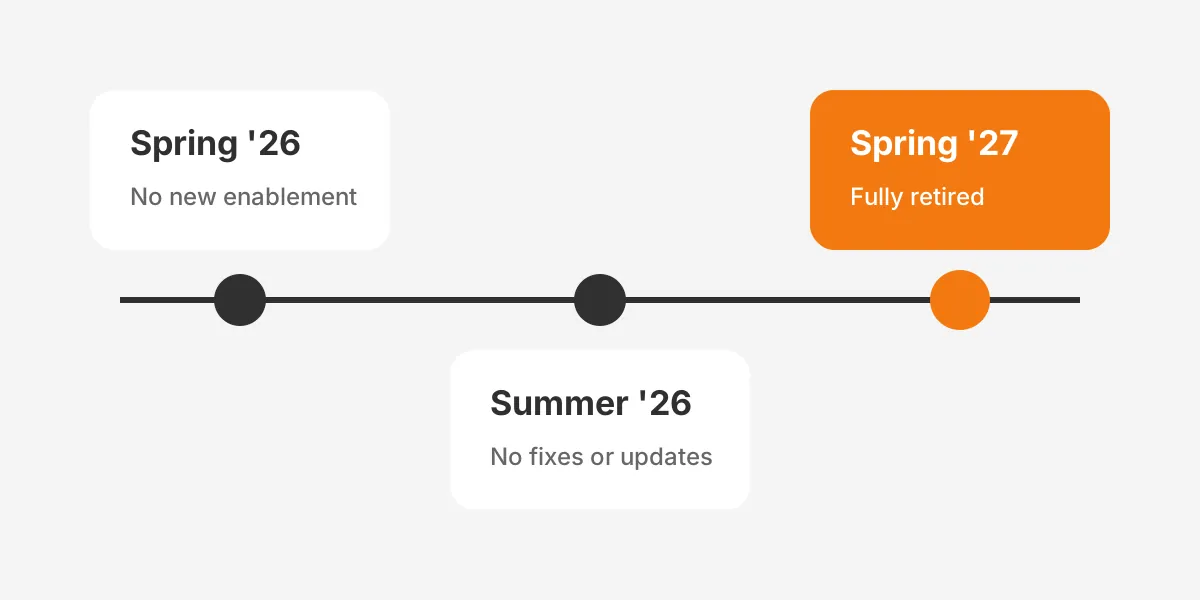
Salesforce to Salesforce stops working in each org at that org's Spring '27 major release upgrade. Salesforce's Salesforce-to-Salesforce Retirement article, dated 3 October 2026, sets out three phases.
| Release | What changes | What it means for your org |
|---|---|---|
| Spring '26 | The feature can no longer be enabled in an org | No new Salesforce to Salesforce connection projects |
| Summer '26 | No bug fixes or enhancements; support cases still accepted | Existing connections run as they are, with no fixes |
| Spring '27 | Fully retired in all orgs and no longer functions | Every connection stops sharing records |
Is Salesforce to Salesforce being retired for every customer? The S2S retirement article says it will no longer function in all orgs, so no edition is exempt.
Salesforce gives no single calendar date. The retirement follows each instance's major release upgrade. The retirement article tells admins to check the maintenance tab on the Salesforce Trust status site for their instance dates.
So when does Salesforce to Salesforce retire for a given company? On its instance's Spring '27 upgrade weekend. Plan your cut-over at least one sandbox refresh before your production upgrade. A Salesforce release update for this retirement also appears in Setup, which gives admins a second reminder inside the org.
How Do You Audit Existing Connections in Your Org?
To find Salesforce to Salesforce connections, start with the API objects. Audit each one by listing every PartnerNetworkConnection, then every object each connection publishes and subscribes to. Start in the org that sends records, then repeat in every receiving org.
- Open Setup and search Quick Find for Salesforce to Salesforce Settings to confirm the feature is enabled.
- Open the Connections tab in Salesforce Classic and list each partner connection and its status.
- Run a SOQL query against PartnerNetworkConnection for ConnectionName, ConnectionStatus and ConnectionType.
- Record each published object, each subscribed object and its field mapping.
- Query PartnerNetworkRecordConnection to count shared records by status and object.
- Search Apex, flows and reports for PartnerNetwork, ConnectionReceivedId and ConnectionSentId references.
A CloudCounsel retirement checklist notes a useful signal. If the PartnerNetworkConnection query returns "sObject type not supported," the feature was never enabled in that org.
Put the results into one inventory sheet, the working core of this Salesforce to Salesforce implementation guide. Give each connection a business owner and a partner contact. Add the objects it shares, record volumes and dependent code.
That inventory becomes the scope for everything that follows in this Salesforce to Salesforce implementation guide.
Give every S2S connection in the inventory a decision date as well. Following a Salesforce to Salesforce implementation guide goes faster when the inventory, not the calendar, drives the schedule.
Look closely at Apex triggers. Salesforce's object reference says PartnerNetworkRecordConnection is unavailable in an org without the feature. A trigger that inserts those rows should be expected to fail after retirement. Reports that filter on connection fields need review too.
What Were the Original Salesforce to Salesforce Setup Steps?
Each Salesforce to Salesforce implementation guide published before 2026 described the same setup. The original Salesforce to Salesforce setup took six steps across both orgs. You cannot run them in an org that never had the feature. They still explain how your existing connection is configured.
- Enable Salesforce to Salesforce in Salesforce to Salesforce Settings in both orgs.
- Add the Connections tab to the user's tab set in Salesforce Classic.
- Create a contact with a valid email on an account that represents the partner.
- Create a new connection from the Connections tab, choose that contact and the connection owner, then click Save & Send Invite.
- The partner accepts the invitation from the email link and logs in to their org.
- Publish objects and fields in one org, then subscribe and map fields in the other.
Vendor guides add two details that matter during an audit. Ascendix notes that a connection template could pre-set published objects. Most guides also mention the auto accept setting, which accepted incoming records without a user review.
Salesforce to Salesforce auto accept shapes the replacement design. If records arrived without review, the new design must recreate that flow automatically. If a user reviewed each record, the new design needs an approval step instead.
How Did Teams Automate Record Sharing?
Salesforce to Salesforce field mapping also lived inside each subscription. Export those mappings before the feature retires, while the subscription screens still exist.
Teams automated sharing with an Apex trigger that created a PartnerNetworkRecordConnection row whenever a record met a rule. The ParentRecordId and RelatedRecords fields shared child records, such as contacts under an account.
Document every such trigger now. Each one marks a business rule that must move into the replacement. That could be a flow, a MuleSoft process or a data stream.
What Limitations Did Salesforce to Salesforce Have?
Salesforce to Salesforce limitations explain why most teams outgrew it before the retirement. The feature shared records, but it gave little control over timing, errors or volume.
- Setup and connection management ran in Salesforce Classic, not Lightning Experience.
- Updates arrived asynchronously, so a partner could see stale values for a period.
- Formula and roll-up summary fields could not be published.
- Each object needed its own publish, subscribe and field mapping setup.
Those limits shape the replacement brief. Note which ones hurt your team most before reading the rest of this Salesforce to Salesforce implementation guide. Slow updates point toward an event-driven design. Missing formula fields point toward a data platform that calculates values centrally.
Salesforce to Salesforce in Lightning was never a full setup experience, so connection work stayed in Classic. An org that moved its users to Lightning can easily lose sight of a connection. The audit above brings those connections back into view.
How Did It Compare With Other Options?
Salesforce org to org integration had three common routes before the retirement. The native salesforce to salesforce connector was free and simple. Middleware and custom APIs cost more but handled volume, transformation and errors.
Multi-org Salesforce companies can end up running all three. Picture, as an example, a connection that forwards leads to a reseller beside a MuleSoft flow that moves orders. The retirement is a reason to consolidate onto fewer patterns.
A Salesforce cross org integration review is the right moment for that consolidation. Group the connections by job, then decide whether one replacement can serve two jobs. Fewer patterns mean fewer licenses and fewer failure points.
Some teams connect two Salesforce orgs only to share records between Salesforce orgs for reporting. They may need no integration at all. A shared data platform such as Data Cloud One can read both orgs for analytics instead.
Which Replacement Fits Each Salesforce to Salesforce Use Case?
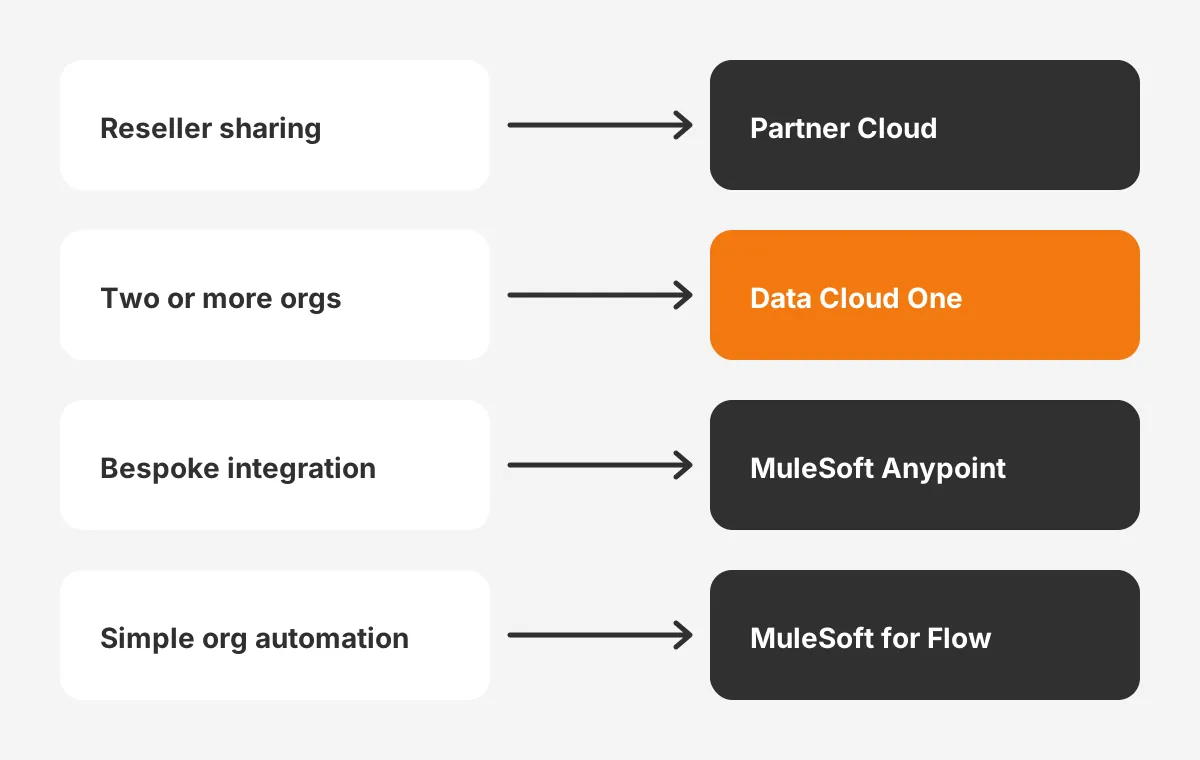
The right replacement depends on why two orgs share data. Salesforce's retirement article names four alternatives and warns that each has some license or cost impact. It tells customers to contact their account executive for pricing.
| Use case | Replacement Salesforce names | What it does |
|---|---|---|
| Sharing leads and deals with resellers | Partner Cloud | A branded partner portal built on Experience Cloud |
| One company running two or more orgs | Data Cloud One | Shares data across orgs with identity resolution into one profile |
| Bespoke or high-volume integration | MuleSoft Anypoint | Orchestrates integrations across hundreds of systems |
| Simple org to org automation | MuleSoft for Flow | Lets a flow call another Salesforce org |
What replaces Salesforce to Salesforce depends on that job, not on a single product. Map each connection in your Salesforce to Salesforce implementation guide inventory to one row of that table.
A reseller connection that forwards leads is a partner problem. Two orgs inside one group that share accounts is a multi-org data problem.
Where Does Salesforce Connect Fit?
The Salesforce Connect cross-org adapter is not on Salesforce's list of suggested alternatives, as the CloudCounsel checklist points out. It shows another org's records as external objects, without copying them. That suits read-mostly lookups, not record ownership transfer.
When Is a Custom API Build Right?
How to integrate two Salesforce orgs without a vendor tool? A custom build on the Salesforce REST API fits teams with developers. It uses a connected app and named credentials for authentication. Our Salesforce ERP integration guide covers the same authentication pattern for another system.
Partner portals need their own design work. Teams moving reseller sharing into a portal can review our Experience Cloud consulting services for the usual build scope.
Why Use a Salesforce to Salesforce Implementation Guide Now?
Use a Salesforce to Salesforce implementation guide now because the replacement needs licensing, design and testing time. None of the three can start the week before the upgrade.
Licensing usually moves slowest. Salesforce states that each alternative carries some cost impact. Budget approval, contract changes and partner agreements can take weeks before any build starts.
Design is the second constraint. A partner who receives your leads must agree to the new process. Their admin needs time to accept a portal login, a new integration user or a changed field map.
Testing comes third, and here the Salesforce to Salesforce implementation guide follows Salesforce's own advice. Salesforce recommends testing the replacement in a sandbox without Salesforce to Salesforce configured. Running both side by side in production can create duplicate records, which the retirement article warns about directly.
Reporting is the quiet risk. Pipeline reports that count forwarded opportunities will drop the moment sharing stops. A cut-over scheduled from a Salesforce to Salesforce implementation guide lets finance adjust those reports early.
A worked example shows the timing. Assume, as an example only, an org with two connections and one Apex trigger. Licensing takes four weeks, the build takes three, testing takes two, and cut-over takes one. That is ten weeks before the Spring '27 upgrade weekend.
How Do You Run the Migration in Six Phases?
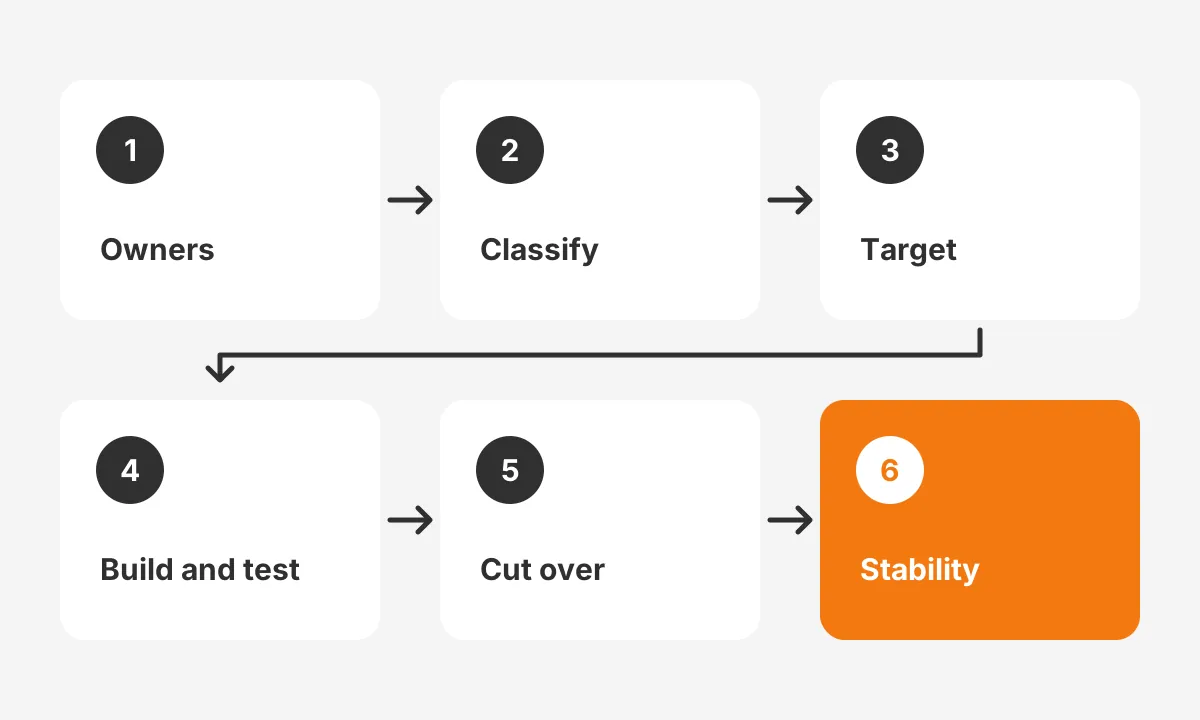
Run the migration in six phases. Confirm ownership, classify connections and define the target. Then build and test, cut over, and prove stability. YuniQ's migration plan uses the same structure.
- Confirm the deadline and owners. Check your instance date on Salesforce Trust and name one owner per connection.
- Classify each connection. Mark it as partner sharing, multi-org data, bespoke integration or simple automation.
- Define the target contract. List the objects, fields, direction, frequency and the system of record for each field.
- Build and test without the legacy feature. Use a sandbox that never had Salesforce to Salesforce enabled.
- Cut over by cohort. Move one partner or one object at a time, then deactivate the old connection.
- Prove stability. Compare record counts, check error logs and retire Apex triggers that referenced the old objects.
How Should You Handle Field Mapping and Records?
This Salesforce to Salesforce migration plan rebuilds field mapping from the audit, not from the old subscription screen alone. Add an external ID on each shared object so the new integration can match records. That prevents duplicate records during the first sync.
Partner record sharing needs its own rule. Decide what happens to records already shared. Salesforce's retirement article does not say whether forwarded copies remain. YuniQ states that stopping sharing does not delete the copy in the other org, so plan ownership for those copies.
Data quality work belongs before the cut-over in any Salesforce to Salesforce implementation guide. Our Salesforce data migration guide lists the cleanup and validation steps that apply when records move into a new structure.
Who Should Own Data Governance After Cut-Over?
Data governance should sit with one named owner per shared object. That owner approves new fields, sharing rules and partner access. Without one, the replacement drifts the same way the old connection did. Any Salesforce to Salesforce implementation guide that stops at go-live leaves that gap open.
What Mistakes Do Teams Make When Replacing S2S?
Copying every field the old connection shared is the mistake to avoid first. Connections built years ago tend to grow by habit. A replacement is a chance to share only the fields a partner uses.
Other mistakes repeat across projects:
- Leaving licensing until the build is finished, which delays go-live past the upgrade.
- Testing in a sandbox that still has the legacy feature enabled.
- Ignoring Apex triggers and scheduled jobs that reference PartnerNetworkRecordConnection.
- Skipping a partner briefing, so the receiving admin rejects the new process.
- Running both systems in production, which creates duplicate records.
Each mistake has a direct fix in the six phases above, so the Salesforce to Salesforce implementation guide order matters. Licensing sits in phase one. Clean sandbox testing sits in phase four. Trigger cleanup sits in phase six.
Integration projects that span sales, billing and service orgs share these risks. Our Salesforce multi-cloud success story shows how one client connected those teams on a single platform.
For teams that want outside help, our CRM integration services cover connection audits, replacement design and cut-over testing. That work follows the same Salesforce to Salesforce implementation guide steps described here.
Frequently Asked Questions
Can a new org still enable Salesforce to Salesforce?
No. Salesforce blocked new enablement with the Spring '26 release. An org that never had the feature cannot turn it on. Orgs that already had it keep running connections until their Spring '27 upgrade. They receive no bug fixes or enhancements in that period.
Do shared records disappear when the feature retires?
Salesforce's retirement article does not say. YuniQ states that stopping sharing leaves the copy in the receiving org. Treat every forwarded record as data you must own, clean and map. Confirm the behavior in a sandbox and with Salesforce support before your upgrade weekend.
Is Salesforce Connect a replacement for Salesforce to Salesforce?
Salesforce does not list it as one. The Salesforce Connect cross-org adapter shows another org's records as external objects without copying them. It can suit read-only lookups between orgs. It does not forward records or transfer ownership, which most legacy connections did.
Does Salesforce to Salesforce work in Lightning Experience?
The Salesforce help page lists the feature as available in Salesforce Classic. Vendor setup guides from Skyvia and Ascendix tell admins to switch to Classic before managing connections. Plan any audit work in Classic, and expect the Connections tab there.
How much do the replacement tools cost?
Salesforce does not publish one price for the switch. Its retirement article says each alternative has some license or cost impact and asks customers to contact their account executive. Request quotes for Partner Cloud, Data Cloud One or MuleSoft early, because contracts take time.
Is Your Salesforce to Salesforce Implementation Guide Ready?
A Salesforce to Salesforce implementation guide is ready when every connection has an owner, a replacement and a tested date. Anything less leaves records, reports and partners exposed at the Spring '27 upgrade.
Use this Salesforce to Salesforce implementation guide as the checklist for that review. Unboxx is a Salesforce Crest Partner that audits connections, designs replacements and runs the cut-over with your partners. Schedule a consultation to review your connections before the deadline.
Let's create something out of this world together.
Have a project in mind? Contact us for expert design and development solutions. Let's discuss how we can help grow your business.
Ready to Unboxx Your Potential?
Build smarter systems. Automate faster. Scale confidently.