
Can Screen Sharing Solutions Integrate With CRM for Brokers?
An insurance producer walks a client through three quote options on a shared screen. The call ends, the client says yes, and nobody records what was shown. A week later the client disputes a deductible, and the CRM holds only a one-line note.
The fix is a connection. Most screen sharing solutions integrate with CRM platforms used by insurance brokers. They connect through a native app, a middleware tool or an API. The integration starts the session from the client record and writes the session details back to that record.
Key Takeaways
- Screen sharing solutions integrate with CRM platforms such as Salesforce, HubSpot and Dynamics 365 through native apps, middleware or APIs.
- The useful part is the write-back: date, duration, recording link, notes and next step on the client record.
- Insurance brokers also need consent, field masking and vendor oversight, because recorded sessions can hold nonpublic client data.
How Do Screen Sharing Solutions Integrate With CRM?
Screen sharing solutions integrate with CRM systems in two directions. The CRM launches the session, and the session tool reports back to the CRM. The rest is detail about how those two calls happen.
The launch side is a button or link on the contact, lead, account or case record. The producer clicks it, and the tool opens a session already tied to that record. The client's name, email or phone number often fills in automatically.
The write-back side runs when the session ends. The tool sends an activity to the CRM, usually a logged meeting, call or task on the record timeline. That activity can carry the start time, duration, participants, a recording link and a short summary.
The HubSpot Zoom CRM integration is a clear example. According to HubSpot's Zoom integration guide (2026), meetings log as activities on participants' contact records. HubSpot matches participants by email and creates a new contact when no match exists.
Co-browsing tools work the same way inside Salesforce. Glance's Salesforce documentation says users can start or join sessions directly from a Salesforce record. The package then syncs session metadata back to that record automatically.
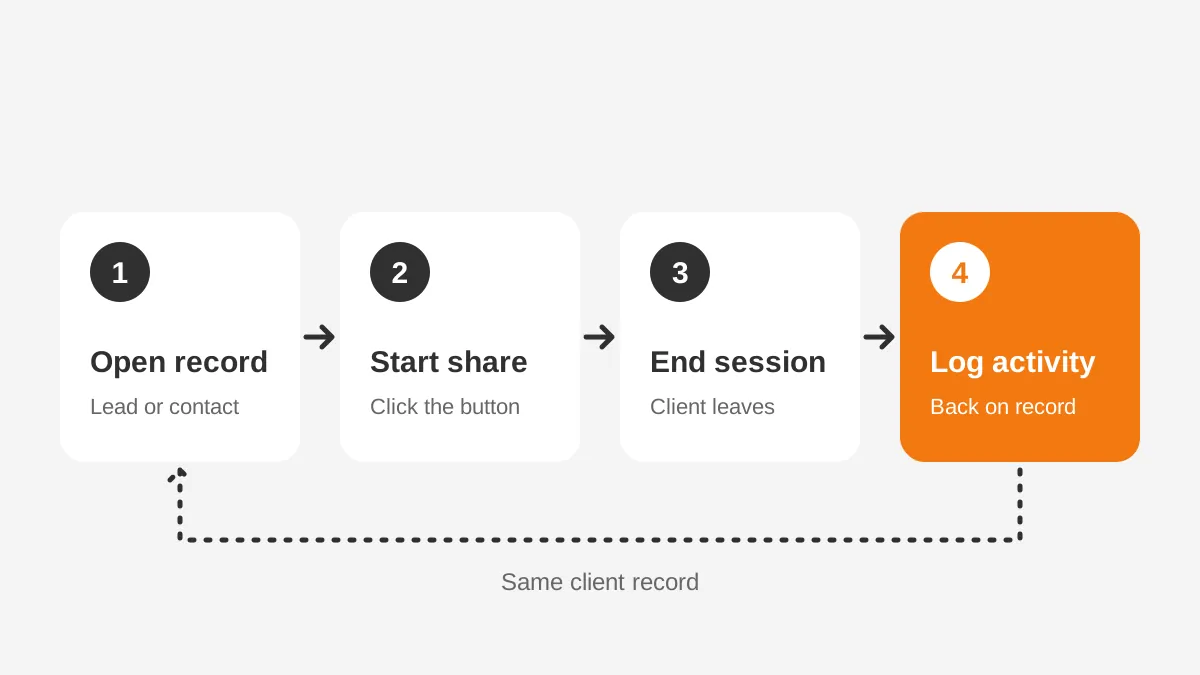
So the answer is yes. What varies is the depth of the connection. That depends on the broker's CRM, the tool type and the data the record needs.
What does a native connector add?
A calendar invite with a meeting link creates no record of what happened. A native connector ties the session to one client and keeps the recording one click away. It can log screen share sessions in the CRM without typing. That makes the session usable as evidence.
Which Screen Sharing Tools Fit Insurance Broker CRMs?
Four kinds of tools cover most broker use cases. Each one connects to the CRM differently, so the choice of tool shapes the integration work. Not all screen sharing solutions integrate with CRM systems to the same depth.
| Tool type | Examples | Best broker use | Typical CRM link |
|---|---|---|---|
| Meeting platform | Zoom, Microsoft Teams, Google Meet | Scheduled policy reviews and renewals | Marketplace app logs meetings and recordings |
| Phone-first screen share | CrankWheel, Zoho Assist | Outbound quoting calls with no download | Button on the lead record, session logged after |
| Co-browsing | Glance, Zoho Assist Cobrowse, Cobrowse.io | Guiding clients through an online application | Session started from a case or contact |
| Remote support | TeamViewer, Zoho Assist, ScreenMeet | Fixing client portal or e-signature problems | Linked to a support case |
Meeting platforms suit planned conversations. Their marketplace apps mean these screen sharing solutions integrate with CRM calendars with little setup. A commercial lines account manager books an annual review, sends an agenda and records it. The CRM connection mainly needs to log the meeting and attach the recording.
Phone-first screen sharing software for sales suits the producer who is already on a call. The producer sends a text or email link, and the client sees the screen in a browser within seconds.
Screen sharing for insurance agents works best this way on warm calls. With no download screen sharing, remote insurance sales calls keep moving and the client needs no IT help.
Co-browsing differs from screen sharing. Both people see the same web page, and the agent can point or fill fields with permission. It fits an online insurance application, a client portal or a claims form. The client finishes the work themselves.
Remote support tools belong to service teams more than sales. They matter when a client cannot open a policy document or sign an e-signature request. In those cases, the session should attach to a service case rather than a sales opportunity.
How should a broker choose between these tool types?
Start with the call that happens most often. A personal lines agency that quotes by phone needs phone screen sharing for sales. A benefits broker that runs a yearly renewal review meeting needs a meeting platform.
Then check how those screen sharing solutions integrate with CRM records you already use. Most brokers end up with two tools, one for sales and one for service.
Which CRMs Do Screen Sharing Tools Support Best?
For CRM integration for insurance brokers, Salesforce, HubSpot and Microsoft Dynamics 365 have the widest choice of connectors. Smaller CRM systems such as HighLevel, Zoho CRM and Less Annoying CRM rely more on middleware.
In Salesforce, screen sharing solutions integrate with CRM objects through managed packages. The package adds a button to page layouts, a related list of sessions and permission sets for users. Brokers on Salesforce Financial Services Cloud should confirm the package works with its household and policy objects.
In HubSpot, screen sharing solutions integrate with CRM contacts through marketplace apps. Sessions appear on the contact timeline next to emails and calls. The CRM contact timeline keeps the producer's view of the client in one place. That matters when renewals and cross-sell share a record.
In Dynamics 365, screen sharing solutions integrate with CRM records through Microsoft Teams and partner apps. Teams is the natural meeting tool for brokers already on Microsoft 365. Phone-first tools usually connect through middleware or a custom connector instead.
Brokers that built a custom CRM have the most control and the most work. Every launch button and every write-back rule must be built and maintained. This overview of how insurance producers use CRM for renewals and cross-sell shows which records matter most.
What Should Sync Back to the Broker CRM?
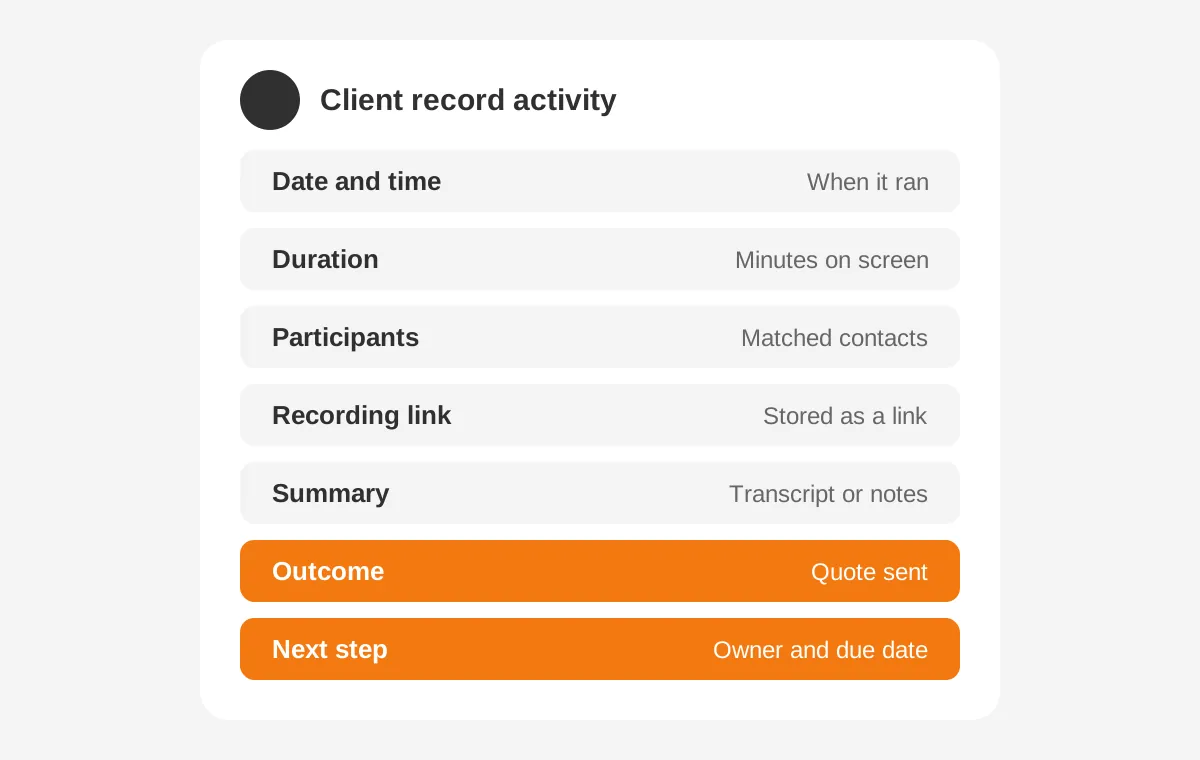
Seven fields should sync back to the broker CRM after every session. The rule holds however your screen sharing solutions integrate with CRM records. Anything less leaves gaps that someone fills by hand, or never fills at all.
- Date, start time and end time of the session.
- Duration, which shows whether the call was a quick check or a full review.
- Participants, matched to existing contacts by email or phone.
- Recording link, stored on the activity rather than as a loose file.
- Transcript or summary, when the tool and the client's consent allow it.
- Outcome, such as quote sent, application started or renewal confirmed.
- Next step, with an owner and a due date.
The first four fields usually arrive automatically when screen sharing solutions integrate with CRM activities natively. The outcome and next step often need a short form the producer fills in when the call ends. A good integration presents that form on the CRM record, not inside the screen sharing tool.
Recordings need extra care. HubSpot's guide notes that recordings and transcripts sync only when the user turns on the setting for them. A broker that assumes recordings are syncing should test this on day one with a real session.
Watch for duplicates too. Screen sharing solutions integrate with CRM records by email in most cases. A client with two addresses can then become two contacts. Decide in advance which field is the match key, and clean CRM duplicate contacts before go-live.
Where should the recording itself live?
Keep the recording in the screen sharing tool or a governed storage location, and store the link in the CRM. Large video files inside the CRM raise storage costs. A link also lets the broker apply one retention rule to every recording.
Can Screen Sharing Solutions Integrate With CRM Without Code?
Yes, screen sharing solutions integrate with CRM platforms without code in most common pairings. Native marketplace apps cover the main CRM systems, and middleware covers most of the rest. Code becomes necessary only for custom objects, unusual fields or an agency management system without an open connector.
There are three integration routes, and each has a clear place.
- Native app: installed from the HubSpot Marketplace, Salesforce AppExchange or the vendor's own package.
- Middleware: Zapier, Make or Workato listens for a "session ended" event and creates a CRM activity.
- API or webhook: a developer maps session data to custom fields and objects.
A native CRM integration is the first choice when one exists. Those screen sharing solutions integrate with CRM data models the vendor has already tested. They handle authentication, contact matching and updates without a separate tool to maintain. They also come with limits worth reading before purchase.
HubSpot's Zoom guide lists real limits. One Zoom account connects per HubSpot account, and each user connects their own Zoom user. Personal Meeting ID sessions are not supported. Installing the app needs App Marketplace permissions or Super Admin in HubSpot, plus admin rights in Zoom.
Glance's documentation shows a similar pattern in Salesforce. Setup needs a Glance group with an administrator, the cobrowse script on the website and permission sets in Salesforce. The legacy package only allows buttons on Cases, Contacts and Leads, while the current package supports custom objects.
Middleware fills the gaps when no app exists. Here screen sharing solutions integrate with CRM records through a trigger and an action. That is CRM integration without code, set up by an admin rather than a developer.
Take a phone-first tool with no Microsoft Dynamics 365 integration. A Zapier flow can post each finished screen sharing session to the right CRM contact. The trade-off is one more system to monitor and one more vendor with client data.
When does a broker need a custom build?
A custom build makes sense when policies live in a custom object. It also fits when the agency needs session data inside its AMS. Unboxx builds these through its CRM integration services, using APIs and webhooks with error logging.
How Do You Add Screen Sharing to Sales Workflows?
Add screen sharing to sales workflows in six steps, starting from the call types in the existing insurance sales workflow. The goal is a session that starts from the record and finishes with a logged activity and a next step.
- List the three calls where producers show a screen most: the insurance quote presentation, the renewal review and the application.
- Pick one tool per call type and confirm it has a connector for the CRM.
- Add the launch button to the lead, contact and opportunity page layouts.
- Map the write-back fields, including outcome and next step, to the activity record.
- Pilot with two producers for two weeks and review every logged session.
- Roll out with a ten-minute training and a one-page checklist.
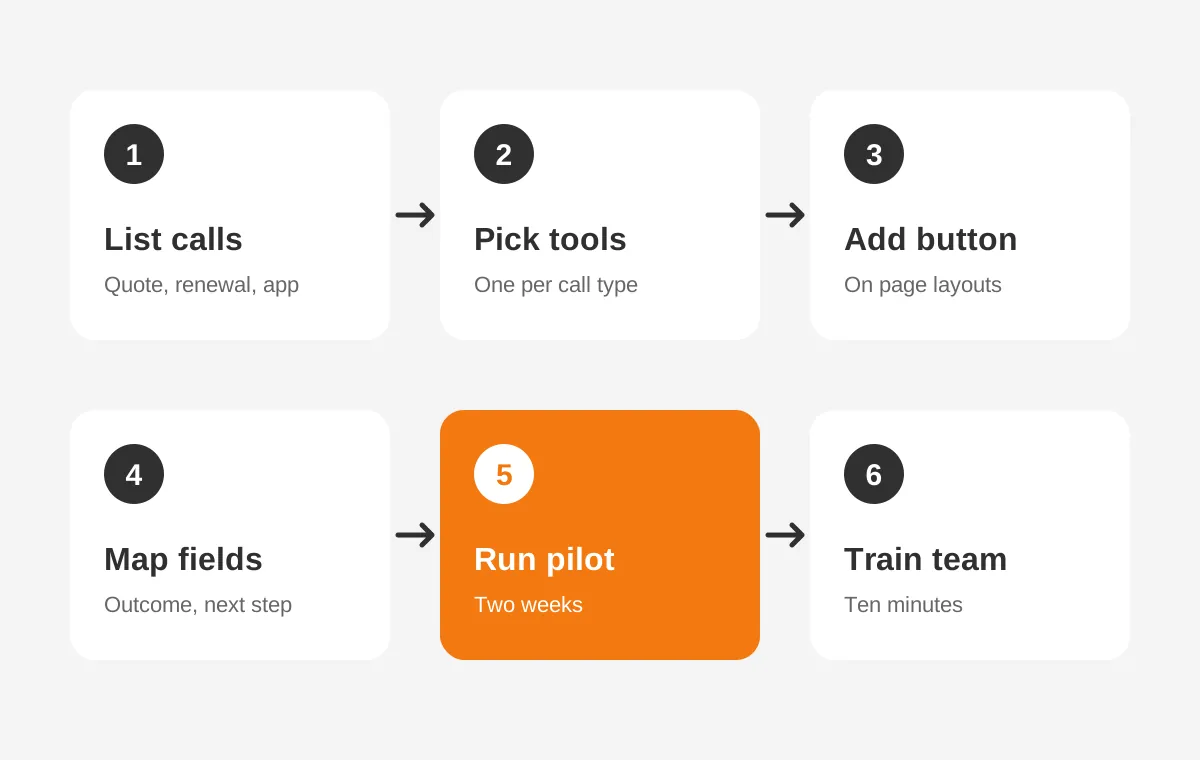
The pilot shows whether your screen sharing solutions integrate with CRM records as the vendor described. Most problems surface here. Contacts fail to match, recordings do not attach, or the outcome field stays blank. Fix each one before the rollout, because errors multiply with every new user.
Sales workflow automation adds value once screen sharing solutions integrate with CRM records reliably. CRM follow-up task automation can create a task two days after a "quote presented" session. A renewal review session can move the renewal opportunity to the next stage.
Consider a worked example with assumed figures. A 12-producer agency runs 40 screen-share calls a week. If manual logging takes three minutes per call, that is 120 minutes a week. Automatic logging returns those two hours, and the records become complete.
Which workflow automations help producers most?
Three automations pay off quickly. Create a follow-up task after any quote session. Alert the account manager when a client joins a renewal session late or leaves early. Add the recording link to the policy file once the client binds coverage.
What Compliance Rules Apply to Recorded Screen Shares?
Recorded screen shares fall under the same insurance client data security rules as other records a broker holds. A session can show dates of birth, health answers, driver's license numbers and bank details. That makes the recording nonpublic information in most states.
The NAIC Insurance Data Security Model Law (2017) is the template states use for their own insurance data security laws. It requires licensees to maintain a written information security program based on a risk assessment. It also requires due diligence when selecting third-party service providers.
When screen sharing solutions integrate with CRM data, the recording vendor counts as a third-party service provider. The model law requires licensees to make such providers implement administrative, technical and physical safeguards. It also sets a 72-hour deadline to notify the insurance commissioner after a cybersecurity event is determined.
The model law exempts licensees with fewer than ten employees from its information security program section. Small agencies should still check their own state's version, because adoption and wording vary by state.
Tool features help with the practical side. Zoho Assist's insurance co-browsing page describes explicit customer consent before a session and organization-controlled masking of sensitive fields. It also says customers can pause or end the session at any time.
Build five controls into the integration itself:
- A consent field on the activity, set before recording starts.
- Field masking for Social Security numbers, bank details and health answers.
- A recording retention policy that deletes files on schedule.
- Access limits so only the client's team can open the recording.
- Third-party service provider oversight, such as a yearly review of the vendor's security report.
Screen sharing compliance in insurance also covers call recording. Call recording consent laws apply, and some states require every party to agree. This article is general information, not legal advice. Confirm the rules for each state where the agency sells.
How Do AMS and CRM Split the Session Data?
The agency management system holds the policy, and the CRM holds the relationship and the pipeline. Session data belongs mostly in the CRM. A link or summary passes to the AMS when the session affects a policy.
Agency management systems such as Applied Epic, AMS360 and HawkSoft run policies, billing and commissions. Most producers do not prospect inside them. That is why brokers often pair an AMS with Salesforce or HubSpot. Our guide to CRM for insurance agents explains how the two systems share the work.
A clean split looks like this. Quote and prospect sessions stay in the CRM until the client binds. Renewal and service sessions on an active policy log in the CRM. They also send a short note to the AMS policy record.
Agency management system CRM integration for sessions is less common. Screen sharing solutions integrate with CRM platforms more often than with an AMS. Without an open AMS API, the CRM stays the system of record. The AMS gets the outcome only.
What happens to session history during a CRM migration?
Session activities and recording links should move with the contact. Map them like any other activity type, and test that old links still open. The field mapping steps are in the article on how to migrate insurance client data.
How Do You Measure Whether the Integration Works?
Measure the integration with four numbers, checked weekly for the first month and monthly after that. Each number shows whether screen sharing solutions integrate with CRM records the way the team expects.
- Match rate: the share of sessions logged against an existing contact.
- Completion rate: the share of sessions with an outcome and next step filled in.
- Recording attach rate: the share of recorded sessions with a working link.
- Follow-up speed: the hours between a quote session and the next touch.
When screen sharing solutions integrate with CRM contacts poorly, the match rate shows it first. A rate below 90% usually means duplicate contacts or missing emails. A low completion rate points to a form that is too long or too hidden. Fix the cause rather than reminding producers again.
Pipeline reports become more useful once screen sharing solutions integrate with CRM data reliably. Leaders can see which quote sessions turned into bound policies, by producer and by line. This guide to insurance sales CRM reporting shows how agency owners build those views.
Frequently Asked Questions
Can screen sharing tools integrate with Salesforce for agencies?
Yes. Screen sharing solutions integrate with CRM platforms like Salesforce through AppExchange packages. Producers start sessions from lead, contact or case records, and session details log back to the same record. Custom objects for policies may need an updated package or a small custom build to connect properly.
Do clients need to install software to join?
Not with most phone-first and co-browsing tools. The client opens a link or enters a short code in a browser and sees the producer's screen within seconds. Meeting platforms such as Zoom may prompt for an app, although browser joining is usually available for clients who decline.
Is co-browsing safer than screen sharing for insurance applications?
Co-browsing limits the view to one web page, so the agent never sees the client's desktop or other apps. Sensitive fields can be masked from the agent. That makes it a strong fit for online applications and claims forms, where clients enter personal data themselves.
How much does a screen sharing CRM integration cost?
Native apps often cost nothing beyond the screen sharing and CRM licenses, though plans differ by vendor. Middleware adds a monthly subscription based on task volume. Custom API work is priced as a project. Its cost depends on the number of objects, fields and systems involved.
Should session recordings be stored inside the CRM?
Store the link in the CRM and keep the file in the screen sharing tool or governed storage. Links keep CRM storage costs low and allow one retention rule for every recording. They also make it easier to restrict access to the client's assigned team only.
Ready to Make Screen Sharing Solutions Integrate With CRM?
Screen sharing solutions integrate with CRM platforms well when the project is planned as one piece. The connection, the write-back fields and the compliance controls belong in the same plan. Start with one call type, pilot it with two producers, and measure match and completion rates before scaling.
Unboxx connects screen sharing and co-browsing tools to Salesforce, HubSpot and Dynamics 365. Agencies get a CRM for insurance that logs every session. To map your own integration, schedule a consultation with the team.
Let's create something out of this world together.
Have a project in mind? Contact us for expert design and development solutions. Let's discuss how we can help grow your business.
Ready to Unboxx Your Potential?
Build smarter systems. Automate faster. Scale confidently.