
Salesforce vs Dynamics 365: Cost, AI and Fit Compared
A sales director at a 40-person manufacturer opens two proposals on the same day. One quotes Salesforce, the other quotes Microsoft Dynamics 365, and the per-user prices look close.
Salesforce held a 20.7% share of the CRM market in 2024, according to IDC data published by Salesforce in 2025. The director must pick one before the next budget cycle. The Salesforce vs Dynamics 365 question has no default answer.
The Salesforce vs Dynamics 365 decision is a choice between two different platforms, not two price lists.
Salesforce is a CRM-first cloud with its own automation and app marketplace. Dynamics 365 is a set of business apps built on Microsoft Dataverse and the Power Platform. The right pick depends on your tech stack, your processes and your budget for AI.
Key Takeaways
- Dynamics 365 Sales costs less at the mid tier and includes Copilot, while Salesforce starts cheaper with Starter Suite.
- Teams that live in Microsoft 365, Power BI and Business Central usually get more value from Dynamics 365.
- Teams that need deep sales automation, a large app marketplace and Agentforce agents usually lean toward Salesforce.
What Is the Difference in Salesforce vs Dynamics 365?
The main difference in Salesforce vs Dynamics 365 is the platform underneath each CRM. Salesforce Sales Cloud runs on a multi-tenant cloud that Salesforce builds and runs itself. Every customer shares the same code base and receives the same upgrades.
Microsoft Dynamics 365 Sales is one app in a wider family. It stores data in Dataverse, the same database behind Power Apps and Power Automate. That design lets a company add customer service or field service apps on one data model.
So a Salesforce vs Dynamics 365 comparison starts with a question about scope. Do you need a sales and service CRM, or a CRM that sits inside a Microsoft business suite? Salesforce answers the first need with depth. Dynamics 365 answers the second need with reach across Microsoft products.
Both vendors cover the core CRM jobs, so the Salesforce vs Dynamics 365 debate rarely turns on basic features.
Each one handles lead management, opportunity tracking, a sales pipeline, quotes, forecasts and customer service cases. The gaps between them show up in licensing, AI pricing, customization tools and the partner network that implements them.
Who builds and sells each platform?
Salesforce sells mostly direct, with consulting partners handling setup. Microsoft sells Dynamics 365 through Cloud Solution Provider partners as well as direct enterprise agreements. That difference affects how you buy licences, who supports you and how discounts get negotiated.
How Do the Two Platforms Compare Feature by Feature?
Feature by feature, the two platforms are close on core CRM and far apart on tools around it. The table below compares the areas that decide most B2B evaluations.
It reflects each vendor's own product pages and pricing pages read in November 2026. Use it to see where Salesforce vs Dynamics 365 splits.
| Area | Salesforce Sales Cloud | Dynamics 365 Sales |
|---|---|---|
| Data layer | Salesforce multi-tenant cloud | Microsoft Dataverse on Azure |
| Automation | Salesforce Flow, Apex code | Power Automate, plug-ins |
| Custom UI | Lightning Web Components | Power Apps, model-driven forms |
| Reporting | Salesforce reports and dashboards, Tableau | Built-in charts, Power BI |
| AI | Agentforce, Flex Credits | Copilot, Copilot Credits, Copilot Studio |
| App marketplace | AgentExchange (formerly AppExchange) | Microsoft AppSource |
| Collaboration | Slack | Microsoft Teams, Outlook |
| Finance link | Integration to an external ERP | Native path to Business Central |
Salesforce keeps most capabilities inside its own product family. Dynamics 365 borrows heavily from the Power Platform and Microsoft 365. Neither approach is better in general, but each favours a different kind of company. A Salesforce vs Dynamics 365 shortlist should start from that split, not from feature counts.
Where do sales teams notice the difference?
Sales reps notice it in the inbox and the calendar. Dynamics 365 opens inside Outlook and shares contacts with Microsoft 365. Salesforce connects to Outlook and Gmail through its own add-in, so reps work in two windows more often.
Sales managers notice it in reporting. Salesforce reports and dashboards are fast to build for pipeline and quota views. Dynamics 365 teams often move heavier analysis to Power BI, since Power BI reporting handles cross-system views well.
What Does Salesforce vs Dynamics 365 Cost per User?
Salesforce vs Dynamics 365 pricing per user runs from $25 to $550 a month on the Salesforce side. On the Microsoft side it runs from $65 to $150 a month, plus a quote-based tier. Both vendors price per user per month and most plans need an annual contract.
Prices below come from the Microsoft Dynamics 365 Sales pricing page and the Salesforce Sales Cloud pricing page in USD. List prices change, and partners can discount them, so confirm them before you sign.
| Tier | Salesforce Sales Cloud | Dynamics 365 Sales |
|---|---|---|
| Entry | Starter Suite, $25 per user per month, monthly or annual | Sales Professional, $65 per user per month, paid yearly |
| Mid | Pro Suite, $100 per user per month, billed annually | Sales Enterprise, $105 per user per month, paid yearly |
| AI-heavy | Agentforce 1 editions from $550 per user per month | Sales Premium, $150 per user per month, paid yearly |
| Top tier | Agentforce 1 Sales, quoted with Flex Credits included | Microsoft Relationship Sales, variable price, 10-seat minimum |
The Salesforce starter suite is the cheapest way into either platform. It suits a small team that wants contacts, deals and email in one place. The Salesforce pro suite adds more sales automation and customization, and it needs an annual contract.
On the Microsoft side, Dynamics 365 Sales Professional covers core sales automation. Dynamics 365 Sales Enterprise adds Copilot in Dynamics 365 and prebuilt agents such as the Sales Close Agent. Dynamics 365 Sales Premium adds 1,000 Copilot Credits per user per month and AI-driven data enrichment.
What does a 25-user team pay in year one?
Take a worked example with assumed figures: 25 sales users, list prices, no discounts and no add-ons. The year-one licence cost for Pro Suite is $100 x 25 x 12, or $30,000. Dynamics 365 Sales Enterprise costs $105 x 25 x 12, or $31,500 a year.
AI changes the picture. Agentforce 1 editions start at $550, which comes to $165,000 a year for the same 25 users. Dynamics 365 Sales Premium at $150 comes to $45,000.
On list price at the AI-heavy tier, Dynamics 365 is cheaper than Salesforce by a wide margin. At the mid tier, the Salesforce vs Dynamics 365 gap is only $1,500 a year.

Licences are only part of total cost of ownership. Implementation, data migration, integrations, training and a CRM admin often cost as much as the first two years of licences. The guide to CRM implementation cost breaks those lines down.
How have prices moved recently?
Salesforce raised list prices by an average of 6% on 1 August 2025. It covered Enterprise and Unlimited editions of Sales Cloud and Service Cloud, per the Salesforce pricing update of June 2025. Starter and Pro editions had no planned change at that time.
Which costs sit outside the licence price?
Four costs sit outside the licence price in every Salesforce vs Dynamics 365 budget. Each one can change which platform is cheaper over three years.
- Storage beyond the included allowance, priced per gigabyte by each vendor.
- Add-on apps for quoting, e-signature, telephony or territory planning.
- Integration middleware or connector licences for ERP and marketing tools.
- Admin time, whether from a staff member or a managed services contract.
Salesforce lists its sales add-ons separately, such as Sales Engagement and Revenue Intelligence. Microsoft folds more of the sales tools into Sales Enterprise and Sales Premium. Ask each vendor or partner for a three-year quote that names every add-on, then compare the totals side by side.
How Do Agentforce and Copilot Compare on AI?
Agentforce and Copilot both add AI agents to the CRM, but they are priced in different ways. Agentforce vs Copilot is now a large part of any Salesforce vs Dynamics 365 decision. AI can cost more than the base licence.
Salesforce sells Agentforce for Sales as an add-on at $125 per user per month, billed annually. The Agentforce pricing page also lists Flex Credits at $500 per 100,000 credits. Agentforce 1 editions include 2.5 million Flex Credits per org per year.
Agentforce pricing therefore mixes seats and usage. A team that runs agents on every inbound lead burns credits fast. A team that drafts the odd email burns few. Salesforce notes there is no overage penalty, and extra use bills at the contracted rate.
Microsoft bundles Copilot in Dynamics 365 into the Sales Enterprise licence. Heavier agent use runs on Dynamics 365 Copilot Credits, bought as a prepaid commitment or pay-as-you-go through Azure. Copilot Studio lets teams build their own agents on the same credits.
Which AI model suits which team?
Copilot suits teams that want AI help inside Outlook, Teams and the CRM record with little extra spend. Agentforce suits teams that want autonomous agents to qualify leads, update records and follow up at scale. Model credit use on a pilot before you commit to a tier.
Whichever you choose, clean data decides how well the AI works. An agent reading duplicate accounts or stale opportunities gives wrong answers with confidence. Clean the data first. During a Salesforce vs Dynamics 365 trial, test both AI tools on the same sample of records.
Which Platform Fits a Microsoft 365 Tech Stack?
Dynamics 365 fits a Microsoft 365 tech stack more closely than Salesforce does. It shares sign-in through Microsoft Entra ID, opens inside Outlook, and stores files in SharePoint. That is why buyers often search for the best CRM for Microsoft 365 and land on Dynamics.
Microsoft 365 integration shows up in daily work. Reps log emails from Outlook, managers share pipeline views in Teams, and finance pulls data into Excel and Power BI. Each step works without a third-party connector.
A Microsoft-first company should give that real weight when it scores Salesforce vs Dynamics 365.
Salesforce can integrate with Outlook too, through its Outlook integration and Einstein Activity Capture for email and calendar sync. It works well, but it is a connection between two vendors rather than one shared platform. Teams integration exists for Salesforce too, while Slack remains its own collaboration tool.
Finance systems matter as much as email. A company on Dynamics 365 Business Central links quotes, orders and invoices to the CRM through Microsoft's built-in Dataverse integration. A Salesforce customer usually connects an ERP through an integration layer, such as MuleSoft or an iPaaS tool.
What if your stack is mixed?
Mixed stacks are common. A company may run Microsoft 365 for email but Google Workspace for files, or NetSuite for finance. In those cases the Microsoft advantage shrinks, and the Salesforce vs Dynamics 365 choice rests on sales process fit instead.
How Do Customization and Integration Differ?
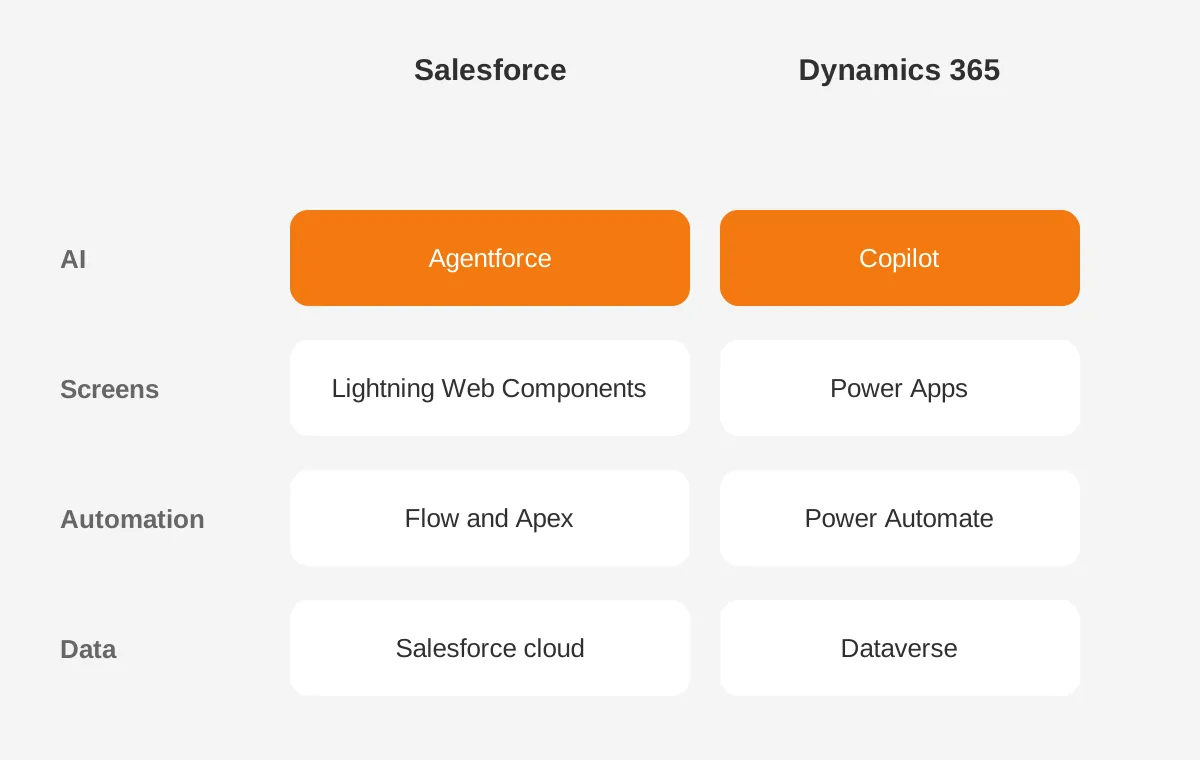
Customization differs in tools and in who can use them. Salesforce customization runs on Salesforce Flow for automation, Apex for code and Lightning Web Components for interfaces. Dynamics 365 customization runs on Power Automate, Power Apps and plug-ins written in C#.
Both platforms count as low-code CRM for everyday changes. An admin can add fields, page layouts and approval flows on either one without a developer. Complex logic, such as pricing rules or territory assignment, still needs code on both.
The diagram below shows the layers each platform stacks on its data, and why skills rarely transfer between the two. Treat that tool layer as a Salesforce vs Dynamics 365 hiring question, not only a technical one.
Integration follows the same split. Salesforce relies on its APIs, MuleSoft and apps from AgentExchange, which was called AppExchange until recently. Dynamics 365 relies on Dataverse connectors, Power Automate and Azure services. Both connect to common tools such as DocuSign, Mailchimp and LinkedIn Sales Navigator.
What about the people who run it?
Skills decide running cost. Salesforce skills come from a large community of certified admins, developers and partners. Dynamics 365 and Power Platform specialists often work inside Microsoft partner firms.
Ask which skill set you can hire or contract before you pick. A Salesforce vs Dynamics 365 decision locks in that hiring pool for years.
Which Industries and Team Sizes Fit Each Platform?
Industry fit depends more on the processes than on the industry name. Still, some patterns repeat across Salesforce vs Dynamics 365 projects in B2B companies.
- Manufacturers that quote from inventory and run Business Central often lean to Dynamics 365.
- Professional services firms that sell projects and track utilisation often fit either platform.
- SaaS companies with high-volume pipelines and product-led sign-ups often lean to Salesforce.
- Financial services firms often favour Salesforce industry clouds or Dynamics with strict Dataverse security.
For Salesforce vs Dynamics 365 for manufacturing, the deciding factor is usually the ERP. A Dynamics shop gets order and product data with less integration work. A plant on SAP or Epicor faces integration either way. The CRM for manufacturers page covers that setup.
Which fits a small business or a mid-sized company?
For Salesforce vs Dynamics 365 for small business, Salesforce Starter Suite at $25 is the lower entry price. Dynamics 365 Sales Professional starts at $65 and needs annual payment. A team under ten users with simple deals often starts on Salesforce or on a lighter CRM.
For CRM for mid-sized companies with 50 to 500 users, both platforms fit. The question then moves to tech stack, AI plans and who will run the system. A structured CRM comparison, scored against written requirements, settles those three points.
What Does Implementation Involve on Each Platform?
Implementation on either platform follows the same phases: requirements, design, build, data migration, testing, training and launch. The Salesforce vs Dynamics 365 difference sits in the tools and partners at each phase.
- Gather and rank CRM requirements by sales stage and team.
- Design the data model, security roles and integrations.
- Build automation in Flow or Power Automate and test it.
- Run CRM data migration from the old system in test loads.
- Train users by role and launch in phases.
A Salesforce implementation partner usually works in Sales Cloud sandboxes and deploys changes through change sets or DevOps Center. A Dynamics 365 implementation partner works in Power Platform environments and moves changes with solutions. Both need a named owner inside your company. The CRM implementation plan lists those owners.
What if you are switching platforms?
Teams that switch from Dynamics to Salesforce, or migrate from Salesforce to Dynamics 365, face a mapping job. Accounts, contacts and opportunities map cleanly. Custom objects, activity history and automation need rebuilding by hand. The Dynamics to Salesforce migration guide covers the order of loads.
Plan for CRM user adoption as part of any Salesforce vs Dynamics 365 switch. Reps who learned one interface will resist a new one unless the new system saves them clicks. Short role-based training and a clear go-live date help more than long manuals.
How Do You Decide Between Salesforce vs Dynamics 365?
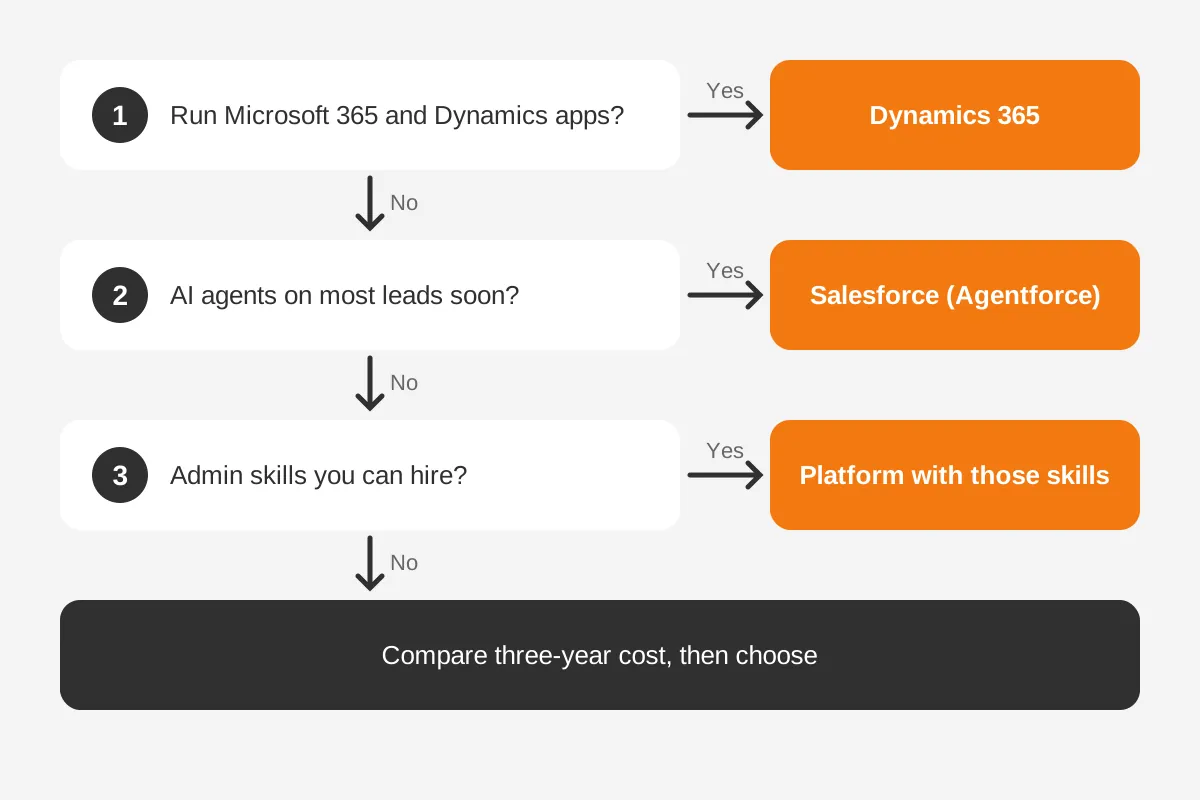
Decide between Salesforce vs Dynamics 365 by answering four questions in order, before any vendor demo. Each answer narrows the choice, and the last one settles most cases.
- Does your company run Microsoft 365 and Business Central or another Dynamics app?
- Do you plan to run AI agents on most leads within a year?
- Which skill set can you hire or contract for admin work?
- What is your three-year budget for licences and implementation together?
The decision path below turns those questions into a rule of thumb. It is a starting point for a shortlist, not a final verdict.
Asking which CRM is better, Salesforce or Dynamics, has no answer that holds for every company. Choose Dynamics 365 when Microsoft tools already run the business and AI should come bundled. Choose Salesforce when sales automation depth, app choice and Agentforce agents matter more than the Microsoft link.
Write the requirements down before any demo. The CRM selection process shows how to score vendors against them. If a third option is on the table, the Odoo vs Salesforce comparison covers a lower-cost route.
A neutral CRM consultant can run the scoring and price both platforms on the same terms. Unboxx implements both platforms through its CRM consulting and implementation services, so the advice does not depend on one vendor.
Frequently Asked Questions
Can you use Salesforce and Dynamics together?
Yes, you can use Salesforce and Dynamics together, but it costs integration work. Some companies run Salesforce for sales and Dynamics 365 Business Central for finance. A connector or middleware syncs accounts, orders and invoices. Agree which system owns each record first, or duplicates will follow within weeks.
Is Dynamics 365 easier to use than Salesforce?
Dynamics 365 feels easier for staff who already work in Outlook, Excel and Teams, because the screens follow Microsoft patterns. Salesforce feels easier for reps used to a dedicated sales app. Ease depends on setup more than brand. A cluttered page layout slows users on either platform.
Which has better reporting, Salesforce or Dynamics 365?
Salesforce has faster built-in reports and dashboards for pipeline, forecasts and activity. Dynamics 365 has simpler built-in charts but pairs with Power BI for deeper analysis across systems. Teams already paying for Power BI often prefer Dynamics. Teams that report only on sales often prefer Salesforce.
How long does a CRM migration between them take?
A CRM migration between Salesforce and Dynamics 365 takes as long as its custom objects, data volume and integrations demand. Moving five years of activity history adds weeks compared with moving open records only. Test loads and user training take longer than the final cutover, so plan for them first.
Do you need a partner to implement either platform?
Small teams can set up Salesforce Starter Suite or Dynamics 365 Sales Professional alone. Larger rollouts with integrations, data migration and custom automation usually need a certified partner. A partner shortens the build and avoids design mistakes that are expensive to undo after launch. Check references on similar projects.
Which Next Step Fits Your Team?
The Salesforce vs Dynamics 365 choice comes down to Microsoft footprint, AI plans and available skills. Price both on the same 25-user or 100-user model, including implementation, before you compare demos. A fair Salesforce vs Dynamics 365 comparison uses one set of requirements for both.
Unboxx helps B2B teams score both platforms against written requirements and plan the rollout that follows. Book a CRM platform consultation to compare Salesforce and Dynamics 365 on your own processes and budget.
Let's create something out of this world together.
Have a project in mind? Contact us for expert design and development solutions. Let's discuss how we can help grow your business.
Ready to Unboxx Your Potential?
Build smarter systems. Automate faster. Scale confidently.