

A 20-location business can run 20 versions of the same process without anyone noticing. One branch answers reviews in an hour, another in a week. One site keys invoices into the ERP daily, another waits until month end. Head office sees the gap only when it reaches the P&L.
AI automation for multi-location businesses closes that gap. AI software reads data from every site, decides the next step and acts inside shared systems under one rulebook. Below are the first workflows to automate, then the data, governance, rollout and cost behind AI automation for multi-location businesses.
Key Takeaways
- AI automation for multi-location businesses runs one set of AI workflows at every site through a shared CRM.
- The best first workflows are frequent, rule-heavy and visible at every location, such as review replies and lead routing.
- A pilot in two or three locations, with approval tiers and per-location KPIs, should come before a network rollout.
What Is AI Automation for Multi-Location Businesses?
AI automation for multi-location businesses uses AI agents to run repeatable work the same way at every site. A site can be a branch, store, clinic or franchise unit. The AI reads inputs from each site, applies central rules and writes results back to shared systems.
Three parts make up the setup. The first is the data layer: location master data, the CRM, the point of sale (POS) system and the ERP.
The second is the decision layer. That is usually a large language model or an AI agent that plans steps and calls tools through an API.
The third part is the control layer. It holds brand rules, approval tiers and an audit trail. Head office can then see what the AI did at each site and why. Without that layer, AI automation for multi-location businesses spreads inconsistency faster instead of fixing it.
The idea differs from older workflow automation in one way. Robotic process automation (RPA) repeats fixed clicks on fixed screens. An AI agent handles varied inputs, such as a review in Spanish or a new invoice layout. It still follows the same central rule.
| Factor | Single-site automation | Multi-location AI automation |
|---|---|---|
| Rules | Set by one manager | Set by head office, applied at every site |
| Data | One system of record | Location master data joined to a shared CRM |
| Main risk | Errors in one process | One error repeated across every location |
| Reporting | One dashboard | Per-location KPIs compared side by side |
| Owner | Site manager | Operations lead with regional managers |
Multi-location management already runs on software. What the AI layer adds is judgment. A rule written once in head office then holds in location 3 and location 30 alike.
Business process automation is the wider field this belongs to. AI automation for multi-location businesses is the branch built for one problem. That problem is the same task done differently at each site.
Why Do Multi-Location Operators Need It Now?
Multi-location operators need it now because AI use is common, but scaled, consistent use is not. McKinsey reports that nearly nine in ten organizations use AI in at least one function. Only 44% say they are scaling it across the enterprise (McKinsey, 2026).
Franchise systems show the same pattern in franchise technology budgets. In the IFA 2025 Franchisor Survey, 75% of franchisors planned to raise technology spending. Another 28% named AI and increased automation as their answer to labor shortages (FRANdata, 2025).
Integration is where most projects stall. The 2025 Annual Franchise Marketing Report found that 60% of franchise brands use AI to improve customer experience. Yet 53% struggle with system-wide integration, and 47% lack skilled staff (Franchising.com, 2025).
Those two gaps, integration and skills, decide whether AI automation for multi-location businesses scales. Both are planning problems, so both can be fixed before launch.
Staff time is the other pressure. Microsoft reports that 80% of the global workforce lack time or energy for their work (Microsoft Work Trend Index, 2025). In a multi-site business, that strain sits with location managers who also serve customers.
The same report found that 46% of leaders say their companies use agents to fully automate workflows. For a multi-location business, the question is no longer whether AI fits. The question is how to apply AI automation for multi-location businesses without creating 20 local experiments.
That is the work behind AI business automation services: one design, built once and run at every site. The sections below follow the same order a project does.
Which Workflows Suit AI Automation for Multi-Location Businesses?
The workflows that suit AI automation for multi-location businesses repeat at every site and follow clear rules. They also leave a record in a shared system. A good test asks three things. Does it repeat daily? Does each location do it differently? Can the result be checked?
These six workflows pass that test in most multi-site companies:
- Review management automation: the AI drafts replies to Google Business Profile reviews and flags complaints for the site manager.
- Lead routing by location: new inquiries go to the nearest site in the CRM, with a follow-up task.
- Appointment scheduling: an AI assistant books, moves and confirms visits against each location's real calendar.
- Invoice processing: the AI reads supplier invoices, matches them to purchase orders and posts them to the ERP.
- Local marketing automation: the AI adapts central campaigns and local SEO pages for each town, within approved templates.
- Location performance alerts: the AI compares per-location KPIs each week and tells regional managers which site has drifted.
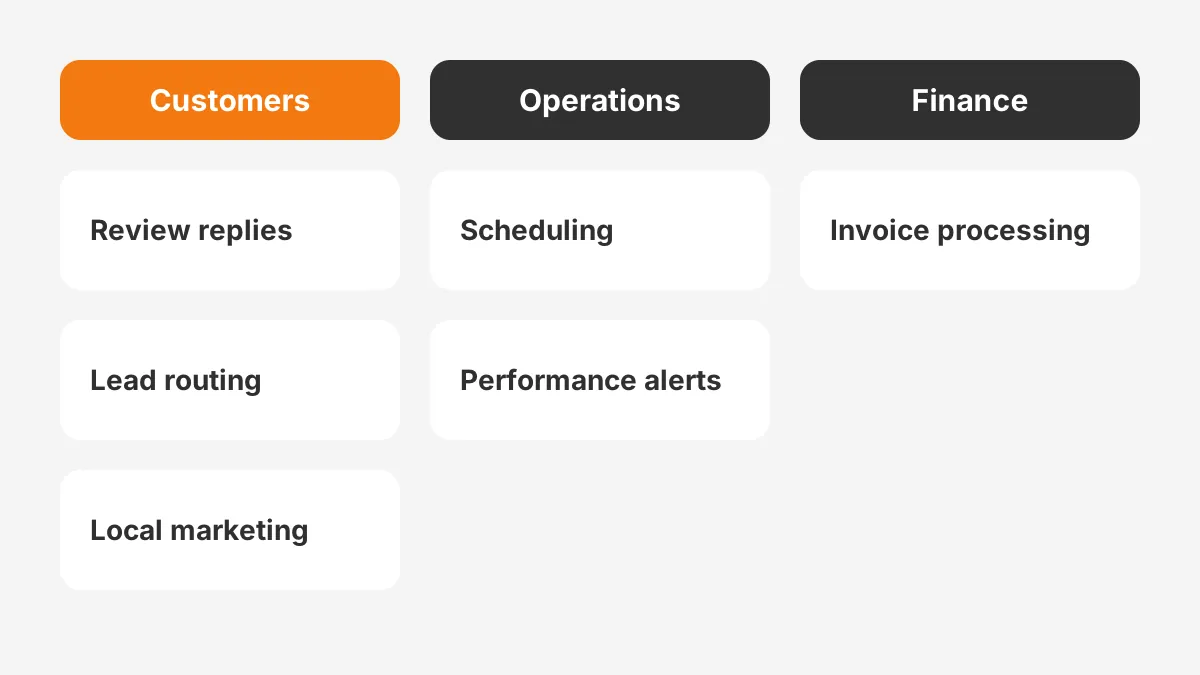
Customer-facing work usually pays back first, because every location already does it and the results are public. In the AFMR data, 43% of franchise brands reported better customer service efficiency from AI in 2025. A year earlier, the figure was 20%.
Back-office work, such as invoice processing, gives the clearest cost savings. It also carries the most risk if the AI posts a wrong figure. So it needs a stricter approval tier. The guide to workflow automation examples for sales, finance, HR and IT shows how each type is built.
Which processes should you automate first? The list of AI agent use cases by team scores options by frequency and risk. Pick one customer workflow and one back-office workflow. That pairing tests both the brand rules and the data quality before AI automation for multi-location businesses reaches every site.
What Data Does Each Location Need First?
Each location needs clean, shared master data before any AI acts on its behalf. AI automation for multi-location businesses fails most often for one reason. Two sites store the same fact in different ways.
Start with location master data: one record per site with its ID, address, opening hours, manager, services and territory. That record feeds the Google Business Profile listing, the CRM, the booking tool and the AI's own instructions.
What data do you need for AI automation beyond that? Four sources matter in most companies:
| Source | What the AI reads | Common problem |
|---|---|---|
| CRM | Contacts, leads, cases and owner per location | Records with no location field |
| POS system | Sales, visits and refunds by site | Different product codes per site |
| ERP | Purchase orders, invoices and stock | Suppliers set up twice |
| Review and listing tools | Ratings, review text and listing data | Old hours or closed sites still listed |
Data governance is the rule set that keeps these sources aligned. It names who owns each field, who may change it and how often it is checked. A short data governance policy, signed off by operations and finance, prevents most later disputes.
Fix the location field in the CRM first. Every contact, lead and case should carry a clean location ID. The AI can then route work, compare sites and report results without manual mapping.
A data audit makes this concrete. Pull every CRM record created in the last 90 days and count the records that lack a location ID. That share is the first number AI automation for multi-location businesses needs to bring down.
How Does a CRM Tie Every Location Together?
A CRM ties every location together by acting as the shared record the AI reads from and writes back to. Each site's leads, customers, cases and tasks sit in one database, tagged with the location ID.
CRM platforms such as Salesforce, HubSpot and Microsoft Dynamics 365 all support this model. Odoo adds the same CRM record inside an ERP. That suits companies that want one vendor for sales and stock.
Each platform now ships its own AI agents. Salesforce offers Agentforce, HubSpot offers Breeze, and Microsoft offers Copilot Studio agents that work with Dynamics 365. A multi-location CRM can use these agents, or connect an outside model through an API.
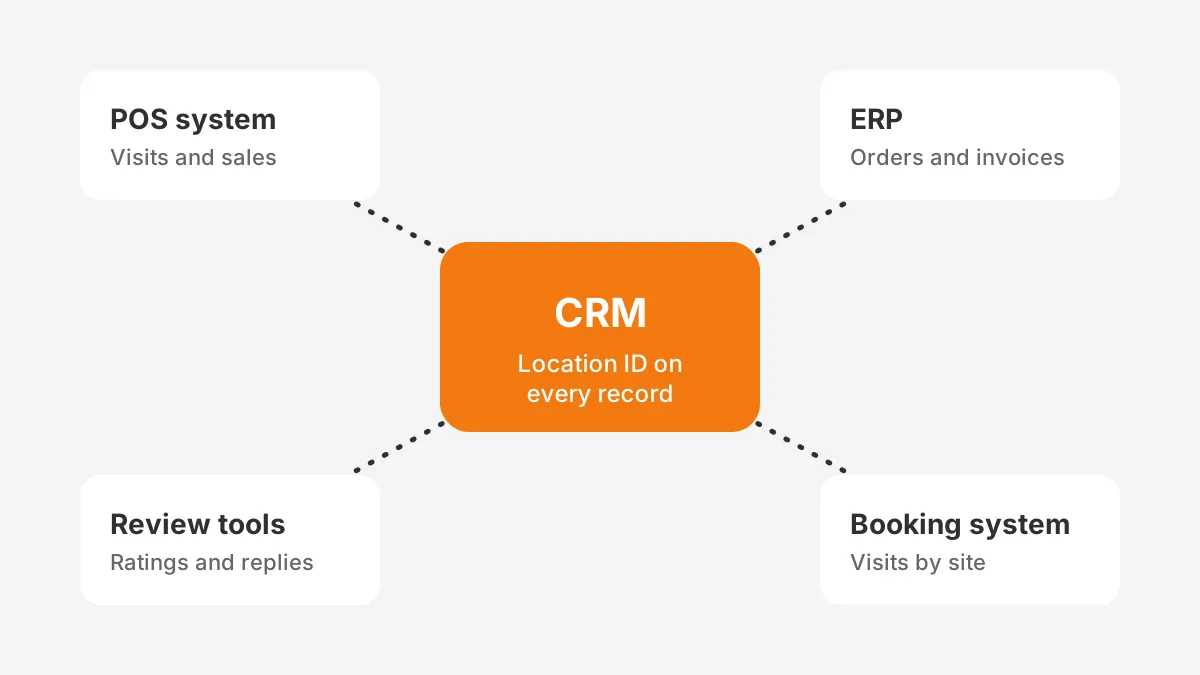
CRM integration with the POS and ERP matters more here than in a single-site company. POS integration brings visits and sales into the customer record. ERP integration brings orders and invoices. Without both, AI automation for multi-location businesses sees only part of each location.
The CRM integration services page explains how those connections are scoped. Plan the integrations before the AI workflows, because each workflow depends on them.
AI can manage multiple locations from one CRM, provided every record carries the location ID and every automation reads it. Take a rule such as "reply to five-star reviews within four hours." It then applies to every site, and the CRM shows which sites met it.
The CRM also becomes the place where AI automation for multi-location businesses is reported. One dashboard can rank sites on the same KPI, using the same definitions, every week.
What Governance Keeps Every Location Consistent?
Governance keeps every location consistent by deciding, in advance, what the AI may do alone and what needs a person. AI governance for a multi-site company has three parts: approval tiers, brand rules and an audit trail.
Approval tiers set the level of autonomy for each workflow. Human review of AI output is the default for three cases. Those are anything that spends money, changes a price or speaks for the brand in public.
| Tier | AI may | Example workflow | Who approves |
|---|---|---|---|
| 1. Draft | Prepare work for a person | Replies to negative reviews | Site manager |
| 2. Act with checks | Act, with sampled human review | Lead routing by location | Regional manager, weekly sample |
| 3. Act alone | Act and log the result | Booking confirmations | Operations lead, monthly audit |
Brand rules sit in one central document the AI reads at every site. They cover tone, banned claims, discount limits and when to hand off to a person. A local manager can add facts about the site, such as parking, but cannot change the rules.
The audit trail records each AI action with the location, the input, the output and the approver. An approval workflow in the CRM gives that record a home. It also protects franchisees, because they can see what head office automated in their name.
To keep brand consistency across locations once AI is live, review a monthly sample of AI output from every site. The AFMR found 33% of franchise brands name customer experience consistency across locations as their top challenge.
Franchise automation adds one more owner to each decision: the franchisee. Agree the tiers with franchisees before launch, not after the first complaint.
Governance is also what lets AI automation for multi-location businesses earn more autonomy over time. A workflow moves up a tier only after its audit trail shows clean results at every site. Log each tier change for AI automation for multi-location businesses with a date and an owner.
How Do You Roll Out AI Across Locations?
Roll out AI across locations in three phases: pilot, expand, then run at network scale. Each phase has an exit test, so a fault found in two sites is fixed before it reaches twenty.
- Pick the pilot. Choose two or three locations with average performance and willing managers.
- Set the baseline. Record four to six weeks of per-location KPIs for the chosen workflow before the AI starts.
- Run the AI pilot program for eight to twelve weeks. Keep every action at tier 1 or 2, and review the audit trail weekly.
- Expand by region. Add one region at a time, with the regional manager trained first.
- Move to network scale. Raise approval tiers only for workflows that met their targets in every region.
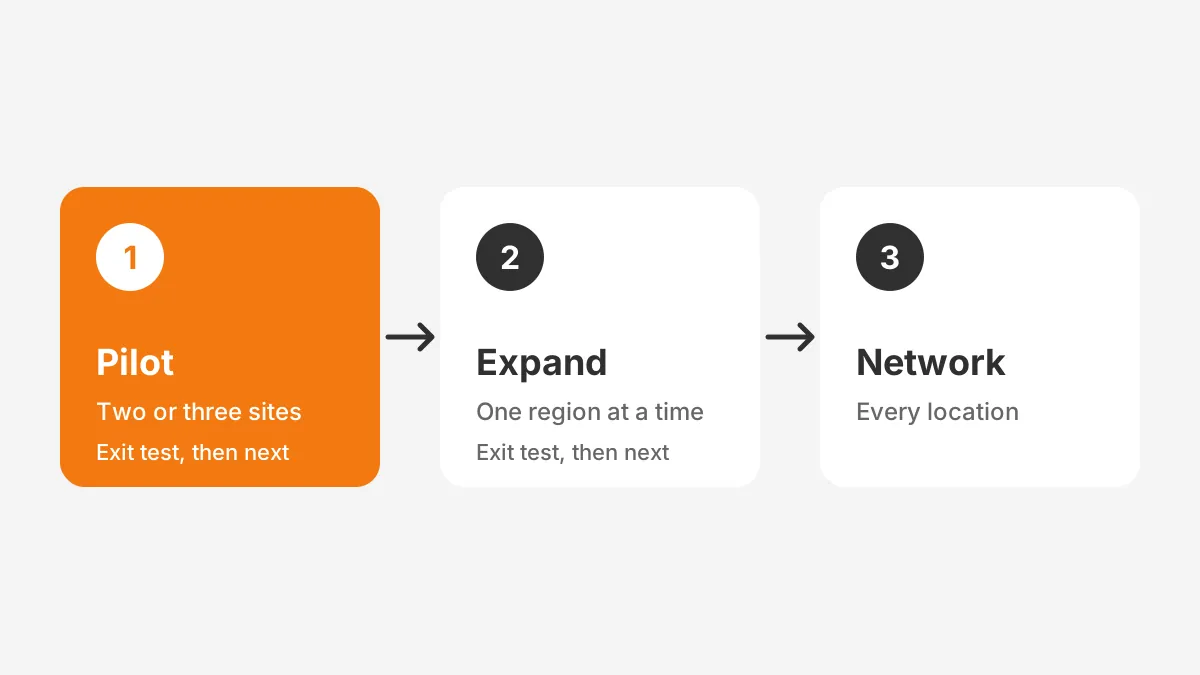
Average sites make the best pilots. A strong site hides problems, and a weak site blames the tool. Two average sites show what AI automation for multi-location businesses does under normal conditions.
Change management decides whether staff use the system. Location managers need to know what the AI does, what they still own and how to override it. A one-page guide per workflow works better than a long training deck.
Franchisee adoption needs one more step. Franchisees own their units, so they need proof from the pilot before they accept new costs. Share the pilot KPIs openly, including the weak results.
The 90-day AI implementation roadmap sets out the same phases for a single team. For AI automation for multi-location businesses, the main change is the regional step between pilot and full scale.
How Much Does AI Automation Cost Per Location?
AI automation for multi-location businesses has five cost lines: setup, integration, software licences, usage fees and ongoing support. The mix depends on the number of locations, workflows and systems, so a single price is not meaningful.
- Setup covers workflow design, prompts, brand rules and testing.
- Integration covers CRM, POS and ERP connections, often the largest one-time line.
- Licences cover AI features in the CRM, priced per user or per agent.
- Usage fees cover model tokens or per-conversation charges, which grow with each new site.
- Support covers monitoring, prompt updates and audits after launch.
Operating costs deserve attention early. McKinsey found that about one in five organizations say AI operating costs, including tokens, constrain their use. Usage fees scale with every location added, so model them per site.
A worked example with assumed figures shows the method. Suppose each of 20 sites answers 150 reviews a month, and each reply takes 6 minutes. That is 300 staff hours a month across the network.
Now suppose AI drafting cuts the time to 1 minute per review. The network then saves 250 hours a month. These figures are assumptions for the example, not benchmarks. Use your own baseline from the pilot.
Set the cost of AI automation for multi-location businesses against that saving, per site and per month. A workflow that pays back at 20 sites may not pay back at 3. The guide to AI agent cost and pricing models breaks down build and run costs in more detail.
How Do You Measure AI ROI Per Location?
Measure AI ROI per location by comparing each site's KPIs before and after launch. Compare them against sites not yet live, too. Per-location KPIs show where the AI works and where local habits block it.
Choose KPIs that the workflow changes directly. For review replies, track response time and rating. For lead routing, track time to first contact and conversion rate. For invoice processing, track cycle time and error rate.
The AFMR found that 56% of franchise brands measure AI through customer feedback and reviews, and 48% track KPIs. Both are useful. KPIs tied to a baseline give the clearer answer at board level.
Report three figures per location each month. These are the KPI, the share of work the AI handled and the number of human overrides. A high override rate at one site points to bad data or a rule that does not fit that location.
Per-location KPIs keep AI automation for multi-location businesses honest about weak sites. A network average can hide one site that never adopted the workflow.
How do you measure AI ROI at network level? Add the hours saved and revenue gained across sites, then subtract all five cost lines. McKinsey found only 37% of organizations say AI contributed to EBIT, so a clear baseline matters.
Results also depend on workflow design. McKinsey reports that nearly three-quarters of AI high performers redesign workflows, against about one-quarter of other companies. Automating a broken process across 20 sites repeats the break 20 times.
Order matters for AI automation for multi-location businesses. Fix the process at one site, measure it, then copy it.
Frequently Asked Questions
How do franchises use AI today?
Franchises use AI mostly for customer experience, review replies, local marketing and booking. The 2025 AFMR found 60% of franchise brands use AI this way. Back-office uses are growing too, such as invoice processing and performance alerts. They rely on POS and ERP data joined to a shared CRM.
Can a small chain use AI for multi-location businesses?
Yes, a chain of three to five sites can use AI for multi-location businesses through features already inside its CRM. HubSpot, Salesforce and Dynamics 365 include AI tools. The key requirement is a clean location field on every record, not a large budget.
Who should own multi-location business automation?
An operations lead should own multi-location business automation, with regional managers as owners for their areas. IT or a CRM partner runs the integrations. Site managers own the daily approvals at tier 1. One named owner per workflow prevents gaps when a rule needs changing.
When should a franchisor start AI for franchise operations?
A franchisor should start AI for franchise operations once location master data is clean and the CRM holds every site. Starting earlier means the AI repeats data errors at scale. A short data audit, usually two to four weeks, shows whether the base is ready.
Where does human review fit in multi-location operations?
Human review fits wherever the AI spends money, changes prices or speaks publicly for the brand. In multi-location operations, that review sits with site or regional managers. Sampled review is enough for low-risk tasks. Refunds and negative review replies need approval every time.
How Should You Start AI Automation for Multi-Location Businesses?
Start AI automation for multi-location businesses with one customer workflow, one back-office workflow and clean location data in the CRM. Pilot both in two or three sites and measure against a baseline. Then expand by region, raising autonomy only where the audit trail is clean.
Unboxx helps multi-site companies plan and build these workflows on Salesforce, HubSpot, Dynamics 365 and Odoo. One example is its AI-powered follow-up success story. To map your first two workflows, schedule a consultation with the Unboxx team.
Let's create something out of this world together.
Have a project in mind? Contact us for expert design and development solutions. Let's discuss how we can help grow your business.
Ready to Unboxx Your Potential?
Build smarter systems. Automate faster. Scale confidently.