
Sales teams buy a CRM to see their pipeline, then spend hours typing into it. When reps skip the typing, forecasts drift and managers stop trusting the dashboard. Nine in 10 sales teams use agents or expect to within two years (Salesforce State of Sales, 2026).
An AI-native CRM is a customer relationship system where AI agents work on the same records people use. The AI drafts updates from calls and emails, and people approve them. For most B2B companies, the real question is how far their current CRM can move in that direction.
Key Takeaways
- An AI-native CRM puts AI agents inside the data model, so they update records instead of only suggesting text.
- Salesforce, HubSpot and Dynamics 365 now ship agent platforms, so teams can often move toward AI-native without migrating.
- Clean data, clear field owners and human approval steps decide whether CRM agents save time or add errors.
What Is an AI-Native CRM, in Plain Terms?
An AI-native CRM is a CRM where AI agents are part of the core system. They are not an add-on with a separate copy of the data. The agents work on live records, follow the same permissions as staff and leave an audit trail.
Vendors define the term in different ways. Some describe a spectrum, from AI-assisted CRM tools to fully AI-native platforms. Others apply a subtraction test: remove every AI feature and see whether the product still works. Both views agree that in an AI-native CRM, the AI does the routine data work.
Three traits separate an AI-native CRM from an older system:
- Records start as drafts that AI builds from calls, emails and meetings.
- Agents take actions, such as updating a stage or creating a task, within set limits.
- People review, approve or correct the AI's work, and the system logs each change.
The opposite model is the manual CRM. A rep finishes a call, opens the record and types notes, next steps and the deal stage. The data is only as current as the rep's free time on that day.
Why the term appears so often now
Large language models made it practical for software to read a call transcript and fill in CRM fields. Before that, automation in a CRM meant rules: if a field changes, send an email or assign a task. Rules cannot read a conversation, so people still did the data entry.
Agent platforms changed that. An AI agent can read context, decide which fields to update and call an action. That shift is why buyers now ask what is an AI-native CRM and whether their current system qualifies.
Older CRM data also sits in fields built for human typing, such as long free-text notes. Agents work better with short, structured fields they can read and fill reliably.
How Does an AI-Native CRM Differ From Bolt-On AI?
An AI-native CRM lets AI write to the system of record. Bolt-on AI mostly suggests text for a person to paste. Bolt-on tools often sit in a side panel or a separate app. They read a synced copy of the data and return a summary or an email draft.
The difference shows up in data quality. A suggestion still waits for a person to finish the update, and on a busy Friday nobody does. An agent that writes back under rules keeps the record current anyway. The table compares the three models.
| Factor | Manual CRM | CRM with bolt-on AI | AI-native CRM |
|---|---|---|---|
| Data entry | Reps type notes and fields | AI suggests notes, reps paste them | AI drafts updates, reps approve them |
| Data the AI reads | None | Synced copy or export | Live records |
| Actions | Rules fire on field changes | Rules fire on field changes | Agents act within set limits |
| Audit trail | Field history | Partial, often outside the CRM | Every AI change logged on the record |
| Typical failure | Missing updates | Unused suggestions | Wrong updates that nobody reviews |
The diagram below shows where the AI sits in each model. In the bolt-on model it works beside the CRM. In the AI-native model it works inside the record, under the same permissions as the user.
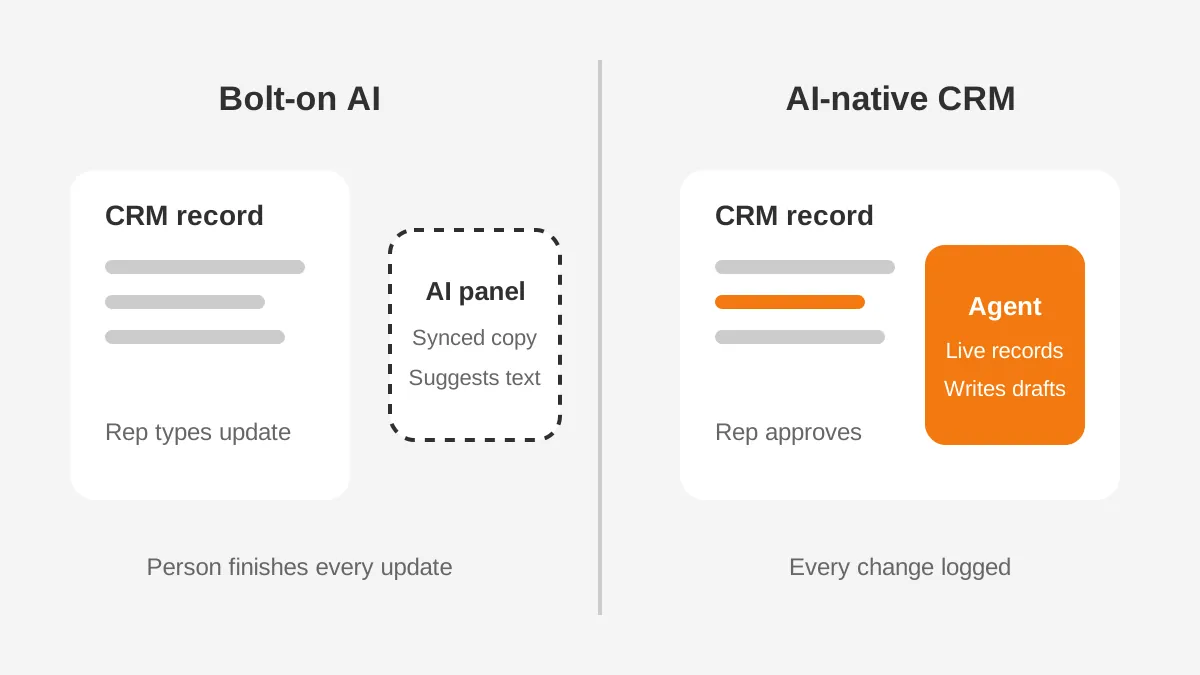
An AI-native CRM versus traditional CRM is not a choice between AI and no AI. It is a choice about who owns the first draft of each record. In a traditional CRM, the person writes it. In an AI-native CRM, the agent writes it and the person checks it.
What Makes Up an AI-Native CRM?
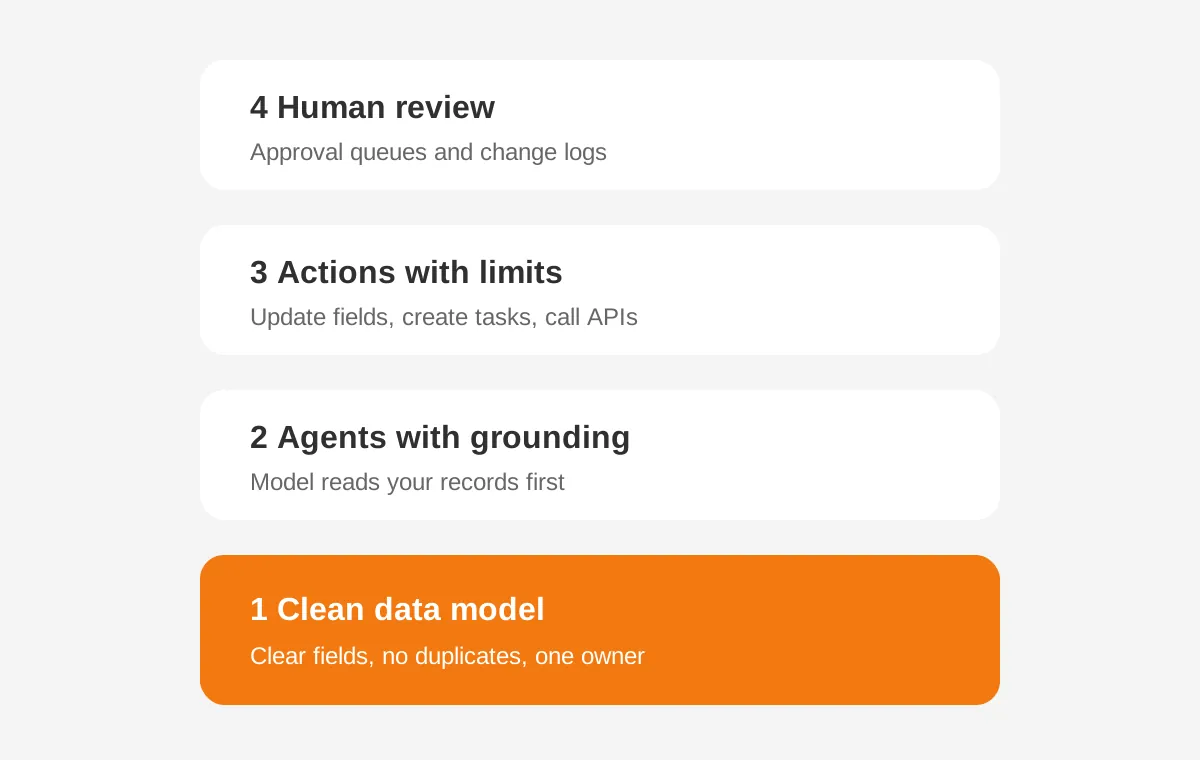
An AI-native CRM has four layers: data model, agents, actions and human review. Each layer depends on the one below it, so a weak data model breaks everything above.
A clean, connected data model
Agents need fields with clear meanings. A field called Status that sales, service and finance each use differently will confuse a model. Accounts, contacts, deals and activities should link correctly, with duplicates removed and custom objects documented.
An agent layer with grounding
The agent layer holds the large language model and the instructions it follows. Grounding means the model answers from your CRM records and approved documents instead of general training data. Retrieval tools fetch the right records before the model writes anything.
An action layer with limits
Actions are the steps an agent may take. Examples include updating a field, creating a task or calling an API. Each action needs a limit. An agent might draft a quote but never send it without approval.
A human review layer
Reviewers check drafts before they reach customers or reports. Approval queues, confidence scores and change logs make that review fast. Over time, low-risk actions can run without review, while high-risk actions keep a person in the loop.
Read the diagram from the bottom up. A gap in the data model resurfaces later as a bad draft, a wrong action or a long queue.
What Can an AI-Native CRM Do Day to Day?
Day to day, the agents take over the routine data work that people skip across sales, service, marketing and operations. Each task is small. Done on every record, the tasks add up to a pipeline people can trust.
Sales
After a call, an agent drafts the summary, updates next steps and suggests a new close date. The rep approves the changes in one click. AI lead scoring ranks new leads from fit and engagement data. Pipeline forecasting flags deals with no activity in 14 days.
Customer service
A service agent reads an incoming case, finds the account and drafts a reply from approved knowledge articles. It routes the case to the right queue and logs the conversation on the record. Agents hand complex or angry customers to a person.
Marketing
Marketing teams use agents to segment contacts, draft follow-up emails and enrich records with firmographic data. The agent writes to the same contact record sales uses, so both teams see one history.
Operations and revenue teams
Revenue operations teams use agents to clean fields, spot duplicates and explain forecast changes. Connected to an ERP, an agent can answer order status questions from live data. The Agentforce for sales guide lists sales agents worth testing first on Salesforce.
What agents should not do
Some work should stay with people. Agents should not approve discounts, change contract terms or close deals without a named person signing off. They should also avoid sending first messages to key accounts without review, because tone and timing still need judgment.
How Do Salesforce, HubSpot and Dynamics 365 Compare?
Salesforce, HubSpot and Microsoft Dynamics 365 each now offer an agent platform inside the CRM. None started life as an AI-native CRM, but each now lets agents work on live records under user permissions.
Salesforce Agentforce
Salesforce describes Agentforce as "the AI agent platform that delivers 24/7 autonomous support at enterprise scale." Agents use Salesforce data, Flow automations and permission sets. Data Cloud can bring records from other systems into one profile before agents read them.
HubSpot Agent Hub and Breeze
HubSpot calls Agent Hub "HubSpot's home for every agent running your go-to-market." HubSpot says Agent Hub is included in Starter, Professional and Enterprise editions. Breeze Assistant answers questions inside the CRM.
Microsoft Dynamics 365 Copilot
Microsoft describes Copilot in Dynamics 365 Sales as an AI assistant for sales teams. It summarizes leads, opportunities and accounts. Microsoft notes that its Sales agent is the next step of that Copilot experience.
| Platform | Agent tool | Where agents get data | Typical fit (Unboxx view) |
|---|---|---|---|
| Salesforce | Agentforce | Salesforce records, Data Cloud, Flow | Larger teams with complex processes and an admin |
| HubSpot | Agent Hub, Breeze Assistant | HubSpot CRM records | Mid-sized teams running marketing and sales in one tool |
| Dynamics 365 | Copilot, Sales agent | Dataverse, Outlook, Teams | Companies standardized on Microsoft 365 |
Newer vendors build AI-native CRM products from scratch, with agents at the core. They can suit small teams starting fresh. For a company with years of history, custom objects and integrations, extending the current platform is usually the lower-risk path.
The Unboxx AI-native CRM solutions team works on all three platforms. The choice depends on where your data lives today and which team will own the agents.
Which Tests Show Whether a CRM Is AI-Native?
Four tests show whether a CRM is AI-native or AI-assisted. Ask the vendor or your admin each question, and ask for a live demo rather than a slide.
- Does the AI read live records, or a synced copy?
- Can the AI write back to the record under your permission rules?
- Does every AI change appear in the record history with a reason?
- Would daily work change if you switched the AI off?
Four yes answers point to an AI-native CRM. Two or fewer suggests a CRM with AI features, which is a useful finding in itself. The no answers become the list of gaps to close first.
A good demo uses your own sample data. Watch an agent read a call transcript, update the opportunity and log the change. Then open the record history and check that the change, its source and its approver all appear there.
Ask one more practical question: how is AI usage billed? Agent platforms may charge per conversation, per action or through credits. Model the cost on real volumes before you scale any agent.
What Data Does an AI-Native CRM Need First?
An AI-native CRM needs accurate accounts, contacts, deals and activity history before agents can help. Agents repeat whatever errors sit in the data, and they repeat them faster than people do.
- One owner per field, written down in a data dictionary.
- Duplicate accounts and contacts merged before launch.
- Deal stages with entry and exit rules the whole team agrees on.
- Call and email capture switched on, with consent where the law requires it.
- Product, pricing and policy documents stored where the agent can read them.
The Unboxx guide to CRM data cleansing covers merge rules and field checks by platform. Plan the cleanup before the agent build, because an agent cannot invent context the record never held.
Data governance matters as much as data quality. Decide which fields an agent may change, which it may only suggest and which it must never touch. Write those rules down before the first agent goes live.
Which integrations feed the agents?
Agents are only as good as the activity they can see. Connect email and calendar first, because they hold most customer contact. Add call recording and transcription next, so agents can draft notes from real conversations.
For order, invoice or contract questions, connect the ERP or billing system through an API. Keep each integration documented with its owner, sync direction and refresh schedule. An agent that reads stale order data will give customers wrong answers with full confidence.
What Risks Come With AI Agents in the CRM?
Wrong updates, data exposure and rising cost are the three risks that come up in almost every agent project. Each has a control a team can put in place before launch.
Wrong or invented updates
A model can misread a call and set the wrong close date. Approval queues for high-impact fields, such as amount and stage, catch these errors before they reach reports. Sample 20 AI changes each week and track the error rate.
Data exposure
Agents must follow the same sharing rules as the person they act for. Test that an agent cannot read records outside a user's access. Keep sensitive fields, such as health or payment data, out of prompts unless a policy allows it.
Cost and scale
Gartner predicts that by 2029, agentic AI will resolve 80% of common customer service issues without human help. It links that shift to a 30% cut in operational costs (Gartner, 2025). Savings like that depend on usage costs staying below the labor they replace.
Rules still beat agents for fixed, high-volume steps, such as assigning leads by territory. The comparison of AI agents and traditional automation explains where each one fits.
Model changes and drift
Vendors update their models, and prompts change as teams edit them. Either change can shift how an agent behaves. Keep a test set of 30 real records and rerun it after every change. Compare the outputs before the update reaches users.
How Do You Move Toward an AI-Native CRM?
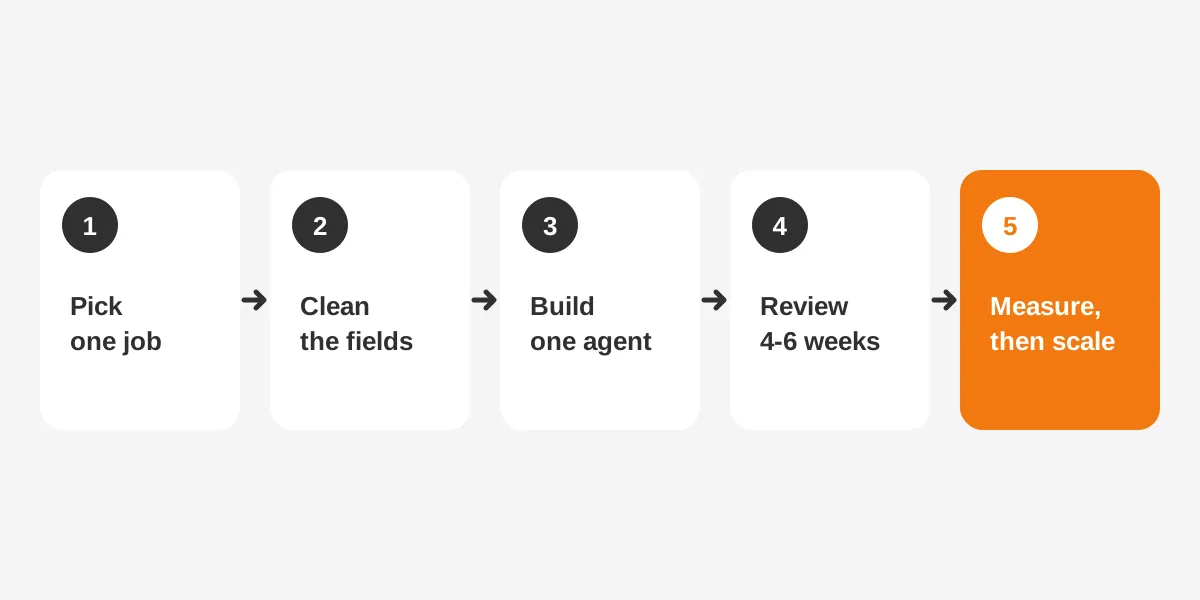
Move toward an AI-native CRM in five steps, starting with one narrow use case. A phased plan limits the damage a bad agent can do, and it can show results within one quarter.
- Pick one job, such as logging call notes or updating next steps.
- Clean and map the fields that job touches.
- Build one agent with clear instructions and limited actions.
- Run it with human approval for four to six weeks.
- Measure accuracy and time saved, then widen the scope.
The order matters. A pilot that skips cleanup tends to produce drafts that reviewers reject. The team then loses faith in the agent early.
Each step needs an owner. Sales operations usually owns the use case, a CRM admin owns fields and permissions, and IT owns the security review. A CRM implementation plan helps assign those owners and dates.
A worked example with assumed figures
This example uses assumed figures, not measured results. A team of 10 reps logs 25 calls each per week. If an agent saves four minutes of note-taking per call, the team saves 1,000 minutes a week. That is about 16.7 hours of selling time.
Run the same sum with your own call volume and a measured time per note. Then compare it with the agent's usage cost and the hours spent reviewing drafts. The pilot is worth scaling only if the net figure stays positive.
For a real project, see how Unboxx helped a client automate enterprise work with secure AI agents. It shows the permission and review steps in practice.
How Do You Measure Results From CRM Agents?
Measure CRM agents on accuracy, adoption, time saved and cost per action. Track each one weekly during the pilot, then monthly once the agent is stable.
| Metric | What it shows | How to track it |
|---|---|---|
| Acceptance rate | Share of AI drafts approved without edits | Approval queue reports |
| Error rate | Share of sampled AI changes that were wrong | Weekly sample of 20 changes |
| Record completeness | Share of open deals with next step and close date filled | CRM report on required fields |
| Time to update | Hours between a call and the record update | Activity and field history timestamps |
| Cost per action | Usage spend divided by completed agent actions | Vendor usage dashboard |
Set a target for each metric before launch. For example, a team might require an acceptance rate above 85% before it lets an agent update stages without review. That threshold is a decision for your team, not an industry standard.
Watch adoption as closely as accuracy. If reps ignore the approval queue, drafts pile up and the record goes stale again. Managers should review the queue in pipeline meetings until approving drafts becomes a habit.
Revenue leaders also care about forecast quality. Compare forecast accuracy for the quarter before the pilot with the quarter after it. Better activity data should narrow the gap between the forecast and closed revenue, although other factors also move that number.
Frequently Asked Questions
What is an AI-native CRM?
An AI-native CRM is a customer relationship system where AI agents work inside the core data model. They read live records, draft updates from calls and emails, and take limited actions. People approve the changes, and every AI edit is logged on the record for later review.
Is Salesforce an AI-native CRM?
Salesforce was not built as an AI-native CRM. Agentforce, though, lets agents read and update live records under user permissions. With clean data, approval steps and audit logging, a Salesforce org can pass most AI-native tests. The gap is usually data quality, not the platform itself.
Do you need to replace your CRM?
You rarely need to replace your CRM. Salesforce, HubSpot and Dynamics 365 all offer agent tools that work on live records. Replacing a CRM makes sense only when the current data model cannot support agents. High licensing or integration costs can also justify a migration.
How long does an AI-native CRM rollout take?
A first agent pilot usually takes eight to 12 weeks. That covers data cleanup, the build and a four to six week approval period. Wider rollouts across sales, service and marketing take longer. The timeline depends most on data quality and how quickly owners sign off field rules.
Can small businesses use an AI-native CRM?
Small businesses can use an AI-native CRM, and they often move faster because they have less data to clean. HubSpot includes Agent Hub in its Starter edition. A small team should still start with one agent, one job and a person reviewing the output each week.
Is an AI-Native CRM the Right Next Step?
An AI-native CRM pays off when the data is clean and the team has a clear first job for agents. That job might be call notes, case routing or duplicate cleanup. Give it one owner and an approval step, and expand once accuracy holds for a full month.
Unboxx helps B2B teams plan and build AI-native CRM setups on Salesforce, HubSpot and Dynamics 365. Schedule a consultation to review your data and choose the first agent to build.
Let's create something out of this world together.
Have a project in mind? Contact us for expert design and development solutions. Let's discuss how we can help grow your business.
Ready to Unboxx Your Potential?
Build smarter systems. Automate faster. Scale confidently.