
CRM RFP: Sections, Vendor Questions, Scoring and Timeline
A CRM purchase pulls in sales, marketing, service, finance and IT at once. Gartner research on the B2B buying journey puts a typical buying group at six to 10 decision makers. Without a shared document, each one asks vendors different questions.
A CRM RFP gives them one script. It tells CRM vendors and implementation partners what your business needs and how they must answer. It also states how you will score them, so a noisy sales cycle becomes a fair, side-by-side comparison.
Key Takeaways
- A CRM RFP works best when the project involves data migration, integrations, compliance rules or more than one department.
- The document needs nine sections, from company background to submission rules, plus a published scoring matrix.
- A six-week calendar, a scripted demo and reference checks give buyers evidence instead of sales claims.
What Is a CRM RFP?
A CRM RFP is a formal request for proposal. It asks CRM vendors or partners to answer your requirements in one format. It covers the software, the implementation work, pricing and contract terms. An evaluation committee then scores every written reply against the same criteria.
The document states the problem, sets the rules and explains the decision. The problem part names the teams that will use the system and what they do every day. The rules cover deadlines, the response template and who answers questions. The last part describes how the winner will be chosen.
A request for proposal for CRM software can target two kinds of supplier. A software vendor such as Salesforce, HubSpot, Microsoft Dynamics 365 or Odoo answers the licensing and product questions. An implementation partner answers the delivery questions.
Delivery covers configuration, data migration, integrations, training and support. Most mid-sized buyers send one document that asks partners to propose both the platform and the delivery plan. Larger buyers sometimes split the work into two documents.
That split creates two variants. A CRM software RFP compares platforms, editions and license prices. A CRM implementation RFP assumes the platform is chosen and compares partners on method, team and fixed fees. Unboxx often sees the second kind after a company has already signed licenses.
Ask what is a CRM RFP on paper, and the answer is a 15 to 30 page document. It comes with a requirements spreadsheet and a pricing sheet that vendors fill in. The spreadsheet matters most, because it makes answers comparable line by line.
When Is a CRM RFP Worth the Effort?
A CRM RFP is worth the effort when the decision is complex, expensive or hard to reverse. Gartner reports that 77% of B2B buyers rated their latest purchase very complex or difficult. A structured process reduces that difficulty, because every vendor answers the same questions.
Do you need an RFP for CRM? Use these signals to decide:
- More than one department will use the CRM daily.
- The project includes data migration from a legacy CRM, spreadsheets or an ERP.
- The CRM must connect to finance, marketing or support systems.
- Your industry has compliance rules, such as HIPAA for clinics or FINRA for broker-dealers.
- The first-year budget needs procurement or board approval.
When to use an RFP is also a question of fairness. Public bodies, universities and most nonprofits must document how they chose a supplier. A CRM RFP for nonprofits often exists because a grant or the board requires a competitive process.
A formal process can be overkill for five sales reps buying an off-the-shelf plan. A two-page requirements summary and two scripted demos will do there. If a wrong choice would cost a year of rework, write the RFP.
Cost is the other signal. The main drivers of CRM implementation cost are users, integrations, data volume and customization. When those four add up to a large first-year figure, a written comparison pays for itself.
How Do RFI, RFP and RFQ Differ?
An RFI gathers information, an RFP asks for a full proposal, and an RFQ asks for a fixed-scope price. Buyers often run them in that order. The table below covers rfi vs rfp and rfp vs rfq in one view.
| Document | Purpose | When to use it | What vendors return |
|---|---|---|---|
| Request for information (RFI) | Learn what the market offers | Early, before requirements are final | Capabilities, case studies, rough pricing |
| Request for proposal (RFP) | Compare full solutions | Requirements are defined, solution is open | Solution design, plan, team, price, terms |
| Request for quotation (RFQ) | Compare prices | Scope and product are already fixed | Line-item price and delivery dates |
A request for information suits buyers who do not yet know whether Salesforce, HubSpot or Dynamics 365 fits. It keeps the long list wide at low cost. The full RFP then goes to the three to five vendors that pass the RFI.
Some buyers skip the RFI when they already know the two or three platforms that fit. That shortcut works when an earlier evaluation or an industry peer has narrowed the field.
An RFQ fits license renewals or add-on purchases. It rarely suits a new CRM, because price alone hides the cost of a weak implementation plan.
Effort differs too. An RFI can be two pages and a week of vendor time. A full proposal takes vendors far longer, so the RFP belongs with serious candidates only.
What Are the 9 Sections of a CRM RFP?
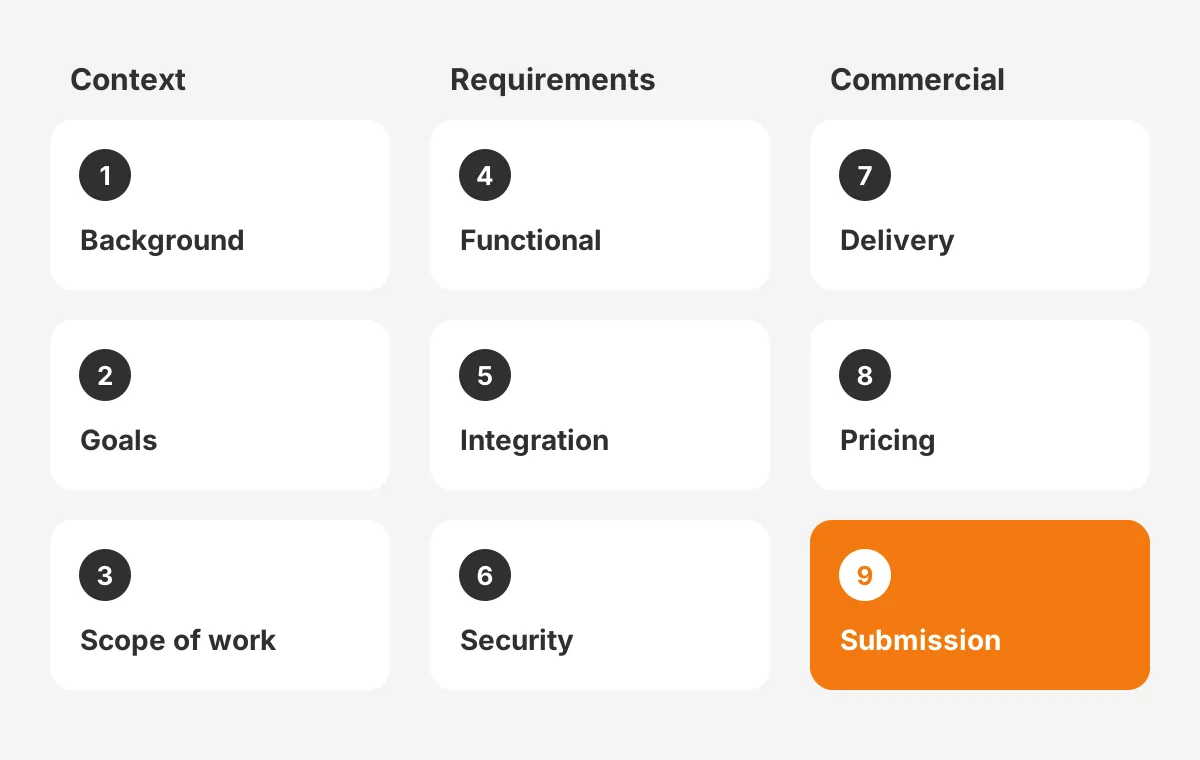
A CRM RFP template needs nine sections, and each one answers a question vendors would otherwise guess at. The list below shows what to include in a CRM RFP and why each part matters.
- Company background: industry, size, locations, current systems and the reason for the project.
- Goals and success measures: the three to five outcomes the CRM must deliver, with a number for each.
- Scope of work: users by team, regions, objects, processes and what is out of scope.
- Functional requirements: the CRM requirements document, each line ranked must-have, should-have or nice-to-have.
- Technical and integration requirements: systems to connect, data volumes, sync direction and frequency.
- Security and compliance: hosting region, SOC 2 reports, GDPR terms and access controls.
- Implementation, training and support: phases, team roles, a service level agreement and post-launch help.
- Pricing and licensing: a fixed pricing sheet covering licenses, services and three-year total cost of ownership.
- Submission rules and timeline: deadline, format, question window, contact person and the scoring method.
The nine sections fall into three groups. Sections one to three give context. Sections four to six define requirements, and sections seven to nine set the commercial terms.
The scope of work and the functional requirements carry the most weight. Write requirements as business scenarios, not feature names. "Sales reps log a call from Outlook in under 30 seconds" tells a vendor more than "email integration."
The pricing section needs a fixed format. Ask every vendor to fill in the same sheet with license tiers, user counts, implementation fees and annual support. Ask them to state their licensing model, any minimum term and the price rise allowed at renewal.
The submission section should name one contact person. All vendor questions go to that person, and every answer goes to every bidder. That rule keeps the process fair and stops side conversations with individual executives.
A CRM system RFP should also attach a draft master services agreement or list your key contract terms. Vendors then flag objections in the proposal, not after the award. Unboxx's CRM consulting and implementation services include drafting these sections with the buyer's team.
Which Questions Should a CRM RFP Ask Vendors?
CRM RFP questions should ask vendors to prove fit with evidence, not to confirm features with a yes. A yes/no column invites every vendor to answer yes. Ask instead how each requirement is met, with which edition and at what extra cost.
These questions to ask CRM vendors cover the areas where proposals differ most:
- Which edition and add-ons does your proposal assume, and what does each cost per user?
- How will you handle data migration, including deduplication and record ownership?
- Which integrations use native connectors, and which need custom development?
- Who will work on the project, and what share of their time is committed?
- What did a similar client in our industry go live with, and in how many weeks?
- What is excluded from your fixed price, and how are change requests priced?
- What does support cover after launch, and what are the response times?
Add a security questionnaire for IT. It should ask for the latest SOC 2 report, data residency, encryption, single sign-on support and breach notification terms.
Write the requirements as a spreadsheet with one row per requirement. Vendors mark each row as standard, configuration, custom build or not supported. That four-way answer exposes hidden development cost before the contract stage.
Industry context changes the questions. A CRM RFP for manufacturers should ask about quoting, distributor portals and ERP order sync. A clinic should ask about patient privacy and appointment systems. Build that list before the RFP goes out, using this guide to gathering and ranking CRM requirements.
Ask each vendor for one sample deliverable, such as a past data map or test plan. A sample shows working quality better than a sales summary. It also reveals whether the proposed team has done this kind of project before.
Limit open questions to the ones that change the decision. Twenty sharp questions get better answers than 200 generic ones, since every extra question costs vendor hours and scoring hours.
How Do You Score CRM RFP Responses?
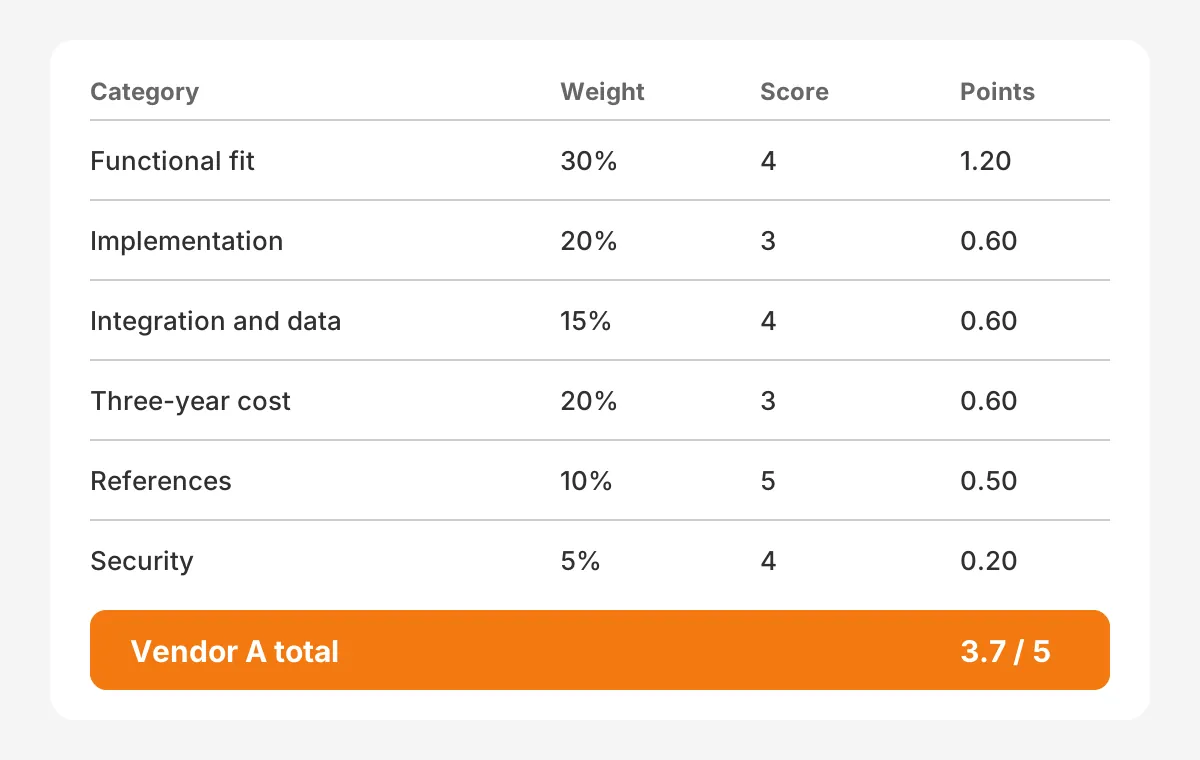
You score CRM RFP responses with a weighted scoring matrix agreed before any proposal arrives. Each evaluator scores each category from 1 to 5. The scores are then multiplied by the category weight and added up.
The weights below are an example for a mid-sized B2B company, not a benchmark. Adjust them to your own priorities.
| Category | Example weight | What a 5 looks like |
|---|---|---|
| Functional fit | 30% | All must-haves met with standard features |
| Implementation approach | 20% | Clear phases, named team, realistic timeline |
| Integration and data | 15% | Native connectors and a tested migration method |
| Three-year total cost | 20% | Lowest cost with no hidden services |
| Vendor stability and references | 10% | Three similar clients who confirm results |
| Security and compliance | 5% | Current SOC 2 report and required hosting region |
Define what each score means. A 1 means the requirement is not met. A 3 means it is met with configuration. A 5 means it is met out of the box, with proof in the demo.
A worked example shows the math with assumed scores. Vendor A scores 4 on fit, 3 on approach and 4 on integration. It also scores 3 on cost, 5 on references and 4 on security. Its weighted total is 3.7 out of 5.
Here is how to score CRM RFP responses fairly. Score independently first, then meet to discuss gaps larger than two points. Keep pricing hidden from functional reviewers until their scores are in, so cost does not shape fit.
Publish the CRM RFP evaluation criteria in the document itself. Vendors write better proposals when they know what matters. The evaluation committee also keeps a record of why it chose the winner.
The CRM RFP scoring matrix then joins the decision file for procurement. Weighted scoring will not make the choice. What it does is show where vendors differ, so the final debate lands on two or three real trade-offs.
How Long Does the CRM RFP Process Take?
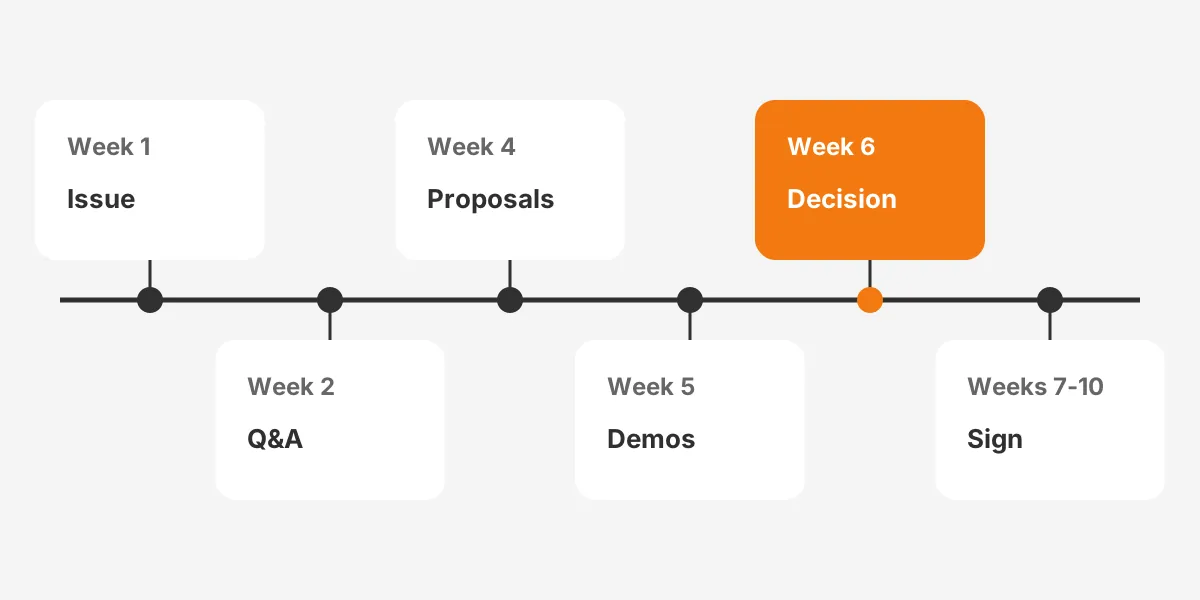
A CRM RFP process usually takes six to ten weeks from issue to signed contract. The CRM RFP timeline below is an example for a mid-sized company that already has its requirements.
- Week 1: issue the RFP to the vendor shortlist and confirm intent to respond.
- Week 2: hold the question window and send every answer to all vendors.
- Week 4: receive proposals and run the first scoring round.
- Week 5: run scripted demos with the top three vendors.
- Week 6: complete reference checks and final scoring.
- Weeks 7 to 10: negotiate terms, sign and plan the kickoff.
The first six weeks end in a decision. The remaining weeks depend on how fast legal and procurement agree contract terms with the chosen vendor.
Give vendors at least two weeks to answer. Loopio's 2026 RFP statistics report that teams spend 33 hours on an average RFP response. Nine people contribute to each one.
The same Loopio data shows organizations respond to 55% of the RFPs they receive. Vendors decline bids they judge unclear or unwinnable. A clear scope and a published budget range raise your response rate.
Writing comes before all of this, and teams often ask how long does a CRM RFP take to draft. Allow two to four weeks before issue for stakeholder interviews and the requirements sheet. The CRM implementation plan that follows the award should reuse that same sheet.
What Should a CRM Demo Script Include?
A CRM demo script lists the exact scenarios each shortlisted vendor must show, using your data and your processes. Without a script, each vendor shows its strongest screens. With one, the evaluation committee compares like with like.
Build the script from four to six day-in-the-life scenarios:
- A new lead arrives from the website and is routed to the right rep.
- A rep converts the lead, builds a quote and logs an email.
- A manager reviews the pipeline and the forecast for the quarter.
- A service agent opens a case from an email and resolves it.
- An admin adds a field and changes a workflow without code.
Send vendors a sample file of 50 anonymized records one week before the demo. Ask them to load it and run every scenario on that data. A proof of concept goes further and gives the top vendor two weeks in a sandbox.
Score each scenario on the same 1 to 5 scale used for the written proposal. Invite end users to the demo, not only managers. A rep who will log calls daily spots friction that a director misses.
Buyers spend only 17% of their purchase time meeting with potential suppliers, according to a 2020 Gartner press release. A scripted demo makes that limited time count.
What Happens After You Pick a Vendor?
After you pick a vendor, you check references and negotiate the contract. Then the proposal becomes a statement of work. These steps decide whether the promises in the proposal survive into delivery.
Reference checks should reach clients of a similar size and industry. Ask each reference three questions. Did the project finish on budget, did the named team stay, and what would they change?
Negotiation covers more than price. Fix the named team, the payment milestones, the acceptance criteria and the cap on renewal increases. Attach the scoring notes, so both sides remember what was promised.
The statement of work should copy the scope, requirements and timeline from the RFP and the winning proposal. Gaps between the two documents become change requests later. One Unboxx client story covers a Salesforce build planned right from day one. The scope set early carried into delivery.
Which CRM RFP Mistakes Cost Buyers the Most?
The costliest CRM RFP mistakes are vague requirements, hidden budgets and scoring rules invented after proposals arrive. Each one drives good vendors away or makes answers impossible to compare.
- Copying a generic crm rfp sample without adapting it to your processes.
- Listing 400 requirements with no ranking, so every line looks critical.
- Hiding the budget, which invites proposals from the wrong price band.
- Skipping integration requirements, then paying for custom work later.
- Letting one department write the RFP alone.
- Choosing on license price while ignoring services and support.
A CRM RFP example that works well is short on adjectives and long on scenarios. Use any crm rfp checklist only as a starting point, then cut what does not apply.
Another mistake is ignoring the vendor side. Loopio and the Association of Proposal Management Professionals surveyed bid teams for their 2026 RFP trends report. Companies submit 166 RFPs a year on average.
Vendors run a go/no-go decision on each bid, so a confusing document loses strong bidders. The CRM RFP response you get reflects the clarity of the request. A seven-step CRM selection process shows where the RFP fits in CRM vendor selection overall.
Frequently Asked Questions
Who should write the RFP for a CRM project?
A project sponsor owns the document, and a cross-functional team writes it. Sales, marketing, service, finance and IT each draft their requirements. Procurement manages the process and contract terms. An outside implementation partner can run workshops, but should not bid on an RFP it helped write.
How many vendors should receive a CRM RFP?
Send it to three to five vendors. That is the usual answer to how many vendors to invite to an RFP. Fewer limits real comparison, and more adds scoring work. Use a request for information first, so only vendors that fit your size and budget reach the vendor shortlist.
Should a CRM RFP include the budget?
Yes, include a budget range. A range lets vendors propose the right edition and team size. Without it, proposals arrive in different price bands and cannot be compared. State whether the range covers licenses only or licenses plus implementation services, and over which contract term.
Can a small business skip the CRM RFP?
A small business can skip a formal RFP when the scope is simple and integrations are few. Replace it with a two-page requirements summary, two scripted demos and one reference call. Write the full document once data migration or compliance rules are involved.
How does an RFP differ from a requirements document?
A CRM requirements document lists what the system must do. The RFP wraps those requirements with company background, scope, pricing format, contract terms and scoring rules. The requirements document is one section inside the RFP, and both later feed the implementation statement of work.
How Can Unboxx Help With Your CRM RFP?
Unboxx helps B2B teams write a CRM RFP, run scripted demos and score proposals. The team works across Salesforce, HubSpot, Dynamics 365 and Odoo, and then delivers the build once a platform is chosen.
If your CRM RFP is due this quarter, schedule a consultation with Unboxx. The review covers your scope, requirements and scoring matrix before vendors see them.
Let's create something out of this world together.
Have a project in mind? Contact us for expert design and development solutions. Let's discuss how we can help grow your business.
Ready to Unboxx Your Potential?
Build smarter systems. Automate faster. Scale confidently.