
How B2B Manufacturers Use CRM for Multi-Site Accounts

A manufacturer can sell to one customer through five plants, three purchasing teams and two approval chains. Each plant has its own buyer, budget cycle and reasons to say no.
That complexity shows in the data. SuperOffice surveyed 161 manufacturing decision-makers. Only 47% felt confident they had a complete, current view of their top 10 customers.
The way B2B manufacturers use CRM decides whether that customer looks like one relationship or five strangers. A parent account holds the corporate agreement. Each facility becomes a child account with its own contacts, opportunities and buying process.
Reports then roll the sites back up. The account team sees the whole customer and every plant at once.
Key Takeaways
- Model each facility as a child account under one parent, because each site buys on its own schedule.
- Link people who influence more than one plant to every site account they touch, never to a single record.
- Plan rollup reports before go-live, since native hierarchies report only one level down.
How Do B2B Manufacturers Use CRM for Multi-Site Accounts?
B2B manufacturers use CRM to keep one corporate customer and its separate facilities in a single structure. The parent record carries the master agreement, pricing tier and executive sponsor. Each plant, warehouse or regional office gets its own record underneath, with its own pipeline and service history.
The model matters because manufacturing customers rarely buy as one unit. A packaging line upgrade in Ohio may move through a plant engineer and a local buyer.
The same company's Texas site may route every purchase through central procurement. When B2B manufacturers use CRM this way, sales reps stop guessing which rules apply.
Most B2B manufacturers use CRM already. According to NetSuite (2025), 86% of manufacturing companies have adopted a CRM system, compared with 73% of all businesses. Adoption figures say nothing about structure, though. The account model chosen on day one decides what the CRM can show.
Three jobs sit at the center of this setup:
- Show which sites belong to which corporate customer.
- Record who decides, who influences and who signs at each site.
- Roll revenue, pipeline and service cases up to the corporate level.
What Does a Worked Example Look Like?
Take a hypothetical example with assumed figures. A packaging equipment maker sells to a food producer with one head office and six plants. Two plants buy locally. Four route purchases through central procurement in Chicago.
In the CRM, the food producer is one parent account with six site accounts. The Chicago category manager is linked to all six sites as Approver. Each plant engineer sits on one site only, as Technical evaluator.
The master agreement lives on the parent as a framework opportunity. Each line retrofit is a site opportunity linked to that agreement. The account lead can see that three plants run a competitor's sealers, which becomes next quarter's target list.
This is how B2B manufacturers use CRM to keep one customer intact across six plants. The sections below explain each part.
Unboxx builds these structures through its CRM for manufacturers practice, starting with how the customer buys.
Why Do Multi-Site Accounts Break a Standard CRM?
Before B2B manufacturers use CRM hierarchies, the default setup assumes one account equals one buyer. Multi-site customers break that assumption in four predictable ways.
- Duplicate records appear. Reps create a new account for each plant they visit, with slightly different names and no link between them.
- Ownership blurs. Two reps call on the same company from different regions, and neither sees the other's pipeline.
- Forecasts double count. A corporate framework deal and a plant-level order for the same equipment both land in the pipeline.
- Service history scatters. A warranty claim at one site is invisible to the rep quoting a replacement at another.
The cost shows up in time. The same SuperOffice research found that 43% of manufacturing teams spend four hours or more per week on customer information. Only 13% say they typically spot an at-risk customer before it is too late.
Growth also depends on these accounts. The survey found that 76% of manufacturers expect growth mostly, or partly, from existing customers. That makes expansion across sites the main revenue lever, and a flat account list hides it.
B2B manufacturers use CRM hierarchies to fix the structure, but a hierarchy alone does not fix ownership or reporting. Those need rules, which the next sections cover.
How Should You Model Parent and Site Accounts?
The first decision when B2B manufacturers use CRM for multi-site customers is the account model. Start with one parent account for the legal customer and one child account per buying location.
Salesforce Trailhead recommends establishing accounts for each separate location. Setting the Parent Account field then lets Salesforce show a family tree.
Keep the tree shallow. Two or three levels cover most manufacturing customers: corporate, region or division, and site. A deeper tree looks precise but makes reporting harder, because each extra level needs its own rollup logic.
Add a simple field on every account to state what kind of record it is. Common values are Parent, Division and Site. That one field lets reports, list views and automation tell a headquarters apart from a plant without reading names.

Decide which data lives where. A practical split for manufacturers looks like this:
- Parent account: master agreement, credit terms, corporate pricing tier and executive sponsor.
- Division account: regional buying policy and the division's approved supplier status.
- Site account: shipping address, installed equipment, local contacts, opportunities and service cases.
Every hierarchy has limits worth knowing before design. Each child account can have only one parent in Salesforce and HubSpot. A plant owned by a joint venture cannot sit under both owners. Pick the owner that controls purchasing and note the other in a field.
The ERP matters here too. Sites usually exist there already as ship-to or sold-to customers. Match CRM site accounts to ERP customer numbers early. This guide to CRM ERP integration explains why that avoids a second cleanup.
Where Do Contacts and Buying Groups Fit?
Contacts belong to the site where they work, with extra links to every other site they influence. A plant manager sits on one site account. A corporate category manager who approves spending for six plants should appear on all six.
Salesforce handles this with Contacts to Multiple Accounts, a feature an administrator must enable. Each contact keeps one primary account, and the other links are indirect relationships. Trailhead notes this tracks relationships between people and businesses without creating duplicate records.
HubSpot follows a similar model with associations and labels. A contact can be associated with more than one company record. Labels describe each relationship, such as "Approver" or "Plant engineer".
Where B2B manufacturers use CRM to map buying groups, each site usually includes these roles:
- Plant or operations manager, who owns uptime and production targets.
- Maintenance or process engineer, who writes the technical specification.
- Site buyer, who runs the quote comparison and issues the purchase order.
- Corporate procurement or category manager, who sets approved suppliers and price ceilings.
- Quality or safety lead, who signs off on compliance for regulated lines.
Record the role on the relationship, not only on the contact. The same engineer may be a decision-maker at one plant and only an influencer at another. When B2B manufacturers use CRM role fields this way, account plans show who is missing before a deal stalls.
Clean data makes this work. Merge duplicate people before linking them to sites. This CRM data cleansing runbook covers the order of operations by platform.
Who Should Own Each Site Account?
Each site account needs one named owner, and the parent needs a strategic account lead above them. Shared ownership sounds fair but usually means nobody updates the record.
The most common ownership models are these:
- Global account lead owns the parent, regional reps own the sites in their territory.
- One rep owns the parent and every site, which suits customers with three or four plants.
- Inside sales owns small sites, field sales owns large plants and the parent.
Pick the model by revenue and travel, not by habit. A customer with 12 plants across four states rarely fits one rep. A customer with two plants in one city rarely needs a global lead.
B2B manufacturers use CRM sharing rules to make the hierarchy visible to everyone who works the account. Site owners should see the parent and sibling sites. In Salesforce, account teams and sharing rules handle that. In HubSpot, teams and record permissions do the same job.
Credit splits need a written rule. A corporate buyer may approve a deal that ships to a plant. Decide upfront whether the global lead, the site rep or both get credit.
Store the rule in the opportunity through a split or a second owner field. Commission disputes then stay out of spreadsheets.
Territory changes also need a plan. When B2B manufacturers use CRM ownership rules, a rep leaving or a plant closing triggers a clear handover. The new owner inherits open opportunities, cases and the meeting history for that site.
How Do You Track Separate Buying Processes per Facility?
Track each facility's buying process as its own opportunity path, tied to the site account. A corporate framework agreement and a plant-level purchase are different deals, with different stages and different people.
When B2B manufacturers use CRM for site deals, they usually need two opportunity types:
- Framework or master agreement, owned at the parent level, covering pricing, terms and approved products.
- Site order or project, owned at the site level, covering a specific line, retrofit or replenishment order.
Give each type its own stages. A framework deal moves through supplier qualification, commercial review and legal sign-off. A site project moves through technical survey, quote, trial and purchase order. Forcing both through one set of stages hides where each deal stands.
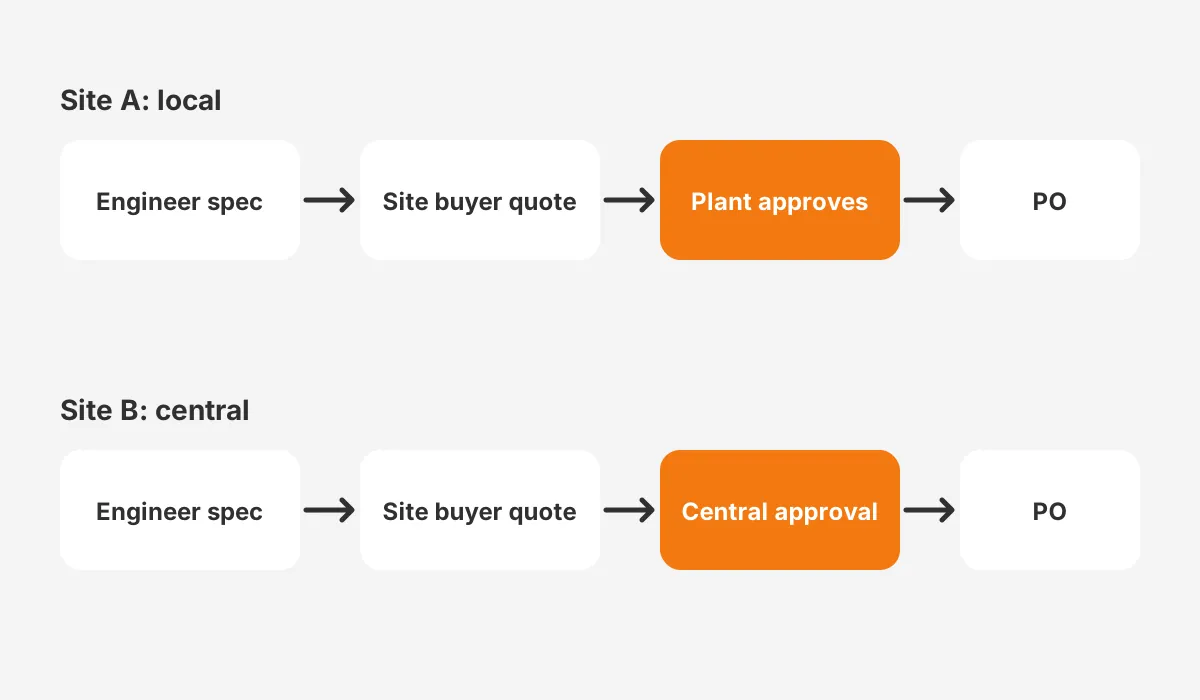
Some sites buy locally and some route everything through central procurement. Capture that on the site account with a field such as Approval Route, with values like Local, Regional or Central. Reps then see the right path before they quote.
Pricing follows the same split. The site quote should inherit the corporate price tier from the parent, then add site-specific freight, installation and spare parts. A quote template that reads the parent tier stops reps from discounting below the agreed floor at one plant.
Link site opportunities to the framework agreement through a lookup field. That link lets reports show how much plant-level revenue each corporate agreement produced. It also prevents the double counting described earlier, because framework value and site orders are reported separately.
Lead routing follows the same logic. A web inquiry from a known plant should reach the site owner, not the next rep in a round-robin. The rules for that are covered in this guide to lead routing rules.
How Do B2B Manufacturers Use CRM in Account Planning?
B2B manufacturers use CRM account plans to find the next site to win. The next order at an existing site matters too, but new sites drive expansion. The parent account becomes the planning view, and each child account shows coverage.
A useful multi-site account plan answers five questions:
- Which sites already buy from us, and which buy from a competitor?
- Which product lines does each site run, and which do we supply?
- Who is the decision-maker at each site, and when did we last meet them?
- Which sites have open service cases that could block a new sale?
- Which framework terms allow a new site to buy without a fresh contract?
B2B manufacturers use CRM installed base fields to spot gaps. Store installed base data on the site account, with a field per major product line or a related equipment object.
The hierarchy then becomes a whitespace map. A rep can see that four plants run a competitor's conveyors and two run yours.
Platform features can help here. Salesforce Manufacturing Cloud adds sales agreements and account-based forecasting on top of standard accounts. HubSpot users often build the same view with custom properties and association labels.
When B2B manufacturers use CRM for planning, the review rhythm matters as much as the fields. A quarterly review per strategic parent account, with each site owner reporting coverage, keeps the data current. Without that meeting, site fields go stale within months.
What Reports Show the Whole Customer Across Sites?
Rollup reports are where B2B manufacturers use CRM data to see the whole customer. They need planning, because native hierarchies are shallow. RevOps Co-op (2025) warns that you can only report one layer down in parent-child relationships in Salesforce.
Once B2B manufacturers use CRM rollups, four reports cover most multi-site needs:
- Revenue by parent, with each site's share of closed business.
- Open pipeline by site, grouped under the parent and split by opportunity type.
- Coverage map, listing every site with its owner and last meeting date.
- Service exposure, showing open cases by site next to open opportunities.
Leaders usually want one dashboard per strategic customer. It shows revenue by site, open pipeline against the framework value, and open service cases. Site owners then use the same dashboard in account reviews, so nobody argues over whose numbers are right.
The fix for the one-level limit is a stored ultimate parent. Add a field on every account that always points to the top of the tree. Automation fills it when an account is created or moved. Reports then group by that field, however deep the tree runs.
Totals need a similar fix. In Salesforce, roll-up summary fields require a master-detail relationship, and Parent Account is a lookup. A Flow or a rollup tool can sum site revenue onto the parent on a schedule instead.
Salesforce and HubSpot differ on the structural points that matter to manufacturers:
| Capability | Salesforce | HubSpot |
|---|---|---|
| Parent and child accounts | Parent Account lookup on each account | Parent and child company associations |
| Parents per child | One | One |
| Hierarchy view | View Hierarchy page on the account | Parent and child cards on the company record |
| Contact linked to more than one site | Contacts to Multiple Accounts, enabled by an admin | Contact associated with two or more companies, with labels |
| Native rollup to parent | Not on a lookup; use Flow or a rollup tool | Custom rollup properties or workflows |
| Bulk import rule | Load parents first, then set Parent Account | Parent companies must exist before child import |
The HubSpot rules come from the HubSpot Knowledge Base (2026). It states that a child company can only be associated with one parent company.
How Do You Roll Out a Multi-Site Account Model?
Roll it out in five steps, starting with the data you already have. A first pass on the top accounts is a focused project, not a multi-year program.
- Audit. Export every account and group them by corporate owner, using domain, tax ID or ERP customer number.
- Design. Agree on levels, the account type field, opportunity types and which fields live at each level.
- Clean. Merge duplicates, then load parents before children so every site has a home.
- Link. Attach contacts to every site they influence and record their role at each one.
- Report. Build the ultimate parent field, the rollups and the four core reports, then train account owners.
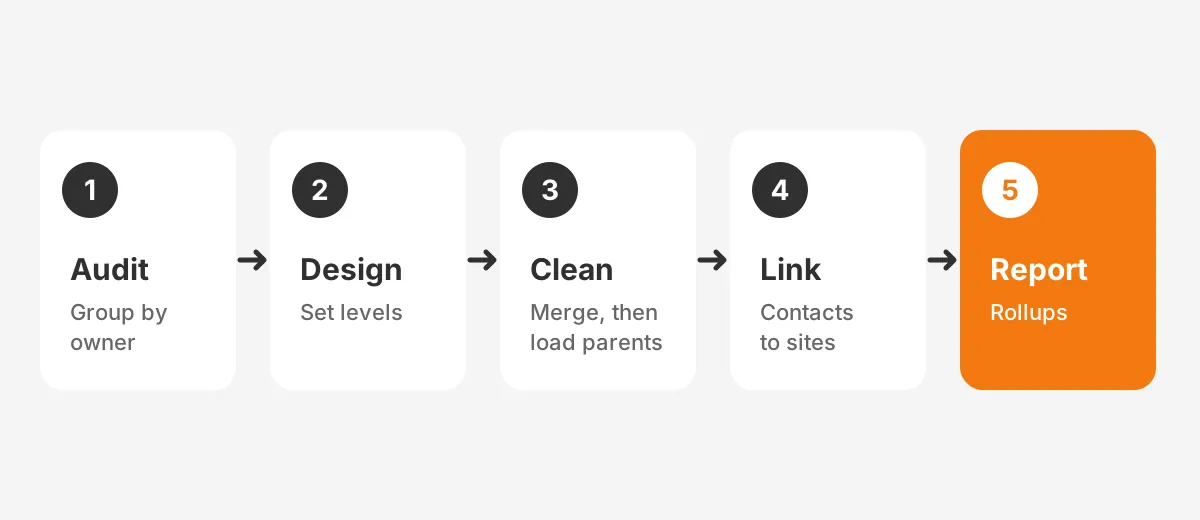
Start with the 20 largest corporate customers rather than the whole database. They hold the most revenue and the most sites, so the design gets tested where it matters. Smaller accounts can follow once the rules hold.
Watch for three common mistakes during rollout:
- Using the hierarchy for brands or product lines, which inflates site counts and confuses reports.
- Letting reps create site accounts freely, which brings duplicates back within a quarter.
- Skipping the ultimate parent field, which leaves leaders without a true corporate total.
Assign one owner for the hierarchy itself, usually a CRM administrator or sales operations lead. That person approves new parents and moves between levels. When B2B manufacturers use CRM without that owner, the structure drifts back into a flat list.
Smaller manufacturers can follow the same steps at a lighter scale. This guide to the best CRM for small manufacturing business explains which platforms suit a leaner team.
Frequently Asked Questions
How do B2B manufacturers use CRM per site?
B2B manufacturers use CRM by giving each facility its own child account under one parent. Each site carries its own contacts, opportunity stages and approval route field. Reports roll site results back to the parent. Leaders see the whole customer while reps follow each plant's buying process.
Can one contact belong to two site accounts?
Yes. In Salesforce, an administrator enables Contacts to Multiple Accounts, and each contact keeps one primary account plus indirect links. In HubSpot, a contact can be associated with two or more company records using labels. Record the person's role at each site, since influence often differs by plant.
What depth suits a manufacturing account hierarchy?
When B2B manufacturers use CRM hierarchies, two or three levels cover most customers: corporate parent, optional division, and site. Each extra level needs its own rollup logic and makes reports harder to build. Add a level only when that layer has its own budget, buyer or agreement.
Does Salesforce roll up opportunities to the parent account?
Not natively across levels. Parent Account is a lookup, and roll-up summary fields need a master-detail relationship. Teams add an ultimate parent field filled by automation, then group reports by it. A Flow or a rollup tool can store site totals on the parent record.
When should manufacturers get outside help with hierarchies?
Outside help pays off when B2B manufacturers use CRM data with duplicates across thousands of records. It also helps when CRM and ERP customer numbers disagree, or two platforms share one hierarchy. A partner designs the levels, runs the merge and builds rollups.
Is Your CRM Ready for Multi-Site Accounts?
Your CRM is ready when every site has a parent and every influencer is linked to the plants they touch. Leaders should also see one corporate total. When B2B manufacturers use CRM this way, expansion across sites becomes visible and plannable instead of accidental.
Unboxx helps B2B manufacturers use CRM hierarchies with confidence. The team designs account levels, cleans site data and builds the rollup reports in Salesforce and HubSpot. To review your current structure with a consultant, schedule a consultation.
Let's create something out of this world together.
Have a project in mind? Contact us for expert design and development solutions. Let's discuss how we can help grow your business.
Ready to Unboxx Your Potential?
Build smarter systems. Automate faster. Scale confidently.