
Competitive Intelligence Software and CRM: How They Connect
A rep opens a deal and sees a rival named in the notes. The rep has no idea how that rival usually wins.
The answer sits in a battlecard on a shared drive that nobody opens. That gap weakens competitive selling. Crayon's 2025 State of Competitive Intelligence report found that 44% of teams cannot see which competitors are in which deals.
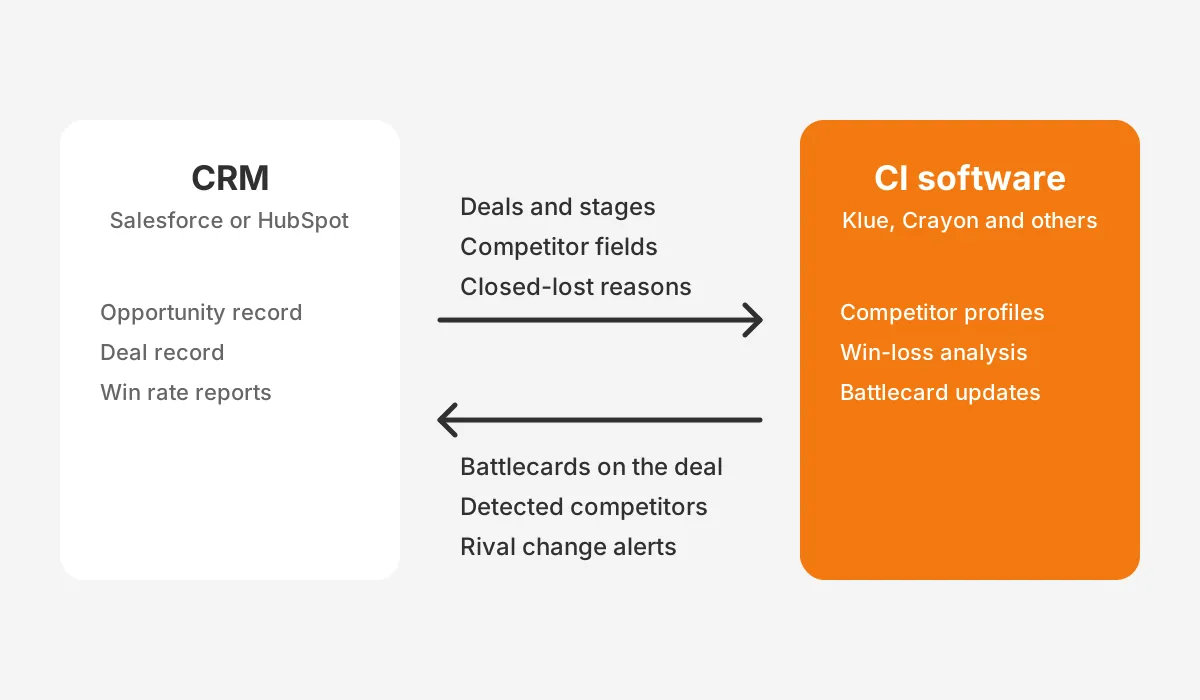
Competitive intelligence software integrates with a CRM in two directions. It reads deal data such as competitors, stages and closed-lost reasons from Salesforce or HubSpot. It then pushes battlecards and alerts back into the opportunity or deal record, where reps already work.
Key Takeaways
- Competitive intelligence software pulls competitor, stage and outcome data from the CRM and pushes battlecards back into each deal.
- Clean competitor fields in Salesforce or HubSpot decide whether win rate by competitor reports can be trusted.
- A working integration is judged by battlecard use inside live deals and by win rate against named rivals.
What Is Competitive Intelligence Software and Its Job?
Competitive intelligence software collects information about rivals and turns it into material sales teams can use in a deal. It handles competitor tracking across websites, pricing pages, reviews, job posts and press releases. It then sorts the changes so a product marketer can decide what matters.
Sales teams mostly see the result as a battlecard. It is a short page per competitor with positioning, objections, landmines to set and proof points. Sales battlecards lose value the moment a rival changes its pricing or pitch.
Dedicated competitive intelligence tools keep them current, which a static slide deck cannot do. Each card change is then visible to every rep at once.
Competitive intelligence platforms usually cover four jobs:
- Monitoring: tracking rival websites, pricing, product releases and hiring for changes.
- Curation: letting an analyst or product marketer rank and summarise what was found.
- Enablement: delivering battlecards and alerts to sellers in the tools they use daily.
- Analysis: running win-loss analysis to show which rivals beat the team, and why.
Vendors of competitive intelligence software include Klue, Crayon, Kompyte, Contify and Owler. Market intelligence software such as ZoomInfo overlaps at the account level. ZoomInfo's 2026 comparison of competitive intelligence platforms lists Kompyte with "bi-directional Salesforce and HubSpot sync". It notes that Owler offers CRM integration only on its Enterprise tier.
The first three jobs can run outside the CRM. The fourth cannot. Win-loss analysis needs deal outcomes, deal values and competitor names, and those live in Salesforce, HubSpot or Microsoft Dynamics 365. That dependency is why competitive intelligence software and the CRM usually get connected early in a rollout.
Product marketing owns the research and the battlecards. Reps and sales engineers read the cards during live deals. Sales leaders use the win-loss reports to decide where to coach, price or invest.
How Does Competitive Intelligence Software Integrate With a CRM?
Competitive intelligence software integrates with a CRM through a vendor-built connector that syncs deal data in and pushes content out. Most connectors install from the Salesforce AppExchange or the HubSpot App Marketplace. An admin authorises the app, maps fields and chooses where battlecards appear.
Each direction of the connection serves a different team.
- CRM to competitive intelligence software: deals, accounts, owners, stages, amounts, competitor fields and closed-lost reasons, used for reporting.
- CI tool to CRM: battlecards, competitor alerts and detected competitor names flow back into the deal record for sellers.
Some vendors also capture field intel inside the CRM. Crayon describes reps submitting field intel for the wider organisation from inside Salesforce, which then feeds its battlecards. Klue's Salesforce connector prompts reps to say when a competitor is present in a deal.
A third input often joins the connection: conversation intelligence. Klue lists integrations with Gong and Chorus that detect competitor mentions on recorded calls. Those mentions can trigger a Deal Tip for the rep. They can also update the competitor on the CRM record automatically.
Competitive intelligence software usually posts the same updates to Slack and Microsoft Teams. Cards also sync to sales enablement tools such as Highspot and Seismic. Of all these channels, only the CRM link ties a battlecard to a deal outcome.
What Data Moves Between Competitive Intelligence Software and CRM?
Deal context goes in and competitive guidance comes out. Mapping both lists before setup prevents the most common reporting problems. A small field set that reps fill in beats a long one they ignore.
Data the competitive intelligence software reads from the CRM:
- Opportunity or deal ID, name, amount, stage and close date.
- Account or company name, industry and segment.
- Deal owner, so reports can be split by team or region.
- Competitor fields, such as the Salesforce competitors related list or a HubSpot deal property.
- Closed-lost reasons and free-text loss notes.
Data the competitive intelligence software writes or shows in the CRM:
- Battlecards for the competitor named on the deal.
- Competitor names detected from calls or emails.
- Alerts when a rival changes pricing or launches a product.
The read direction carries the most risk. If competitor names arrive as free text, "Acme", "Acme Inc" and "ACME CRM" become three rivals in every report. A defined competitor picklist fixes that before the first sync. The CRM data cleansing runbook covers how to merge existing variants.
How Does the Salesforce Integration Work in Practice?
In Salesforce, competitive intelligence software reads opportunity data and places battlecards on the opportunity record. Salesforce already has a standard home for rivals, so Salesforce opportunity competitors report natively. The OpportunityCompetitor object links competitors to an opportunity, with fields for name, strengths and weaknesses.
The Outreach 2026 guide to competitive intelligence tools describes the "Opportunities with Competitors" report type, which lists competitors by opportunity. A custom summary formula then calculates win rate by competitor.
The same guide warns that competitor names can be typed as free text. Reports are then only as clean as the admin's list.
Vendors build on that foundation in different ways. Klue's Salesforce integration adds a Battlecard Button that opens deal-specific battlecards in one click.
Its Win-Loss Cards push deal notes from Salesforce into Klue, where they feed competitor profiles. Klue's Threat Analysis Report uses Salesforce competitive data to show which rivals the team meets and loses to.
Crayon takes a similar route. It embeds battlecards into open opportunity records and ingests win and loss data when those opportunities close. Crayon states the connection takes 10 minutes; that figure is the vendor's claim, and field mapping usually takes longer.
Check these Salesforce settings before go-live:
- Page layouts: the battlecard component must be added to every opportunity layout and record type in use.
- Permissions: the integration user needs read access to opportunities and competitor records.
- Validation: a rule can require a competitor before an opportunity moves past discovery.
Teams that changed their opportunity model heavily should review it first. Custom opportunity objects, extra record types and managed packages can all hide the battlecard component from some users. A short test with one rep per record type catches this before launch.
How Does the HubSpot Integration Work in Practice?
In HubSpot, competitive intelligence software works through marketplace apps that map to deals, companies, contacts and owners. HubSpot has no standard competitor object, so most teams store rivals in a custom deal property. That property becomes the key the competitive intelligence software reads.
The Klue Data Sync listing in the HubSpot App Marketplace shows the mapping. Klue opportunities map to HubSpot Deals, accounts to Companies, contacts to Contacts and users to Owners.
When Klue detects a new competitor on a deal, it writes that competitor's name back to the HubSpot deal. Reports refresh daily, so a newly named rival shows up in win-loss views within a day.
Crayon's HubSpot app works in one direction. Its listing says no data is pulled from HubSpot; battlecards are pushed from Crayon into HubSpot company records. That design suits enablement but gives no win-loss reporting from HubSpot data.
| Factor | Salesforce | HubSpot |
|---|---|---|
| Where competitors live | Standard OpportunityCompetitor object | Custom deal property, usually a dropdown |
| Where battlecards appear | Opportunity record component or button | Company or deal record, depending on the app |
| Install source | Salesforce AppExchange | HubSpot App Marketplace |
| Win rate by competitor | Opportunities with Competitors report type | Deal report grouped by the competitor property |
| Write-back | Vendor-specific; confirm before enabling | Klue writes detected competitors to deals |
Teams setting up the competitor property for the first time can follow the property planning in the HubSpot implementation guide. A dropdown with one value per rival keeps HubSpot deal reports clean.
Which Competitor Fields Should the CRM Hold First?
The CRM should hold four competitor fields first: primary competitor, other competitors, outcome reason and the stage the rival appeared. These four fields answer most questions product marketing and sales leaders ask. Extra fields can wait until reps fill the first four reliably.
- Primary competitor: a required dropdown with one value per rival, plus "None" and "Unknown".
- Other competitors: a multi-select for deals with more than one rival.
- Closed-lost reason: a dropdown such as price, product gap, relationship or timing.
- Competitor stage: the stage at which the rival first appeared in the deal.
Required fields need a sensible trigger. Asking for a competitor at deal creation produces "Unknown" in most records. Asking for it at the move from discovery to evaluation gives reps time to learn the answer.
The closed-lost reason is the field most often skipped. Crayon's 2025 research found sellers face a competitor in nearly 7 in 10 deals. A missing reason hides most of the story. Make the reason required at close, and allow one free-text note for detail.
Picklist values need one owner and one naming rule. Use the rival's common trading name, not its legal entity, and retire values instead of deleting them. Deleting a value in Salesforce or HubSpot can blank it on closed deals and break historical win rates.
Backfill matters as well. Before launch, ask each rep to set the primary competitor on open deals in one short session. Historical closed deals can stay blank. Report on them separately so they do not lower the share of deals with a known rival.
The CRM dashboard guide shows how these fields become charts. Leaders usually ask for three charts first: win rate by competitor, losses by reason and average deal size by rival.
How Do You Set Up Competitive Intelligence Software?
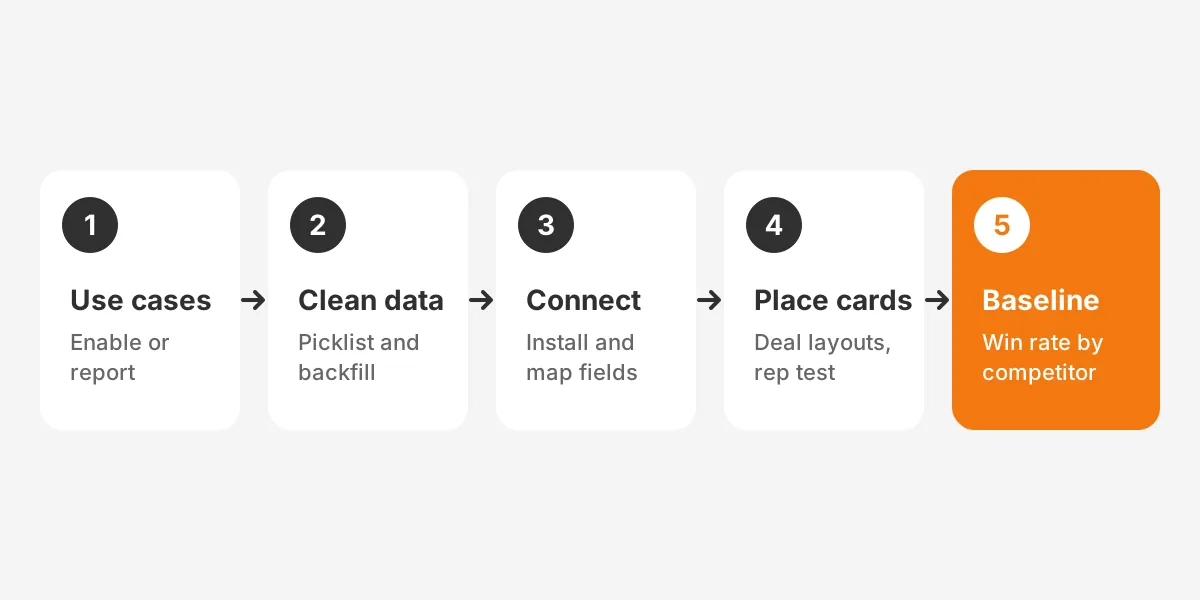
Setting up competitive intelligence software with a CRM takes five steps. Define use cases, clean data, connect apps, place battlecards and agree on metrics. Vendor connectors install in minutes. The field work around them is what takes days.
- Define the use cases. Decide whether the goal is enablement, win-loss reporting or both. A one-way connector can serve enablement alone.
- Clean competitor data. Build the picklist, merge spelling variants and backfill the competitor on open deals.
- Connect the CRM. Install the app, authorise an integration user and map deals, accounts and owners.
- Place battlecards. Add the component to opportunity or deal layouts and test it with three reps.
- Agree on metrics. Record baseline win rate by competitor before launch so later changes can be compared.
A pilot keeps the rollout honest. Start with the two or three rivals that appear in the most deals, and launch their battlecards first. Expand the competitive intelligence software to the full competitor list once reps open those cards without being reminded.
Teams most often skip steps two and five, and both cause trouble later. Without clean data, the first win-loss report is wrong. Without a baseline, nobody can show whether the competitive intelligence software changed anything.
Set the integration user up with care. Give it read access to the objects the vendor needs. Grant write access only to the competitor field, if write-back is used. A dedicated user also keeps sync activity separate in audit logs.
Teams running four or more connected tools often bring in a partner for field design and the integration user. Unboxx's CRM integration services cover connector setup, field mapping and testing for Salesforce, HubSpot and Dynamics 365.
How Do You Measure Whether the Integration Works?
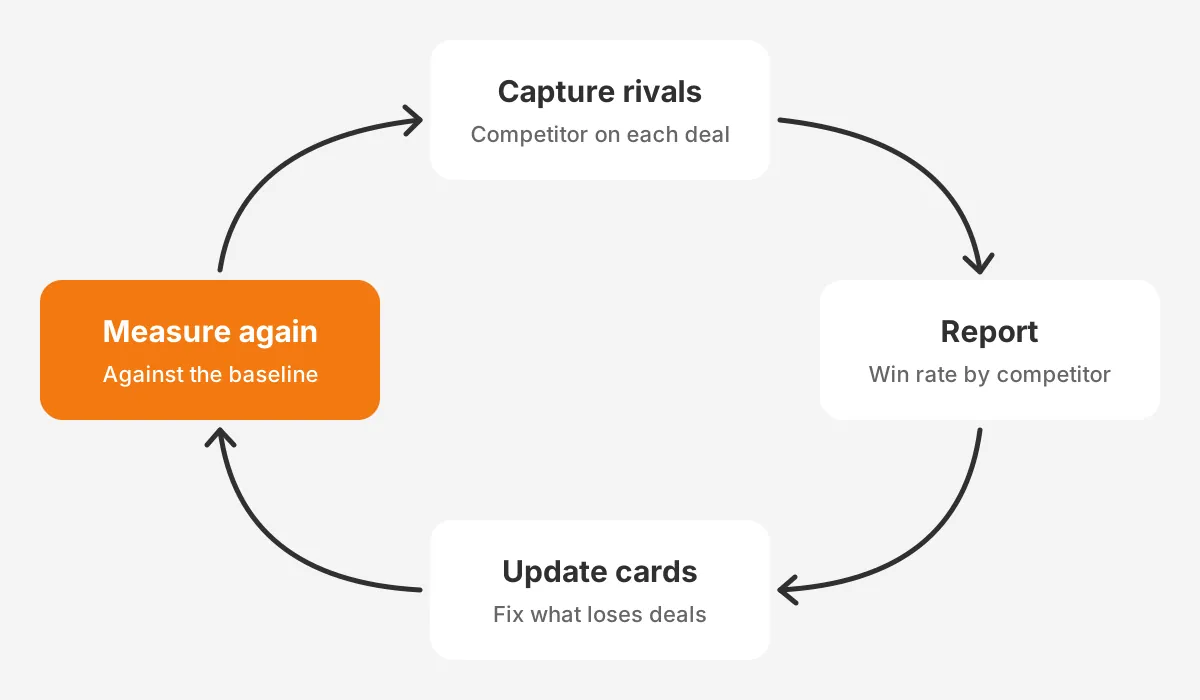
An integration works when reps open battlecards in live deals and win rate against named rivals improves. Activity alone proves little. Klue's Impact Analysis Report compares deal performance with battlecard adoption. It covers win rate, sales cycle length and deal size.
Track measures at three levels:
- Data quality: the share of open deals with a primary competitor, and of closed deals with a loss reason.
- Adoption: battlecard views per competitive deal and the share of reps who opened one this month.
- Outcome: win rate by competitor, sales cycle length and average deal size, compared with the baseline.
Freshness is part of measurement. The Outreach guide cites an April 2026 Wynter survey of 101 B2B product marketers. In it, 47% said battlecards go stale within three months. A review date on every card, shown next to the card in the CRM, keeps that visible.
Use the two quarters before launch as the baseline window, so a seasonal swing does not distort the comparison. Keep the same win rate formula before and after launch, counting only deals with a named rival.
Compare like with like. Split win rate by segment and deal size before crediting the competitive intelligence software. A change in pricing or territory can move win rates more than any battlecard. The revenue intelligence guide explains how call and pipeline data add context to these comparisons.
What Should You Ask Competitive Intelligence Software Vendors?
Ask competitive intelligence software vendors how their connector reads, writes and displays data in your specific CRM. Demos usually show battlecards in a clean sandbox. The questions below expose the gaps that appear only in a real org with custom fields and years of history.
- Which CRM objects and fields does the connector read, and can it read custom fields?
- Does it write anything back, and can write-back be limited to one field?
- Where exactly do battlecards appear on the opportunity or deal record?
- How often does data sync, and what happens when a sync fails?
- Which CRM editions or tiers does the integration require?
- Can win-loss reports filter by segment, region, deal size and owner?
Ask about tier limits directly. Some competitive intelligence software reserves CRM integration for its top plan, as ZoomInfo's comparison notes for Owler. A cheaper plan without the connector leaves reps copying battlecards by hand, which defeats the purpose.
Ask for a reference customer on the same CRM and a similar sales motion. A team selling six-month enterprise deals in Salesforce needs different reporting than a team closing HubSpot deals in two weeks. The CRM selection process uses the same scored approach for comparing vendors side by side.
Finally, ask how the competitive intelligence software handles a renamed or merged competitor. Rivals get acquired and rebrand. The tool should let an admin merge two competitor records without breaking historical win rates in the CRM.
What Mistakes Break a CI and CRM Integration?
Connectors rarely break. Integrations fail on data, placement or ownership, and these five mistakes recur across competitive programs.
- Free-text competitor fields that split one rival into three spellings.
- Battlecards placed on a tab reps never open, instead of the main deal view.
- No owner for the competitor picklist, so new rivals never get added.
- Write-back enabled without testing, which overwrites a rep's competitor entry.
- Reports built before backfilling open deals, which makes early win rates misleading.
Ownership gaps cause slow decay. Product marketing owns battlecard content, while the CRM admin owns fields and layouts. Write both owners into the rollout plan. Add a monthly check of the picklist against rivals named in loss notes.
Overloading the record does similar damage. Competitive intelligence software that shows every alert on every deal teaches reps to ignore the panel. Limit the deal view to the battlecard for the named rival and the last two material changes.
Reporting trust is the other risk. When sales leaders see a win rate they doubt, they stop using the dashboard. The Unboxx story on fixing unreliable Salesforce reports shows how administration work restores confidence in CRM numbers.
Frequently Asked Questions
Does competitive intelligence software work with Microsoft Dynamics 365?
Yes, some vendors support it. Klue lists a Microsoft Dynamics 365 integration that shows competitive insights inside Dynamics. Support varies by vendor, so check the details. Before signing, confirm which objects sync, where battlecards appear and whether win-loss data flows back into reports.
How long does a CI and CRM integration take?
The connector itself usually installs in under an hour; Klue's HubSpot listing claims about five minutes. Field cleanup, picklist design, layout changes and rep testing take longer. As a planning assumption, allow one to three weeks for a mid-sized sales team, depending on data quality.
Can competitive intelligence tools update CRM records automatically?
Some can. Klue's HubSpot Data Sync writes a detected competitor's name back to the deal record. Others, such as Crayon's HubSpot app, only push battlecards and pull no data. Test any automatic write-back in a sandbox so it never overwrites a value a rep entered.
Who should own the integration after launch?
Ownership is usually split between two roles. Product marketing owns battlecards, competitor research and win-loss analysis. The CRM admin owns fields, layouts, the integration user and data quality. A monthly meeting between them keeps the competitor list and the battlecards in step.
Is a CRM integration needed for small sales teams?
As a rule of thumb, it helps beyond three rivals or twenty competitive deals a quarter. Below that, a shared battlecard page and a required competitor field may be enough. The CRM field still matters, because it creates the history later reporting needs.
Is Competitive Intelligence Software Worth Connecting to Your CRM?
Competitive intelligence software is worth connecting to the CRM when the team wants battlecards in deals and trusted win rates. The connector is the simple part. Clean competitor fields, a clear owner and a baseline metric decide whether the integration pays off.
Unboxx designs competitor fields, connects CI platforms to Salesforce, HubSpot and Dynamics 365, and builds the win-loss reports that follow. Schedule a consultation to plan the integration around the deals your team already runs.
Let's create something out of this world together.
Have a project in mind? Contact us for expert design and development solutions. Let's discuss how we can help grow your business.
Ready to Unboxx Your Potential?
Build smarter systems. Automate faster. Scale confidently.