
A buyer fills in a demo form at 9:05 on a Tuesday. The lead lands in a shared queue, two reps assume the other one has it, and nobody calls until Thursday. By then the buyer has booked a call with a competitor who answered in minutes.
Lead routing is the set of rules that decides which rep owns each new lead. Good lead routing assigns the right owner in seconds, alerts them and reassigns the lead when nobody acts. This guide covers the models, the CRM settings and the checks that keep it working.
Key Takeaways
- Lead routing assigns every new lead to one named owner within seconds, using rules agreed in advance.
- Most B2B teams combine two or three routing models, such as account matching first, territory second and round robin last.
- A fallback rule with a time limit matters as much as the main rule, because unworked leads go cold fast.
What Is Lead Routing and Why Does It Matter?
Lead routing is the CRM process that reads a new lead's data and applies ordered rules. The result is one name in the owner field. A clear lead routing process removes the guesswork about who calls whom.
The stakes are about speed and fit. Drift's 2024 Conversation Trends Report, cited by Traction Complete, analysed more than 30 million conversations. It found that waiting 5 minutes raised the risk of a visitor leaving 10 times. A 10-minute wait raised it 100 times.
Fit is the second half. A lead from a 2,000-person manufacturer should not reach a rep who sells to startups. An existing customer belongs with the account owner rather than a new-business rep. Sales lead routing handles both problems with the same rules.
Lead routing also protects the pipeline report. When every lead has one owner, response time and conversion can be measured by rep, by source and by segment. Without an owner, a lead is invisible to every dashboard.
Routing applies to inbound leads first: forms, chat, webinars and trade show lists. Outbound prospects usually have an owner from the start, because a rep added them. Partner referrals sit in between, so they need their own rule and their own owner.
How Does Lead Routing Work Step by Step?
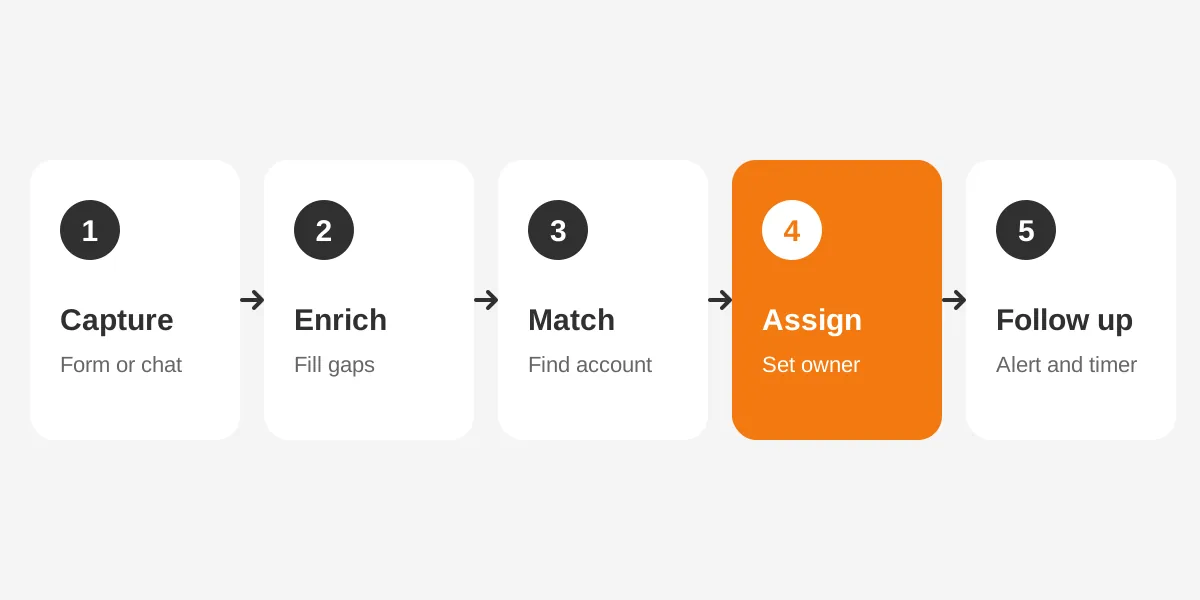
Lead routing works in five steps, from the moment a lead is created to the first follow-up task. Each step runs inside the CRM or in a routing app connected to it. The order below fits Salesforce, HubSpot and Microsoft Dynamics 365.
- Capture: a form submission, chat, import or event list creates the lead record.
- Enrich: data enrichment adds company size, industry and country to fill gaps in the form.
- Match: lead to account matching checks whether the company already exists and has an owner.
- Assign: the lead distribution rules pick an owner and set the owner field.
- Follow up: the CRM workflow alerts the owner and starts a timer for the first touch.
Steps 2 and 3 decide the quality of everything after them. Routing leads to sales reps on empty fields sends them to the default queue. Matching on a misspelled company name creates duplicate leads and a second owner for the same buyer.
Clean data is the cheapest fix. A CRM data cleansing runbook merges duplicates and standardises country and industry values. Every rule after it then becomes more accurate.
Which Lead Routing Rules Should B2B Teams Use?
B2B teams should use rules that mirror how their sales team is organised. Regional teams need territory rules, while pods split by deal size need company-size bands. The table compares the eight lead routing rules seen most often.
| Routing model | How it assigns | Best fit |
|---|---|---|
| Account-based routing | Sends the lead to the owner of the matching account | Teams with named accounts |
| Territory based lead routing | Uses country, state or postcode | Field and regional teams |
| Company size | Uses employee count or revenue bands | SMB, mid-market and enterprise splits |
| Industry or product line | Uses industry or the product the lead asked about | Specialist sellers |
| Lead score | Sends high scores to senior reps, low scores to nurture | Teams with mature lead scoring |
| Source | Uses the form, campaign or channel | Partner and event programmes |
| Round robin | Rotates leads evenly between eligible reps | Equal territories and equal reps |
| Load balancing | Sends the lead to the rep with most open capacity | Teams with uneven workloads |
Most teams combine two or three of these in a fixed order. A common lead routing strategy runs account matching first, territory second and round robin last. The first rule that matches wins, so the order is a decision the sales leader signs off.
Lead score routing depends on a working scoring model. The HubSpot lead scoring setup guide shows how points and thresholds work. They decide when a marketing qualified lead becomes a sales qualified lead. Route on the score only after it predicts closed deals.
What does a sample routing order look like?
The order below is an example for a mid-market team of eight reps. The criteria are assumed, so adjust them to the real territories and segments.
- Existing account with an owner: send the lead to that account owner.
- Partner referral form: send it to the partner manager.
- Company with 1,000 or more employees: send it to the enterprise pod.
- Country outside North America: send it to the international queue.
- Everything else: rotate it between the four mid-market reps.
- Missing country or company: send it to a review queue for enrichment.
Rule 6 is the catch-all. It keeps a bad form submission from landing on a random rep. A RevOps admin should clear that queue every business day.
Round Robin or Load Balancing: Which Is Fairer?
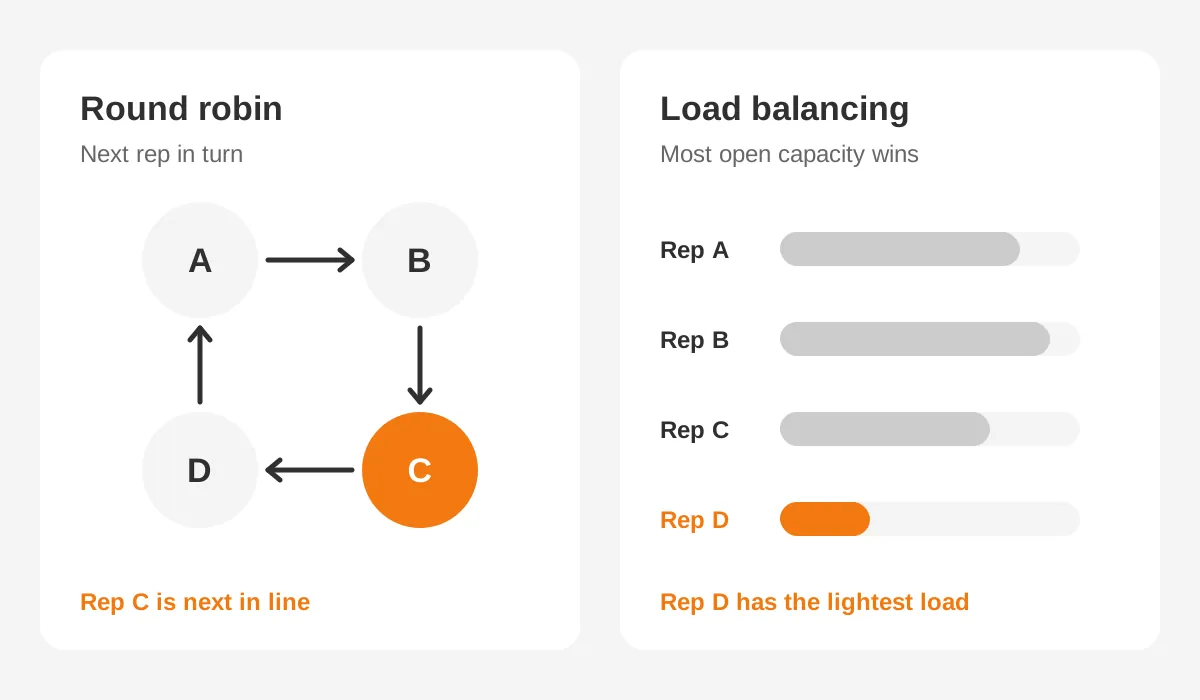
Round robin is fairer when reps have equal capacity, and load balancing is fairer when they do not. Round robin lead distribution gives each eligible rep the next lead in turn. Load balancing checks open work first and picks the rep with the most room.
Microsoft's guide to lead distribution in assignment rules defines the two precisely. Round robin gives the record to the seller who has waited longest. Load balancing gives it to the seller who can take on more work.
A weighted round robin sits between the two. It gives a senior account executive two leads for every one sent to a new sales development rep. Weights should change when a rep ramps up, goes on leave or leaves the team.
Round robin vs load balancing comes down to capacity data. If the team tracks open leads per rep, load balancing prevents overload. If it does not, round robin is simpler to explain and to audit.
Eligibility rules matter in both methods. A rep on leave, in training or at quota cap should drop out of the pool automatically. Otherwise the rotation keeps sending leads to someone who cannot work them.
How Do You Set Up Lead Routing in Salesforce?
Salesforce lead routing starts with Lead Assignment Rules, and complex cases move to Salesforce Flow. According to Salesforce's guidelines for assignment rules, only one rule of each type can be active at a time. That rule can assign leads created manually, from Web-to-Lead forms or from the Data Import Wizard.
To set up lead assignment rules in Salesforce, follow this order:
- List the routing criteria and their priority with the sales leader.
- Create one active lead assignment rule with ordered rule entries.
- Point each entry at a user or a queue, never at a person who might leave.
- Add a final catch-all entry that sends unmatched leads to a review queue.
- Test with 20 sample leads that cover every entry and edge case.
Native rules cannot rotate leads evenly or check rep availability. Teams that need round robin, lead to account matching or business hours use Flow, Apex or a routing app. Routing apps such as Chili Piper, Traction Complete and LeanData add those features on top of Salesforce.
Readability is a warning sign worth watching. A rule with 40 entries that nobody can explain is a sign the territory model needs a redesign. The CRM administration cadence guide covers who should own those changes.
Queues help when a team shares the first touch. A queue holds the lead until a member accepts it, and the accept time becomes a useful measure. Use a queue for teams, and a named user only for account owners.
How Does HubSpot Handle Lead Assignment?
HubSpot handles lead assignment through workflows and the Rotate record to owner action. HubSpot's knowledge base says the action needs Sales Hub or Service Hub Professional or Enterprise. It assigns records only to users with paid sales or service seats.
HubSpot lead routing usually combines two workflow branches. The first branch sets the contact owner from the company owner when one exists. The second branch rotates the remaining contacts between specific users or a team. Records are shared equally between the selected reps.
One limit needs a fallback plan. HubSpot states that when no eligible user exists, no owner is assigned. A workflow branch should catch those records and alert a sales manager, or the lead sits ownerless.
HubSpot also syncs owners with Salesforce in some stacks. If both systems assign owners, decide which one is the source of truth before go-live. Two systems routing the same lead produce two owners and one confused buyer.
What does a HubSpot routing workflow contain?
A typical contact-based workflow has five parts:
- Enrolment trigger: the contact submits a demo or pricing form.
- Branch one: if the associated company has an owner, copy that owner to the contact.
- Branch two: if the country is outside the sales region, assign the regional team.
- Rotation: rotate remaining contacts between the inbound reps.
- Task and alert: create a call task due in 30 minutes and notify the owner.
Test the workflow with one contact per branch before switching it on. Then check the enrolment history daily for the first week. A blank country field, for example, sends contacts into the rotation instead of the regional team.
How Do Dynamics 365 Assignment Rules Route Leads?
Dynamics 365 assignment rules route leads by matching them to a segment, then distributing them among eligible sellers. Microsoft's guide to creating and activating assignment rules says a rule can hold up to 10 conditions. Rules run in order, and the first matching rule applies.
Two settings handle capacity-aware routing in Dynamics 365. The first assigns a lead only if a seller is free within 1 to 120 hours. The second assigns based on seller capacity and leaves records unassigned when nobody has room.
Both settings need a fallback. Leads that no seller takes within the time limit are marked overdue. A view of overdue leads, reviewed each morning, keeps them from going cold.
Segments keep the rules short. A segment such as "US manufacturing leads over 500 employees" filters records once. The assignment rule then decides which sellers in that segment receive them, by round robin or load balancing.
Segments and assignment rules belong to the work assignment feature in the sales accelerator. Check the licence before designing the model, because the feature may be missing on some plans.
What Should Happen When No Rep Is Available?
When no rep is available, a fallback rule should pass the lead to the next owner within a set time. Fallback routing is the part most teams skip. It decides what happens during holidays, out of office days and after business hours.
A practical fallback ladder has four rungs:
- The assigned owner gets an alert and a first-touch deadline, such as 30 minutes.
- If the deadline passes, a reassignment rule moves the lead to the team queue.
- The queue rotates the lead to the next available rep.
- If nobody accepts within 2 hours, the sales manager gets an alert.
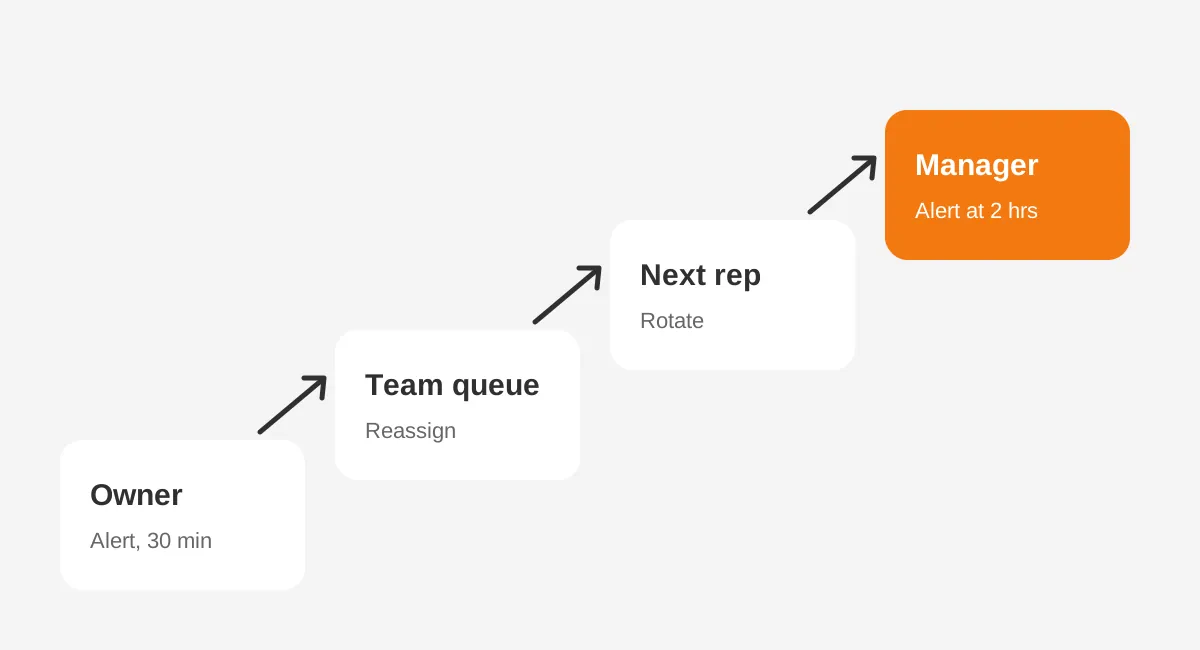
Treat those deadlines as an example rather than a benchmark. Set them from the team's service level agreement for first response. Then publish the agreement, so every rep knows the clock starts when the owner is assigned.
After-hours leads need their own decision. With no rule at all, they wait for whoever logs in first.
Some teams hold those leads until the next business day and assign them at 8:00. Others route them to a rep in another time zone. Either choice works if it is written down and tested.
Out of office handling needs the rep's status in the CRM. HubSpot can skip users marked away for leads, and Dynamics 365 reads work schedules. In Salesforce, availability usually comes from Flow or a routing app.
Where Does AI Fit in Lead Routing?
AI fits in lead routing as a scoring and matching layer that sits on top of clear rules. AI lead routing uses predicted fit, intent signals and past win rates to rank leads. The rules still decide which team and which rep receive them.
Three uses are worth testing first. A predictive score can move high-intent leads to the front of the queue. Matching models can link a lead to the right account when the email domain is unclear. Agents can draft the first reply while the owner reviews the lead.
AI needs history to learn from. A model trained on 200 closed deals will give weaker rankings than one trained on 2,000. Teams with thin data should start with rules and a simple score, then add prediction later.
The overview of Agentforce for Sales shows how Salesforce agents qualify and follow up with inbound leads. Unboxx builds these setups as part of its AI-native CRM solutions, connecting scores, routing rules and agents in one flow.
A human checkpoint still matters. An AI model can drift when the product, pricing or market changes. Review a sample of AI-routed leads each month, and compare their conversion with leads routed by rules alone. If the AI routes convert worse, return those leads to the rule path.
How Do You Measure and Audit Lead Routing?
Measure lead routing with four numbers: time to assign, time to first touch, unassigned leads and conversion by route. Time to assign should be seconds. Time to first touch is the speed to lead the buyer feels.
| Metric | What it shows | Where to find it |
|---|---|---|
| Time to assign | Whether the rules run instantly | Created date vs owner change date |
| Time to first touch | How fast owners act | Created date vs first logged call or email |
| Unassigned leads | Gaps in the rule order | Leads owned by a queue or default user |
| Reassignment rate | Wrong first owners or missed deadlines | Owner history field tracking |
| Conversion by route | Which rule produces pipeline | Route name stored on the lead |
Store the route name on each lead in a custom field. It costs one field and makes conversion by route a standard report.
A worked example with assumed figures shows the audit in practice. A team receives 600 inbound leads a month. A routing audit finds 54 leads with no owner and a median lead response time of 7 hours. Those 54 leads are 9% of inbound demand.
The fix in that example is mechanical. A catch-all rule removes the ownerless leads. An alert and a 30-minute deadline cut the median first touch. The sales pipeline then shows which route converts best.
Run the audit each quarter. Check rule order, inactive users still named in rules, and territories that changed. RevOps should own the check, because routing touches marketing, sales and data quality at once.
Which routing mistakes show up most in audits?
- Deactivated users still named in rule entries, so leads go nowhere.
- No catch-all rule, so leads with odd data stay ownerless.
- Rules that ignore existing accounts, so customers reach new sales reps.
- Round robin that counts reps on leave, so leads wait for days.
- No alert after assignment, so owners learn about leads hours later.
Each mistake has a test. Create a sample lead for every case and check who receives it. Record the result, fix the rule and run the test again after each change.
For a related example, read how Unboxx helped a team stop losing ready-to-buy customers with CRM automation.
Frequently Asked Questions
How is lead routing different from lead scoring?
The difference between lead routing and lead scoring is ownership versus readiness. Scoring ranks how ready a lead is to buy, while routing decides who owns it. Routing reads that score, along with territory and account data, and assigns the owner. Most teams build scoring first.
Who should own lead routing in a sales team?
Revenue operations should own lead routing, with sign-off from the sales leader. RevOps maintains the rules, users and queues in the CRM. The sales leader approves the territory and priority order. Marketing should join quarterly reviews, because form fields and campaigns feed every routing rule.
When should lead routing move from manual to automated?
A company should move from manual to automated lead routing once two reps share inbound leads. Manual assignment works for a single seller. With two or more, manual routing creates delays, uneven workloads and ownerless leads. Automated lead routing also gives the response time data managers need.
How fast should a routed lead get a response?
A routed lead should get its first response within minutes during business hours. Drift's 2024 research found a 5-minute wait raised the risk of a visitor leaving tenfold. Set a written service level agreement, start the timer at assignment, and alert managers when it passes.
Can lead routing handle existing customers differently?
Yes, lead routing can send existing customers to their account owner or customer success manager. The rule checks whether the lead's company matches an account with an owner. If it does, that owner receives the lead. If not, territory or round robin rules decide the owner.
How Can Unboxx Help Fix Your Lead Routing?
Unboxx designs and rebuilds lead routing in Salesforce, HubSpot and Microsoft Dynamics 365. The work covers routing rules, fallback ladders, data enrichment and AI scoring, tested against real leads before go-live.
If leads are waiting hours for an owner, the routing model is costing pipeline. Book a CRM consultation with Unboxx to audit the current lead routing setup and get a fix plan.
Let's create something out of this world together.
Have a project in mind? Contact us for expert design and development solutions. Let's discuss how we can help grow your business.
Ready to Unboxx Your Potential?
Build smarter systems. Automate faster. Scale confidently.