
Best CRM for Small Manufacturing Business: How to Choose

A 25-person machine shop can lose a $40,000 reorder because the quote sat in one estimator's inbox for nine days. The owner rarely blames the CRM. The usual culprit is scattered data. Quotes, customer history and order status live in three places, and nobody sees the whole account.
The best CRM for small manufacturing business teams links quotes, repeat orders and the ERP without a second admin hire. For most shops, the shortlist is HubSpot, Salesforce, Dynamics 365 or Odoo. This guide shows which fits which manufacturer, what each costs and how to choose.
Key Takeaways
- The best CRM for small manufacturing business teams depends on the ERP already in place, quote complexity and distributor sales.
- List prices run from under $25 to $105 per user each month, and setup often costs more than year-one licences.
- Pick the CRM after mapping the quote-to-order flow, because the ERP link decides most of the project's cost and risk.
What Is the Best CRM for Small Manufacturing Business?
There is no single best CRM for small manufacturing business owners, but four platforms cover nearly every case. HubSpot suits simple direct sales. Dynamics 365 suits shops that run Microsoft tools. Salesforce suits complex quoting and dealer channels. Odoo suits makers who want CRM, inventory and production in one system.
The right answer depends on three facts about the business. First, which ERP or accounting system holds orders and stock. Second, how complex a quote is, from a simple price list to an engineered bill of materials. Third, whether sales go direct or through distributors and reps.
A shop that answers those three questions can usually cut the list to two platforms in one meeting. The rest of this guide gives the criteria, prices and steps to finish the choice.
It also shows where each candidate for the best CRM for small manufacturing business teams breaks down. That way the shortlist holds up under a demo. A short list of two beats a long list of six, because each demo costs a week of sales time.
Why Do Small Manufacturers Need a Different CRM?
Small manufacturers sell in a way generic sales tools were not built for. Deals involve an RFQ, engineering review, a quote with lead times and then repeat orders for years. A CRM for manufacturers has to track the account and its reorder rhythm, not only a single closed deal.
Most US manufacturers are small firms. That makes the search for the best CRM for small manufacturing business teams a common one. According to the National Association of Manufacturers (2025), 239,265 manufacturing firms operated in 2022.
All but 4,177 had fewer than 500 employees. About three-quarters had fewer than 20 employees.
That size profile shapes the CRM decision. A 20-person firm rarely has a full-time CRM admin.
So the best CRM for small manufacturing business teams must run on templates, sensible defaults and a light integration. Custom code that only a consultant can change is a poor fit. Unboxx sets up CRM for manufacturers on that principle.
The sales cycle adds a second pressure. CRM for manufacturing companies of this size must reflect repeat buying.
One customer may order a part every six weeks for five years. Reorder reminders, account health and lead times matter more here than cold-lead scoring. Generic small business CRM tools often log each order as a new deal, and the pattern disappears.
Which 7 Features Should a Manufacturing CRM Have?
Whichever platform wins, the best CRM for small manufacturing business use covers seven features. General sales tools often sell them as add-ons. Use this list to score every demo, and ask each vendor to show the feature with your own sample data.
- Quote management that handles product variants, volume breaks and lead times, ideally with configure price quote (CPQ) rules.
- ERP integration that syncs customers, items, prices, orders and invoices in both directions.
- Account management with order history, open quotes and service cases on one record.
- Distributor management, including a partner portal for reps and dealers to register deals.
- Sales forecasting by account and product, not only by open opportunity.
- Reorder reminders based on each customer's normal buying interval.
- Reports that show quote win rate, quote turnaround time and margin by customer.
Two features cause most failed projects. The first is quoting. A shop that builds quotes from a bill of materials needs CPQ rules or an ERP-driven quote. A basic quote template will not cope. The second is the ERP link, covered in its own section below.
Trade shows still drive new accounts, so a CRM for industrial companies needs fast lead capture. A follow-up sequence turns a stack of badge scans into a sales pipeline.
HubSpot and Salesforce both offer mobile apps for capturing leads at the booth. Odoo handles follow-up through its CRM and Email Marketing apps.
Test these features with a real account, not a slide. Manufacturing CRM software often looks alike in a feature grid. The difference shows when a rep reorders a part for a customer with three ship-to addresses.
Generic sales software for manufacturers covers pipelines and email well. The gap is usually the item catalogue. CRM software for manufacturers must read item numbers, units of measure and price tiers from the ERP. Otherwise reps retype them.
A good CRM system for manufacturing also respects the shop floor. Sales should see promised ship dates without calling production. That is why picking the best CRM for small manufacturing business use is mostly a data decision.
How Do HubSpot, Salesforce, Dynamics 365 and Odoo Compare?
The four platforms differ most on quoting, ERP fit and price. Any of them can be the best CRM for small manufacturing business pick. The table below compares them on the criteria a small manufacturer weighs first. Prices are list prices per user per month, as published in 2026.
| Factor | HubSpot Sales Hub | Salesforce Sales Cloud | Dynamics 365 Sales | Odoo |
|---|---|---|---|---|
| Entry paid plan | Starter, $20 or less per seat | Starter Suite, $25 | Professional, $65 | Standard, about $24.90 |
| Plan most shops need | Professional, $90 to $100 per seat | Pro Suite, $100 | Enterprise, $105 | Standard or Custom |
| Quoting | Quotes standard, quote workflows in Enterprise | Quoting in Pro Suite, CPQ in Revenue Cloud | Quotes and products standard | Quotes tied to stock and production |
| ERP fit | Connectors to NetSuite and QuickBooks | Connectors and middleware to any ERP | Native fit with Business Central | CRM and ERP in one database |
| Distributor sales | No native partner portal | Partner Relationship Management add-on | Partner portals built on Power Pages | Portal for customers and resellers |
| Best for | Simple direct sales, marketing-led growth | Complex quotes and dealer channels | Microsoft-based shops | Makers wanting one system |
Prices come from each vendor's pricing page or a dated partner source. HubSpot's Sales Hub pricing page lists Professional at $90 to $100 per seat monthly. A one-time $1,500 onboarding fee applies. Salesforce's Sales Cloud pricing page lists Pro Suite at $100 per user each month, billed annually.
Microsoft partner Encore Business Solutions (2026) lists Dynamics 365 Sales Professional at $65 per user monthly. Enterprise lists at $105. ERP Research (2026) lists Odoo Standard at about $24.90 per user each month on a promotional rate, renewing near $31.10.
Which Platform Fits Which Kind of Manufacturer?
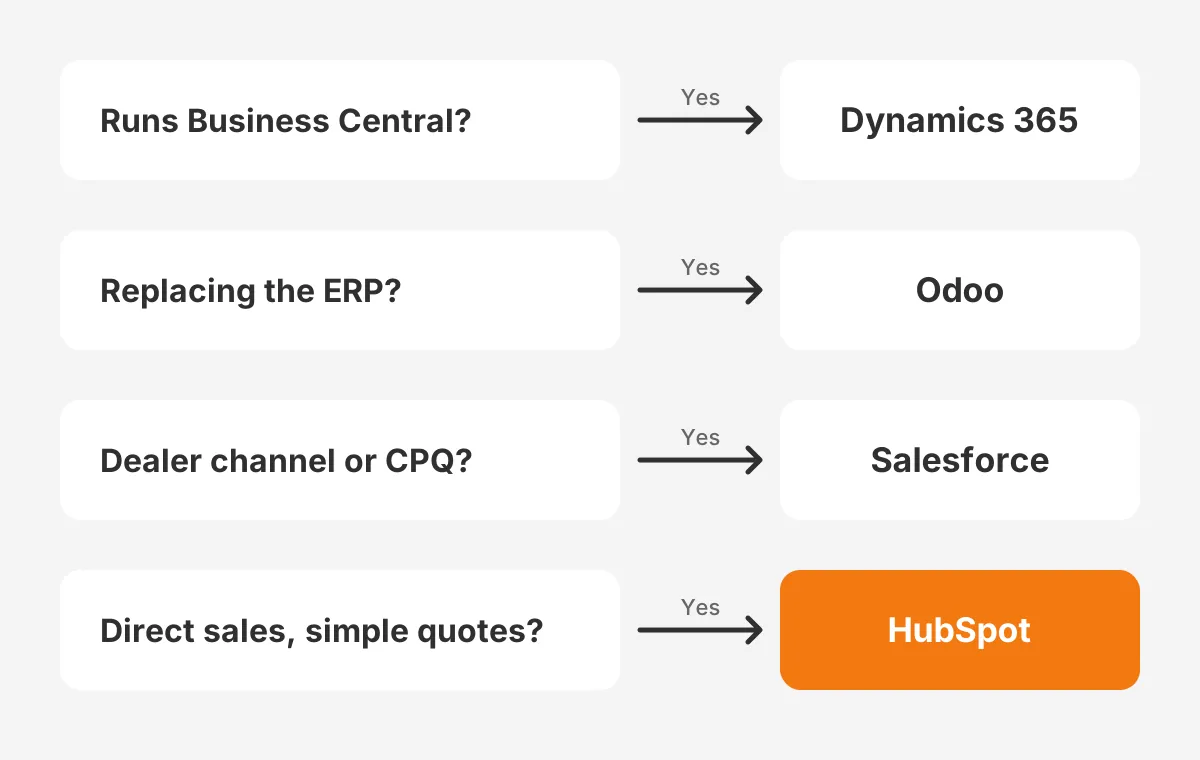
Each platform fits a distinct manufacturer profile, so start with the profile and not the feature list. Once the profile is clear, the best CRM for small manufacturing business use is usually obvious. The decision map below shows the first question to ask, then the platform it usually points to.
When Does HubSpot Fit a Small Manufacturer?
HubSpot fits a manufacturer with direct sales, simple quotes and a marketing team that runs email and content.
For that shop, HubSpot is often the best CRM for small manufacturing business teams pick first. Its strength is speed to value. A 10-person sales team can run pipelines, sequences and quotes within weeks on the Professional plan.
The limits show with complex quoting and dealer channels. HubSpot for manufacturing works best when the ERP owns pricing and HubSpot owns the relationship. Unboxx has written about marketing automation for manufacturing on HubSpot, which suits this profile.
When Does Salesforce Fit a Small Manufacturer?
Salesforce fits a manufacturer with engineered quotes, dealer networks or long-term supply contracts.
Salesforce for manufacturing goes furthest through Manufacturing Cloud, which adds sales agreements and account-based forecasting. These tools track planned volumes against actual orders for each customer. Among dealer-led makers, Salesforce is often the best CRM for small manufacturing business teams grow into.
The cost is admin effort. Is Salesforce good for small business teams without an admin? Usually only with a partner on retainer. Unboxx works as a Salesforce Manufacturing Cloud partner for shops that need sales agreements without a full-time admin.
When Does Dynamics 365 Fit a Small Manufacturer?
Dynamics 365 for manufacturing fits a shop that already runs Microsoft 365 and Business Central. Contacts, items and orders share one data platform. Reps work in Outlook and Teams without switching apps.
In a Microsoft shop, Dynamics 365 is usually the best CRM for small manufacturing business teams adopt fastest.
The Professional plan covers leads, products and quotes. Forecasting and sales goals need the Enterprise plan. Copilot for Sales is a separate $50 licence, according to Encore Business Solutions.
Is Odoo the Best CRM for Small Manufacturing Business?
Odoo is the best CRM for small manufacturing business owners who want sales, inventory and production in one database. Its CRM, Sales, Inventory and Manufacturing apps share records. A quote can check stock, and a confirmed order can create a manufacturing order.
That single database removes the integration project, which is the biggest risk in the other three options.
Is Odoo CRM good on its own? It covers pipelines, quotes and activities well, but its sales features are lighter than HubSpot or Salesforce. Odoo for manufacturing earns its place through the shared bill of materials and stock data.
The trade-off is change. Moving to Odoo often means replacing QuickBooks or the current ERP too. ERP Research (2026) prices a typical 10 to 30 user Odoo project at $20,000 to $75,000. That scope covers ERP, CRM and ecommerce. Its timeline estimate is one to four months.
So Odoo is the best CRM for small manufacturing business teams only when an ERP replacement is already planned. If the ERP stays, the comparison shifts to Odoo vs HubSpot and the other CRM-only options.
How Much Does a Manufacturing CRM Cost?
A manufacturing CRM costs licences plus setup, and setup is usually the larger number in year one. Licence costs are easy to compare. Setup depends on quoting rules, the ERP link and data cleanup.
Take an example 12-seat manufacturer on annual billing, using the list prices above. These are assumed seat counts for illustration, not a quote.
- HubSpot Sales Hub Professional: 12 seats at $90 is $12,960 a year, plus the $1,500 onboarding fee.
- Salesforce Pro Suite: 12 users at $100 is $14,400 a year.
- Dynamics 365 Sales Professional: 12 users at $65 is $9,360 a year.
- Odoo Standard: 12 users at $24.90 is $3,585.60 a year on the promotional rate, covering all Odoo apps.
Licences are only part of the bill. ERP integration, data migration, quote templates and training add the rest. Unboxx breaks these lines down in its guide to CRM implementation cost, including what drives a budget up.
Budget for the best CRM for small manufacturing business teams choose over three years, not one. Year two and three add support hours, new users and connector fees. A partner retainer of four to ten hours a month is common for teams without an admin.
A useful rule: if setup quotes exceed three years of licences, the scope probably includes custom quoting or ERP work. That may be right for the business. It should still be a conscious choice, not a surprise in month three.
Which CRM Mistakes Should Small Manufacturers Avoid?
The five costliest mistakes come from choosing software before mapping the work. Each one below appears in small manufacturer CRM projects of every size, and each has a simple prevention.
Copying a Retail or SaaS Sales Setup
A B2B manufacturing CRM tracks accounts that reorder, not one-time buyers. Copying a SaaS pipeline with monthly quotas hides repeat revenue. Set up a separate pipeline or record type for reorders and another for new projects.
Letting Two Systems Own Prices
Prices should live in one place, normally the ERP. When reps edit prices in the CRM, quotes and invoices drift apart. Even the best CRM for small manufacturing business needs locked price fields that sync on a schedule.
Ignoring Job Shops and Contract Work
A CRM for job shops needs quote versions, because a customer may request four revisions of one RFQ. A CRM for contract manufacturers needs project records that hold drawings, tolerances and approval dates. Check that the platform can store both.
Skipping Distributor and Rep Data
A CRM for distributors and outside reps must show which partner owns which account. Without that, two reps quote the same customer at different prices. A partner portal or a simple territory field prevents most conflicts.
Overbuilding in Phase One
A CRM for machine shops can start with accounts, quotes and reorder reminders. CPQ rules, forecasting and portals can follow in phase two. A smaller first phase gets reps using the system within weeks.
Each mistake has the same root. The team shortlisted best CRM for small manufacturing business candidates from a feature list. The gaps then appeared in month three. A CRM platform for manufacturers should be chosen against the shop's own workflow.
How Should the CRM Connect to Your ERP?
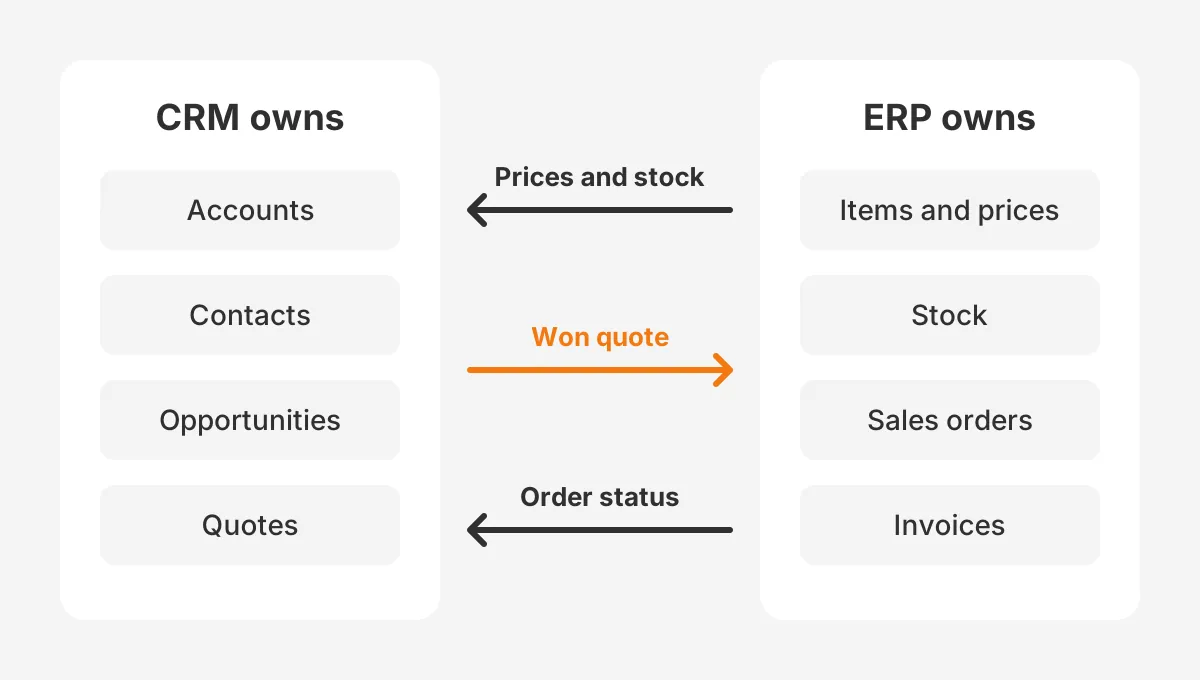
The CRM should own customers, contacts and opportunities, and the ERP should own items, prices, stock and invoices. Each record needs one owner. Two systems editing the same price list is the most common cause of wrong quotes.
Sync timing matters too. Prices and stock can sync every 15 minutes or nightly, but order status should update within the hour. Write these rules down before building any connector. They matter more than which best CRM for small manufacturing business option wins.
The quote-to-order flow shows where each record travels. A rep builds the quote in the CRM from ERP prices. The won quote becomes a sales order in the ERP. Order status, shipments and invoices flow back to the account record.
Which CRM integrates with ERP systems best? Dynamics 365 with Business Central and Odoo with itself need the least integration work. HubSpot has connectors for NetSuite and QuickBooks. Salesforce connects to almost any ERP through middleware, at a higher setup cost.
The CRM vs ERP for manufacturing question often comes up here. The two do different jobs and rarely replace each other. Unboxx explains what to sync and how to plan it in its CRM ERP integration guide.
How Do You Choose a CRM in 6 Steps?
To choose the best CRM for small manufacturing business teams need, map the sales process first. Then score vendors against it. This six-step method suits a small team and fits into about six weeks.
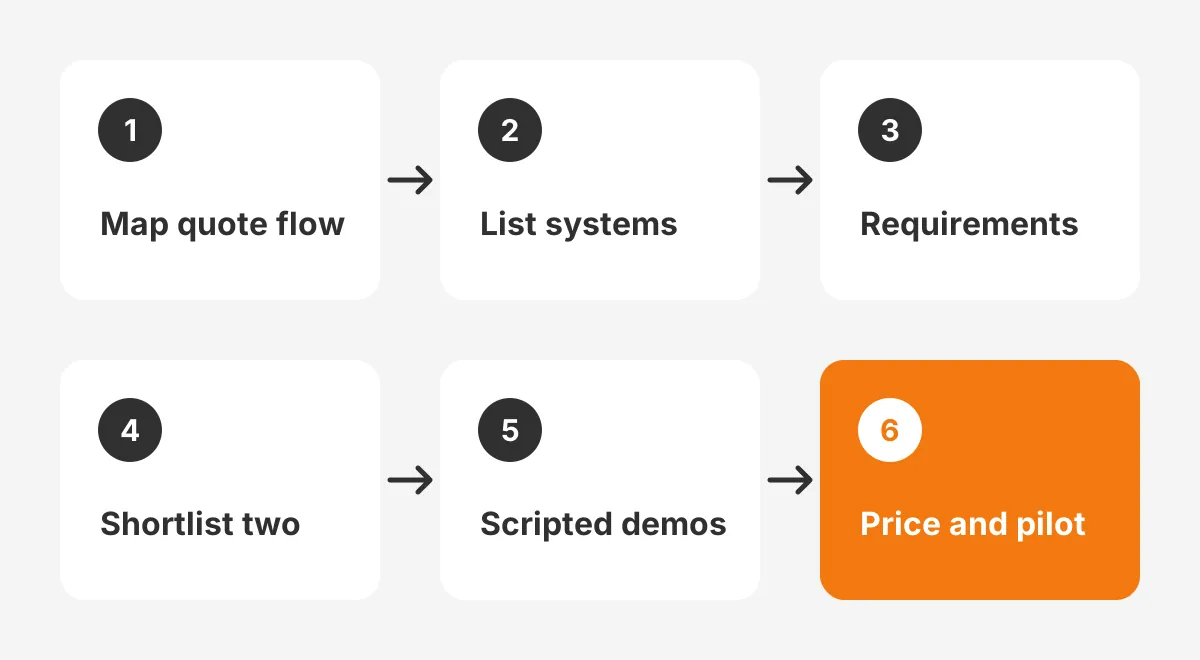
- Map the quote-to-order flow, from RFQ to invoice, and mark every manual handoff.
- List the ERP, accounting and email systems the CRM must connect to.
- Write ten must-have requirements, using the seven features above as a base.
- Shortlist two platforms using the decision map and the comparison table.
- Run scripted demos with your own customers, items and one real quote.
- Price licences, setup and three years of support, then sign with a 30-day pilot.
Step five matters most. A vendor demo with sample data hides the hard parts. Ask each vendor to build one real quote with lead times and volume breaks. Then push it to a test ERP.
How to choose a CRM for manufacturing without bias? Score each requirement from one to five and weight the ERP link and quoting highest. The Unboxx CRM selection process includes a scoring sheet built on the same idea.
Avoid choosing on licence price alone. The cheapest option can cost the most once integration and workarounds are added. In practice, the best CRM for small manufacturing business owners want costs least over three years.
Frequently Asked Questions
Does a manufacturer with an ERP need a CRM?
Yes, in most cases. An ERP records orders, stock and invoices, but rarely tracks quotes, contacts or lost deals well. A CRM fills that gap before an order exists. The best CRM for small manufacturing business links to that ERP rather than replacing it.
Who should own the CRM in a small factory?
The sales manager should own the CRM, with one named admin for settings and data quality. In a 20-person firm, that admin role often takes four to six hours a week. Even the best CRM for small manufacturing business teams buy fails without a clear owner.
How long does a manufacturing CRM implementation take?
A small manufacturing CRM implementation usually takes six to sixteen weeks. A basic HubSpot or Dynamics 365 setup with clean data sits at the short end. Projects with CPQ rules, distributor portals or a two-way ERP integration sit at the long end, sometimes longer.
Can a free CRM work for a small manufacturer?
A free CRM can work for one or two sellers with simple quotes. HubSpot's free plan supports up to two users. Free plans usually lack quote automation, ERP connectors and forecasting. A free tool rarely stays the best CRM for small manufacturing business teams need for long.
When should a shop move off spreadsheets?
A manufacturer should move off spreadsheets to a CRM when quotes go missing. Other signs are follow-ups that depend on memory, or two people quoting one customer differently. Another sign is three or more sellers sharing one file. Version conflicts then cost more than a licence.
What Should You Do After Building a Shortlist?
Book scripted demos with your two shortlisted vendors and test one real quote end to end. That test shows which option is the best CRM for small manufacturing business needs like yours. Unboxx prepares these demo scripts with manufacturers before any contract is signed.
If the ERP link or quoting rules look risky, get a second opinion before signing. Schedule a consultation with Unboxx to review the shortlist, the quote flow and the integration plan.
Let's create something out of this world together.
Have a project in mind? Contact us for expert design and development solutions. Let's discuss how we can help grow your business.
Ready to Unboxx Your Potential?
Build smarter systems. Automate faster. Scale confidently.