
A sales team asks for one new field, then an approval step, then a second pipeline. Two years later, nobody knows which rules still run. Validity's State of CRM Data Management 2025 report surveyed 602 CRM users. 76% said less than half of their CRM data is accurate and complete.
CRM customization means changing a CRM platform beyond its standard settings to match how a business sells and serves. Planned well, it raises adoption and data quality. Done one request at a time, it creates technical debt. This guide covers what to change, what to skip and the cost.
Key Takeaways
- Configure with standard settings first, and write custom code only when a written requirement cannot be met any other way.
- Salesforce, HubSpot and Dynamics 365 each set limits on custom fields, custom objects and API calls.
- Every customization needs an owner, a sandbox test and a place in the release calendar.
What Is CRM Customization?
CRM customization is any change that makes a CRM platform fit a specific business process, data model or user role. It covers new fields, objects, page layouts, automation rules, permissions, dashboards and integrations. Some changes use point-and-click tools. Others need code written by a developer.
A good CRM customization request starts with a business problem. "Reps cannot see open invoices" describes the problem. "Add an invoice tab" jumps to one answer, which may be the wrong one.
The aim is a CRM that records what the business does every day. Standard data models assume a generic sales cycle of leads, contacts, deals and cases. Firms with dealer territories, engagement letters or service contracts add the fields, objects and steps the generic model lacks.
CRM customization is different from building software from scratch. A customized CRM still runs on the vendor's platform, security model and upgrade schedule. A custom-built CRM is a separate application that the business owns and maintains. The difference decides who fixes problems and who pays for upgrades.
CRM customization usually happens in two waves. The first comes during implementation, when the team maps its sales and service process into the platform. The second comes after launch, as users find gaps and managers ask for new reports.
The term also covers the user experience. A customized CRM shows each role only the fields, buttons and reports that role uses. Sales reps see deals and tasks. Finance sees invoices and credit limits. Support sees cases and service levels. Less clutter means fewer skipped fields and cleaner data.
How Does CRM Customization Differ From Configuration?
CRM configuration changes settings the vendor built for change. CRM customization adds logic or structure the vendor did not supply. Configuration covers picklist values, page layouts, validation rules and standard reports. Customization covers custom objects, code, custom user interface components and bespoke integrations.
The line matters because each level carries a different cost of ownership. Configuration survives vendor upgrades with little testing. Code must be tested at every release and maintained by someone who understands it. Custom CRM development carries the full cost of hosting, security and support.
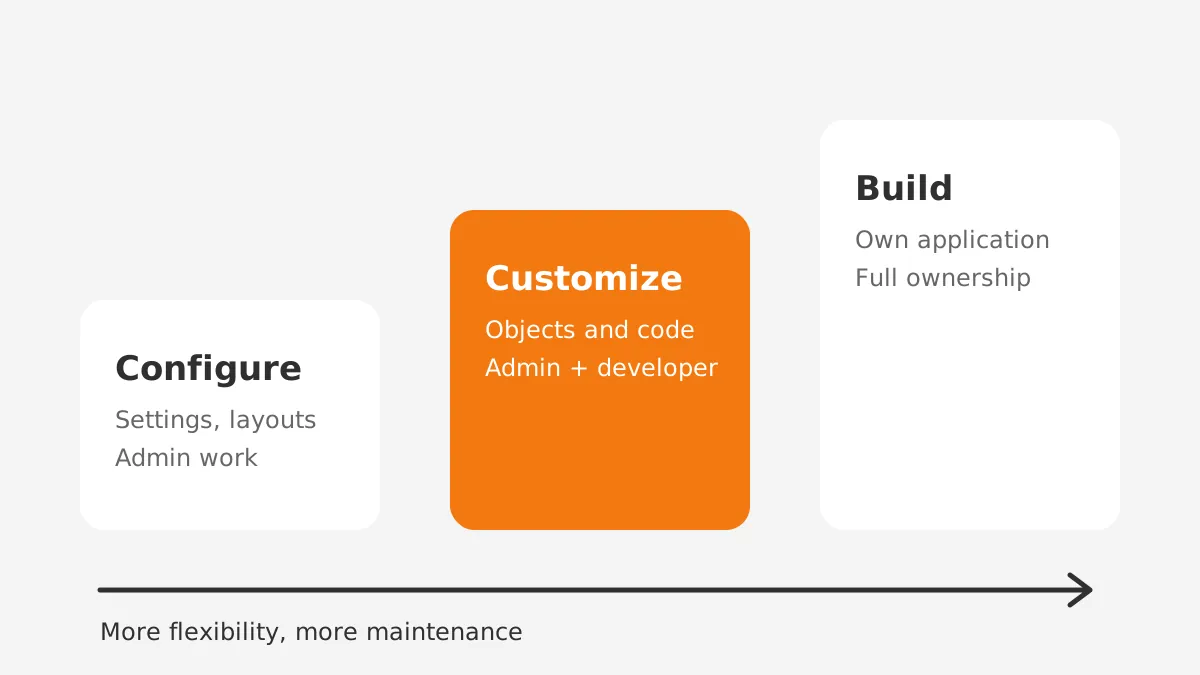
The table below compares the three levels across the factors a budget owner asks about.
| Factor | Configuration | Customization | Custom build |
|---|---|---|---|
| Typical changes | Fields, layouts, picklists, reports | Custom objects, code, custom components | A new application and database |
| Who does the work | CRM admin | Admin plus developer | Development team |
| Upgrade risk | Low | Medium, needs regression tests | Owned fully by the business |
| Speed to change | Hours to days | Days to weeks | Weeks to months |
| Best fit | Standard sales and service processes | Unique steps on a standard platform | Processes no platform supports |
A simple example shows the difference. Adding a "Contract Value" field to the opportunity is configuration. Writing Apex code that splits that value across three revenue schedules is customization. Building a separate contract system outside the CRM is a custom build.
Most mid-sized B2B teams need configuration plus a small, documented layer of CRM customization. A full custom build makes sense only when no platform supports the core process. The custom CRM development route suits that rare case.
What Can You Customize in a CRM?
Most CRM platforms let you customize seven parts. They are the data model, layouts, automation, permissions, reporting, integrations and the user interface. Each part has a standard option and a custom option.
- Data model: custom fields hold extra attributes, and custom objects hold new record types such as contracts or installed assets.
- Page layouts: each role sees the fields it uses, in the order it works.
- Automation rules: workflows assign leads, send alerts, update records and create tasks.
- Validation rules: the CRM blocks a save when required data is missing or wrong.
- Permissions: profiles and permission sets decide who can read, edit or delete each record.
- Dashboards and reports: CRM reporting shows pipeline, forecast and service metrics per team.
- Integrations: APIs connect the CRM to ERP, billing, email and support tools.
The data model comes first because every other layer depends on it. A field added without a definition gets filled in three different ways within a month.
Write the field name, its purpose, its allowed values and its owner before anyone creates it. A short CRM requirements document is the right place for those definitions.
Treat permissions with the same discipline. Grant access by role through permission sets rather than one-off changes to single users. A role-based model stays readable as the team grows, and audits take minutes instead of days.
CRM workflow customization is the second most common request. Lead routing, quote approvals and renewal reminders all live here. Keep each workflow to one trigger and one outcome. Long chains of rules are hard to test and harder to debug.
What Are Common CRM Customization Examples?
Common CRM customization examples include custom objects for contracts, approval flows for discounts and role-based layouts for service teams. The right examples depend on the industry and the sales model.
Manufacturers and distributors
Manufacturers often add an installed-asset object linked to each account. Service reps then see serial numbers, warranty dates and past cases on one screen. Distributors add dealer price lists and territory fields, so quotes follow the right price and the right rep.
Professional services and accounting firms
Accounting firms add engagement records with tax year, service type and partner sign-off. A validation rule blocks a new engagement until the conflict check field is complete. Consulting firms add project stages that start when a deal closes, which hands work from sales to delivery.
SaaS companies
SaaS teams add subscription fields such as plan, renewal date and seat count. An automation rule creates a renewal task 90 days before each renewal date. A health score field, fed from product usage data, flags accounts that need attention.
Nonprofits and clinics
Nonprofits add donation, grant and volunteer objects, and track gift history by campaign. Clinics add appointment and recall fields, with strict permissions on patient details. In each case, the change reflects a record type the standard CRM does not hold.
How Does Customization Work in Salesforce, HubSpot and Dynamics?
Salesforce, HubSpot and Microsoft Dynamics 365 all support CRM customization, but each sets its own tools and limits. Knowing the limits before design avoids rework later.
Salesforce offers declarative tools first. Admin.salesforce.com tells admins to use low-code tools to customize a Salesforce org. Salesforce Flow handles most automation. Apex code and Lightning Web Components cover what Flow cannot.
According to Salesforce's custom field allocation documentation, Enterprise Edition allows 500 custom fields per object. Unlimited Edition allows 800.
The same page allows up to 400 more fields on Enterprise from certified AppExchange managed packages. An org near those limits usually has a data model problem rather than a shortage of fields.
HubSpot customization centres on custom properties, workflows and custom objects. HubSpot's custom objects guide lists Enterprise subscriptions only. It also states that limits on custom objects and properties depend on the subscription. Teams on Professional plans must model new record types with standard objects and properties.
Dynamics 365 customization runs through Power Apps and model-driven apps. Changes travel between environments in solutions. Microsoft's solution concepts guide says unmanaged solutions are developed and managed solutions are deployed. Components inside a managed solution cannot be edited directly, which protects production from ad hoc changes.
| Platform | Low-code tools | Code options | Limit to check first |
|---|---|---|---|
| Salesforce | Flow, Lightning App Builder, validation rules | Apex, Lightning Web Components | 500 custom fields per object on Enterprise |
| HubSpot | Custom properties, workflows | APIs, UI extensions | Custom objects need an Enterprise plan |
| Dynamics 365 | Power Apps, model-driven apps, Power Automate | Plug-ins, PCF controls | Changes move in managed solutions |
Integrations sit across all three platforms. Each one uses APIs with daily call limits and rate limits. A sync that writes on every field change can hit those limits during busy periods. Batch updates and change-only syncs keep traffic within plan limits.
Odoo follows a similar pattern. Odoo Studio handles fields and views without code, and Python modules handle deeper logic. Whatever the platform, check the limits page before the design workshop.
Why Do Companies Need CRM Customization?
Companies need CRM customization when the standard data model or process cannot record how they sell, deliver or bill. Without it, users keep side spreadsheets and the CRM loses its value as the single record.
The cost of poor fit shows up in data. In Validity's 2025 survey, 37% of CRM users reported losing revenue from poor data quality. Fields that match real work get filled in. Fields that make no sense get skipped or filled with junk.
Four benefits of CRM customization come up in most B2B projects:
- Higher user adoption, because each role sees a screen built for its tasks.
- Cleaner data, because validation rules stop bad entries at the source.
- Faster cycles, because automation handles routing, approvals and reminders.
- Better reporting, because the data model matches the questions leaders ask.
Customization also supports compliance. Clinics restrict patient fields to clinical roles. Financial firms log who changed a client's risk rating and when. These controls come from field-level security, audit history and validation rules set up for the business.
Reporting gives a measurable case. A sales director wants win rates by product line. If product line sits in a free-text field, the report is useless. A picklist with fixed values makes the report possible from the first closed deal.
What Are the Risks of Over-Customizing a CRM?
Over-customization creates technical debt: logic that nobody documents, nobody owns and everybody fears to change. It shows up as slow pages, failed upgrades and automation that fires twice.
Vendors ship updates on a fixed schedule. Microsoft's release documentation states that Power Platform has two major releases each year, in April and October. Salesforce ships seasonal releases, such as Winter '27. Every custom component must be tested against each release.
Five warning signs point to over-customization:
- Fields that no report or automation uses.
- Two or more automation tools acting on the same object.
- Custom code that copies a feature the vendor now ships.
- No written owner for each object and workflow.
- Upgrade testing that takes longer than the release window allows.
Speed suffers next. Each trigger, flow and validation rule runs when a record saves. Stack enough of them on one object and saves slow down for every user. Integrations that call the CRM on each change add API load as well.
Access rules drift over time. Custom objects created in a hurry often get broad access. A quarterly permission review catches records that the wrong roles can see or edit.
A CRM audit finds these problems and ranks the fixes. Removing unused fields and merging duplicate workflows often cuts page load times and admin effort. A Salesforce optimization project applies the same cleanup to a mature Salesforce org.
When Should You Customize Instead of Configure?
Customize only when a documented requirement fails three tests. Standard settings cannot meet it. No AppExchange or marketplace app meets it. A process change cannot remove it. This decision rule keeps CRM customization small and deliberate.
Start with the standard feature. Ask whether a picklist, layout or validation rule solves the request. Next, check the vendor's app marketplace for a supported package. Then ask whether the business process itself should change to fit the platform.
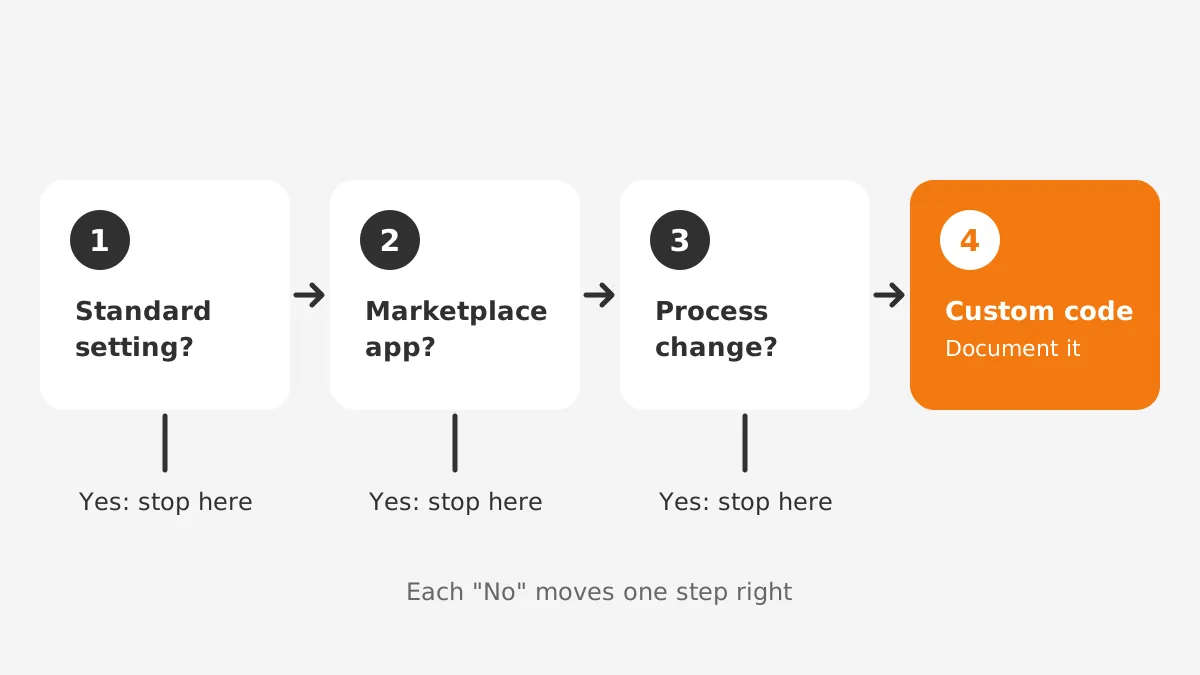
When all three tests fail, write the custom solution and record it. The record lists the requirement, the business owner, the components changed and the test cases. That record turns a one-off fix into a maintained feature.
Here is the rule applied to one request. Finance asks for a credit-limit check before an order is approved. A validation rule cannot read the ERP, so standard settings fail. A marketplace connector syncs credit limits nightly, which meets the need without new code. Customization stops at configuration.
Wait before large changes where possible. Run the standard CRM for one full sales cycle first. Real usage reveals which gaps are real and which were assumptions from the design workshop.
How Much Does CRM Customization Cost?
CRM customization cost depends on four drivers. They are the number of changes, the share needing code, the integrations and release testing. Licence tier matters too, because some features exist only on higher plans.
The worked example below uses assumed figures to show the method, not market rates. Assume a partner rate of $150 an hour. Assume 20 configuration changes at 2 hours each. Add 4 coded features at 24 hours each and one integration at 60 hours.
| Line item (example only) | Hours | Cost at $150/hour |
|---|---|---|
| 20 configuration changes | 40 | $6,000 |
| 4 coded features | 96 | $14,400 |
| 1 integration | 60 | $9,000 |
| Testing and release (20% of build) | 39 | $5,850 |
| Total | 235 | $35,250 |
The same method works for any quote. List each change, mark it as configuration, code or integration, and price each group on its own. A partner quote that does not separate the three groups hides the long-term cost of code.
The example shows where money goes. Code and integrations take most of the budget, even when configuration makes up most of the change list. Each coded feature also adds yearly test hours at every release.
Licence costs belong in the same budget. HubSpot custom objects require an Enterprise subscription, so a Professional customer pays for an upgrade before any build starts. Salesforce Unlimited Edition raises field limits, but the licence price rises with it. Check the plan before pricing the work.
Plan for ongoing CRM administration as well. An admin keeps fields, users and automation in order between projects. The CRM administration guide covers what that role owns.
How Do You Run a CRM Customization Project?
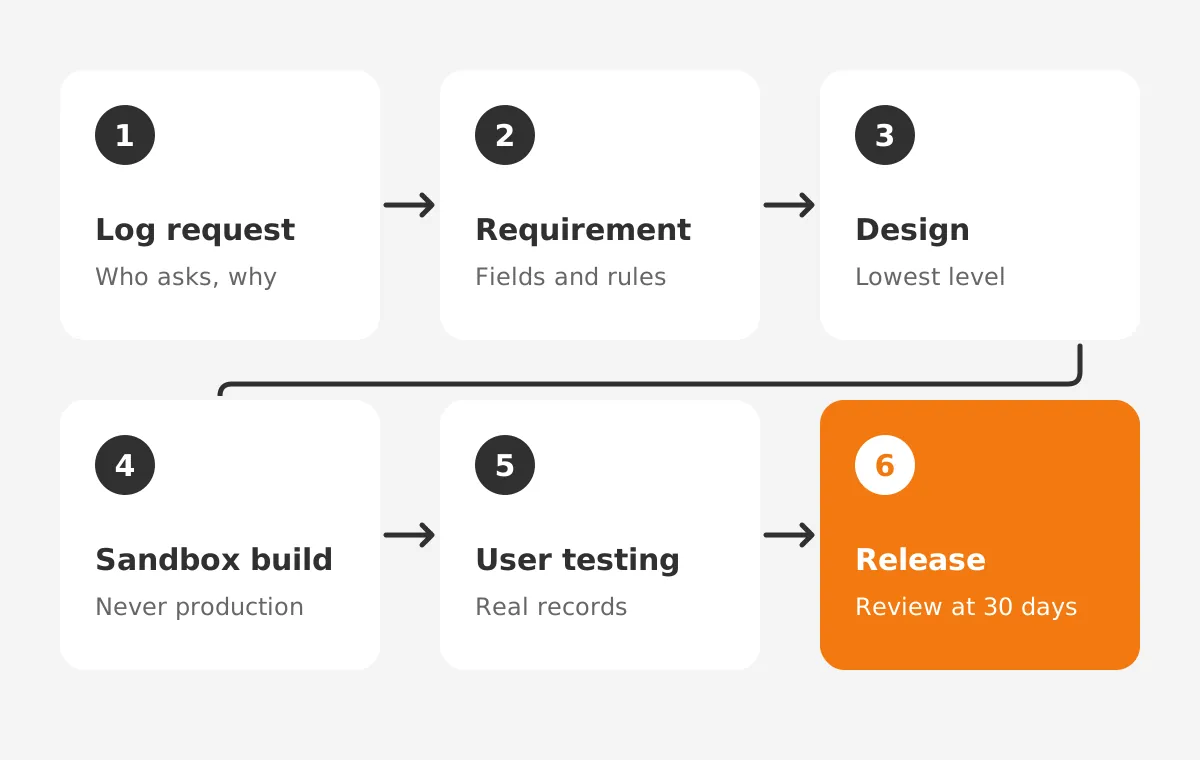
Run a CRM customization project in six stages, each with one owner and one output. The order below keeps code out of production until users have tested it:
- Log every request with the person asking and the problem it solves.
- Write the requirement, including fields, rules and the report it feeds.
- Design the change at the lowest level that works: configure, then app, then code.
- Build in a sandbox, never in production.
- Test with real users and real sample records before sign-off.
- Release on a set date, then review usage after 30 days.
Write the documentation while you build. Each custom object, field and workflow gets a description inside the CRM. A change log records the date, the owner and the reason. New admins can then read why the system works the way it does.
Test cases need the same rigour. Write test cases from the requirement, not from the build. Include a record that should pass, a record that should fail and a record with missing data. Repeat the same cases in the sandbox before every vendor release.
Governance keeps the process honest. A small change board, often the CRM admin, a sales lead and a finance lead, approves each request. It meets on a fixed cycle and rejects changes without a named owner.
An experienced partner shortens the learning curve. Unboxx's CRM consulting services cover design, CRM customization and release planning on Salesforce, HubSpot, Dynamics 365 and Odoo. For Salesforce teams, the Salesforce CRM services page lists the customization work in detail.
Frequently Asked Questions
How long does CRM customization take?
Configuration changes take hours to two or three days. As a planning range, a coded feature with tests takes one to three weeks. A larger CRM customization project with integrations runs six to twelve weeks. Timelines grow when requirements are unclear, so finish the requirements document before any sandbox build.
Should you customize a CRM before using it?
Configure the essentials before launch, then wait before deeper changes. Fields, layouts, permissions and core automation should be ready on day one. Coded features can wait for one full sales cycle. Real usage shows which gaps matter, which keeps the customization layer small, focused and easier to maintain.
Who should own CRM customization?
A named business owner should own each change, and the CRM admin should own the platform. The business owner defines the requirement and signs off tests. The admin decides how to build it and keeps the change log. A developer or partner handles code under the admin's direction.
Can CRM customization break during vendor upgrades?
Yes, custom code and some automation can break when a vendor ships a release. Configuration rarely breaks. Test every custom component in a sandbox during each preview window. Keep a written list of custom components and their owners. Then testing covers every component before the release date.
Is CRM customization worth it for small businesses?
CRM customization pays off for small businesses when it stays at the configuration level. Custom fields, layouts and simple workflows cost little and raise adoption. Coded features rarely make sense for teams under 20 users. A focused configuration plan delivers most of the value for less.
Is CRM Customization Right for Your Team?
CRM customization is right for your team when each change has a written requirement and a named owner. Use the lowest level of change that works. Configure first, customize second and build custom software last. Sort open requests by level and fund the code layer last.
Unboxx helps B2B teams plan and deliver CRM customization on Salesforce, HubSpot, Dynamics 365 and Odoo. Schedule a consultation to review your current setup and get a ranked list of changes worth making.
Let's create something out of this world together.
Have a project in mind? Contact us for expert design and development solutions. Let's discuss how we can help grow your business.
Ready to Unboxx Your Potential?
Build smarter systems. Automate faster. Scale confidently.