
HubSpot Implementation: Phases, Timeline, Costs and Team
A team buys HubSpot on Friday and expects a working CRM by Monday. Three months later, reps still keep deals in spreadsheets, marketing emails land in spam, and nobody trusts the pipeline report. The licence was never the problem. The rollout had no plan, no owner and no order.
A HubSpot implementation is the project that turns a new account into the system your teams use every day. It covers scope, data, configuration, integrations, training and adoption. This HubSpot implementation guide explains the phases, realistic timelines, costs, team roles and the mistakes that stall most projects.
Key Takeaways
- A HubSpot implementation works best as six phases, each with a named owner and a sign-off before the next starts.
- Scope, tier and data decisions set the timeline, which runs from 2-4 weeks to 16 weeks or more.
- Required onboarding fees for Sales Hub and Marketing Hub run from $1,500 to $7,000, before partner or internal costs.
What Is a HubSpot Implementation?
A HubSpot implementation is the structured project of configuring HubSpot around your sales, marketing and service processes. It also moves your people and data onto the platform. The project ends when teams treat HubSpot as their system of record. Switching the account on is only the first day.
Three terms get mixed up. HubSpot setup is the technical switch-on: users, domains and default settings, usually done in days. HubSpot onboarding is the guided programme HubSpot or a partner runs to teach the tools. A HubSpot implementation includes both, plus process design, data migration, integrations and adoption work.
A HubSpot CRM implementation always starts with the Smart CRM, the shared database of contacts, companies, deals and tickets. Every Hub reads from it. That is why the CRM data model comes first, and campaigns, sequences and service queues come later.
Implementing a CRM system on HubSpot is mostly decision work. Your team must decide which fields matter and which stages a deal passes through. It must also decide who owns each record and which numbers leadership reads every Monday. Those answers shape every later step of the HubSpot implementation.
Which Hubs and Tiers Should You Scope First?
Scope the Hubs that support your highest-value process first, then add the rest in later releases. A sales-led B2B company usually starts with HubSpot Sales Hub and the Smart CRM. A demand-led company starts with HubSpot Marketing Hub. Support-heavy teams add HubSpot Service Hub early.
Each Hub adds its own build work on top of the shared CRM:
- Sales Hub adds pipelines, deal stages, sequences, quotes and forecasting.
- Marketing Hub adds forms, email, campaigns, lead scoring and attribution.
- Service Hub adds tickets, help desk routing, a knowledge base and surveys.
- HubSpot Content Hub adds the website, landing pages and blog on HubSpot's CMS.
- HubSpot Data Hub adds data sync, data quality tools and programmable automation.
Tier matters as much as Hub. Starter, Professional and Enterprise unlock different limits. On Sales Hub, HubSpot's 2026 pricing page lists up to 50 workflows on Starter, with restricted triggers. Professional allows up to 300, and Enterprise up to 1,000.
Some features need Enterprise outright. HubSpot's knowledge base lists HubSpot custom objects as an Enterprise feature in 2026. Some businesses track shipments, properties or contracts as their own records. For them, that need changes both the licence and the HubSpot sales hub implementation plan.
AI features need a scope decision, too. Breeze is HubSpot's set of AI tools across the Hubs. Decide which Breeze features each team may use in phase one, and who reviews AI-written emails or records. Leaving that open invites inconsistent data in the first month.
Write the scope down before kickoff. List the Hubs, the tier, the teams in phase one, and the features deferred to phase two. Implementing HubSpot in releases keeps the first go-live small enough to finish and test properly.
What Are the 6 Phases of HubSpot Implementation?
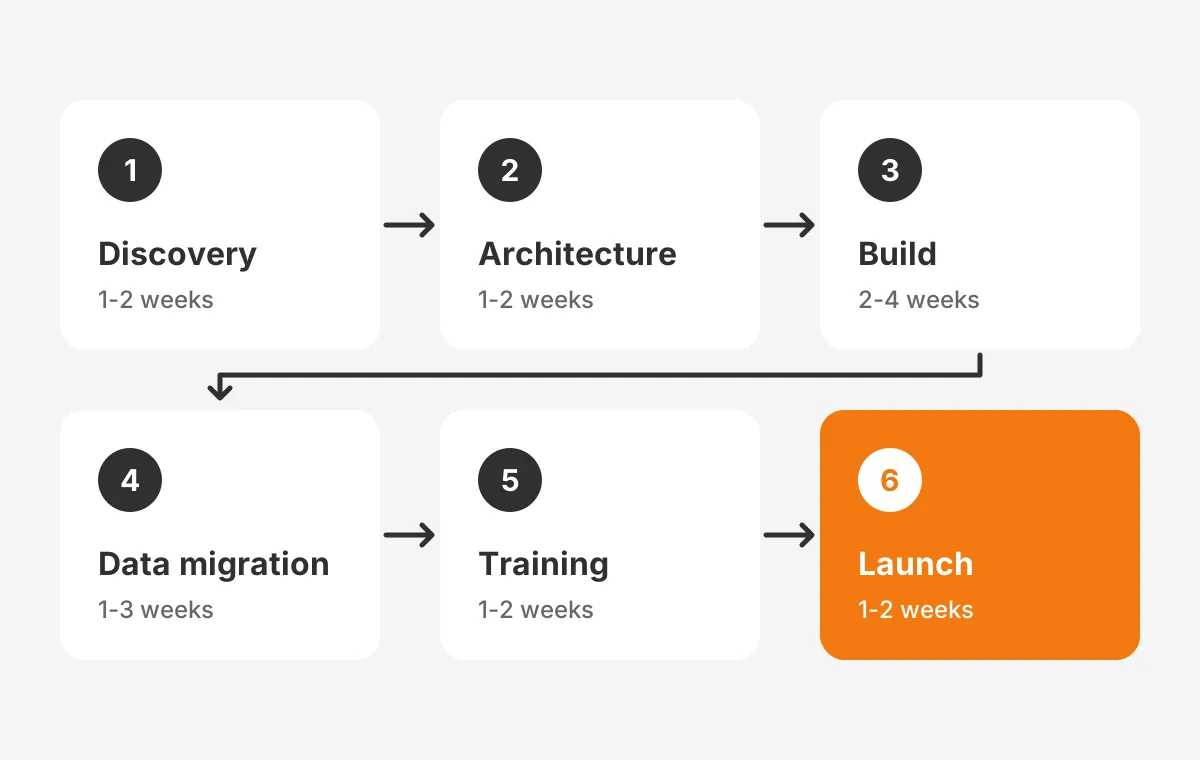
A HubSpot implementation runs in six phases: discovery, architecture, build, data migration, training and launch. Each phase ends with a sign-off. The phase names differ by partner, but the order rarely changes, because later work depends on earlier decisions.
- Discovery: interview each team, map current processes and agree three to five measurable goals.
- Architecture: design objects, properties, pipelines, HubSpot lifecycle stages and permissions on paper.
- Build: configure the portal, HubSpot workflows, HubSpot dashboards and integrations in that order.
- Data migration: clean, map, test-load and then fully load records from the old system.
- Training: run role-based sessions using your own data, not demo records.
- Launch: switch the teams over, retire the old tool and review usage weekly.
Vaulted, a HubSpot partner, publishes typical phase lengths in its HubSpot implementation guide. Discovery takes 1-2 weeks, architecture 1-2 weeks, build 2-4 weeks and data migration 1-3 weeks. Training and launch take 1-2 weeks each.
The architecture phase prevents the most rework. Decide HubSpot lead status values, deal stages and lifecycle stages before anyone builds automation. A workflow that sets a lifecycle stage breaks the moment someone renames that stage.
The build phase also covers HubSpot reporting. Agree the five to eight reports leadership needs, then design properties that feed them. A report cannot show a field nobody fills in.
This HubSpot implementation plan differs from a task list. Our HubSpot onboarding checklist lists the individual setup items, owners and checks. The HubSpot onboarding process follows these same phases. A HubSpot implementation checklist and an onboarding plan should share one order.
The same six phases match general CRM implementation steps. Any sound CRM implementation plan follows this sequence, whatever the platform. The HubSpot-specific part is which features each Hub adds inside the build phase.
How to implement HubSpot in practice comes down to one habit: a 30-minute review at the end of each phase. The data owner, the admin and the executive sponsor sign off there. Open questions stay in the current phase, because the HubSpot implementation process punishes skipped decisions later.
The same reviews keep HubSpot CRM onboarding on schedule. They also keep the HubSpot onboarding plan visible to teams that join in a later release.
Close the build phase with user acceptance testing. Each process owner runs five to ten real scenarios, such as a new inbound lead or a renewal. They record pass or fail. Every failure gets fixed before training starts, so trainers never demo a broken step.
How Long Does a HubSpot Implementation Take?
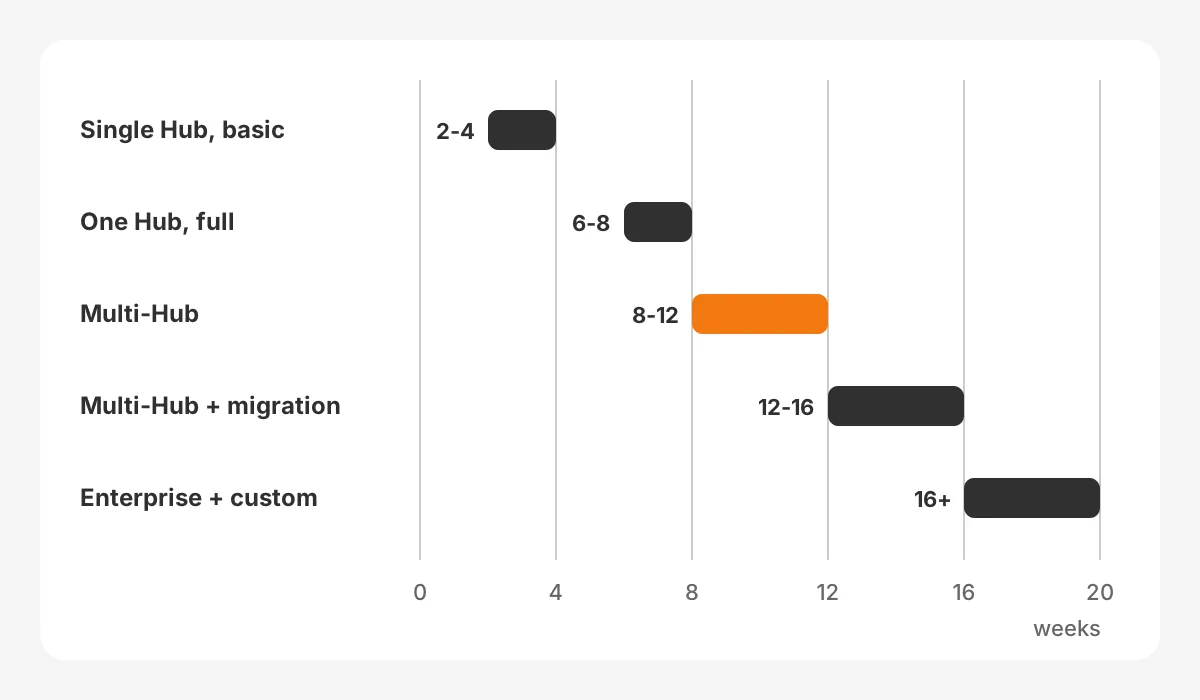
A HubSpot implementation takes 2-4 weeks for a single Hub with basic setup. A multi-Hub Professional rollout takes 8-12 weeks. Projects with a complex migration or custom objects run 12-16 weeks or longer, according to Vaulted's published timeline table.
Scope, data and integrations drive the HubSpot implementation timeline more than team size:
| Scope | Example | Typical duration |
|---|---|---|
| Single Hub, basic setup | Marketing Hub Starter | 2-4 weeks |
| One Hub, full implementation | Marketing Hub Professional | 6-8 weeks |
| Multi-Hub | Marketing and Sales Hub Professional | 8-12 weeks |
| Multi-Hub with complex migration | Salesforce to HubSpot | 12-16 weeks |
| Enterprise with custom objects and API work | Multi-Hub Enterprise | 16+ weeks |
The ranges above come from Vaulted's guide, which describes its own client work. Treat them as planning ranges, not promises. Your own CRM implementation timeline depends on how fast decisions get made.
Schedules slip past these ranges for three reasons. Slow sign-offs add a week each time a phase waits for an approver. Dirty source data can double the migration phase.
The third reason is integration work. Connecting an ERP or billing system can add 2-4 weeks on its own. Custom fields on both sides stretch it further.
Plan backwards from the go-live date. Lock the date for a quiet week, not quarter-end. Then fit the phases inside it and protect the training week, which teams cut first and regret most.
How Much Does a HubSpot Implementation Cost?
A HubSpot implementation costs the required HubSpot onboarding fee, plus partner or internal labour, plus licences. For Sales Hub and Marketing Hub, the onboarding fee alone runs from $1,500 to $7,000. Partner-led projects add $5,000 to $25,000, per Vaulted's published ranges.
HubSpot lists its required one-time onboarding fees on its 2026 pricing pages for Sales Hub, linked above, and Marketing Hub:
| Hub and tier | Required one-time onboarding fee |
|---|---|
| Sales Hub Professional | $1,500 |
| Sales Hub Enterprise | $3,500 |
| Marketing Hub Professional | $3,000 |
| Marketing Hub Enterprise | $7,000 |
HubSpot professional onboarding and HubSpot enterprise onboarding are one-time, required fees. They cover a guided onboarding programme. They do not cover your process design, data cleanup or custom integrations, which is where most project hours go.
Licences sit on top. The HubSpot Marketing Hub pricing page shows Professional starting at $800 a month with three core seats. Enterprise starts at $3,600 a month with five. Check HubSpot Sales Hub pricing per seat on the live page, since seat prices change with billing terms.
Here is a worked example with assumed figures. A 25-person B2B team buys Sales Hub Professional and Marketing Hub Professional. The required onboarding fees total $4,500. A partner-led build in Vaulted's range adds $5,000 to $25,000, depending on migration and integration scope.
Internal time is the cost most budgets miss. Count the admin, the data owner and every team lead who attends workshops and testing. The honest answer to how much does HubSpot implementation cost includes those hours. Add them to fees, partner work and licences before approving the HubSpot implementation cost.
The same structure applies to general CRM implementation cost on any platform. Our CRM implementation services page shows how Unboxx scopes and prices that work.
Who Belongs on the Implementation Team?
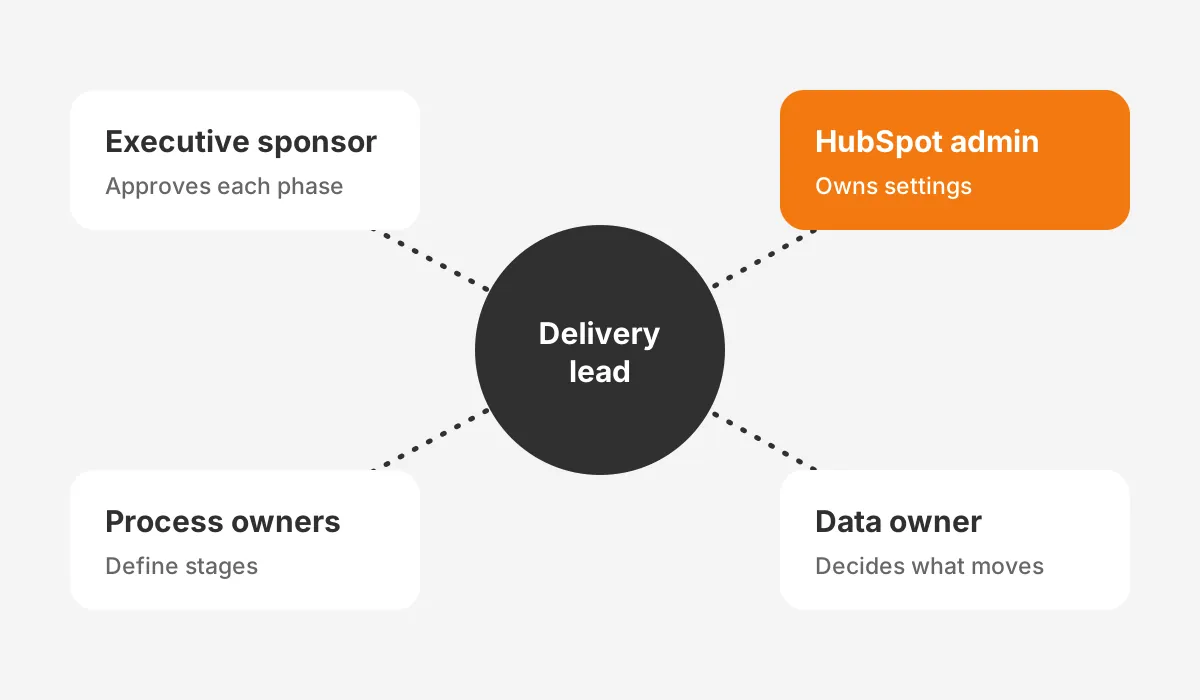
Every HubSpot implementation needs five roles. They are an executive sponsor, a HubSpot admin, process owners, a data owner and a delivery lead. One person can hold two roles in a small company. No role can stay empty.
- Executive sponsor: sets goals, settles disputes and approves each phase.
- HubSpot admin: holds Super Admin rights and owns settings after go-live.
- Process owners: one each from sales, marketing and service, who define stages and rules.
- Data owner: decides which records move, which fields map and what counts as a duplicate.
- Delivery lead: an internal project manager, a HubSpot implementation consultant or a partner.
The admin role decides long-term success. Set HubSpot permission sets so each team sees and edits only the records it owns. Give admin rights to two people at most, so settings do not drift after launch.
A HubSpot implementation specialist from a partner brings build speed and pattern knowledge. The process owners still decide how the business works. A partner can configure a pipeline in an hour, but only your sales lead knows when a deal is qualified.
Training belongs to the team, too. HubSpot Academy offers free courses for each Hub. Assign the relevant courses to each role during the build phase. Then run live sessions on your own portal before launch.
How Do You Migrate Data Into HubSpot?
Migrate data into HubSpot by cleaning it first, mapping every field, test-loading a sample, then loading in dependency order. Companies load first, then contacts, then deals and tickets, so associations land correctly.
HubSpot data migration follows the same rules as any CRM data migration. Decide what stays behind. Old closed-lost deals, contacts with no email and unused custom fields rarely earn their place in a new system.
The HubSpot import tool has published limits. For paid accounts, HubSpot's import file guide (2026) allows files up to 512 MB and 1,048,576 rows. A file must also stay under 1,000 columns, and daily caps apply.
- Export every object from the old system with its record IDs.
- Run HubSpot deduplication rules on the export, keyed on email and company domain.
- Map each source field to a HubSpot property, and create missing properties first.
- Import a 100-record sample and check associations, owners and dates.
- Load the full set, then compare record counts against the source.
Record owners need the same care as fields. Create every user in HubSpot before the import, so each record lands with the right owner.
Reassign records held by former employees to a named manager before the load. Skip that step, and reports by owner show gaps on day one while reps lose accounts they expect to see.
Keep the old system read-only for 30 days after launch. Teams will find gaps, and a read-only copy answers questions without reopening the migration. Our HubSpot CRM migration guide covers source-specific steps for moving from Salesforce, Pipedrive and Microsoft Dynamics 365.
Which Integrations Should Go Live First?
Connect email, calendar and email-sending domains first, because every team depends on them on day one. Add the systems that feed revenue data next, then everything else in phase two.
Email authentication comes before any marketing send. HubSpot's email authentication guide (2026) lists four DNS record types to set up: MX, DKIM, SPF and DMARC. DKIM needs two CNAME records, while SPF and DMARC each need a TXT record.
Next, connect Gmail or Outlook inboxes and calendars for every sales user. Without that sync, reps log emails by hand, and adoption drops in the first month.
HubSpot integrations with core business systems come after the CRM model is stable:
- A HubSpot Salesforce integration, when the two systems must run side by side during a transition.
- A HubSpot ERP integration with NetSuite or another ERP, so orders and invoices reach the deal record.
- Billing, support desk and telephony tools that create or update records.
Each integration needs a written field map, a direction of sync and a rule for conflicts. Our article on HubSpot ERP integration explains those choices for order and invoice data. Test every integration in the build phase with real sample records, not at launch.
Do You Need a HubSpot Implementation Partner?
You need a HubSpot implementation partner when the project spans more than one Hub. The same applies to a migration from another CRM or any custom integration. A single-Hub Starter setup with clean data is often manageable in-house with HubSpot's onboarding.
A HubSpot solutions partner is an agency or consultancy in HubSpot's Solutions Partner Program. HubSpot implementation partners and agencies sell fixed-scope builds, ongoing admin support or both. Compare HubSpot implementation services on scope, not on day rate.
How to choose a HubSpot implementation partner comes down to five questions:
- Have they implemented the same Hubs and tier for a company of your size?
- Do they run discovery before quoting a fixed price?
- Who writes the data map, and who signs it off?
- What documentation do you receive at handover?
- What support do they offer in the first 90 days after launch?
Companies offering HubSpot implementation services range from solo consultants to large agencies. A HubSpot implementation agency suits multi-Hub builds with content work. A focused CRM consultancy suits projects heavy on data, integrations and sales process.
Unboxx delivers this work through its CRM consulting and implementation services. One example is our HubSpot CRM implementation success story, which describes a HubSpot CRM rollout Unboxx delivered.
What Are the Most Common HubSpot Setup Mistakes?
The most common HubSpot setup mistakes are building automation before the data model, importing dirty data, and skipping role-based training. Each one creates rework that costs more than doing the step in order.
- Creating properties ad hoc, so three fields hold the same value in three formats.
- Turning on HubSpot sequences before email inboxes and domains are connected.
- Building HubSpot lead scoring without agreeing what a qualified lead means.
- Giving every user Super Admin rights during the build and never removing them.
- Launching every Hub at once instead of releasing in phases.
- Measuring launch success by logins instead of records updated and deals moved.
Most common HubSpot setup mistakes trace back to skipped decisions in the architecture phase. A HubSpot CRM setup that looks finished can still fail if nobody agreed the lifecycle stages first.
User adoption needs its own plan. Track three numbers for 90 days after go-live. Watch active users per week, deals updated per rep, and pipeline with a next step. Fix the gaps team by team.
Run a HubSpot audit 90 days after launch. Check unused properties, broken workflows, duplicate records and reports nobody opens. A short audit then prevents a costly rebuild a year later.
Frequently Asked Questions
Does HubSpot require technical skills to set up?
Basic setup does not require coding. Admins configure users, properties, pipelines and workflows through HubSpot's settings. Technical skills matter for DNS records, data mapping and API integrations with ERP or billing systems. Most teams pair an internal admin with a partner or developer for those technical parts.
How long does it take to implement HubSpot?
It takes 2-4 weeks to implement HubSpot for a single Hub with basic setup. A multi-Hub Professional rollout usually takes 8-12 weeks. Projects with a complex migration, custom objects or API work can run 12-16 weeks or longer. Fast sign-offs and clean data shorten every range.
Is HubSpot onboarding the same as implementation?
No. HubSpot onboarding is a guided programme that teaches your team the tools. It carries a required one-time fee on Professional and Enterprise. Implementation is the wider project. It adds process design, data migration, integrations and adoption tracking, and it continues until teams use HubSpot daily.
How do you get sales teams using HubSpot?
To get the sales team to use HubSpot after implementation, make it the only source for pipeline reviews. Connect inboxes and calendars so activity logs itself. Train reps on their own deals. Track deals updated per rep weekly, and coach the lowest users first during the first 90 days.
Can you implement HubSpot in phases?
Yes. Phased rollouts reduce risk and speed up the first go-live. A common pattern launches the Smart CRM and one Hub, then adds another once the first is in daily use. Each phase gets its own scope, sign-off and training.
How Can Unboxx Help With Your HubSpot Implementation?
A HubSpot implementation holds up when scope, data, roles and training happen in the right order. Unboxx plans and delivers HubSpot rollouts for B2B teams. The work runs from discovery and data migration to integrations and post-launch CRM adoption support.
If you are planning a HubSpot implementation or fixing one that stalled, schedule a consultation with the Unboxx team. You will get a phased plan, a realistic timeline and a clear view of costs before any build starts.
Let's create something out of this world together.
Have a project in mind? Contact us for expert design and development solutions. Let's discuss how we can help grow your business.
Ready to Unboxx Your Potential?
Build smarter systems. Automate faster. Scale confidently.