
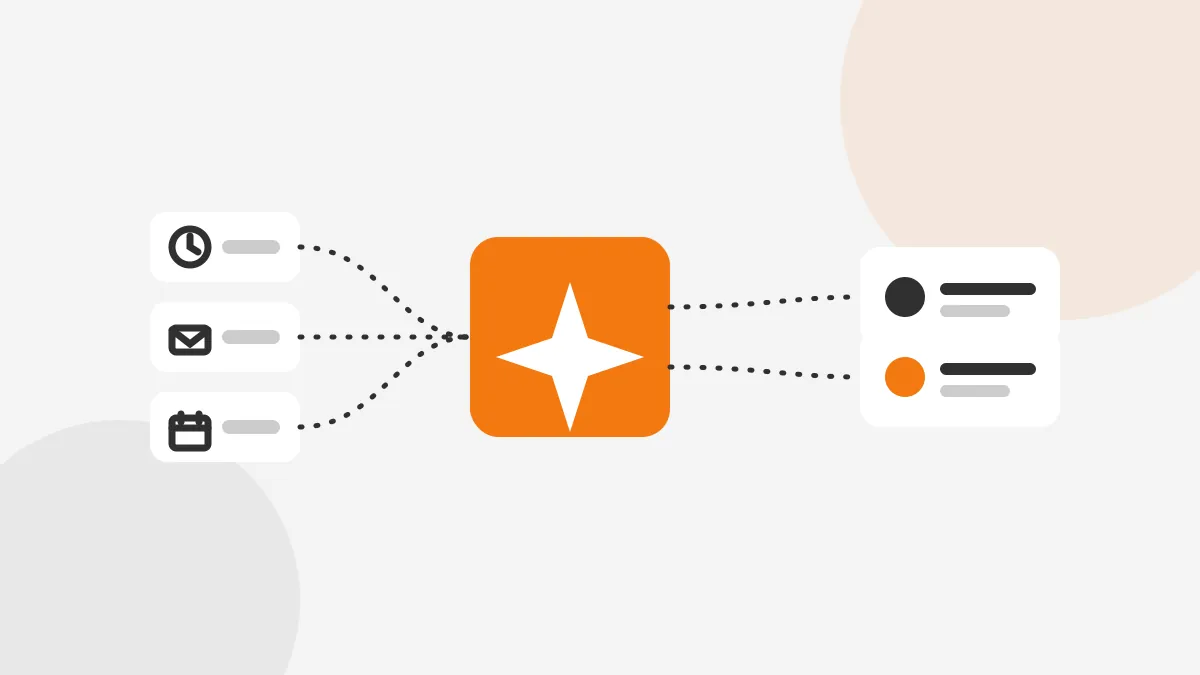
A sales team runs on two systems that rarely agree. Reps talk to buyers on calls, email and video. The forecast, meanwhile, lives in the CRM. Gartner found that fewer than half of sales leaders and sellers trust their forecasting accuracy. Poor data quality is a main cause.
Revenue intelligence closes that gap. It reads the real sales conversations, scores each deal, and pushes what it learns back into Salesforce or HubSpot. This guide explains what the category does. It then covers, in detail, how a revenue intelligence platform connects to each CRM.
Key Takeaways
- Revenue intelligence captures sales calls, email and calendar activity, then matches each record to a CRM account, contact and deal.
- Salesforce connections use OAuth, a managed package and a dedicated integration user, while HubSpot uses OAuth with contact-level scopes.
- Plan field mapping, API limits and stage alignment before connecting, or the sync writes noise instead of signal.
What is revenue intelligence?
Revenue intelligence uses data and AI to find risk and opportunity across every deal in the pipeline. It collects signals the CRM never sees, such as who spoke on a call and how a buyer responded. Those signals then become a deal score the whole team can read.
Salesforce defines the category as software that surfaces insights inside the CRM where the team already works. A revenue intelligence platform sits beside the CRM, not on top of it. The CRM holds the record of truth. The platform adds the context around each record.
Revenue intelligence tools include Gong, Clari, Revenue Grid and Salesforce Revenue Intelligence. Some lead with conversation intelligence, which analyzes calls. Others lead with forecasting. Most now combine both. As a result, the lines between a revenue intelligence platform, a sales engagement platform and revenue tracking software have blurred.
The category also overlaps with revenue operations, or RevOps. That team owns the sales process from first touch to closed deal. Revenue intelligence solutions give RevOps the numbers to run on. A revenue operations platform ties those numbers to the pipeline the team manages day to day.
Newer tools add AI agents that act on those numbers, such as Salesforce Agentforce. Revenue intelligence AI systems earn their deep workflow integration moat by living inside the CRM. The more the platform writes back, the harder it is to replace.
The question buyers ask is rarely what the category means. It is how the revenue intelligence software will fit the CRM they already run. That is where the value, and the risk, sits.
What data does the platform use?
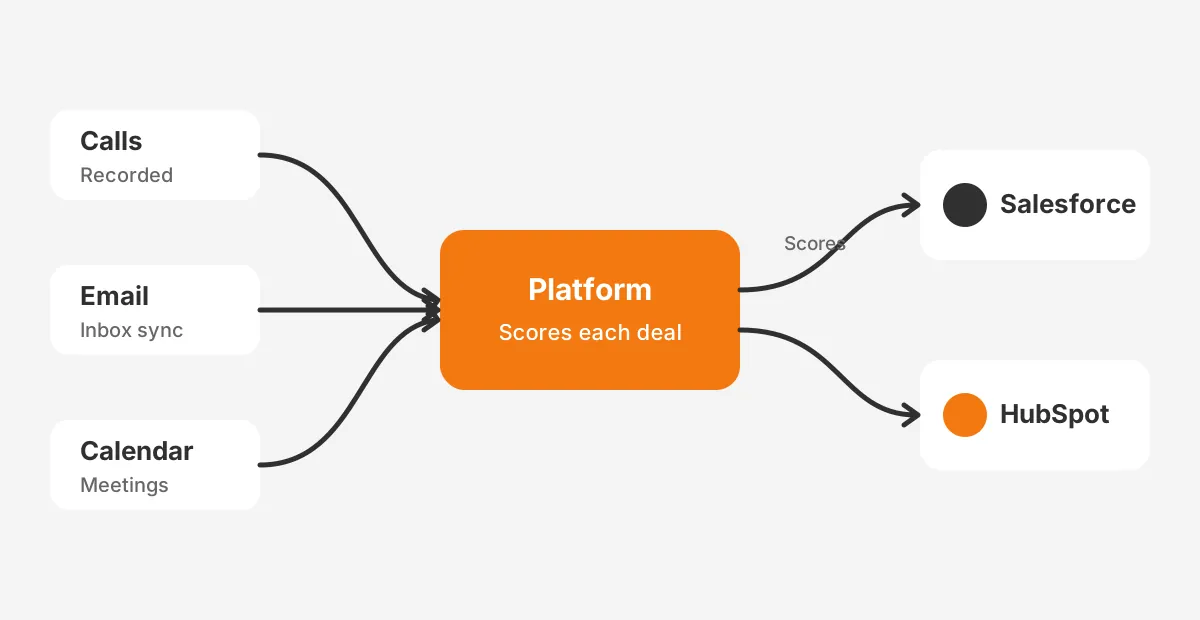
A platform draws on three sources the CRM holds poorly. Each one feeds the deal scores and the forecast.
The first source is conversations. Call recording and conversation intelligence transcribe sales calls. They tag topics, competitors, next steps and talk-to-listen ratios.
The second source is email and calendar activity. A platform captures it through an inbox connection, not manual logging. The third source is the CRM itself: accounts, contacts, deals and opportunity history. Conversation intelligence software adds the layer the CRM cannot record on its own.
Salesforce reports that reps spend only 28% of their week selling. The rest is lost to admin and data entry. Activity capture removes most of that logging. The forecast then reflects what happened, not what a rep remembered to type.
These signals drive the metrics sales leaders watch. Pipeline coverage shows whether there is enough pipeline to hit the number. Win rate shows how often deals close. Deal risk flags the deals that are slipping. Revenue forecasting pulls all three together.
Sales intelligence improves revenue forecast accuracy because the model reads engagement a manual review would miss. This is how revenue intelligence platforms help drive sales in practice. The challenges in accurate forecasting without revenue intelligence platforms come down to blind spots the CRM cannot fill alone.
The model weighs these signals rather than counting them. A late-stage deal with no recent buyer reply scores as a risk. An early deal with strong engagement scores higher than its stage suggests. The score is a prompt for a conversation, not a verdict on the deal.
Each signal is only as useful as its match to a record. If a call cannot be tied to a contact, it adds nothing. This is why the match key, email address and domain, sits at the center of every connection described below.
How does a platform connect to Salesforce?
Salesforce connections follow a clear pattern. Gong, a common example, shows how most tools behave. Salesforce Revenue Intelligence, by contrast, works natively inside the org.
A third-party platform installs a managed package from AppExchange. It then authenticates with OAuth. Gong states that it uses OAuth and stores the token, rather than your credentials.
You connect through a dedicated integration user. If the person who set up the link is deactivated, the integration disconnects. A shared integration user avoids that risk.
The platform reads a defined set of objects. A Gong Salesforce integration imports accounts, opportunities, leads, contacts and users. It also reads opportunity history and field history.
It matches the people on a call to CRM records by email address and email domain. Read access alone drives the deal scores and the activity timeline. No write access is needed to start.
Salesforce Revenue Intelligence is a different model. It runs on CRM Analytics, the native analytics layer, which you set up first. Salesforce documents the setup in its Revenue Intelligence setup module. It adds Revenue Insights dashboards, Pipeline Inspection and forecasting.
Two features keep the data current. Einstein Activity Capture syncs email and calendar between Salesforce and the rep's inbox. Einstein Conversation Insights reads call and video content.
Two permission sets, Revenue Intelligence Admin and Revenue Intelligence User, control access. Knowing how to use Salesforce Revenue Intelligence effectively starts with these two roles. Assign them before the dashboards go live.
Pipeline Inspection reads opportunity history to show how each deal moved, week by week. It gives managers a single pipeline management view with trend arrows on every deal. For teams planning a rollout, our Salesforce optimization guide covers the org cleanup that should come first.
How does a platform connect to HubSpot?
HubSpot connections are lighter but follow the same logic. The platform authenticates with OAuth. It then reads the objects that hold deal context.
Gong connects to HubSpot through OAuth. It asks for read and write access to the contacts scope. It imports companies, deals and contacts, along with pipelines, owners and engagements. A deal that associates with a contact but not a company does not import. Association hygiene therefore matters before you connect.
The object names differ from Salesforce, and the mapping has to account for that. A Salesforce account becomes a HubSpot company, and a Salesforce opportunity becomes a HubSpot deal. Both platforms use contacts. HubSpot stores logged calls, emails and meetings as engagements against those records.
HubSpot also ships its own conversation intelligence and forecasting tools inside Sales Hub. The native tools answer a common question for a growing team. How HubSpot revenue intelligence compares to AI CRM agents often comes down to depth. Start with what is built in, then add more as needs grow.
The native route has one clear advantage. There is no second system to map, and no extra API load. For a team early in its pipeline, that simplicity can outweigh the deeper scoring a dedicated tool brings. Revisit the choice as deal volume grows.
One more difference matters for HubSpot. The platform writes to engagements, which HubSpot counts as objects. A heavy sync can touch thousands of them in a day. That load is why HubSpot API limits deserve a check before you scale the connection.
HubSpot forecasting projects a number from deal stages and amounts. It works well for a clean pipeline. A dedicated platform adds call signals the native tool does not read. Our HubSpot lead scoring guide shows where the built-in model ends and a deeper one begins.
What gets written back to your CRM?
Reading data drives the scores. Writing data changes the rep's daily view. This is where bidirectional sync needs the most care.
A platform writes activity back so the CRM timeline shows every touch. In Salesforce, Gong exports its conversations as a custom object. It can also log a Task against the account or opportunity. It creates roughly 25 child records per recorded call.
In HubSpot, the platform exports each call as a meeting, call or note. The record attaches to a company, contact or deal. The object type depends on how your team logs touches today.
The HubSpot record carries a link back to the recording and the action items. One detail surprises teams: the transcript does not cross over. Gong exports the call record and a link, not the full text. Store the transcript in the platform, and keep the CRM for the summary.
Deletion rules need to match on both sides. Deleting a call in the platform also deletes the synced record in the CRM. Set retention policy once, and apply it to both systems. The table below shows what moves in each direction.
| Direction | Salesforce | HubSpot |
|---|---|---|
| Reads | Accounts, opportunities, leads, contacts, opportunity history | Companies, deals, contacts, pipelines, owners, engagements |
| Writes | Conversation object, Task activities, custom fields, child records | Meeting, call or note engagements with a link to the recording |
| Match key | Email address and email domain | Contact association to a company or deal |
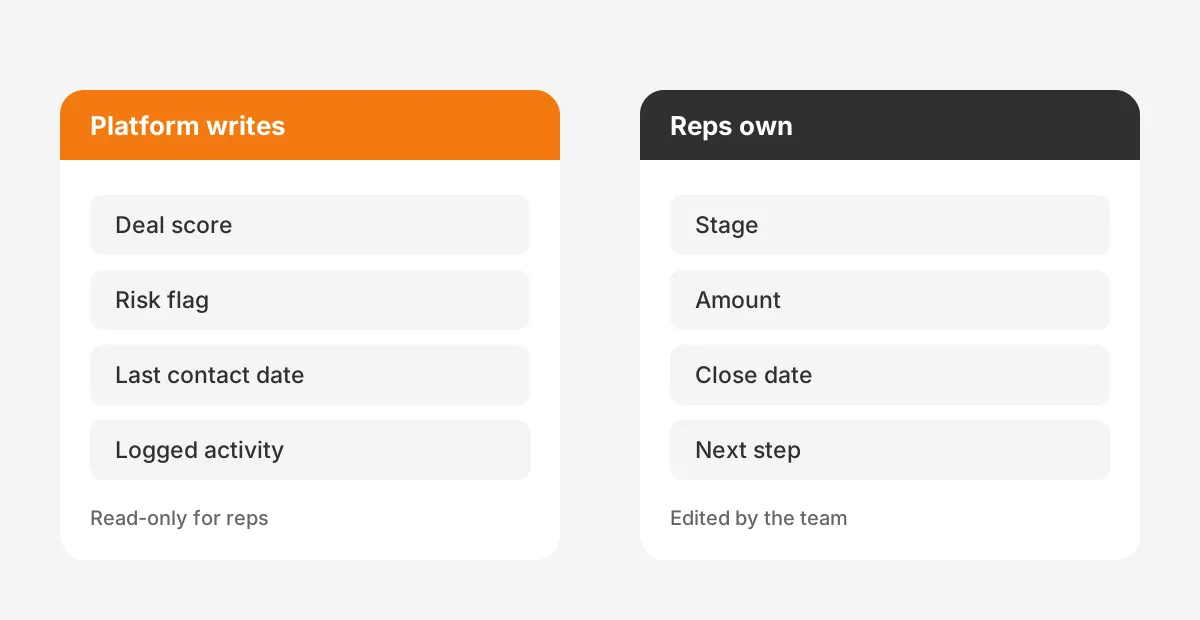
Decide early which fields the platform owns. Say it writes a deal score to an opportunity field. That field should be read-only for reps. Two systems then never fight over one value. Clean records make this safer, which is why a data cleansing pass belongs before go-live.
Permissions deserve the same care as fields. The integration user needs only the access the sync requires. Grant read on the objects it scores, and write on the fields it owns. Nothing more. A scoped user keeps the connection auditable and easy to revoke.
Watch field-level security as well. A field the integration user cannot see is a field it cannot sync. Most failed write-backs trace to a hidden field, not a broken connection. Confirm visibility before you blame the integration.
How do API limits affect the sync?
Every sync spends API calls, and both CRMs cap them. A platform that imports thousands of calls can reach a limit. The math therefore belongs in the plan.
Salesforce enforces a daily cap across all API calls in a 24-hour window. The Salesforce API limits reference sets the Enterprise Edition allocation at 100,000 requests plus 1,000 per license. A 15-license org gets 115,000 requests a day. Calls from an installed managed package count against that same org limit.
That last point matters. The platform shares the budget with every other integration in the org. A middleware sync, a marketing tool and a scoring platform all draw from one pool. Track total usage across the org, rather than the new tool alone.
HubSpot works differently. A private app on a Professional or Enterprise account is capped at 190 requests per 10 seconds. The daily account ceiling runs from 625,000 on Professional to 1,000,000 on Enterprise. The daily limit is shared across every app in the account. The burst limit applies per app.
These numbers rarely block a mid-sized team, though a large backfill can. Gong notes that an initial import or export may take up to 24 hours.
Plan the first sync for a quiet window, and watch usage during it. Our Salesforce integration guide covers how to budget API calls across connected systems. The tool is one more draw on that shared pool.
What should you map before connecting?
The connection is a wizard. The mapping is the real work. It decides whether the forecast means anything.
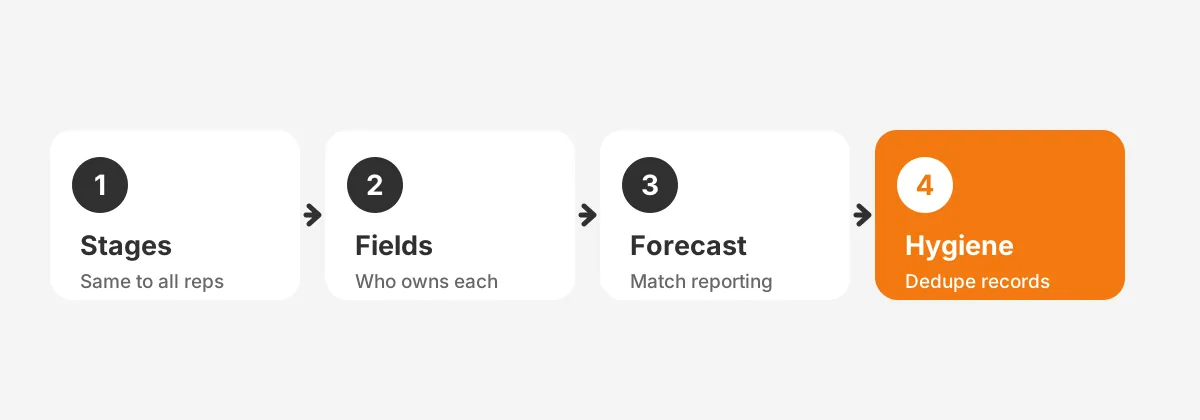
Start with stages. A platform reads Salesforce opportunity stages or HubSpot deal stages to judge where a deal sits. If the stages are vague or inconsistent, the deal scores inherit that noise. Align the stages and their exit criteria first. Each stage should mean the same thing to every rep.
Then map the fields. Decide which CRM fields feed the model and which fields the platform writes. Field mapping is where two schemas meet. A HubSpot Salesforce integration that skips it produces mismatched records on both sides. Confirm that forecast categories line up with how leadership already reports.
Data hygiene decides the rest. The model is only as good as the records it reads. CRM data quality problems scale straight into the forecast. Deduplicate accounts, fix broken associations, and set clear ownership rules. Treat data hygiene as a standing habit, not a one-time cleanup.
Keep a short dictionary of the mapped fields as you go. Record what each field means and which system owns it. The document saves hours when a sync behaves oddly later. It also onboards the next admin without a guessing game.
The checklist below keeps the order straight. Work top to bottom, and finish one row before starting the next.
How do you choose a revenue intelligence platform?
The best revenue intelligence platform is the one that fits your CRM and your forecasting depth. Three questions narrow the field fast.
First, which CRM holds your pipeline? Salesforce Revenue Intelligence is native to Salesforce only. HubSpot ships its own tools inside Sales Hub. Gong, Clari and Revenue Grid connect to both. If you run one CRM, the native option may be enough to start.
Second, how deep is your forecasting need? A clean pipeline with simple deals may only need native forecasting and sales forecasting software. A complex pipeline with long cycles gains more from a dedicated platform that reads every call.
Third, what will it cost to run? Revenue intelligence pricing usually scales per seat, and call storage can add to it. Weigh that cost against the forecast accuracy it buys. Price the API load too, since a heavy sync can push an org toward paid call add-ons.
Knowing how to choose a revenue intelligence platform also means checking fit with your workflow. A tool that reps ignore returns nothing, whatever its scores say. Ask how the daily view changes for a rep, not only what a dashboard shows a manager.
Run a short pilot before you commit. Connect read-only, score live deals, and compare the scores to reality. A tool that matches what your best managers already sense is worth the seat. One that argues with them needs a closer look at the mapping.
How do you roll out revenue intelligence safely?
A scoring platform touches the forecast every leader relies on. The rollout should move in stages, not one switch.
Phase one is read-only. Connect the platform, import history, and compare its deal scores against what the team already believes. This proves the model without changing a single CRM field. It also surfaces any mapping gaps while the stakes are low.
Phase two turns on write-back for one team. The platform owns its own fields, and nothing is shared. Watch for conflicts, confirm the timeline looks right, and gather rep feedback. Knowing how to implement revenue intelligence is mostly knowing what to connect last.
Phase three widens access once the fields hold and adoption sticks. Treat adoption as its own goal. A platform nobody opens changes nothing. Our CRM adoption guide covers how to measure and raise it across a team.
Decide what success looks like before phase one. Pick two or three measures and track them from the start. Forecast accuracy against actual results is the clearest. Rep logging time and pipeline review length are easy to watch too.
Review those measures at the end of each phase. If the scores do not improve forecast accuracy, stop and check the mapping. The sync is working only when the forecast gets harder to argue with, not when the dashboards fill up.
Mapping comes first. Write-back comes second. Broad access comes only after the scores have earned trust. Unboxx runs this sequence as part of our CRM integration services, so the sync launches clean the first time.
Frequently Asked Questions
Is revenue intelligence the same as conversation intelligence?
No. Conversation intelligence analyzes sales calls and is one input. Revenue intelligence is broader. It combines call data, email and calendar activity, and CRM records into deal scores and forecasts. Most platforms include conversation intelligence as one feature inside the larger toolset.
Does the platform replace your CRM?
No. The CRM stays the record of truth for accounts, contacts and deals. The platform reads those records. It adds context from conversations and activity, then writes scores and logged touches back. It sits beside the CRM rather than replacing any part of it.
Which revenue intelligence tools work with both CRMs?
Gong, Clari and Revenue Grid connect to both Salesforce and HubSpot. Salesforce Revenue Intelligence is native to Salesforce only. HubSpot ships its own tools inside Sales Hub. The right choice depends on which CRM holds your pipeline and how deep your forecasting needs run.
How long does it take to connect a platform?
The authentication takes minutes, but a full setup takes longer. The initial import can run up to 24 hours. Stage and field mapping usually takes days of planning. Rushing the mapping is the common mistake, because the deal scores inherit any noise in the underlying stages and fields.
Will the sync break your CRM reports?
Not if you plan field ownership. Give the platform its own fields and keep them read-only for reps. Two systems then never overwrite one value. Align forecast categories with how leadership already reports. The platform adds columns to your reporting rather than disturbing the numbers already there.
Is revenue intelligence worth the setup?
For a team that forecasts on feel, revenue intelligence changes the base it works from. It reads the conversations the CRM never captured. It turns them into scores leaders can question and trust. The mapping and rollout separate a clean launch from a noisy one.
Unboxx connects revenue intelligence platforms to Salesforce and HubSpot the right way. Stages are aligned, fields are owned and API limits are planned. To scope your own rollout, schedule a consultation. We will map the sync before anything touches your pipeline.
Let's create something out of this world together.
Have a project in mind? Contact us for expert design and development solutions. Let's discuss how we can help grow your business.
Ready to Unboxx Your Potential?
Build smarter systems. Automate faster. Scale confidently.