
A development team picks a new donor database in spring. By October, the donor data still sits in spreadsheets. Year-end giving starts, and the old system has to carry the busiest season. That gap between contract and go-live is where most teams that implement a fundraising CRM lose time.
How long does it take to implement a fundraising CRM? Small nonprofits go live in 6 to 12 weeks. Mid-sized teams need 3 to 6 months, and large foundations need 6 to 12. What moves that number, and how to implement a fundraising CRM without losing a campaign, follows below.
Key Takeaways
- Most teams implement a fundraising CRM in 6 weeks to 6 months, depending on record count and data quality.
- Data cleanup and donor data migration take more calendar time than software configuration.
- Start planning 9 to 12 months before your current contract renews, and avoid a go-live in November or December.
How Long to Implement a Fundraising CRM?
The time it takes to implement a fundraising CRM ranges from about 6 weeks to 12 months. Donor database size, data quality and the number of integrations explain most of that spread.
Vendors and consultants publish similar bands. Neon One (2026) says most organizations under $5 million in annual revenue go live in 4 to 12 weeks. Mpire Solutions (2026) sizes projects by record count instead.
| Organization profile | Typical records | Time to go live | Source |
|---|---|---|---|
| Small nonprofit, under $5M revenue | Spreadsheets or a basic donor database | 4 to 12 weeks | Neon One, 2026 |
| Small nonprofit | Under 20,000 records | 6 to 10 weeks | Mpire Solutions, 2026 |
| Mid-sized nonprofit | 20,000 to 250,000 records | 3 to 6 months, plus 30 to 60 days of tuning | Mpire Solutions, 2026 |
| Enterprise nonprofit or foundation | Decades of gift history | 6 to 12 months | Mpire Solutions, 2026 |
| Small team moving from spreadsheets | Basic contacts and gifts | 60 to 90 days of core rollout | Bloomerang, 2026 |
No single nonprofit CRM implementation timeline fits every team. The vendor figures above come from their own customer projects, so treat them as starting points for your plan.
Read these ranges as go-live dates, not finish lines. After you implement a fundraising CRM, the system keeps changing for 30 to 90 days. Reports are rebuilt and staff settle into new habits.
Sizing by revenue and sizing by record count can give different answers. A small foundation with $3 million in revenue may still hold 60,000 records from decades of grantmaking. Use the larger of the two estimates when you plan to implement a fundraising CRM.
What matters is where your organization sits inside its band, and five factors decide that.
What Changes Your Fundraising CRM Implementation Timeline?
Five factors set your fundraising CRM implementation timeline: record volume, data quality, integrations, decision speed and the fundraising calendar. Platform choice matters less to how fast you implement a fundraising CRM than most teams expect.
Record volume and history
Each donor record carries gift history, pledges, recurring gifts, tributes and notes. Ten thousand contacts with five years of gifts is a small job. Two hundred thousand contacts with twenty years of soft credits is a large one.
Data quality
Duplicate records, blank fields and free-text gift codes all need decisions before import. A team that cleans its data first saves weeks of rework later. The CRM data cleansing runbook lists the checks to run by platform.
Integrations
Every connection adds design and testing time when you implement a fundraising CRM.
Common ones are an online giving form and a payment processor such as Stripe. Email tools such as Mailchimp and accounting software such as QuickBooks follow. Test each one with a real transaction, such as a $1 gift through the live form.
Decision speed
Field mapping and gift coding need sign-off from the development director and the finance team. A project that waits two weeks for each answer can double its length without any technical problem. A weekly 30-minute decision meeting with the owner, development and finance keeps answers moving.
Fundraising calendar
Year-end giving, GivingTuesday and gala season all freeze change. A team that cannot test during those weeks loses them from the plan.
What Are the Phases to Implement a Fundraising CRM?
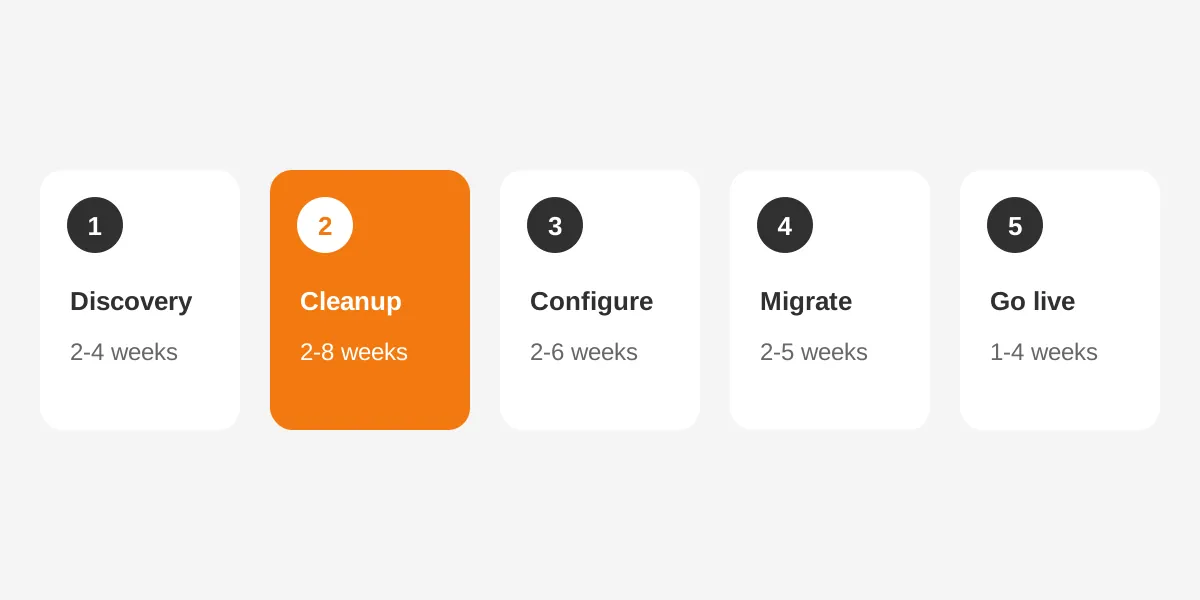
Every project to implement a fundraising CRM passes through five phases: discovery, cleanup, configuration, migration and testing, then go-live. Mpire Solutions (2026) gives each phase a duration range.
- Discovery and audit, 2 to 4 weeks: list every data source, report and integration, then agree what success looks like.
- Data cleanup, 2 to 8 weeks: merge duplicate records, fix addresses and standardize gift codes and campaign names.
- CRM configuration, 2 to 6 weeks: build fields, gift types, user roles, workflows and receipts in the new system.
- Migration and testing, 2 to 5 weeks: map fields, load a test batch, check totals, then run the full import.
- Training and go-live, 1 to 4 weeks: train staff by role, switch the old system to read-only and launch.
To implement a fundraising CRM, these ranges add up to roughly 9 to 27 weeks of work. Phases overlap in practice, because data cleanup can run while configuration starts.
Virtuous splits the same work into two larger blocks. Virtuous (2024) puts preparation and vendor selection at 4 to 8 weeks and implementation at 18 to 26 weeks. Its numbers fit a mid-sized organization with a legacy system.
The CRM implementation plan article shows how to assign an owner and a budget line to each phase.
How Long Does Donor Data Migration Take?
Donor data migration takes 2 to 8 weeks for most nonprofits. It runs longer when gift history spans decades or three or more systems. It is the step that most often delays teams that implement a fundraising CRM.
A move from one CRM to another takes as long as a first rollout, because the data work is similar.
Neon One (2026) reports that a standard data conversion takes six weeks and a premium conversion takes eight. DonorDock (2026) says most migrations finish in 30 to 60 days. Both figures assume the data was exported and reviewed before the import starts.
Load records in a fixed order
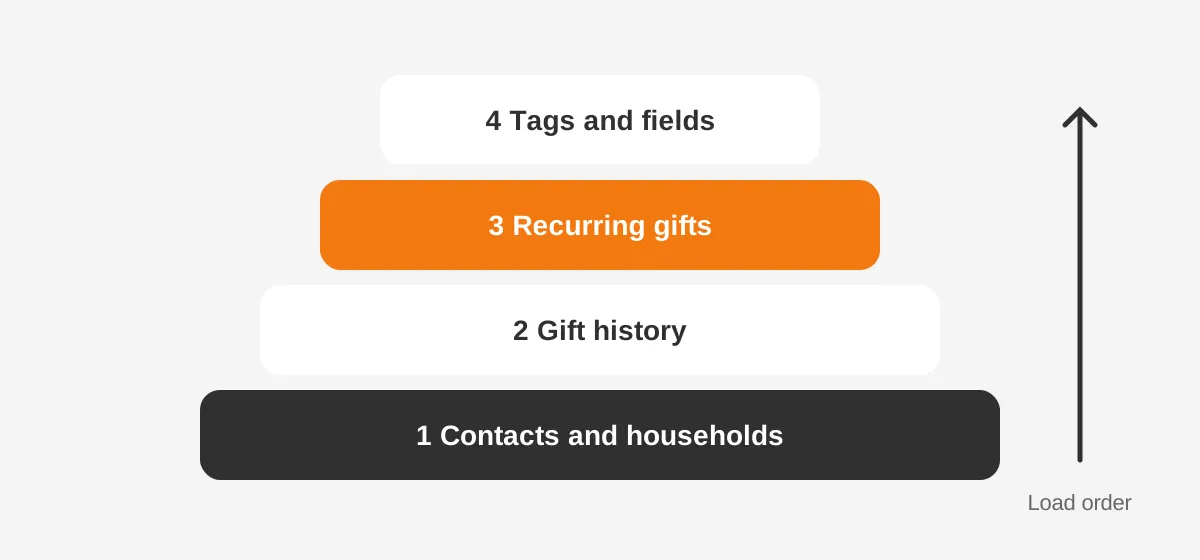
The order of the import matters, because each layer depends on the one before it. DonorDock recommends this sequence:
- Contacts and households, so every gift has a record to attach to.
- Gift history, with dates, amounts, funds and campaign codes.
- Recurring gift schedules, so monthly donors keep giving without a break.
- Tags, segments and custom fields, which depend on the records above.
A nonprofit CRM migration from an older database also needs an export plan. Some legacy systems limit export formats, so request a full CSV export early and check it opens cleanly.
Check totals before you switch
Field mapping is where errors hide. Map each field by what it means, not by its label. A field called "Type" in one system can hold a gift type, a donor type or a payment method.
After the test load, compare three numbers between systems: donor count, gift count and total giving by year. If any number differs, find the cause before the full import. Recurring gifts can migrate safely, but confirm card tokens and next charge dates with the payment processor first.
Nonprofits need a donor model built around households, soft credits and funds, not a sales pipeline. The CRM for nonprofits page explains how Unboxx approaches that donor model.
Is New Fundraising Software Faster to Implement?
Standalone fundraising software, such as a giving form or an event tool, is faster to implement than a full CRM. A donation page can go live in days. To implement a fundraising CRM takes weeks or months, because it holds every donor relationship.
The difference comes from scope. A giving form touches one process and one data flow. A fundraising CRM touches prospect research, gift entry, receipting, stewardship, grants, reporting and finance reconciliation.
Purpose-built donor CRMs, such as Bloomerang, Neon CRM and DonorPerfect, ship with nonprofit objects already in place. Platforms such as Salesforce Nonprofit Cloud, HubSpot and Microsoft Dynamics 365 offer more room to customize, which adds configuration time.
That is the one place where platform choice moves the timeline in a noticeable way.
| Project type | Typical scope | Typical time |
|---|---|---|
| Online giving form or event tool | One process, one payment flow | Days to 2 weeks |
| Purpose-built donor CRM, small team | Contacts, gifts, receipts, basic reports | 4 to 12 weeks |
| Configurable CRM such as Salesforce Nonprofit Cloud | Fundraising, grants, programs, integrations | 3 to 9 months |
Small teams that implement a fundraising CRM from spreadsheets often finish fastest. There is no legacy logic to unpick, only columns to map. The trade-off is cleanup, since spreadsheets rarely enforce one format for names, dates or gift codes.
The ranges in this table combine the vendor figures quoted earlier with the scope of each project type. They are planning bands, not quotes.
Salesforce projects run longer because teams usually move programs, volunteers and grants at the same time. The Salesforce Nonprofit Cloud consulting page explains how that scope is phased.
For a side-by-side view of platforms, read the nonprofit CRM software comparison before you set a date.
When Should a Nonprofit Plan the CRM Switch?
Start planning 9 to 12 months before your current CRM contract renews. Virtuous (2024) recommends that window, and the full 12 months for larger, more complex migrations.
That lead time covers vendor selection, budget approval and the work to implement a fundraising CRM. It also leaves room for one slipped phase without paying for two systems.
Pick a go-live date that avoids your peak giving season. For most US nonprofits, year-end giving runs from GivingTuesday through December 31. Neon One suggests switching between January and early summer.
Keep the old system available after launch. Bloomerang (2026) advises moving it to read-only mode for 3 to 6 months. Staff can then check historical records while trust in the new data grows. Plan a parallel period of 2 to 4 weeks, as DonorDock recommends, when both systems are open.
Budget cycles matter too. Nonprofits often approve software spend once a year. The decision to implement a fundraising CRM may need to reach the board two quarters ahead.
Count back from the go-live date by your expected duration, then add four weeks of buffer. If the start date has already passed, move the go-live, not the campaign.
Who Do You Need to Implement a Fundraising CRM?
To implement a fundraising CRM, name one owner, a development lead, a finance contact and an executive sponsor. Without those four roles, decisions stall and the timeline stretches.
Bloomerang (2026) estimates the weekly time each role gives during rollout:
- CRM manager or administrator: 20 or more hours a week.
- Development lead or director: 4 to 6 hours a week.
- Executive sponsor: 2 to 4 hours a week.
Plan that time before the contract is signed. A development director who is also running the spring appeal cannot give six hours a week to field mapping.
Roles to add for larger projects
Mid-sized and large organizations usually add a gift processor, a data analyst and an implementation partner. The gift processor tests receipts and batch entry. The analyst rebuilds the reports the board reads every month.
The finance team matters more than most nonprofits expect. Gift coding has to match the general ledger in QuickBooks or another accounting system, or month-end reconciliation breaks after launch.
The person who should own the CRM long term sits in development operations, not IT. That person decides on new fields, reports and user access after the project team steps back.
What Slows Down a Fundraising CRM Implementation?
Four problems slow most attempts to implement a fundraising CRM: dirty data, overbuilding, late decisions and weak adoption. Each one is easier to prevent than to fix.
Dirty data found too late
Bloomerang (2026) tells teams to expect 15 to 25% duplicate records and 30 to 40% missing fields in legacy systems. Finding them during the test load, rather than in discovery, can add a month.
Rebuilding the old system
Teams often copy every field and report from the old database. Bloomerang suggests limiting custom fields to 20 to 30 essentials. Fewer fields mean less mapping, less testing and faster training.
Decisions without an owner
Gift types, campaign codes and household rules need one decision-maker. When three managers each hold a veto, a two-week phase can take six.
Training left to the last week
Staff who first see the system on launch day go back to spreadsheets. Staff adoption then lags the technical go-live by months.
Start with the people who enter gifts every day, because their habits decide data quality. Bloomerang recommends role-based sessions of 45 to 90 minutes, spread over 2 to 3 weeks before go-live.
Teams moving from HubSpot or onto it face the same four risks. The HubSpot for nonprofits guide covers eligibility and setup on that platform.
What Does a 16-Week Implementation Plan Look Like?
A mid-sized nonprofit with about 40,000 donor records can implement a fundraising CRM in roughly 16 weeks. The plan below is a worked example with assumed figures, not a benchmark from a survey.
The example organization has three integrations: an online giving form, an email tool and QuickBooks. It moves from a legacy donor database to a configurable CRM, and it targets a March go-live.
- Weeks 1 to 3: discovery, data audit, success measures and sign-off on scope.
- Weeks 3 to 8: data cleanup, merging duplicates and standardizing gift codes.
- Weeks 5 to 10: configuration of fields, gift types, roles, receipts and workflows.
- Weeks 9 to 13: integrations, field mapping, two test loads and user acceptance testing.
- Weeks 13 to 15: role-based training and a final full import.
- Week 16: go-live, with the old system switched to read-only.
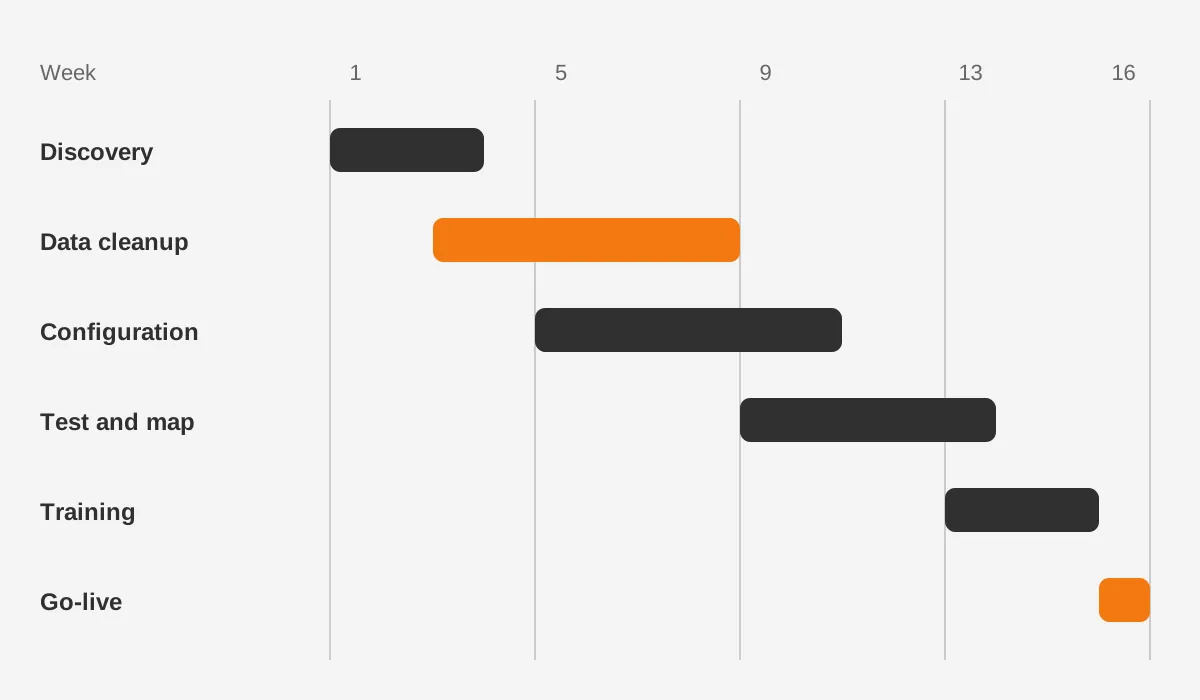
Two choices keep this example on schedule. Cleanup starts before configuration ends, and the finance team signs off gift coding by week 6.
The plan also leaves the old system open through the first reconciliation cycle. That protects month-end reporting while staff build trust in the new numbers.
A smaller team could implement a fundraising CRM in about half that time. With 8,000 records, no accounting integration and a purpose-built donor CRM, weeks 3 to 13 shrink to about five weeks. The same order of phases still applies.
Expect 30 to 60 days of tuning after week 16. Reports, dashboards and automations rarely match every need on day one. A new donor CRM settles faster when someone tracks gift entry, support questions and report accuracy daily.
How Can You Shorten the Implementation Timeline?
You can shorten the time to implement a fundraising CRM by doing the slow work before the contract starts. Cleanup, decisions and exports do not need the new system.
Six steps save the most calendar time:
- Export a full copy of contacts, gifts, recurring schedules, notes and custom fields now, and store two backups.
- Merge duplicates and fix addresses in the current system, where staff already know the tools.
- Write down the 10 reports the board, finance and fundraisers use every month.
- Agree gift types, funds and campaign codes with finance before configuration begins.
- Name one CRM owner and protect that person's calendar for the length of the project.
- Book training dates when you book the go-live date.
Each of these steps removes a wait from the critical path. A team that arrives with clean data and signed-off codes can often finish near the short end of its band.
Scope control helps as much as preparation. Launch fundraising first, then add volunteers, grants or programs in a second phase. A smaller first release reaches go-live sooner and teaches the team how the platform works.
An experienced partner also shortens the plan. Unboxx runs CRM implementation services for Salesforce, HubSpot and Microsoft Dynamics 365. Data migration and integrations sit in the same plan.
The data you should migrate is every gift, every active donor and every recurring schedule. Archive lapsed prospects with no gifts and no activity in ten years, rather than loading them into the new CRM.
Frequently Asked Questions
How long does it take to implement new fundraising software?
New fundraising software takes days to 2 weeks when it covers one process, such as a giving form. A full donor CRM takes 4 to 12 weeks for a small nonprofit. Mid-sized teams need 3 to 6 months. Scope, records and integrations set the difference.
Can we use the new CRM before data arrives?
Yes, staff can explore the new CRM during configuration, but live gift entry should wait for the final import. Running two systems for new gifts creates duplicate records. Keep the old database as the system of record until the cutover date, then switch it to read-only.
Must we clean our data before we migrate?
Yes, clean data before migration, because every error you import has to be fixed twice. Merge duplicate donors, standardize addresses and agree gift codes in the old system first. Cleaning early also shortens donor data migration, since fewer records need manual review after each test load.
How do you train staff on a new CRM?
Train staff in short, role-based sessions of 45 to 90 minutes over 2 to 3 weeks. Gift processors learn batch entry and receipts. Fundraisers learn donor records, tasks and pipelines. Leaders learn dashboards. Record each session, so new hires can watch it later without extra trainer time.
Does nonprofit size change the CRM cost?
Yes, a larger nonprofit usually pays more, because record count and integrations drive both time and partner fees. A longer project means more consultant hours and more staff time. License pricing also scales with users, so price both the software and the work to implement a fundraising CRM.
How Can Unboxx Help You Implement a Fundraising CRM?
Unboxx helps nonprofits implement a fundraising CRM on a realistic schedule. Data cleanup, donor data migration, integrations and training sit in one plan. The team works across Salesforce Nonprofit Cloud, HubSpot and Microsoft Dynamics 365.
Do you need to implement a fundraising CRM before your next contract renewal or year-end campaign? Start with a scoped timeline. Schedule a consultation to map your records, integrations and go-live date.
Let's create something out of this world together.
Have a project in mind? Contact us for expert design and development solutions. Let's discuss how we can help grow your business.
Ready to Unboxx Your Potential?
Build smarter systems. Automate faster. Scale confidently.