
An insurance customer rarely moves in a straight line. A prospect asks for a quote by phone and opens a renewal email a year later. The same person files a claim on a mobile app, then calls an agent about a second policy.
TTEC Digital, citing Salesforce research, notes that customers now use an average of eight channels. Each channel is a chance to help, or to send the wrong message.
So should an insurer buy a journey orchestration platform or extend its CRM? A journey orchestration platform decides the next message or action for each policyholder in real time. A CRM records who that policyholder is. The answer depends on journey volume, channel count, data quality and ownership.
Key Takeaways
- A journey orchestration platform reacts to individual events in real time, while a CRM stays the system of record.
- Extending your CRM suits agencies with one or two channels and simple renewal, quote and onboarding journeys.
- A dedicated platform earns its cost when journeys span five or more channels, brands or product lines.
What Is a Journey Orchestration Platform?
A journey orchestration platform is software that watches customer events and picks the next action for each person. Adobe describes it as a tool for understanding the customer journey. Its purpose is to deliver personalized experiences that keep the customer engaged with a company.
Adobe names three main features: data, content and delivery. Data tells the journey orchestration platform what happened. Content is the message, offer or task it can send. Delivery is the channel, such as email, SMS, a push notification, the agent's phone queue or the web portal.
The working model is event, condition, action. An event arrives, for example a policyholder opening a renewal notice. A condition checks something, for example whether the premium rose more than 10%. An action follows, such as a task for the producer to call within two days.
The loop repeats for every person and every event. A renewal journey for 20,000 policyholders becomes 20,000 separate paths. Each path moves at the speed of the customer, not the speed of a campaign calendar.
How does journey orchestration work in practice?
Customer journey orchestration differs from batch marketing automation in one key way. Adobe notes that marketing automation tools work at the segment or audience level.
Journey orchestration focuses on the individual. A segment email goes to everyone renewing in March. An orchestrated journey reacts when one person stalls at step three.
Gartner groups this software under customer journey analytics and orchestration. Vendors in that space include Adobe Journey Optimizer, Salesforce Marketing Cloud, Microsoft Dynamics 365 Customer Insights and Genesys. Buyers also call this category a journey orchestration engine, CJO platform or journey orchestration software.
Vendors use different labels for the same idea. Underneath, the event-driven core is identical. It listens for signals, checks rules or models, picks the next best action and records the result.
How Does a CRM Handle Insurance Customer Journeys?
A CRM handles insurance customer journeys by storing the record and running rule-based workflows on top of it. It knows the contact, the household, the policies, the producer, the renewal date and the open opportunities. It then triggers tasks and emails when a field changes or a date arrives.
Insurance CRM platforms such as Salesforce Financial Services Cloud, HubSpot and Dynamics 365 Sales all include workflow tools. HubSpot lists four enrollment trigger types for its workflows: filter-based, event-based, schedule-based and webhook-based. That covers most quote follow-up and renewal reminders an independent agency needs.
The limits show up at scale. HubSpot notes that records enroll in a workflow only the first time they meet the triggers, by default. A record cannot re-enroll until it completes the workflow. HubSpot also keeps workflow action logs for 90 days and enrollment history for six months.
For a record-keeping system, those rules make sense. They become friction for a carrier that wants a policyholder to move between journeys every week. Our guide on CRM for insurance agents covers the record design and the agency management system link that come first.
A CRM also tends to see the world through the producer's eyes. Its objects are leads, opportunities, accounts and cases. A journey that starts with an app login may never reach the CRM. Someone has to build that integration first.
Where Does a Journey Orchestration Platform Fit in Insurance?
A journey orchestration platform fits above the CRM and the policy systems, as a decision layer. It reads events from the CRM, the agency management system, the claims system and digital channels. It sends actions back out, then writes the outcome to the CRM so producers see the full story.
The Pedowitz Group puts the rule plainly: successful journey orchestration depends on a clean, connected CRM. It advises keeping the CRM as the system of record for people and accounts. A governed, bi-directional sync then moves key fields and events between the two systems.
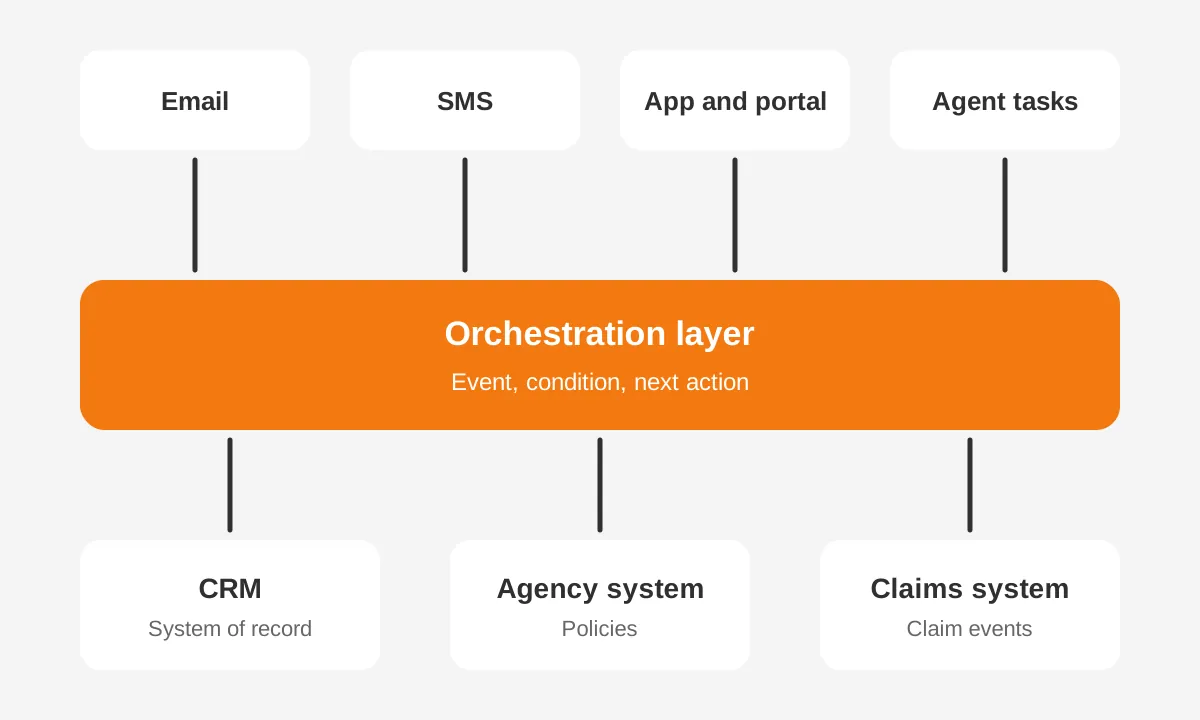
In insurance, this layer usually covers five journeys. They are new policy onboarding, quote follow-up and the policy renewal journey. The other two are the claims journey, from first notice of loss to settlement, and cross-sell to an existing household.
The CRM still matters for each journey. The producer works the opportunity in the CRM, and service staff log calls there. The journey orchestration platform decides timing and channel. It then hands the human step back to the CRM as a task with context attached.
What Are the Tradeoffs Between Both Approaches?
The main tradeoff is control versus cost. A dedicated journey orchestration platform gives real-time decisions across channels. It also adds a license, an integration and a second team. Extending your CRM keeps one system and one data model, but it limits how fast and how widely journeys react.
| Factor | Extend the insurance CRM | Dedicated journey orchestration platform |
|---|---|---|
| Decision speed | Rule-based, often batch or field-change triggers | Real-time, event by event |
| Channels | Email, tasks, some SMS | Email, SMS, push, web, app, contact center |
| Data model | One record, no sync to maintain | Needs a governed sync with the CRM |
| Personalization | Segment and field based | Individual next best action |
| Owners | CRM admin and marketing ops | Marketing ops, IT and revenue operations |
| Journey orchestration cost | Mostly configuration hours | License, integration build and ongoing support |
| Time to first journey | Weeks | Months, because of integration |
Journey orchestration tradeoffs also include risk. Two systems can disagree about a policyholder's consent or stage. If the sync fails, the platform might send a renewal offer to someone who cancelled yesterday. In a regulated industry, that is a compliance issue.
Extending your CRM carries its own risk. Workflows pile up, and nobody can see which one fired a message. Teams then build workarounds such as extra fields, duplicate workflows and manual lists. The CRM slows down and data governance gets harder to enforce.
What does each option cost to run?
Total cost of ownership has three parts for either path. There is the software license, the build and integration work, and the people who keep journeys current. A dedicated platform raises the first two. Extending your CRM keeps them low but can raise admin hours as journeys multiply.
Here is a worked example with assumed figures, not market data. An agency runs four journeys today and plans eight next year. Each new CRM workflow takes about 12 admin hours to build and test. Eight journeys with three branches each means roughly 24 workflows and about 290 hours.
A journey orchestration platform might cut build time per journey once the integration exists. The integration itself might take 300 to 500 hours in this example. Journey count, not vendor features, usually decides the business case.
When Is Extending Your CRM the Better Choice?
Extending your CRM is the better choice when journeys are few, channels are limited and one team owns the work. Most independent agencies and smaller carriers fit this profile. They need quote follow-up, renewal reminders and onboarding, with email and tasks as the main channels.
Four signs point to extending your CRM:
- Your agency runs fewer than six active journeys.
- Email, tasks and SMS cover most customer touches.
- One CRM admin can own and document every workflow.
- Your policy data already syncs into the CRM daily.
Salesforce Marketing Cloud includes Journey Builder, which can connect to Sales Cloud data. Salesforce describes Journey Builder as a campaign planning tool. It guides customers through their journey with a brand. Contacts enter from an entry source and move to the next activity.
For a Salesforce agency, that is often the middle path. It adds orchestration features without a new vendor. HubSpot workflows and Dynamics 365 Customer Insights - Journeys offer the same middle path for their users. Our marketing automation implementation plan shows how to phase that work.
The middle path still needs discipline. Name every workflow by journey and step. Keep one document that lists triggers, exits and owners. Review that list each quarter, and retire any workflow nobody can explain.
When Does a Dedicated Platform Earn Its Cost?
A dedicated journey orchestration platform earns its cost when journeys cross brands, product lines and five or more channels. Large carriers, bancassurance partners and multi-line insurers fit here. Their policyholders deal with agents, call centers, apps and portals, often owned by different teams.
Three conditions make the dedicated journey orchestration platform worth the build:
- Real-time triggers matter, such as a claim filed or a payment missed.
- Journeys must span more than one CRM, brand or region.
- Marketing, service and claims need one view of journey state.
Consider the claims journey. A first notice of loss arrives from the app at 10 p.m. The journey orchestration platform can send an SMS with next steps within seconds. It can then open a task in the CRM for the adjuster. A nightly batch workflow would wait until morning.
Genesys and Adobe both position their orchestration tools for this cross-channel work. A dedicated platform also helps when an insurer has two CRMs after a merger. One orchestration layer can keep journeys consistent during the CRM consolidation. Our guide to migrating insurance client data covers that consolidation.
Scale shifts the numbers as well. A carrier with 500,000 policyholders and four product lines might run 30 journeys. Managing 30 journeys as hundreds of CRM workflows becomes hard to audit. A journey orchestration platform shows each journey on one canvas with its branches and exits.
How Do the Two Systems Share Data?
The two systems share data through a governed, two-way sync of identities, key fields and events. The CRM sends who the person is, their lifecycle stage and their consent. The journey orchestration platform sends back what it did and what the customer did next.
The Pedowitz Group recommends designing around lifecycle stages and signals, such as opportunity stage changes and renewal dates. It also advises writing outcomes back to the CRM. Every orchestrated touch then appears on the record a producer opens before a call.
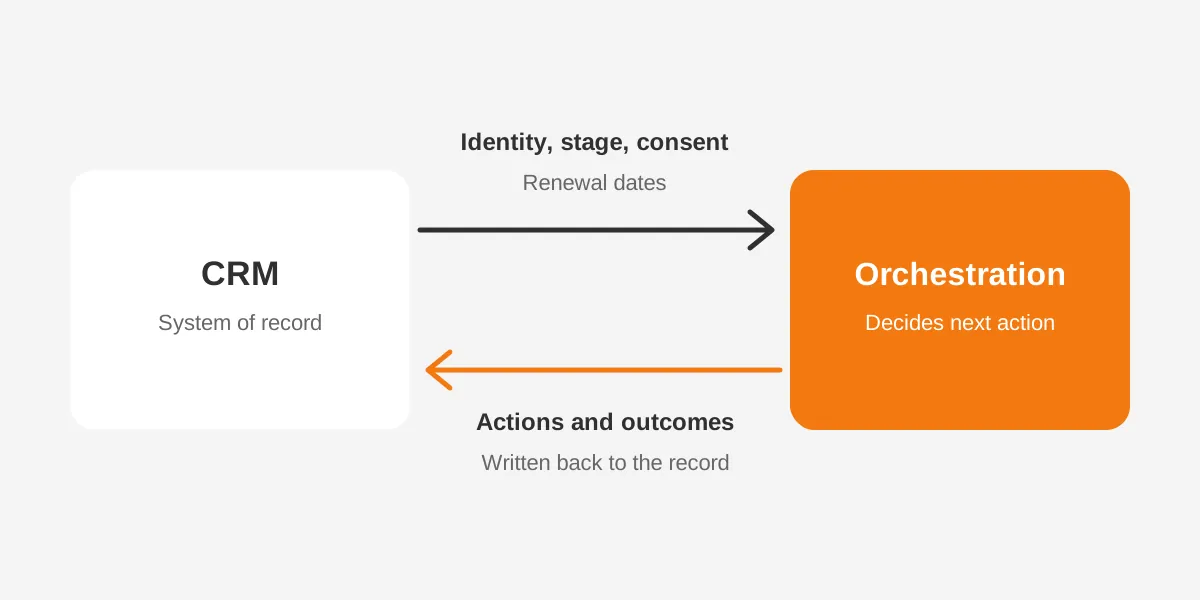
Sync speed matters for triggers. Pedowitz suggests aiming for real-time or near real-time sync for triggers and routing. A 24-hour lag can make a renewal reminder land after the customer already called. Daily sync is acceptable for reporting fields.
Identity resolution is the hardest part in insurance. One household may hold auto, home and life policies under three records. The platform needs one customer ID, or it will send three conflicting messages. Agree on the matching rule before any journey goes live.
Which fields should sync first?
Start with eight fields. They are customer ID, household ID, email, mobile number and consent status. The other three are lifecycle stage, policy renewal date and assigned producer. Those support onboarding, renewal and cross-sell journeys. Add claims status and payment status when the claims journey launches.
Consent management deserves its own owner. Email, SMS and phone consent often live in different systems. The CRM should hold the master value. The journey orchestration platform should check it before every send. That rule protects the insurer when a policyholder opts out on one channel.
What Mistakes Do Insurers Make With Orchestration?
The most common mistake is buying a journey orchestration platform before the data is ready. The software cannot fix duplicate households, stale renewal dates or missing consent flags. It will act on them faster, which makes errors more visible to policyholders.
Five other mistakes appear often in insurance projects:
- Launching every journey at once instead of piloting renewal first.
- Leaving producers out of design, so tasks arrive without context.
- Skipping exit rules, so customers stay in journeys after they buy.
- Measuring opens and clicks instead of renewals and retention.
- Running CRM workflows and platform journeys on the same trigger.
The last mistake causes double messages. If a CRM workflow and the journey orchestration platform both react to a renewal date, the policyholder gets two reminders. Pick one owner for each trigger and switch off the other before launch.
One more mistake is treating the launch as the finish line. Journeys need monthly review. Products change, rates change and regulators publish new rules. A renewal journey built for last year's pricing can send the wrong message this year.
Assign a journey owner for each journey. That person reviews copy, branches and exit rules every month. Keep a change log in the CRM, so service staff can see why a policyholder received a message. The log also helps during a compliance audit.
Producer buy-in matters as much as the technology. An agent who sees a task with the customer's last three touches will call with context. An agent who sees a bare task will often ignore it.
Which Metrics Show Orchestrated Journeys Are Working?
The metrics that matter are business outcomes tied to each journey, not message activity. Renewal rate, quote-to-bind rate, time to first contact after a claim and opt-out rate tell you whether journeys help policyholders. Opens and clicks only show that a message arrived.
Set one primary metric per journey before launch:
| Journey | Primary metric | Guardrail metric |
|---|---|---|
| Policy renewal | Renewal rate | Opt-out rate |
| Quote follow-up | Quote-to-bind rate | Time to first call |
| New policy onboarding | Portal or app activation | Service calls in first 30 days |
| Claims | Time to first update | Complaint volume |
| Cross-sell | Policies per household | Unsubscribes |
Use a holdout group for every pilot. Keep 10% of eligible policyholders out of the new journey. Compare their results after 60 to 90 days. Without a holdout, a renewal lift might come from pricing or seasonality.
A journey orchestration platform usually reports journey-level results on its own canvas. A CRM reports them through dashboards built on written-back activities. Either way, the numbers belong in the CRM, where producers and leaders already look each week.
How Should an Insurance Team Decide and Roll Out?
An insurance team should decide by mapping journeys first and buying software second. The decision rests on the number of journeys, the channels involved and the real-time needs. Vendor feature lists come after those three facts.
- List every customer journey you run or plan, with its trigger and owner.
- Count the channels and systems each journey touches.
- Mark which steps need a reaction within minutes.
- Score your CRM data quality on the eight core fields.
- Choose to extend the CRM or add a journey orchestration platform.
- Pilot one journey, usually renewal, for 60 to 90 days.
- Measure renewal rate, response time and opt-outs against a control group.
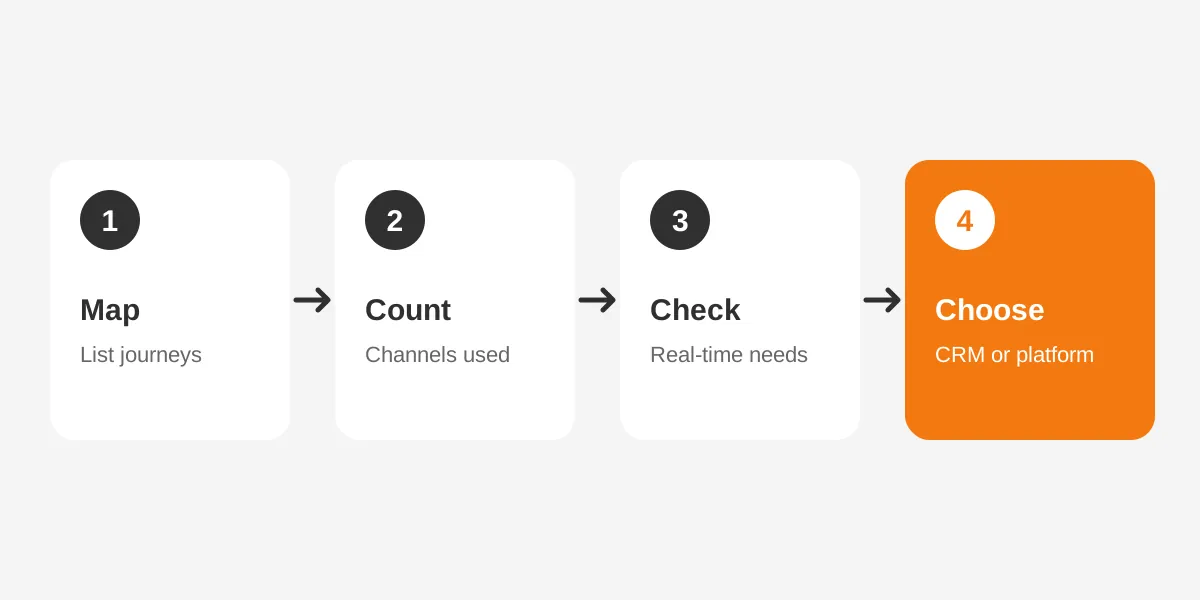
Step four often changes the answer. If policy data reaches the CRM late or with duplicates, a new platform will amplify the problem. Fix the record first. Our CRM requirements guide includes a scoring method that fits this review.
Ownership is the last decision. Pedowitz notes that ownership typically sits with revenue operations or a joint group. That group spans marketing ops, sales ops and IT. In an agency, it might be one operations lead and one CRM admin. Name them before the pilot starts.
Unboxx helps insurers and agencies make this call through its CRM for insurance work. The team scopes journeys, checks data and builds on Salesforce, HubSpot or Dynamics 365. For marketing-led journeys, our AI growth marketing services cover campaign design and measurement.
Frequently Asked Questions
Is journey orchestration the same as marketing automation?
No. A journey orchestration platform reacts to each person's events in real time and chooses the next action across channels. Marketing automation usually sends scheduled campaigns to segments. Journey orchestration software can include automation features. Its focus is the individual journey and its timing across service, sales and marketing.
Can a customer data platform replace a CRM?
No. A customer data platform unifies profile and behavior data for analysis and targeting. A CRM manages relationships, opportunities, service cases and producer tasks. Insurers often run both. The CRM stays the system of record, and the customer data platform feeds audiences and events into journeys.
How long does journey orchestration implementation take?
Extending an existing CRM with renewal and onboarding journeys usually takes six to twelve weeks. A dedicated platform often takes four to nine months. Identity resolution, consent sync and policy system integration come first. These ranges are typical project estimates, not guarantees, and depend on data quality and scope.
Which insurance journeys should be orchestrated first?
Start with the policy renewal journey. It has a fixed date and clear revenue impact, and most CRMs already hold its data. New policy onboarding usually comes second, then quote follow-up. Claims and cross-sell journeys come later, because they need more connected systems and stronger consent controls.
Do independent agencies need a dedicated orchestration platform?
Most do not. An independent agency with one CRM, an agency management system and three channels can run strong CRM workflows. A dedicated journey orchestration platform starts to pay off later. That point comes with two or more brands, wider regions, or real-time channels.
Which Journey Orchestration Platform Path Should Your Agency Take?
Choose the path your journeys justify. If you run four or five journeys on email and tasks, extend the CRM and keep one system of record.
For journeys across five or more channels with real-time needs, a journey orchestration platform on a clean CRM fits better.
Unboxx can map your journeys, score your data and recommend the right build for your team. Schedule a consultation to review your journey orchestration platform options with a CRM consultant who works with insurers.
Let's create something out of this world together.
Have a project in mind? Contact us for expert design and development solutions. Let's discuss how we can help grow your business.
Ready to Unboxx Your Potential?
Build smarter systems. Automate faster. Scale confidently.