
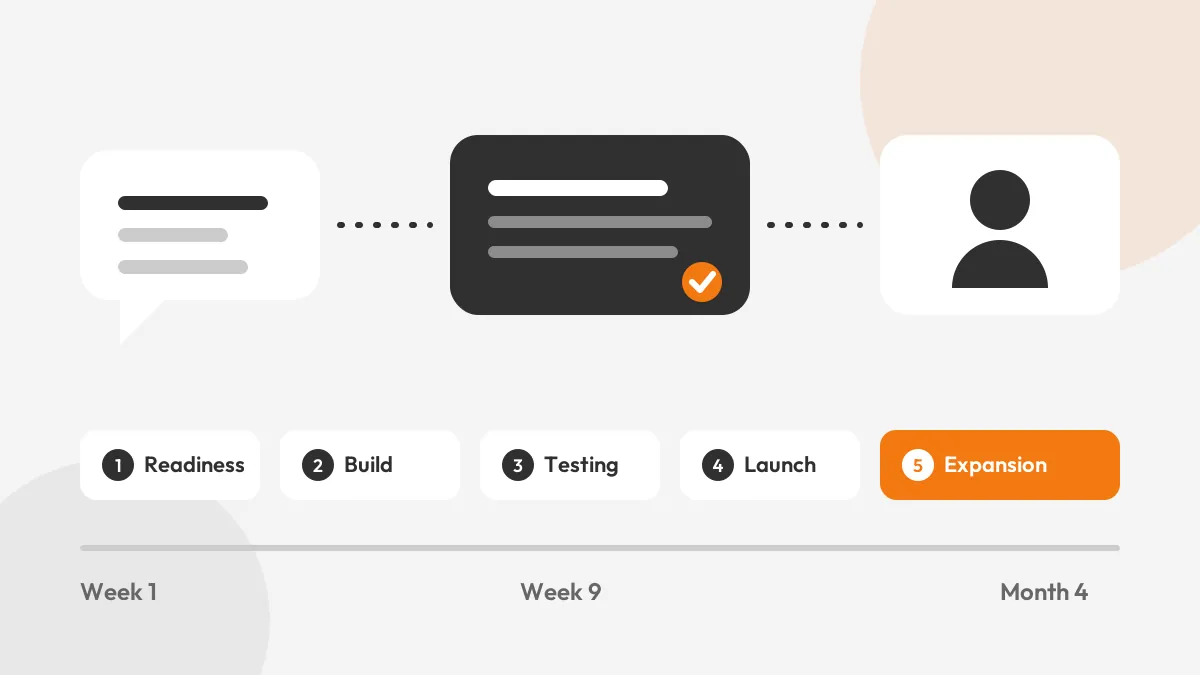
A service team buys a conversational AI platform in a week. Five months later it still answers no real customer. The model is almost never the hold-up. Integrating a conversational AI platform waits on the CRM work underneath.
Integrating a conversational AI platform with an enterprise CRM is a data and routing project. A chat window sits on top. Gartner predicted in 2025 that agentic AI will autonomously resolve 80% of common customer service issues by 2029. Reaching that depends on the plumbing, not the prompt.
Key Takeaways
- A connected pilot takes 6 to 8 weeks. A production rollout with CRM write-back runs 12 to 20 weeks.
- The schedule is set by CRM readiness: routing, queues, fields, roles, knowledge and permissions.
- Budget two to three weeks of testing for each system the agent reads from or writes to.
What Does Integrating a Conversational AI Platform Involve?
Integrating a conversational AI platform means wiring four things together. Those are the chat channel, the intent model, the CRM record and the escalation path. Each one has an owner and a dependency.
The chat channel is where the conversation starts: a website widget, an in-app message, WhatsApp or voice. The intent model decides what the customer is asking for. Conversational AI for customer service lives or dies on it.
The enterprise CRM holds the account, the case and the history each answer depends on.
The escalation path is the part teams underestimate. An agent that cannot reach a person puts service level agreement targets at risk. Gartner also advised dynamic routing that separates human and AI interactions. It asks for a written AI interaction policy covering privacy, security and escalation.
Three delivery models exist, and they move at different speeds. What differs is the AI agent CRM integration, not the chat itself.
A packaged agent inside the CRM is fastest, because the CRM objects already exist. Agentforce and Copilot Studio work that way. A specialist vendor platform connected by API comes next, and a custom build on a cloud model is slowest.
Unboxx sees most mid-market work land in the middle model. The platform is bought, the agent is configured, and the integration layer is built against the CRM. That is the path this article measures, and it is the core of AI-native CRM solutions work.
Scope control is the first discipline. Integrating a conversational AI platform for one journey can reach production inside a quarter. Order status and renewal questions are good first journeys. Opening the same project across sales, service and billing at once rarely does.
One rule shapes every estimate. The agent can only be as good as the CRM data it reads. Integrating a conversational AI platform on top of duplicate accounts and empty fields produces confident wrong answers at scale.
The second rule is about ownership. Integrating a conversational AI platform touches the CRM, the website, the knowledge base and the service rota. Four owners with no single decision maker is the pattern behind most stalled projects.
How Long Does a Realistic Timeline Take?
A conversational AI timeline for mid-market companies runs 12 to 20 weeks to production. A connected pilot reaches real customers in 6 to 8 weeks. A programme across sales and service runs 4 to 6 months.
What a conversational AI implementation timeline looks like depends on CRM readiness. Those ranges assume one CRM, one channel and a named CRM administrator each week. The table below sets out an example schedule for a Salesforce or Dynamics 365 estate.
| Stage | Example duration | CRM work that sets the pace | Owner |
|---|---|---|---|
| Scope and readiness | Weeks 1 to 2 | Data audit, intent list, access and roles | Project owner |
| Build and first integration | Weeks 3 to 6 | Queues, routing flow, field mapping, knowledge | CRM administrator |
| Integration testing | Weeks 6 to 9 | Sandbox scenarios, API limits, escalation tests | Service lead |
| Phased launch | Weeks 9 to 12 | Traffic split, reporting, transcript storage | Service lead |
| Expansion | Month 4 onward | Second channel, second system, write-back depth | Project owner |
Those figures are an example, not a benchmark. Two variables move them more than anything else. One is the number of systems the agent touches. The other is whether the CRM already routes work through queues.
How long it takes to integrate a chatbot with a CRM follows those two answers.
The 12 to 20 week range holds only when readiness is finished before the build starts.
Integrating a conversational AI platform also competes for the same CRM administrator who runs releases and reports. That contention, not the vendor, is the usual reason a 12-week plan becomes a 20-week one.
Voice adds time on top. An AI chatbot on a CRM is text first, and the integration layer build assumes it. A working text agent needs four to six more weeks for a phone channel.
Speech handling, call transfer and recording consent each need their own tests. Integrating a conversational AI platform for voice is a second project, not a setting.
Which Phases Make Up the Rollout?
The conversational AI rollout phases are readiness, build, integration testing, phased launch and expansion. Plan these conversational AI integration phases week by week. Each one ends with a check that a person signs, which is what keeps a schedule honest.
Readiness runs two weeks. It produces a ranked intent list, a data audit and a decision on which questions the agent may answer. Who owns a conversational AI CRM project is settled here too.
Ten to fifteen intents is enough for a first release. A list of sixty guarantees a missed date.
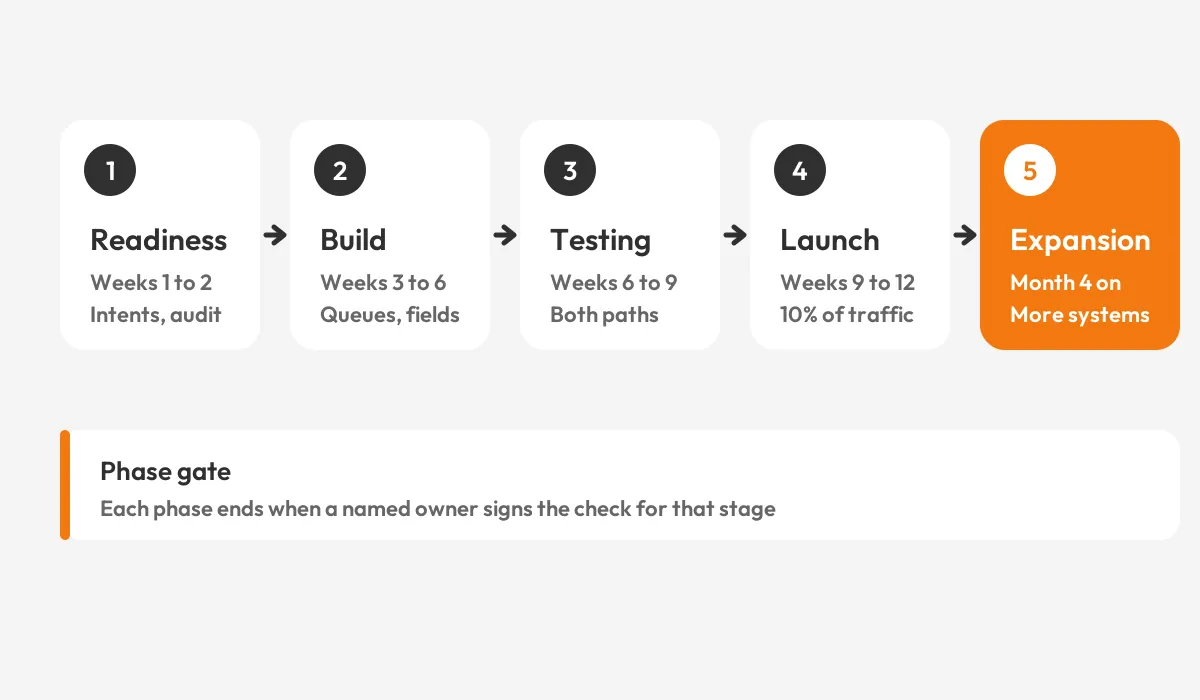
Build runs weeks three to six. The CRM administrator creates the queues, the routing flow and the fields the agent writes to. The platform team builds the intents and connects the knowledge base. Both tracks run in parallel, so one blocked task stalls the other.
Integration testing runs weeks six to nine. Every path is tested twice: once where the agent answers, once where it escalates. Transcripts are checked on the CRM record. API limits are measured under load, not estimated.
Phased launch runs weeks nine to twelve. Traffic starts at 10% and rises when containment and accuracy hold for a week. Expansion starts in month four, once reporting shows which intents earn their place.
Phase gates keep the plan truthful. Readiness ends when the intent list and the data audit are signed.
The phase order matters more than the dates. Teams that build before readiness rebuild intents. Teams that launch before testing lose the trust of the service team. A service team that stops trusting the agent routes around it. The same sequencing logic sits behind a 90-day AI implementation roadmap.
What Must Be Ready Before Build Starts?
Six things must be ready before the build starts. Those are clean CRM data, a named owner, platform roles, queues, knowledge articles and a data policy. Integrating a conversational AI platform without them turns the build into discovery.
What to prepare before a conversational AI build is CRM work, not model work. That is why the readiness stage belongs to the CRM administrator.
Clean data comes first, because integrating a conversational AI platform exposes every gap in the records it reads. Duplicate contacts produce two answers to one question. Empty entitlement fields promise support a customer never bought. Audit the objects the agent reads, because CRM data quality decides answer quality.
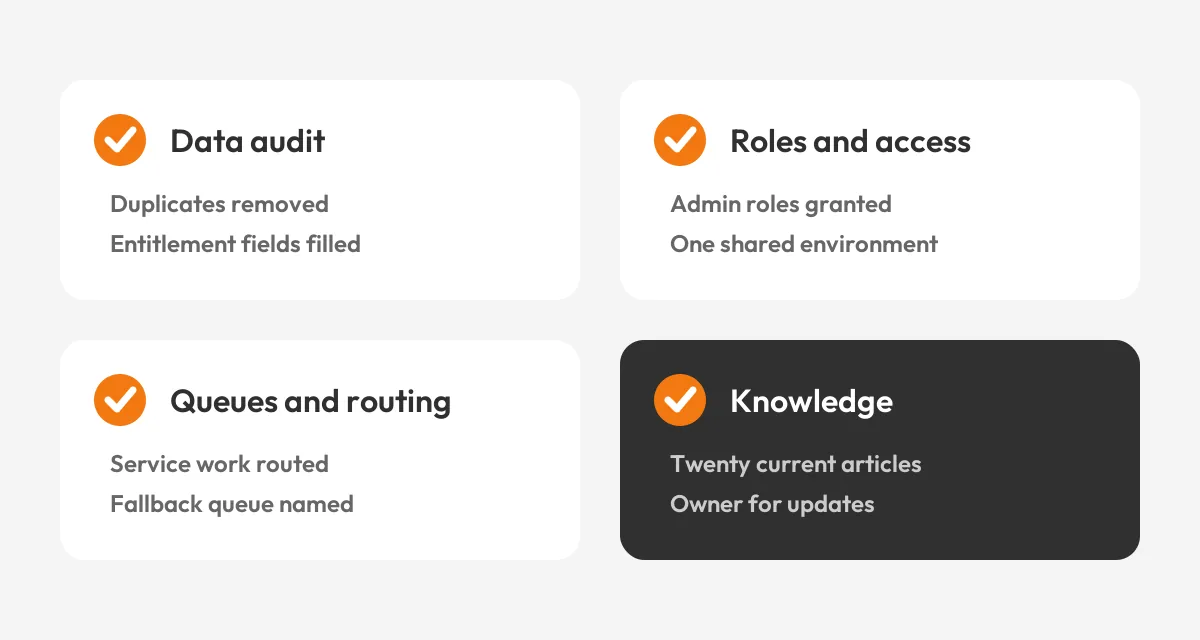
Roles and access are the second blocker. Microsoft documents that a Copilot Studio handoff needs at least the OC_Admin and Agent Author roles. It states that the agent and Dynamics 365 Customer Service must share one environment. A request for those roles can sit in a queue for a week.
Queues and routing come third. CRM chatbot integration has nowhere to escalate without them. If service work does not already route through queues, that design comes first. No agent can escalate into a queue that does not exist. That is CRM configuration, and it belongs to the CRM administrator.
Knowledge is fourth. Knowledge base articles are the grounding, and twenty current ones beat a stale wiki. Fifth is the data policy, covering PII redaction in transcripts, data residency rules and retention. Authenticated chat also needs single sign-on.
Sixth is the owner, because the five decisions above all need one person to settle them. This conversational AI integration checklist has no optional item for CRM teams.
Licensing sits behind the roles. Agent credits, messaging licences and sandbox seats are procurement items with their own lead time. Integrating a conversational AI platform stalls for a week over a late licence order. Buy during readiness, not during the build.
Clean data has a second payoff. The same work raises reporting quality across AI business automation services, so the audit is not sunk cost.
How Does the CRM Handoff Work in Practice?
Integrating a conversational AI platform ends at the handoff. How an AI agent escalates to a human is a routing decision.
The agent decides a question is out of scope. The CRM routes the conversation to a queue. The conversation transcript lands on the CRM record a person opens.
The data transfer is better than most teams expect. Microsoft documents what travels with a Copilot agent handoff. It can share the full history of the conversation and all relevant variables. Those context variables fill the case fields. The representative opens the case with the context already there.
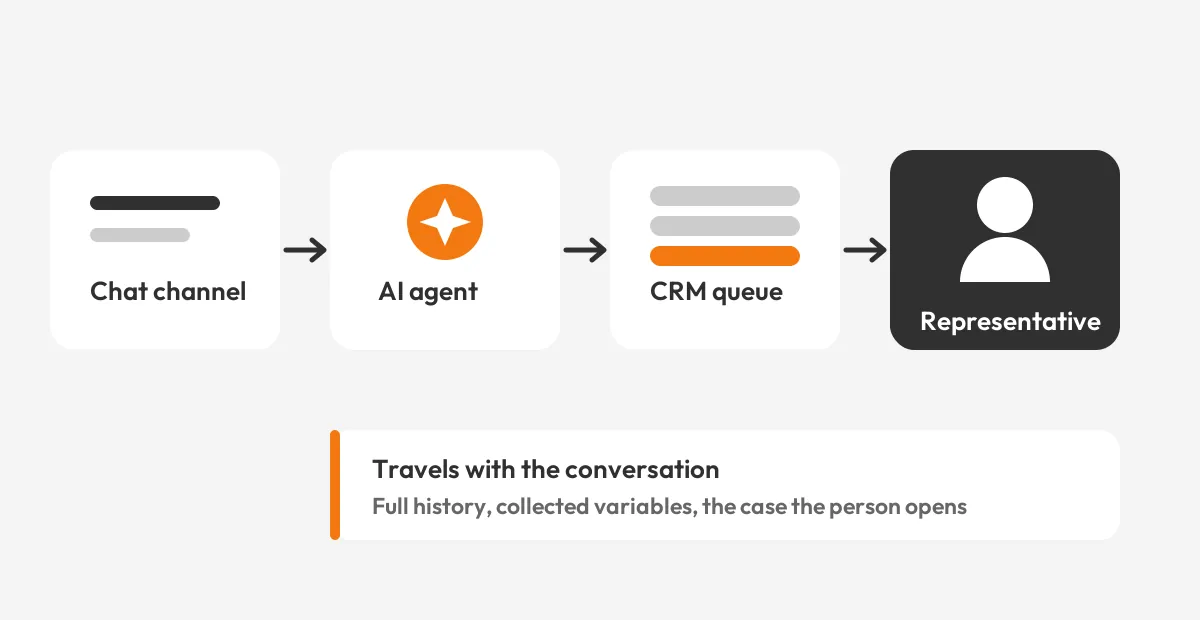
The AI agent handoff to the CRM carries that context, so its rules set the schedule. Microsoft documents three of them. One agent only can be added per workstream. Agents receive conversations only from push-based workstreams. A conversation closes automatically after 30 minutes of inactivity.
Two more documented traps cost days each. A Copilot Studio agent with a name longer than 30 characters fails to connect. Using the embed code from Copilot Studio stops handoff working at all.
Conversational AI integration with Salesforce Service Cloud runs through Omni-Channel, and the shape is familiar. The Agentforce service agent deployment steps start with enabling messaging and Omni-Channel.
Next comes an Omni-Channel routing flow, then the messaging channel points at that flow. An embedded service deployment is created and published last. The flow carries a fallback queue for the cases the agent cannot hold.
Each of those four steps is CRM configuration with its own approval. Integrating a conversational AI platform in a Salesforce estate moves at the speed of the Omni-Channel design. The agent build is not the constraint. Teams running both clouds should read the Agentforce implementation guide before scoping.
How a chatbot writes back to the CRM deserves its own test plan. What the agent may create, update and close is a policy question for the service lead. A read-only first release is defensible.
A guide to AI agent use cases by team helps rank which writes earn the risk, and which can wait.
Why Does Integration Testing Take So Long?
Testing is where integrating a conversational AI platform stops being a demo. The agent has to behave when the data is wrong, the API is slow and the customer is angry. None of that appears in a scripted walkthrough.
Conversational AI integration testing takes weeks for a plain reason. Each connected system needs two to three weeks of its own. Every path has two outcomes, and both have to be proven. The answer path and the escalation path fail in different ways.
A single intent carries a surprising number of cases. The customer is known or unknown. The entitlement is current or lapsed. The record exists, is duplicated, or is missing. The API answers, throttles or times out.
API limits during sync are the most common late surprise. Sandbox traffic rarely reaches production volume, so throttling shows up at launch rather than in testing. Measure the limits under load, as any CRM and ERP integration plan should.
Sandbox fidelity is the second cost. A sandbox without representative data gives clean test results and no confidence.
User acceptance testing is where service teams earn their veto. The people who answer the question today should try to break the agent.
Regression testing belongs in the plan as well. The CRM will get a platform release during the project, and a routing change can break a working handoff. A short test suite that runs after each CRM release protects the work.
Teams connecting a second platform, such as a marketing or billing system, should add its own testing window. Integrating a conversational AI platform across two systems is not twice the work, but it is not one window either.
How Should Traffic Be Phased After Launch?
Integrating a conversational AI platform ends with a dial, not a switch. How much traffic an AI agent should handle at launch is 10% of eligible conversations. That is the first notch of a conversational AI pilot.
Week two moves to 25% if containment and accuracy hold. Week three moves to 50%. Full eligible traffic follows once the service team stops filing complaints about handoffs.
Three metrics decide each step up while integrating a conversational AI platform. Intent coverage shows how often the agent recognises the question. Containment rate shows how often it finishes the conversation. Average handle time on escalated cases shows whether the handoff helps or hurts the person who takes over.
Case deflection is the number a finance team will ask for when integrating a conversational AI platform. It is also the easiest to overstate. A conversation the agent closed without answering is not deflection, so the count needs a quality check against transcripts.
Reporting has to be built during the build phase, not after launch. Teams that already report cleanly from the CRM can extend an existing dashboard. That is the quickest win in the project.
Rollback rules are worth agreeing before the first percentage point of traffic moves. One rule is enough: if containment or accuracy drops for two days, traffic returns to the previous step. Integrating a conversational AI platform with a written rollback rule is what lets a team raise traffic quickly.
What Delays Integrating a Conversational AI Platform?
What delays a conversational AI project falls into five causes. They are missing roles, unclean data, no queue design, scope growth and an absent owner. All five are visible in week one if anyone asks.
None of the five is a technology problem. Integrating a conversational AI platform is therefore managed as a CRM project with an AI component. The reverse order fails. The project plan should name the CRM tasks first.
Scope growth is the quietest killer when integrating a conversational AI platform. An agreed list of twelve intents becomes thirty when a second department hears about the project.
Platform access is the most common hard stop, and the conversational AI project timeline slips with it. A role request, a licence or a sandbox refresh can idle a build team for a week.
Copilot Studio to Dynamics 365 handoff requirements include those roles and one shared environment. Raise every request in week one, when it costs nothing.
Change management for service teams is the delay teams forget to price. Service representatives need to know when the agent answers and how to take over. They also need a rule for wrong answers. Training and a written escalation rule take three days and prevent a rollback.
Security review is the fifth. Transcript storage, data residency and redaction of personal information attract questions from legal and risk. Starting that review in week two, rather than week eight, keeps it off the critical path.
Procurement of the data processing agreement often runs alongside it. Transcript data leaves the CRM when a vendor platform is used, so the contract has to say where it goes.
A CRM estate with existing integrations has an advantage worth naming. Teams that have run a HubSpot and Salesforce integration know where their field mapping and API ceilings sit. They usually finish faster.
Frequently Asked Questions
How long does a conversational AI CRM integration take?
A connected pilot takes 6 to 8 weeks, and a production rollout with CRM write-back takes 12 to 20 weeks. One CRM, one channel and one language sit behind those ranges. Each extra connected system adds two to three weeks of testing.
Can an AI agent write back to the CRM?
Yes, and the write scope is a policy decision. Most first releases read records and create a case or a note. Updating entitlements, closing cases or issuing credits waits longer. Hold those writes until containment and accuracy have been stable for a month.
What skills does the project need?
Three roles cover it. CRM conversational AI setup falls to a CRM administrator, who builds queues, fields and routing. A platform builder handles intents and knowledge, and a service lead owns the escalation rules. A named project owner settles scope.
Does the chatbot need the knowledge base first?
Grounding content should exist before the build starts. Twenty current articles that match the top intents beat a large library of stale pages. Teams without that content should plan a short writing sprint during readiness, because the agent cannot answer from nothing.
Is a packaged CRM agent faster to deploy?
Usually yes, because the objects, queues and permissions already exist in the CRM. A specialist platform wins on channel coverage and language support. The gap between the two is weeks of integration work. Let the channels a team already serves decide the choice.
Where Should You Start Integrating a Conversational AI Platform?
Start integrating a conversational AI platform with two weeks of readiness, not a vendor demo. Rank the intents, audit the CRM objects the agent will read, raise the access requests and name the owner. That work decides whether the rollout takes 12 weeks or 20.
Then pick one journey and ship it. Integrating a conversational AI platform for one high-volume question proves the routing, the write-back and the escalation path. Real customers find what tests miss. Every later intent reuses that plumbing.
Unboxx builds these integrations across Salesforce, HubSpot, Dynamics 365 and Odoo. The CRM configuration gets the same attention as the agent. To review your own estate before integrating a conversational AI platform, schedule a consultation with the team.
Let's create something out of this world together.
Have a project in mind? Contact us for expert design and development solutions. Let's discuss how we can help grow your business.
Ready to Unboxx Your Potential?
Build smarter systems. Automate faster. Scale confidently.