

A SaaS trial user signs up on Monday, never connects their data, and leaves by Friday. Nobody notices, because the trial emails ran on a fixed calendar. Buyers expect to progress alone. A Gartner survey published in March 2026 found that 67% of B2B buyers prefer a rep-free experience.
Marketing automation for SaaS closes that gap by timing each message to user behaviour. It connects product events, billing data and the CRM. Onboarding, handoff, recovery and renewal workflows then run from those signals. This guide shows how to set up marketing automation for SaaS, stage by stage.
Key Takeaways
- Marketing automation for SaaS works best when product usage data, not a calendar, triggers each message.
- Product-qualified leads need a written scoring rule and a sales response time before any routing goes live.
- Failed payment recovery and renewal reminders protect revenue the business has already won.
What Does Marketing Automation for SaaS Cover?
Marketing automation for SaaS covers every automated message and record update from first visit to renewal. It spans acquisition, trial onboarding, activation, conversion, retention and expansion. A classic B2B program stops at the sales handoff. A SaaS program keeps running for the whole subscription.
The second difference is the data source. Ecommerce flows react to carts and orders. SaaS lifecycle marketing reacts to product events such as "invited a teammate" or "connected an integration". Those events show intent more reliably than an email open.
The table below maps each customer lifecycle stage to its main trigger and its first automated action.
| Lifecycle stage | Typical trigger | First automated action |
|---|---|---|
| Visitor | Pricing page visit or content download | Add to a nurture sequence |
| Trial or freemium user | Account created | Start the onboarding email sequence |
| Activated user | Core feature used twice | Raise the PQL score |
| Paying customer | First invoice paid | Switch to customer onboarding |
| At-risk customer | Failed payment or falling usage | Start dunning emails or a health alert |
| Expansion candidate | Usage near the plan limit | Send a usage-based upsell message |
Give each stage an owner, an exit rule and a metric. Skip that step and workflows overlap and users receive conflicting emails on the same day. Teams that want help with this design can review our AI growth marketing services for SaaS lifecycle programs.
Marketing automation for SaaS companies also differs in who reads the messages. One account can hold an admin, a daily user and a budget holder. Each role needs its own track, tied to the same account record.
Which Data Must Feed Your SaaS Automation Platform?
Three data sources must feed marketing automation for SaaS: product usage data, billing data and CRM records. Product events show what users do. Billing shows what they pay and whether payment failed. The CRM shows who owns the account and what sales has promised.
Product analytics tools such as Mixpanel, Amplitude and Segment capture events in the app. Those events often go to a data warehouse first. A reverse ETL job then copies the agreed fields into HubSpot or Salesforce. A webhook can push urgent events, such as a cancelled subscription, within seconds.
Billing systems such as Stripe, Chargebee and Recurly send invoice and payment events. The CRM integration must agree on one customer ID across all three systems. Without that shared key, one user can appear as three contacts with three lifecycle stages.
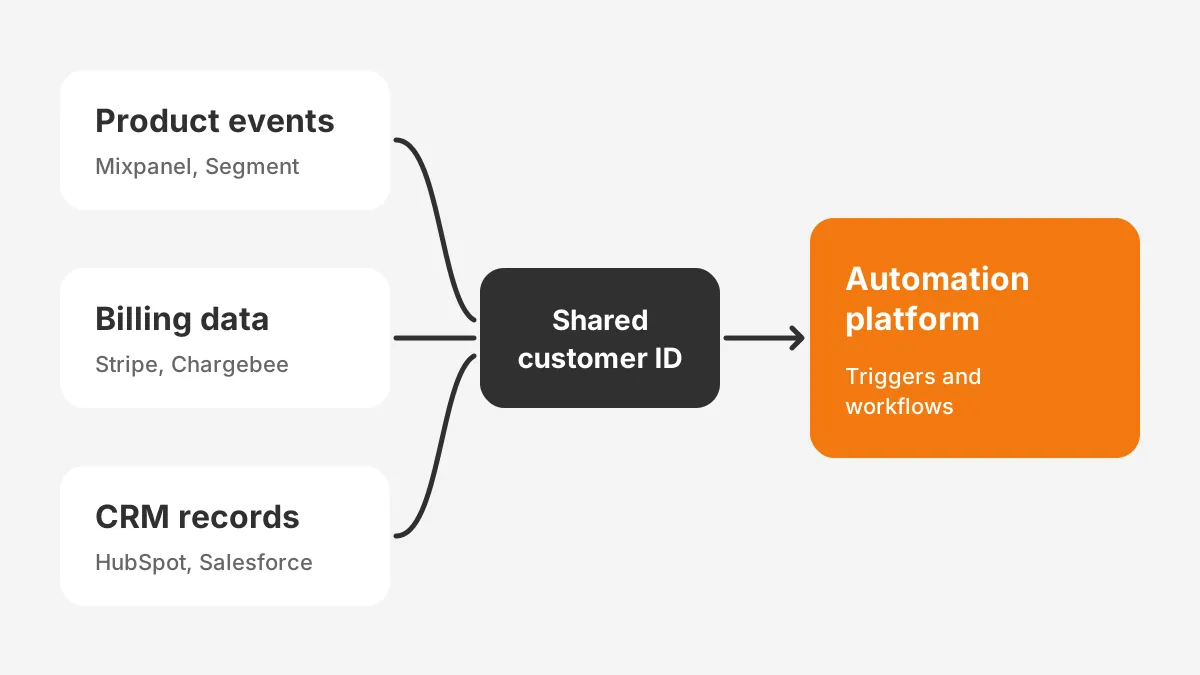
Agree on a short event list before you build anything. Ten to fifteen events can cover the lifecycle. Typical events are signup, data source connected, teammate invited and first report created. Add plan limit reached, payment failed and subscription cancelled. Name each event once and document what fires it.
What Should Each Product Event Include?
Each event should carry a user ID, an account ID, a timestamp and two or three properties. A "report created" event might add the report type and the number of data sources. Those properties let marketing automation for SaaS branch on detail, not only on the event name.
Speed matters by stage. Trial workflows need events within minutes, so use a webhook or a streaming Segment integration. Health scores and renewal steps can run on a daily data warehouse sync. Match the sync method to the decision the workflow makes.
How Do You Automate Trial Onboarding and Activation?
Trial onboarding works when each message depends on what the user has done, not on the day count. The goal is activation: the first moment the product delivers its core value. Define that moment as one or two product events, such as "connected a data source and created a report".
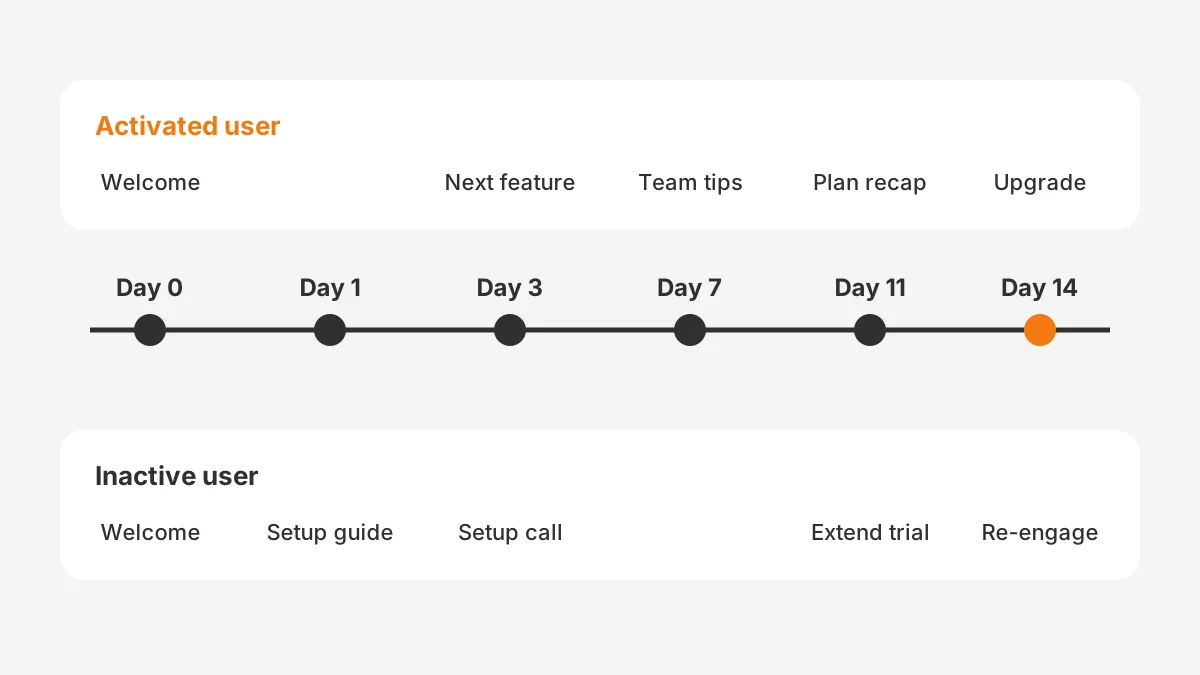
A trial onboarding workflow for a 14-day trial can follow this order. The timings are an example, not a benchmark.
- Day 0: send a welcome email with one setup task, plus an in-app messaging checklist.
- Day 1: if no data source is connected after 24 hours, send a short setup guide.
- Day 3: if the user activated, show the next feature. If not, offer a 15-minute setup call.
- Day 7: if a teammate joined, send a team tips email and raise the PQL score.
- Day 11: send a trial expiration email that recaps what the user built.
- Day 14: if the trial ends without payment, start a 30-day re-engagement sequence.
Every branch reads product usage data. Behavioral triggers replace the fixed schedule, so an active user never receives a "getting started" email on day 11.
The trial expiration email deserves extra care. List what the user set up, name the plan that fits their usage and give one clear button. Users who never activated should get an offer to extend the trial instead of a payment request.
Split the work between channels. In-app messages guide the user while they are logged in. SaaS onboarding emails bring them back when they are not. Keep each email to one task and one button, so the next step is obvious.
Freemium conversion follows the same logic over a longer window. A free user may stay on the free plan for months. Here, event-based marketing automation waits for a limit or a team signal before it sends an upgrade message.
Set one trial to paid conversion target before launch, and track it per signup cohort. Free trial conversion can move after a single change, such as a shorter setup step. Compare cohorts before and after each change, so the onboarding emails earn their place with data.
How Should Product-Qualified Leads Reach Your Sales Team?
Product-qualified leads should reach sales through a written score, a routing rule and a response time. A product qualified lead is a user whose product behaviour shows buying intent. Signals include inviting teammates, reaching usage limits or visiting the pricing page during a trial.
Buyers still want people at key moments. A Gartner survey released in May 2026 found that 69% of B2B buyers prefer to check AI-generated insights with reps. Buyers in that survey used an average of seven information sources.
PQL scoring adds product points to the fit points that SaaS lead scoring already uses. The example below shows assumed values for illustration only.
- Company size of 50 to 500 employees: 15 points.
- Connected a data source: 20 points.
- Invited two or more teammates: 25 points.
- Visited pricing twice in seven days: 15 points.
- No login for ten days: minus 20 points.
At 60 points, the contact moves to sales qualified lead and lead routing assigns an owner. Our guide to HubSpot lead scoring points and thresholds shows how to build the score inside the CRM.
Consider a worked example with assumed numbers. A team gets 400 trials a month, and 48 cross 60 points. Reps can call 48 accounts a month, but not 400. The score turns marketing automation for SaaS into a sales queue that fits the team's real capacity.
In HubSpot, the default lifecycle stages run from Subscriber and Lead to Marketing Qualified Lead. They continue to Sales Qualified Lead, Opportunity, Customer and Evangelist. HubSpot notes that default automatic updates only move the stage forward. Plan any backward move as a deliberate workflow step.
The sales handoff also needs a service level. A common rule asks reps to contact each PQL within one business day. Send a Slack alert with the triggering events, so the rep knows what the user tried. Reps then log the outcome, and marketing reviews rejected leads every month.
Teams on Salesforce can run the same logic with Account Engagement scoring and Flow. The CRM differs, but the rules stay the same. Marketing automation for SaaS needs one score definition, one owner per lead and one response time on any platform.
How Does Marketing Automation for SaaS Reduce Churn?
Marketing automation for SaaS reduces churn by catching two problems early: failed payments and falling usage. The first causes involuntary churn, where a customer leaves without deciding to. The second signals voluntary churn weeks before the cancel button.
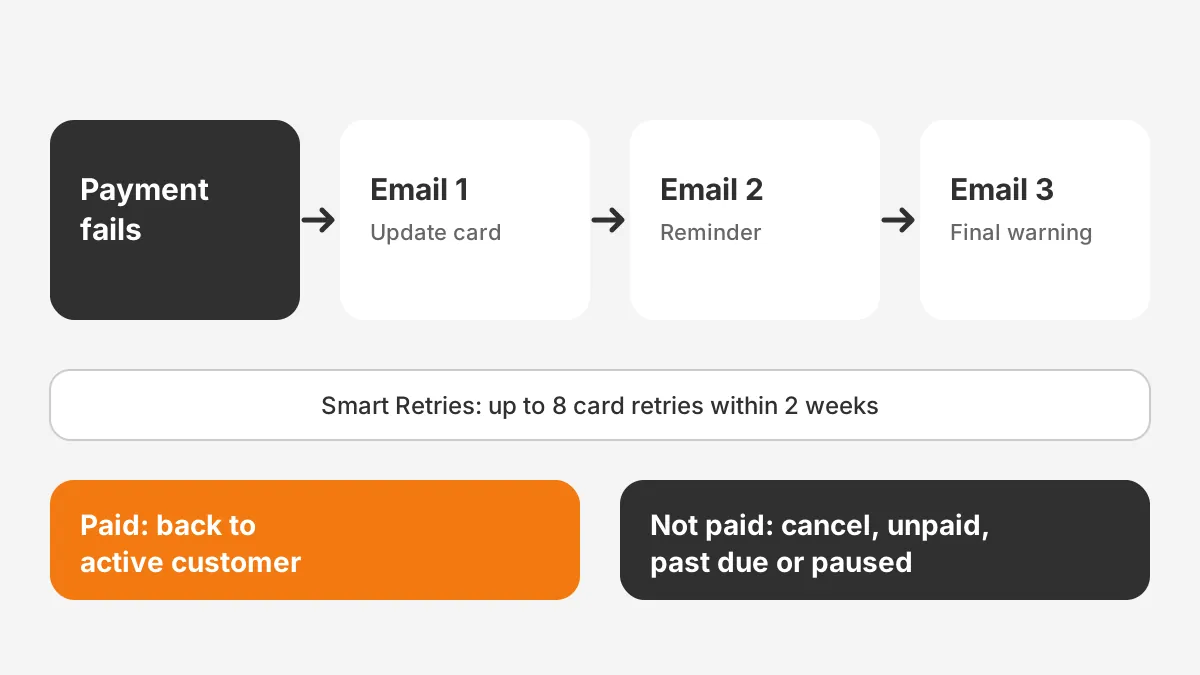
Failed payment recovery starts in the billing system. Stripe's Smart Retries documentation says new accounts retry up to 8 times within 2 weeks by default. After the final attempt, the subscription can be cancelled, marked unpaid, left past due or paused.
Dunning emails run alongside those retries. A typical sequence sends a notice on the first failure and a reminder three days later. A final warning follows before cancellation. Each email links to a page where the customer updates the card, and the CRM records each step.
Prevention beats recovery. Stripe's revenue recovery tools can email customers when a card expires or a payment method needs an update. Send that notice before the renewal date, so the first charge succeeds.
Marketing automation for SaaS should also treat a paused subscription differently from a cancelled one. A paused customer still has data in the product and a reason to return. Send a short check-in before the pause ends, with a link to restart billing.
Usage-based churn needs a customer health score. Combine login frequency, core feature use and open support tickets into one number. When the score drops below a set level, alert the customer success owner and send a helpful email.
Win-back campaigns then target users who cancelled. Send a reason-based offer 30 to 60 days after cancellation. Keep the tone helpful. A user who stopped logging in needs a reason to return, such as a new feature. A discount in the first message teaches customers to wait for one.
How Do You Automate Expansion and Renewal Revenue?
Expansion revenue comes from users who need more seats, usage or features. Marketing automation for SaaS handles it by watching plan limits and team growth. When an account reaches 80% of a usage limit, send an in-app message and an email about the next plan.
Usage-based upsell works when the message names the limit and the benefit. "Your team has used 8 of 10 seats" is clearer than a generic upgrade banner. Accounts that hit their limit for three months in a row go to the account owner instead.
SaaS upsell automation also covers cross-sell. A customer who uses reporting but not integrations can receive a short guide on connecting one. Product usage data, not guesswork, decides who sees which offer, which is where marketing automation for SaaS earns its keep.
Renewal reminders protect annual contracts. A practical schedule sends reminders at 90, 60 and 30 days before renewal. The 90-day step should also create a task for the account manager. Pair each reminder with a usage summary, so the customer sees the value before the invoice arrives.
Track net revenue retention to judge this stage. It shows whether expansion outweighs downgrades and churn across the same customer group. Marketing automation for SaaS feeds that number every time an upsell or renewal workflow fires.
Which Platforms Fit Each SaaS Growth Stage?
Which platform suits marketing automation for SaaS depends on how your company sells. Product-led growth teams need strong event data. Sales-led growth teams need deep CRM integration. Most B2B SaaS marketing automation stacks end up with one CRM, one messaging tool and one data pipeline.
| Platform | Strength for SaaS | Best fit |
|---|---|---|
| HubSpot Marketing Hub | CRM, email and lifecycle stages in one place | Sales-assisted SaaS teams |
| Salesforce with Account Engagement | Deep CRM objects, Pardot scoring and grading | Larger sales teams already on Salesforce |
| Customer.io | Event-based messaging from product data | Product-led teams with engineering support |
| Intercom | In-app messages, tours and support chat | Onboarding inside the product |
| ActiveCampaign or Brevo | Email automation at a lower entry cost | Early-stage SaaS teams |
HubSpot for SaaS suits teams that want marketing, sales and service records in one database. Salesforce for SaaS suits companies with complex territories, contracts and approval steps. Customer.io and Intercom often sit beside either CRM to handle product messages.
Write down which system owns each field before you connect them. Billing should own plan and payment status. The product should own usage fields. The CRM should own the account owner and deal stage. Two-way sync on the same field causes overwrites that break workflows quietly.
Compare SaaS marketing automation tools on four points. Check event ingestion, CRM sync direction, contact pricing and reporting depth. Run a two-week pilot with one real workflow before signing an annual plan. Our CRM for SaaS companies page explains how Unboxx sets up these stacks.
How Do You Measure Marketing Automation for SaaS?
Measure marketing automation for SaaS by the revenue events each workflow changes. Email opens and clicks show delivery health, but they do not prove value. Tie each workflow to one outcome metric and one owner.
These SaaS marketing metrics cover the main lifecycle stages:
- Activation rate: the share of new signups who reach the activation event.
- Trial to paid conversion: the share of trials that become paying accounts.
- PQL to paid rate: the share of product-qualified leads that close.
- Involuntary churn rate: revenue lost to failed payments each month.
- Net revenue retention: revenue kept and expanded from existing customers.
Use a holdout group to prove impact. Send the workflow to 90% of eligible users and hold back 10%. After one full cycle, compare conversion between the two groups. The difference shows what marketing automation for SaaS added beyond normal behaviour.
Connect these numbers to cost to judge marketing automation ROI. Our article on marketing automation ROI, its formula and costs walks through the calculation. Report results by cohort, because a SaaS sales cycle can span three to six months.
Attribution needs a rule too. Credit a conversion to a workflow only if the user received it within a set window, such as 14 days. Without a window, marketing automation for SaaS takes credit for conversions that sales or the product earned alone.
Build one dashboard per lifecycle stage. Show the volume entering the stage, the conversion rate and the median days to the next stage. A sudden drop in one number points to the workflow that needs attention.
What Mistakes Break SaaS Automation Programs?
When marketing automation for SaaS breaks, the cause is usually data, not email copy. The first mistake is firing workflows from stale data. A nightly sync means a user who activated at 9 a.m. still receives a "need help?" email at noon.
The second mistake is building every workflow at once. Start marketing automation for SaaS with three flows: trial onboarding, PQL handoff and failed payment recovery. Add renewal and expansion later. A phase-by-phase marketing automation implementation plan keeps the scope under control.
The third mistake is ignoring the sales feedback loop. If reps reject half the PQLs, the score is wrong. Review rejected leads monthly and adjust the points.
The fourth mistake is weak lead nurturing for SaaS buyers who are not ready. A visitor who downloads a guide needs education, not a demo request. Our guide to B2B lead nurturing stages and cadence covers that early work.
The fifth mistake is duplicate records. When one person signs up twice, marketing automation for SaaS sends two onboarding tracks. Merge contacts on email and account ID every week, and block duplicate creation at signup.
The last mistake is leaving consent out of the marketing automation strategy. Record the consent source for every contact. Keep transactional billing emails separate from promotional ones. Unboxx fixed a similar follow-up gap for one client, as this automated HubSpot lead follow-up story shows.
Frequently Asked Questions
How is SaaS marketing automation different from B2B?
SaaS marketing automation runs for the whole subscription, while classic B2B programs often stop at the sales handoff. SaaS workflows react to product usage data, billing events and renewal dates. B2B programs rely more on form fills, email engagement and account-based marketing for SaaS target lists.
Why does SaaS need a CRM with marketing automation?
SaaS companies need a CRM so marketing, sales and success teams see one customer record. The CRM holds ownership, deal stage and contract dates. Without it, automation cannot route product-qualified leads or alert account managers about failed payments. Renewal reminders also lose their owner.
Who should own marketing automation in a SaaS company?
Marketing operations usually owns the platform, the data model and workflow quality. Product marketing owns onboarding content, and customer success owns health alerts and renewal steps. One named owner should approve every new workflow, so messages from different teams never collide in the same week.
When should a SaaS startup invest in marketing automation?
A SaaS startup should invest once signups arrive faster than the team can follow up by hand. That point often comes when one person can no longer review each signup daily. Start with onboarding and payment recovery, then add scoring once sales needs a steady queue.
How long does SaaS marketing automation setup take?
A focused first phase can take six to ten weeks. That covers the event list, CRM integration, trial onboarding emails and one sales handoff workflow. Larger programs with Segment integration, a data warehouse sync and two or more products can take three to six months.
Where Should You Start With Marketing Automation for SaaS?
Start marketing automation for SaaS with the data model, then build trial onboarding, PQL handoff and failed payment recovery. Those three workflows cover new revenue, sales time and existing revenue, and each has a clear metric. Add expansion, renewal and win-back flows once the first three are stable and measured.
Unboxx connects product data, billing and CRM platforms such as HubSpot and Salesforce for SaaS teams. Our growth marketing team covers workflow design, scoring and reporting. Schedule a consultation to map your SaaS lifecycle workflows.
Let's create something out of this world together.
Have a project in mind? Contact us for expert design and development solutions. Let's discuss how we can help grow your business.
Ready to Unboxx Your Potential?
Build smarter systems. Automate faster. Scale confidently.