
A sales rep finishes a discovery call, then spends ten minutes typing notes and updating the deal. Multiply that by every call in a week. Salesforce research from 2024 found reps spend 70% of their time on non-selling tasks, based on 5,500 responses.
Automating sales data entry pays back when it returns those hours to selling. The CRM also gets more complete as a result.
The ROI rests on three numbers you can measure. They are hours saved per rep, the cost of an hour and the share of saved time spent with customers.
Key Takeaways
- The return from automating sales data entry equals hours saved, times loaded labor cost, times the share reinvested in selling.
- Activity capture, email logging and call transcription remove the largest share of manual typing in Salesforce and HubSpot.
- A 60 to 90 day pilot with a measured baseline is the only reliable way to prove the payback period.
What does automating sales data entry cover?
Automating sales data entry means the CRM records sales activity without a rep typing it. Emails, meetings, calls, contact details and deal updates flow in from the systems where the work already happens. The rep reviews the record instead of building it.
The work falls into five groups. Each group has its own tools and its own payoff.
- Activity logging: emails and calendar events attach to the right contact, account and opportunity.
- Contact creation: new people from email threads become contact records with name, title and company.
- Call notes and meeting notes: transcripts and summaries replace notes typed after each call.
- Opportunity updates: stage, next step and close date change based on rules or AI suggestions.
- Lead enrichment: firmographic fields such as industry and company size fill from a data provider.
Automated data entry differs from general CRM automation. HubSpot workflows and Salesforce Flow route leads and send follow-ups, but they act on data already in the system. Automating sales data entry is the step that gets the data there first.
The benefits of automating sales data entry show up in two places. Reps get time back, and managers get a CRM they can trust for pipeline reviews. Both matter for the ROI model later in this guide.
Some teams also pull order and invoice data from an ERP into the CRM. That sync saves typing too, but it is an integration project with its own budget. Keep it out of the first business case.
Unboxx scopes this work through its AI business automation services. A clear scope decides which manual steps to remove first and keeps the business case honest.
How much time do reps lose to data entry?
Reps lose a large share of each week to sales admin work. Published surveys put non-selling tasks at 60% to 75% of their time. The exact figure varies by company, so measure your own team before you build a business case.
Three surveys frame the problem. They use different methods, so treat the figures as a range.
| Source | Year | Finding on selling time |
|---|---|---|
| Salesforce research | 2024 | Reps spend 70% of their time on non-selling tasks |
| Salesforce State of Sales, 7th edition | 2026 | Reps spend 60% of their time on non-selling tasks |
| Bain & Company Technology Report | 2025 | Sellers spend about 25% of their time selling |
The 2026 Salesforce State of Sales takeaways name the main non-selling tasks. They are manual data entry, lead research and tool switching. That list matters for ROI. Only the data entry part disappears when you start automating sales data entry.
Manual data entry also costs more than the minutes it takes. Reps who type notes at the end of each day forget details. Records go stale, and managers chase updates before every forecast call.
This explains why sales reps hate CRM data entry. The work feels like reporting for someone else, with no direct benefit to the rep. That attitude drives low adoption, which the guide to measuring and raising CRM adoption covers in detail.
A two-week time study shows how much time sales reps spend on data entry in your own team. Ask five reps to log every CRM task in 15-minute blocks. The result is the baseline for automating sales data entry and for every calculation that follows.
What ROI comes from automating sales data entry?
The ROI from automating sales data entry is reinvested selling time minus total cost, divided by that cost. Most of the value comes from time savings. A smaller share comes from better data and faster deal updates.
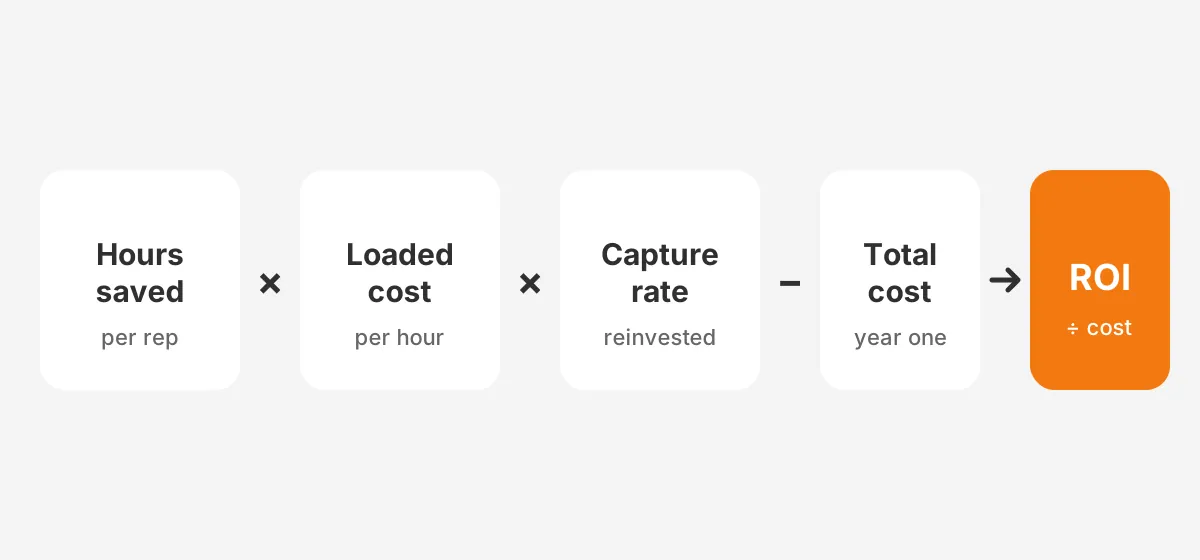
Calculate sales automation ROI in four steps.
- Measure hours saved per rep per week from your time study, before and after a pilot.
- Multiply by loaded labor cost per hour: salary, commission, benefits and overhead divided by working hours.
- Multiply by a capture rate: the share of saved hours that goes back into selling.
- Subtract year-one costs, then divide the result by those costs.
The capture rate is the step most business cases for automating sales data entry skip. A rep who saves four hours a week will not spend all four with customers. Some time goes to internal meetings or breaks.
A capture rate of 50% is a cautious starting point until your pilot shows the real figure.
Sales productivity gains add value on top of the time savings. Bain's 2025 report says AI could double the time sellers spend selling. It also reports early win rate gains of 30% or more. Treat that win rate figure as an upside case, not as the base of your model.
What ROI can be expected from automating sales data entry depends on your baseline. A team that logs everything by hand has more to gain than a team already using email sync.
That is why the ROI of automating data entry must start from measured hours, not a vendor benchmark. A benchmark describes someone else's team. Your time study describes yours.
The CRM ROI calculation guide uses the same structure for a full CRM project. Use it when automating sales data entry is one part of a larger platform decision.
Which costs belong in the ROI model?
Four cost lines belong in the model: licenses, implementation, data cleanup and ongoing administration. Leaving any of them out overstates the return. It also shortens the payback period on paper only.
- License cost: add-on fees for activity capture, conversation intelligence or enrichment, priced per user per month.
- Implementation cost: configuration, integration with email and calendar, testing and training.
- Data cleanup: merging duplicate records first, so captured activity lands on the right record.
- Administration: monthly hours to review sync errors, exclusion lists and field mappings.
Data entry costs do not stop at software. Reps need training on what the system captures and what they still own. A one-hour session per rep and a short reference sheet usually cover it.
Data entry automation cost also depends on your current stack. A team on Salesforce Sales Cloud or HubSpot Sales Hub may already own part of the capability. Check your contract before buying an add-on that duplicates a feature you pay for.
Internal time is a cost. RevOps staff who map fields and test syncs are not working on other projects. Price their hours at the same loaded rate you use for reps when automating sales data entry.
What does a worked ROI example look like?
A worked example shows how the formula behaves with real-looking inputs. Every figure below is an assumption for illustration, not a benchmark. Replace each one with your own measured value.
Assume a team of 20 reps, each spending 5 hours a week on manual data entry. Automating sales data entry removes 60% of that work. Loaded labor cost is $75 an hour, across 46 working weeks a year.
- Hours saved per rep: 5 hours times 60% equals 3 hours a week.
- Team hours saved per year: 3 hours times 20 reps times 46 weeks equals 2,760 hours.
- Gross value: 2,760 hours times $75 equals $207,000.
- Captured value at a 50% capture rate: $103,500.
Now the year-one costs. Assume an add-on license of $30 per user per month, or $7,200 a year. Assume $25,000 for implementation. Add 4 admin hours a month at $75, or $3,600. Total year-one cost is $35,800.
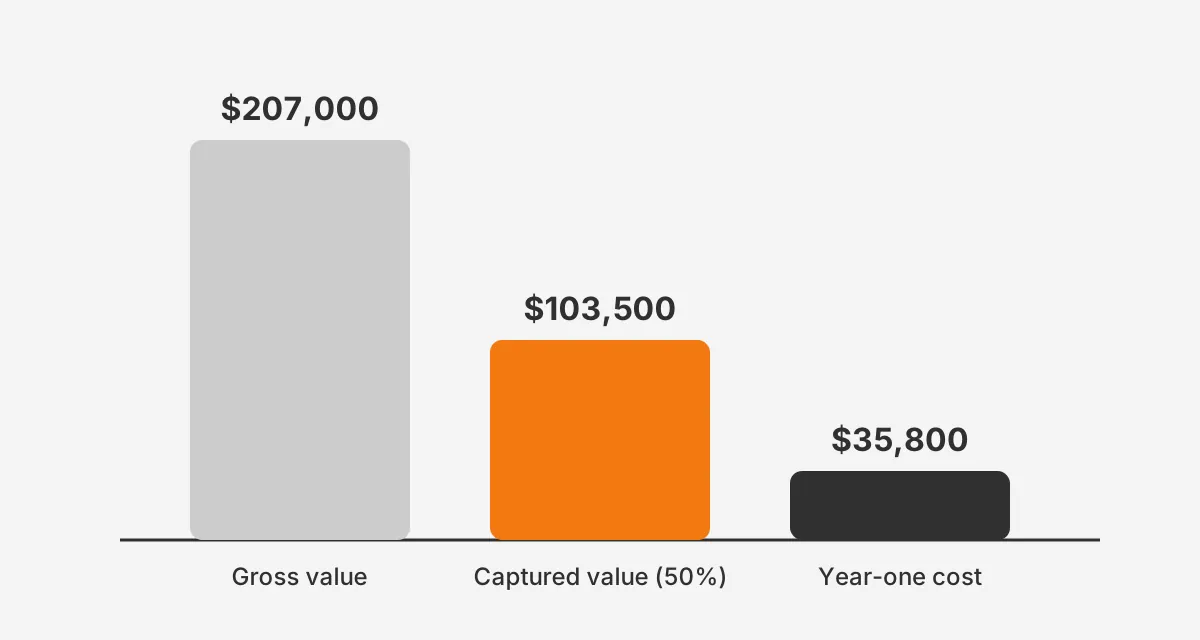
At the 50% capture rate, ROI is ($103,500 minus $35,800) divided by $35,800, or about 189%. The payback period is about 4.2 months. At gross value, ROI would read 478%, which is the inflated figure to avoid.
The capture rate decides how long sales automation takes to pay off. In this example, it is two to five months. A team with fewer hours to save, or higher implementation costs, will take longer.
The hours saved per rep drive the result more than any other input. Suppose your time study shows 2 hours of manual entry a week instead of 5. Captured value falls to $41,400, and ROI drops to about 16%.
That smaller return is still positive, but it changes the decision. A team with little manual typing may automate for one role only. Account executives are often the best first group. Run the formula per role before you buy licenses for everyone.
Which tools automate data capture in Salesforce and HubSpot?
Salesforce and HubSpot both include native data capture for email, calendar and contacts. Add-on tools then cover calls, meetings and enrichment. Start with what your plan already includes before you buy anything new.
Salesforce: Einstein Activity Capture
Einstein Activity Capture connects Salesforce to Gmail, Microsoft Outlook and their calendars. It works through Google Workspace or Microsoft 365. Per the Salesforce Admins blog, emails appear on the activity timeline automatically.
Events and contacts sync between Salesforce and the connected account, and admins choose the sync direction. There is one limit to plan for. The same source says captured email data is stored in Amazon Web Services, not as Salesforce records.
That storage choice affects standard reporting. Our article on Einstein Activity Capture setup, storage and limits covers the configuration choices. Read it before automating sales data entry in Salesforce.
HubSpot: email logging rules
HubSpot logs email from connected inboxes through its Gmail and Outlook integrations. The HubSpot email logging rules article lists the options. The default logs all emails from known contacts, and a second option logs replies only.
A never log list excludes chosen addresses and domains from email logging and contact creation. Use it for internal domains and personal contacts. A beta setting also creates new contacts from incoming emails to connected inboxes. HubSpot also offers a BCC address for logging email from other clients.
Add-on tools for calls and enrichment
Conversation intelligence tools record calls, produce call transcription and summarize next steps. Data enrichment tools fill company fields from external databases. AI agents, such as Salesforce Agentforce, can draft record updates for a rep to approve.
Follow this order to automate CRM data entry without buying overlapping tools.
- Turn on native email and calendar capture in your CRM.
- Set exclusion rules so personal and internal email stays out.
- Add call recording and transcription only for teams that sell by phone or video.
- Add enrichment last, once records are clean enough to match.
This order also answers how to reduce manual data entry for sales reps quickly. Native capture covers the highest-volume part of automating sales data entry first. The guide to sales process automation by stage shows which steps to automate after data capture works.
What does automating sales data entry change for reps?
Automating sales data entry changes a rep's day from typing records to reviewing them. The rep checks that captured activity landed on the right deal, then updates the fields only a person can judge.
Consider a typical afternoon before and after. Before, a rep spends the last hour of the day logging calls and copying email threads. After, the timeline already holds those emails and meetings. The rep spends ten minutes on next steps and close dates.
For managers, pipeline reviews start from current data instead of a round of status requests. Coaching time goes to deal strategy rather than chasing missing notes.
Buyers feel the change on their side. A rep who no longer spends the evening on admin can reply to buyer questions the same day. Follow-up emails go out while the conversation is still fresh, and handoffs to service teams carry complete history.
Automating sales data entry does not remove every task. Reps still write qualification answers, competitor notes and the reasons behind a stage change. Make that list short and explicit, so reps know what they still own.
Why do data entry automation projects miss their ROI?
These projects miss their ROI for four reasons. Captured data lands on the wrong records, or nobody reinvests the saved time. Old rules block updates, or nobody measured a baseline. Each failure is preventable with a setting or a process.
Poor CRM data quality comes first. Automatic activity capture matches email addresses to contacts. If duplicate records exist, activity splits across them. Reps then stop trusting the timeline and go back to manual notes.
Weak CRM hygiene after go-live does similar damage. Validation rules that forced reps to type fields may block automated updates. Review every rule and keep only those that protect data a system cannot capture.
Saved time also tends to go nowhere. Managers need a plan for the hours: more calls, more meetings, or faster follow-up. Without that plan, the capture rate stays low and the ROI stays on paper.
Privacy settings cause the last gap. In HubSpot, with GDPR settings on, email logging only works for contacts with a recorded legal basis. Confirm consent rules with your legal team before automating sales data entry across regions.
How do you roll out automation in 90 days?
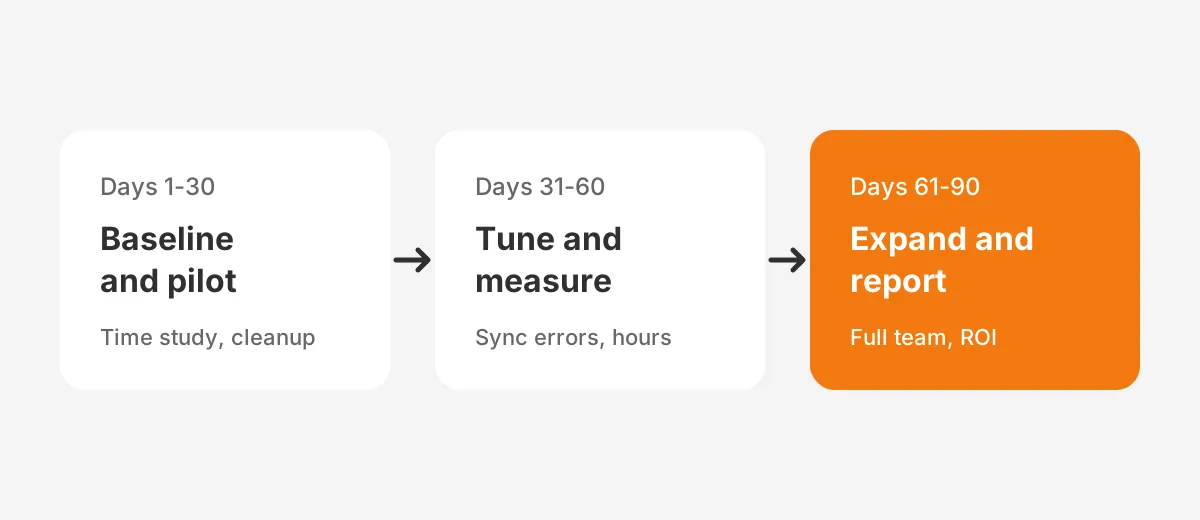
Roll out automating sales data entry in three 30-day phases. Run a measured pilot, fix data issues, then expand to the full team. Each phase ends with a decision point backed by numbers.
- Days 1 to 30: run the time study, clean duplicate records and start capture for a pilot group.
- Days 31 to 60: review sync errors weekly, adjust exclusions and measure hours saved against the baseline.
- Days 61 to 90: expand to the full team, train managers on reinvesting time and report ROI.
A pilot group of five to eight reps is enough to measure a change. Pick reps from different segments, so the result reflects the whole team.
Change management decides whether a pilot of automating sales data entry works. Tell reps what the system now records for them and what they still own, such as deal strategy notes. Reps accept automation faster when it removes work they dislike.
Revenue operations should own the rollout of automating sales data entry. RevOps already manages fields, reports and integrations. It can tune capture settings without a separate project team.
Which metrics prove the return after go-live?
Four metrics prove the return: manual entry hours, selling time, activity coverage and pipeline accuracy. Track each against the baseline from your time study.
- Manual entry hours: repeat the time study at 60 and 90 days.
- Selling time: the share of the week spent with customers, from calendar data.
- Activity coverage: the share of open opportunities with activity logged in the last 14 days.
- Pipeline visibility: the share of deals with a current next step and close date.
Rep productivity metrics follow later. Watch meetings booked per rep, sales cycle length and win rate over two quarters. Other factors affect these, so do not credit automating sales data entry with every change.
Forecast accuracy is the metric leadership cares about most. Compare forecast to actual for the quarters before and after rollout. Automating sales data entry should narrow that gap.
Knowing how to measure CRM adoption matters here. Logins alone mislead, because captured activity makes a record look busy. Track the fields reps still own, such as next step, and check how current they are.
Deal-level insight from captured data comes from a revenue intelligence layer, added later. The article on how revenue intelligence connects to your CRM explains the data flow.
Frequently Asked Questions
Can automation replace all CRM data entry?
No. Automation captures emails, meetings, calls and contact details, but reps still own judgment fields. Deal strategy, competitor notes and qualification answers need a person. Plan for automation to remove repetitive logging. Keep a short list of fields each rep updates by hand every week.
Does automated data capture work with Microsoft Outlook?
Yes. Salesforce Einstein Activity Capture and HubSpot both connect to Microsoft Outlook and Microsoft 365 calendars. Feature coverage differs between the Outlook desktop app, the web app and mobile. Test your exact email setup in the pilot before you roll capture out to the whole sales team.
What capture rate should a business case assume?
Start with 50%, meaning half of the saved hours go back into selling. Adjust it after the pilot using calendar data on customer meetings. A capture rate above 70% is rare without a manager plan for the freed time. Treat higher figures with care in any forecast.
Is automated email capture a privacy risk?
It can be without exclusions. Personal, legal and HR emails should never reach the CRM. Use exclusion lists for domains and addresses, and confirm consent rules under GDPR where they apply. Review the captured data in the pilot before expanding access across every team and region.
Who should own data entry automation?
Revenue operations should own it, with support from IT for email and calendar connections. RevOps manages CRM fields, reports and sync errors already. Sales managers own the second half of the result. They turn saved hours into customer conversations and measurable pipeline growth.
Is automating sales data entry worth it?
Automating sales data entry is worth it when your time study shows real hours to save. Managers also need a plan to reinvest them. Start with native capture, measure a pilot and report captured value, not gross value.
Unboxx helps B2B teams scope, configure and measure sales data entry automation across Salesforce and HubSpot. To build a business case with your own numbers, schedule a consultation with our team.
Let's create something out of this world together.
Have a project in mind? Contact us for expert design and development solutions. Let's discuss how we can help grow your business.
Ready to Unboxx Your Potential?
Build smarter systems. Automate faster. Scale confidently.