
A prospective client fills in your website form at 9 p.m. and calls two other firms the next morning. The firm that answers first usually signs the matter. Legal CRM software exists to make sure that firm is yours.
Response speed is a weak spot across the profession. In the Clio 2019 Legal Trends Report secret-shopper test, firms answered only 40% of emails from potential clients. CRM use is also uneven.
The ABA 2024 Solo and Small Firm TechReport found 39% of small firms use CRM software. The average across all firm sizes was 31%. Legal CRM software built around intake, conflicts and referrals goes straight at the first problem.
Key Takeaways
- Legal CRM software manages intake, referral sources and client relationships, while practice management software runs the matter after engagement.
- A conflict check inside intake protects the firm under ABA Model Rule 1.7 and Rule 1.10 before engagement.
- Choose a legal-specific tool for fast setup, or configure Salesforce, HubSpot or Dynamics 365 for custom reporting.
What Is Legal CRM Software?
Legal CRM software is a client relationship management system built around how law firms win and keep work. It tracks prospective clients, referral sources, past clients and the matters that connect them. Its job ends where practice management begins: at the signed engagement.
A general sales CRM tracks deals moving toward a close. A legal CRM tracks people and matters instead, because one client may bring five matters over ten years. That is why vendors describe the category as legal client relationship management rather than sales automation.
Most CRM for legal professionals shares the same core records across practice areas. A typical legal CRM software product stores contacts, organizations, intake records, matters, referral sources and activity history. Products differ in what they add on top: marketing, scoring, portals or billing.
Some firms want a configured platform rather than a packaged tool. Unboxx sets up CRM for law firms on Salesforce, HubSpot and Odoo. Each build includes intake, conflict checks and referral attribution.
Whichever route a firm takes, legal CRM software pays back first in faster replies to new inquiries. Partners also see which referral sources produce paying matters. Relationship history stays with the firm when a lawyer leaves.
How Does Legal CRM Software Differ From Practice Management?
Legal CRM software handles the client before and between matters. Legal practice management software handles the work inside each matter. The split matters because firms often buy one and expect it to do both jobs.
Practice management software covers matter management, deadlines, documents, time entry, billing and trust accounting. Products such as Clio Manage, MyCase, PracticePanther and Smokeball sit in this group. PracticePanther and Smokeball also include built-in intake features.
The legal CRM vs practice management software question comes down to where your bottleneck sits. Lost leads and untracked referrals point to a CRM gap. Missed deadlines and slow billing point to a practice management gap. The table shows the typical split of duties.
| Job | Legal CRM | Practice management |
|---|---|---|
| Capture web and phone inquiries | Yes | Basic in some tools |
| Run intake forms and qualification | Yes | Basic in some tools |
| Track referral sources and origination | Yes | Rarely |
| Store matter documents and deadlines | Link only | Yes |
| Time entry, billing and trust accounting | No | Yes |
| Marketing email and nurture | Yes | Rarely |
Buyers searching for client intake software or law firm client management software can land in either category. For a growing firm, the usual answer is both. A CRM for lawyers wins the work, and a practice system delivers it.
Firms in neighboring professions face the same split. Unboxx covers that split for accountants in CRM for CPA firms vs practice management software. The same pattern applies to CRM for professional services firms in general.
Which Features Should Legal CRM Software Include?
Legal CRM software should cover six jobs: intake, conflict screening, referral tracking, marketing, relationship history and reporting. A product that skips any of them leaves staff working in spreadsheets for that job.
- Client intake: web, phone and chat inquiries land in one queue, with intake forms that capture parties and matter type.
- Conflict screening: names from intake run against existing clients, adverse parties and related entities before engagement.
- Referral tracking: each matter records its referral sources, so partners can see which relationships produce work.
- Lead tracking and nurture: legal marketing automation sends follow-ups to prospects who are not ready to sign.
- Relationship history: emails, meetings and past matters sit on one contact record to support business development for lawyers.
- Reporting: dashboards show intake volume, conversion by practice areas and revenue by referral source.
Speed sits at the center of client intake. A legal intake CRM can reply automatically within a minute of a web inquiry. It can also assign a callback task to the intake team. That is the gap the Clio secret-shopper test exposed.
A matter-centric CRM links every record to a matter as well as a contact. That design shows, for example, that one general counsel has sent four matters across three practice groups. It also supports cross-selling legal services, such as offering estate planning to a business client's founders.
Two further features help client retention. A client portal gives clients a secure place to upload documents and check status. An attorney CRM should also log every touchpoint, so a departing associate does not take the relationship history along.
Security is the feature with an ethics rule behind it. ABA Model Rule 1.6(c) requires lawyers to make reasonable efforts to prevent unauthorized access to client information.
ABA Formal Opinion 477R (2017) adds vendor due diligence and staff training to that duty. In practice, legal CRM software should support role-based permissions, audit logs and encryption.
How Should a Law Firm CRM Handle Conflict Checks?
A law firm CRM should run a conflict of interest check at intake. That check comes before anyone gives advice or sends an engagement letter. A later check risks the firm holding confidential information from a client it cannot take.
ABA Model Rule 1.7 covers conflicts with current clients, and Rule 1.9 covers former clients. Under ABA Model Rule 1.10, one lawyer's conflict is generally imputed to every lawyer in the firm.
That imputation is why the check must search the whole firm's data, not one lawyer's contacts. A legal CRM with conflict check features searches these records:
- Current and former clients, including trading names and former names.
- Adverse parties and opposing counsel from every open and closed matter.
- Related entities such as parent companies, subsidiaries and spouses.
- Prospective clients who were turned away, since they can also create duties.
The workflow below shows where the check sits between the first inquiry and an open matter.
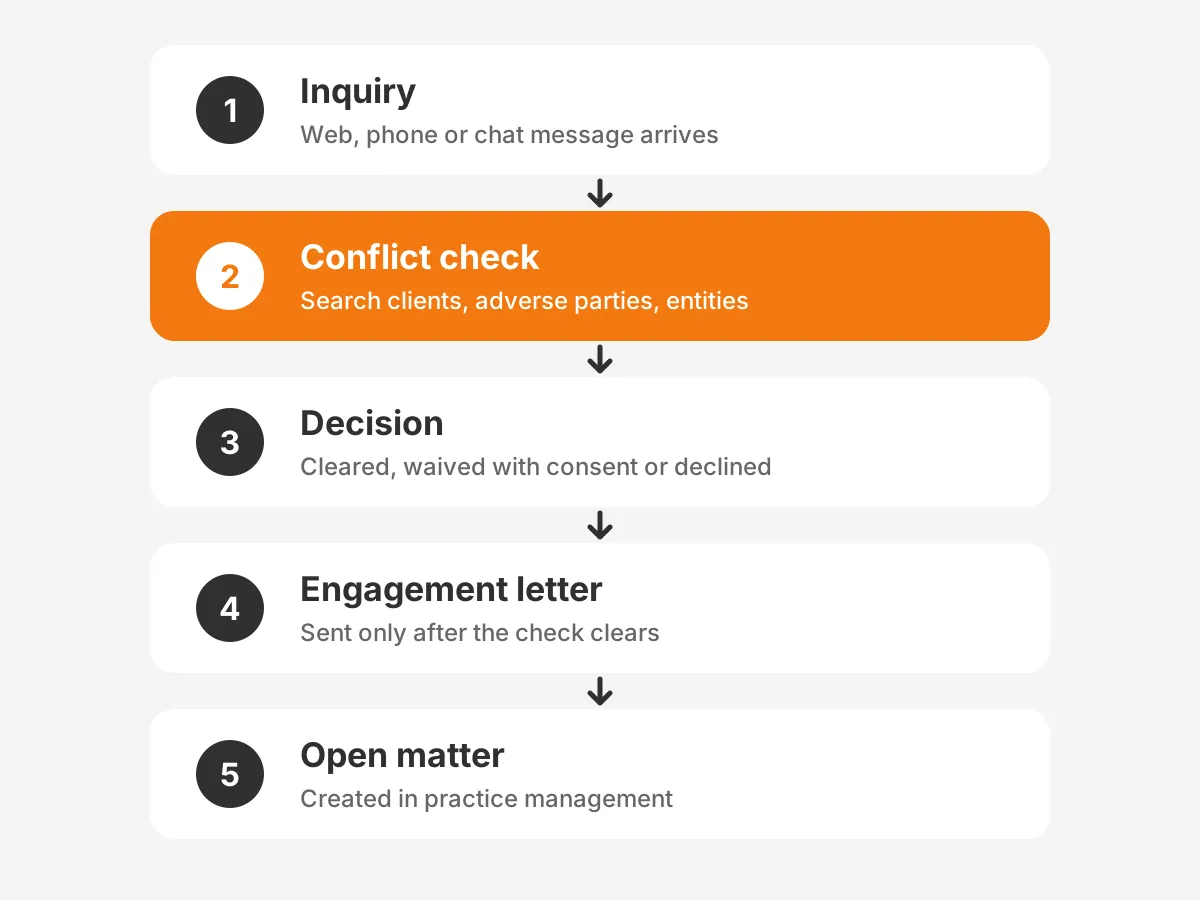
Conflict checking software inside the CRM should use fuzzy matching, so "J. Smith Holdings" still flags "John Smith Holdings LLC". Each result needs a recorded decision: cleared, waived with consent or declined. That log is the firm's evidence if a conflict is questioned later.
Legal CRM software can only find conflicts in data it holds. Intake forms should therefore capture every party name, related company and opposing counsel. A field skipped at intake becomes a missed conflict months later.
Ethical walls are the second control. Rule 1.10 permits screening a lateral hire in some cases. The screen must be timely, and the screened lawyer gets no part of the fee.
The firm must also give written notice to the affected former client. In the CRM, ethical walls become permission rules that hide the matter from the screened lawyer.
Should You Buy a Legal CRM or Configure One?
Buy a legal-specific product when speed matters more than flexibility. Configure a general platform when reporting and integrations matter most. Both routes to legal CRM software can work, so the decision rests on firm size, existing systems and budget.
Legal-specific tools such as Clio Grow, Lawmatics and Law Ruler arrive with intake forms and legal fields. Practice management connectors are usually built in too. Setup tends to be faster because legal fields exist from day one. The trade-off is less control over the data model and reporting.
The other route starts with a general CRM. Salesforce for law firms, HubSpot for law firms and Microsoft Dynamics 365 all work this way.
A partner adds objects for matters, referral sources and conflict results. The firm then owns a legal CRM platform that matches its exact intake rules and reports. The cost is a longer build and an ongoing need for an administrator after launch.

Use this decision rule when you work out how to choose a legal CRM. The thresholds are a working rule of thumb, not an industry standard.
- Fewer than 20 lawyers, one main system and standard intake: start with a legal-specific tool.
- Complex referral networks, two or more offices or custom reports: configure a platform.
- Already on Microsoft 365 or HubSpot marketing: extend that platform before adding another vendor.
Write down what the firm needs before any demo. The Unboxx guide to gathering and scoring CRM requirements gives a method that suits law practice CRM decisions. Scored requirements stop a legal industry CRM demo from selling features nobody uses. They also make two quotes for CRM for attorneys comparable.
Which Legal CRM Software Options Suit Each Firm Size?
The best legal CRM software for one firm can be wrong for the next. Firm size, practice mix and existing systems decide the fit. The table groups common options by the profile each vendor targets, based on its stated focus.
| Option | Type | Typical fit | Main strength |
|---|---|---|---|
| Clio Grow | Legal-specific CRM | Small firms on Clio Manage | Intake linked to Clio matters |
| Lawmatics | Legal-specific CRM | Small and mid-size firms | Intake and marketing automation |
| Law Ruler | Legal-specific CRM | High-volume consumer practices | Omnichannel intake and call tracking |
| Lead Docket | Intake tool | Consumer and injury practices | Lead source tracking |
| CosmoLex | All-in-one suite | Small firms wanting one vendor | CRM with accounting and trust accounting |
| LexisNexis InterAction | Legal-specific CRM | Relationship-driven firms | Relationship intelligence |
| Salesforce | Configurable platform | Mid-size and large firms | Custom objects and reporting |
| HubSpot | Configurable platform | Marketing-led firms | Marketing automation |
| Microsoft Dynamics 365 | Configurable platform | Firms on Microsoft 365 | Outlook and Teams fit |
For CRM for small law firms, the choice often narrows quickly. The best fit is usually the tool that connects to the practice system already in use.
A firm on Clio Manage will find Clio Grow the shortest path. A legal CRM for small firms should also run without a full-time administrator. Check that intake forms, conflict searches and reports can be changed by trained staff rather than a developer.
High-volume consumer practices need speed above all. CRM for personal injury law firms should route calls, texts and web forms into one queue. It should also sort cases by type.
Law Ruler and Lead Docket focus on this kind of intake. Lawmatics also works as a legal marketing CRM, with campaigns tied to intake.
Larger firms whose partners bring in work care more about relationships than lead speed. Relationship intelligence tools such as LexisNexis InterAction map who knows whom across the firm. Salesforce can do similar work once configured, with more room for custom reporting.
When you shortlist law firm CRM software, test it with three real intake cases from last month. Any lawyer CRM on the shortlist should export all data in a standard format. CRM software for lawyers without a clean export makes a future switch costly.
Review-site lists of legal CRM tools rank features, not fit, so ask each vendor three questions during the demo. How does the legal CRM software run a conflict search? Which practice management systems does it connect to natively? What does an export of all records look like?
How Do You Connect CRM to Practice Management Tools?
Connect the CRM to practice management at one hand-off point: the moment a prospect signs and becomes a client. At that point the CRM creates the matter in the practice system and stops owning it.
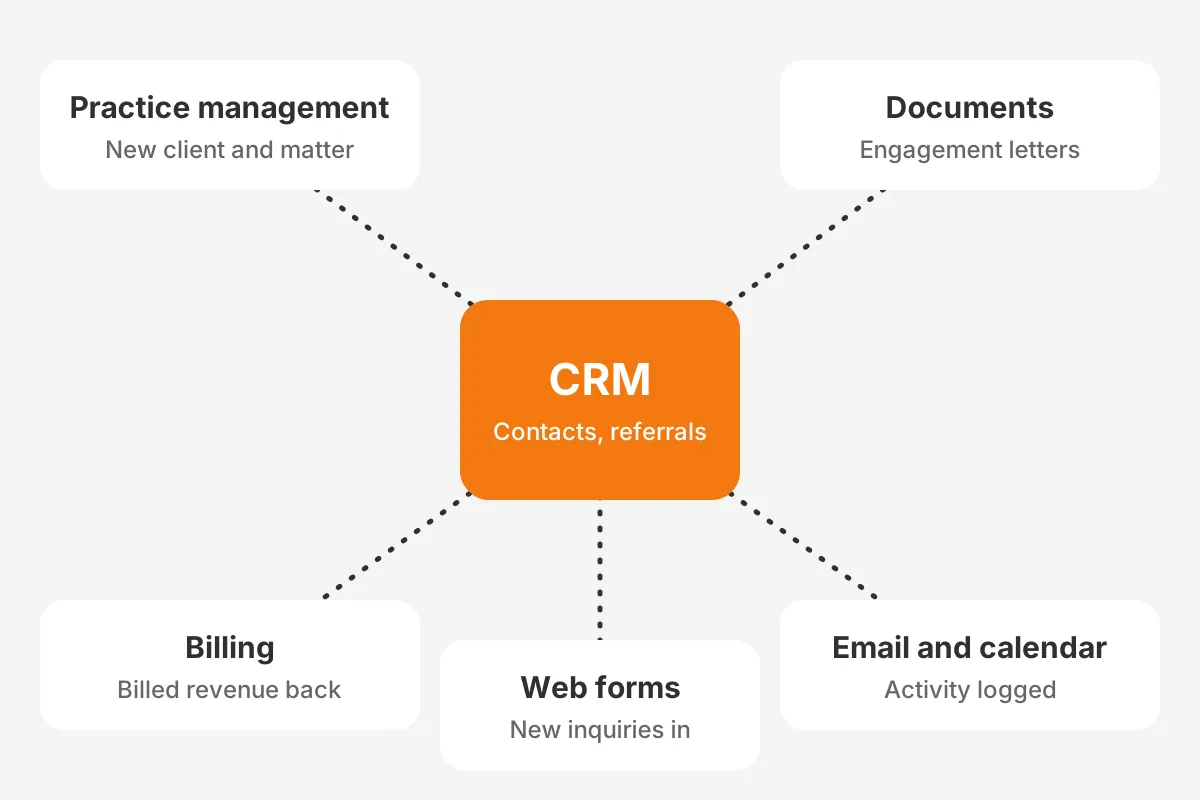
A typical integration set for a law firm covers five systems:
- Practice management, such as Clio Manage, MyCase or Smokeball, receives the new client and matter.
- A document management system such as iManage or NetDocuments stores intake documents and engagement letters.
- Financial systems such as Aderant or Elite 3E send billed revenue back for origination reports.
- Email and calendar in Microsoft Outlook or Google Workspace log contact activity.
- Website forms, phone and chat send new inquiries into intake.
The map below shows which data moves in each direction between the CRM and the other systems.
Legal-specific tools often include a native Clio connector. Salesforce and HubSpot usually connect through the Clio API or a middleware tool. A CRM integration with Clio should pass the client, the matter type and the referral source.
Test the integration with real cases before launch. Legal CRM software that creates duplicate clients in the practice system will undo the cleanup done during migration.
Decide data ownership field by field. The CRM owns contacts, referral sources and intake history. The practice system owns deadlines, time and billing. Teams planning this kind of sync can review the scope Unboxx covers in its CRM integration services.
What Does Legal CRM Software Cost in Year One?
Legal CRM software costs more than its license price, because setup, migration, integration and training sit on top. Vendors publish per-user monthly prices, but some list only quotes. Total cost therefore needs its own model.
Legal CRM pricing has five lines to budget:
| Cost line | What drives it |
|---|---|
| Licenses | Number of users and edition |
| Configuration | Intake rules, conflict search and custom fields |
| Data migration | Record count and data quality |
| Integrations | Number of connected systems |
| Training and support | Number of users and roles |
Here is a worked example with assumed figures, not market rates. A 25-lawyer firm buys 30 seats at an assumed $60 per user per month. Licenses then cost $21,600 a year.
Assume setup adds $15,000 for configuration, $8,000 for migration and $10,000 for two integrations. Training adds $4,000. The year-one total in this example is $58,600, and year two falls back to roughly the license line.
So how much does legal CRM software cost for your firm? Put your own quotes into the same five lines. In this example the license is 37% of year one, which is why a license-only comparison misleads.
Recurring costs also deserve a line. Legal CRM software needs an administrator, in-house or outsourced, to maintain intake rules and reports. Budget that time from year two onward, alongside license renewals and extra seats.
How Do You Roll Out Legal CRM Software?
Roll out legal CRM software in six steps. Give each step one owner and a written sign-off before the next begins. The order matters because conflict data and intake rules depend on clean records.
- Scope: list practice areas, intake channels and the reports partners want.
- Clean: remove duplicate contacts and merge firm names before any law firm CRM migration.
- Configure: build intake forms, the conflict search and permissions for ethical walls.
- Integrate: connect practice management, documents and email at the agreed hand-off point.
- Test: run 20 past intake cases through the system and compare conflict results with the old process.
- Launch and train: start with one practice group, then extend after two weeks of fixes.
Step two decides how useful the conflict search will be. Deduplication rules for client and adverse party records are covered in the Unboxx article on CRM data cleansing.
Legal CRM implementation also needs a timeline and named owners. The Unboxx CRM implementation plan gives a phase-by-phase template. Knowing how to implement CRM in a law firm means planning for lawyer adoption as much as for features. Adoption decides whether the legal CRM system gets used after launch.
Measure the rollout with four numbers taken from the legal CRM software itself:
- Median response time to new inquiries.
- Conversion from intake to signed engagement.
- Conflict checks completed before engagement.
- Share of matters with a recorded referral source.
Review these numbers monthly with the managing partner. A falling response time is the earliest sign that the intake rules work.
Frequently Asked Questions
Does a law firm need a CRM?
A law firm needs a CRM once intake, referrals or follow-ups live in inboxes and spreadsheets. Solo lawyers with steady referral work may manage without one. Firms that advertise or run two or more practice areas gain the most. So do firms that rely on partner origination.
Is legal CRM software secure?
Legal CRM software can meet a firm's confidentiality duty with the right controls. Look for encryption, role-based permissions, audit logs and data residency options. ABA Model Rule 1.6(c) requires reasonable efforts to protect client information. Ask each vendor for its security documentation and confirm where data is stored.
How is a legal CRM different from practice management?
A legal CRM manages prospects, intake, referral sources and client relationships before and between matters. Practice management software manages the matter itself: deadlines, documents, time, billing and trust accounting. Growing firms often run both, connected at the point where a prospect signs the engagement letter.
Can Salesforce or HubSpot work as a legal CRM?
Salesforce and HubSpot can work as a legal CRM once configured with objects for matters, referral sources and conflict results. They suit firms that need custom reporting or already use those platforms. Setup takes more effort than a legal-specific tool, so budget for a configuration partner.
How long does a legal CRM implementation take?
Timelines depend on scope. A legal-specific tool with standard intake and no data migration is the fastest route. A configured platform with conflict search, integrations and migration takes longer, because each phase needs testing. Clean data and a fixed scope shorten any timeline.
Where Should Your Firm Start With Legal CRM Software?
Start with legal CRM software by mapping where prospects and referrals get lost today. Then pick the route that fixes that gap. A legal-specific tool suits standard intake, while a configured platform suits custom conflict search, reporting and integrations.
Unboxx is a Salesforce Crest Partner that configures legal CRM software on Salesforce, HubSpot and Odoo. To review your intake, conflict checks and integration plan, book a CRM consultation with Unboxx.
Let's create something out of this world together.
Have a project in mind? Contact us for expert design and development solutions. Let's discuss how we can help grow your business.
Ready to Unboxx Your Potential?
Build smarter systems. Automate faster. Scale confidently.