
A development coordinator sends thank-you emails by hand every Monday. Gifts from Friday night wait three days for a reply. Event sign-ups sit in a spreadsheet, and new volunteers hear nothing for a week.
The cost of that delay shows up in retention. The Fundraising Effectiveness Project (2026) put 2025 donor retention at 43.3%, while the number of donors fell 3.6%. Marketing automation for nonprofits closes that gap. The thank-you goes out when the gift arrives, whether or not anyone is at a desk.
Key Takeaways
- Marketing automation for nonprofits works best when the CRM holds the donor record and the email platform reads from it.
- Six workflows cover most of the value: welcome, gift thanks, second gift, monthly upgrade, lapse win-back and events.
- Consent records, domain authentication and one-click unsubscribe must be in place before the first automated email goes out.
What Is Marketing Automation for Nonprofits?
Marketing automation for nonprofits is software that sends emails, texts and tasks when a supporter does something. A first gift, a form submission or a missed monthly payment can each start a sequence. Staff write the messages once, and the system delivers them on schedule.
Under the hood, every setup has three parts. A trigger starts the sequence, and rules decide who receives which message. The nonprofit CRM records every send, open, click and gift, so the next step rests on what the supporter did.
Nonprofit marketing automation differs from a newsletter tool in one way. A newsletter goes to everyone on a set date. An automated sequence goes to one person at the moment that person acts. That timing makes a thank-you feel personal at scale.
Donor journey automation is the most common use. It maps the supporter journey from first contact to repeat gift, with a trigger, message and goal at each step. Once those steps are mapped, marketing automation for nonprofits runs them without manual sends.
Marketing automation for nonprofits also works differently from the B2B version. A sales team scores leads and hands them to a rep. A nonprofit moves supporters between giving stages and keeps most of them in automated stewardship. Only major-gift prospects go to a person, usually as a call task.
Most pages that rank for this search come from software vendors. WildApricot, Jotform, Virtuous and Donorbox each publish lists that put their own product first. Those lists rarely touch the CRM data model, consent records or deliverability rules, which is where most projects stall. This guide starts there.
Why Does Marketing Automation for Nonprofits Matter Now?
Marketing automation for nonprofits matters now because donor counts are falling while email returns stay flat. Fewer donors now give more money each, so every first-time donor a team keeps is worth more than before.
The M+R Benchmarks Study (2026) reported that nonprofits raised $54 for every 1,000 fundraising messages sent in 2025. The average response rate was 0.05%. Nonprofits sent 50 messages per subscriber that year, including 31 fundraising appeals.
Read together, those figures say that nonprofit email marketing does not grow by sending more. Relevance moves the numbers, and relevance depends on knowing what each supporter gave, attended or opened.
Teams working out how to automate nonprofit marketing usually start with email, and that is the right first channel. Automated fundraising emails reach people who already chose to hear from the organization. Every reply can be measured.
Small teams feel the pressure most. A three-person development office cannot write a personal note for every gift and sign-up. Automated donor communications free those three people for major donors, grants and events.
One Unboxx client, a community nonprofit, moved participant outreach into HubSpot Marketing Hub. The nonprofit HubSpot marketing automation success story reports a 95% reduction in manual follow-up and 70% faster participant response times.
Unboxx builds marketing automation for nonprofits through its AI growth marketing services. That work covers campaign strategy, marketing automation and performance tracking, starting with the donor data.
Which 6 Workflows Should a Nonprofit Automate First?
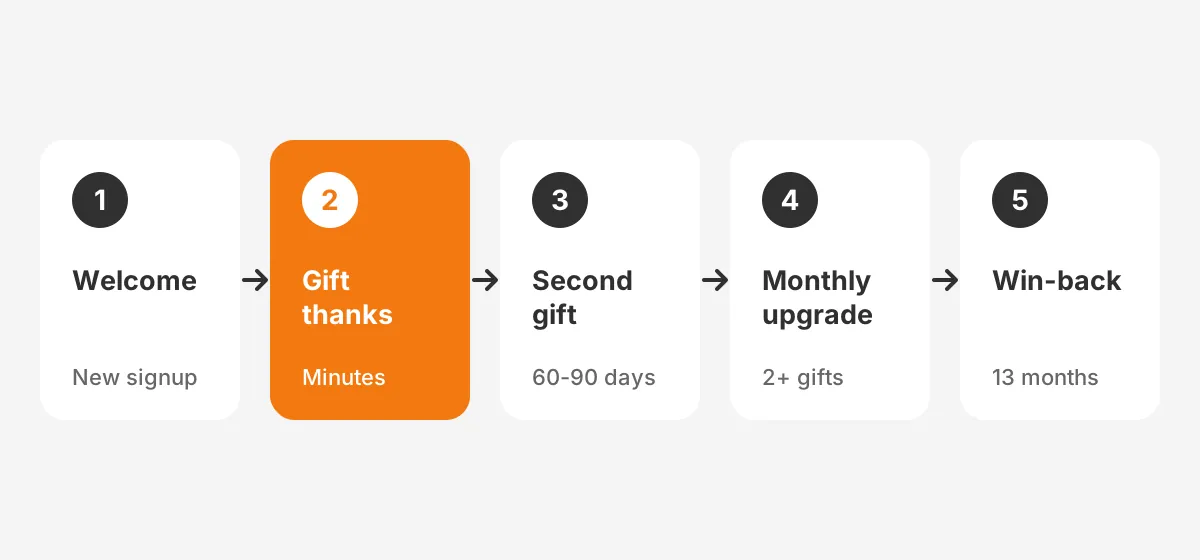
Start with six workflows: welcome, gift acknowledgment, second gift, monthly upgrade, lapse win-back and event follow-up. Together they cover the donor journey from first contact to repeat giving, and each has a clear trigger.
These are the marketing automation examples for nonprofits that pay off fastest, because they run every day. Each one meets a moment when a supporter decides whether to stay. Build them in this order and launch each before starting the next.
- Welcome series for new donors and subscribers: three emails over 14 days. They explain the mission, show impact and invite a second action.
- Automated gift acknowledgment: an automated thank you email with the receipt within minutes. Gifts above a set amount also create a call task.
- Second-gift ask: a donor nurture workflow that waits 60 to 90 days, shares a story and makes a modest request.
- Monthly giving upgrade: a recurring donor workflow that moves repeat donors into recurring giving. It invites donors with two or more gifts to give each month.
- Lapsed donor reengagement: a win-back sequence for donors with no gift in 13 months. It includes a short survey and an update.
- Event registration follow-up: reminders before the event, a thank-you after it and a next-step ask within a week.
The 60 to 90 day wait and the 13-month lapse rule are working assumptions, not research figures. Your own giving data should set them.
Volunteer onboarding automation follows the same pattern. A sign-up form triggers a welcome note, a training link and a reminder before the first shift. HubSpot lists volunteer onboarding among the standard workflows on its nonprofit page.
A year-end giving campaign is the exception, because scheduled sends still matter there. Build it as a segmented series and let suppression rules stop the asks once a donor gives. That rule prevents the most common complaint, an appeal that arrives after the gift.
How Should the CRM and Email Platform Connect?
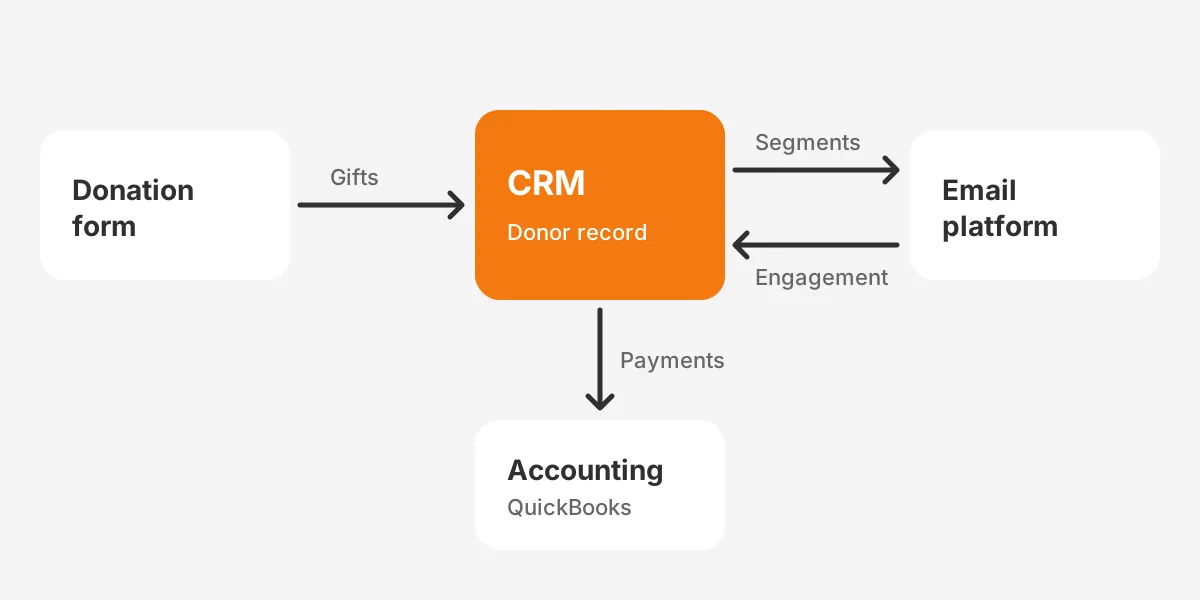
In marketing automation for nonprofits, the CRM should own the donor record and the email platform should read from it. Gifts, pledges and volunteer hours live in the nonprofit CRM. The email platform sends messages and writes engagement back.
The split matters for donor stewardship. Before calling, a gift officer should see that a major donor opened the year-end appeal. A marketing manager should know who gave last week before the next ask goes out.
Nonprofits usually connect the pieces in one of three ways:
- One platform: HubSpot or Salesforce runs both the CRM and the marketing automation, so no sync is needed.
- Native connector: donor management software such as Bloomerang or Virtuous syncs with an email tool through a built-in integration.
- Middleware: Zapier passes form and donation data from tools such as Donorbox into the CRM.
Each route to marketing automation for nonprofits carries a cost. Middleware is quick to set up, though every Zap is one more thing that can break without warning. A single platform costs more per year and removes the sync altogether.
Whichever route you pick, accounting tools such as QuickBooks belong on the CRM side, not the email platform.
The nonprofit CRM software comparison covers the CRM side of this decision. Pick the CRM first, then the email automation for nonprofits that fits it.
What Data and Consent Records Do You Need?
Every contact needs clean supporter data and a consent record before any workflow goes live. Marketing automation for nonprofits repeats whatever the data says. A duplicate record sends two thank-you emails, and a missing opt-out emails someone who asked to stop.
Start with data hygiene. Merge duplicates, standardize names and addresses and remove hard bounces. The CRM data cleansing runbook sets out the steps by platform, including deduplication rules and validation checks.
Next, define the fields the workflows will read. When marketing automation for nonprofits runs on a lean data model, each contact carries these fields:
| Field | Used by | Example value |
|---|---|---|
| First gift date | Welcome series, second-gift ask | 2026-09-14 |
| Last gift date and amount | Lapse win-back, gift thanks | 2026-10-02, $75 |
| Recurring status | Monthly upgrade, failed payment | Active, Lapsed, None |
| Email consent and source | Every workflow | Opted in, donation form |
| Interests | Personalization | Housing, youth programs |
| Engagement score | Suppression, list cleaning | 0-100 |
Donor segmentation then becomes a set of saved filters, not a weekly export. Typical segments are first-time donors, monthly donors, lapsed donors, major donors and volunteers. Engagement scoring adds a number that drops when a contact stops opening, a signal to pause sends.
Most vendor guides skip consent management, yet marketing automation for nonprofits depends on it. Each consent record should show what the person agreed to, when and through which form. Double opt-in adds a confirmation email and gives the strongest proof of consent.
Federal Trade Commission (FTC) guidance on the CAN-SPAM Act asks commercial senders to use accurate headers and subject lines. It also requires a way for people to stop receiving email. Fundraising emails can raise different questions, so confirm the rules with counsel.
How Do You Protect Email Deliverability?
Email deliverability rests on three habits: an authenticated sending domain, one-click unsubscribe and low spam complaints. Mailbox providers now enforce all three for bulk senders, charities included. A message that lands in spam raises nothing.
Gmail bulk sender requirements took effect in February 2024. Help Net Security (2023) reported the core rule. Senders of over 5,000 Gmail messages a day must set up SPF, DKIM and DMARC. Recipients must be able to unsubscribe with one click.
The same report says spam rates in Google Postmaster Tools must stay below 0.3%. A mid-sized nonprofit with a 40,000-person list crosses the 5,000-message line with a single appeal. So treat these rules as the default for every send.
Before marketing automation for nonprofits sends its first appeal, work through this checklist:
- Publish SPF and DKIM records for the domain your platform sends from.
- Add a DMARC record, starting with a monitoring policy before you enforce it.
- Turn on one-click unsubscribe in every marketing and fundraising template.
- Suppress contacts who have not opened in 12 months before a large appeal.
- Watch the unsubscribe rate and spam rate after every campaign.
The 12-month window is a common starting rule, not a benchmark, so adjust it as your engagement data builds up. The marketing automation implementation plan shows where authentication fits in a full rollout.
Which Marketing Automation Tools Fit Different Nonprofits?
The right nonprofit marketing automation tools depend on donor volume, staff skills and the CRM already in place. No product is the best marketing automation for nonprofits of every size. The table compares four routes instead of ranking brands.
| Route | Examples | Best fit | Trade-off |
|---|---|---|---|
| All-in-one CRM and marketing | HubSpot Marketing Hub | Teams that want one system and visual workflows | Higher tiers needed for advanced automation |
| Enterprise CRM plus marketing | Salesforce Nonprofit Cloud with Marketing Cloud Account Engagement | Larger nonprofits with programs, grants and complex data | Needs an admin or partner to run it |
| Donor CRM with built-in email | Bloomerang, Virtuous | Fundraising-led teams that want donor features ready | Less flexible for programs and services |
| Email-first tool plus connector | Mailchimp, Constant Contact with Zapier | Marketing automation for small nonprofits with simple lists | Data lives in two places and must sync |
Mid-sized teams often run marketing automation for nonprofits on HubSpot. Its nonprofit program page (2026) lists donor cultivation pipelines, segmentation and automation, and volunteer onboarding workflows. The same page says Breeze, HubSpot's built-in AI, can draft donor emails and campaign content.
Salesforce suits organizations that run programs, case management or grants in one system. A nonprofit marketing automation platform built on Salesforce takes more setup and holds the whole supporter record. Account Engagement, formerly Pardot, adds scoring and nurture programs on top.
Mailchimp and Constant Contact work for marketing automation for small nonprofits with one list and under 1,000 donors. They get harder to manage once gifts, events and volunteers sit in other systems.
When comparing marketing automation software for nonprofits, test four things in a trial. Can it trigger on a gift? Can it read custom fields? Does it write engagement back to the CRM? Can a non-technical staff member edit a workflow safely?
Donor engagement automation differs most between tools on that last question. A workflow that only the vendor can edit tends to stall after launch.
How Much Does Marketing Automation for Nonprofits Cost?
Marketing automation for nonprofits costs anywhere from a free email tier to a five-figure annual licence, plus setup time. The licence is often the smaller line, because data cleanup, integration and content take most of the budget.
Two vendor programs set the starting point for most buyers. HubSpot offers 40% off list prices on net-new Professional or Enterprise products for eligible nonprofits, on an annual term. The discount does not apply to Starter products.
That answers a common question: is HubSpot free for nonprofits? Only in part. HubSpot has a free CRM tier, while the nonprofit discount covers paid Professional and Enterprise products.
Salesforce gives eligible nonprofits 10 Nonprofit Cloud Core licences at no cost through its Power of Us program. The Salesforce Nonprofit Cloud pricing page (2026) lists paid Core seats at $70 per user per month. Marketing Cloud pricing is quoted on request.
Plan the total marketing automation cost for nonprofits in four lines:
- Licences, after any nonprofit discount.
- Data cleanup and migration from spreadsheets or an old system.
- Integration with donation forms, events and accounting.
- Content: templates, stories and the copy for each workflow.
Ask each vendor for a written quote with the discount applied. Then add staff time for training and three months of tuning.
How Do You Roll It Out in 12 Weeks?
A 12-week rollout of marketing automation for nonprofits fixes data first, then deliverability, then three workflows, then measurement. The plan below is a worked example for a mid-sized nonprofit. Larger data sets or a CRM migration add time.
- Weeks 1 to 3: clean supporter data, define fields and import consent records.
- Weeks 3 to 4: authenticate the domain, set up one-click unsubscribe and build templates.
- Weeks 5 to 8: launch the welcome series, gift acknowledgment and event follow-up.
- Weeks 9 to 12: review results, then add the second-gift ask and monthly upgrade.

Give each phase one owner. The development director takes content and segments, and a database manager takes data and consent. A platform admin or partner handles integration and deliverability.
Three mistakes slow most rollouts. Teams build ten workflows before the first one works, or import contacts without consent records. Others skip the suppression rule, and donors get an appeal the day after giving.
Marketing automation for nonprofits works better when it starts small and proves two workflows before adding a third.
Use A/B testing from the first month, one variable at a time. Test the subject line on the welcome series, then the timing of the second-gift ask. Personalization through merge fields, such as first name and last gift amount, waits until the data is reliable.
How Do You Measure Results Against Benchmarks?
Measure marketing automation for nonprofits by tracking revenue, retention and list health for each workflow against sector benchmarks. Open rates say little about giving. Clicks, gifts and unsubscribes say far more.
The M+R figures make a fair baseline for nonprofit email benchmarks. Set your own numbers beside them each quarter:
| Metric | What it shows | M+R 2025 figure |
|---|---|---|
| Revenue per 1,000 emails | Money raised per fundraising message | $54 |
| Response rate | Share of recipients who gave | 0.05% |
| Messages per subscriber | Send volume across the year | 50 |
| Lost to unsubscribes | List churn from opt-outs | 12% |
| Lost to bounces | Addresses that stopped working | 4% |
Two numbers of your own belong next to them. First-time donor retention shows whether the welcome series and second-gift ask are working. The click-through rate and unsubscribe rate should be tracked per workflow, not only per campaign.
In practice, how to measure marketing automation comes down to one comparison. Set donors who went through a workflow against similar donors who did not. If the welcome series group gives a second gift more often, the workflow earns its place.
Review each workflow every quarter. Retire messages nobody clicks and rewrite the ones that drive unsubscribes. Fundraising automation keeps improving as the data grows, so marketing automation for nonprofits is never a one-time build.
Frequently Asked Questions
Is marketing automation worth it for a small nonprofit?
Yes, if the nonprofit has steady online giving, automation repays the setup quickly. A welcome series and automated gift acknowledgment save staff hours every week. Start with those two on the email tool you already pay for. Expand once donor data in the CRM is clean.
Is HubSpot free for nonprofits?
HubSpot is not fully free for nonprofits. It offers a free CRM tier, and eligible nonprofits get 40% off list prices on net-new Professional or Enterprise products. Starter products are excluded, and the discount needs an annual contract. Check the eligibility rules for your region before you plan a budget.
How often should a nonprofit email its supporters?
Nonprofits sent an average of 50 email messages per subscriber in 2025, according to M+R Benchmarks. That works out to about four a month. Automated messages should replace some scheduled sends. Suppression rules should stop appeals once a supporter gives.
Can marketing automation replace a donor CRM?
No, marketing automation cannot replace a donor CRM on its own. The automation tool sends messages, while the CRM holds gifts, pledges, receipts and relationships. Platforms such as HubSpot and Salesforce combine both functions, so one system keeps a shared record for each supporter.
How long does marketing automation setup take?
Setting up marketing automation for nonprofits takes about 12 weeks for a mid-sized team's first three workflows. Data cleanup and consent records take the first three weeks. A CRM migration, a large donor database or three donation tools to connect will add time. Plan the integration work before writing emails.
Where Should Marketing Automation for Nonprofits Start?
Marketing automation for nonprofits should start with clean data, consent records and two workflows: the welcome series and gift acknowledgment. Those two reach every new supporter and prove the setup works. The second-gift ask and monthly upgrade follow once the first results are in.
Unboxx sets up nonprofit CRM and marketing automation on HubSpot, Salesforce and Dynamics 365. The work runs from data cleanup to the first live workflow. See the CRM for nonprofits services, or schedule a consultation to review your current setup.
Let's create something out of this world together.
Have a project in mind? Contact us for expert design and development solutions. Let's discuss how we can help grow your business.
Ready to Unboxx Your Potential?
Build smarter systems. Automate faster. Scale confidently.