
An agency decides to replace spreadsheets or an aging agency management system with a CRM. The software choice takes a month. Then someone asks how to move twenty years of clients, policies and notes, and the project stalls.
The best way to migrate insurance client data is a staged process: inventory, clean, map, test and cut over. According to Vertafore in Leader's Edge (2024), changing an agency system takes about three months on average. Done in stages, the work does not interrupt service.
Key Takeaways
- Move clients and active policies first, and archive closed history outside the new CRM.
- Field mapping is the hardest step, so give it to the staff who know the book of business.
- Run a test migration and reconcile counts and premium totals before go-live cutover.
What Does It Mean to Migrate Insurance Client Data?
To migrate insurance client data means moving client, policy and service records into a CRM without losing meaning. The source is often an agency management system (AMS), a set of spreadsheets or an older insurance CRM.
Insurance client data has more structure than a sales database. One household can hold auto, home and umbrella policies. Each policy links to a carrier, a producer, coverages, renewal dates and a commission schedule. A plain contact import flattens those links and breaks every renewal workflow that depends on them.
That is why insurance data migration differs from a generic customer data migration. The task is to move relationships, not rows. A client record without its policies is a name. A policy without its carrier and producer codes cannot drive reporting or commission checks.
Agencies usually migrate insurance client data for one of three reasons. They want a sales pipeline the AMS cannot provide. They are consolidating systems after an acquisition. Or they are building a custom platform, a path covered in how to build a custom CRM for insurance agents.
How Should You Migrate Insurance Client Data?
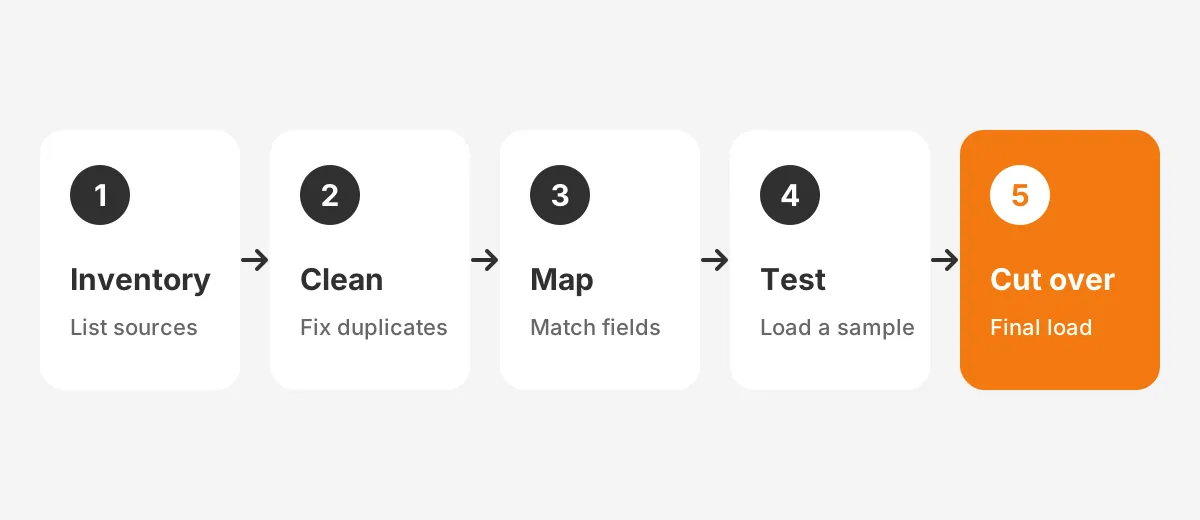
You should migrate insurance client data in five stages, each with its own sign-off. Skip one and its problems travel into the live system, where staff find them in the middle of renewals. That is the main risk when you migrate insurance client data in a hurry.
- Inventory: list every source, object and field, plus record counts for each.
- Clean: remove duplicate records, fix carrier names and close out dead policies.
- Map: match each source field to a CRM object and field in a map sheet.
- Test: load a sample, check it with the people who use it, and fix the map.
- Cut over: freeze changes in the old system, load the final data and reconcile totals.
The inventory is where an insurance agency data migration often goes wrong. Teams list the AMS and forget producer spreadsheets and the quoting tool. Each one holds client data that someone uses every week. A full list keeps the agency from finding a missing source after go-live.
Write the inventory as a short data migration plan. For each source, record the owner, the export format, the record count and whether it moves, syncs or retires. That table becomes the CRM migration plan the whole team signs.
Each stage produces a document the next stage depends on. The inventory feeds the cleanup list. The cleanup list feeds the field mapping. The map sheet drives the test migration, and the test results set the go-live cutover plan.
Name one owner for the whole effort to migrate insurance client data. Dyad, writing in Insurance Journal (2026), recommends an internal subject-matter owner who knows agency workflows.
That person does not need to be technical. A partner such as the Unboxx CRM consulting team can handle the technical load while the owner makes data decisions.
So, what is the best way to migrate insurance client data into a CRM? A repeatable process with a check at every stage. One large import on a Friday night is the opposite.
Which Records Should an Agency Move First?
An agency should move clients, contacts and active policies first, because daily service depends on them. Leader's Edge (2024) gives the same advice: start with clients and current policies, then decide on history.
So what data should an insurance agency migrate? Sort every object into three groups before any load.
| Group | Records | Why it matters |
|---|---|---|
| Move first | Clients, households, contacts, active policies, carriers, producers | Service, renewals and ownership depend on them |
| Move second | Open tasks, recent notes, key documents, commission rates | Staff need recent context in the first weeks |
| Archive | Expired policies, closed claims, old activity logs | Kept for reference and compliance, not daily work |
Policy data migration is where most of the effort sits. A client record has a dozen fields. A policy record can have fifty, plus coverages, drivers or locations below it.
Insurance policy data needs its renewal dates, premium, line of business and status. Personal lines and commercial lines often need different fields. A commercial package policy carries locations and coverage schedules that a personal auto policy does not.
How much policy history should you migrate?
How much policy history to migrate depends on what staff use and what regulators expect. Dyad (2026) states that five to seven years of data satisfies most operational and compliance requirements. Vertafore advises agencies to err toward moving less.
A practical rule is to load active policies plus one prior term into the CRM. Keep older history in a read-only archive or a single licence of the old system. This lets you migrate insurance data without losing history while keeping the new CRM fast and clean.
What about carrier downloads?
Carrier downloads usually feed the AMS, not the CRM. The ACORD property and casualty standards describe AL3 as a one-way batch format for policy and commission data. Agencies often receive AL3 download files through IVANS into their AMS.
If the AMS stays, the CRM should sync from it after go-live. If the CRM replaces the AMS, confirm it accepts carrier downloads before you migrate insurance client data into it.
How Do You Clean Data Before Moving It?
You clean data before moving it by fixing duplicates, standards and dead records in the source system first. Cleaning after the load doubles the work, because errors spread into automations and reports.
Here is how to clean insurance client data in a fixed order:
- Merge duplicate records for clients and households, matching on name, date of birth and address.
- Standardise carrier names, so one carrier does not appear under two spellings.
- Fill missing NAIC code values for carriers, since names alone are unreliable for matching.
- Mark records prefixed with "DNU" or "zzz" and decide whether to archive or delete them.
- Close policies that expired years ago but still show as active.
- Validate emails, phone numbers and mailing addresses in bulk.
Carrier naming deserves special attention. RecordLinker (2024) gives the example of one carrier stored as both "Insurance Co" and "Insurance Company". Each spelling becomes a separate carrier account in the CRM unless someone merges them first.
Data cleansing is also the cheapest point to apply data retention rules. Delete what the agency has no reason to keep.
Every record you carry over adds mapping and testing time, so trim the source before you migrate insurance client data. The Unboxx CRM data cleansing runbook covers deduplication rules by platform in more detail.
Set a quality target before you migrate insurance client data. One example: fewer than 1% duplicate clients and 100% of active policies linked to a carrier and a producer. These figures are an illustration, so set your own thresholds with the project owner.
How Do You Map AMS Fields to CRM Objects?
You map AMS fields to CRM objects with a map sheet. It lists every source field, its target field and its transformation rule. Vertafore calls mapping the hardest part of a conversion, so assign staff who know the data.
Start with objects, then fields. A field-only plan leaves policies detached from their clients. Settle the object map before you migrate insurance client data. The diagram below shows a typical object map for a move from an AMS into a CRM.
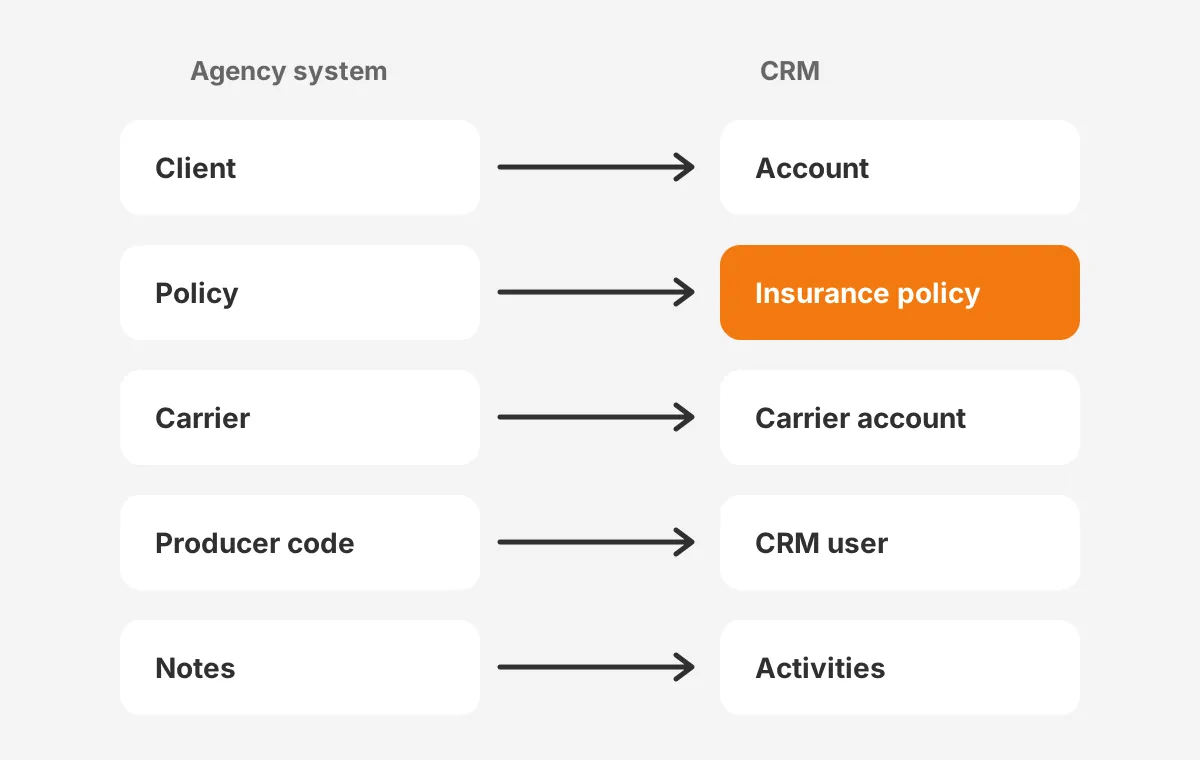
On Salesforce, the Financial Services Cloud insurance data model includes Insurance Policy, Claims, Financial Account and Insurance Policy Assets objects. Salesforce Financial Services Cloud saves agencies from building policy objects by hand. HubSpot and Microsoft Dynamics 365 usually need custom objects for policies.
Source structure matters too. RecordLinker notes that Applied Epic stores companies as a flat list, while AMS360 uses a parent and child hierarchy. A map built for one source will not fit the other without changes.
Follow five rules on how to map policy fields:
- Store the old system's record number in an external ID field on every object.
- Translate status codes and line-of-business codes into picklists before the load.
- Map producer codes to CRM users, so record ownership and commission reports work.
- Keep one field per meaning, rather than copying free-text columns that nobody reads.
- Give every policy a line-of-business code, because renewal and cross-sell reports filter on it.
The external ID is the key to a safe insurance CRM migration. It lets you reload a record without creating duplicates. It also gives every CRM record an audit trail back to its source.
Which Tools Load Insurance Data Into a CRM?
The tools that load insurance data into a CRM are the platform's import utilities, ETL tools and vendor conversion services. The right choice depends on record volume and the number of related objects that must stay linked.
| Tool | Best for | Limit to plan around |
|---|---|---|
| Salesforce Data Import Wizard | Small CSV loads of accounts and contacts | Batch size and supported objects |
| Salesforce Data Loader | Large loads of any object | Needs a technical operator |
| HubSpot import | Contacts, companies and associated records | Custom objects need planning |
| Dynamics 365 import | Dataverse tables from CSV or Excel | Lookup fields must match exactly |
| ETL or conversion service | AMS exports with complex links | Cost and setup time |
Salesforce's Data Loader guide states it supports files of up to 150 million records with Bulk API 2.0. It also writes success and error logs in CSV, which become the evidence for data validation.
A spreadsheet-only agency has a simpler path. To move client data to a new CRM from spreadsheets, clean each sheet and add a unique ID column. Import clients before policies. The same rules apply at a smaller scale.
Load order decides whether relationships survive. A policy cannot point at a client that does not exist yet. Parents go in first when you migrate insurance client data.
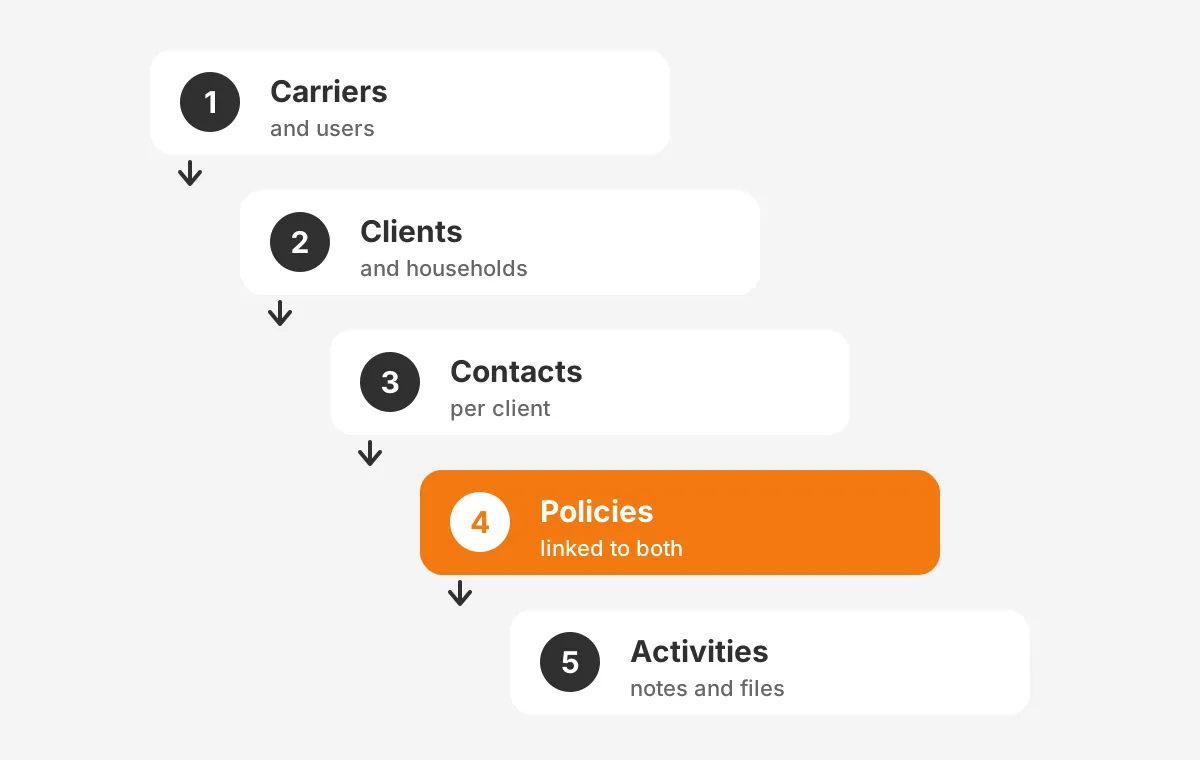
The usual sequence is carriers and users, then clients and households, then contacts and policies. Notes, tasks and files come last. Following that order is how to migrate data from AMS to CRM without orphan records.
How Do You Test and Cut Over Safely?
You test and cut over safely with a sandbox test migration, a short freeze and a final load. A test load surfaces mapping errors while they are cheap to fix. Skipping it means you migrate insurance client data into production on hope.
Here is how to test a CRM data migration:
- Load a sample of 200 to 500 clients that covers every line of business.
- Ask account managers to check 20 records each against the old system.
- Compare record counts per object between source and target.
- Reconcile written premium totals by carrier and producer.
- Run a renewal report and confirm it matches the AMS for the next 60 days.
The sample size and the 60-day window are working examples, not industry figures. Adjust them to the size of your book of business.
For the go-live cutover, freeze edits in the old system. Export the changes made since the test, load them and reconcile again. Keep the old system read-only for a set period, so staff can check anything that looks wrong.
Record each discrepancy, its cause and its fix in one shared log.
The common failure patterns are well known. The Unboxx article on common CRM migration mistakes lists the ones that cause the longest delays.
Which Security Rules Apply to Insurance Client Data?
The security rules that apply to insurance client data come mainly from state insurance law. The NAIC government affairs brief (October 2026) reports the Insurance Data Security Model Law is in force in 28 jurisdictions.
The NAIC model, adopted in 2017, asks licensees to maintain a risk-based information security program. It also requires oversight of third-party service providers. A migration partner, an ETL vendor and the CRM host all count as third parties. Licensees with fewer than 10 employees are exempt under the model.
The FTC Safeguards Rule under the Gramm-Leach-Bliley Act sets similar controls for other financial firms. Examples include encryption and multi-factor authentication. Insurance licensees usually answer to state regulators instead, but its controls are a sound baseline for insurance CRM data security.
- Encrypt export files in transit and at rest, and delete them after go-live.
- Require MFA for every account that can export or import records.
- Limit field access to tax IDs, birth dates and bank details by role.
- Keep the import logs as an audit trail of who moved what and when.
This is general information, not legal advice. A client data migration still needs a compliance review. Confirm the rules for your states with your compliance adviser before you migrate insurance client data.
When Should You Migrate Insurance Client Data?
You should migrate insurance client data during a quiet renewal period and after the cleanup is signed off. Avoid the weeks around 1/1 and 7/1 commercial renewals, when service teams have no spare time.
How long does insurance data migration take? Vertafore puts the average at about three months for an AMS change. A focused team can cut that time in half. A CRM project that syncs from a retained AMS often takes less.
The timeline stretches when source access is slow. RecordLinker describes acquisitions where agencies waited two months for the acquired agency's database. Request exports and system access in the first week. A fixed go-live date leaves no room to migrate insurance client data from files that arrive late.
Insurance data migration cost follows the same drivers as time: record volume, number of sources, data quality and custom objects. The Unboxx CRM for insurance agents guide covers platform costs, which sit alongside the migration budget.
Use a short insurance data migration checklist to decide on timing:
- Cleanup signed off by the project owner.
- Map sheet approved by an account manager and a producer.
- Test migration reconciled within agreed tolerances.
- Staff trained on the new CRM before the freeze starts.
What Happens After You Migrate Insurance Client Data?
After you migrate insurance client data, the work moves from loading records to keeping them right. The first 30 days decide whether staff trust the CRM or return to the old system.
Run a daily reconciliation for the first two weeks if the AMS and the CRM stay connected. Compare active policy counts, renewal dates and producer assignments between the two systems. Any gap points to a sync rule or a mapping error that the test migration missed.
Training matters as much as the load. Dyad (2026) treats training as a core part of an agency data conversion, tailored by role. Producers need pipeline and renewal views. Account managers need service tasks and policy details. Administrators need import, export and permission controls.
Skip it, and staff keep side spreadsheets even after you migrate insurance client data. Those sheets become the next data migration problem.
- Week 1: daily checks of new records, failed syncs and duplicate alerts.
- Weeks 2 to 4: office hours for questions and fixes to page layouts.
- Month 2: retire the old system or switch it to read-only archive access.
- Month 3: review adoption reports and decide which history to load next.
Treat the AMS to CRM migration as the start of a data quality routine. Assign one admin to own duplicate rules, field changes and import permissions. Without an owner, data quality drifts back to where it started.
Ongoing administration is part of insurance agency software ownership, not an extra. A clean AMS data migration only holds its value if new records follow the same rules as the migrated ones.
Frequently Asked Questions
What is the best way to migrate insurance client data into a CRM?
The best way is a staged migration: inventory, clean, map, test and cut over. Load carriers and users first, then clients, contacts and policies. Reconcile record counts and premium totals before go-live. Keep the old system read-only for a set period.
Can a CRM replace an agency management system?
A CRM can replace an agency management system only if it handles policies, carrier downloads and commission accounting. Agencies often keep the AMS as the policy record and sync clients and policies into the CRM. That split gives producers a sales pipeline without rebuilding accounting.
Who owns the data migration in an agency?
One internal owner who knows agency workflows should own the data migration and make every data decision. A technical partner or admin runs the loads. Account managers and producers review the map sheet and the test migration, because they know which fields matter for service.
Do carrier downloads continue after migration?
Carrier downloads continue if the AMS stays in place, because AL3 files usually load into the AMS. Migrate insurance client data beside the AMS and that flow stays as it is. If the CRM replaces the AMS, first confirm with each carrier that it accepts policy files.
What drives insurance data migration cost?
Insurance data migration cost depends on record volume, the number of source systems, data quality and custom objects. Cleanup and field mapping take the most staff time. A sync between the AMS and the CRM usually costs less than replacing the AMS, because accounting stays put.
Ready to Migrate Insurance Client Data With Unboxx?
Migrate insurance client data with a staged plan and the CRM opens clean. Clients, policies and renewals match the old system. Unboxx builds that plan, the map sheet and the load scripts for Salesforce, HubSpot, Dynamics 365 and Odoo. See the Unboxx CRM for insurance services.
If your agency is planning a move, schedule a consultation to review your data sources and a realistic timeline.
Let's create something out of this world together.
Have a project in mind? Contact us for expert design and development solutions. Let's discuss how we can help grow your business.
Ready to Unboxx Your Potential?
Build smarter systems. Automate faster. Scale confidently.